
A shopper adds a product to the cart, starts checkout, and leaves. The store owner waits for the recovery email to do its work, but no email goes out, no shopper returns, and the sale quietly disappears. The owner checks the orders page, finds the abandoned checkout, and wonders whether the feature is broken. If you want to fix Shopify abandoned cart emails not sending small store owners rely on, the first thing to understand is that in most cases nothing is broken. The email was skipped for a specific reason, and finding that reason is the whole diagnosis.
Shopify treats an abandoned checkout in a precise way. A checkout counts as abandoned when it remains incomplete for more than ten minutes after the shopper has provided an email address. Recovery emails are available only for the Online Store and Buy Button sales channels, so checkouts abandoned on Shopify POS or on third party channels will not receive a recovery email. Even for eligible checkouts, Shopify skips the email in several defined situations, and those skips explain most reports of emails not sending.
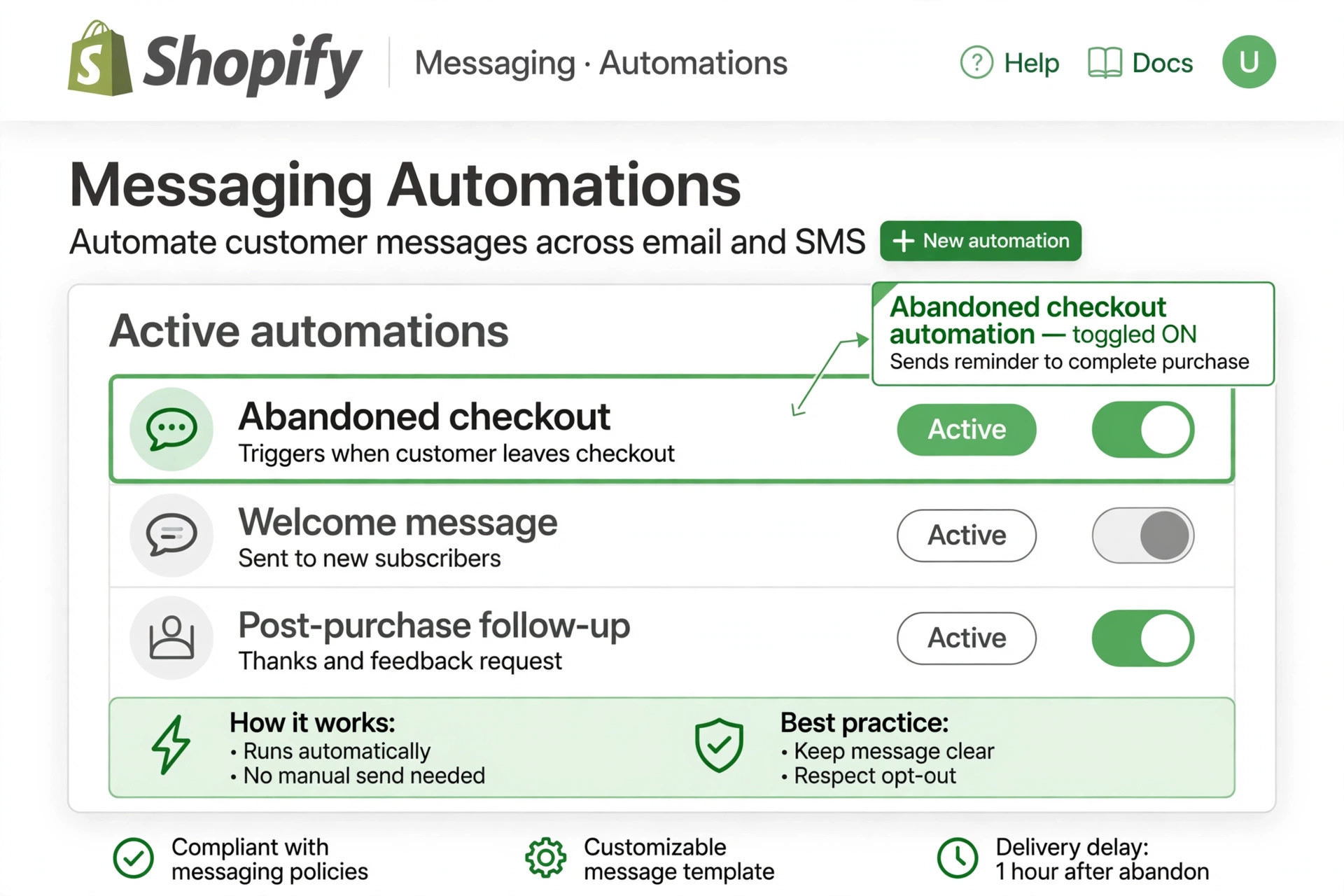
This guide works through diagnosis in order, from the most common cause to the rarer ones. Check each step before moving on, because the fix for an automation that was never switched on is very different from the fix for a shopper who never gave marketing consent. Each step states where to look in Shopify admin, what the correct setting looks like, and how to test whether the fix worked.
Step 1. Confirm the Automation Is Actually Switched On
Shopify has been moving abandoned checkout email control from the classic settings pages into the built in Messaging app, where it is managed as an automation rather than a static setting. Stores are moved onto the newer system at different times, so the correct navigation path depends on which version a store currently runs, and older guides can point to a screen that no longer controls anything. Start in the current location, not the remembered one.
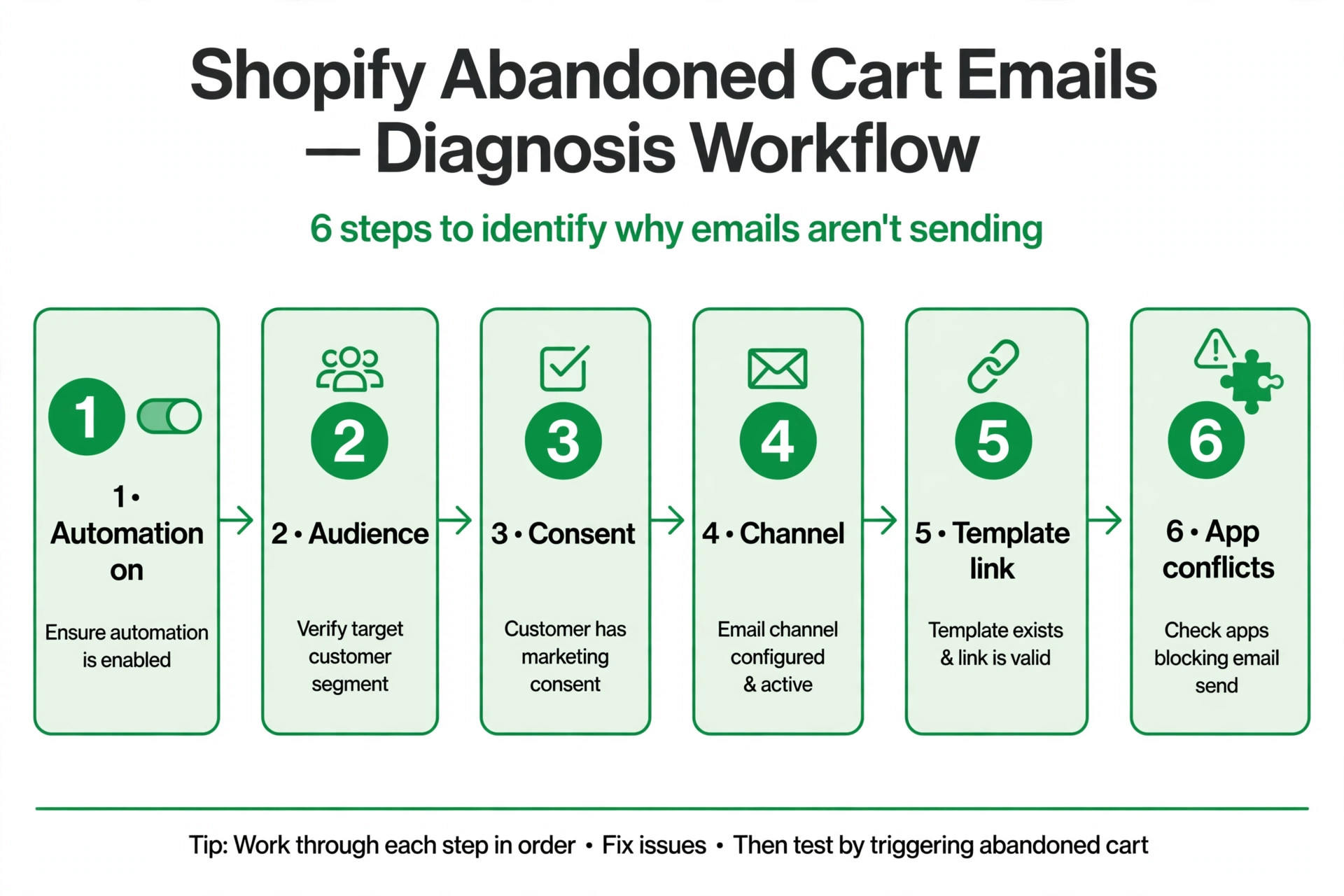
From Shopify admin, go to Apps, then Messaging, then Automations, and look for the abandoned checkout automation. Open it and confirm it is turned on, then open its settings and check the send to audience and the send after delay. If the automation is off, turning it on is the fix, but do not stop there, because an automation that is on with the wrong audience will still send to almost nobody, which is step three of this guide.
If Messaging does not show the automation, check the older setup. On stores still running it, the email template lives under Settings, then Notifications, under abandoned checkout, while the on and off toggle and timing live under Settings, then Checkout. Because those two pieces sit on different pages, it is easy to check only one, see nothing relevant, and conclude the feature is gone. Check both pages, and check from a desktop browser with a staff account that has full settings permissions, since restricted accounts and the mobile app can hide entire sections.
What the Correct Automation Settings Look Like
A working automation shows an active status, a send to audience that matches the store’s consent strategy, and a delay that gives shoppers time to return on their own without waiting so long that they buy elsewhere. A common starting delay is around one hour for the first message, with later messages in a sequence at roughly one day and three days where the store uses a multi email flow. The exact delay matters less than the fact that the automation is on, the audience is correct, and the template contains a working recovery link.
A second system problem often hides in plain sight, because an owner who wants to fix Shopify abandoned cart emails not sending small store accounts report may check Shopify, find the automation on, and still see no Shopify sends, without realising an email app already sent the shopper a different message. Always check the sent history in every email tool the store uses before concluding that nothing was sent, since a shopper who received an app email and ignored it needs a better message, not a duplicate one. One owner, one flow, and one sent history are the only basis for a fair diagnosis.
Step 2. Check Whether a Second System Is Sending Instead
Many small stores run email through Klaviyo, Omnisend, or a similar app alongside Shopify, and that creates the most confusing diagnosis of all. The store owner checks Shopify, sees no Shopify email sent, and concludes nothing works, while the email app sent its own flow hours ago. Conversely, a store that enables both systems sends shoppers two reminders, which annoys customers and makes reporting impossible to read.
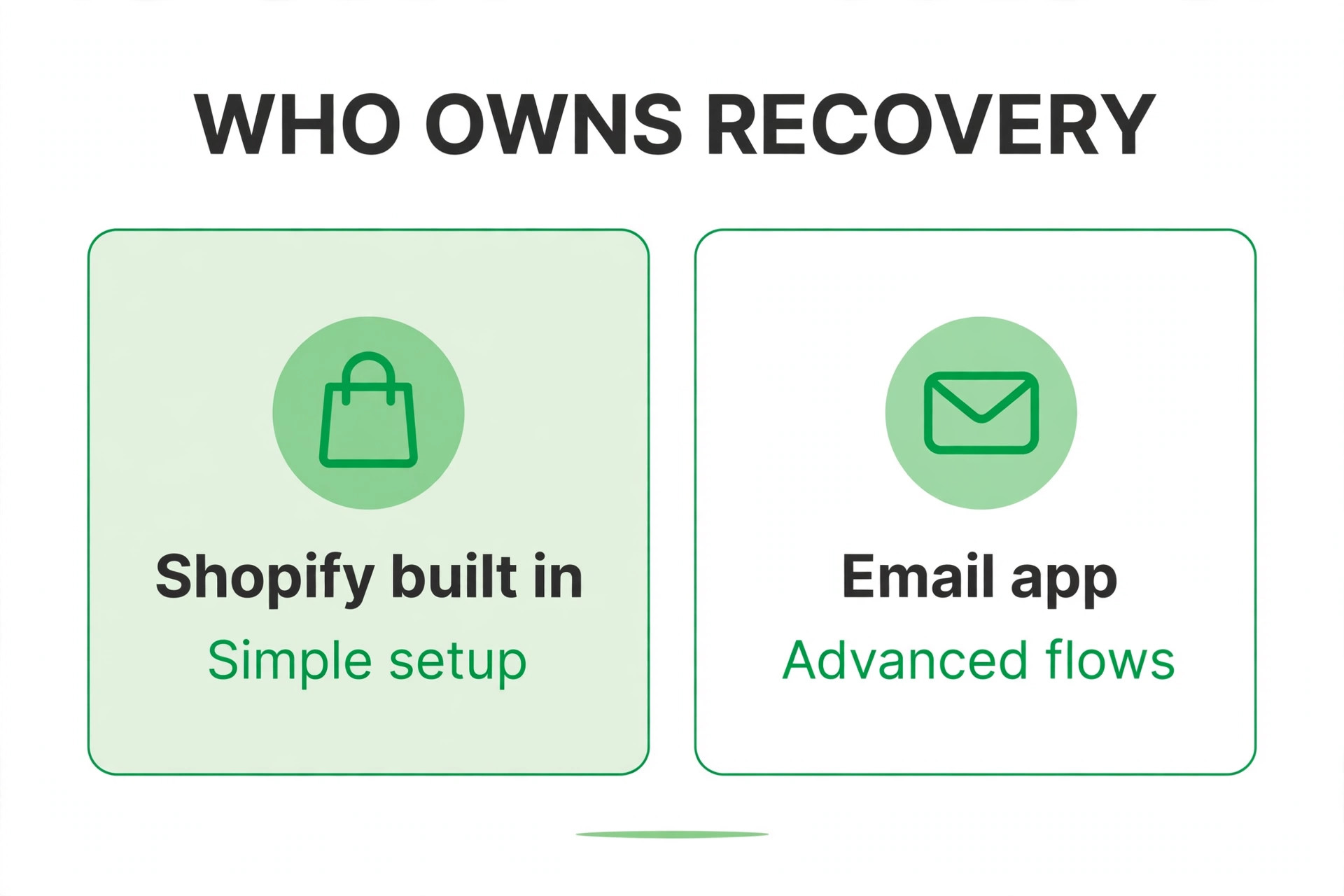
Decide which system owns abandoned checkout recovery, and switch the other one off for that flow. If the email app owns it, confirm its flow is active, its trigger is correct, and its exit condition removes shoppers the moment they place an order, because a reminder that arrives after a purchase is the fastest way to lose trust. If Shopify owns it, confirm the email app’s abandoned cart and abandoned checkout flows are paused or deleted, not merely left inactive in a way that could be re enabled by a template update.
Also check for duplicate flows inside the chosen system. A flow copied for editing, a flow left active from a previous agency, or a flow created by an app installation can all send alongside the main flow. List every active automation that mentions cart or checkout, and keep only the intended one. A store with one clean flow can be diagnosed, while a store with three overlapping flows cannot, because no single report tells the truth about what shoppers received.
Consent also affects how the owner should interpret a quiet week, and a store that wants to fix Shopify abandoned cart emails not sending small store owners complain about should first calculate its consent rate among abandoners. If only a small share of abandoners consented, the expected email count is small, and the real project is consent growth through clearer checkout wording, a signup incentive that does not discount the main product, and a post purchase invitation to join the list. Chasing sends without consent is a dead end, while growing consent turns a quiet flow into a productive one over a season.
Step 3. Check Marketing Consent, the Cause Behind Most Silent Skips
This step explains most cases where the automation is on yet almost no emails go out. Abandoned checkout emails generally go only to shoppers who have given marketing consent, unless the shopper has previously completed a purchase with the store. A first time visitor who abandoned without subscribing will not receive the email, however valuable their cart, because Shopify treats that skip as correct behaviour rather than a failure.
Check the consent position in two places. First, confirm the checkout and signup forms actually ask for marketing consent in a clear way, because a form that hides the consent box or pre ticks it in a confusing manner will produce a small consenting audience. Second, look at recent abandoned checkouts and compare the number with consent against the number without, since that ratio predicts how many recovery emails the store should expect. A store with mostly non consenting abandoners should expect few emails, and the fix is to grow consent, not to force sends.
Growing consent is a checkout design job. Make the email marketing signup clear at checkout, explain the benefit in one short line, and offer it on the signup form and the order confirmation page as well. Never add shoppers to marketing without consent in order to make recovery numbers look better, because that creates spam complaints, damages sender reputation, and can cause far worse delivery problems than the ones it pretends to solve. Consent grown honestly is slower, but every email it produces reaches a shopper who asked to hear from the store.
The defined skips also teach an important lesson about expectations, because an owner trying to fix Shopify abandoned cart emails not sending small store pages describe should stop expecting an email for every abandonment. Some checkouts complete late, some reset their timer with a newer checkout, some lose stock, and some come from channels that recovery does not cover, and all of those are correct skips. A store that understands its skip reasons can forecast recovery honestly, while a store that expects one email per abandonment will always feel disappointed by a system working as designed.
Step 4. Check the Skips Shopify Applies by Design
Even for consenting shoppers, Shopify skips the recovery email in several defined situations, and the abandoned checkouts page will usually explain why with a tooltip. A shopper who completes the order before the wait time elapses needs no recovery email, and sending one anyway would confuse a customer who just paid. A shopper who abandons a more recent checkout resets the timer, so the email waits for the newer checkout’s delay rather than firing on the older one.
Stock and price conditions also cause skips. If none of the items in the checkout are still available to buy, there is nothing to recover, so no email goes out. If every item is free and the shopper never reaches a shipping step that adds a fee, or shipping is free as well, the checkout may also be skipped, because the recovery logic treats that case differently from a normal paid checkout. A checkout abandoned inside the Shop app rather than the online store is another defined skip, since recovery covers the Online Store and Buy Button channels only.
A blocked payment is a further skip worth checking. If Shopify Payments blocks a checkout attempt because it is identified as high risk, the checkout appears in the blocked view of abandoned checkouts and no recovery email is sent. That is a fraud protection behaviour, not a broken automation, and the fix is to review the blocked checkout through the fraud tools rather than to force an email. Owners who understand these skips stop chasing a fault that does not exist, and can focus on the checkouts that genuinely should have received an email but did not.
Deliverability testing should use real shoppers’ conditions, not only the owner’s inbox, because an owner who wants to fix Shopify abandoned cart emails not sending small store accounts suffer from may find the test email arrives fine at one provider and lands in spam at another. Test with at least two providers, check the sender domain authentication records with the domain host, and keep the template text focused on the cart rather than on heavy images and promotional language. A clean, simple recovery email with a working link will outperform a flashy template that filters cannot trust.

Step 5. Check the Email Itself, Deliverability, and the Recovery Link
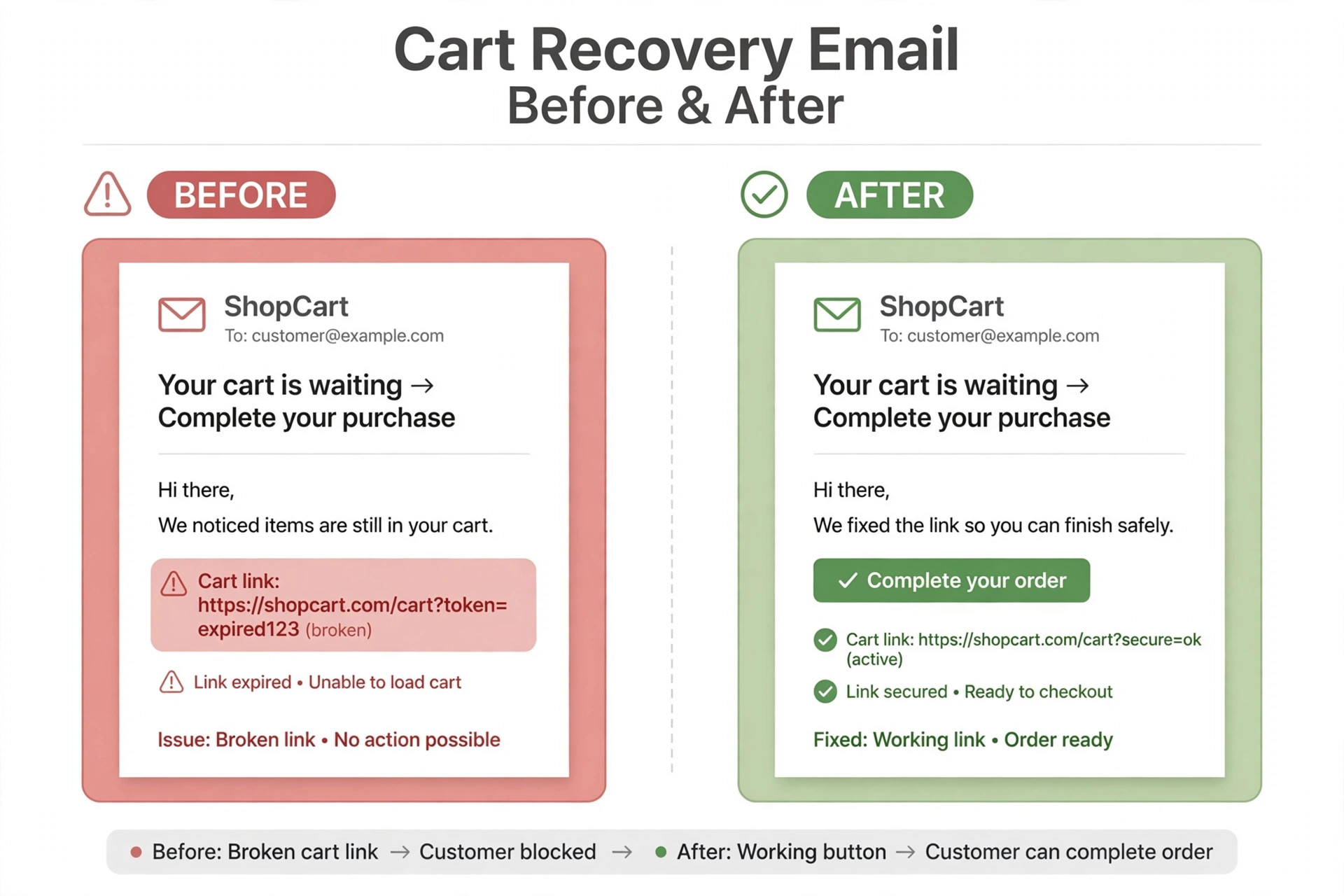
If eligible checkouts with consent are still not producing emails, check the message itself. Open the template in the automation settings and confirm it contains a working recovery link that returns the shopper to their cart. Test the full flow with a real test checkout using a personal email address, abandon it, wait for the delay, and confirm the email arrives, the link works, and the cart contents are intact. A test that nobody runs is the reason many template errors survive for months.
Deliverability problems hide behind vague reports of emails not sending. Check the sender address and domain authentication, because a store sending from an unauthenticated domain is far more likely to land in spam or be rejected. Ask the test recipient to check spam and promotions folders, and test with two different email providers, since a problem that affects only one provider points to that provider’s filtering rather than to Shopify. Also confirm the template has not been edited into a broken state, such as a missing link, a deleted dynamic field, or an image heavy design that triggers a filter.
Bounce and typo problems matter too. A shopper who mistyped their email address cannot receive a recovery email, and a store with many bounced recovery attempts should review whether the checkout form validates addresses or catches common typos. Shopify will not fix a wrong address, but a checkout form that gently flags an obvious typo before submission will prevent a portion of these silent failures. Record bounce patterns for a month, and fix the most common typo pattern first, such as a missing domain ending.
Discount strategy inside the flow deserves the same careful testing as the link itself, since a store that manages to fix Shopify abandoned cart emails not sending small store owners face can still lose the recovered sale if the code in the email fails at checkout. Test the code as a real shopper would, from the email link through to payment, and confirm the code’s dates, limits, and product eligibility before the flow goes live. A tested code that works first time keeps the recovered shopper’s trust, while a failed code at the final step turns a recovery into a complaint.
Step 6. Check Order Status, Discounts, and App Conflicts
A checkout that looks abandoned may not be abandoned at all. Check whether the shopper completed the order through another session, whether a draft order was created for them, or whether a payment error prevented completion in a way that needs a different fix. A recovery email sent to a shopper who already paid, through a duplicate flow, is a customer service problem, so confirm order status before resending anything manually.
Discount handling also needs a check. If the recovery template promises a discount code that has expired, reached its usage limit, or applies only to a different collection, shoppers who return will find the code fails and may abandon again, this time angry. Test every discount code in the recovery flow with a real checkout, confirm its dates and limits, and hold discounts for later messages in a sequence rather than giving the best offer in the first email. A sequence of roughly one hour, one day, and three days, with the discount held until the last message, is a common pattern that protects margin while still recovering sales.
App conflicts are the final check in this step. A recently installed app that edits checkout, email, or customer records can change consent handling, suppress a flow, or replace a template without an obvious warning. If emails stopped after an app installation or a theme change, review that change first, and test the flow with the app temporarily disabled where safe to do so. A store owner who keeps a simple change log, noting each app and theme change with its date, can diagnose these cases in minutes instead of days.
Email Flow Diagnosis Checklist for a Store That Sends Nothing
This checklist is the copyable diagnosis plan. Work through it in order, and mark each item as confirmed before moving on, because skipping ahead to deliverability while the automation is off wastes the whole exercise. Keep the completed checklist with the store’s settings notes, so the next person who touches email starts from evidence.
Confirm the abandoned checkout automation is on in Messaging or the older settings.
Confirm only one system owns cart recovery and other flows are paused.
Check marketing consent on recent abandoned checkouts.
Read the skip tooltip on each abandoned checkout that received no email.
Confirm the checkout came from the Online Store or Buy Button channel.
Test a full abandonment with a personal email and confirm the link works.
Check sender domain authentication and spam folder placement.
Confirm discount codes in the flow are live and tested.
Review recent app or theme changes for conflicts.
Check order status before manually resending any recovery email.
Record the fix and retest with a second abandonment.
A checklist followed in order turns a vague complaint into a specific finding, such as an automation that is on but audience limited, or a consent rate that explains the low send count. That specific finding is what allows a fix, while a vague complaint only allows guessing. Stores that keep the completed checklist also avoid repeating the same diagnosis next quarter, because the settings that caused the problem are recorded alongside the fix.
One final diagnostic habit is worth building, which is a monthly email health review for any owner who has learned how to fix Shopify abandoned cart emails not sending small store accounts experience. Once a month, compare eligible checkouts with sends, opens, and recoveries, check consent rates, and test the flow with a fresh abandonment. A monthly review takes under an hour, catches automation changes made by app updates, and keeps the flow healthy across theme changes, app installations, and seasonal traffic shifts.

Mistakes That Make a Working Flow Look Broken
The most common mistake is judging the flow by total abandoned checkouts rather than by eligible checkouts. A store with one hundred abandoned checkouts, of which only twenty had consent and came from an eligible channel, should expect roughly twenty emails, not one hundred. Judging against one hundred makes a working flow look broken, and leads owners to force changes that damage a system that was behaving correctly. Always compare sends against eligible checkouts, not against all abandonments.
The second mistake is sending a manual recovery email to every abandoned checkout without checking consent or order status. Manual sends are useful when a customer asks for their cart link, or when the automation was genuinely off and the store wants to recover a small number of recent eligible checkouts. Manual sends to non consenting shoppers, or to shoppers who already paid, create complaints and confusion that cost more than the recovered sale is worth. Use manual sends sparingly, and only for shoppers the store could legitimately have emailed automatically.
The third mistake is changing three settings at once and then declaring the problem fixed. A store that turns the automation on, changes the audience, and rewrites the template in one session cannot tell which change mattered, and cannot repeat the fix if the problem returns. Change one setting, test with a real abandonment, record the result, and only then change the next. Slow diagnosis feels frustrating, but it produces a store whose owner actually understands the flow.
Store owners with a related checkout problem should use the right guide for that problem. A checkout that fails entirely follows a different path, covered in a guide to fixing Shopify checkout not working, while a discount code that fails at checkout is covered in a guide to fixing Shopify discount codes not working. Payment holds need their own diagnosis, explained in a guide to fixing Shopify payments on hold. Budget planning around recovery tools is covered in a guide to the cost of Shopify for small business, and sellers moving platforms can read a guide to switching from Etsy to Shopify.

How to fix Shopify abandoned cart emails not sending small store Owners Can Test in Two Weeks
A two week test gives the diagnosis a fair chance without dragging on for a season. In week one, confirm the automation, the single owner system, and the consent position, and run one real test abandonment to prove the link works. Record the eligible checkout count, the send count, and the recovery count as a baseline, so week two can be judged against real numbers rather than impressions. In week two, fix the single biggest gap found in week one, whether that is audience, consent wording, template, or a duplicate flow, and run a second test abandonment to prove the fix.
An owner who wants to fix Shopify abandoned cart emails not sending small store accounts struggle with should judge the test on eligible sends first, not on total sales, because a flow that sends correctly to every eligible shopper is working even if some shoppers still choose not to return. Sales recovery follows correct sending, but it also depends on price, shipping, and product fit, which no email can fully overcome. A flow that sends correctly, links correctly, and respects consent is a success on its own terms, and the sales it recovers are a bonus that grows as the store improves its checkout experience alongside the flow.
Frequently Asked Questions
How long after abandonment should the first recovery email send?
A delay of around one hour is a common starting point, because it gives shoppers time to return on their own while the purchase is still fresh. Longer delays risk the shopper buying elsewhere, while immediate sends can feel intrusive. Test one hour first, then adjust based on open and recovery rates over a month of data.
Can a store send recovery emails to shoppers who never subscribed?
Generally no, for first time visitors without a prior purchase, because recovery emails go to shoppers with marketing consent on file. The fix is to grow consent honestly at checkout and signup, not to send to non consenting shoppers. A shopper who previously purchased may be treated differently, so check the store’s consent and customer history for each case.
Why did one shopper get an email but another with the same cart did not?
The two shoppers usually differ in consent, channel, or timing. One may have subscribed while the other did not, one may have abandoned on the online store while the other used the Shop app, or one may have completed a newer checkout that reset the timer. Compare the two checkouts side by side in admin, including consent and channel, and the difference usually appears immediately.
Should a store use Shopify or an email app for cart recovery?
Either can work, but only one should own the flow. Shopify’s built in automation suits stores that want a simple, reliable flow with no extra cost, while an email app suits stores that want multi email sequences, advanced segmentation, and combined flows. Choose one, switch the other off for cart recovery, and judge the choice on recovery rate over a full month.
What if the recovery email arrives but the cart link does not work?
Test the link with a real abandonment, confirm the template still contains the dynamic recovery link, and check whether items went out of stock or the checkout expired. Abandoned checkouts older than three months are automatically deleted from Shopify admin, so very old links will not recover. Fix the template, retest, and only then judge the flow again.
How can a small store reduce abandonment instead of only recovering it?
Reduce the causes of abandonment first, such as unexpected shipping costs, forced account creation, limited payment options, and slow checkout pages. A recovery email is worth less than a checkout that never gets abandoned, so review the checkout experience monthly, show shipping costs early, and offer guest checkout where possible. Recovery and prevention together produce more sales than either alone.
A Flow the Owner Understands Is a Flow That Keeps Working
The goal of this diagnosis is not a single recovered sale. It is a store owner who understands which checkouts should receive an email, which should not, and why, so the next quiet week can be diagnosed in minutes rather than days. That understanding comes from working through the steps in order, testing with a real abandonment, and keeping a record of the settings that matter. A flow understood this way rarely breaks silently, because the owner notices when eligible sends drop.
Start with the automation switch and the consent ratio, since those two checks explain most silent flows. Then work through skips, deliverability, and app conflicts only if the first checks pass. Within a week, the store should have a clean single flow, a realistic expectation of how many emails it should send, and a test result proving the link works. That is a recovery system worth keeping, and it will quietly return sales that would otherwise have been lost to a checkout nobody followed up.