
Per guides, a full featured VoIP system is often described at 25 to 35 dollars per user per month, while traditional landline service with fewer features is often described at 50 to 80 dollars. That gap explains why many small businesses have moved, but price alone is a poor way to choose, because the cheapest system that misses calls or cannot grow with your team will cost far more in lost work. Learning how to choose a business phone system small business owners can live with for years means weighing call volume, team size, internet quality, and the features you will actually use, not just the monthly rate on a pricing page.
A phone system is also a customer experience decision. The first call a buyer makes to your business sets a tone, and a system that routes that call cleanly, answers with a professional greeting, and reaches the right person quickly does quiet work for your reputation. A system that rings unanswered, sends callers to a personal mobile, or forces them through a confusing menu does the opposite, and it does so before you ever speak to them. This guide helps you avoid both outcomes with a decision table, a porting checklist, and a practical trial plan.
The choice has changed in the past decade, per guides on the topic. Traditional landline systems, hardware boxes, and copper wiring have largely been replaced for small businesses by internet based systems that run on your existing connection and deliver more features at lower cost. For most small businesses, the question is no longer simply landline or internet, but which internet system, with what features, and with what backup when the internet fails. Check the vendor current page for exact pricing and features before you buy, because tiers differ and a feature in a review may not be in the plan you priced.
Start With How Your Business Actually Uses the Phone
Before you compare vendors, describe your real phone use for one normal week. How many inbound calls arrive, at what hours, and from whom. How many are new enquiries, how many are existing customers, and how many are suppliers or partners. How long does a typical call last, and how often does a caller need to be transferred, put on hold, or called back. Those answers decide whether you need queues, an auto attendant, call recording, or simply a reliable business number that forwards to the right mobile.
Team size and location matter just as much. A solo owner working from a mobile needs a different system from a five person office with a front desk, and both differ from a ten person team split between an office, a workshop, and the road. Count the people who answer calls, the people who only need to make calls, and the people who need neither but still need a voicemail. Paying for a full licence for every employee, including staff who never take a call, is one of the most common wastes in small business phone spending.
Also list the tools your phone system must work with. A customer system, a booking tool, a help desk, or a scheduling app can all benefit from call logging, click to call, or screen popups that show who is calling. Those integrations are valuable only if you will use them, so check whether your current tools support them and whether your team will actually open the integration during a call. A feature that sounds impressive in a demo and is never used after week one is not a feature. It is a cost.
VoIP, Mobile, and Landline Compared Honestly
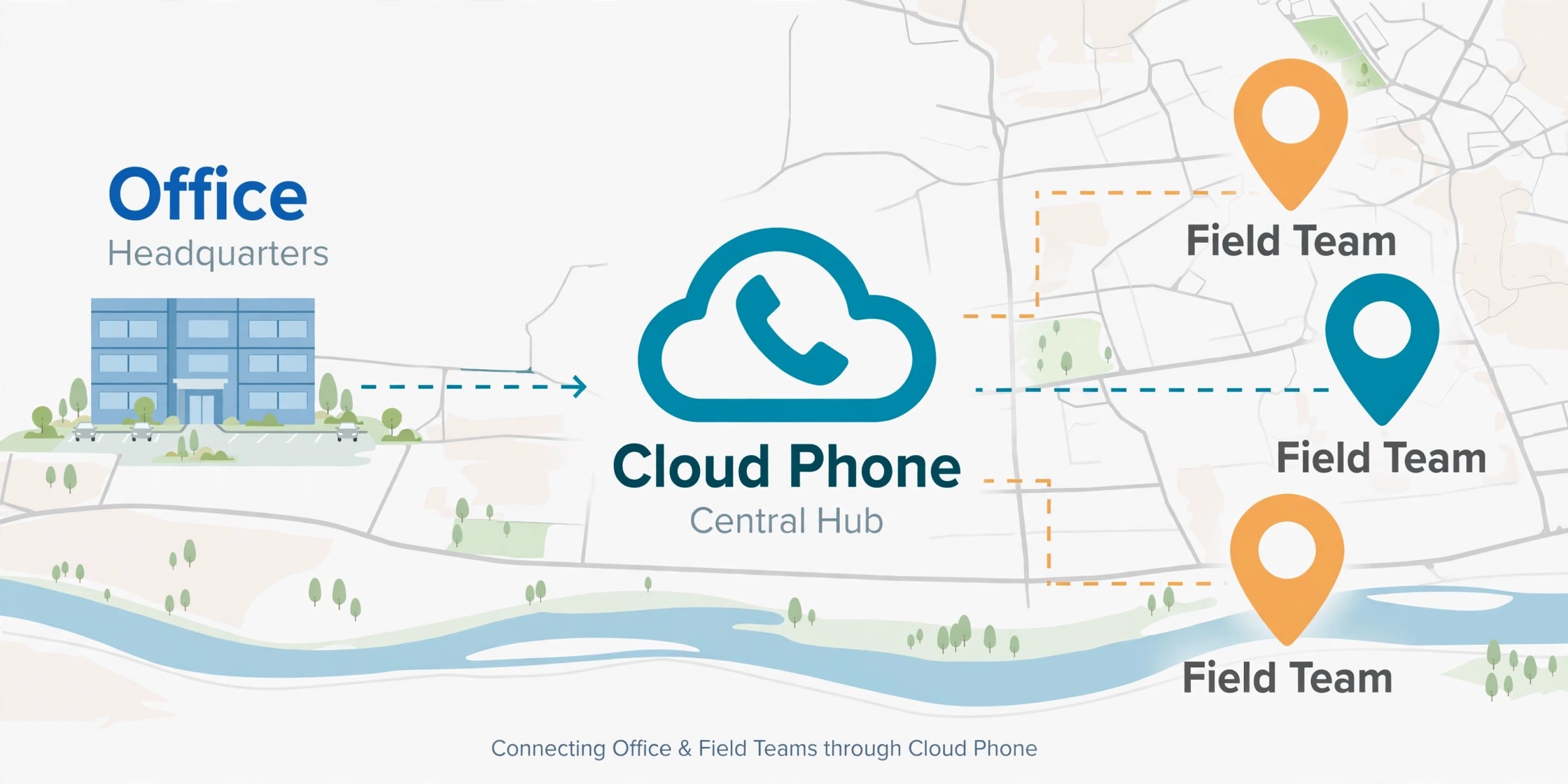
VoIP, which carries voice over the internet, is the default choice for most small businesses with reliable broadband, per guides. It offers an auto attendant, call routing, voicemail to email, call queues, video, and analytics through a web dashboard, without on site hardware. It scales by adding users in software, and it lets staff answer from a desk phone, a computer, or a mobile app, which suits hybrid teams. Its main weakness is dependence on internet and power. Without a stable connection, or without a mobile failover, call quality and availability suffer.
A virtual phone system, often built around a mobile app, suits solo operators and very small mobile first teams. It provides a business number, extensions, call forwarding, and voicemail transcription, often at a lower flat monthly cost, per guides at around 10 to 25 dollars per month for basic plans. It does not tie the business number to a personal device, which is a major improvement over using a personal mobile as the business line. Its limits appear as the team grows, when call queues, call recording, hardware desk phones, or deeper integrations become important.
A traditional landline, using copper lines and a physical system, still has a place where internet is unstable, where a single line must work during a power cut, or where a location has no reliable broadband at all. It is simple, it is tied to a physical location, and it works when power fails in ways internet systems do not, unless a backup is in place. Its limits are cost, fewer features, and poor mobility.
Staff cannot easily take the office number on the road, add users without hardware work, or manage routing from a dashboard. For most urban and suburban businesses with reliable broadband, those limits outweigh the reliability benefit, but for a rural site with poor internet, a landline or a hybrid system may be the honest choice. Staff cannot easily take the office number on the road, add users without hardware work, or manage routing from a dashboard. For most urban and suburban businesses with reliable broadband, those limits outweigh the reliability benefit, but for a rural site with poor internet, a landline or a hybrid system may be the honest choice.
A hybrid approach combines VoIP for daily work with a landline or a mobile failover for outages. That approach suits businesses where availability is critical, such as clinics, trades with emergency calls, or shops that take bookings by phone all day. The extra line costs money, but it buys a floor under your availability. Decide whether that floor is worth paying for by asking what a full morning without phones would cost you in lost bookings and lost trust. If the answer is high, a hybrid backup is not a luxury.
The Phone System Decision Table
Use the table below as a starting filter, not as a final verdict, and then test the top two options against your own call patterns. Team size is a guide, not a rule, because a three person business with high inbound volume may need more features than a ten person business that rarely takes calls.
| Situation | Best starting option | Why it fits | Watch out for |
|---|---|---|---|
| Solo owner, mobile first | Virtual phone system | Business number separate from personal number, low cost, easy setup | Limited queues and recording as you grow |
| Team of 2 to 5, office or hybrid | Cloud VoIP | Auto attendant, routing, voicemail to email, easy scaling | Needs reliable internet and a failover plan |
| Team of 5 to 15, high inbound volume | Cloud VoIP with queues | Queues, call recording, analytics, desk phones if wanted | Higher per user cost, needs admin time |
| Unstable internet or remote site | Landline or hybrid | Works during internet outages, simple and proven | Fewer features, poor mobility, higher line cost |
| Staff mostly on the road | Mobile first VoIP app | Answer anywhere, transfer between mobiles, no desk hardware | Call quality depends on mobile signal and data |
Learning how to choose a business phone system small business teams can grow with means checking the next step, not only the current step. Ask how the system handles adding five users, adding a second location, or adding a queue for a seasonal rush. Ask whether numbers, greetings, and routing can be changed in software, or whether they require a technician visit. A system that is cheap for three users but painful for ten will cost you a migration later, and migrations are where phone numbers, greetings, and customer patience are most at risk.
Also check contract terms before you fall in love with a feature list. Some plans require a long term commitment, some charge for number porting, and some limit the features that look standard in a demo to a higher tier. Read the current terms on the vendor page, note the renewal price as well as the introductory price, and ask what happens to your number if you leave. A business number is an asset, and any system that makes it hard to take that number with you should be treated with caution.

Features That Matter, and Features That Do Not
An auto attendant, sometimes called a virtual receptionist, matters if callers need to reach different people or departments. It should be short, with no more than a few clear choices, and it should always offer a way to reach a person. A long menu that hides a human will frustrate callers more than a simple greeting that forwards to the right mobile. Call routing matters if you have staff in different places, because it can ring several people in order, ring them at once, or follow a schedule by time of day.
Voicemail to email or to text matters for teams that are often away from a desk, because it turns a missed call into a readable message that can be acted on quickly. Call recording matters for training, for quality, and for some regulated work, but it also creates consent and storage duties that vary by place, so check the rules that apply to your business before you switch it on. Analytics matter if you want to know when calls peak, how many are missed, and how long callers wait, because those numbers tell you whether you need more cover at certain hours.
Features that matter less for most small businesses include complex call centre dashboards, extensive video conferencing built into the phone plan when you already use a separate video tool, and a large library of greetings and music options that nobody will ever hear in full. Do not pay for a bundle because it looks complete. Pay for the features that solve a call problem you actually have, and add others later when a real need appears. A phone system should be judged by missed calls, wait times, and caller satisfaction, not by the length of its feature list.

Test Internet, Devices, and Sound Before You Commit
VoIP quality depends on your internet connection, your network setup, and your devices, so test them before you sign a long contract. Check your upload speed and stability, not only your download speed, because voice needs steady upload as well as download. Check whether your router prioritises voice traffic, and whether other heavy uses, such as large uploads or video calls, will compete with calls at peak times. A short trial with real calls, at your busiest hour, will reveal problems that a speed test alone will not.
Devices deserve the same trial. Desk phones suit staff who sit at a desk all day and want a dedicated handset, a headset, and a clear mute and transfer button. A computer app suits staff who already work on a computer and want click to call and call notes on screen. A mobile app suits staff on the road, provided it does not drain the battery, drop calls when the phone locks, or confuse personal and business calls. Let each role try the device they will actually use, and listen to call recordings from the trial, because audio quality that sounds fine to the caller may still sound poor to your team, or the reverse.
Also test emergency calling, because internet systems handle location differently from landlines. A landline number is tied to a physical address, while a VoIP number may need enhanced emergency calling setup to send the correct location. Check the vendor guidance for your place, register the correct address for each location, and test the process with your team so nobody discovers a gap during a real emergency. That check takes minutes, and it is the kind of detail that separates a careful choice from a rushed one.

Number Porting Checklist
Number porting moves your existing business number to a new provider, and it is the step where most migrations go wrong, not because porting is complex, but because details are missed. Use the checklist below, keep one completed copy per number, and do not cancel the old service until the port is confirmed complete. Cancelling early is the fastest way to lose a number, and recovering a lost number is often impossible.
- Confirm the exact business number, including area code, that will be ported.
- Confirm the account holder name and address match the old provider records exactly.
- Confirm the account number and any porting authorisation code required by the old provider.
- Confirm that the number is not tied to a bundle, a contract, or a service that blocks porting.
- Tell the new provider the date you want the port to happen, and avoid a busy Monday if possible.
- Test the new system with a temporary number before the port date, including greetings and routing.
- Record the current greetings, routing rules, and voicemail settings so they can be rebuilt.
- Tell staff, suppliers, and regular customers that a change is coming, with the date and the number unchanged.
- On port day, test inbound calls, outbound calls, voicemail, and emergency calling setup.
- Keep the old service active until the new provider confirms the port is complete in writing.
- After the port, test calls from a mobile, a landline, and a different network, not only from your own phone.
- Update the number on your website, listings, invoices, and signatures only after the port is confirmed.
Porting times vary by provider and by number type, so ask for a realistic window and plan cover for that window. A common mistake is to port on the busiest day of the week, with no one available to test calls or fix routing. Choose a quieter day, have a named person available to test, and keep a mobile number as a temporary contact on your website if a delay occurs. A calm port is a planned port, and planning is mostly about matching records and testing before the switch, not about technology.

Setting Up Routing, Greetings, and Voicemail Well
Good routing starts with a simple question, who should answer this call first, and what should happen if they cannot. Write that answer for each main call type, such as new enquiries, existing customers, bookings, and urgent calls, and then build routing to match it. A new enquiry might ring the sales person first, then the owner, then voicemail. An urgent call might ring several people at once. A booking call might go to a queue with a clear wait message. Each path should end in a voicemail or a callback promise, never in a dead end where the caller hears silence or a busy tone with no next step.
Greetings should be short, warm, and useful. State the business name, state the choice if there is one, and state how to reach a person. Avoid long introductions, background music that drowns the voice, and menus with more choices than a caller can remember. Record greetings in a quiet room, with a clear voice, and test them from a mobile in a noisy place, because that is how many callers will hear them. Update greetings for holidays, closures, and seasonal hours, and set a reminder to change them back, because an out of date holiday greeting in February tells callers that nobody is paying attention.
Voicemail should promise a callback time you can keep, and your team should keep that promise. A voicemail that promises a callback within two hours, answered the next day, is worse than a voicemail that honestly promises a callback by the next working day and delivers it. Set a voicemail check routine, with a named person for each day, and a rule for urgent messages. A phone system can route a call perfectly, but only people can return it, and that return call is where the system either earns trust or loses it.
Costs Beyond the Monthly Rate
The monthly per user rate is only part of the cost, and a comparison that stops there will mislead you. Add the cost of desk phones or headsets if you buy them, the cost of number porting if charged, the cost of any premium features on a higher tier, and the cost of call charges for international calls, toll free numbers, or high volume outbound work. Check whether taxes and fees are included in the quoted rate, because some vendors quote a low base rate and add fees that raise the real monthly cost noticeably.
Also count staff time. A system that needs a technician for every change will cost you in delays and in support fees, while a system with a clear web dashboard lets you change routing, greetings, and users yourself in minutes. Count training time as well. A system that is easy for one person but confusing for the rest of the team will generate support calls and missed calls, which are costs even if they do not appear on an invoice. A short trial, with the staff who will use the system daily, is the best way to judge those hidden costs before you commit.
Renewal pricing deserves a specific check. Some introductory rates rise sharply after the first term, and some discounts apply only to the first year. Note the renewal rate in your comparison, and set a calendar reminder before renewal to review whether the system still fits. A system that was right at three users may be wrong at ten, and a system that was cheap in year one may be expensive in year two. Reviewing at renewal is not disloyalty. It is how a small business keeps its phone costs honest.

How to Choose a Business Phone System Small Business Teams Will Not Regret
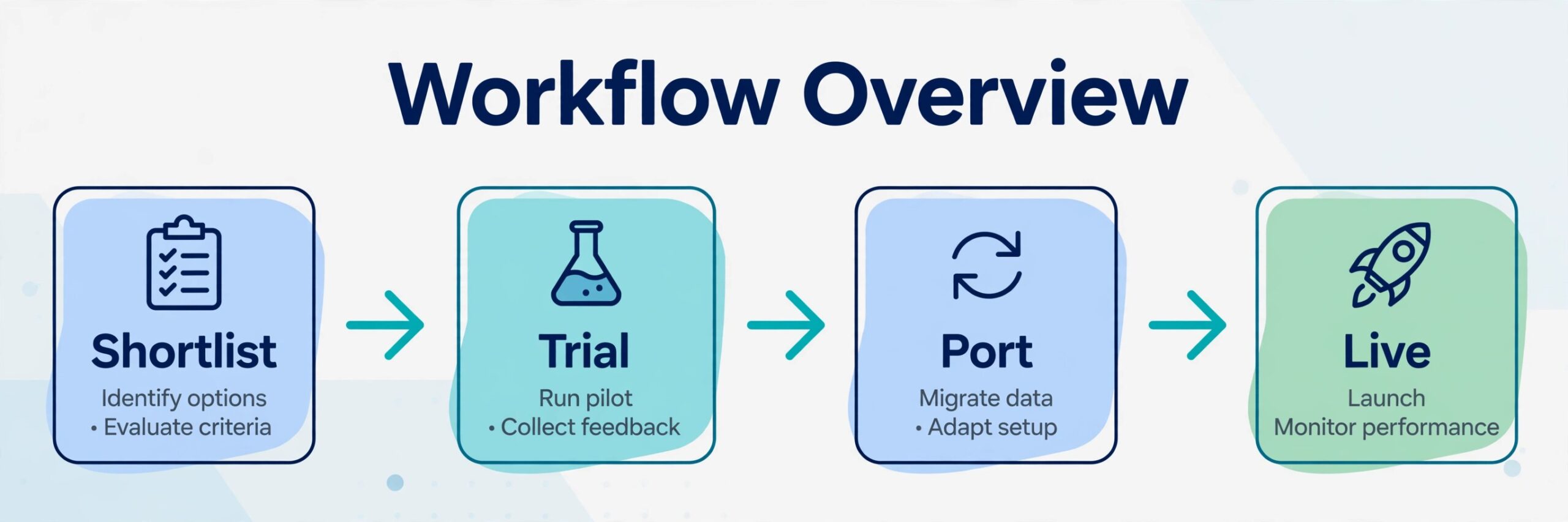
A choice you will not regret usually follows a short, disciplined process. First, write down your call patterns, team size, and must have features, and use them to shortlist two systems, not ten. Second, trial both systems with real calls, real devices, and real staff, at your busiest hour, and judge them by missed calls and audio quality, not by demo polish. Third, check the contract, the renewal price, the porting process, and the emergency calling setup, and get those answers in writing. Fourth, port on a quiet day, test thoroughly, and keep the old service until the port is confirmed.
That process, applied to how to choose a business phone system small business owners can trust, also protects you from the most common regret, which is choosing a system for a feature you never use while missing a basic need you use every day. A system that answers reliably, routes simply, and lets you take your number with you will serve most small businesses better than a complex system with a long feature list and a confusing dashboard. Simplicity, tested with real calls, is a strength, not a compromise.
If you are still torn between two options, choose the one with clearer support, clearer porting, and clearer renewal terms, even if its monthly rate is slightly higher. Phone support matters most when something goes wrong, and a provider who answers quickly, explains plainly, and fixes routing without a long ticket queue will save you more than a small monthly saving ever will. That support quality is hard to see on a pricing page, which is why a trial that includes a support question is worth doing before you sign.
For related reading, see client feedback loop, dispatch software, Jobber cost, HR software and online ordering software. Those posts cover adjacent operations, scheduling, and customer tools, and the same lesson applies when you learn how to choose a business phone system small business customers will reach easily. Start from your real calls, filter by team size and internet quality, trial the top two, and port carefully. A phone system chosen that way will answer, route, and grow with you, instead of becoming another monthly cost you wish you had tested properly.
Running a Two Week Trial That Actually Decides
A trial should decide the choice, not merely confirm a demo, and that requires a plan for what you will measure. Start the trial with a temporary number, so real callers are not affected while you learn, and route a small share of real calls through the trial system in the second week, once staff are comfortable. Record missed calls, wait times, audio problems, and support questions for each day, and compare those numbers with your current system over a similar period. A trial without numbers is just a feeling about a new dashboard.
Include the people who will suffer if the system fails. Front desk staff, road staff, and anyone who handles urgent calls should each make and receive trial calls, including a transfer, a voicemail, and a call from a noisy location. Ask them to rate audio clarity, ease of transfer, and ease of finding a voicemail, and record their answers in plain words. A system that the owner loves and the team hates will fail in practice, because the team will find workarounds that bypass the new routing and greetings.
End the trial with a decision meeting that uses the trial record, not a sales call. Review the cost including renewal pricing, the porting plan, the support response you received during the trial, and the emergency calling setup. If a provider was slow to answer a trial support question, expect the same speed after you sign. A disciplined approach to how to choose a business phone system small business teams can keep is to let the trial evidence overrule the demo, even when the demo looked polished.
That discipline also applies to timing. Do not start a trial in your busiest week, when staff have no time to test properly, and do not end a trial by signing on the last day without a porting date. Give the trial a clear end date, a decision owner, and a fallback if the trial fails, such as staying on the current system for another quarter. Learning how to choose a business phone system small business owners can defend means treating the trial as part of the purchase, not as a free extra before it.
Finally, write down why you chose the winner, in one short paragraph, and keep it with the contract. That note helps a future manager understand the choice, helps you judge the renewal, and prevents a later argument about whether a feature was promised. It also reminds you that the choice was based on your calls, your team, and your internet, not on a pricing page. When you learn how to choose a business phone system small business teams will use daily, that written reason is the last step that turns a trial into a decision you can stand behind.
Frequently Asked Questions
Is VoIP better than a landline for a small business
For most small businesses with reliable broadband, yes, per guides, because VoIP offers more features, easier scaling, and lower monthly costs than a traditional landline. A landline or a hybrid system remains a sensible choice where internet is unstable, where a line must work during a power cut, or where a location has no reliable broadband.
How many phone lines does a small business need
Count people who answer calls and people who only make calls, rather than counting every employee. A solo owner may need one business number with forwarding, a five person team may need five user licences with shared queues, and a high volume team may need queues plus a spare line for overflow. Trial data on missed calls will tell you if you need more cover at peak hours.
Can you keep your existing business number when you switch
In most cases, yes, through number porting, provided the account details match the old provider records and the number is not blocked by a bundle or contract. Do not cancel the old service until the new provider confirms the port is complete in writing, and test inbound, outbound, voicemail, and emergency calling setup on port day.
What internet speed do you need for VoIP
VoIP needs stable upload and download, low delay, and low packet loss more than raw speed alone. A stable broadband connection that handles your normal office work plus voice calls at peak times is usually enough for a small team, but test real calls at your busiest hour before committing, and check whether your router prioritises voice traffic.
Should a small business buy desk phones or use mobile apps
Desk phones suit staff who sit at a desk all day and want a dedicated handset and headset. Mobile apps suit staff on the road, and computer apps suit staff who work on screen all day. Many teams mix devices by role, and a trial with each role using its real device will show which combination works best for your business.
What should you check before renewing a phone contract
Check the renewal rate, not only the introductory rate, check whether the features you use are still on your tier, check missed call and wait time data from the past term, and check whether adding users or a second location will be easy. Set a reminder before renewal, so you can review or renegotiate while you still have time to port if needed.