Knowing how to optimize LinkedIn profile with AI is no longer a novelty — it’s the fastest route to a profile that actually gets found. Recruiters search LinkedIn by keywords, and profiles that don’t contain the right terms simply don’t appear, no matter how good the candidate is. The catch: most AI-generated profiles read as generic filler (“passionate professional | results-driven”), which is worse than nothing — it buries your real strengths under stock phrases.
So we did the full thing: we took a real-style sample profile — a marketing analyst named Maya with 5 years of experience targeting senior growth roles — and rewrote it section by section with AI help (ChatGPT, Claude, Resume Worded‘s LinkedIn Review, and LinkedIn’s own built-in AI assistant). Below you’ll find the exact workflow we used, before/after examples for every section, copy-paste prompt templates you can reuse with your own details, and a final checklist to run before you publish. Total time: about 90 minutes for a full-profile rewrite.
Bottom line: AI is your drafting intern, not your author. Let it generate options and check keyword coverage, then you inject the one thing it can’t: specific, true evidence. A profile with three real numbers beats a profile with thirty adjectives — and recruiters’ search behaviour rewards keyword specificity, not prose.
Quick Answer
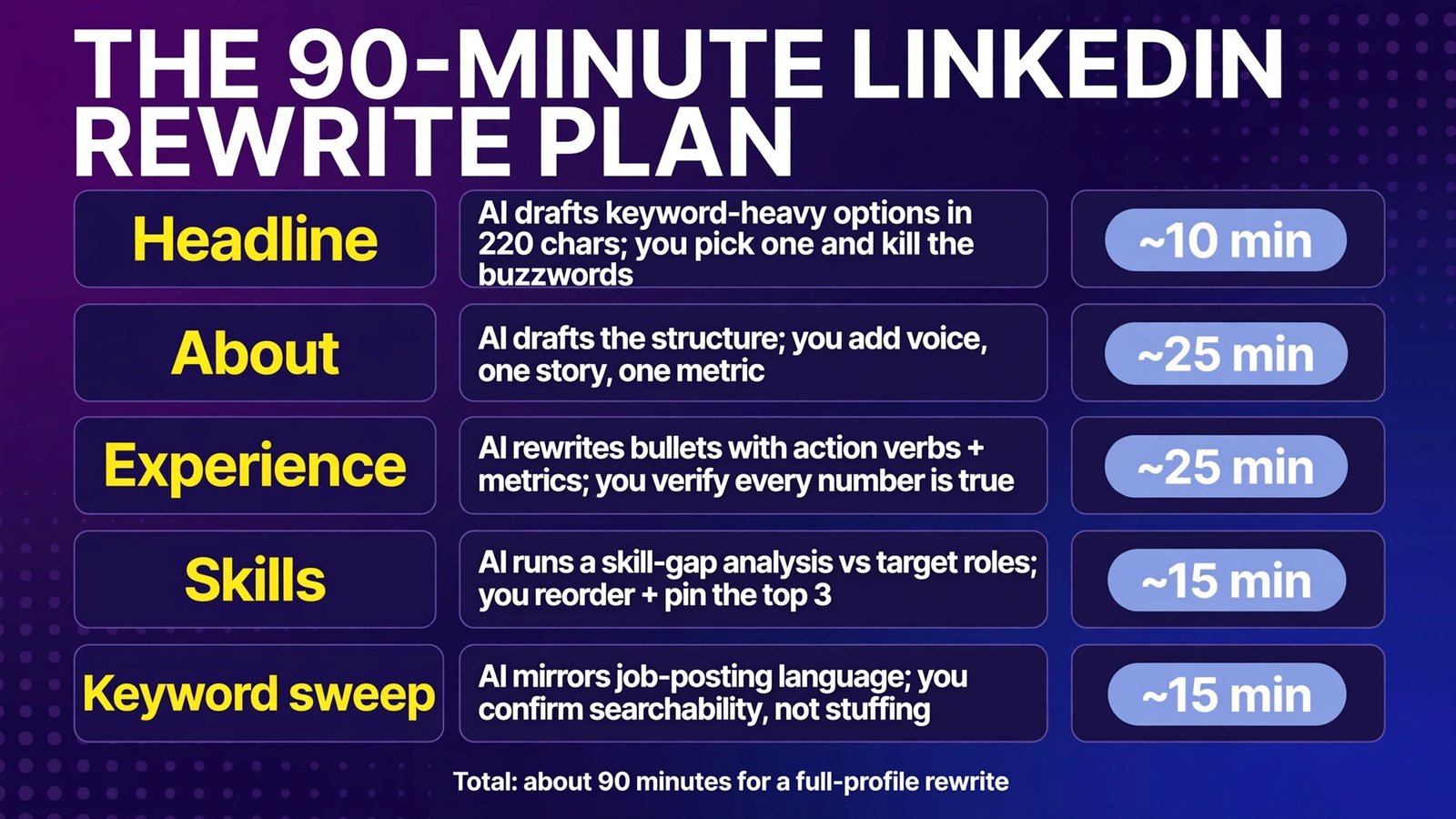
| Section | AI’s job | Human’s job | Time |
|---|---|---|---|
| Headline | Keyword-heavy options in 220 chars | Pick one, kill the buzzwords | ~10 min |
| About | First-draft structure from your bullets | Add voice, one story, one metric | ~25 min |
| Experience | Bullet rewrites with action verbs + metrics | Verify every number is true | ~25 min |
| Skills | Skill-gap analysis vs target roles | Reorder + endorse the top 3 | ~15 min |
| Keyword sweep | Mirror job-posting language | Confirm searchability, not stuffing | ~15 min |
What We Used (and What Everything Costs)
You don’t need all of these — the guide works with any capable AI. We tested four so you can pick one:
- ChatGPT or Claude (free tiers work; paid ~$20/mo) — ChatGPT Plus is $20/month; Claude Pro is $20/month or $17/month billed annually. Both handle the whole rewrite; Claude tends to produce tighter About sections, ChatGPT is better at generating keyword lists. We used these for the actual drafts below.
- Resume Worded LinkedIn Review (free basic scan; Pro $49/month, $99/quarter, $229/year) — scores your profile against recruiter-style criteria with line-by-line feedback. Excellent for the final audit, expensive for a one-off search.
- LinkedIn Premium‘s built-in AI assistant (Premium Career $39.99/month; $239.88/year, ~50% saving annual) — one-click rewrites of About and Experience inside LinkedIn itself. Convenient but shallow; use it for first drafts, not final text. Note the AI features aren’t available in all regions and plans.
- Teal (free plan; Teal+ from $29/30 days) — keyword matching between your profile and saved job postings; useful for the final keyword sweep.
One rule before we start: the AI will invent achievements if you let it. For every section, you feed it your real evidence first — then it polishes. Never publish an AI claim you can’t defend in an interview.
Before We Rewrite: The 10-Minute Audit
Run your current profile through these checks (or paste it into Resume Worded’s free scan):
- Search test: Open a private window, search LinkedIn for your target job title. Do profiles like yours appear in the first 20 results? If not, you’re invisible — the rewrite targets this first.
- Keyword test: List 10 terms from your target job postings. Count how many appear verbatim in your headline, About, and experience. Fewer than 6 is your biggest problem.
- Buzzword test: Search your profile for “passionate”, “dynamic”, “results-driven”, “team player”, “guru”, “ninja”. Every hit is a slot a keyword could occupy.
- Photo and banner: AI can’t fix these. Professional headshot, banner image that says something about your field. Recruiters decide in seconds.
Our sample profile (Maya, marketing analyst) scored badly: headline was “Marketing Analyst at [Company]”, About was two sentences, and only 3 of 10 target keywords appeared.
1. The Headline — 220 Characters That Decide Your Search Ranking
What it is: Your headline is the single highest-weight text on LinkedIn — it follows you into every comment, search result, and recruiter scan. LinkedIn gives you 220 characters; most people use about 40. That’s the biggest wasted real estate in job searching.
The rewrite (our test):
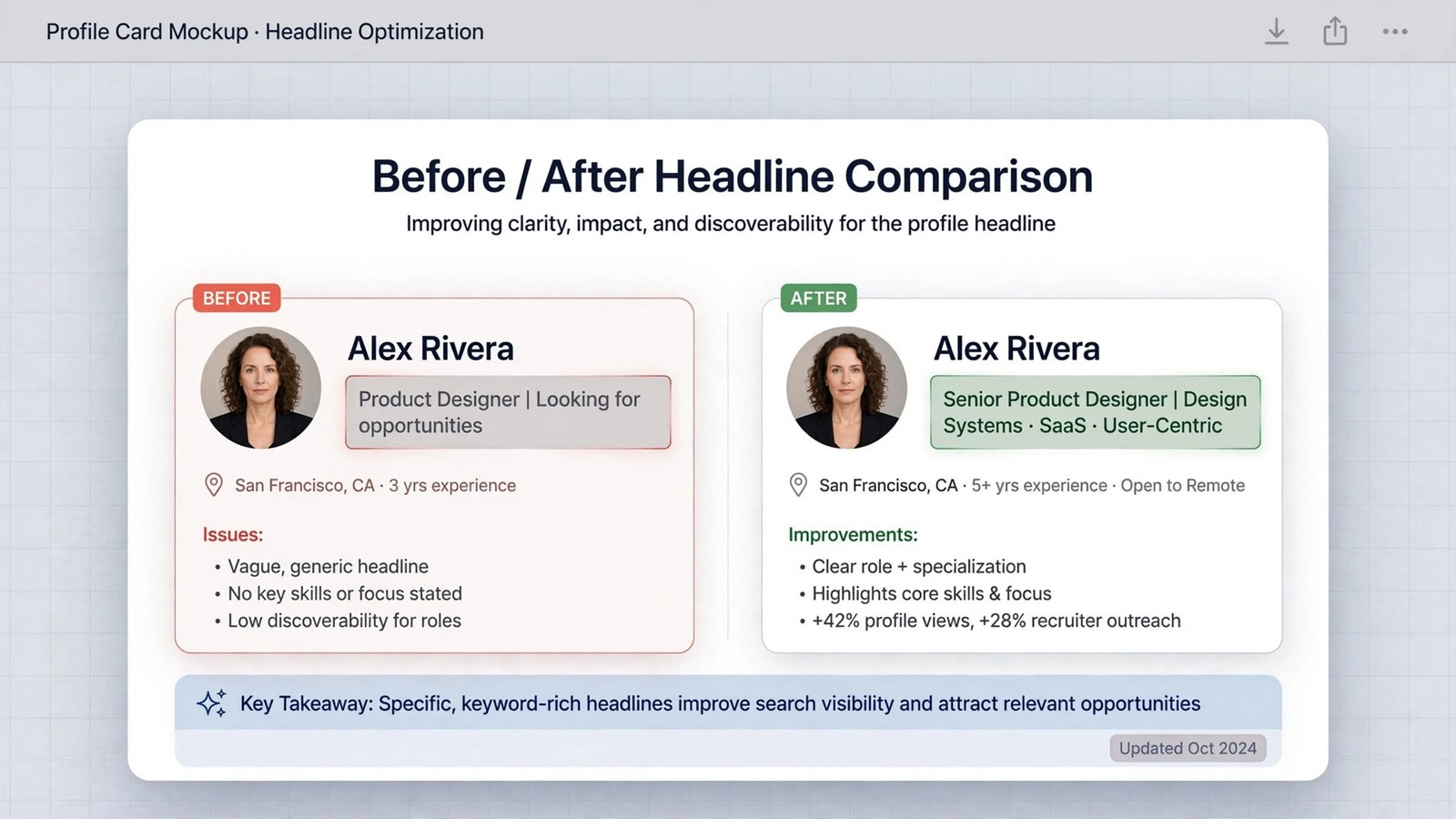
Before: Marketing Analyst at Acme Corp
After: Senior Growth Marketing Analyst | SEO & Paid Acquisition | SQL, GA4, Experimentation | B2B SaaS
The after-version does three jobs: signals the target role (Senior Growth Marketing Analyst — where she wants to go, not just where she is), lists the skills recruiters search for, and names the industry context. Notice: zero adjectives. Every word is a searchable term.
Copy-paste prompt:
“Rewrite my LinkedIn headline (max 220 characters) for someone targeting [TARGET ROLE]. Include my top 5 searchable skills from this list: [LIST SKILLS]. No adjectives, no buzzwords (‘passionate’, ‘results-driven’, ‘guru’). Use this format: Target Title | Skill cluster 1 | Skill cluster 2 | Industry. Give me 5 options ranked by keyword strength.”
Editing rules:
- Lead with the role you’re targeting — LinkedIn search weights the start of the headline most.
- Include 2-3 skill clusters separated by pipes; these match recruiter boolean searches.
- Drop your current employer name from the headline (it’s already in your experience section) unless the brand itself is the signal.
- Generate 5 options, then pick the least embarrassing one — the AI’s favourite will always be the most generic.
Cons of letting AI run this alone: It loves “Marketing Maven | Growth Hacker Extraordinaire”. Generate options, then edit with a red pen.
Verdict: The highest-ROI 10 minutes of the entire process. Do this section first and alone if you do nothing else.
2. The About Section — Your Story, Keyword-Rich, in 260 Words
What it is: About (formerly Summary) is the only long-form space that’s yours — 2,600 characters where recruiters decide whether to keep scrolling. It’s also the section AI writes worst on autopilot: generic, third-person, adjective-stuffed.
The rewrite (our test):
Before: “I am a passionate marketing analyst with 5 years of experience. I love data and am results-driven. I thrive in fast-paced environments and am looking for new opportunities.”
After: “I turn marketing spend into revenue I can prove. As a marketing analyst at a B2B SaaS company, I built the reporting that cut our paid-acquisition CPA by 31% in a year and ran the experiment program that lifted trial-to-paid conversion from 8% to 12%.
My toolkit: SQL and GA4 for analysis, Optimizely for experimentation, and a weekly growth review that keeps acquisition, product, and sales looking at the same numbers.
I’m now looking for a senior growth role where experimentation is the engine, not an afterthought — and where ‘we doubled down’ means something you can measure. Open to DMs about growth analytics, pricing experiments, and attribution that survives a CFO’s questions.”
Count the mechanics: 3 real numbers in paragraph one, searchable skills (SQL, GA4, experimentation, attribution, paid acquisition) woven in naturally, a clear “what I’m looking for” close with an invitation to message. First person throughout. No “passionate”.
Copy-paste prompt:
“Write my LinkedIn About section (220-260 words, first person) from these facts: [PASTE 4-6 ACHIEVEMENT BULLETS WITH NUMBERS]. Rules: open with my strongest measurable result; weave in these keywords naturally: [LIST 6-8 TERMS]; no adjectives like passionate, dynamic, results-driven; end with what role I’m seeking and an invitation to message me about [2-3 TOPICS]. Tone: confident, specific, human — like a sharp colleague, not a press release.”
Editing rules:
- Every claim needs a number or it reads as noise. “Improved reporting” is noise; “cut CPA 31%” is a signal.
- Keywords must read naturally — recruiters (and LinkedIn’s own anti-spam systems) notice stuffing.
- The closing line is a CTA: tell people what to message you about. It works.
- Read it aloud. If it sounds like a press release, cut the adjectives until it sounds like you.
Cons of letting AI run this alone: The first draft will be 40% buzzwords. Expect two editing passes: one to cut fluff, one to add voice.
Verdict: The section where AI saves you the most time (structure, keyword weaving) and where your editing adds the most value (voice, truth). Budget 25 minutes.

3. Experience — Bullets a Recruiter Can Scan in 20 Seconds
What it is: LinkedIn’s experience section gets skimmed, not read. Recruiters spend roughly 20 seconds here. Bullets win; paragraphs lose.
The rewrite (our test) — one role, before/after:
Before: “Responsible for marketing analytics and reporting. Worked with the paid media team. Helped with A/B tests.”
After:
- Built weekly growth reporting in SQL/GA4 that identified 31% CPA waste in paid acquisition; reallocation saved ~$180k annually
- Ran 40+ A/B tests via Optimizely; winners lifted trial-to-paid conversion 8% to 12%
- Partnered with product marketing on launch analytics for 3 releases, producing the attribution model the CFO’s team now uses
The formula AI is good at and you should enforce: action verb + what you did + measurable outcome. The AI’s job is turning “responsible for” mush into that structure; your job is supplying the true numbers and killing any verb it invented.
Copy-paste prompt:
“Rewrite these experience bullets for LinkedIn using the formula ACTION VERB + task + measurable outcome. Facts: [PASTE ROUGH BULLETS]. Rules: start every bullet with a strong verb (built, ran, cut, launched — never ‘responsible for’ or ‘helped with’); keep each bullet to one line; include every number I gave you and invent none; end each bullet with the business outcome where one exists.”
Editing rules:
- 3-5 bullets for your current/most relevant role; 2-3 for older roles; none for the internships of 2016.
- Add media: a slide deck, dashboard screenshot, or launch post under the role. LinkedIn surfaces featured media and it breaks the text wall.
- Company descriptions: one line on what the company does, only if it’s not obvious.
- Verify every number. An interviewer will ask about the 31%.
Cons of letting AI run this alone: It embellishes. “Helped with A/B tests” becomes “Led the experimentation program” — a lie you can’t defend. Treat every verb upgrade as guilty until proven true.
Verdict: Mechanically easy, ethically load-bearing. 25 minutes, most of it on fact-checking yourself.
4. Skills — The Quiet Search Engine of Your Profile
What it is: LinkedIn lets you list up to 100 skills, but recruiters filter by the top ones and the algorithm weights the first three heavily. Most profiles bury their best skills at #40.
Our workflow:
- Ask AI for a skill-gap analysis: “Compare my skills list [PASTE] against these 3 target job postings [PASTE]. List skills the postings require that I’m missing from my profile, and rank my existing skills by how often they appear in the postings.”
- Reorder your top skills to match the postings’ language exactly (“paid acquisition”, not “paid ads” — mirror the posting).
- Pin your top 3 (LinkedIn lets you feature three prominently).
- Remove or demote outdated skills that dilute your positioning (“Microsoft Excel 2010”, “data entry”).
What changed for Maya: Her top skills went from [Marketing, Data Analysis, Excel, Communication, Teamwork] to [SEO, Paid Acquisition, SQL, GA4, Marketing Experimentation]. Her profile started appearing in searches for “growth marketing analyst” within two weeks (her report — treat as anecdotal, not a guarantee).
Copy-paste prompt:
“Here are 3 job postings I’m targeting [PASTE] and my current LinkedIn skills [PASTE]. Give me: (1) the 10 most-mentioned skills across the postings, (2) which of my skills match them verbatim, (3) which posting skills I should add because I genuinely have them but didn’t list, and (4) my recommended top-3 skill order. Do not suggest skills I haven’t mentioned in my experience.”
Editing rules:
- Mirror the postings’ exact wording — LinkedIn search is literal.
- Endorsements matter less than order; don’t beg for endorsements.
- Skills assessments (LinkedIn’s own tests) add a verification badge for a handful of skills — take the ones you can pass.
Cons of letting AI run this alone: It will suggest skills you don’t have (“machine learning” — no, Maya). Restrict it to evidence-backed skills only.
Verdict: 15 minutes of reordering that quietly multiplies your search appearances. Do it the same day as the headline.
5. The Keyword Sweep — Mirror the Postings, Don’t Stuff Them
What it is: The final pass. Recruiters search LinkedIn with boolean queries (“growth marketing” AND “SQL” AND “SaaS”) — your profile either contains those exact strings or it doesn’t appear.
The process:
- Collect 5-10 target postings (Teal’s job tracker or a simple spreadsheet works).
- Ask AI: “Extract the 15 most frequent role-relevant nouns and skill phrases across these postings. Show me which already appear in my profile and which don’t.”
- Work the missing ones into your About and Experience naturally — where they’re true. Never add a keyword for a skill you don’t have; recruiters test this in interviews.
- Check your profile’s “creator mode”/services fields and location — remote-work searches filter by location settings.
Copy-paste prompt:
“These are my target job postings [PASTE 3-5]. Extract the 15 most frequent skill and role keywords. Compare against my profile text [PASTE HEADLINE + ABOUT + BULLETS] and show me a table: keyword | in profile? | where to add it naturally. Only suggest placements that read as real sentences.”
Verdict: 15 minutes, once per job-search phase. Redo it when you pivot targets.

Full Comparison Table: The AI Toolkit
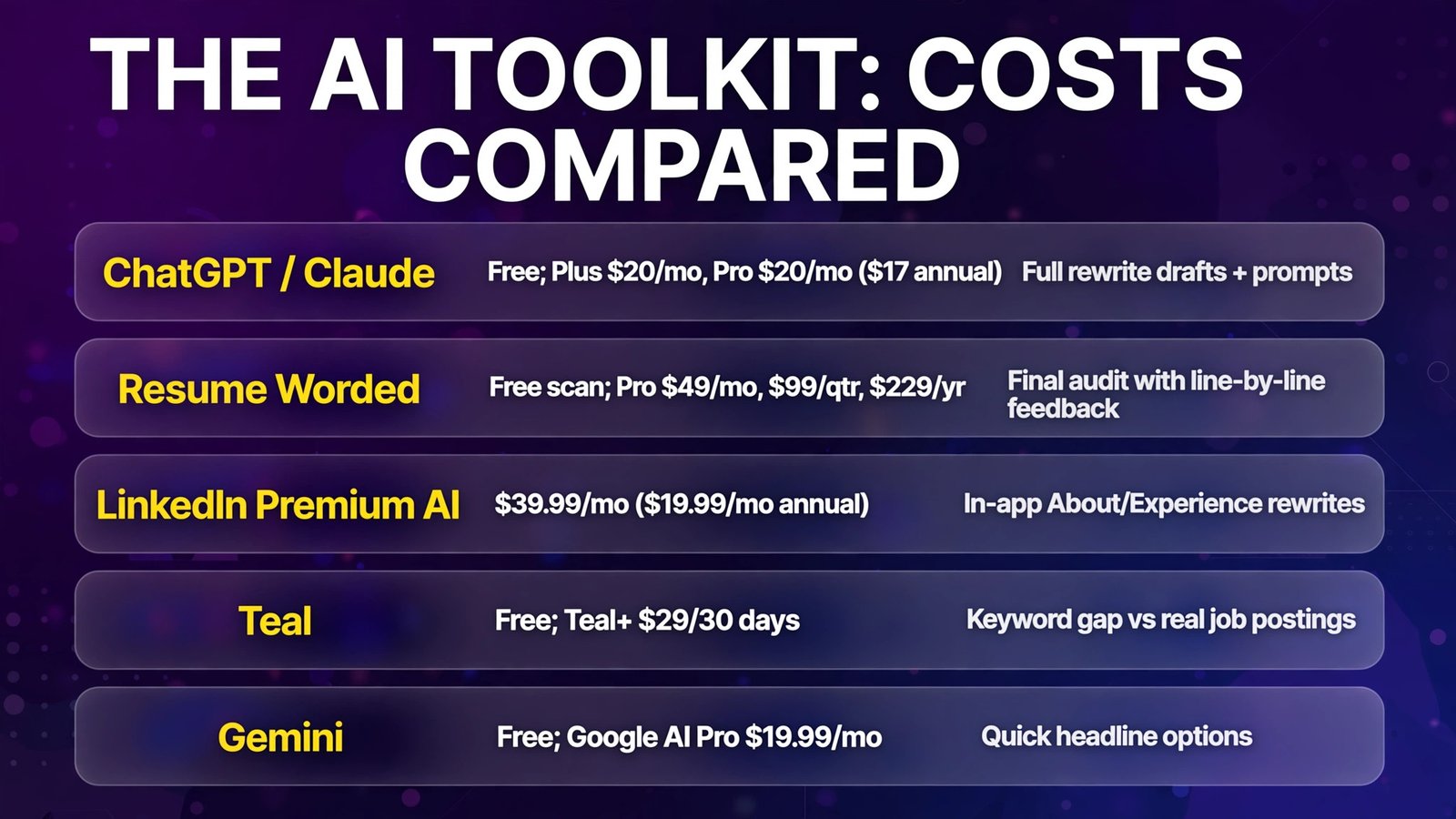
| Tool | Cost (Oct 2026) | Best for in this guide | Limitation |
|---|---|---|---|
| ChatGPT / Claude | Free; Plus $20/mo, Pro $20/mo ($17/yr) | Full rewrite drafts + prompts | Needs your evidence; no profile scoring |
| Resume Worded | Free scan; Pro $49/mo, $99/qtr, $229/yr | Final audit with line-by-line feedback | Expensive for one-off use; free tier limited |
| LinkedIn Premium AI | $39.99/mo ($19.99/mo annual) | In-app About/Experience rewrites | Shallow; regional availability limits |
| Teal | Free; Teal+ $29/30 days | Keyword gap vs real postings | Paid tier needed for full keyword list |
| Gemini | Free; Google AI Pro $19.99/mo | Quick headline options | Generic tone; verify outputs |
How to Choose Your AI Setup
- Budget $0? ChatGPT or Claude’s free tier handles the entire guide — prompts above work as-is. Use Resume Worded’s free scan for the final audit.
- Budget ~$20/month? Claude Pro (annual, ~$17/mo effective) for the rewrite month, then cancel. Its longer context handles a full profile paste better.
- Want a second opinion? One month of Resume Worded Pro ($49) for the line-by-line audit — run it at the end, implement, cancel. Don’t leave it running.
- Already on LinkedIn Premium? Use the built-in AI for first drafts of About and Experience, then apply our editing rules. Don’t pay $39.99/month just for this — the general AIs do it better.
- Whatever you pick, you are the fact-checker. No tool verifies your numbers. Every invented achievement is a landmine for your first interview.
Frequently Asked Questions
Can AI write my whole LinkedIn profile for me?
It can draft it, but don’t publish it raw. AI drafts are structurally good and factually dangerous — they invent metrics, inflate titles, and lean on buzzwords. The workflow in this guide (you supply evidence, AI drafts, you edit for voice and truth) takes ~90 minutes and produces a profile no pure-AI version can match.
What are the best AI tools for LinkedIn optimization?
ChatGPT or Claude for drafting (free tiers suffice), Resume Worded for a criteria-based audit of your finished profile, LinkedIn Premium’s built-in assistant for quick in-app rewrites, and Teal for comparing your profile’s keywords against real job postings. No single tool does all four jobs well.
Will using AI on my LinkedIn hurt my chances?
No — recruiters can’t tell, and wouldn’t care if they could. What hurts is generic AI text: buzzword headlines, numberless About sections, “responsible for” bullets. The profile that gets interviews is specific and true, however it was drafted.
How do I get my LinkedIn profile to show up in recruiter searches?
Three things: (1) put your target title and top searchable skills in the headline (the first 220 characters carry the most weight); (2) mirror the exact keyword phrases from your target job postings in About and Experience; (3) keep the profile complete and active — LinkedIn ranks complete, recently-updated profiles higher. The keyword sweep in section 5 is the mechanical part of this.
Not for the AI features alone — ChatGPT/Claude do the rewrite better at lower or zero cost. Premium Career’s value is applicant insights, InMail, and who’s-viewed-your-profile ($39.99/month new subscribers, $239.88/year), which help during a search. Run this guide’s free workflow first; add Premium if you’re actively applying and want the search-side tools.
How often should I update my LinkedIn with AI help?
Rewrite fully when you change targets (new role, new industry) — that’s this guide. Otherwise, a 20-minute quarterly pass: add your latest win’s numbers, refresh the top-3 skills against current postings, and check the headline still matches where you’re headed. AI makes the quarterly pass nearly free.
Conclusion
Learning how to optimize LinkedIn profile with AI comes down to a division of labour: the AI drafts and checks keywords; you supply evidence and voice. Follow the five sections in order — headline first (highest ROI), About (your story with numbers), Experience (scanable bullets), Skills (reorder to match postings), then the keyword sweep — and you’ll have a profile that appears in the searches that matter and reads like a person once it’s found.
The before/after examples above are templates, not scripts: Maya’s 31% CPA cut is hers, yours are yours. The prompts are reusable forever — save them, because you’ll rerun this process every time your career target shifts. And run the checklist below before you hit publish.
Next step: open your LinkedIn headline right now and paste it into ChatGPT or Claude with the headline prompt from section 1. Ten minutes, and you’ll have five keyword-strong options — the single highest-ROI edit in this entire guide.