
Your list has 2,000 contacts. Your bill says 2,000 contacts. But 600 of those people unsubscribed months ago, and Mailchimp charges you for them anyway. That is the first surprise in mailchimp pricing for small business, and it is not the last. The headline prices look simple, four plans from free to 350 dollars a month, but the real cost depends on how many contacts you store, how many you actually mail, and how many of them stopped listening long ago.
Mailchimp is the email platform most small businesses start with, because it is polished, familiar, and easy to learn. It is also the platform whose pricing has changed most in recent years, with three price increases since 2023 and a free plan that shrank sharply in February 2026. This guide works through every plan with prices checked against the vendor pricing page and independent comparisons in late 2026, so check the vendor pricing page before committing, because Mailchimp changes prices and limits often.
The short version is that most small businesses land on Standard, at 20 dollars a month for 500 contacts, because that is where the smarter automation and segmentation live. Essentials at 13 dollars covers the basics, and Premium at 350 dollars belongs to large lists with a dedicated marketing team. The decision that matters is the list size, because Mailchimp prices by contacts stored, not by emails sent, and the bill grows with the list whether those contacts open your mail or not.
Mailchimp Pricing for Small Business at a Glance
| Plan | Entry price | Contacts at entry | Monthly sends | Seats | Audiences |
|---|---|---|---|---|---|
| Free | 0 dollars | 250 max | 500, 250 a day | 1 | 1 |
| Essentials | 13 dollars a month | 500 | 10 times contacts | 3 | 3 |
| Standard | 20 dollars a month | 500 | 12 times contacts | 5 | 5 |
| Premium | 350 dollars a month | 10,000 | 15 times contacts | Unlimited | Unlimited |
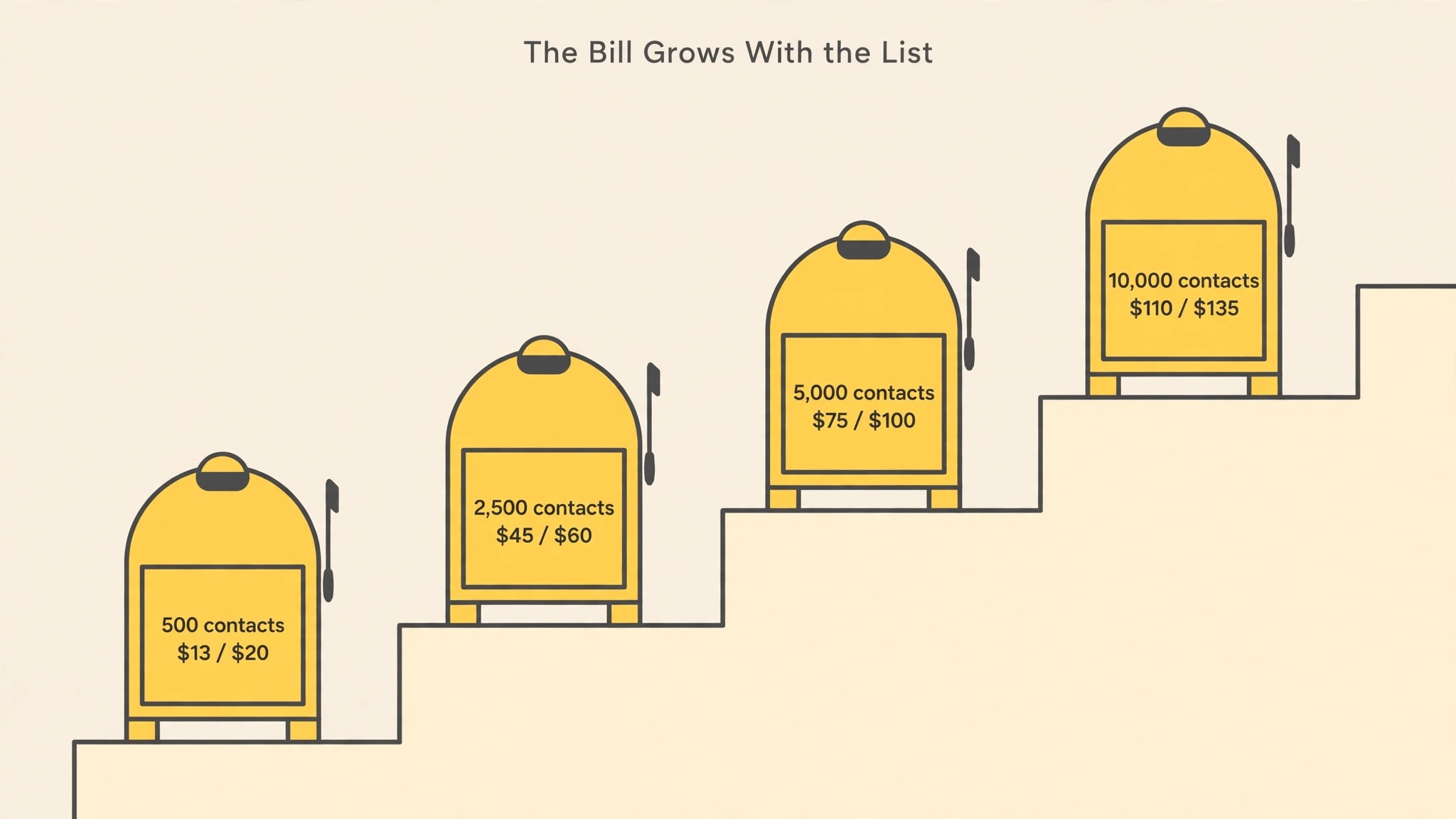
The table shows the four plans as Mailchimp lists them, and the first thing to notice is that the price is a function of the contact band, not a flat plan fee. Mailchimp publishes twenty bands, from zero to 500 contacts up to over a million, and the price rises at each band. Essentials at 500 contacts costs 13 dollars a month, at 2,500 contacts it costs 45 dollars, at 5,000 it costs 75 dollars, and at 50,000 it costs 385 dollars. Standard follows the same shape, from 20 dollars at 500 contacts to 450 dollars at 50,000.
The second thing to notice is the send allowance, which is a multiple of the contact count rather than a fixed number. Essentials allows ten emails per contact per month, Standard allows twelve, and Premium allows fifteen, which means a 5,000 contact list on Standard can send 60,000 emails a month. That multiple is generous for most small businesses, and the send limit rarely bites before the contact limit does. The bill grows with the list, not with the sending, and that shape rewards a clean list more than a quiet one.
The third thing to notice is the seat and audience count, which is the quiet dividing line between the plans. Free allows one seat and one audience, Essentials allows three of each, Standard allows five of each, and Premium allows unlimited. A business with two people sending mail and two audiences, such as customers and leads, already needs Essentials, and a business with a team of five needs Standard. Count seats and audiences before you count contacts, because the plan that fits your team may not be the cheapest one on the page.

The Free Plan and the February 2026 Cut
The free plan used to be generous, and it is not anymore. In February 2026, Mailchimp cut it from 500 contacts and 1,000 sends a month to 250 contacts and 500 sends a month, with a cap of 250 sends a day, and sending pauses outright once either ceiling is crossed. That cut followed two earlier reductions, from 2,000 contacts before 2023, and it means the free plan is now best used as a test drive rather than a home for a real list.
What the free plan still gives you is a working email tool with one seat, one audience, basic templates, and automation flows as a preview only. That is enough to learn the interface, send a first campaign to a small list, and decide whether Mailchimp fits your business. It is not enough to run a real marketing programme, because 250 contacts and 500 sends will be outgrown within weeks by any business that takes email seriously, and the upgrade will arrive sooner than expected.
The honest way to use the free plan is as a two week trial, not as a permanent home. Build the list, send three campaigns, test the templates and the reporting, and then move to Essentials or Standard once the list passes 250 contacts. A business that tries to stay on free by deleting contacts and splitting lists will spend more time managing the limit than marketing, and that trade is the clearest lesson in mailchimp pricing for small business, because the time costs more than the 13 dollars a month that Essentials charges.
Essentials at 13 Dollars a Month
Essentials costs 13 dollars a month for 500 contacts, and it is the cheapest paid door into Mailchimp. It adds three seats, three audiences, A/B testing, and multi-user support, plus automation flows of up to four steps, which covers a welcome series and a simple abandoned cart flow. The send allowance is ten times the contact count, so a 500 contact list can send 5,000 emails a month, which is plenty for a weekly newsletter and a welcome series.
The automation limit is the detail that decides whether Essentials fits, because four steps is enough for a simple flow and not enough for a real customer journey. A welcome series of four emails works. A journey that branches by behaviour, sends different messages to buyers and browsers, and follows up over weeks does not, because that journey needs the branching and the two hundred flows that Standard offers. A business that plans to automate seriously will outgrow Essentials quickly, and the upgrade to Standard is the honest step.
Essentials also lacks the smarter tools that make email pay, including predictive segments, send time optimisation, and dynamic content, which all sit on Standard. Those tools are the difference between an email that arrives at a good time for each subscriber and an email that arrives at the same time for everyone, and the open rate difference is real. A business that sends a simple weekly newsletter will be happy on Essentials, and that judgement is the heart of mailchimp pricing for small business, because the 7 dollar step to Standard is only worth paying when the smarter tools will actually be used.
Standard at 20 Dollars a Month
Standard costs 20 dollars a month for 500 contacts, and it is the plan Mailchimp pushes, because it is where the platform becomes a marketing tool rather than a sending tool. It adds five seats, five audiences, the Journey Builder with branching, advanced and predictive segments, multivariate testing, custom coded templates, and send time optimisation. The send allowance rises to twelve times the contact count, so a 500 contact list can send 6,000 emails a month.
The Journey Builder is the feature that justifies the step up, because it turns email from a broadcast into a conversation. A new subscriber gets a welcome series, a buyer gets a different next message from a browser, and a lapsed customer gets a win back flow, all automatically, with up to two hundred flows available. That branching is what makes email feel personal at scale, and it is the reason Standard earns its price for a business that takes email seriously. A business that sends one newsletter a week to everyone will not use it, and should stay on Essentials.
Standard also adds the reporting depth that a growing business needs, including custom reports, comparative reporting, and dynamic content that changes by segment. Those tools turn email from a chore into a system that improves every month, because the reports show which subject lines work, which segments buy, and which flows earn their keep. A business that reviews those reports monthly will get more from Standard than a business that never opens them, and the difference is in the habit, not the plan. That habit is what mailchimp pricing for small business rewards, because the plan only pays when the owner uses the tools it buys.
The price at larger list sizes is where Standard shows its shape. At 2,500 contacts it costs 60 dollars a month, at 5,000 it costs 100 dollars, at 10,000 it costs 135 dollars, and at 50,000 it costs 450 dollars. That growth is steady and predictable, and it means a business can forecast its email bill a year ahead from its list growth alone. The forecast is the point, because a bill that grows with the list is a bill that rewards cleaning the list, and cleaning the list is the cheapest saving in this guide.
Premium at 350 Dollars a Month
Premium costs 350 dollars a month for up to 10,000 contacts, and it is built for large lists with a dedicated marketing team rather than small businesses. It adds unlimited seats, unlimited audiences, phone support, co-browsing help, and a send allowance of fifteen times the contact count, so a 10,000 contact list can send 150,000 emails a month. The price also buys priority support and advanced testing, which matter when email is a core revenue channel rather than a side job.
A small business should buy Premium only when the list passes 10,000 contacts and the team needs unlimited seats and phone support, which is rare for a team under ten people. At 15,000 contacts Premium costs 465 dollars a month, at 25,000 it costs 620 dollars, and at 50,000 it costs 815 dollars.
At 100,000 contacts the price reaches 1,025 dollars a month, and those numbers belong to a business with a marketing budget in the thousands. A small business that buys Premium early is paying for support it will never call. The gap between Premium and Standard is the widest in mailchimp pricing for small business, and it should only be crossed when the list and the team both demand it.
There is one discount worth knowing, which is the introductory offer on Premium for lists of 10,000 contacts or more. The offer cuts the price by 15 percent for the first twelve months, to 297 dollars and 50 cents a month, before returning to 350 dollars in month thirteen. That saving is real, but it is a first year saving, and the steady price is the one to budget for. Judge Premium on the steady price, not the teaser, because the teaser ends and the list does not shrink.
What Mailchimp Costs at Your List Size
| Contacts | Essentials | Standard | Premium |
|---|---|---|---|
| 500 | 13 dollars a month | 20 dollars a month | 350 dollars a month |
| 1,500 | 26 dollars and 50 cents a month | 45 dollars a month | 350 dollars a month |
| 2,500 | 45 dollars a month | 60 dollars a month | 350 dollars a month |
| 5,000 | 75 dollars a month | 100 dollars a month | 350 dollars a month |
| 10,000 | 110 dollars a month | 135 dollars a month | 350 dollars a month |
| 25,000 | 185 dollars a month | 310 dollars a month | 620 dollars a month |
| 50,000 | 385 dollars a month | 450 dollars a month | 815 dollars a month |
The table makes the scaling visible, and the scaling is the whole story of mailchimp pricing for small business. The bill grows with the list at every band, and it grows whether those contacts open your mail or not. A list that doubles from 2,500 to 5,000 contacts doubles the Essentials bill from 45 dollars to 75 dollars, and a list that doubles again to 10,000 pushes it to 110 dollars. There is no point where the per contact price falls, which means the bill grows in a straight line with the list.
That straight line is worth comparing with tools that charge by emails sent rather than contacts stored, because the two models reward different habits. A business that mails rarely but stores a large list pays more on Mailchimp than on a send based tool, while a business that mails often to a small list pays less. Work the numbers on your own list size and sending frequency before choosing, because the cheapest model depends entirely on how you use email, not on the headline price.
The forecast matters more than the current bill, because a list grows every month that marketing works. A business adding a hundred contacts a month will cross a band every few months, and each crossing raises the bill. Model the list a year ahead, price the plan at that size, and budget for the future bill rather than the present one. A business that budgets for today list will be surprised at every band crossing, and the surprise is avoidable with a simple forecast.
The Hidden Costs, Contacts You Pay for Twice
The subscription is the first line of the bill, and three smaller lines catch small businesses by surprise. The first is the unsubscribed contacts, and it is the biggest. Mailchimp charges for subscribed, unsubscribed, and non-subscribed contacts by default, which means a 10,000 contact list with 30 percent inactive still bills at the 10,000 contact tier. The fix is to archive unsubscribed contacts, which removes them from the bill, and to do it every quarter, because the inactive share grows silently while nobody watches.
The second hidden line is the add ons. SMS marketing, transactional emails through Mandrill, and a custom domain for landing pages are all paid extras, and Mandrill is available only on Standard and Premium plans. A business that adds SMS to its marketing will pay per message on top of the subscription, and a business that sends order confirmations through Mandrill will pay per email as well. Price the add ons before you promise them to a customer, because the subscription is only the start of the email bill.
The third hidden cost is the overage, which is how Mailchimp handles a list or a send volume that crosses a limit. Exceeding the contact or send limits bills overages rather than pausing service on paid plans, which means the bill can rise without warning in a busy month. Watch the contact count weekly, archive the inactive contacts quarterly, and set a reminder before the list crosses the next band. A ten minute quarterly clean is the cheapest habit in this guide, and it can save a business hundreds of dollars a year.
There is also the cost of the trial that ends. Paid plans come with a 14 day free trial, which is enough to test the interface and the automation, but not enough to test a full customer journey. Use the trial to build one journey end to end, send it to a test segment, and judge the platform on whether the journey works, because a trial that only sends one newsletter tells you nothing about the automation that justifies Standard. The trial is short, so plan the test before it starts.

How to Pick the Right Plan
Start by counting the contacts you actually mail, not the contacts you store. Export the list, remove the unsubscribed and the non-subscribed, archive anyone who has not opened in a year, and count what remains. That count is the real list size, and it is the number the plan should be priced on. A business that counts the stored list will buy a bigger plan than it needs, and a business that counts the mailed list will buy the right one.
Next, count the seats and the audiences, because those numbers decide the plan before the contact count does. A business with one person and one audience can use Free for a trial and Essentials after that. A business with three people and three audiences needs Essentials as a minimum. A business with five people and five audiences needs Standard. A business that needs branching journeys, predictive segments, and send time optimisation needs Standard regardless of list size, because those tools do not exist on Essentials at any price.
Then decide the billing rhythm. Mailchimp bills monthly, and the introductory discounts on Standard and Essentials cut the price for the first twelve months before returning to list price in month thirteen. Judge the plan on the steady price, not the teaser, because the teaser ends and the list does not shrink. Revisit the plan every six months, because a list that grows will cross bands, and a business that reviews the plan at each crossing will never be surprised by the bill.
Finally, clean the list before you pay for it. Archive the unsubscribed, remove the bounces, and segment the engaged from the lapsed, and then price the plan on the cleaned list. A cleaned list costs less, mails better, and produces higher open rates, because the people who receive the mail are the people who want it. Cleaning is the one action that cuts the bill and improves the results at the same time, and it is free.
Cheaper Alternatives Worth Knowing
Mailchimp is the polished, familiar choice, and it is also one of the most expensive once the list grows, so the alternatives deserve an honest look before you commit. Brevo is the budget option many small businesses choose, with a free plan covering 300 emails a day and unlimited contacts, and a Business plan from 25 dollars a month with unlimited sends. MailerLite is the simple option, with a free tier and paid plans that cost less than half of Mailchimp at the same list size. ConvertKit, now Kit, suits creators with a free plan up to 10,000 subscribers and a paid plan from around 33 dollars a month.
The honest comparison is not price alone, because the tools differ in polish and depth. Mailchimp has the most polished templates, the widest integration library with more than 300 integrations, and the most familiar interface, which matters when a team member needs to learn it fast. Brevo and MailerLite are simpler and cheaper, and they cover the core jobs well, but they lack some of the advanced segmentation and testing that Mailchimp sells on Standard. A business that needs the polish will pay for it. A business that needs the basics will not.
There is also the question of the free plan, and here the alternatives win clearly. Mailchimp free covers 250 contacts and 500 sends, while Brevo free covers unlimited contacts and 300 emails a day, and Kit free covers up to 10,000 subscribers. A business starting from zero will get further on a rival free tier than on Mailchimp free, and that head start matters when the list is small and the budget is smaller. The free tier is the place to test, and the rival free tiers give you more room to test in.
The decision rule is simple, and it applies to every alternative. Try the cheaper tool for a month, send the same campaigns, and compare the open rate, the click rate, and the time the work takes. If the cheaper tool matches Mailchimp on results, the saving is real and the switch is justified. If the cheaper tool costs hours in workarounds, the saving is false, because the hours cost more than the subscription. A tool earns its price by saving time, and the test is always the time, never the feature list. That test is the heart of mailchimp pricing for small business, because it turns a price question into a value question.
Related Guides
Keep exploring with these guides on Stratilyze:
- Square Pricing for Small Business
- Sprout Social Pricing for Small Business
- Notion Pricing for Small Business
Frequently Asked Questions
How much does Mailchimp cost for a small business?
The realistic entry point is Standard at 20 dollars a month for 500 contacts, which covers five seats, five audiences, and the Journey Builder with branching. Essentials at 13 dollars a month covers the basics for a small list, and Premium at 350 dollars a month suits lists over 10,000 contacts. The price rises with the list, so a 5,000 contact list costs 75 dollars on Essentials and 100 dollars on Standard. Check the vendor pricing page before committing, because prices and bands change often.
Is Mailchimp free for small business?
Mailchimp free covers 250 contacts and 500 sends a month, with one seat and one audience, which is enough for a test drive but not for a real list. The free plan was cut in February 2026 from 500 contacts and 1,000 sends, and sending pauses outright once either ceiling is crossed. A business with a real list will need Essentials at 13 dollars a month or Standard at 20 dollars a month, so budget for the paid plan from the start rather than treating free as a permanent home.
Does Mailchimp charge for unsubscribed contacts?
Yes, by default Mailchimp charges for subscribed, unsubscribed, and non-subscribed contacts, which means a list with 30 percent inactive still bills at the full tier. The fix is to archive unsubscribed contacts, which removes them from the bill, and to do it every quarter. A business that never archives will pay for people who stopped listening long ago, and the waste grows silently while nobody watches the contact count.
What is the difference between Essentials and Standard?
Essentials costs 13 dollars a month for 500 contacts and covers three seats, three audiences, A/B testing, and automation flows of up to four steps. Standard costs 20 dollars a month and adds five seats, five audiences, the Journey Builder with branching, up to two hundred flows, advanced and predictive segments, multivariate testing, and send time optimisation. The 7 dollar difference buys the automation and segmentation that make email sell, so choose Standard when email is a revenue channel rather than a newsletter.
Can I switch from Mailchimp to a cheaper tool later?
Yes, and the export is straightforward, because Mailchimp lets you export your list, including segments and tags, and the rival tools all offer import wizards. The switch costs a weekend of work, rebuilding templates and journeys in the new tool, and the cost is worth paying when the saving is large. A business with 10,000 contacts paying 135 dollars a month on Standard will save real money on Brevo or MailerLite, and the switch is the honest step once the list outgrows the budget.
How many emails can I send on Mailchimp?
The send allowance is a multiple of the contact count, not a fixed number. Essentials allows ten emails per contact per month, Standard allows twelve, and Premium allows fifteen. A 5,000 contact list on Standard can therefore send 60,000 emails a month, which is plenty for a weekly newsletter and several automated flows. The free plan allows 500 sends a month with a cap of 250 a day, and sending pauses outright once the ceiling is crossed.
A Final Word Before You Pay
Start with the free plan for two weeks, clean the list before you price it, and pay for Standard only when the automation and segmentation start to matter. Standard at 20 dollars a month for 500 contacts is a fair price for a small business that takes email seriously, and it is the plan most small teams should buy.
Essentials is the right call when the list is small and the mail is simple, and Premium belongs to lists over 10,000 contacts with a team to run it. Mailchimp pricing for small business looks simple until the list grows, and it grows with the list whether those contacts open your mail or not. Clean the list, count the mailed contacts, and the bill will stay fair for years.