
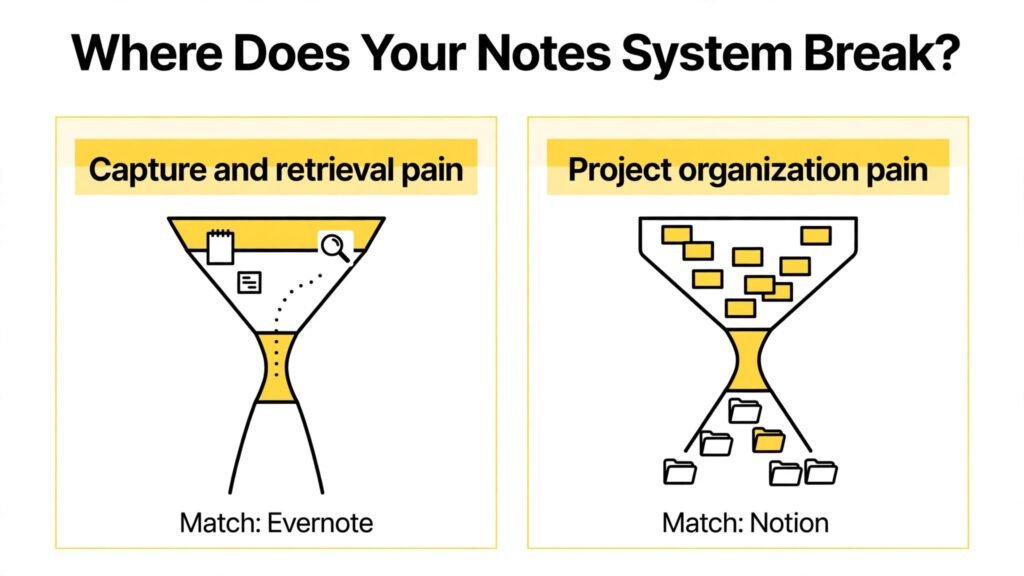
Notion vs Evernote starts with a striking contrast: millions of people use Notion as a workspace for docs, tasks, wikis, and databases, while Evernote remains the classic tool for capturing, clipping, and finding notes fast. Surveys of knowledge workers consistently show that the biggest notes app problem is not storage. It is retrieval. People lose notes in folders, duplicate ideas across apps, and spend more time searching than thinking. The winner for you depends on whether your main pain is organizing a growing body of work, or capturing ideas quickly and finding them again months later.
That contrast explains why a direct feature count misleads buyers. Notion is a flexible workspace that can become a second brain, a team wiki, a project tracker, and a publishing tool. Evernote is a focused capture and search tool that excels at web clipping, document scanning, and full text search across notes, PDFs, and images. Notion rewards builders who enjoy designing systems. Evernote rewards collectors who want to save now and search later without building anything.
This guide compares the two apps on real tasks: capturing an idea in ten seconds, organizing a large research project, managing team knowledge, searching old notes, working offline, and paying for the right plan over time. Pricing changes often, so verify current plan limits at checkout. By the end, you should know which app fits your thinking style, and when using both, or using one for capture and another for projects, is the smarter answer.
The Numbers Behind the Choice
Consider how notes actually pile up. A student, researcher, or manager can easily save 20 notes a week from meetings, articles, books, and ideas. Over a year, that is more than 1,000 notes. Without good search, tags, and structure, that library becomes a graveyard. Evernote was built for that volume problem, with search that can find text inside images and PDFs, and a clipping tool that saves web pages in seconds. Notion was built for a different volume problem: dozens of projects, each with docs, tasks, and linked data, that need to stay connected.
Another useful number is setup time. A new Evernote user can be productive in an hour, because the core model is simple: notebooks, notes, tags, and search. A new Notion user can also take notes in an hour, but building a useful workspace with databases, templates, and linked views often takes days, and refining it takes weeks. That setup time is an investment if you will use the system daily for years. It is a cost if you only need to save and find notes.
The takeaway is not that one app is smarter. It is that they solve different bottlenecks. If your notes are scattered and hard to find, Evernote search and capture may save you more time than Notion databases. If your work is scattered across docs, tasks, and wikis, Notion consolidation may save you more time than faster capture alone. Start from your bottleneck, not from a popularity ranking.
Test 1: Capturing an Idea in Ten Seconds
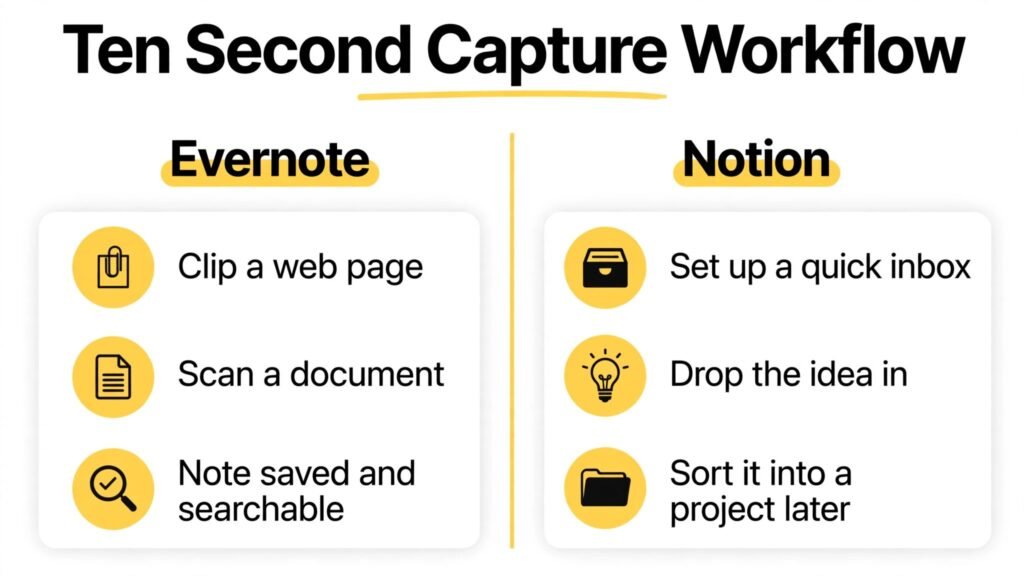
Evernote wins fast capture. Open the app, create a note, type or dictate, add a photo, clip a web page, or scan a document, and you are done. The mobile app is built for quick entry, and the web clipper saves articles with source links and formatting that remain readable later. For a researcher saving 30 articles, a manager capturing meeting notes on a phone, or a student photographing a whiteboard, that speed matters every day.
Notion capture is good, but it is less instant for a new user. You must choose a page, a database, or a template, and decide where the note belongs. That decision friction is small for one note, but it adds up across dozens of daily captures. Power users solve this with a simple inbox page or a quick capture button, where every idea lands first and gets organized later. That workflow works well once set up, but it requires setup, and many new users skip it and end up with notes scattered across pages.
Offline capture also matters. Evernote has a long history of offline notebooks and mobile access, although plan limits vary, so check current offline rules at checkout. Notion offline support has improved, but it is still more limited than Evernote for heavy offline use, especially for large workspaces and database views. If you work on planes, in rural areas, or in buildings with poor wifi, test offline capture and search on both apps before you commit.
Verdict for this test: Evernote, for speed, clipping, and simple capture. Notion, once a quick inbox system is set up, for capture that feeds directly into projects.
Test 2: Organizing a Large Research Project
Notion wins large project organization by a wide margin. Databases let you track sources, status, priority, due dates, and related ideas in one linked system. A research project can have a source database, a task list, a reading notes page, and a writing outline, all connected. Change a status in one view, and it updates everywhere. Filter by author, tag, or status, and you get a focused view without duplicating notes.
Evernote organization is simpler: notebooks, stacks, tags, and saved searches. That model works well for hundreds of notes, but it struggles when a project needs relational structure, such as linking a source to multiple chapters, tracking review status, and viewing tasks by assignee. Evernote tags and saved searches can approximate some of this, but they do not replace linked databases. Users often end up with long tag lists and many notebooks that are hard to maintain.
For a thesis, a book, a product launch, or a client project with many moving parts, Notion structure pays off. For a personal archive of articles, recipes, travel plans, and scanned documents, Evernote structure is enough and easier to maintain. The right test is to take a real project with at least 50 items and try to organize it in both apps. If you find yourself creating spreadsheets to track what Evernote cannot link, Notion is probably the better home for that project.
Verdict for this test: Notion, clearly, for relational projects and team knowledge. Evernote, for personal archives where simple folders and tags are enough.
Test 3: Team Wikis, Docs, and Collaboration
Notion wins team collaboration for most modern teams. Pages can be shared, commented on, and edited in real time, with permissions by page or workspace. A team wiki can hold onboarding guides, meeting notes, project docs, and decision logs in one searchable place. Templates standardize meeting notes and project briefs, and databases track work without a separate project tool for many small teams. That consolidation is why startups, agencies, and product teams often choose Notion as a single workspace.
Evernote team features exist, including shared notebooks and business plans in some markets, but collaboration is not its core strength. Comments, real time editing, and page permissions are more limited than Notion, and the workspace feels more like a shared archive than a living wiki. For a small team that mainly shares reference notes and research, Evernote can work. For a team that writes docs together daily, Notion is the better fit.
Collaboration also raises a governance question. Notion workspaces can grow messy without owners, templates, and archiving rules. Assign a workspace owner, create a simple page structure, and archive old projects regularly. Evernote teams face a different risk: duplicate notebooks and unclear tagging, which make search less reliable over time. Either way, a little structure early saves a lot of cleanup later.
Verdict for this test: Notion, for team wikis and collaborative docs. Evernote, for small teams that mainly share reference material.

Test 4: Finding an Old Note Months Later
Evernote wins search and retrieval for archived material. Its search can find text in notes, PDFs, images, and scanned documents, and saved searches help you repeat common queries. The web clipper preserves source material in a searchable form, and tags plus notebooks give you multiple paths back to a note. For a lawyer finding an old clause, a doctor finding a scanned form, or a researcher finding a quote from a PDF, that search depth is valuable.
Notion search is strong for pages, titles, and database properties, and it improves with good naming and structure. But Notion search is weaker for text inside uploaded PDFs and images in many cases, and it depends more on how well you organized pages in the first place. If you named a page vaguely and did not tag it, finding it later can be hard. Evernote forgives messy capture better, because search does more of the work.
The practical lesson is to design for your future self. In Evernote, use consistent titles, add a few tags, and let search handle the rest. In Notion, use clear page titles, a simple database for important items, and a weekly review to move inbox notes into their proper place. Either system works if you maintain it, but Evernote requires less maintenance for pure retrieval.
Verdict for this test: Evernote, for finding old, scanned, and clipped material. Notion, for finding structured project information you organized well.

Notion in Depth: Pricing, Best Fit, and Watch Outs
Notion pricing is workspace based, with free plans for personal use, paid plans for teams, and higher plans for larger organizations with advanced permissions and admin controls. Free plans are generous for individual notes and small projects, but limits on file uploads, version history, and guest access vary, so check current plan details at checkout. Paid plans add collaboration features, unlimited blocks for teams in many cases, and admin tools that matter for companies.
Notion is best for students, writers, product teams, startups, agencies, and anyone building a personal knowledge system or team wiki. It is also best for users who enjoy templates, databases, and designing a workspace that matches how they think. If you want one place for notes, tasks, docs, and light project tracking, Notion can replace several apps, which simplifies your tool stack.
Watch out for three things. First, setup time and template overload. Start with a simple system: one inbox, one project database, and a few templates. Add complexity only when a real problem appears. Second, performance with very large workspaces. Huge databases with many relations can slow down, so archive old projects and split large workspaces when needed. Third, offline limits. Test offline access for your most important pages before relying on Notion during travel.
Evernote in Depth: Pricing, Best Fit, and Watch Outs
Evernote pricing is user based, with free plans that are limited by device count and monthly upload limits in many markets, and paid plans that add larger uploads, offline access, search in PDFs, and advanced features. Check current free plan limits at checkout, because Evernote has changed device and upload rules over time. Paid plans suit heavy collectors, professionals, and teams that need search and capture at scale.
Evernote is best for researchers, lawyers, consultants, students, and anyone who clips, scans, and archives a lot of material. It is also best for users who want a simple, reliable capture tool without building a workspace. If your main workflow is save now, search later, Evernote remains a strong choice, even as newer apps get more attention.
Watch out for three things. First, free plan limits. If you use more than two devices or upload many PDFs, you may need a paid plan sooner than expected. Second, organization drift. Without a simple notebook and tag system, a large archive becomes hard to browse, even if search remains strong. Third, price changes. Evernote pricing and plan features have changed several times, so review your plan at renewal and compare total cost with Notion for your actual usage, not for a generic user.
Side by Side Comparison Table
| Area | Notion | Evernote |
|---|---|---|
| Core strength | Flexible workspace, databases, wikis | Fast capture, clipping, deep search |
| Best for | Projects, team knowledge, systems | Archives, research, scanned material |
| Setup time | Days to build a strong system | Hours to be productive |
| Organization | Databases, linked views, templates | Notebooks, stacks, tags, saved searches |
| Collaboration | Strong real time docs and permissions | Good sharing, weaker wiki features |
| Search | Strong for pages and properties | Strong for PDFs, images, and clips |
| Offline use | Improving, test before travel | Strong history, check plan limits |
| Pricing model | Free personal, paid team plans | Free limited, paid user plans |
| Learning curve | Higher, rewards system builders | Lower, rewards quick collectors |
| Portability | Export pages and markdown options | Export notes, check format limits |
This table is a guide, not a scorecard. A user who captures 50 articles a week will value Evernote search more than Notion databases. A user who runs five projects at once will value Notion links more than Evernote clipping. Weight the rows that match your daily work.
How to Decide in 30 Minutes
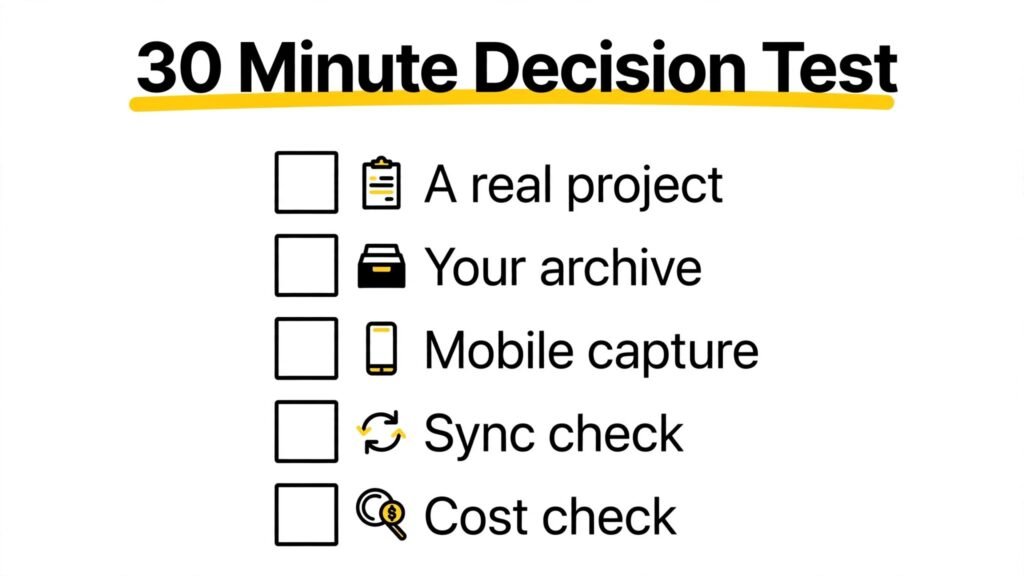
Try a focused test instead of reading more comparisons. Pick one real project and one real archive task. For the project, create a task list with 20 items, link three sources, and build a view filtered by status. For the archive task, clip five articles, scan or upload two PDFs, and search for a phrase inside one PDF a week later in your mind, by testing search now. Time both tasks in each app, and note where you felt friction.
Also test mobile capture. Walk away from your desk, open each app on your phone, and save an idea, a photo, and a web page. If one app feels slow or confusing on mobile, that matters, because many ideas arrive away from a desk. Test sync by editing a note on your phone and checking it on your laptop. Sync should be fast and reliable on both apps, but large attachments and poor wifi can reveal differences.
Finally, check cost for your real team size. A solo user on a free plan faces a different decision than a ten person team on paid plans. Price both apps for the same number of users, same storage needs, and same offline requirements, and include the cost of any extra tools you would still need. If Notion replaces a separate task app, that saving counts. If Evernote replaces a separate scanner app, that saving counts too.
Security, Privacy, and Data Control
Both apps offer encryption in transit, account security options, and sharing controls, but details vary by plan and region. Use strong passwords, enable two factor authentication where available, and review sharing settings for sensitive pages and notebooks. For client work, health information, or legal material, check each vendor privacy and security pages, and avoid storing highly sensitive data in a notes app unless your organization approves it.
Data export matters for long term control. Notion allows export of pages in markdown, HTML, and other formats, although database exports can lose some structure. Evernote allows export of notes, although formatting and attachments may need checking after export. Test export with a small set of notes before you commit your whole archive to either app. A good export test prevents a painful migration later, and it tells you how portable your knowledge really is.
Backups are also your responsibility, even on cloud apps. Export important notes periodically, keep a local copy of critical documents, and do not rely on a single app as your only copy of irreplaceable material. That habit protects you against account issues, pricing changes, and app changes, regardless of which tool you choose.
Mistakes to Avoid
First, building a complex Notion system before you have a habit. Start simple, use it daily for two weeks, then add databases and templates only for problems you actually hit.
Second, saving everything in Evernote without titles or tags. Search helps, but clear titles and a few consistent tags make retrieval faster and browsing possible.
Third, choosing on popularity instead of workflow. A tool your friends love may not fit how you capture and organize. Test with your own projects, not with demo data.
Fourth, paying for a team plan when a personal plan is enough. Price for real users and real features, and upgrade only when limits block your work.
Fifth, keeping notes in two apps without a rule. If you use both, define which app holds what: for example, Evernote for capture and archive, Notion for projects and team docs. Without a rule, you will search in the wrong app.
Sixth, ignoring mobile and offline needs. Test both apps on your phone and offline before you move a large archive or a critical project.
Frequently Asked Questions
Is Notion better than Evernote?
For projects, team wikis, and linked databases, yes. For fast capture, web clipping, and searching PDFs and images, Evernote is often better. The best app follows your main workflow.
Can I use Notion and Evernote together?
Yes. Many users clip and archive in Evernote, then plan projects in Notion. Use a clear rule for what lives where, and review that rule monthly so notes do not scatter.
Is Notion free?
Notion has a free plan for personal use with limits that change over time. Team and business features require paid plans. Check current limits at checkout before relying on free tier features.
Is Evernote still good in 2026?
Yes, for capture and search, especially for researchers and professionals with large archives. It is less popular as a team wiki than Notion, but its core capture and search strengths remain relevant.
Which app is better for students?
Notion is often better for coursework, projects, and study systems with linked notes and tasks. Evernote is often better for clipping lecture material, scanning handouts, and searching old notes quickly. Many students use Notion for study plans and Evernote for archives.
Which app works better offline?
Evernote has a longer history of offline access, although plan limits vary. Notion offline support has improved but should be tested for your workspace size and travel needs before you depend on it.
Can I move notes from Evernote to Notion?
Yes, with export and import tools, but formatting, attachments, and tags may need cleanup. Test migration with a small notebook first, and keep your original export as a backup.
Final Verdict: Which Notes App Wins for Which User
Notion wins for builders, project managers, product teams, students with complex study systems, and anyone who wants docs, tasks, and wikis in one workspace. It wins when structure, linking, and collaboration create value every day, and when you are willing to invest setup time for a system that lasts.
Evernote wins for collectors, researchers, lawyers, consultants, and anyone whose main job is to capture a lot of material and find it again later. It wins when speed, clipping, and deep search matter more than databases, and when you want a tool that works well without building a system first.
If you must pick one app today, ask one question: Do I lose more time organizing projects, or finding old notes? If organizing projects is your bottleneck, pick Notion. If finding old notes is your bottleneck, pick Evernote. If both bottlenecks are real, use Evernote for capture and archive and Notion for projects, with a clear rule for what lives where, and review that split after a month of real use.
For related comparisons, see our guide to Notion alternatives if you want other workspace tools, our comparison of Notion vs Obsidian for a local first alternative, and our guide to best AI tools for project managers if project tracking is your main need. If note taking supports client work, our guide to best AI tools for freelance writers covers writing workflows that pair well with either app.
Notion vs Evernote: Which Workflow Fits You
The fastest way to decide is to match the app to a workflow you already use, rather than to a workflow you hope to adopt. Start by listing your last ten notes. Were they articles to read later, meeting notes, ideas for projects, scanned documents, or tasks with deadlines? If most of them were articles, scans, and reference material, Evernote capture and search will feel natural from day one. If most of them were project plans, task lists, and linked documents, Notion structure will feel natural once you set up a simple system.
Next, look at how you work with other people. Do you mainly share finished reference material, or do you write and revise documents together? Sharing a finished note is easy in both apps. Writing a living document together, with comments, tasks, and linked pages, is where Notion pulls ahead. On the other hand, if your team works in another project tool already, and you only need a shared archive, Evernote may be enough, and adding Notion could duplicate work rather than reduce it.
Also consider your tolerance for setup. Some people enjoy designing a workspace, choosing templates, and refining a system over time. For those users, Notion setup is a pleasure, not a burden, and the system improves with use. Other people want a tool that works the moment they open it, with no setup decisions. For those users, Evernote simplicity is a feature, and a complex Notion workspace can feel like a second job. Be honest about which type you are, because the best system is the one you will maintain when work gets busy.
A practical compromise works for many people. Use Evernote as a capture inbox and archive for everything you save from the web, email, and paper. Once a week, move the items that belong to active projects into Notion, where they become tasks, docs, and linked database entries. That weekly review takes 20 to 30 minutes, and it prevents both apps from becoming cluttered. It also gives you a clear rule: if it is reference material, it lives in Evernote. If it is active work, it lives in Notion. When a project ends, archive its Notion pages and keep the key reference material in Evernote, so your active workspace stays focused.
Cost should follow workflow, not lead it. A solo user may start free on either app and upgrade only when storage, offline access, or collaboration limits block real work. A team should price both apps for the same number of people and the same features, and should also count the cost of any tools that each app replaces. If Notion replaces a task app and a wiki, that saving is real. If Evernote replaces a scanner app and a separate archive, that saving is real too. Choose the workflow first, then price the plan that supports it, and check current terms on the official Notion site and the official Evernote site before you pay.
Finally, give your choice a trial period with a clear end date. Use one app as your main system for 30 days, with your real projects and real archive tasks, not with demo data. At the end of the month, ask three questions: Did I capture ideas faster? Did I find old notes faster? Did my projects stay organized without extra effort? The app that answers yes to the questions that matter most for your work is the winner, even if the other app wins a generic feature comparison.
A Final Check Before You Commit
Before you move a large library or pay for a team plan, answer three questions in writing. What is the one task you do with notes every single day? What is the oldest note you needed in the last month, and how long did it take to find? How many people need to edit your notes, and how often? If daily capture and old note retrieval dominate your answers, Evernote simplicity will serve you well. If project organization and shared docs dominate, Notion structure will serve you better. Test both apps with those exact tasks, not with demo content, and let your own timing decide, because the best notes app is the one that saves you time on the work you actually do.