
The average professional spends more than five hours a week in meetings, and remembers a fraction of what was decided. Otter built a business on that gap, turning talk into searchable text. But its free tier caps minutes, its paid tiers climb fast for teams, and its summaries suit general meetings better than sales calls, research interviews or content creation. The best Otter alternatives fix one of those gaps: more minutes, sharper summaries for a specific job, or a price that fits a small team.
This guide compares 12 tools grouped by the job each one does best: meeting notes and summaries, sales and revenue calls, research and interviews, and creators and media. Prices are October 2026 figures in US dollars. Where a vendor does not publish pricing, or where sources disagreed, the guide says check checkout rather than guessing. One rule runs through the whole guide: judge a transcription tool by the action list it produces, not by the transcript length. A ten page transcript nobody reads is worth less than five accurate next steps.
The 12 best Otter alternatives at a glance
| Tool | Best job | Free option | Paid from |
|---|---|---|---|
| Fireflies.ai | Team meeting notes and search | Free tier | Around $10 per month |
| Fathom | Free meeting summaries | Free tier | Around $19 per month |
| tl;dv | Meeting recording and clips | Free tier | Around $29 per month |
| Gong | Sales call intelligence | Free trial | Check checkout |
| Notta | Fast transcription in many languages | Free tier | Around $8 per month |
| Grain | Shareable meeting clips | Free tier | Around $15 per month |
| Tactiq | Live captions and transcripts | Free tier | Around $8 per month |
| MeetGeek | Meeting summaries and CRM sync | Free tier | Around $15 per month |
| Supernormal | Quick meeting notes | Free tier | Around $28 per month |
| Krisp | Noise removal plus transcription | Free tier | Around $8 per month |
| Sonix | Media transcription and subtitles | Free trial | Around $10 per hour |
| Rev | Human accurate transcripts | Free trial | Around $1.50 per minute |

Best pick by job
| Your job | Start with | If that fails, try |
|---|---|---|
| Team meetings with searchable notes | Fireflies.ai | MeetGeek |
| Free meeting summaries | Fathom | Tactiq |
| Record meetings and share clips | tl;dv | Grain |
| Sales call coaching and intelligence | Gong | Fireflies.ai |
| Transcription in many languages | Notta | Sonix |
| Share a clip, not a transcript | Grain | tl;dv |
| Live captions during the call | Tactiq | Krisp |
| Summaries synced to your CRM | MeetGeek | Fireflies.ai |
| Notes in minutes, not hours | Supernormal | Fathom |
| Clean audio plus a transcript | Krisp | Notta |
| Transcribe media and add subtitles | Sonix | Rev |
| Court grade accuracy for important audio | Rev | Sonix |
Meeting notes and summaries: the core Otter job
These four replace Otter directly: they join meetings, transcribe, summarise and make everything searchable. They differ in price, free minutes and how good the summary actually is.
1. Fireflies.ai
Fireflies is the most complete Otter replacement for teams. Its bot joins Zoom, Meet and Teams calls, transcribes with speaker labels, produces summaries with action items, and makes every meeting searchable by keyword, topic or speaker. It also
integrates with CRMs, Slack and Notion, so meeting notes land where the team already works.

Pricing: A free tier covers limited transcription minutes. Paid plans start at around $10 per user per month for Pro. Check checkout for current minute limits per plan.
Best for: Teams that meet daily and need searchable notes, action items and CRM sync without manual note taking.
Watch out for: Fireflies’ bot joining every meeting can feel intrusive to guests, and its summaries need a quick check before they go to clients. Set the bot to join only meetings you own.
Try it at: fireflies.ai
2. Fathom
Fathom is the free summary pick. Its free tier records, transcribes and summarises unlimited meetings, which makes it the best value here for individuals and small teams. Summaries are short and usable, with action items and highlights, and it integrates with HubSpot, Salesforce and Slack on paid tiers.
Pricing: A free tier covers unlimited recording, transcription and summaries. Paid plans start at around $19 per user per month for Premium. Check checkout for current team pricing.
Best for: Individuals, small teams and job seekers who want free meeting summaries without a minute cap.
Watch out for: Fathom’s free tier lacks some team features like folders, coaching and CRM sync, and its bot must be admitted to each meeting. Heavy team users will still want a paid plan.
Try it at: fathom.video
3. MeetGeek
MeetGeek suits teams that want meeting intelligence synced to their tools. It records, transcribes and summarises meetings, extracts action items and highlights, and pushes notes to HubSpot, Salesforce, Slack and Notion automatically. Its meeting analytics also show talk time and participation, which helps managers spot one sided meetings.
Pricing: A free tier covers limited monthly meeting hours. Paid plans start at around $15 per user per month for Pro. Check checkout for current hour limits per plan.
Best for: Sales and customer teams that need meeting notes in the CRM, and managers tracking meeting habits.
Watch out for: Its free hour limit is tight for heavy meeting weeks, and its summaries are good but not the sharpest here for research interviews. Teams that only need notes should compare Fathom’s free tier first.
Try it at: meetgeek.ai
4. Supernormal
Supernormal is the speed pick: notes ready minutes after a call ends, in a format a manager can skim in thirty seconds. It covers the major meeting platforms, produces summaries, action items and highlights, and stays deliberately simple. For teams drowning in meeting notes nobody reads, its brevity is the feature.
Pricing: A free tier covers limited meetings. Paid plans start at around $28 per month for Starter. Check checkout for current pricing.
Best for: Managers, founders and busy teams that want short, skimmable notes from every meeting.
Watch out for: Supernormal costs more than Fathom or Fireflies for the same core job, and its integrations are fewer. Buy it for summary quality and speed, not for breadth.
Try it at: supernormal.com
Sales and revenue calls: coaching, not just notes
Sales calls need more than a transcript. These two analyse what was said, how the deal is moving and what the rep should do next, which is a different job from general meeting notes.
5. Gong
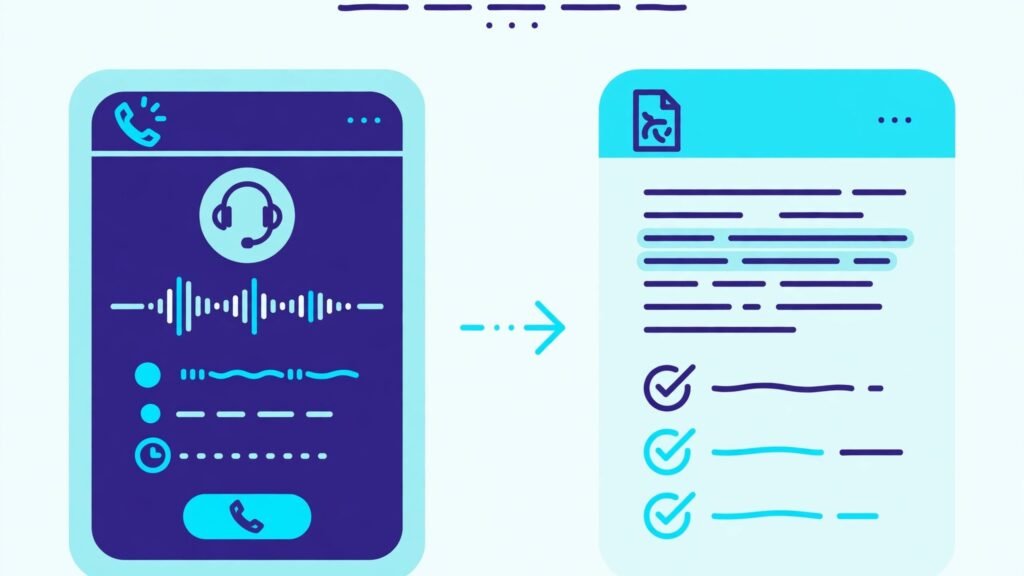
Gong is the sales intelligence standard. It records sales calls, transcribes them, and analyses talk patterns, topics, objections, competitor mentions and deal risk across the whole pipeline. Managers coach from real calls instead of rep summaries, and revenue leaders forecast from what customers actually said. No general transcription tool matches its sales depth.
Pricing: A free trial is offered. Paid plans are quote based for sales teams; check checkout for current pricing, since Gong prices by team size and platform.
Best for: B2B sales teams, revenue leaders and managers coaching reps from real call data.
Watch out for: Gong is priced for sales organisations, not individuals, and it needs a CRM and call setup to deliver value. Small teams should start with Fireflies and upgrade when call volume justifies it. Teams building a sales stack should also see our AI sales prospecting tools guide.
Try it at: gong.io
6. tl;dv
tl;dv sits between general notes and sales intelligence. It records meetings across Zoom, Meet and Teams, transcribes with speaker labels, and lets users clip the exact moment that matters and share it with a timestamp, instead of sending a whole transcript. Its AI summaries, action items and CRM integrations make it a practical sales and team tool at a fair price.
Pricing: A free tier covers limited recording and transcription. Paid plans start at around $29 per user per month for Pro. Check checkout for current minute limits per plan.
Best for: Sales teams, product teams and managers who share moments from meetings rather than full transcripts.
Watch out for: tl;dv costs more than Fathom for basic notes, and its analytics are lighter than Gong’s. Buy it for clips and sharing, not for deep revenue intelligence.
Try it at: tldv.io
Research, interviews and live help: accuracy where it counts
Research interviews, multilingual calls and noisy environments break general transcription tools. These four handle the harder cases.
7. Notta
Notta is the multilingual transcription pick, covering transcription in dozens of languages with speaker labels, summaries and a web, mobile and Chrome extension workflow. It also transcribes uploaded audio and video files, which suits researchers and journalists working from recordings rather than live meetings.
Pricing: A free tier covers 120 minutes a month. Paid plans start at around $8 per month for Pro. Check checkout for current minute pricing.
Best for: Researchers, journalists, students and international teams transcribing interviews and meetings in many languages.
Watch out for: Notta’s meeting summaries are simpler than Fireflies or MeetGeek, and its bot features are lighter. It is a transcription engine first, a meeting assistant second.
Try it at: notta.ai
8. Tactiq
Tactiq is the live caption pick. Its Chrome extension shows live captions and a running transcript during Google Meet, Zoom and Teams calls, and lets users highlight moments as they happen. The transcript is ready the second the call ends, with highlights and action items already marked, which suits fast moving meetings where nobody takes notes.
Pricing: A free tier covers limited transcription. Paid plans start at around $8 per month for Pro. Check checkout for current pricing.
Best for: Teams on Google Meet, interviewers and anyone who wants captions live and a transcript instantly, without a bot joining the call.
Watch out for: Tactiq works best as a browser extension, so its experience varies by meeting platform, and its summaries are shorter than dedicated meeting tools. It complements a notes tool more than it replaces one.
Try it at: tactiq.io
9. Krisp
Krisp is the audio quality pick that also transcribes. Its noise cancellation removes background noise, barking dogs and keyboard clicks from calls in real time, and its transcription and summary features turn a clean call into usable notes. For remote workers in noisy homes or shared offices, it fixes the call before the transcript even starts.
Pricing: A free tier covers limited minutes a day. Paid plans start at around $8 per month for Pro. Check checkout for current pricing.
Best for: Remote workers, call centre staff and anyone taking calls in noisy environments who also wants notes.
Watch out for: Krisp’s transcription is a useful extra, not its core strength, and its summaries are basic next to Fireflies. Buy it for audio quality first, notes second. Support teams should also see our AI call centre software guide.
Try it at: krisp.ai
10. Grain
Grain is the clip sharing pick. It records meetings, transcribes them, and makes it easy to highlight a quote, turn it into a shareable video clip and send it to a teammate, a customer or a whole channel. For product teams sharing user feedback and sales teams sharing customer proof, a 30 second clip beats a transcript every time.
Pricing: A free tier covers limited recording. Paid plans start at around $15 per user per month for Starter. Check checkout for current pricing.
Best for: Product teams, researchers and sales teams sharing exact customer moments as video clips.
Watch out for: Grain’s summaries and analytics are lighter than Fireflies or Gong, and its price is higher than Fathom for basic notes. Buy it for clips, not for meeting intelligence.
Try it at: grain.com
Creators and media: transcripts for content
Podcasters, video creators and researchers working from audio files need transcripts built for editing and publishing, not just meeting notes. These two cover that job.
11. Sonix

Sonix is the media transcription pick. It transcribes audio and video files in dozens of languages with speaker labels, timestamps and an editor built for cutting transcripts into subtitles and clips. It also offers automated translation, which suits creators publishing the same content in several languages.
Pricing: A free trial is offered. Paid plans start at around $10 per hour of transcription for Standard. Check checkout for current per hour pricing.
Best for: Podcasters, video creators, journalists and researchers transcribing files for editing, subtitles and publishing.
Watch out for: Sonix prices by the hour, so a large back catalogue costs more than a monthly meeting tool. It is a file transcription service, not a meeting bot, so live meeting capture needs another tool.
Try it at: sonix.ai
12. Rev
Rev is the accuracy pick. Its AI transcription is fast and affordable, and its human transcription service reaches near perfect accuracy for legal, medical, research and broadcast work where an error matters. Captions, subtitles and global services round out a platform built for professional media work.
Pricing: A free trial is offered. AI transcription starts at around $0.25 per minute, and human transcription at around $1.50 per minute. Check checkout for current per minute pricing.
Best for: Legal, medical, research and media professionals who need verified accuracy, and creators who need professional captions.
Watch out for: Human transcription costs far more than AI tools per minute, so reserve it for audio where accuracy is critical. For routine meetings, an AI tool like Fathom or Fireflies is far cheaper.
Try it at: rev.com
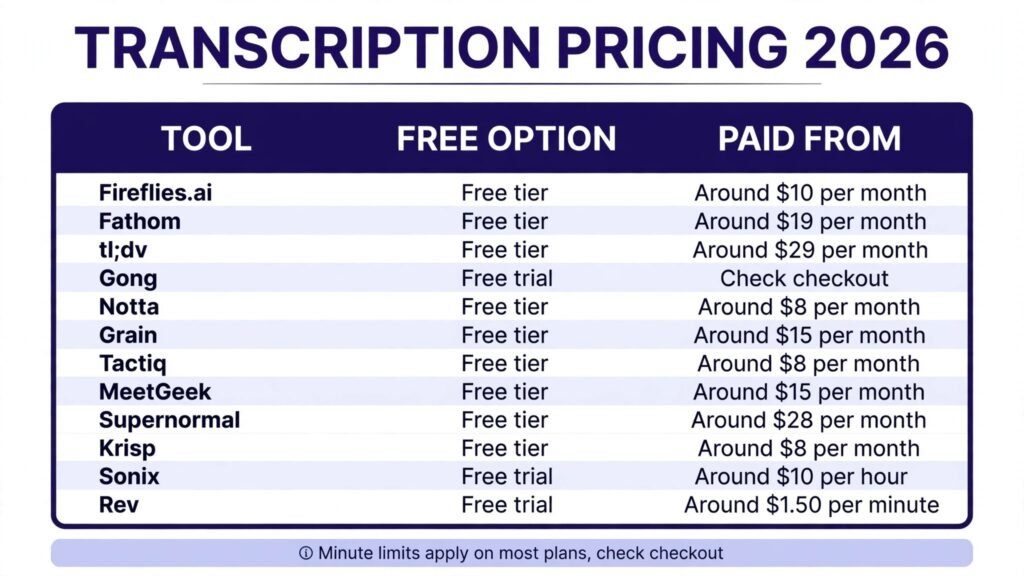
Pricing compared: what transcription really costs
| Tool | Free option | Paid from | Pricing note |
|---|---|---|---|
| Fireflies.ai | Free tier | Around $10 per month | Minute limits apply |
| Fathom | Free tier | Around $19 per month | Free tier unlimited summaries |
| tl;dv | Free tier | Around $29 per month | Minute limits apply |
| Gong | Free trial | Check checkout | Quote based |
| Notta | Free tier | Around $8 per month | 120 free minutes a month |
| Grain | Free tier | Around $15 per month | Per user |
| Tactiq | Free tier | Around $8 per month | Per user |
| MeetGeek | Free tier | Around $15 per month | Hour limits apply |
| Supernormal | Free tier | Around $28 per month | Per user |
| Krisp | Free tier | Around $8 per month | Daily minute limits |
| Sonix | Free trial | Around $10 per hour | Pay per hour |
| Rev | Free trial | Around $1.50 per minute | Human transcription |
A realistic individual setup costs $0 to $10 a month: Fathom free for summaries, plus Notta or Tactiq for files and live captions. A team setup lands around $10 to $20 per user per month. A sales organisation on Gong pays a quote based enterprise price, and professional human transcription on Rev runs per minute. The hidden cost is minutes: check the free and paid minute caps
against your real meeting hours before you commit, because overage charges add up fast. In every case, check checkout for renewal terms, because minute limits change often.
How to Choose the right Otter alternative
Start with the job, not the transcript. If the job is team meetings, pick Fireflies, Fathom or MeetGeek. If the job is sales coaching, pick Gong or tl;dv. If the job is research or media, pick Notta, Sonix or Rev. The summary you need decides the tool, because every tool here transcribes, but few summarise well for your specific work.
Next, test accuracy on your hardest audio, not your easiest. Record a call with accents, crosstalk and background noise, then check names, numbers and action items in the transcript. A tool that handles your worst call will handle every call. Then check the bot question: does a bot join your meetings, or does a browser extension capture them? Guests and clients react differently to a bot, so pick the approach your callers accept.
Finally, check where the notes go. A summary that stays in the transcription app helps nobody; the tools that sync to your CRM, Slack, Notion or docs are the ones whose notes actually get used. Trial two finalists for a real week of meetings, and keep the one whose action lists you actually completed.

Mistakes to avoid
Letting a bot join every meeting without telling guests is the top mistake. Announce recording, get consent where required, and set the bot to join only meetings you own. A second mistake is buying on minute count instead of summary quality: a thousand transcribed minutes nobody reads is worse than a hundred summarised well. A third is skipping the accuracy test on hard audio; names and numbers wrong in a transcript become wrong decisions downstream. Finally, do not forget privacy: meeting transcripts contain sensitive discussion, so check data retention, security and whether the vendor trains models on your calls before you roll it out to a team.
Frequently Asked Questions
Is there a free Otter alternative?
Yes. Fathom offers free unlimited meeting summaries, and Fireflies, Notta, Tactiq, Grain, MeetGeek and Supernormal offer free tiers with minute or meeting limits. Free tiers suit individuals and light users, while heavy teams will still want a paid plan.
Which Otter alternative is best for sales teams?
Gong for call intelligence and coaching, and tl;dv or Fireflies for recording, clips and CRM sync at a lower price. Small sales teams should start with Fireflies and upgrade to Gong when call volume justifies it.
Which Otter alternative is best for research interviews?
Notta for multilingual transcription and file uploads, Sonix for media files and subtitles, and Rev human transcription when accuracy must be verified. Grain suits sharing exact interview moments as clips.
Can I transcribe meetings without a bot joining?
Yes. Tactiq captures meetings from a browser extension without a bot, and Krisp works from your own audio. Bot based tools like Fireflies and Fathom must be admitted to the meeting by a participant.
Which Otter alternative is best for creators?
Sonix for file transcription, subtitles and translation, and Rev for professional captions and human accuracy. Podcasters editing from transcripts should also compare Descript style editors.
Which single tool should most people start with?
Fathom for most individuals, because its free tier covers unlimited summaries, and Fireflies for most teams, because it balances notes, search and integrations. Teams that transcribe calls for support should also see our AI call centre software guide.
Conclusion
The best Otter alternatives do not try to beat Otter at everything. They win one job: Fireflies wins team notes and search, Fathom wins free summaries, MeetGeek wins CRM synced notes, Supernormal wins speed, Gong wins sales intelligence, tl;dv wins clips, Notta wins languages, Tactiq wins live captions, Krisp wins clean audio, Grain wins shareable moments, Sonix wins media files, and Rev wins verified accuracy.
Start with the job, test accuracy on your hardest call, and check where the notes actually go. The right alternative is the one whose action lists get done, not the one with the longest transcript.