
The verdict is simple. For most solo photographers and small studios, yes, you should use AI for photography studio client booking, but only for the repetitive middle of the job. Let the system sort inquiries, send contracts, collect deposits, enforce reschedule rules, and chase gallery reviews. Keep the creative decisions, the pricing calls, and the difficult conversations with people. A studio that automates the admin and protects the personal touch books more sessions and burns out less.
That verdict matters because photography booking is not one job. A wedding inquiry needs a consultation, a contract, and a payment plan spread over months. A family session needs a fast date, a deposit, and a location note. A mini session day needs twenty short slots filled without double booking. A headshot client needs a weekday slot and a quick turnaround. One generic booking form treats all of those the same, and that is where studios lose work.
Prices in this guide are ranges drawn from vendor pages and published guides at writing time, so confirm on the vendor page before you buy. Photography tools change plans often, and the price that matters is the one for your session volume, your gallery storage, and the features you actually switch on.
Why Photography Bookings Fall Apart Between Inquiry and Gallery
A photography client journey is long, and every gap is a chance to lose the booking. A lead messages on social media, and the reply arrives two days later. A client signs a contract but forgets the deposit. A session is booked, but no questionnaire arrives, so the photographer learns the location and the group size on the day. A gallery is delivered, but nobody explains how to order prints, so print sales never happen.
The most common failure is not price. It is silence. A couple planning a wedding may contact three photographers in one evening. The first clear reply, with dates, packages, and a booking link, usually wins, even if that photographer is not the cheapest. Speed plus clarity beats a beautiful portfolio that answers late.
The second failure is disconnection. Booking lives in one tool, contracts in another, payments in a third, and galleries in a fourth. When a client asks a simple question, such as whether the balance is paid, the photographer has to check three places. That delay looks unprofessional, and it creates errors, such as sending a gallery to a client whose balance is still open.
AI booking fixes the handoffs, not the photography, and that distinction is central to how you use AI for photography studio client booking without losing the personal touch. It moves a lead from inquiry to contract to deposit to session to gallery to review in one visible pipeline. At each step, the client knows what happens next, and the photographer sees which bookings are stuck and why.

How to Use AI for Photography Studio Client Booking
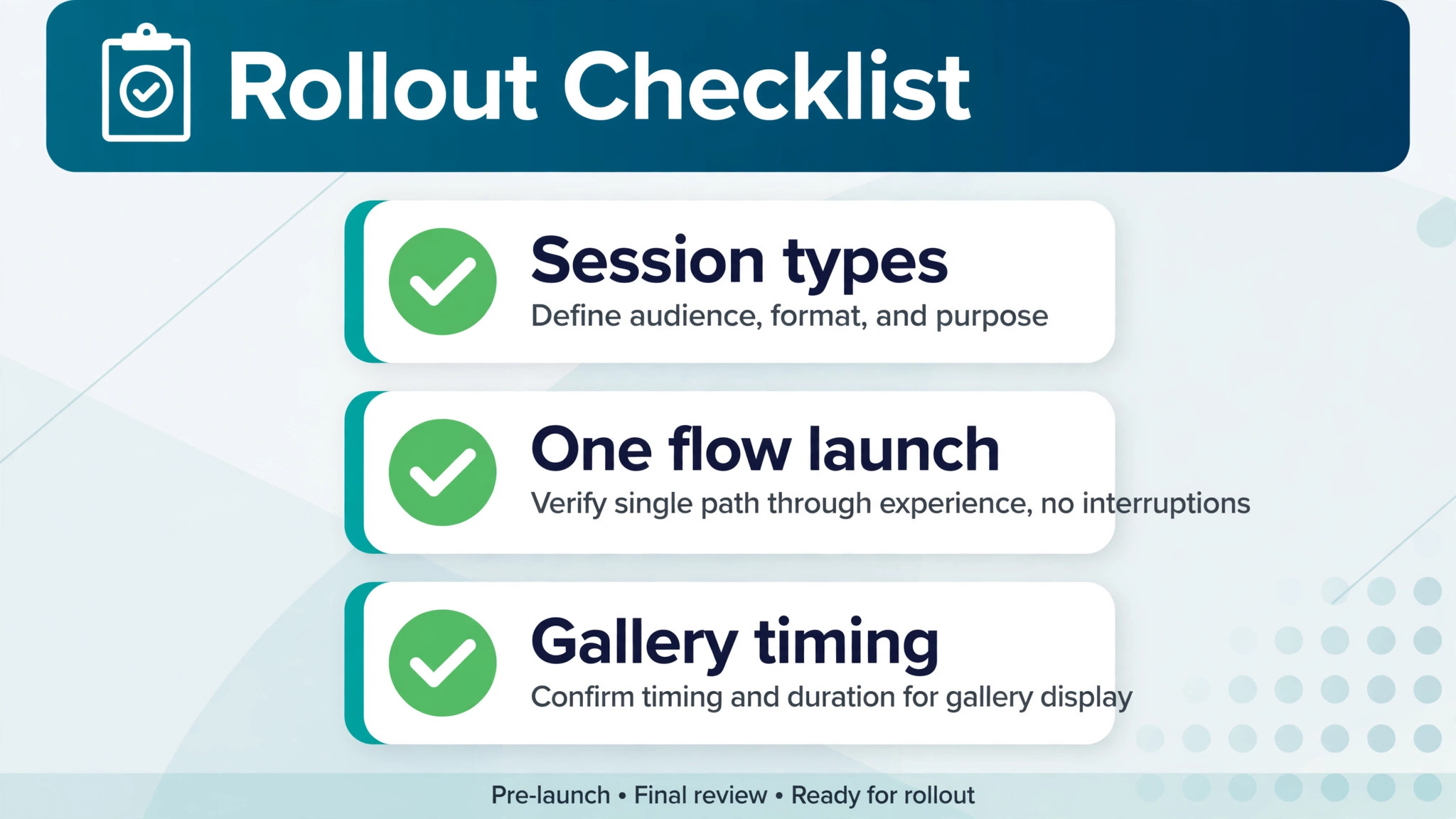
To use AI for photography studio client booking well, start by mapping the five session types you actually sell, then build one flow for each. A wedding flow, a family flow, a newborn flow, a mini session flow, and a commercial flow will differ in deposit size, lead time, questionnaire, and gallery timing. A single flow forced onto all five will feel wrong to at least three of them.
The core workflow has five moving parts, and they must work together.
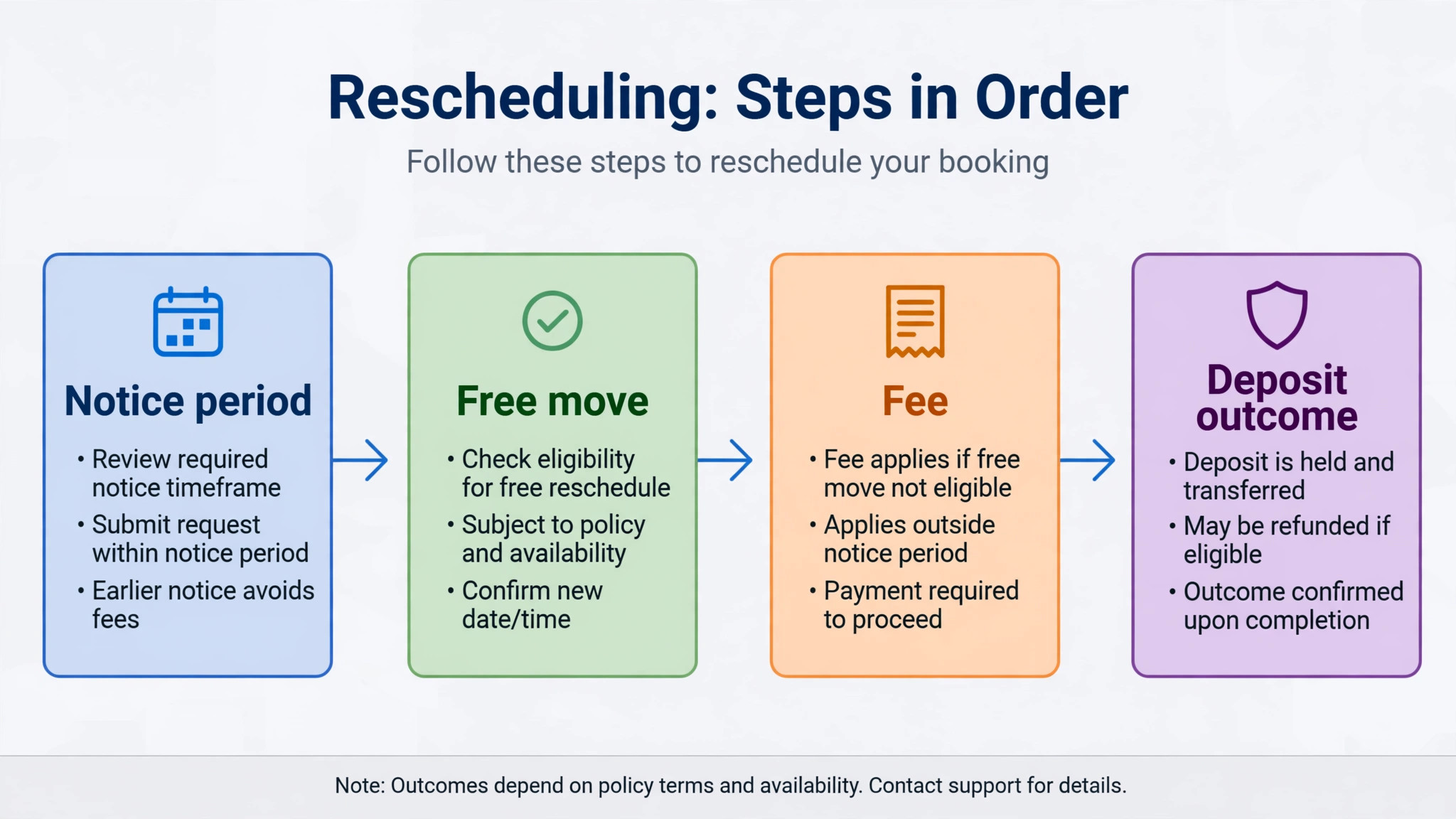
1. Session type triage sorts each inquiry by session type, date, budget range, and urgency, then sends the right package and questionnaire. 2. Reschedule rules state how many free moves a client gets, how much notice is needed, and what happens to the deposit. 3. Gallery delivery sends sneak peeks, then the full gallery, with a clear expiry date and a download guide. 4. Print upsells offer wall art, albums, and extra prints at the moment the client is choosing favourites, not months later. 5. Review requests go out after delivery, when the client has seen the photos and is most likely to recommend you.
Set one rule before you switch anything on. No client should need to chase you to learn the next step. If a client has signed and paid, the system should tell them what happens next without them asking. If a client has not replied, the system should follow up on a schedule you approved, not on a schedule you forgot.

Session Type Triage That Sends Each Inquiry to the Right Flow
Triage starts with four questions. What kind of session is it. When is it needed. Where will it take place. What is the approximate budget. Those four answers are enough to route most inquiries correctly, and they are short enough that a prospect will actually answer them on a phone.
An AI assistant can ask those questions in a natural order, rather than sending a long form that scares people away. If the prospect says wedding, the system asks about the venue and the guest count, then offers a consultation. If the prospect says family session, it offers the next three available weekend slots and the package prices. If the prospect says mini session, it shows the mini day calendar only, so the prospect cannot book a full hour by mistake.
Build fallback rules for unclear answers. If a prospect writes “photos for my business” without detail, the system should ask one clarifying question, then route to the commercial flow if the answer points that way. If the prospect still does not fit a flow after two questions, the system should offer a short call and pass the full conversation to you. A triage system that forces every inquiry into a box will misroute the most valuable inquiries, which are often the unusual ones.
Test triage with real messages from your inbox, because the fastest way to learn how you use AI for photography studio client booking is to watch it route ten real inquiries. Take ten past inquiries, run them through the new flow, and check whether each one reaches the right package and questionnaire. Fix the routing before you launch, because a wedding inquiry sent a family price list will not come back.

Reschedule Rules That Protect Your Calendar Without Losing the Client
Reschedules are where studios lose money quietly. A client moves a session twice, the original date stays blocked for a week, and a new inquiry for that date gets told you are full. Or a client cancels the day before, and the deposit policy was never explained, so the conversation turns into an argument about fairness.
Write the rules in plain language before you automate them. For example, one free reschedule with at least 72 hours notice, a second reschedule with a fee equal to a stated amount, and a deposit that moves with the first reschedule but is kept if the client cancels within 48 hours. The exact numbers are your choice, and they should match your market. The important part is that the client sees them before paying, not after a problem.
AI enforcement works because it is consistent. When a client asks to move, the system checks the booking date, the notice period, and the reschedule count, then offers the allowed options. It does not make an exception because the client is persuasive, and it does not punish a loyal client because a staff member had a bad day. Exceptions still exist, but you make them deliberately, and the system records them.
Keep a human path for genuine emergencies, because a fair exception process is part of how you use AI for photography studio client booking well. Illness, a venue closure, and a family emergency are not the same as a change of mind. A short message that says a human will review the case within one working day keeps goodwill, while a rigid refusal loses a client and earns a bad review. The rule protects the calendar. The exception protects the reputation.
Gallery Delivery That Clients Actually Open
A gallery that nobody opens is a failed delivery, even if the photos are excellent. Clients miss galleries for simple reasons. The link arrives in a spam folder, the password is in a separate message, the expiry date is unclear, or the client does not know whether to download, share, or order first. Fix those four points and delivery rates rise.
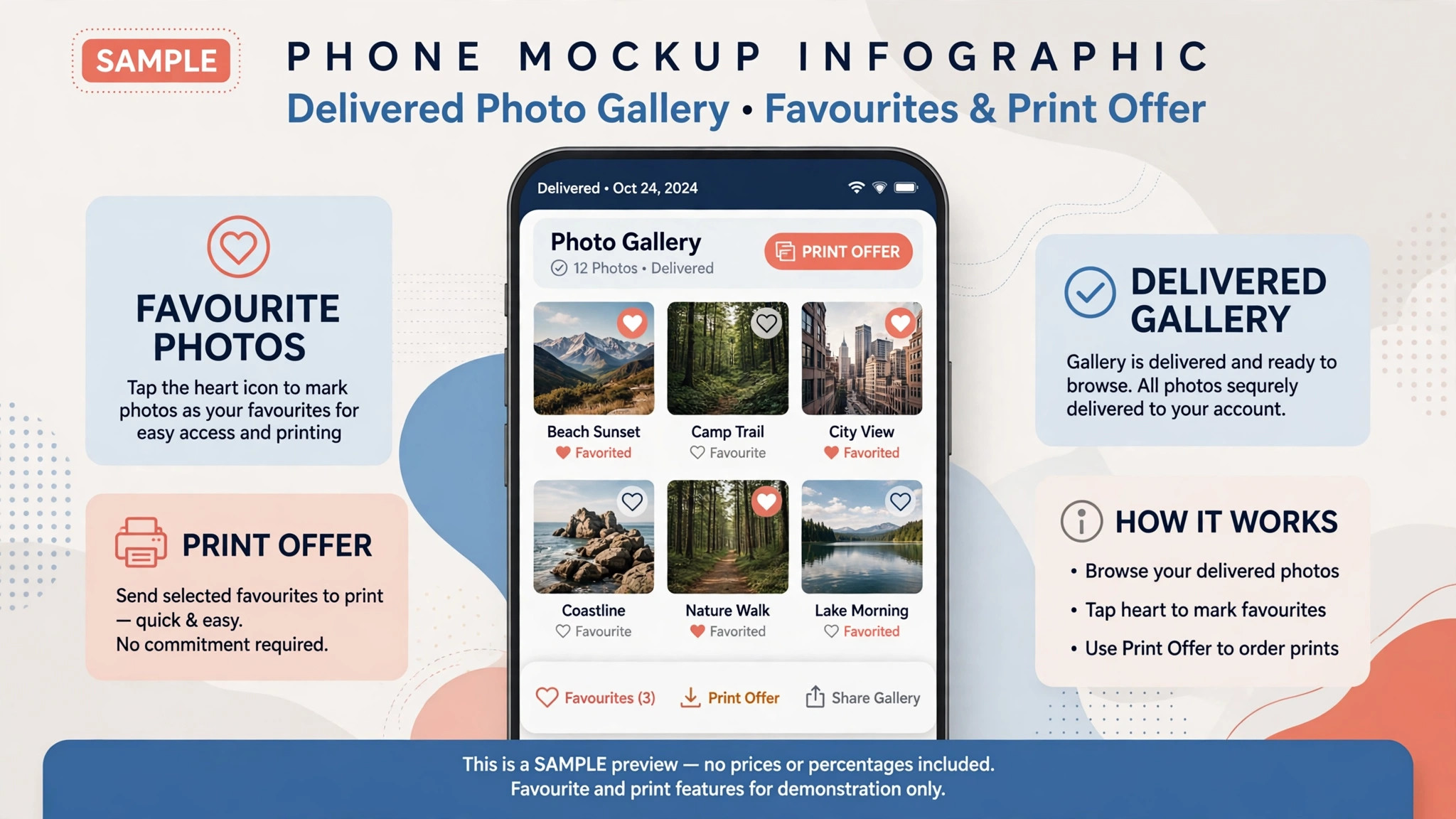
Send the gallery in stages. First, a short sneak peek message with three to five images and a note that the full gallery follows on a stated date. That message builds excitement and confirms the client can open the link. Then send the full gallery with a clear subject, a password in the same message where possible, and three actions in order, meaning view, choose favourites, and order prints. A client who knows the order will not stall at the first step.
Set an expiry date and state it from the start. For example, galleries stay live for 90 days, with a reminder at 30 days and at 7 days before expiry. That deadline is fair only if the client was told at delivery, not if it appears as a surprise in a final warning. AI reminders make the deadline work, because they arrive on time every time, without you remembering to send them.
Track opens and favourites, not just sends, and let those numbers show whether you use AI for photography studio client booking to help clients or merely to send more messages. If a gallery has not been opened in three days, a short check in message is useful. If favourites have been chosen but no order follows, a print offer is timely. If nothing happens at all, a human message asking whether the link worked is better than another automated reminder. The data tells you which of those three cases you are in.
Print Upsells Without Pushy Selling
Print sales fail when they arrive too late or feel like pressure. A client who receives a gallery in June and a print offer in December has already printed elsewhere, or forgotten the photos entirely. A client who gets five upsell emails in the week after delivery feels pushed, and that feeling damages the relationship that should bring repeat bookings.
The right moment is when the client is choosing favourites. At that point, the client is already deciding which images matter most, and an offer that matches that decision feels helpful. Show a wall art preview using a favourite image, or an album layout built from the chosen set, with a clear price and a deadline for a stated discount. One well timed offer beats five generic ones.
Keep the offer simple. Three options are enough, such as a small print set, a wall piece, and an album. More options slow the decision, and a client who stalls often never returns. State the print lab quality in plain terms, such as the paper type and the expected delivery time, because clients who cannot picture the product will not pay a premium for it.
AI can time the offer and personalise the preview, but it should not invent prices or delivery dates, and that discipline is what keeps the way you use AI for photography studio client booking trustworthy. Pull prices from your current price list, and confirm the lab turnaround before you promise it. A print upsell that arrives late or at the wrong price costs more in trust than it earns in revenue.
Review Requests That Arrive When the Client Is Happiest
Reviews are easiest to earn in the first days after gallery delivery, when the client has just shared photos with family and friends. A review request sent three months later, when the excitement has faded, gets ignored. Timing is therefore the main skill, and it is exactly what automation does well.
Send the first request two to three days after the full gallery is delivered, and only if the gallery has been opened. The message should be short, thank the client by name, and link directly to one review page, not to a choice of five platforms. A client who has to decide where to review will often decide not to review at all.
If there is no review after a week, send one gentle reminder, and then stop. A third request feels like nagging, and a nagged client may leave a review that mentions the nagging. A studio with a steady flow of honest reviews does not need to chase any single client hard, because the next happy client is already in the pipeline.
Read every review, good or bad, and reply to the bad ones personally, because the review habit completes the cycle when you use AI for photography studio client booking from inquiry to recommendation. An automated thank you for a five star review is fine. An automated reply to a complaint is not. The client who complained took the time to write, and a personal reply that addresses the specific point is the only response that can turn that client around.

Tools Worth Testing First
The tools below cover the main approaches for photographers, from all in one studio systems to gallery first platforms paired with a booking tool. Prices are ranges at writing time, so confirm on the vendor page before you buy, and test with a real client journey, not just a demo booking.
HoneyBook
HoneyBook is a popular all in one system for creative businesses, with proposals, contracts, invoices, payments, and scheduling in one pipeline. Published pricing at writing time started around 29 dollars a month billed annually. It suits a solo photographer who wants to be live quickly, with templates built around photography workflows, so confirm on the vendor page before you buy.
Dubsado
Dubsado is a deeper workflow tool for studios that want automation built around their own process, with forms, contracts, invoices, and client portals. Published pricing at writing time started around 28 dollars a month billed annually, with higher plans for more advanced features. It suits a studio that is willing to spend setup time to get a precise workflow, rather than a studio that wants the fastest possible launch.
Studio Ninja
Studio Ninja is a photography first booking and studio management tool, built around session workflows rather than generic business management. Published pricing at writing time started around 16 dollars a month. It suits wedding and event photographers who book on volume and want session specific features without paying for a large general platform.
Pixieset
Pixieset combines client galleries, a website builder, and a studio manager with contracts, invoicing, and scheduling. A free plan covers basic galleries, while the Suite bundle at writing time started around 28 dollars a month. It suits a photographer who wants galleries and booking in one place, and who values a low cost entry point before committing to a paid plan.
ShootProof
ShootProof is a gallery and print sales platform with booking features, known for commission free print sales on its plans. Published pricing at writing time started around 8.33 dollars a month billed annually. It suits a photographer whose main income after the session comes from print and product sales, and who wants the gallery to sell, not just to deliver.
Iris Works
Iris Works is a photography native studio platform built around self serve booking, where clients book from your calendar, choose a package, pay a deposit, and sign the contract. Published pricing at writing time started around 14.95 dollars a month. It suits a portrait or family studio that wants clients to book without back and forth messages.
Sprout Studio
Sprout Studio combines business workflows, such as CRM, invoicing, contracts, booking, and questionnaires, with native client galleries and print sales. Published pricing at writing time started around 19 dollars a month. It suits a studio that wants one system for both the business side and the gallery side, rather than pairing two separate tools.
A Worked Example and Templates You Can Copy
Imagine a family photographer who shoots six sessions a month and loses two inquiries a month to slow replies. The fix starts with triage. A prospect messages about a family session, the system asks for the date range, the location preference, and the group size, then offers three weekend slots with the family package price and a deposit link. The prospect books on the same evening, instead of waiting for a reply the next day.
Copy this booking confirmation template and adapt the details to your studio. “Thank you for booking your family session on the date above. Your deposit is received, and your balance is due seven days before the session. Your questionnaire is linked here, and it takes about five minutes. Please send it back at least three days before the session, so we can plan locations and groupings.”
Copy this reschedule template as well. “You can move your session once free of charge with at least 72 hours notice. Please choose a new date from the calendar linked here, and your deposit will move with the booking. If you need to move again, a reschedule fee applies, and the system will show the amount before you confirm.”
Copy this gallery delivery template too. “Your full gallery is ready at the link above, and it stays live for 90 days. Please start by choosing your favourites, then use the print shop inside the gallery to order wall art or an album. If the link does not open, reply to this message and we will resend it the same day.”
Run those three templates for a month and measure three numbers. Inquiries answered within one hour, bookings completed without a phone call, and galleries opened within three days. If the first number rises but bookings do not, the package or price needs work, not the automation. If galleries are sent but not opened, the subject line and the delivery message need work first.
A 30 Day Rollout Plan
Days 1 to 7 are for mapping, not for buying software. List your session types, write the deposit and reschedule rules for each, and gather your ten most recent inquiry messages. That list becomes your test set, and any tool that cannot handle those ten inquiries is the wrong tool, no matter how good the demo looks.
Days 8 to 14 are for one flow only. Choose your most common session type, such as family sessions, and build triage, booking, contract, and deposit for that flow alone. Test it with a friend acting as a client, including a reschedule request and a wrong date choice. Fix every confusing message before a real client sees it.
Days 15 to 21 add gallery delivery and print upsells for that same session type. Set the sneak peek timing, the full gallery timing, the expiry reminders, and one print offer tied to favourites. Check that prices pull from your current price list, and that the gallery link, password, and expiry date all appear in the delivery message.
Days 22 to 30 add review requests and the remaining session types, one at a time. Start review requests only after at least three galleries have been delivered through the new flow, so you can check the timing in real use. At day 30, review the three numbers from the worked example, keep what worked, and fix the weakest step before adding more features.
Mistakes That Lose Photography Bookings
The first mistake is automating a confusing offer. If your packages are unclear, automated messages will deliver that confusion faster, not fix it. Write packages with a clear name, a clear session length, a clear deliverable count, and a clear price, before you build any workflow around them.
The second mistake is asking for too much too soon. A twenty question form before a prospect has seen a price will lose prospects who would have booked from a short inquiry. Ask four questions first, send the package and price, and collect the detailed questionnaire only after the deposit is paid.
The third mistake is hiding the human. A client who wants to discuss a wedding, a sensitive family situation, or a commercial brief needs a person, and a system that blocks every path to a call will lose exactly the high value bookings that matter most. Offer a call option at triage, and make it easy to find, not buried at the bottom of an automated thread.
The fourth mistake is measuring sends instead of outcomes. A hundred automated messages mean nothing if bookings, gallery opens, and reviews stay flat. Track bookings completed, deposits collected on time, galleries opened within three days, and reviews received. Those four numbers show whether the system is helping or merely busy.
My Recommendation for a Solo Studio
If you shoot alone, start with one tool that covers booking, contracts, deposits, and reminders, and pair it with a gallery tool only if the first tool lacks galleries you trust. Do not buy three tools in week one and spend a month connecting them. A single working pipeline that a client can complete on a phone beats a perfect stack that nobody finishes setting up.
If you shoot weddings, add the consultation step and the payment plan before you add anything else, because those two steps decide whether a high value booking completes. If you shoot families and minis, add the fast booking calendar and the reschedule rules first, because volume and calendar protection matter more than a long consultation flow.
Keep the creative work human, keep the admin consistent, and review the numbers monthly. That balance is what turns booking automation from a gadget into a quiet advantage, one that clients notice as speed and clarity, even if they never see the system behind it.
Frequently Asked Questions About Photography Studio Client Booking
How does session type triage actually work?
Triage asks a short set of questions about session type, date, location, and budget, then routes the inquiry to the matching flow, package, and questionnaire. Wedding inquiries get a consultation offer, family inquiries get available slots and prices, and mini session inquiries get the mini day calendar only.
Can a client reschedule without losing the deposit?
It depends on the rules you set and show before payment. A common approach allows one free move with at least 72 hours notice, with the deposit moving to the new date, and a fee or a kept deposit for later moves or late cancellations. State the rule at booking, so the reschedule message only enforces what the client already agreed to.
When should the gallery be delivered?
Send a short sneak peek within a few days of the session, then the full gallery on a stated date, with a clear expiry period such as 90 days. Tell the client the expiry date at delivery, and send reminders at 30 days and at 7 days before expiry, so the deadline never comes as a surprise.
How do print upsells work without annoying clients?
Offer prints when the client is choosing favourites, with three clear options and a price that comes from your current price list. One well timed offer tied to a favourite image feels helpful, while repeated generic offers after delivery feel like pressure and can damage repeat bookings.
When is the best time to ask for a review?
Two to three days after the full gallery is delivered, and only if the gallery has been opened. Link directly to one review page, send one gentle reminder after a week if needed, and then stop. Reply personally to any complaint, because an automated reply to a bad review makes the problem worse.
Is an all in one tool better than separate booking and gallery tools?
An all in one tool suits a solo photographer who wants one pipeline and less setup, while separate tools suit a studio that needs the best gallery sales features and is willing to connect two systems. Test both with a real client journey, from inquiry to gallery to print order, and choose the setup that completes that journey with the fewest manual steps.
More Reading on Stratilyze
– Best Website Builder for Photographers – Use AI for Spin Studio Class Scheduling – Best Booking Software for Yoga Studios – Best CRM for Event Planners Small Business – Family Session Pricing That Clients Understand at a Glance, plain text title, link not verified at writing time – How to Write a Gallery Delivery Message Clients Actually Open, plain text title, link not verified at writing time