
Most restaurant menus fail in the same quiet way. The food is good, the kitchen knows exactly what makes each dish work, and the printed menu still reads like a list of ingredients typed in a hurry. Guests scan it, miss the dish they would have loved, and order the safe option they already know. When owners decide to use AI for restaurant menu descriptions, the goal is rarely to sound fancy. The goal is to turn kitchen knowledge into words a guest can picture in ten seconds, without inventing flavours, hiding allergens, or making every dish sound the same.
This guide gives you a practical workflow for a single restaurant, a small group, or a food truck with a changing board. You will gather true dish facts first, draft with AI in batches, edit for accuracy and taste, and then adapt each description for print, a board, a website, and delivery apps. It includes a reusable template, current tool prices with a check at checkout note, and the mistakes that turn helpful AI copy into copy guests stop trusting.
A weak menu description usually suffers from one of three problems, and AI on its own will repeat all three if you give it a vague prompt. The first is vagueness. Words like tasty, special, and premium tell a guest nothing about heat, texture, portion, or what actually arrives on the plate. The second is sameness. When every starter is handcrafted and every main is mouthwatering, no dish stands out. The third is missing decision information. A guest with a nut allergy, a guest choosing between two similar pastas, and a guest deciding whether a dish serves one person or two all need facts, not praise.
Good menu writing is therefore a service job before it is a sales job. It answers four questions fast. What is the main ingredient. How is it cooked. What will I taste and feel when I eat it. What do I need to know before I order. If a description answers those four questions in about 15 to 25 words, it has done most of its work. Longer descriptions can work for a signature dish, but length alone never fixes a description that is vague about the food itself.
What a Good Description Actually Has to Do
Think of each description as a small promise. The kitchen must be able to keep it on a busy Friday, with a different cook on the pass. If the menu says wood fired, the dish should come from a wood fired oven or grill. If it says local farm, the restaurant should be able to name the farm when a guest asks. If it says spicy, the heat should match what most guests would call spicy.
A useful test is the deletion test. Read a description, remove one word at a time, and ask whether the guest would order differently without that word. Fresh almost never changes a decision, because no restaurant advertises stale food. Delicious never changes a decision, because it is a judgment, not a fact. Slow braised for eight hours does change a decision, because it signals tenderness and time. Charred, crisp, cold, silky, and lightly smoked all change a decision, because they describe texture, temperature, or flavour. Keep words that change a decision.
Tone should follow the room. A neighbourhood cafe can be warm and direct, a fine dining room calm and precise, and a late night taco stand short and playful. A single style sheet, even a half page, prevents drift where Monday descriptions sound formal and Friday descriptions sound like a different restaurant altogether.
| Description job | A weak version | A stronger version |
|---|---|---|
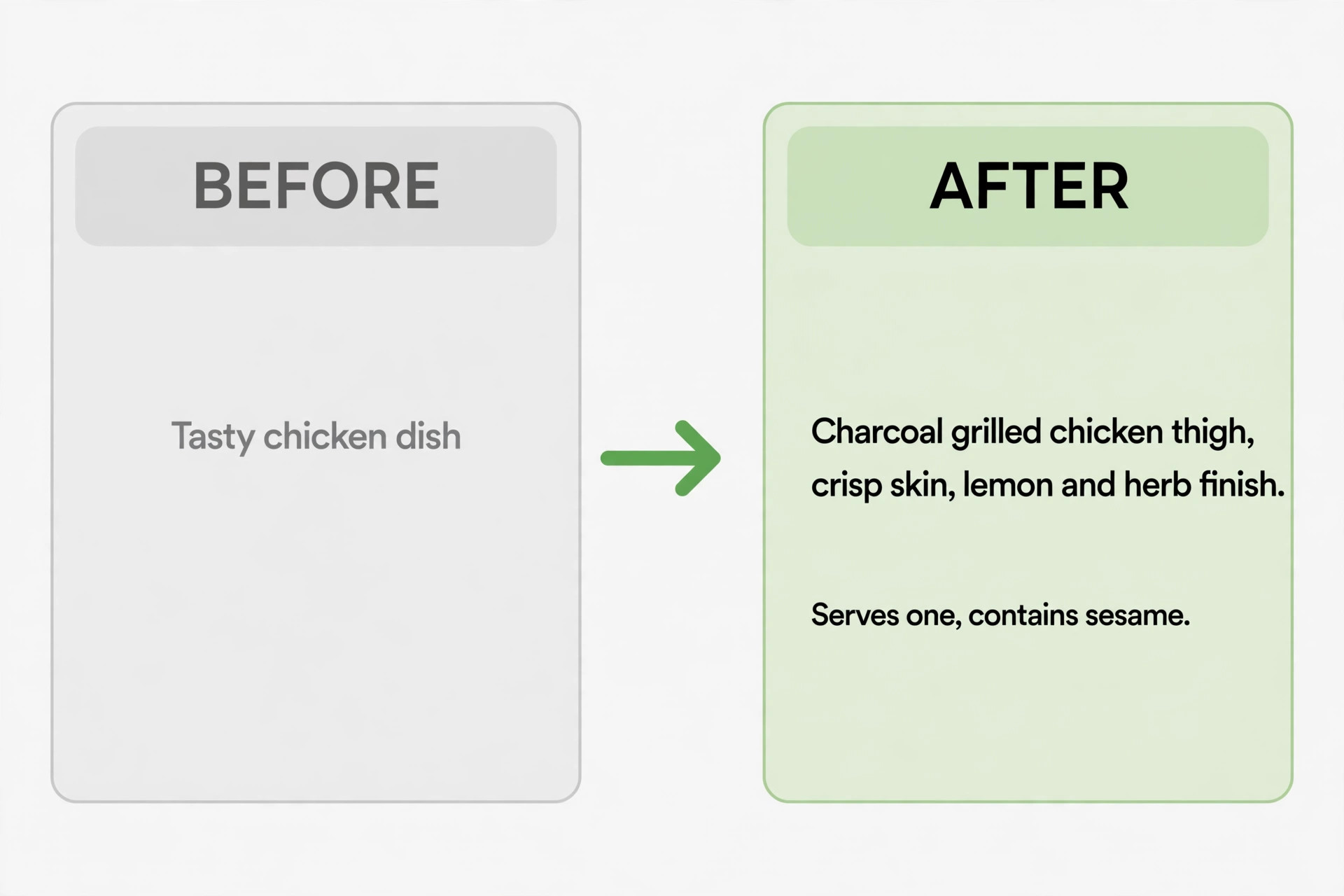
| Main ingredient | Chicken dish | Charcoal grilled chicken thigh |
| Cooking method | Cooked well | Marinated overnight, then grilled over charcoal |
| Taste or texture | Very tasty | Crisp skin, juicy meat, bright lemon and herb finish |
| Decision fact | Ask your server | Serves one, contains sesame, medium heat |
The safest way to work with AI is to treat it as a fast first drafter, not as the author of your menu. You supply the facts, the voice, and the final judgment. AI supplies speed, variety, and clean phrasing you can then correct. That order matters, and it is why you should use AI for restaurant menu descriptions only after the facts sheet exists. If you start with a blank prompt such as write a menu description for pasta, the tool will fill the gaps with plausible inventions, and some of those inventions will be wrong about your dish.
Build the workflow around one batch at a time. A batch of eight to twelve dishes is large enough to be worth setting up, and small enough to edit carefully in one sitting. Work through starters first if your menu is long, because starters teach you the house style before you reach the mains that carry the most revenue. Keep a master document with one approved description per dish, and treat it as the source for every other version. When a dish changes, change the master first, then update print, web, and delivery copies from it.
This is the overview proof workflow for the whole post, and each step below has a clear owner and a clear output. Follow the steps in order, even when a deadline is tight, because skipping the facts step is what creates most AI errors later.
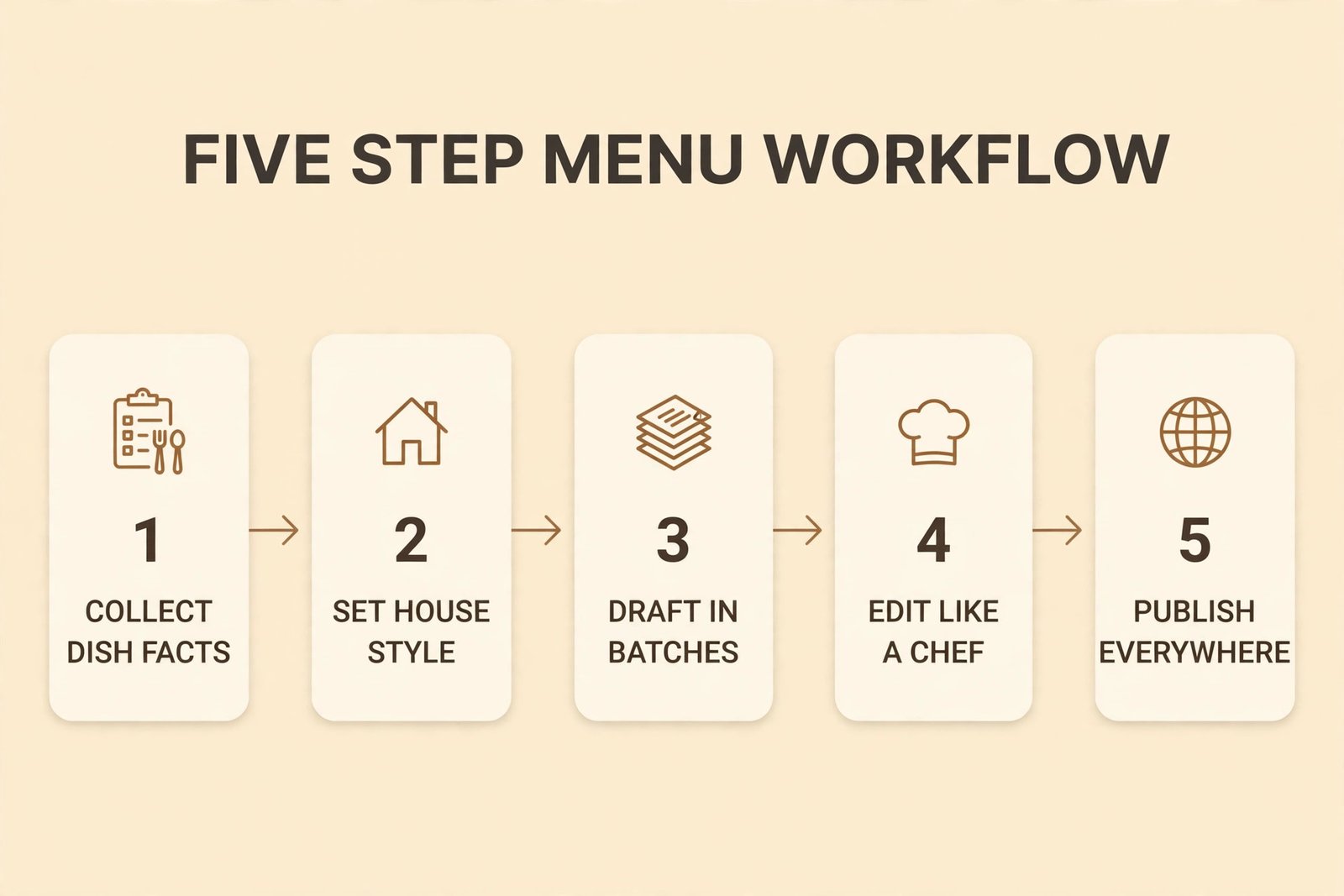
Step 1. Collect dish facts
For each dish, write down the hero ingredient, cooking method, two or three supporting ingredients, one texture or flavour cue, portion notes, spice level, and allergens. Add the supplier or origin only when it is true and stable. If a supplier changes with the season, write the region or method instead of a farm name that may be wrong next month.
Step 2. Set the house style
Write a short style note with three approved example descriptions, a target length, and a banned words list. Include your stance on dietary labels and spice words. Mild, medium, and hot should mean the same thing across the whole menu, so agree on what medium means before AI writes fifty descriptions that use the word loosely. Paste this style note into every AI session for menu work.
Step 3. Draft in batches
Feed the tool one dish facts block at a time, or a small batch of related dishes, and ask for two or three options per dish. Related dishes in one batch help the tool keep contrast, because it can see that two chicken dishes need different hero words. Unrelated dishes in a huge batch tend to blur together. Ask for options, not a single perfect line, because choosing between options is faster than accepting the first draft.
Step 4. Edit like a chef, not like a proofreader
Read each draft against the recipe, not just against grammar. Check method, ingredients, allergen flags, spice level, and portion claim. Then read it aloud as a guest would. If you stumble, the line is too long. If you cannot picture the plate, the line is too vague. If it could describe a dish at any restaurant in town, it needs one true detail from your kitchen.
Step 5. Publish everywhere from one master
Once a description is approved, copy it into the printed menu, website, board, and each delivery app from the master document, adjusting only length and format where a channel forces it. Record the date and approver. When a recipe changes, update the master and push the same change to every channel the same week. A disagreement about allergens or ingredients is a trust problem, not a small typo.
The Description Template You Can Copy
Use this template whenever you use AI for restaurant menu descriptions for a single dish, and skip any slot that has nothing true to say. Never fill an empty slot with praise. A short honest description always beats a long invented one.
**Template**
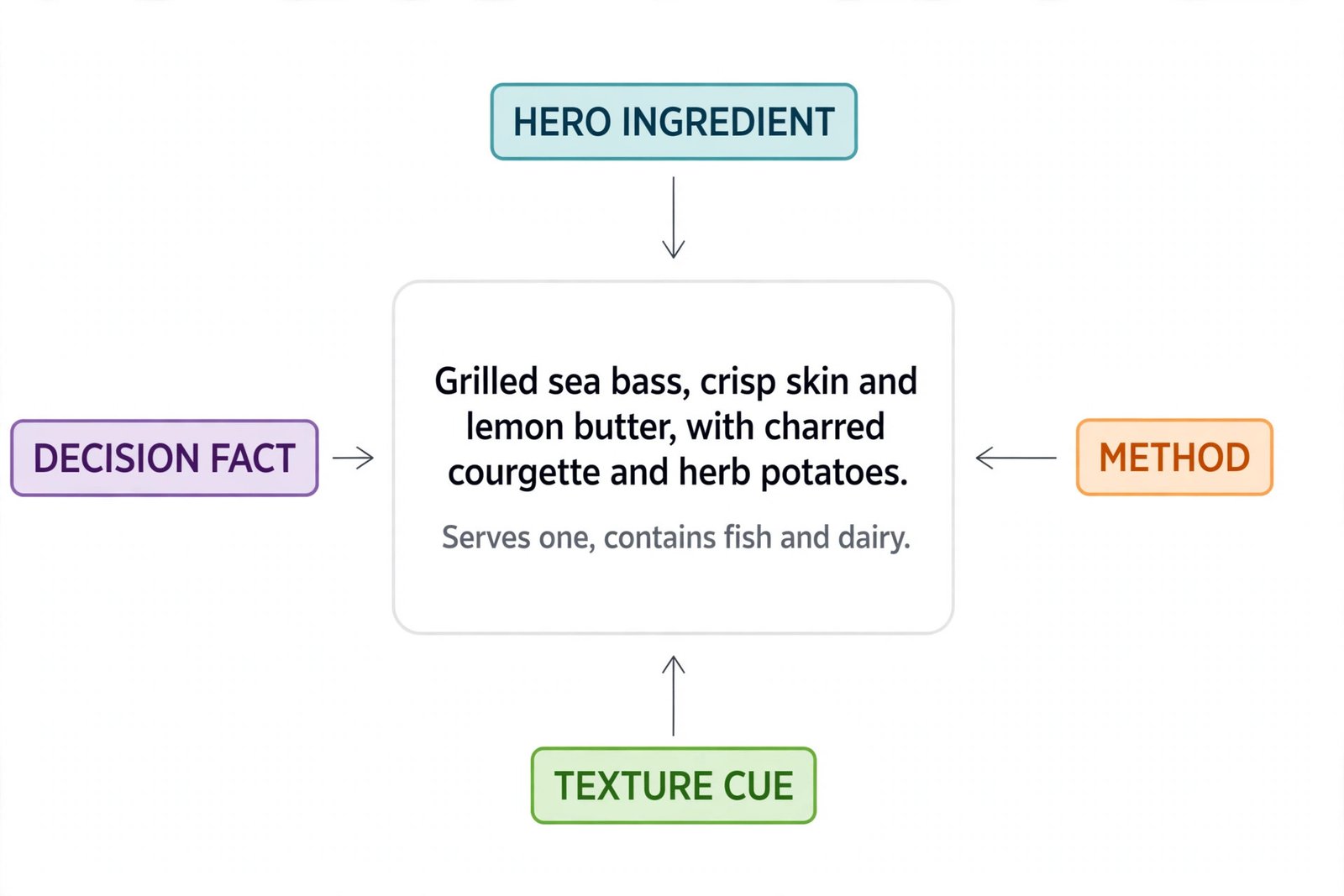
Dish name, then hero ingredient and cooking method in the first words, then one texture or flavour cue, then supporting ingredients, then a decision fact at the end.
**Worked example for a main**
Grilled sea bass, crisp skin and lemon butter, with charred courgette and herb potatoes. Medium portion, serves one, contains fish and dairy.
**Worked example for a starter**
Smoky aubergine dip, whipped with tahini and lemon, served warm with wood fired flatbread. Vegan on request, contains sesame.
**Worked example for a dessert**
Dark chocolate fondant, molten centre, with salted caramel cream and toasted hazelnut crumble. Contains gluten, dairy, egg, and nuts.
Notice what the template does not ask for. It does not ask for a story, a superlative, or a claim about quality. Method and ingredients carry that claim themselves. If a dish has a real story, add one short sentence for that dish only. Save stories for signature dishes, and the rest of the menu will stay scannable.
Length guidance helps a team stay consistent. Aim for 12 to 22 words for most dishes, 20 to 35 words for a signature dish or website version, and under 15 words for a board or delivery app line that gets cut off on a phone. Count words for the first batch, and your eye will learn the length after that.
Build Your Dish Facts File First
A dish facts file is a simple table, and it is the most valuable document in this workflow. It protects you when you use AI for restaurant menu descriptions, it speeds up training for new staff, and it makes future menu changes far easier. Build it in a spreadsheet or a shared document, as long as one person owns it and the kitchen signs off on it.
For each dish, include the dish name exactly as it appears on the menu, hero ingredient, method, key supporting ingredients, texture or flavour cue, allergen list, spice level, and portion note. Add a column for the approved description and a column for the last review date. That last column matters, because menus drift, and a dish that was nut free in spring may gain a garnish in autumn.
Get the facts from the kitchen, not from memory at a desk. Ask the cook who plates the dish to confirm the method and garnish, and ask the person who orders supplies to confirm any origin claim. Photograph the plated dish for reference, and keep the photo with the facts row.
Allergen accuracy deserves its own check, separate from style editing. AI tools do not know your kitchen, shared fryers, or cross contact risks, and they will not flag a hidden allergen in a sauce unless your facts sheet names it. List major allergens in plain words, use the same wording on every channel, and follow your region labelling rules first.

Prompting That Gives You Usable Drafts
Good prompts for menu work are short, factual, and strict about length and invention. A strong prompt has four parts, and you can reuse the same structure every time you use AI for restaurant menu descriptions. First, give the role and audience in one line, such as a menu writer for a neighbourhood bistro, writing for guests choosing dinner. Second, paste the house style note and banned words. Third, paste the dish facts block exactly, with allergens and portion notes included. Fourth, state the output rules, such as two options, each under 22 words, no invented ingredients, no superlatives, and the allergen note at the end where required.
Try a prompt shape like this, adapted to your own dish facts.
Write two menu descriptions for this dish, each under 22 words, in a warm and direct tone. Use only the ingredients and method in the facts below. Do not add garnishes, origins, or cooking claims that are not listed. Keep the allergen note at the end. Dish facts, followed by your hero ingredient, method, supporting ingredients, texture cue, spice level, portion, and allergens.
Test the prompt on three dishes before you run a full batch. If all three drafts invent the same garnish, your facts block is too thin, or your prompt allows too much freedom. Tighten the facts, add a sentence that says use only listed ingredients, and test again. If drafts all sound identical, add a contrast instruction, such as lead with method, not sauce, to separate two chicken mains.
Keep a prompt library with the prompts that worked, including the house style note and one good and one bad example. When a new staff member takes over menu updates, that library saves them from rediscovering every mistake.
Choosing a Tool and What It Costs
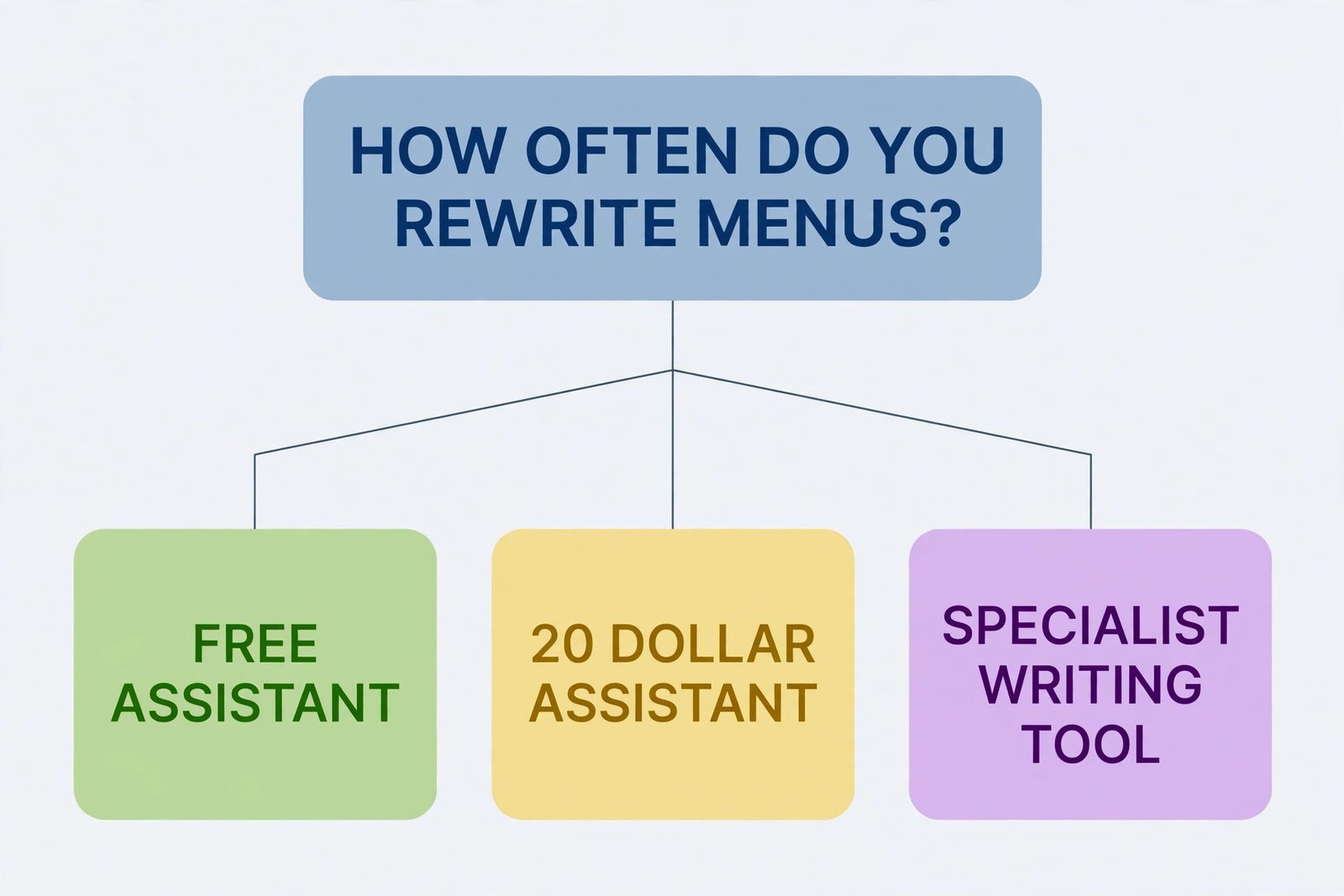
Most restaurants do not need a specialist menu tool to start. A general assistant with a good facts sheet will produce strong drafts, and a specialist tool earns its fee only when you need brand voice control, team seats, or a large volume of copy every week. Start free where you can, run a real batch of ten dishes, and only pay for a tool that clearly saves editing time. That test works the same whether you use AI for restaurant menu descriptions once a year or every week.
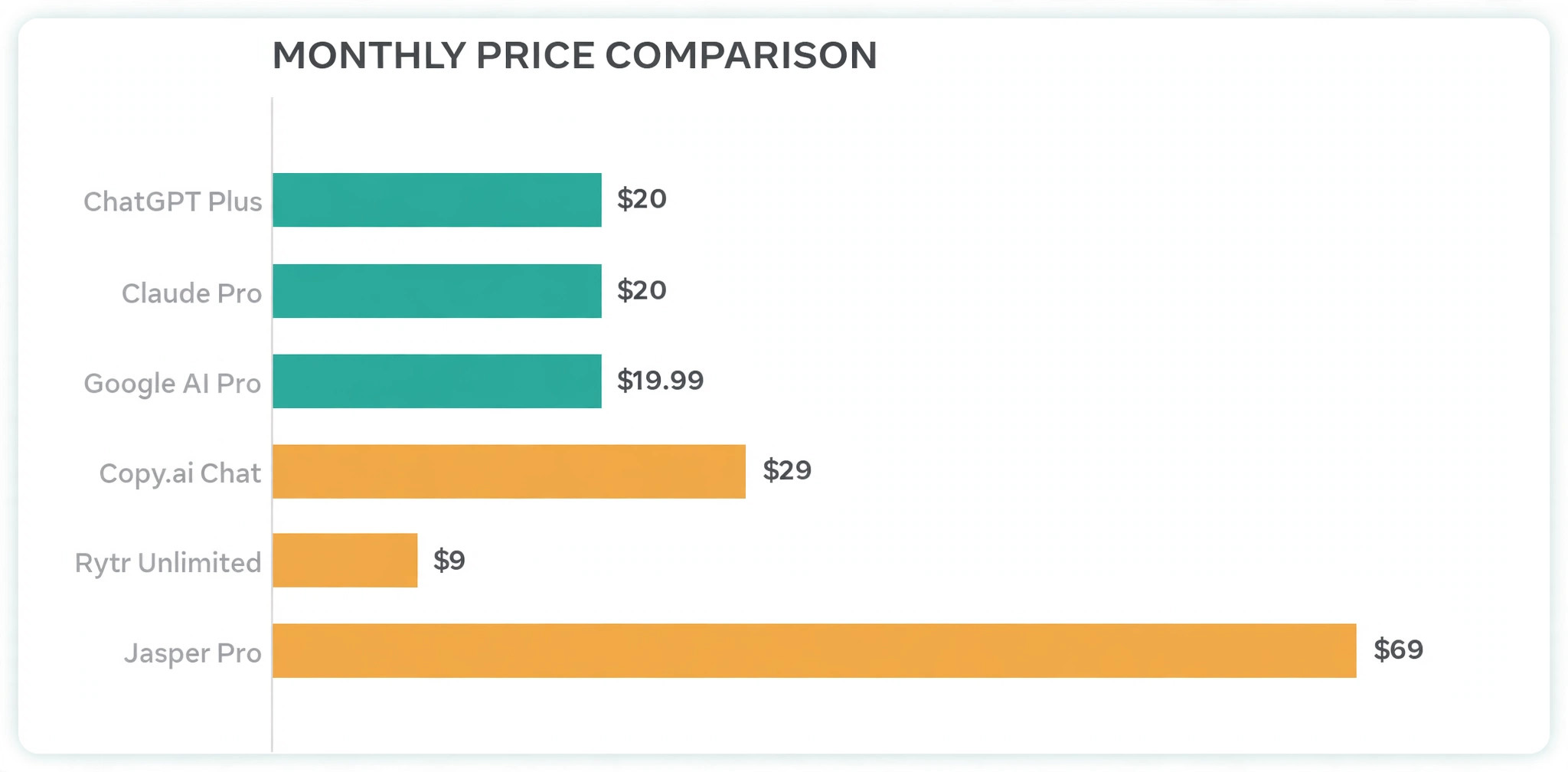
ChatGPT Plus is listed at $20 per month on OpenAI help pages, with a free tier for lighter use. Claude Pro is listed at $20 per month, or about $17 per month when billed annually at $200 upfront, and it is often praised for careful long form prose. Google AI Pro is listed at $19.99 per month and bundles storage and Google app integration. For those three, the price difference is small, so choose by the tool you already open and how well it holds your style note across a batch.
Jasper Pro is a step up in price and structure, listed at $69 per seat per month on monthly billing, or $59 per seat per month on annual billing, with a 7 day trial and no free plan in current listings. That fee makes sense for a group with several sites and weekly copy needs, but it is hard to justify for a single menu rewrite done twice a year. Copy.ai Chat is listed at $29 per month, or $24 per month on annual billing, with five seats in current listings.
Rytr Unlimited is listed at $9 per month, or $7.50 per month on annual billing, and it is a budget option for short drafts, though longer copy usually needs heavier editing.
| Tool | Best for menu work | Listed price to check at checkout |
|---|---|---|
| ChatGPT Plus | Fast general drafting and batch options | $20 per month |
| Claude Pro | Careful, natural sounding prose and style control | $20 per month, about $17 per month annual |
| Google AI Pro | Teams already in Google Docs and Sheets | $19.99 per month |
| Jasper Pro | Multi site brand voice and team workflows | $69 monthly, $59 annual per seat |
| Copy.ai Chat | Small team sharing menu and marketing copy | $29 monthly, $24 annual, five seats |
| Rytr Unlimited | Budget short drafts | $9 monthly, $7.50 annual |
Prices above reflect public listings checked in October 2026, and they change often, so check the official pricing page and checkout total before you pay, including tax, seat counts, and annual commitment terms. A tool that looks cheap per month can cost far more once you add seats. For a one off menu rewrite, a single month of a $20 assistant, plus careful human editing, is usually the best value in the table.
How to Choose in Ten Minutes
Ask four questions and pick the tool that wins three of them. Does it hold your style note across ten dishes without drifting. Does it respect your banned words and allergen notes. Can your menu owner edit its output fast, without learning a new system. Does the monthly cost fit the number of menus you rewrite each year. If no tool wins three, stay on a free tier until you have a facts sheet and a style note, because a paid tool will not fix a missing facts sheet.
Editing for Accuracy, Allergens, and Honesty
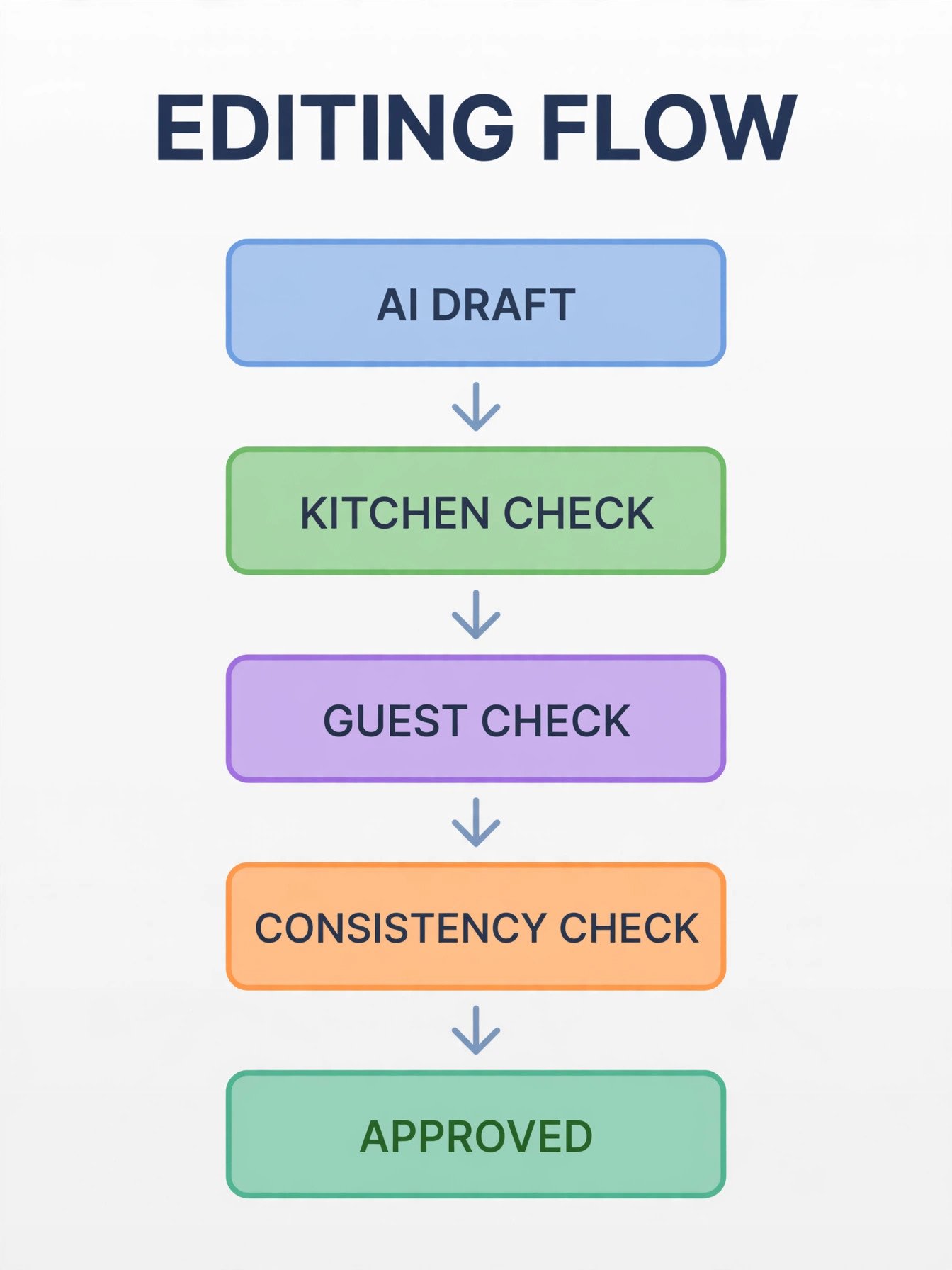
Editing is where AI menu copy either earns trust or loses it, and it should take longer than drafting. Drafting ten dishes might take twenty minutes, and editing those ten dishes properly, with kitchen checks, should take at least as long. Rushing this step is how a menu ends up promising a wood fired dish from a kitchen with no wood fired oven, or listing a dish as vegan when the sauce contains dairy. The fastest way to lose trust when you use AI for restaurant menu descriptions is to skip that kitchen check.
Run three passes, and keep them separate so nothing gets missed. The first is the kitchen pass. Confirm method, ingredients, garnish, portion, and allergen flags against the recipe and plated dish. The second is the guest pass. Read each line as if you have never eaten the dish, and mark any word you cannot picture or claim you cannot verify. The third is the consistency pass. Check spice words, dietary labels, dish name capitalisation, and line length, so the menu reads as one restaurant.
Watch for five quiet inventions that AI tools love. Invented garnishes, such as a herb the kitchen does not use. Invented origins, such as a named farm with no supplier behind it. Invented methods, such as slow cooked for a dish grilled fast. Invented dietary claims, such as gluten free for a dish served with bread. Invented portion claims, such as serves two for a single plate. Each matters more than a spelling error, because a guest may order based on it.
Keep a short correction log for the first batch. Note each invention and style drift, and add a rule to your style note that prevents it next time. After two batches, that log becomes a checklist a new editor can use without your help.
Adapting Descriptions for Print, Boards, Website, and Delivery Apps
One approved description is not four identical copies. Each channel has different space, different guest attention, and different truncation rules, and a line that works on paper can fail on a phone. Keep the facts identical across channels, but adjust length, order, and labels so the guest sees the decision facts first wherever they are looking.
On a printed menu, guests scan by section, so lead with hero ingredient and method, keep most lines under 22 words, and use white space to prevent a wall of text. On a board, guests read from a distance and decide fast, so cut to under 15 words and lead with dish name and one vivid cue. On a website, guests have more time, so you can use the fuller 20 to 35 word version and add a photo.
Delivery apps are the strictest channel, because titles and descriptions often truncate on small screens. Put the hero ingredient and main decision fact in the first words, and check the live listing on a phone before you publish, not just in a dashboard preview. If a description cuts off before the allergen note, move that note earlier or shorten the line until it fits.
| Channel | Target length | Lead with | Watch out for |
|---|---|---|---|
| Printed menu | 12 to 22 words | Hero ingredient and method | Walls of text in one section |
| Board or chalkboard | Under 15 words | Dish name and one vivid cue | Tiny text guests cannot read at a distance |
| Website | 20 to 35 words | Full flavour picture and photo | Outdated copy after a recipe change |
| Delivery app | Under 15 words in the first line | Hero ingredient and decision fact | Truncation hiding allergens or portion notes |
Update all four channels from the master document in the same week, and assign one person to confirm each channel after an update. That check takes ten minutes, and it prevents the most common guest complaint about menus, which is conflicting information. If you cannot update every channel at once, update the website and delivery apps first.
Testing What Guests Actually Order
A better description should change behaviour, and you can test that without complex software. Pick three dishes that sell slowly despite good margins, or three dishes guests often ask servers to explain, and rewrite only those three when you use AI for restaurant menu descriptions for the first time. Keep prices, photos, and placement the same for two to four weeks, and record orders for those dishes against a similar period before the change. If orders rise, if server questions fall, or if guests start naming the dish by its hero ingredient, the new copy is working.
Watch for the right signals, not just total sales. A description that raises orders for a low margin dish while cutting orders for a high margin dish has not helped the business. A description that raises questions about allergens has failed, even if it sounds appetising. A description that helps servers explain a dish in one sentence has succeeded. Ask servers what guests ask after the change, and treat their answers as data.
Test one change at a time where you can. If you rewrite the whole menu, change prices, and add photos in the same week, you will not know which change moved sales. A staged rollout, starters first, then mains, then desserts, gives cleaner feedback and a calmer kitchen.
The first mistake is prompting from memory instead of from a facts sheet. Memory fills gaps with confidence, and AI will turn that confidence into invented garnishes and methods. The second mistake is accepting the first draft for every dish, which produces a menu where every line has the same rhythm and adjectives. Always ask for options, and always change at least one word in every approved line.
The third mistake is overclaiming. Words such as best, finest, and world famous raise expectations the kitchen must then meet, and they invite a guest to test the claim. Specific method and ingredient words sell better than superlatives, and they are easier to defend. The fourth mistake is hiding hard facts. If a dish is spicy, say so. If it contains nuts, say so. If it serves one small portion, say so. Guests surprised by heat, allergens, or portion size do not return, even if the food was good.
The fifth mistake is writing for search engines instead of for guests at the table. Keyword stuffing and long ingredient lists may look thorough, but they slow down a guest who is hungry and deciding. Write for the guest first, and let search benefit from clear dish names and accurate ingredients. The sixth mistake is letting channels drift apart. When print, web, and delivery versions disagree, the guest trusts none of them. Keep one master, update it first, and check every channel after a change.
For related reading, restaurant owners who want to widen this system can start with best AI tools for restaurants, which covers the wider tool field for small food businesses, and best AI product description generators for description tools that also suit retail and online menus. If the goal is to automate more than menu copy, automate small business with AI shows where menu work fits inside a broader system, and caterers can adapt the same facts first method from best AI tools for catering businesses.
Frequently Asked Questions
A menu of 30 to 40 dishes usually takes one focused day when the facts sheet already exists, including drafting and kitchen checks. Without a facts sheet, allow two days, because gathering and confirming dish facts is the slowest step. Rushing the kitchen check to save an hour is the fastest way to publish an error that costs trust.
It can produce fluent lines without a facts sheet, but those lines will contain guesses about ingredients, methods, and allergens, and some guesses will be wrong. A facts sheet turns AI from a guesser into a drafter. Never publish a description that has not been checked against the recipe.
Most printed descriptions work best at 12 to 22 words, with signature dishes allowed up to about 35 words on a website. Boards and delivery app first lines should stay under 15 words so key facts survive truncation on a phone. If a line needs more words to be accurate, keep the accuracy and cut praise elsewhere.
Should every dish get a story or a superlative?
No. Save stories and strong claims for signature dishes where the story is true and the kitchen can defend it every service. For the rest of the menu, method, ingredients, texture, and decision facts sell better than praise and keep the menu scannable. When every dish is special, no dish stands out.
How do I keep AI descriptions accurate about allergens?
List allergens in plain words in the facts sheet, use the same wording on every channel, and run a separate allergen pass after style editing. Do not let AI infer allergens from a dish name, and do not let it soften an allergen note to sound friendlier. If your region has labelling rules, follow those rules first, and ask the kitchen to sign off on the allergen column.
What is the cheapest way to start?
Start on a free tier of a general assistant, build a facts sheet for ten dishes, and test the workflow on starters first. If drafts save editing time and kitchen checks pass, a single month of a $20 assistant is usually enough for a full menu rewrite. Pay for a specialist tool only when you need shared brand voice, team seats, or weekly copy across several sites.
A good menu does not need louder adjectives. It needs true facts, written in the order a guest thinks, in words the kitchen would use to explain each plate. When you use AI for restaurant menu descriptions inside a facts first workflow, you get speed without surrendering judgment. The tool drafts, the kitchen verifies, the editor tightens, and the guest gets a line they can trust before the food arrives.
Start small this week. Pick ten dishes, build the facts sheet, write the house style note, and run one batch through the template. Edit those ten lines with the kitchen, publish them from one master, and watch what servers hear at the table. That small test will teach you more than a full rewrite done in a hurry, and it will give you a system you can reuse every time a dish changes or a season turns. A menu built that way makes ordering easier, protects guests with allergies, and lets dishes that deserve attention finally get it.