

The verdict is simple. For most homes, an Amazon Echo is the best starting point when you use smart speaker for morning routine automation, because Alexa routines are the easiest to build, the cheapest to test, and the most forgiving when one step fails. If your home already runs on Google services and you want calendar and news read aloud with little setup, a Google Nest speaker is the better second choice. Apple households should stay with HomePod and the Home app, but only if most of your lights, plugs, and locks already work with HomeKit or Matter.
If you use smart speaker for morning routine automation and you pick the assistant that already knows your calendar, your music, and your lights, you will build the routine once and keep it. If you pick the prettiest speaker first, you will spend the next month fixing small mismatches.
This guide is not about a speaker that plays music on command. It is about a sequence that wakes you gently, gives you the information you need before you reach for your phone, prepares the house, and gets you out of the door on time, with no daily tapping, no repeated questions, and no silent failure at 7 am when you needed it most. You will learn how to choose the speaker and the extra gear, how to build the routine in three layers, how to test it in a way that catches real failures, and how to keep it running when the internet drops, a bulb goes offline, or a housemate changes the schedule.
Prices in this guide were checked against recent vendor and retailer reporting in October 2026, and you should still check the checkout page before you buy, because smart speaker prices move often and sale prices can sit far below list prices.
The Verdict Up Front
Buy an Echo Dot first if you are starting from nothing. It is small enough for a nightstand, loud enough to hear from a bed, and cheap enough that a mistake costs little. Add one smart bulb for the bedroom and one smart plug for the coffee maker or kettle, and you have a routine worth testing in a single weekend. That three item setup covers the three jobs that matter most in the morning. Light wakes you, sound tells you what the day holds, and a hot drink is ready without a second trip to the kitchen.
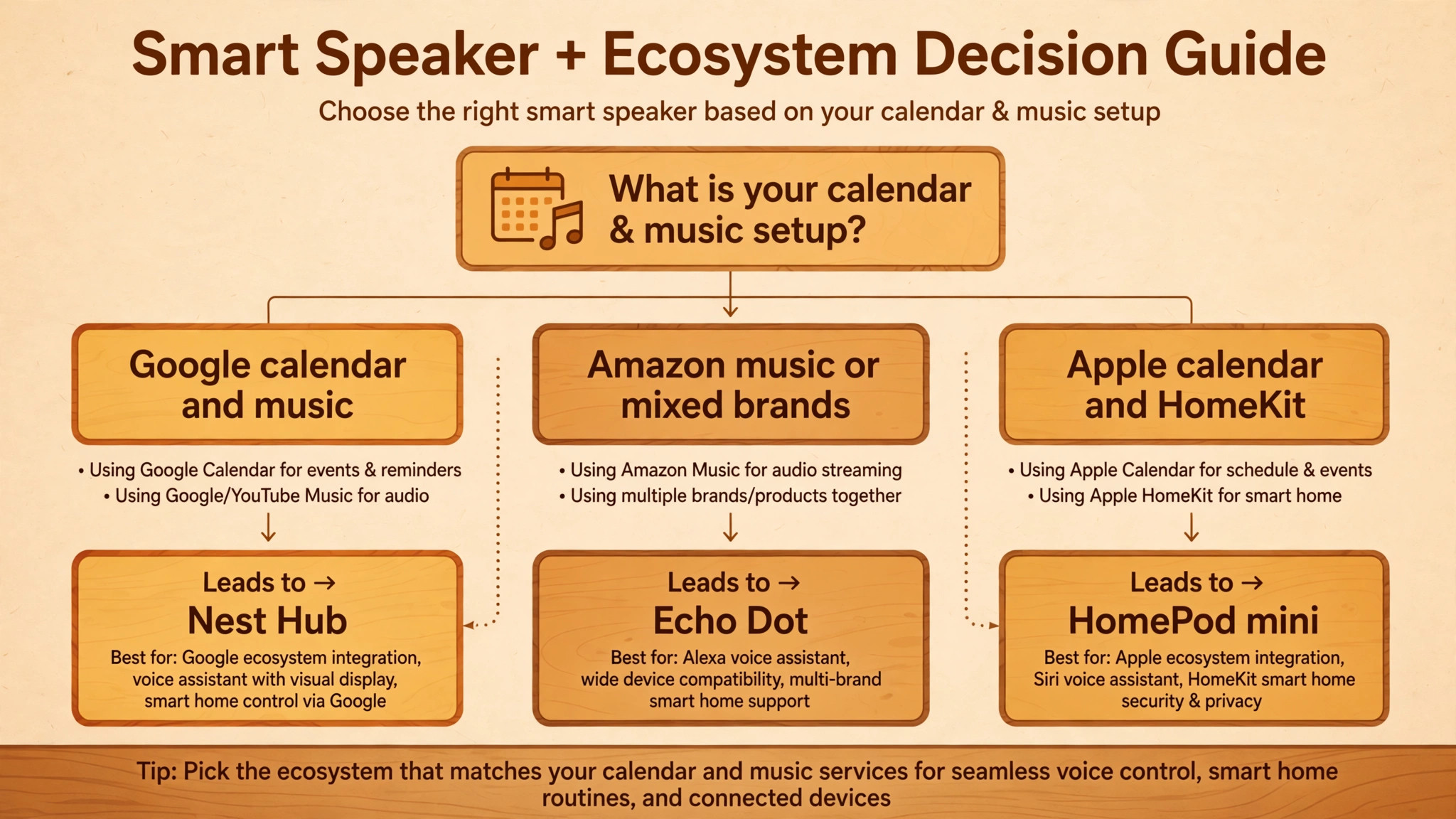
Choose Google Nest instead if your calendar, email, and photos already live with Google, and if you want a screen on the nightstand. A Nest Hub shows the weather, the first calendar events, and a photo slideshow without you asking twice, and it has no camera, which matters to many people who do not want a camera in a bedroom. Choose HomePod mini instead if your home is already an Apple home, with iPhones, an Apple TV or HomePod acting as a hub, and HomeKit devices in the rooms you use most.
The sound is strong for its size, and Siri shortcuts and Home automations can handle a solid morning sequence, but the range of supported devices is narrower, and you will pay more for compatible gear.
How to Choose the Speaker and the Gear Around It
Start with the assistant, not the speaker shape. Alexa, Google Assistant, and Siri each handle routines well, but they handle different calendars, music services, and smart home brands best. If you live in Google Calendar and use YouTube Music, Google will read your day with fewer links to fix. If you use Amazon Music or Spotify and you own a mix of brands, Alexa will usually connect to more of them with less effort. If you use Apple Calendar, Apple Music, and HomeKit locks and lights, Siri will feel the most joined up.
Switching assistants later is possible, but it means rebuilding routines and re-linking devices, so the cheapest first purchase is the one that matches the services you already pay for.
What a Morning Routine Costs in 2026
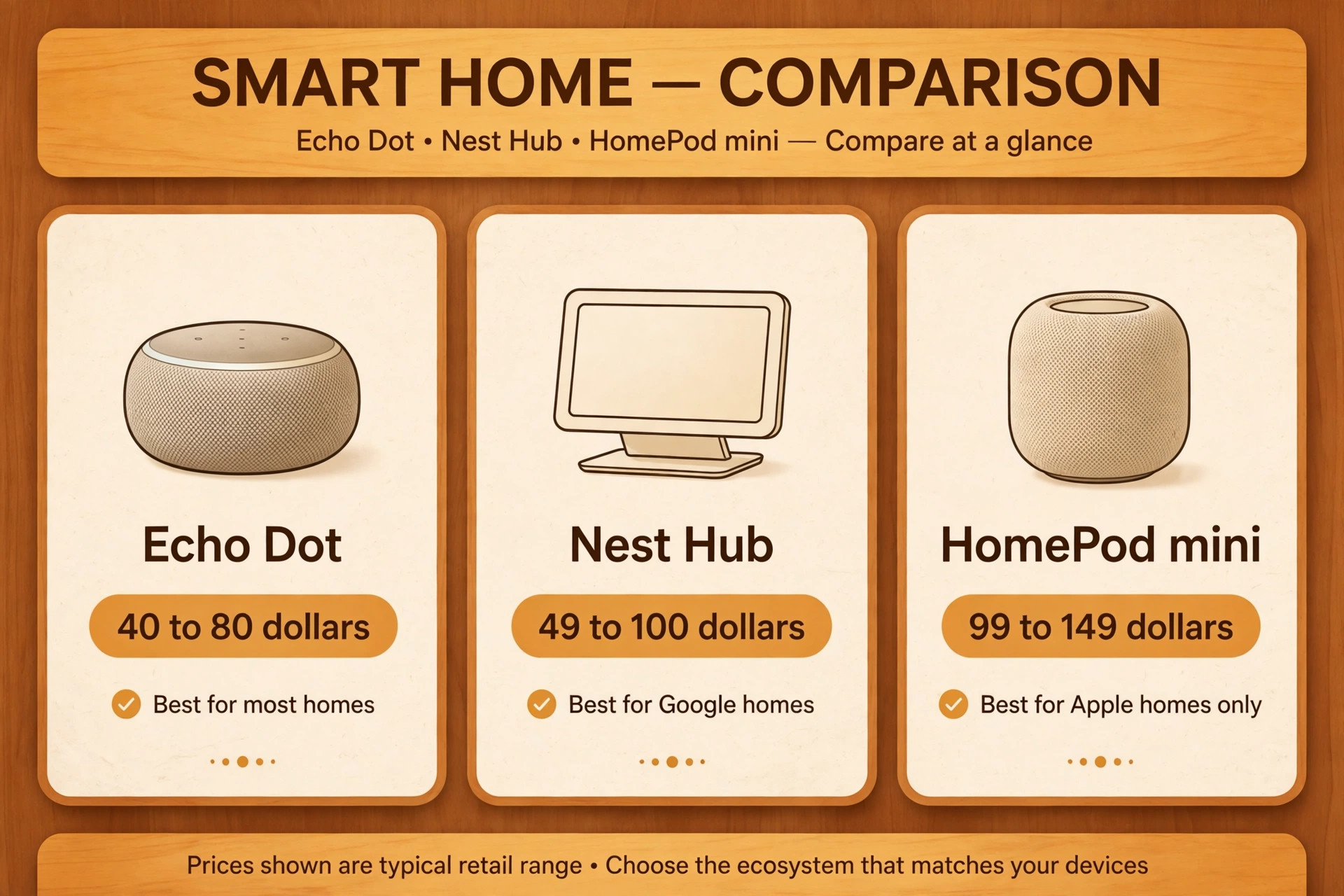
Prices for smart speakers changed sharply during 2026, so treat any single price as a snapshot and check the store page on the day you buy. Recent reporting on the 2026 Amazon repricing put the Echo Dot list price at 79.99 dollars, up from 49.99 dollars, with sale prices near 40 dollars during promotion events. The Echo Show 5 list price was reported at 99.99 dollars, with sale prices near 60 dollars, and the Echo Show 8 list price at 199.99 dollars, with sale prices near 125 dollars.
That gap between list and sale price is the reason to wait for a sale event if you are buying more than one speaker, because a house with three speakers can save more than 100 dollars by timing the purchase.
| Item | Typical price range in 2026 | Worth it for a first routine |
|---|---|---|
| Echo Dot | 40 to 80 dollars depending on sale | Yes, best first speaker for most homes |
| Echo Show 5 | 60 to 100 dollars depending on sale | Yes for a kitchen, no for a dark bedroom |
| Nest Hub second generation | 49 to 100 dollars depending on sale | Yes for Google homes that want a screen |
| HomePod mini | 99 to 149 dollars depending on version | Yes for Apple homes only |
| Smart bulb | 10 to 20 dollars each | Yes, start with the bedroom |
| Smart plug | 13 to 25 dollars each | Yes, for coffee or a lamp |
| Smart thermostat | 130 to 250 dollars | Only if you already want heating control |
The cheapest way to use smart speaker for morning routine automation is to start with the speaker you already own, even if it is an older model, and add one bulb and one plug. That setup usually costs under 60 dollars on sale, and it tests the real question, which is whether you like being woken by a routine at all. If you do not like it after two weeks, you have lost little. If you do like it, you can add a kitchen display, a second bedroom speaker, or a thermostat with confidence, because you already know which steps you use and which steps you skip.

How to Use Smart Speaker for Morning Routine Automation Without the Usual Failures
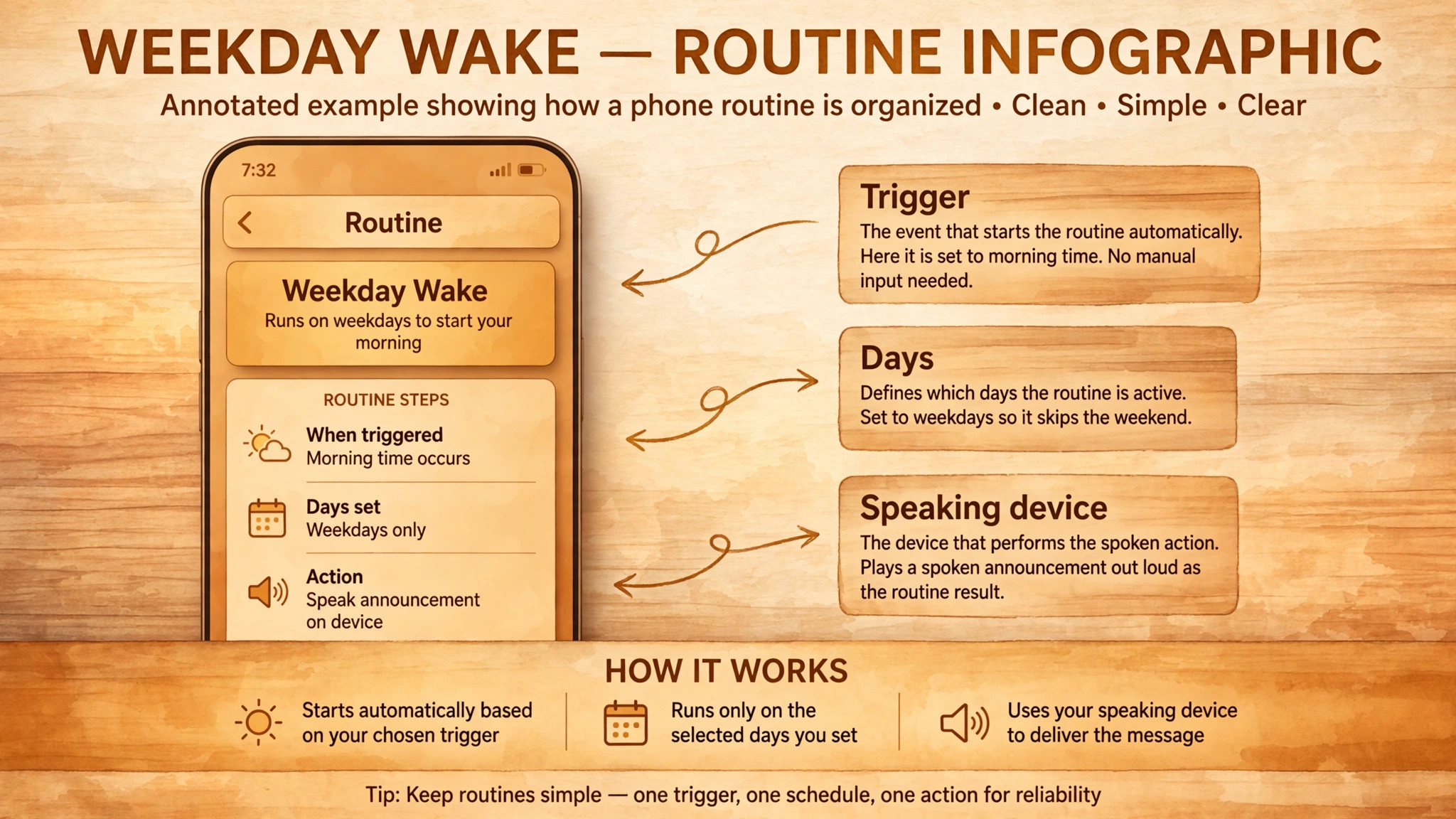
The easiest way to use smart speaker for morning routine automation is to build it in the app that matches your speaker, and to keep the first version short. In the Alexa app, open More, then Routines, then add a new routine. In the Google Home app, open Automations, then add a routine or household routine. In the Apple Home app or Shortcuts app, create a home automation or a personal automation with a time trigger. The names differ, but the structure is the same in all three. You pick a trigger, you add actions in order, you pick the speaker that speaks, and you save. The work is not in tapping the buttons.
The work is in choosing actions that still help when one of them fails.
Start with a trigger you can control. A time trigger is the most reliable for a weekday routine, because it fires whether you remember to speak or not. A voice trigger is better for weekends and days off, because it lets you start the routine when you actually wake up, not when the clock says you should. Many people use both, a quiet time routine on weekdays that fades the lights and plays soft sound, and a voice routine that adds the briefing, the news, and the coffee when they say they are ready.
That split prevents the worst morning failure, which is a full briefing blasting at 6 am on a day you slept in, or a silent house on a day you needed the briefing early.
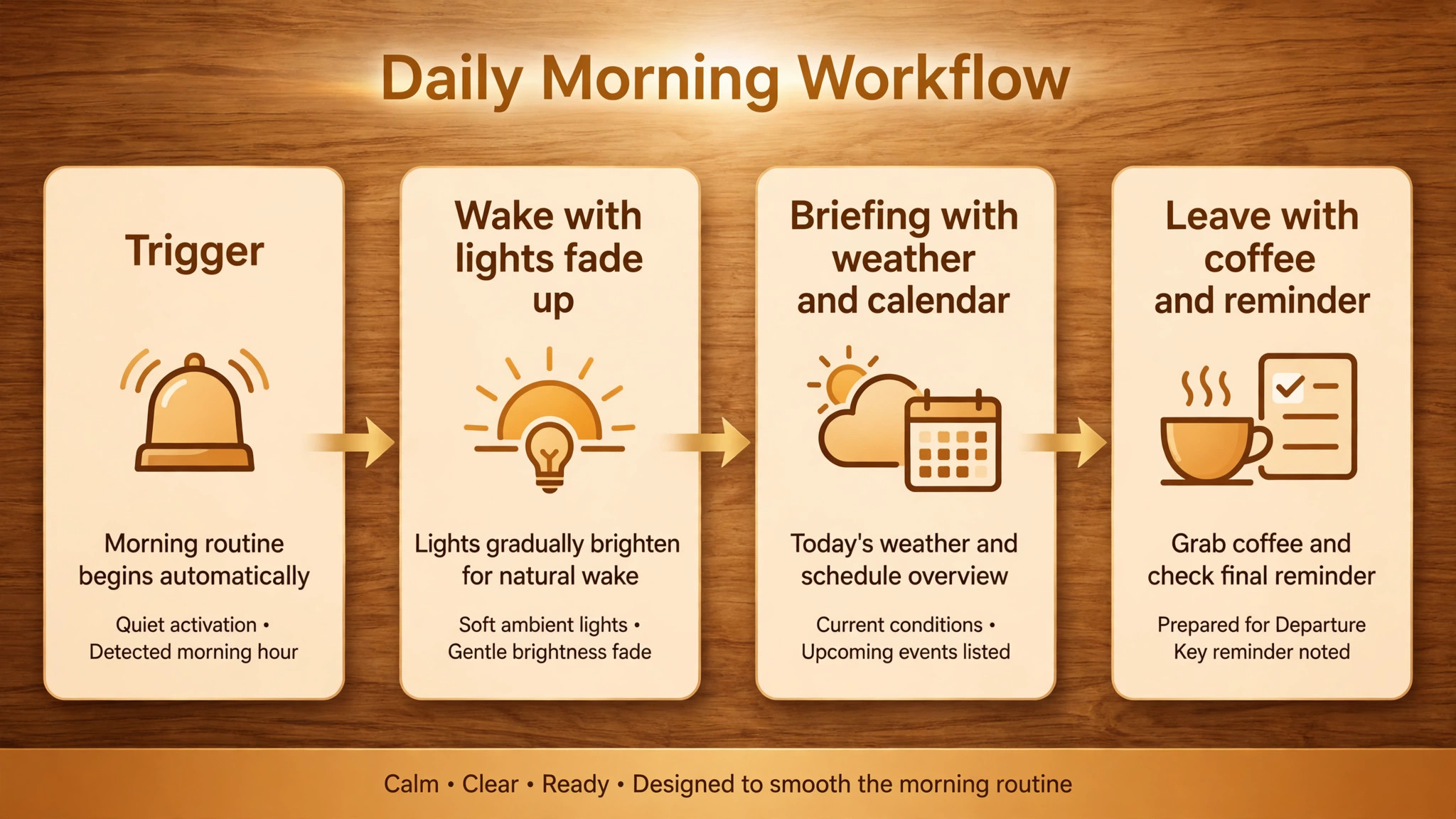
Build the routine in three layers, and test each layer before you add the next. Layer one is wake. Lights fade up over ten to twenty minutes, a gentle sound or alarm plays, and the bedroom warms slightly if a thermostat is available. Layer two is briefing. The speaker reads the weather, the first three calendar events, and a short news summary, in that order, because weather changes what you wear, calendar changes what you prepare, and news can wait if you are short on time. Layer three is leave. Kitchen lights turn on, coffee starts, a reminder speaks the one thing you must not forget, and a final message gives the travel time to work or school.
If layer one fails, you still wake to a phone alarm. If layer two fails, you still leave with lights and coffee. If layer three fails, you still know your day. That layering is what makes a routine feel reliable, even though no single device is perfect.
Keep the spoken part short. A briefing longer than ninety seconds will be ignored by week two, no matter how useful it sounds on day one. Limit the calendar reading to the first three events, and ask for detail only for the event that needs preparation, such as a meeting with a location or a school run with a bag to pack. Limit news to one source or one short summary, not a full broadcast. If you want more news, play it in the kitchen while you make breakfast, not in the bedroom while you are still waking up. Short briefings get listened to. Long briefings get muted, and a muted routine is the same as no routine.
A Sample 30 Minute Routine You Can Copy and Change
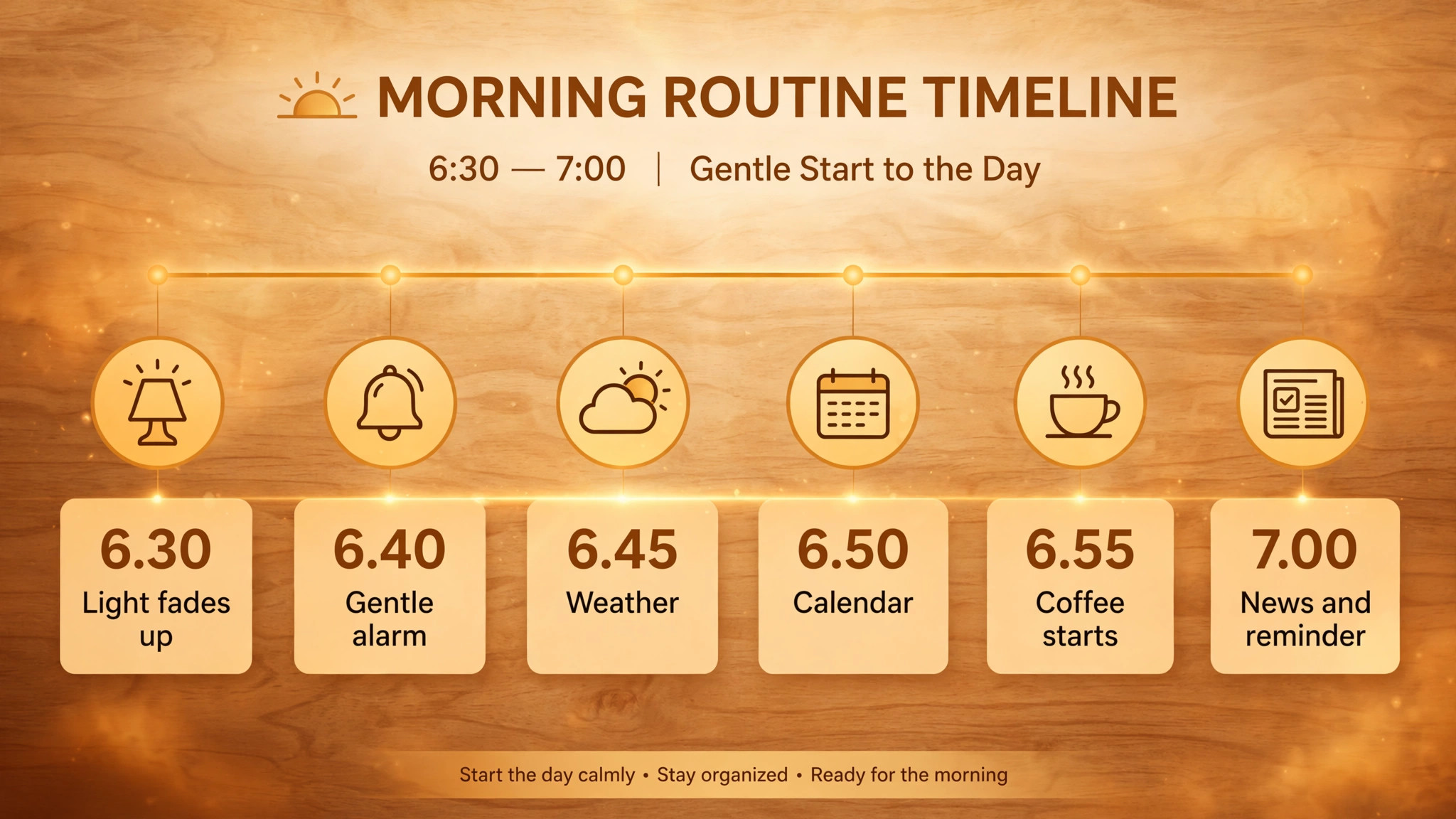
A good morning routine lasts about thirty minutes from first light to leaving the bedroom, and it should feel slower than your old routine, not faster and more rushed. The example below starts at 6.30 am on weekdays, with a softer version on weekends that starts by voice only. Change the times to fit your day, but keep the order, because the order is what protects you when you are half awake.
At 6.30 am, the bedroom light fades from dark to about 20 percent over ten minutes. No voice speaks yet. At 6.40 am, the light reaches about 60 percent, and a gentle alarm sound or a quiet playlist starts on the bedroom speaker at low volume. At 6.45 am, the speaker gives a one sentence weather summary and the high temperature for the day, plus a rain warning if rain is expected. At 6.50 am, the speaker reads the first three calendar events, with times and locations, and flags any event that starts before 10 am.
At 6.55 am, the kitchen light turns on, the smart plug starts the coffee maker, and the thermostat moves to the daytime temperature if you use one. At 7.00 am, the speaker in the kitchen plays a short news summary or your chosen podcast, and a reminder speaks the one item you set the night before, such as a laptop, a permission slip, or a gym bag.
When you use smart speaker for morning routine work, order matters more than the number of actions. A routine with six well ordered actions beats a routine with twenty actions that fight for your attention. Notice what this sample leaves out. It does not read every email, it does not list every calendar event for the week, and it does not try to control every light in the house. It covers waking, weather, calendar, coffee, and one reminder. Everything else can be added later, once this core runs without a failure for two full weeks.
Build the Routine in Steps That You Can Undo
Step 1. Name the routine clearly. Use a name you can say and remember, such as Weekday Wake, and a trigger phrase that is hard to mishear, such as start my morning. Avoid names that sound like other commands, and avoid a trigger phrase that you use in normal conversation, or the routine may fire when you did not intend it to.
Step 2. Set the trigger and the days. Pick weekdays only for the time routine, and pick the bedroom speaker as the speaking device. Check the time zone in the app, because a speaker set to the wrong time zone will fire an hour early or late, and that single error accounts for a surprising number of reported routine failures.
Step 3. Add the wake actions first. Add the bedroom light at low brightness, then a wait, then a higher brightness, then a gentle sound. Test this layer alone for two mornings before you add anything else. If the light does not fade smoothly, change the bulb or the brightness steps, because a light that jumps from dark to full brightness is worse than no light at all.
Step 4. Add the briefing actions next. Add weather, then calendar, then news, in that order. Set the news source in advance, and test the length on a morning when you are not in a rush. If the briefing runs long, cut one source. If the calendar reads events you do not need, such as all day birthdays, adjust the calendar settings so only timed events are read.
Step 5. Add the leave actions last. Add kitchen lights, the coffee plug, and one reminder. Set the reminder the night before, either by voice or in the app, so the morning reminder is specific. A generic reminder to have a good day helps no one. A specific reminder to take the laptop charger helps everyone.
Step 6. Test the full routine by voice and by time. Trigger it by voice on a weekend, then let the time trigger run on a weekday, and watch which actions actually happen. Note any action that is slow, silent, or out of order, and fix that action before you add more. A routine that is tested once is a demo. A routine that is tested for a week is a habit.
Step 7. Add a backup alarm that does not depend on the routine. Keep a phone alarm five minutes after the routine start, for the first month, and keep it even after the routine feels reliable. The backup costs nothing, and it turns a failed routine from a missed morning into a minor annoyance. Remove the backup only when the routine has run cleanly for a month, and put it back the week after any major app update, router change, or new device is added.
The Failure Checklist That Keeps the Routine Alive
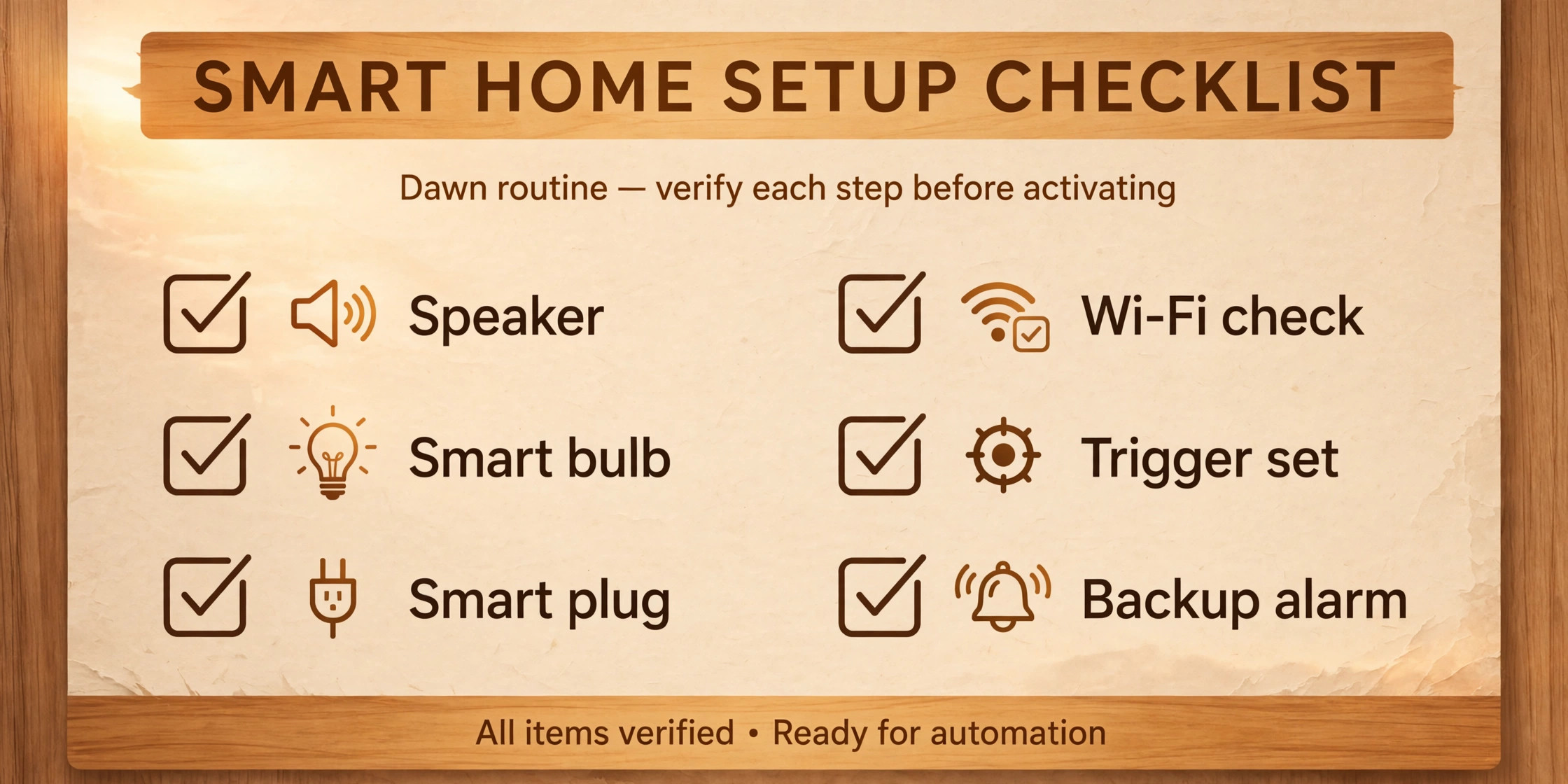
This is the part most guides skip, and it is the reason most routines die. A routine does not usually fail because the idea was wrong. It fails because one small link breaks, and no one notices until the morning it matters. If you use smart speaker for morning routine automation every day, you need a backup for each link, and you need a quick check you can run in two minutes on a Sunday night.
Check the trigger first. Confirm the days, the time, and the time zone. Confirm that Do Not Disturb on the speaker or the phone is not blocking the routine, and confirm that a housemate did not pause or delete the routine while cleaning up the app. If the routine uses a voice trigger, say the trigger phrase exactly as written, and check the voice history in the app to see what the speaker actually heard. A trigger that works for one voice may fail for another, especially in a noisy kitchen or a bedroom with a fan running.
Check the speaker next. Confirm it is plugged in, connected to Wi-Fi, and set to a volume you can hear. Confirm the speaking device in the routine is still the bedroom speaker, not a speaker that was moved to another room or unplugged for a trip. Confirm the speaker firmware is up to date, because updates sometimes change routine behaviour, and a routine that worked last week may need a small edit after an update.
Check the lights and plugs next. Open the app and look for any device marked unresponsive. If a bulb is unresponsive, check whether it was switched off at the wall, because a smart bulb with no power cannot respond to any routine. If a plug is unresponsive, check whether it was unplugged or whether its Wi-Fi signal is weak. Move the plug or the bulb closer to the router if the problem repeats, or add a hub that supports the device protocol.
Check the services next. Confirm the calendar account is still linked, the news source is still available, and the music service is still signed in. Services unlink after password changes, after a free trial ends, or after an app update, and the routine will skip that step silently rather than warning you. Re-link any service that shows as disconnected, and test that single action by voice before you trust the full routine again.
Use this Sunday check as a habit. Trigger the routine by voice, watch each action, and fix the first failure you see. Do not add new actions on the same day you fix a failure, because you will not know whether the fix worked or the new action broke something else. One change at a time is slower, and it is also the only way to keep a routine reliable for months.
Mistakes That Make a Morning Routine Feel Like a Chore
The first mistake is building a routine that is too long. A routine with twenty actions sounds impressive in a setup video, and it feels exhausting on a real Tuesday. Every action adds a chance of failure and a second of waiting, and the total quickly passes the point where you would rather do the job by hand. Start with six actions, live with them for two weeks, and add one action at a time only if you can name the morning problem it solves.
The second mistake is putting the routine on the wrong speaker. A routine that speaks from a kitchen speaker while you are still in bed will be missed, and a routine that speaks from a bedroom speaker after you have moved to the kitchen will be ignored. Assign each action to the speaker in the room where you will be when that action runs. Wake actions belong to the bedroom speaker. Briefing actions belong to the bedroom speaker for the first minutes, then to the kitchen speaker once you move. Leave actions belong to the kitchen or hallway speaker.
The third mistake is automating a coffee maker that is unsafe to automate. A smart plug should only control a coffee maker with a manual on and off switch that stays in the on position, and with water and grounds already in place. Never automate a machine that needs a button press to start brewing, a machine with an empty water tank, or a heater that could overheat if left on. Check the coffee maker manual for warnings about unattended use, and use the plug timer to turn the machine off after brewing, so it does not sit hot all morning.
The fourth mistake is building one routine for a whole household with different schedules. A routine that wakes two people at different times, reads two calendars, and sets two reminders will confuse both people. Build one shared routine for the house, such as lights and coffee, and separate personal routines for each person, such as calendar and reminders, triggered by voice or by personal speaker. That split keeps the shared parts simple and the personal parts private.
Many people who use smart speaker for morning routine control make one more mistake, which is to judge the routine after one day. A routine needs a week to settle, because the first day you listen to every word, the second day you notice the order, and the third day you notice what is missing. Judge it after seven days, change one thing, and judge it again. That slow loop is how a routine becomes part of a morning, instead of a novelty that fades by the weekend.
If you want to extend this setup beyond the bedroom, the guides to best smart home devices 2026 and best AI daily planner apps help you match speakers, lights, and planning tools to the same morning, and best scheduling apps is useful if your calendar is the part of the morning that needs the most work. The official guides from Amazon, Google, and Apple are also worth bookmarking, because routine menus change with app updates, and the official steps are the fastest way to check a menu that moved.
Amazon documents Alexa routines in its developer guide, Google documents routines in its Home help centre, and Apple documents remote home control and automations in its support guides, and links to those official pages are given below in the sources note for this guide.
Frequently Asked Questions
Do I need smart lights and plugs to use a smart speaker for a morning routine?
No. A speaker alone can run a useful morning routine, because it can play an alarm, read the weather, read the calendar, and play news or music, all without extra hardware. Smart lights and plugs make the routine better, because light wakes you more gently than sound alone, and coffee ready on arrival saves a step, but they are not required to start. Begin with the speaker, test the briefing for a week, and add one bulb and one plug only if the briefing alone feels incomplete.
Which smart speaker is best for a morning routine?
For most homes, an Echo Dot is the best first choice, because Alexa routines are easy to build, the speaker is cheap on sale, and it connects to a wide range of lights, plugs, and thermostats. Google Nest speakers are the better choice for Google Calendar and Google service homes, especially if you want a screen with no camera. HomePod mini is the better choice for Apple homes with HomeKit gear, but it costs more and supports fewer third party devices. Pick the assistant that already holds your calendar and music, not just the speaker with the best sound.
Can I use smart speaker for morning routine automation without Wi-Fi?
No, not in any useful way. Routines that read weather, calendar, news, and traffic need an internet connection, and most smart lights and plugs need Wi-Fi or a hub connection to respond. If the internet drops, a speaker may still play a local alarm if one was set, but the briefing and the device actions will usually fail or skip. That is why a phone alarm backup matters, and why a routine should never control anything safety critical, such as a heater that must turn off or a door that must lock.
How do I stop a morning routine from waking my partner?
Use separate speakers and separate triggers. Put the time routine on your bedroom speaker only, at a volume that wakes you but not the whole room, and use a light fade instead of a loud alarm where possible. Give your partner a separate routine on their side of the bed or in their own room, with their own time and calendar. If you share one bedroom speaker, use a voice routine instead of a time routine on days when schedules differ, so the routine only runs when the person who needs it says they are ready.
Why does my morning routine sometimes skip steps?
Most skipped steps come from one of four causes, which are a disconnected service, an unresponsive device, a wrong speaking device, or a routine that asks one speaker to do two things at once. Check the calendar and music links first, then check for devices marked unresponsive, then check which speaker the routine uses for each action. Add a short wait between a device action and a spoken action if the timing feels rushed, and test the routine by voice after each fix, so you know which fix actually worked. If the problem repeats after an app update, recreate the routine from scratch, because updates sometimes leave old routines in a broken state.
Should I use a time trigger or a voice trigger for mornings?
Use a time trigger for weekdays when your wake time is fixed, and a voice trigger for weekends, days off, and shared rooms where schedules vary. A time trigger is more reliable because it does not depend on you remembering to speak, but it can fire on a day you slept in. A voice trigger is more flexible, but it fails if you forget to speak or if the speaker does not hear you. Many homes use both, a quiet time routine for lights and sound, and a voice routine for the briefing and kitchen steps, and that combination gives reliability without losing control.
Mornings That Start Before You Have to Think
The best morning routine is the one you stop noticing. Lights fade up, the weather is spoken in one sentence, the calendar gives you the three events that matter, coffee is ready, and one reminder saves you from a forgotten bag or charger. You did not tap ten buttons, you did not repeat the same questions, and you did not start the day by scrolling a phone in bed. That is the test to apply after two weeks. If the routine still feels like a gadget demo, cut it back until it feels like a habit. If the routine already feels invisible, keep it, and add one new step only when a real morning problem appears.
If you use smart speaker for morning routine automation for two weeks with the core setup in this guide, you will know whether it helps, and you will know which step to change. Start tonight, not next month. Set the bedroom light, set the time trigger, set the phone backup alarm, and let the routine run tomorrow. Fix the first failure on Sunday, using the checklist above, and judge the routine after seven days, not after one. A morning that starts before you have to think is not a luxury purchase. It is a small sequence, built once, tested weekly, and kept short, and it pays back every weekday morning that follows.
Sources and official guides for this post. Amazon Alexa routines developer guide at https://developer.amazon.com/en-US/alexa/alexa-haus/routines . Google Home routines help at https://support.google.com/googlenest/answer/7029585?hl=en&co=GENIE.Platform=Android . Apple Home remote control support at https://support.apple.com/guide/iphone/control-your-home-remotely-iph1d10f7f2b/ios . Prices were checked against October 2026 reporting on Amazon device repricing and 2026 smart speaker roundups, and sale prices vary by store and event, so check checkout before you buy.