Slack vs Microsoft Teams is the choice most workplaces make once, then live with for years. Both tools carry messages, files, calls and apps. Both claim to be the place where work happens. The difference is not which one has more features. It is which one fits the way your team already works, and which one stops being useful the moment your team grows past a certain size.
The short answer: Slack wins for teams that want fast, flexible chat and a huge app ecosystem. Microsoft Teams wins for organisations already paying for Microsoft 365, where chat, meetings, documents and security need to live under one admin roof. If your team uses Outlook, Word and SharePoint every day, Teams is usually the cheaper and simpler choice. If your team lives in tools outside the Microsoft world, Slack usually feels faster and less cluttered.
This guide compares the two on the same tests: starting a channel, running a meeting, finding an old file, and onboarding a new hire. It states where each platform wins, where each one frustrates, and what each one costs in October 2026. No tool wins every category, and the verdict at the end names the winner for four different kinds of team.
Slack vs Microsoft Teams at a Glance
| Question | Slack | Microsoft Teams |
|---|---|---|
| Best for | Fast chat, external guests, app heavy teams | Microsoft 365 organisations, all in one admin |
| Channels | Simple, flexible, easy to browse | Structured around teams, more setup |
| Video meetings | Good, but not its strongest feature | Strong, built for scheduled meetings |
| App integrations | Over 2,600 apps in its directory | Deep Microsoft apps, growing third party list |
| Search | Fast, with strong filters | Good, tied to Microsoft search |
| Free plan | Yes, with a 90 day message history limit | Yes, with limits on storage and meetings |
| Paid pricing | Check checkout for current per user rates | Check checkout, often bundled with Microsoft 365 |
The Quick Verdict
Pick Slack if your team values speed of conversation above everything else. Messages send fast, channels are easy to create and leave, threads keep side talk out of the main channel, and guests from outside your company can join with little friction. Slack feels like a chat tool first and everything else second, and for many teams that is exactly right.
Pick Microsoft Teams if your organisation already runs on Microsoft 365. Chat sits next to Outlook calendars, Word documents open in the same window, meetings launch from a calendar invite, and IT can manage permissions, retention and compliance from one admin centre. Teams feels like an office suite first and a chat tool second, and for large organisations that is a strength, not a weakness.
Pick neither on price alone. The sticker price of either tool tells you little. The real cost is the time your team spends switching between apps, the admin time spent managing permissions, and the cost of the other tools you still need because your chat tool does not cover them. A team that pays for Slack and also pays for a separate video tool and a separate document suite may spend more than a team on a Microsoft 365 bundle that covers all three.
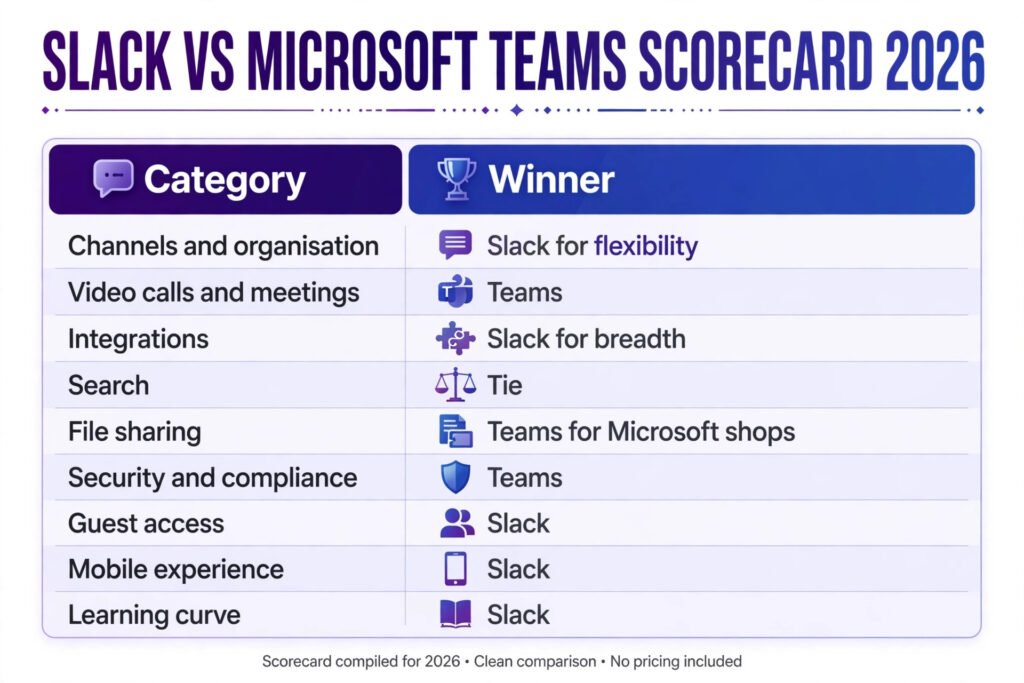
Slack vs Microsoft Teams Head to Head
| Category | Slack | Microsoft Teams | Winner |
|---|---|---|---|
| Channels and organisation | Workspaces, channels, threads, canvases | Teams, channels, chats, tabs | Slack for flexibility, Teams for structure |
| Video calls and meetings | Huddles for quick calls, video for scheduled calls | Full meeting suite, breakout rooms, webinars | Teams |
| Integrations | Over 2,600 apps, strong developer tools | Microsoft apps native, plus third party apps | Slack for breadth, Teams for Microsoft depth |
| Search | Fast full text search, filters by person, channel and date | Search across chats, files and Microsoft content | Tie |
| File sharing | Drag and drop, Google Drive and OneDrive links | SharePoint and OneDrive built in | Teams for Microsoft shops, Slack for mixed shops |
| Security and compliance | Enterprise Grid for large organisations | Enterprise grade controls in Microsoft 365 | Teams for regulated industries |
| Guest access | Easy guest and shared channel access | Guest access available, more admin steps | Slack |
| Mobile experience | Clean, fast, consistent | Good, but heavier on older phones | Slack |
| Learning curve | Low, most people learn it in a day | Moderate, more menus to learn | Slack |
| Pricing | Per user plans, check checkout | Per user plans, often bundled, check checkout | Teams if you already pay for Microsoft 365 |
Slack in Depth
Slack started as a chat tool for software teams and still shows it. The interface is built around channels, which are topic based rooms, and direct messages. A channel can be public to the whole workspace, private to invited members, or shared with another company through Slack Connect. Threads let people reply to a specific message without flooding the channel, and reactions give a quick way to acknowledge a message without writing a reply.
Slack’s strongest asset is its app directory. With more than 2,600 integrations, teams can pull notifications from code repositories, customer support tools, project boards and analytics dashboards into the channels where they already talk. A support ticket can post to a channel, a deploy can announce itself, and a form submission can trigger a message. Workflow Builder lets non technical users automate simple routines, such as welcoming a new member to a channel or collecting a daily standup update, without writing code.
Slack Canvas, added in recent years, gives each channel a shared document surface for notes, checklists and project briefs. It is useful, but it is not a replacement for a full document suite. Teams that need heavy document editing still pair Slack with Google Workspace or Microsoft 365, which is part of the cost calculation.
Slack Pricing
Slack offers a free plan with a 90 day message history limit and limited app integrations. Paid plans are charged per active user per month, with lower rates on annual billing. As of October 2026, published list rates are around 8.75 dollars per user per month for Pro and around 15 dollars for Business Plus on annual billing, with Enterprise Grid priced by quote. Check checkout for current rates, because Slack adjusts pricing and bundle terms over time. The free plan suits small teams testing the tool. Teams that need message history beyond 90 days, unlimited integrations and single sign on should budget for a paid plan.
Slack: Best For
Slack is best for startups, agencies, software teams and any team that works with outside clients, freelancers and partners. Shared channels make cross company work simple, and the app ecosystem means most tools a team already uses can post into Slack.
Slack: Watch Out For
Message history on the free plan disappears after 90 days, which hurts teams that rely on search for old decisions. Notification overload is real: a team with dozens of active channels needs clear rules about which channels are must read and which are optional. Video meetings work, but teams that run all day video calls often prefer a dedicated meeting tool alongside Slack. Finally, Slack costs add up per user, and a growing team should model the annual bill before committing.
Try it at: slack.com

Microsoft Teams in Depth
Microsoft Teams is the chat layer of Microsoft 365. A team is a group of people, usually a department or project, and each team contains channels for topics. Chat, meetings, file storage and apps sit in one window. A document shared in a channel lives in SharePoint, a file shared in a private chat lives in OneDrive, and both open inside Teams without downloading.
Teams is strongest where Microsoft already is. A meeting scheduled in Outlook appears in Teams. A Word document co edited in a channel shows live edits. A PowerPoint deck can be presented in a meeting with speaker notes. For organisations that standardise on Microsoft, this removes the friction of switching between five separate tools.
Teams also carries enterprise controls that matter to large organisations: data retention policies, eDiscovery, information barriers, and compliance recording for regulated industries. IT administrators manage users, permissions and policies from the Microsoft 365 admin centre, alongside email and document permissions. That single admin surface is a major reason large companies pick Teams even when individual employees prefer Slack.
Microsoft Teams Pricing
Teams has a free plan with group meetings up to 60 minutes, limited storage and no full Microsoft 365 apps. Paid access usually comes through a Microsoft 365 business plan. As of October 2026, published list rates include Teams Essentials at around 4 dollars per user per month, Microsoft 365 Business Basic at around 6 dollars, and Business Standard at around 12.50 dollars, with annual billing. Check checkout for current rates and bundle terms. For an organisation already paying for Business Standard or Premium for email and Office apps, Teams effectively costs nothing extra, which is hard for Slack to beat.
Microsoft Teams: Best For
Teams is best for mid sized and large organisations, schools, government bodies and any company already standardised on Outlook and Office. It is also the safer pick for regulated industries that need retention, audit and compliance controls out of the box.
Microsoft Teams: Watch Out For
Teams can feel heavy. The interface packs chat, calendar, files, apps and activity feeds into one window, and new users often take a week to find their way around. Guest access works but needs more admin steps than Slack Connect. Channel structure is more rigid: creating a new team is an admin decision, while creating a Slack channel is a one click act. Teams that want a loose, fast moving chat culture sometimes find Teams slows them down.
Try it at: microsoft.com/microsoft-teams

Side by Side Test 1: Start a Channel
In Slack, starting a channel takes seconds. Click add channel, name it, choose public or private, invite people, and start typing. A project channel, a social channel and a temporary channel for a launch can all exist side by side, and unused channels can be archived without deleting their history on paid plans.
In Teams, starting a channel means picking a team first, then adding a channel inside it. That extra step enforces structure, which helps a 500 person company avoid channel sprawl, but it slows a small team that just wants a quick room for a week long project. Private channels and shared channels exist in Teams, but they carry more permission settings to understand.
Winner: Slack for speed, Teams for governance. Small teams should weight speed. Large organisations should weight governance.
Side by Side Test 2: Run a Meeting
Teams wins the meeting test clearly. Schedule from Outlook or Teams, join from a link, share a screen, use breakout rooms, record with transcription, and read a recap afterwards. Webinar and town hall formats cover large audiences. For a company that runs back to back meetings all day, Teams is a complete meeting platform.
Slack handles quick calls well through Huddles, which are audio first rooms you can join without scheduling. Video calls work for small groups, but Slack lacks breakout rooms, webinar registration and the polished large meeting controls of Teams. Teams that use Slack often pair it with Zoom or Google Meet for formal meetings, which adds another subscription.
Winner: Teams, by a clear margin.
Side by Side Test 3: Find an Old File
Both tools search well, but they search different things. Slack search covers messages, files shared in Slack, and canvas content, with filters for person, channel and date. It is excellent for finding a decision made in a channel three months ago, provided the team is on a paid plan with full history.
Teams search covers chats, channel messages and files, and it reaches into SharePoint and OneDrive. A file shared in a channel can be found from Teams search, from SharePoint search, or from the Files tab of the channel. That depth helps large organisations, but it can confuse users who are not sure where a file actually lives.
Winner: Tie. Slack is simpler to search. Teams searches more places. Pick based on where your files live.
Side by Side Test 4: Onboard a New Hire
Onboarding tests the whole system, not just chat. In Slack, a new hire joins the workspace, gets added to a starter set of channels, reads pinned messages and canvases, and can message anyone. The process is fast, but it depends on someone maintaining the channel list and the pinned welcome material.
In Teams, onboarding is more structured. IT provisions the account through Microsoft 365, the hire appears in the right teams automatically through group membership, and documents, calendars and meeting links are already in place. HR teams that run structured onboarding often prefer this, because access follows group membership rather than manual channel invites. For more on structuring team tooling around people processes, see our guide to AI tools for HR teams.
Winner: Teams for structured onboarding at scale, Slack for fast onboarding in small teams.

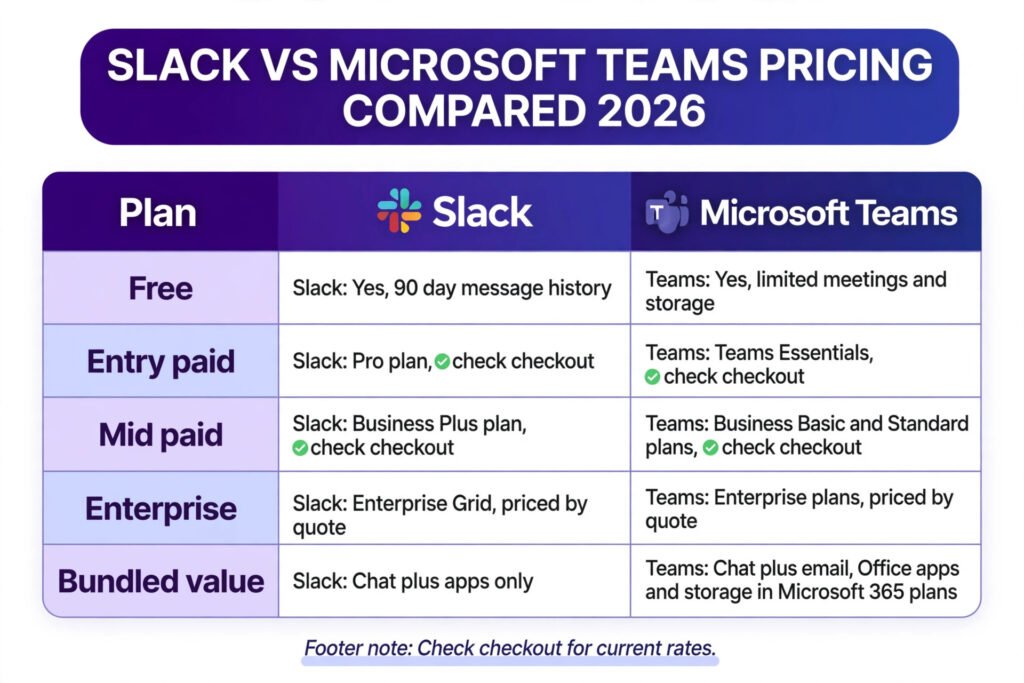
Pricing Compared
| Plan | Slack | Microsoft Teams |
|---|---|---|
| Free | Yes, 90 day message history | Yes, limited meetings and storage |
| Entry paid | Pro, around 8.75 dollars per user per month annual | Teams Essentials, around 4 dollars per user per month |
| Mid paid | Business Plus, around 15 dollars per user per month annual | Business Basic around 6 dollars, Standard around 12.50 dollars |
| Enterprise | Enterprise Grid, priced by quote | Enterprise plans and add ons, priced by quote |
| Bundled value | Chat plus apps only | Chat plus email, Office apps and cloud storage in Microsoft 365 plans |
| Pricing note | Check checkout for current rates | Check checkout for current rates and bundle terms |
The pricing lesson is simple. Compare the whole stack, not the chat tool alone. A Slack team that also pays for Google Workspace or Microsoft 365 for documents and email is paying for two systems. A Teams team on Business Standard already has email, Office apps and storage in the same bill. For a 50 person company, that bundle difference can be thousands of dollars
a year in either direction, so model both stacks before deciding.
How to Choose
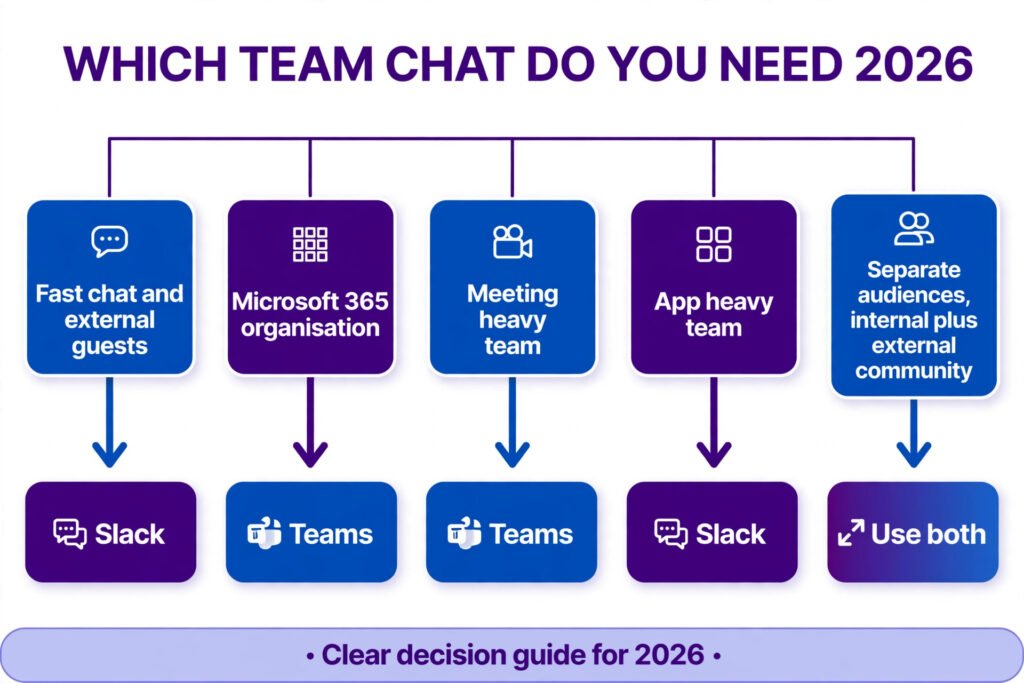
Choose Slack if most of these are true: your team is under 200 people, you work with outside clients and partners, you use many non Microsoft tools, your culture values fast informal chat, and you are willing to pay per user for chat alone.
Choose Microsoft Teams if most of these are true: your organisation already pays for Microsoft 365, you need compliance and retention controls, you run many scheduled meetings, your IT team manages permissions centrally, and you want one vendor for chat, email, documents and meetings.
Choose both, deliberately, only in one case: a large company that standardises on Teams for employees but runs a Slack workspace for an external community, a partner programme or an open source project. Running both for the same internal team creates confusion about where a conversation lives, and it doubles the search problem.
If you are still unsure, run a two week trial with a real project team, not a demo group. Measure three things: how long it takes a new member to find an answer, how many meetings run without a technical hiccup, and how often people say they missed a message. Those three numbers predict satisfaction better than any feature checklist.
Mistakes to Avoid
First, do not pick on price alone. The cheapest chat tool that your team ignores is the most expensive one, because work moves to email, personal messaging apps and hallway conversations that nobody can search later.
Second, do not migrate without a channel map. Moving from Slack to Teams, or the reverse, without deciding which channels survive, which get archived and who owns each one creates a mess that takes months to clean up.
Third, do not ignore notification rules. Both tools ship with noisy defaults. Set channel norms on day one: which channels expect a reply within an hour, which are read when time allows, and when to use a thread instead of a channel message.
Fourth, do not give everyone admin rights. In Slack, workspace admins control guests and app installs. In Teams, team owners control membership and channel creation. Loose admin rights lead to app sprawl and guest accounts nobody remembers.
Fifth, do not forget the free plan limits. Slack free hides messages older than 90 days. Teams free caps meeting length and storage. A team that outgrows a free plan mid project faces a forced upgrade at the worst moment.
Sixth, do not judge a tool by its demo. Both vendors show polished demos with tidy channels and instant search. Real workspaces have hundreds of channels, inactive members and files with vague names. Test with your real mess, not their tidy sample.
Frequently Asked Questions
Is Slack or Microsoft Teams better for small teams?
Slack is usually better for small teams that want fast setup and simple chat. Teams is better for small teams already paying for Microsoft 365, because it adds no extra cost. A team of under ten people with no Microsoft subscription should start with Slack free or Teams free and upgrade only when limits bite.
Can Slack and Microsoft Teams work together?
Yes, through third party bridges and shared tools, but not natively as one chat system. Some companies run both for different audiences, such as Teams internally and Slack for a partner community. Running both for the same team is not recommended, because conversations split across two search indexes.
Which tool has better video meetings?
Microsoft Teams has the stronger meeting platform, with breakout rooms, webinars, recording, transcription and large meeting support. Slack Huddles suit quick informal calls, but formal all hands meetings belong in Teams, Zoom or Google Meet.
Is Microsoft Teams free?
Teams has a free plan with group meetings up to 60 minutes, 5 GB of cloud storage per user and chat. Full features, larger meetings and the Office apps require a paid Microsoft 365 plan. Check checkout for current free plan limits.
Is Slack free?
Slack has a free plan with 90 days of message history, limited integrations and one to one video calls. Paid plans remove the history limit, add unlimited integrations, single sign on and admin controls. Check checkout for current free plan limits.
Which tool is more secure for large companies?
Both offer enterprise grade security on paid plans, including single sign on, data encryption and admin controls. Teams has an edge for regulated industries because its compliance, retention and eDiscovery tools are part of the wider Microsoft 365 compliance centre, which many large companies already use and audit.
Final Verdict
Slack vs Microsoft Teams has no single winner, but it has a clear winner for each kind of team. Slack wins for speed, flexibility, external collaboration and app breadth. Teams wins for meetings, Microsoft 365 integration, central administration and total cost for organisations already in the Microsoft world.
If your team talks more than it meets, pick Slack. If your team meets more than it talks, pick Teams. If your company already pays for Microsoft 365 Business Standard or higher, the rational default is Teams, and you should need a specific reason to pay separately for Slack. If your team lives outside Microsoft, the rational default is Slack, and you should need a specific reason to accept the heavier Teams interface.
Whichever you pick, commit to it. A chat tool only works when everyone uses the same one, when channels have owners, and when the team agrees on notification norms. The best team chat tool in 2026 is the one your whole team actually opens every
morning.