

The verdict is simple. Ask recent happy customers for a short phone video, give them three prompts and a single link, and get written consent before publishing anything. That system is how to collect video testimonials small business owners can run without a camera crew, a studio, or a large budget. Most customers already own the only equipment needed, which is a phone with a camera. What stops most businesses is not equipment. It is friction, awkward asking, and no clear process for what happens after the customer says yes.
Video works because it is hard to fake and easy to trust. A written review can be typed by anyone, but a real customer speaking on camera, naming a specific problem and a specific result, gives a prospect something to judge. Tone, hesitation, and enthusiasm all show. That is why one strong clip can sit on a homepage, run in an advertisement, appear in a sales conversation, and be cut into short social posts. A written review mostly lives where it was posted. A video keeps working across channels, provided the business collects it properly and respects the customer who made it.
This guide builds a complete collection system. It covers who to ask and when, the exact ask script, a phone recording brief the customer can follow in two minutes, tools that collect videos without an app install, a consent form that protects both sides, simple editing rules, and a posting plan that puts each clip where it will influence a buying decision. It also covers the rules that matter, including the need for honest testimonials and written permission, because a testimonial program built on shortcuts creates risk instead of trust.
Why Video Testimonials Convert Better Than Written Reviews
Prospects deciding on a service face a trust problem. They cannot test the work before buying, so they look for proof that other people like them got a good result. A written star rating gives a score but no story. A video gives a face, a voice, and a specific before and after. When a customer says they hesitated over price, then explains what changed their mind and what result followed, a prospect with the same hesitation hears their own objection answered by a peer rather than by the seller. That peer voice is the conversion advantage, and it cannot be copied by rewriting website copy.
Video also answers questions a prospect may not ask directly. How does the business treat people. Does the work feel professional in person. Would someone like me be comfortable here. A relaxed customer speaking naturally answers those questions in seconds. A polished advertisement cannot, because prospects know advertisements are scripted. The most persuasive clips are therefore rarely the most polished. They are the ones where the customer sounds like themselves, mentions a real detail, and gives a number or a timeframe where one exists, such as a result in three weeks or a job finished in one visit.
What Makes a Testimonial Believable
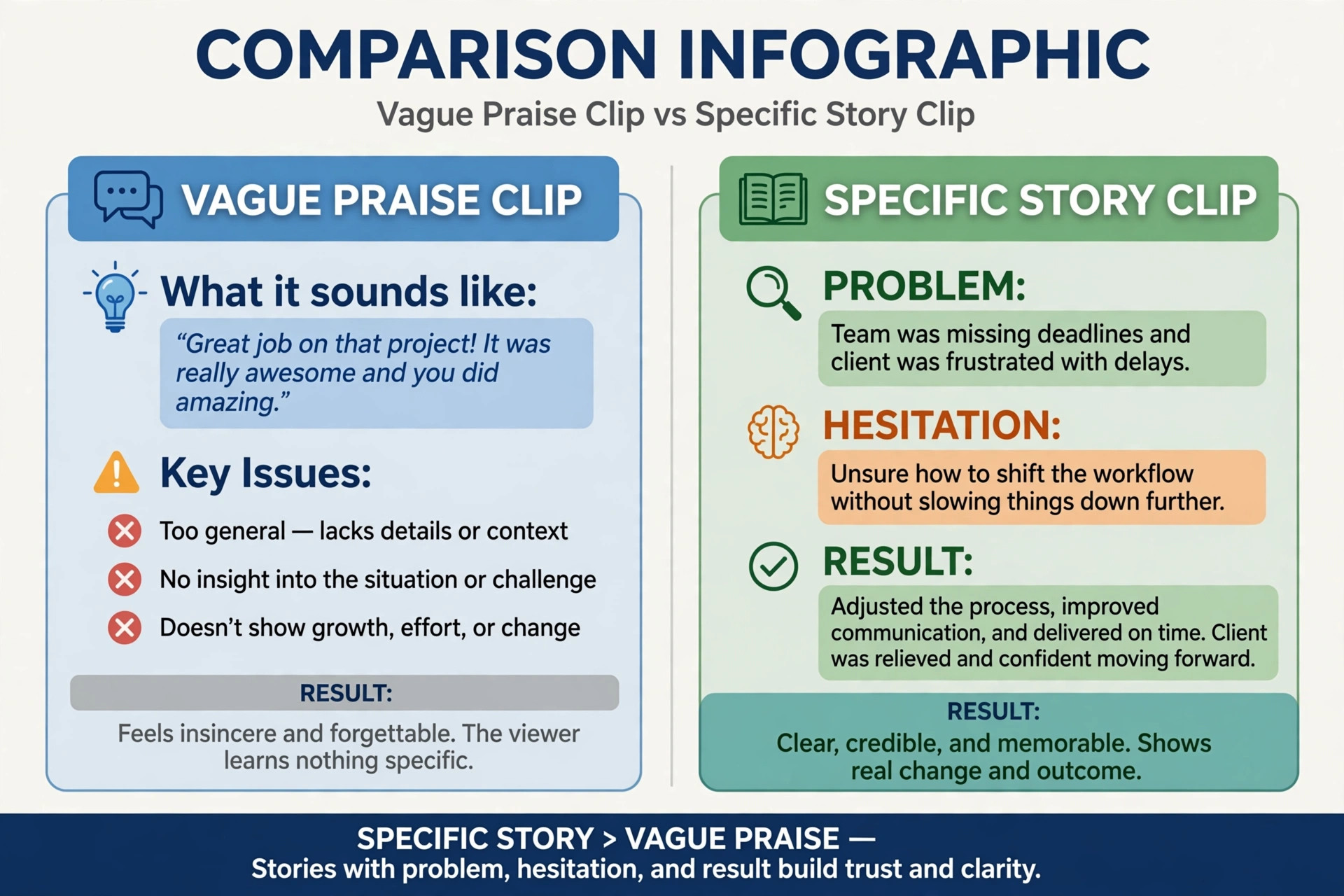
Believability comes from specifics. A clip that says the service was great tells a prospect nothing they can verify. A clip that says the business fixed a leak that two other firms had missed, and the customer has had no problem in six months, gives a prospect a concrete story to weigh. Encourage customers to name the problem they had before, what made them hesitate, what the business did, and what changed afterwards. Those four points form a complete story in under ninety seconds, and guides commonly recommend a final length of 60 to 90 seconds for social use, reported in a third party guide, so confirm current guidance on a vendor page before setting a hard limit.
Honesty rules also protect believability. Do not script the customer words, do not pay for praise, and do not edit a clip so it claims something the customer did not say. A guide summarising endorsement rules notes that incentives must not be tied to positive sentiment, and that fabricating testimonials is prohibited, reported in a third party guide, so confirm the current rules on an official source before publishing. Thanking a customer for their time is different from paying for a positive statement, and that distinction should be kept clear in every message. A testimonial the customer would happily stand behind is worth more than a polished clip they later regret.
How to Collect Video Testimonials Small Business Workflow
Start by choosing who to ask. The best candidates are customers who have already praised the business without being prompted, in a review, a thank you message, or a conversation after a job. Recent customers are better than old ones, because the experience is fresh and the emotion is genuine. A customer who finished a job yesterday can describe the result vividly. A customer from a year ago will give a vaguer account, and may need reminding about details. Build a short list each week from completed jobs, positive messages, and repeat customers, and work through it steadily rather than asking everyone at once.
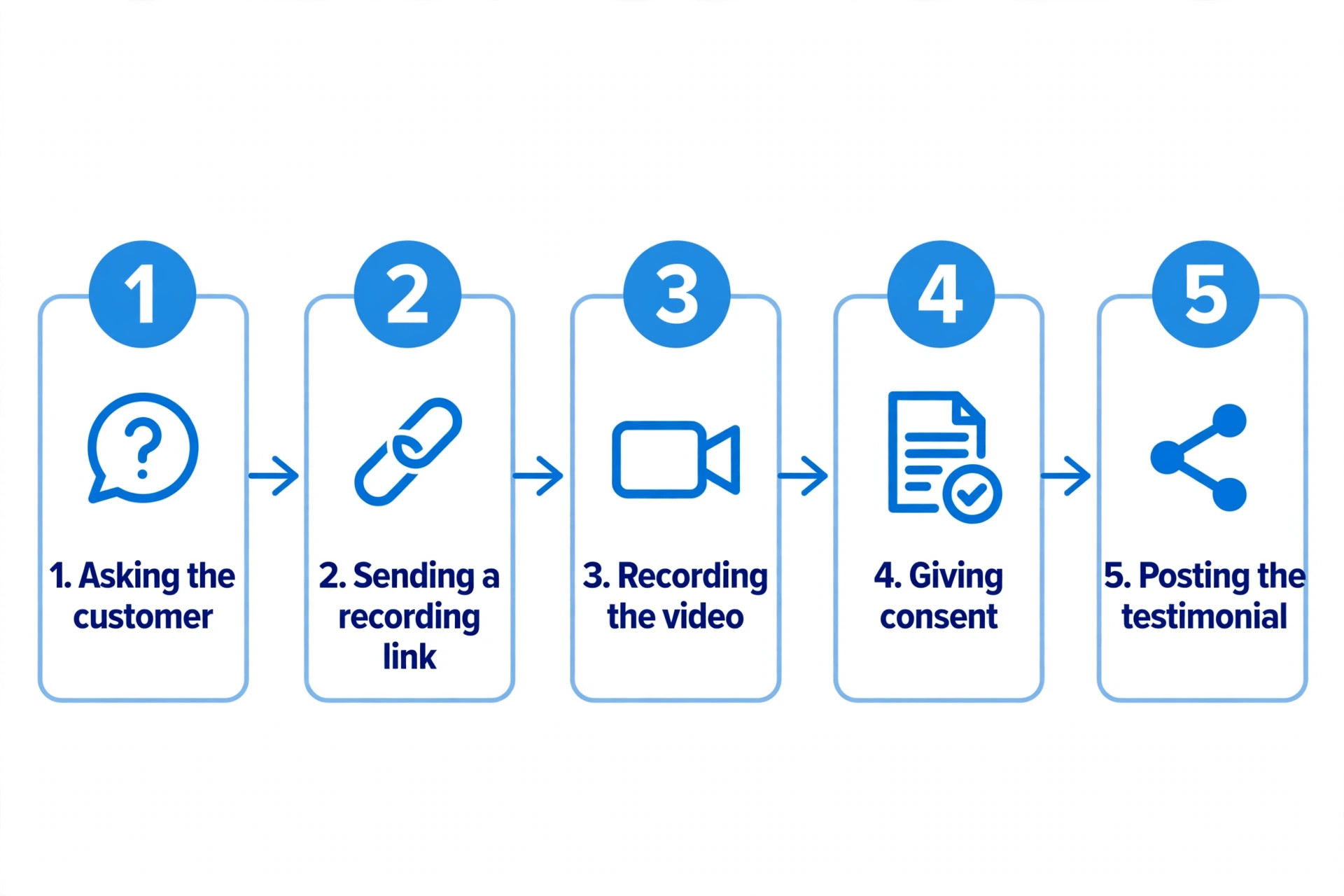
Timing matters as much as selection. Ask soon after a visible result, such as a completed job walkthrough, a delivered order the customer is pleased with, or a milestone in an ongoing service. For product businesses, guides suggest waiting until the customer has had a few uses, often 7 to 14 days after delivery depending on the product type, reported in a third party guide, so adapt the timing to the service rather than copying a fixed number. If the ask comes before the customer has experienced the result, it feels premature. If it comes months later, the moment has passed. The right window is when the customer is pleased and the result is still fresh in mind.
The Ask Script
Keep the ask short, specific, and easy to refuse. A useful spoken form is to thank the customer, mention that other people deciding on the service find real customer stories helpful, and ask whether they would record a short video on their phone using a link the business will send. Say it will take about two minutes, that they can re record, and that they approve the final clip before anything is published. That last promise removes the biggest fear, which is losing control over how they appear. Customers who know they can approve the clip agree far more often.
A written version works for email or text. Keep it to a few lines, thank the customer, state the time needed, include the single link, and list the three prompts. Do not ask the customer to download an app, edit the video, or email a large file. Each extra step loses people, and the customers lost are often the busiest and most credible. One link, one action, and one submit button is the standard to aim for. If the tool requires more than that, choose a simpler tool, because friction is the main reason testimonial requests get ignored.
The Phone Recording Brief
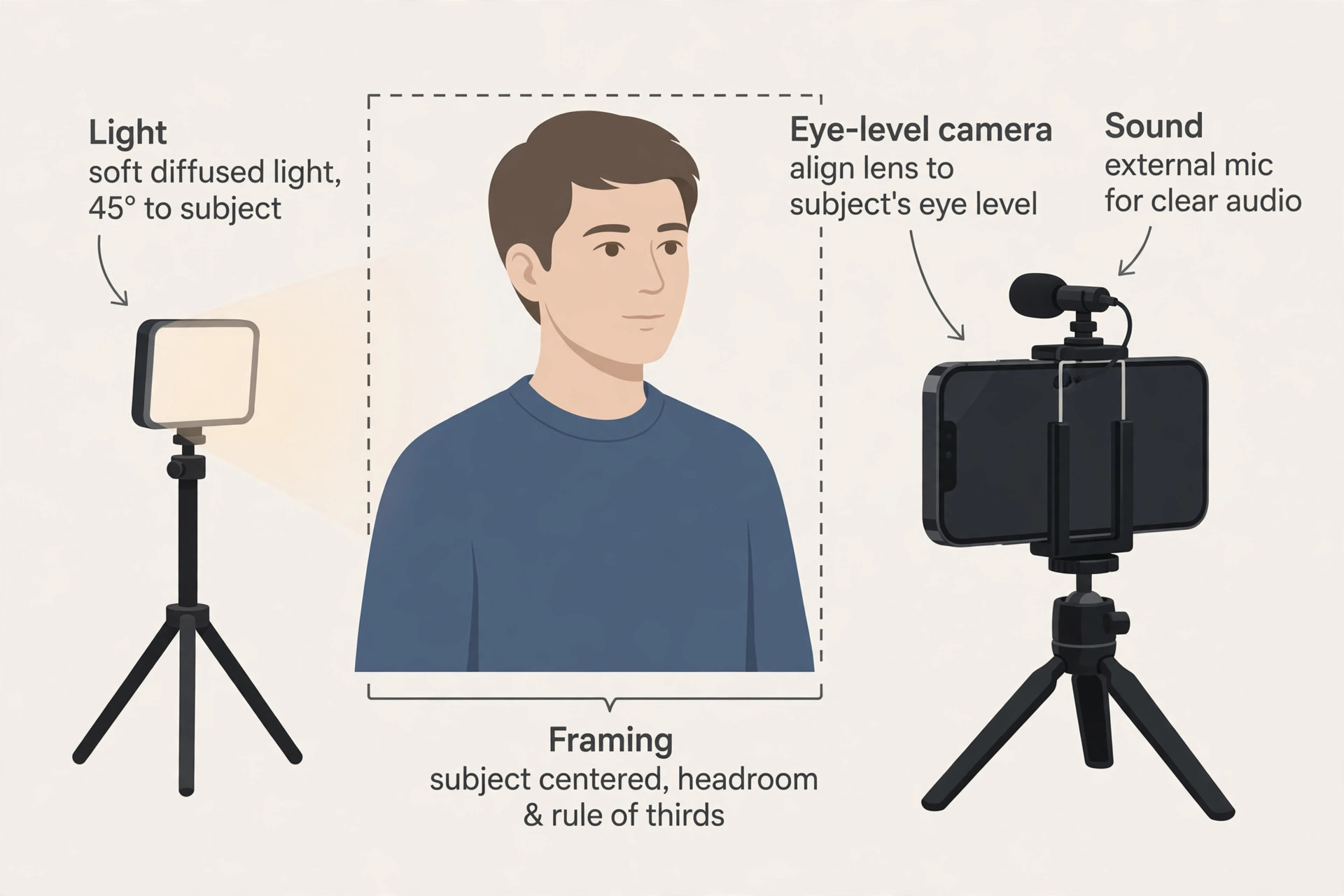
Send the brief with the link, not as a separate document the customer must hunt for. It should fit on a phone screen and take under a minute to read. Tell the customer to find a quiet spot, face a window or a light source, hold the phone at eye level, and keep the background tidy. Those four points handle the two factors that most affect quality, which are light and sound. A customer sitting with a window in front of them, in a quiet room, will produce a usable clip on an ordinary phone, while a customer backlit by a bright window or recorded near traffic will not, however good the phone camera may be.
Give prompts, not a script. Useful prompts are what problem were you trying to solve, what made you hesitate before choosing us, what did we do, and what changed afterwards. Three or four prompts are enough. More prompts make the customer feel examined rather than interviewed, and the clip becomes stiff. Also tell the customer the target length, such as 60 to 90 seconds, and reassure them that pauses and restarts are fine because editing will remove stumbles. Customers relax when they know perfection is not expected, and relaxed customers sound convincing.
Tools That Collect Video Without Friction
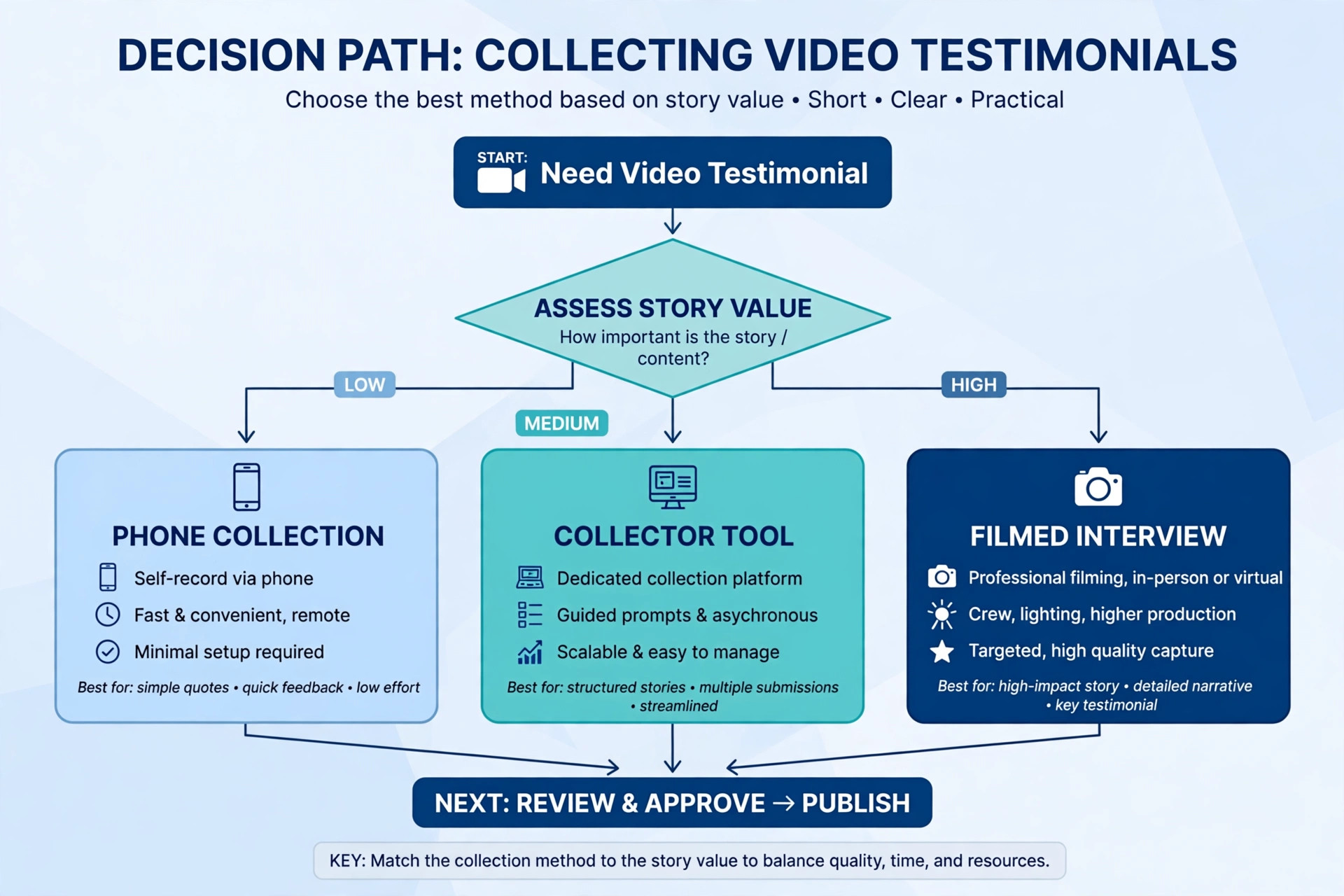
The simplest collection method is a dedicated recording page, often called a collector, where the customer opens a link, taps record in the browser, answers the prompts, and submits. No app install is needed, which matters because an install request is where many customers abandon the task. VideoAsk, Vocal Video, and Boast are names commonly mentioned in testimonial guides for this kind of collector page, and Loom is often mentioned for simple screen and camera recording. This guide does not quote their prices or feature lists, because those change, so check the current vendor page before choosing one and confirm the tool fits the business privacy needs.
Choose a tool by testing the customer journey yourself on a phone. Open the link, record a test clip, submit it, and check how the finished video arrives and how consent is recorded. If any step feels confusing to you, it will feel worse to a customer who has never done it before. Also check whether the tool records consent, allows the customer to re record, and lets the business download the original file. A tool that locks videos inside its own platform creates a problem later if the business wants to use a clip in an advertisement or on a different page. Ownership and download access matter as much as a pretty recording page.
When a Simple Phone Video Is Enough
For many small businesses, a customer recorded phone video sent through a collector link is the right format, and a filmed interview is unnecessary. A filmed interview suits a flagship case study, a high value service, or a story that needs location footage. It costs more, takes longer to arrange, and can make customers nervous, so reserve it for the few stories that deserve that investment. Everyday testimonials should stay quick and phone based, because volume matters. Ten honest phone clips covering different problems and customer types will persuade more prospects than one polished film covering a single story.
Orientation deserves a decision before collection starts. Horizontal video suits a website and video platforms, while vertical video suits short social formats. If the business can only collect one version, horizontal gives more flexibility, because it can be cropped for social use later, reported in a third party guide, so confirm format guidance on a vendor page if social clips are the main goal. Tell customers the orientation in the brief, so clips arrive in a usable shape rather than a mix that needs reworking. A one line instruction in the brief prevents a common editing headache.
Consent, Approval, and Honest Use
Written consent is not optional paperwork. It is the record that proves the customer agreed to be recorded and agreed to the uses listed, such as website, social media, email, and advertising. Get consent before publishing, and keep a record with the customer name, role or business where relevant, the date, and the exact uses covered. Verbal agreement alone is hard to prove if a customer later changes their mind, and a dispute over a published video costs far more than the time needed to collect a signed form. Many collection tools include a consent checkbox, but a separate signed release is still worth keeping for flagship clips.
Approval of the final edit is a separate step from consent to record, and it builds trust. Send the customer the edited clip before publishing, and ask them to confirm they are happy with it. Most customers approve quickly, and some suggest a small correction, such as a job title or a detail they misspoke. Making that correction costs minutes and turns the customer into an advocate for the clip, because they now feel ownership of it. Publishing without approval risks a customer asking for removal after the clip is already live on several pages, which is embarrassing and wasteful.
What a Consent Form Should Cover
A consent form does not need to be long, but it should name the customer and the business, confirm permission to record video and audio, list where the testimonial may appear, state how long the permission lasts, and explain how the customer can ask for removal. It should also confirm that the testimonial reflects the customer honest opinion and that no payment was made for a positive statement, where that is true. If a thank you gift was given, record it honestly rather than hiding it, because undisclosed incentives create endorsement risk. Keep the language plain, so the customer understands what they are signing without needing legal advice.
Removal requests should be handled gracefully, even where the form allows continued use. A customer who asks for removal has a reason, and arguing over the form will damage the relationship and may create a public complaint. Remove the clip promptly, thank the customer, and note the removal in the tracking record so the clip is not republished by mistake. A business that handles removal well often keeps the customer, and sometimes earns a written review instead. The long term relationship matters more than any single clip.
Editing Without Losing the Customer Voice
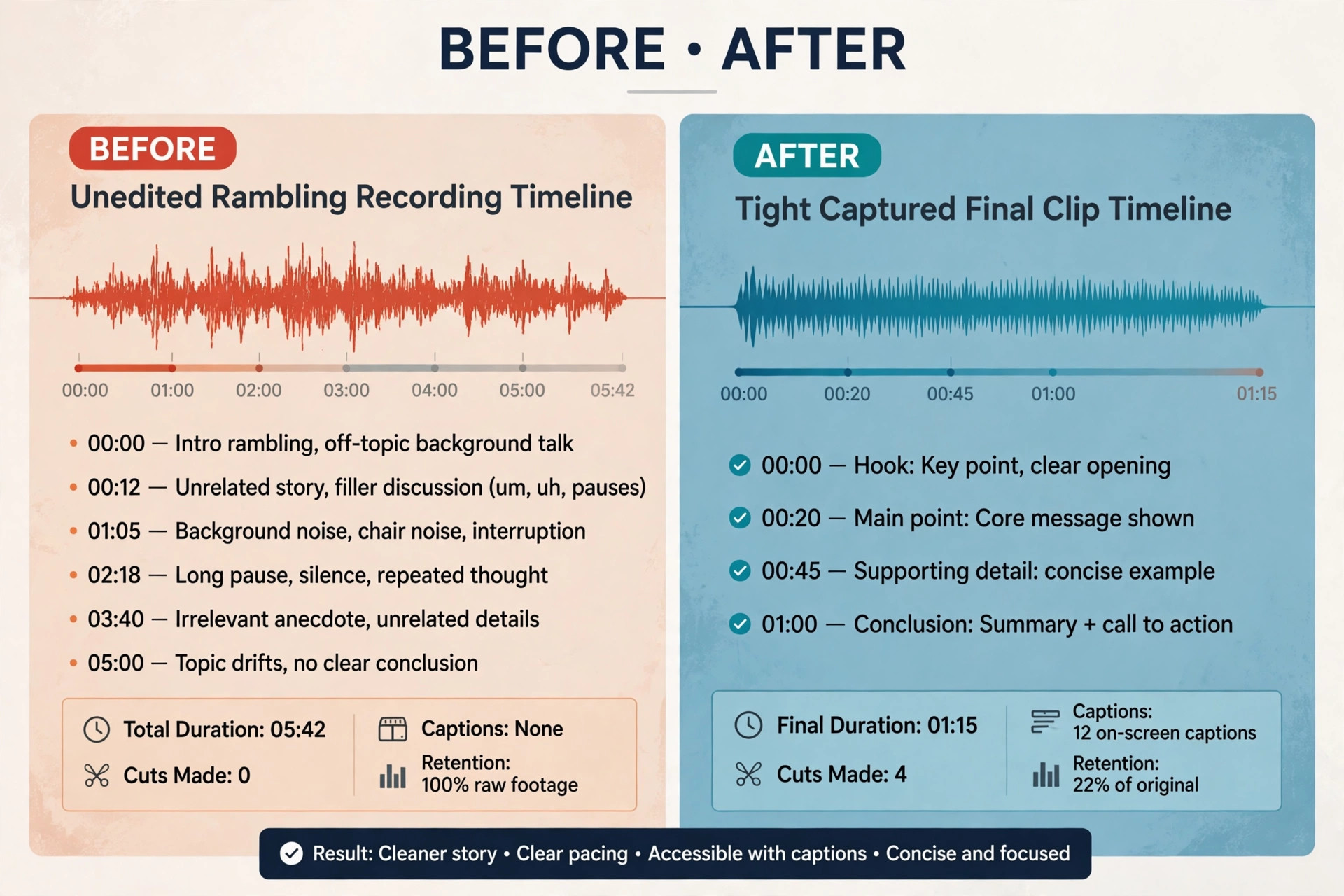
Editing should tighten a clip, not rewrite it. Start by cutting pauses, false starts, and any section that repeats a point already made. Keep the specific details, because they are what make the clip believable. A 3 minute recording that becomes a 75 second clip with a clear problem, hesitation, action, and result is a success. A 3 minute recording cut to 20 seconds of generic praise is a waste, because the specifics that persuaded prospects are gone. Edit for clarity and length, and leave the customer wording intact wherever possible.
Add captions, because many viewers watch social video without sound, and captions also help accessibility. Keep captions accurate rather than polished, and do not change a word the customer said to make the caption read better. Add a short title card or text overlay with the customer first name and role only where the customer approved it, and keep branding subtle. The clip should feel like a customer story, not an advertisement with a customer in it. If the branding dominates the first seconds, viewers skip, and the testimonial loses its main advantage, which is trust.
Cutting One Clip Into Several Uses
One good recording can supply several assets, provided the customer consented to those uses. Cut a 60 to 90 second version for the website, a 30 second version for social feeds, and a single sentence quote with a still image for email or a sales page. Each version should stand alone, so a viewer who sees only the short cut still hears a complete point. Keep the original file safe, because a future campaign may need a different cut, and re asking the customer to record again is avoidable work. Label files clearly with customer name, date, consent status, and approved uses, so no clip is used beyond its permission.
Do not publish every clip received when learning how to collect video testimonials small business stories. Select clips that cover different problems, customer types, and objections, so a prospect browsing the testimonial page sees someone like them. Five varied clips outperform twenty similar ones, because variety answers more objections. Quality here means relevance and clarity, not production polish, and a page with a few strong stories converts better than a wall of forgettable ones.
Where to Post Each Testimonial
Placement should follow the buying journey. A homepage clip should address the most common hesitation for new visitors, such as price, trust, or whether the service works for people like them. A service page clip should feature a customer who bought that specific service, not a general praise clip. A pricing or quote page clip should feature a customer who hesitated over cost and found the result worth it. Matching the clip to the page objection makes each placement work harder than a generic testimonial wall that visitors scroll past.
Social posting needs a different cut and a different caption. Lead with the customer result in the caption, not with the business name, because viewers decide in seconds whether to watch. Email placement works well in follow up sequences, where a short clip from a similar customer can answer a prospect hesitation at the moment they are deciding. This placement discipline is part of how to collect video testimonials small business teams turn into sales help, rather than a folder of unused files.
A Simple Posting Rotation
Post one new clip per week or fortnight rather than publishing ten at once. A steady rotation keeps social feeds active, gives each clip attention, and gives the business time to learn which stories get responses. Track simple signals, such as which clips get watched to the end, which get shared, and which pages with a testimonial convert better than pages without one. Those signals are directional at small volumes, but over months they show which problems and customer types deserve more collection effort. Collection should follow demand, so if pricing objection clips perform best, ask the next customers who hesitated over price.
Repurpose with permission, not assumption. A clip consented for website use may not be consented for paid advertising, and paid use is where disputes most often arise. Check the consent record before each new use, and ask for expanded permission where needed, explaining exactly where the clip will appear. Most customers agree when asked clearly, and the ask itself shows respect. A business that treats consent as a living record, not a one time checkbox, avoids the most common testimonial mistake, which is using a good clip in a place the customer never approved.
Mistakes That Waste Good Testimonials
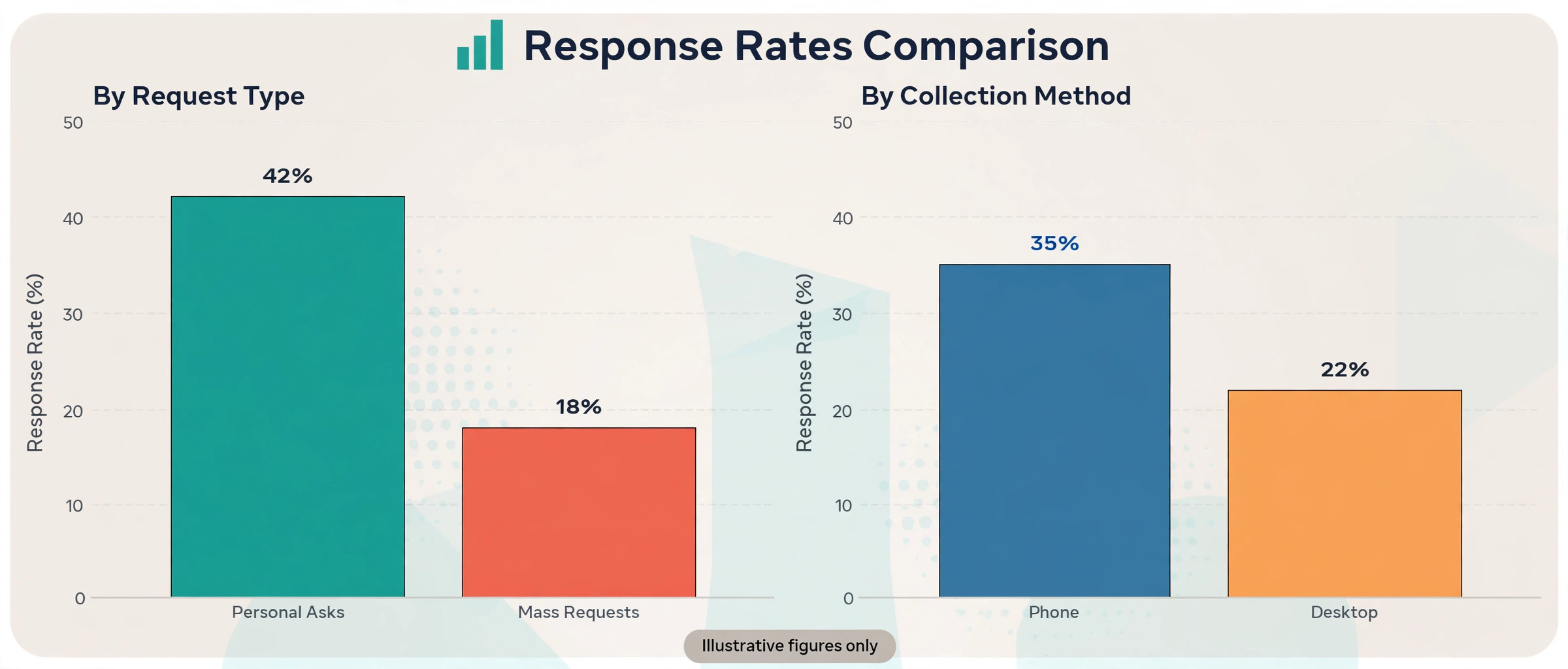
The first mistake is asking everyone with the same generic message. A mass request with no personal note and no link feels like spam, and customers ignore it. Personalise the ask with the job or result, send it soon after the result, and include the link. The second mistake is giving customers a blank camera with no prompts. A blank prompt intimidates even enthusiastic customers, because they do not know what to say or how long to speak. Three prompts solve that problem and produce more useful footage in less time.
The third mistake is collecting clips and never publishing them. Customers who took time to record notice when nothing appears, and they are less likely to help again. Publish promptly after approval, send the customer the live link, and thank them. The fourth mistake is over editing, where the customer voice disappears under music, effects, and corporate wording. Keep editing light, keep the customer words, and let the story carry the clip. A testimonial that sounds like an advertisement loses the trust advantage that made video valuable in the first place, and prospects can tell the difference within seconds.
A fifth mistake is ignoring sound and light in the brief. Owners often worry about camera quality, but the real problems are a customer filmed against a bright window, making their face dark, or recorded in a noisy room where words are hard to hear. The brief in this guide fixes both with two lines, and that is why the brief matters more than any tool choice. Test the brief with a friendly customer first, watch the result, and fix any instruction that produced a poor clip before sending it to twenty people. Small brief fixes prevent a batch of unusable recordings.
Video Testimonial Checklist and Template
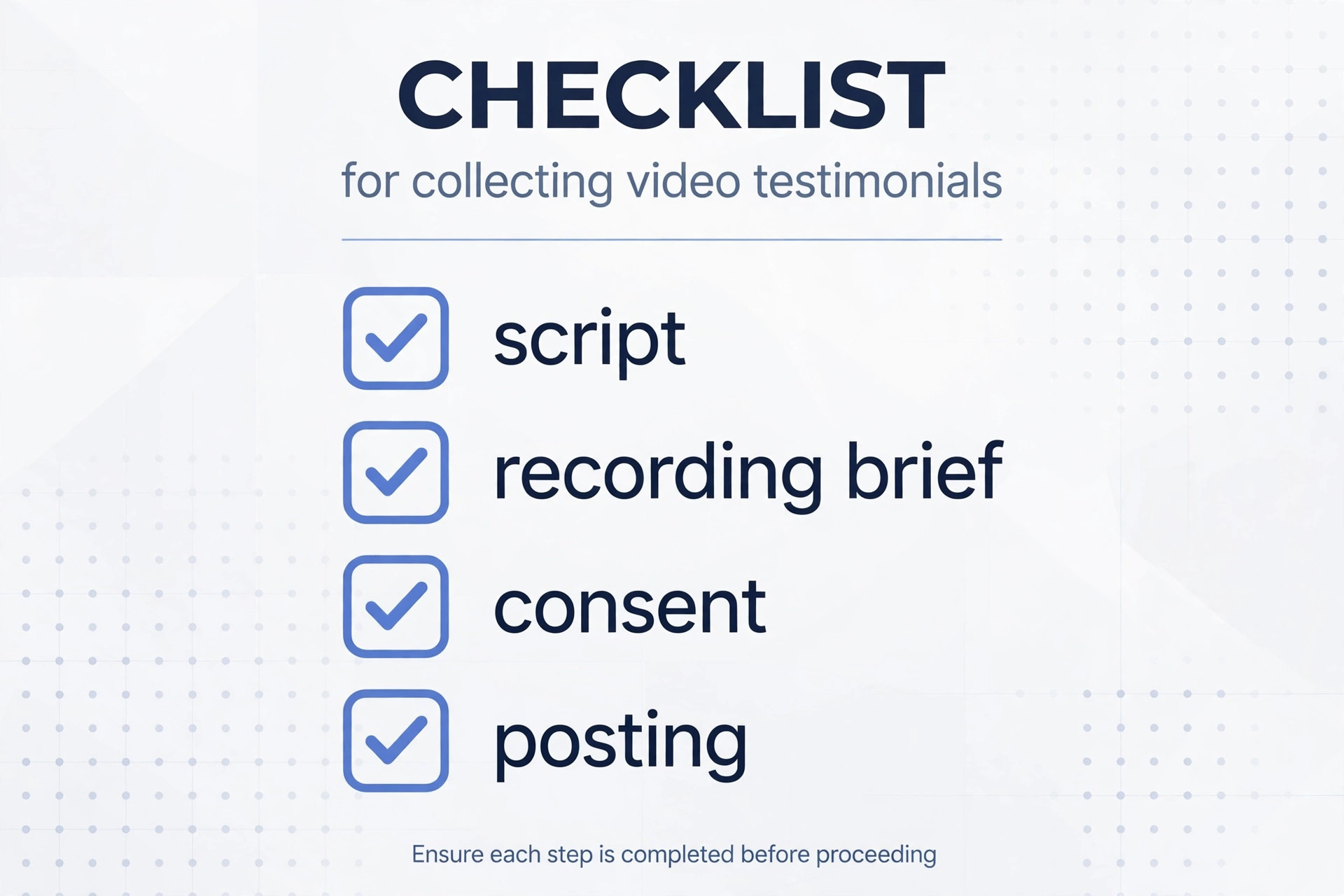
Copy this template into a planning document and complete it for each collection round. It covers the ask script, the phone recording brief, the consent form, and where to post, so a new team member can run collection without reinventing the process. Review the template after each round, and update the prompts or the brief whenever customers report confusion or clips arrive with a repeated problem. A template that improves from real clips is more valuable than a perfect template that is never used.
- Ask script. Write the spoken version and the written version, both stating time needed, re record option, and approval before publishing.
- Phone recording brief. List quiet room, face the light, eye level camera, tidy background, horizontal or vertical as decided, and target length.
- Prompts. Write three or four prompts covering problem, hesitation, action taken, and result, with a number or timeframe where possible.
- Collection link. Name the tool and the link, test it on a phone, and confirm no app install is required.
- Candidate list. List recent happy customers each week, with the job or result to personalise the ask.
- Consent form. Include names, permitted uses, duration, removal process, and a statement that the opinion is honest.
- Approval step. State who sends the edited clip to the customer, and how approval is recorded before publishing.
- Editing rules. State maximum lengths for website and social cuts, caption requirement, and keep customer wording intact.
- Posting plan. Map each clip to a page or channel by the objection it answers, and record the live link sent to the customer.
- Thank you routine. State who thanks the customer, how quickly, and what happens when a clip is published.
- Archive and tracking. Record file location, consent status, approved uses, and removal requests in one log.
A 30 Day Collection Plan
Week one is setup. Choose the tool, test the link on a phone, write the ask script and brief, and prepare the consent form. Week two is the first ask round to ten recent happy customers, with personal messages and a follow up for non responders after five days. Week three is editing and approval, with website and social cuts made only for approved clips. Week four is posting, with one clip on the homepage or key service page, one social cut, and thank you messages with live links to every contributor. At month end, review which prompts produced the best clips, which ask channel worked, and which placement got the most response, then set the next round target.
Before You Ask for the First Video
Video testimonials work when the system respects the customer at every step. Ask personally, make recording easy, give clear prompts, get written consent, let the customer approve the edit, and publish promptly with thanks. Businesses that follow that sequence collect steadily, because each happy contributor makes the next ask easier. Businesses that skip steps, especially consent and approval, collect clips that cannot be used or that damage trust when published.
Start with ten personal asks this week for how to collect video testimonials small business stories, learn from the first clips, and build a library that answers real prospect objections with real customer voices. That library, built honestly over time, becomes one of the most persuasive assets a small business owns, and it costs far less than the advertising it replaces.
Frequently Asked Questions
How long should a video testimonial be
Aim for 60 to 90 seconds for social use, and up to 2 or 3 minutes for a website case study where the story needs more detail, reported in third party guides, so confirm current guidance on a vendor page before setting a rule. Recordings often run longer, and editing should cut them to the strongest section. A short tight clip with a specific result beats a long rambling clip every time, because viewers decide quickly whether to keep watching.
Do I need written permission to publish a video testimonial
Yes. Get written consent before publishing, covering the customer identity, permission to record, permitted uses, duration, and removal process. Keep the record with the video file, and check it before each new use, especially paid advertising. Verbal agreement is not a safe substitute, because it cannot be proved later if the customer disputes the use. This consent discipline is essential when learning how to collect video testimonials small business owners can defend and reuse with confidence.
What equipment does a customer need to record a testimonial
A phone or a laptop with a camera, plus reasonable light and a quiet room. No studio, no crew, and no app install should be required if the collection tool works in a browser. Suggest the customer face a window, sit somewhere quiet, and hold the camera at eye level. Those three points handle most quality problems. A basic clip on lavalier microphone can improve sound, reported in a third party guide at a modest price, so confirm current prices on a vendor page before recommending a purchase.
What questions should I ask in a video testimonial
Ask three or four prompts. What problem were you trying to solve. What made you hesitate before choosing us. What did we do. What changed afterwards. Always include the hesitation question, because a customer raising and then dismissing a doubt is the most persuasive footage available. Ask for a number or timeframe if the customer has one, such as a result in a number of weeks or a job completed in one visit, because specifics make the story believable.
How do I get customers to agree to record a video
Ask recent customers who have already praised the business, soon after a good result, with a personal message, a single link, and a promise that they can re record and approve the clip before publishing. Keep the time needed to about two minutes, and give prompts rather than a script. Low friction is the deciding factor. A link that opens directly to a camera ready page gets far more responses than a request to install an app, edit a file, and email it back. This is the practical core of how to collect video testimonials small business teams can repeat every week.
Where should I post video testimonials first
Start with the homepage and the most visited service page, matching each clip to the main objection on that page, such as price, trust, or fit for a particular customer type. Then cut short social versions with captions, and use clips in follow up emails where a prospect hesitation needs answering. Post steadily, one clip at a time, rather than publishing a large batch at once, so each story gets attention and the business learns which stories perform best.
More Reading on Stratilyze
For related small business marketing, read how to ask customers for Google reviews as a small business and best CRM for cleaning companies. For customer and booking systems, see best booking software for med spas and best scheduling software for home care agencies. Together these guides support how to collect video testimonials small business plans and turn happy customers into reviews, referrals, and video stories that support sales.