

A dog walking route fails in the middle, not at the start. The morning looks fine on paper, then a client cancels late, a dog needs a different pickup point, a key does not work, and the walker is suddenly 40 minutes behind with three dogs still to collect. Software cannot walk the dogs, but it can keep the route, the keys and the client updates in one place so a midday change does not turn into missed walks and apologetic messages. That practical test separates the best route software for dog walking businesses from a generic booking calendar.
This guide compares 8 tools that schedule, route and report dog walks, from solo friendly apps to multi-service platforms. It records published prices where a recent guide or review lists them, and marks other prices as quote only, with a note to check the vendor’s current pricing page before budgeting.
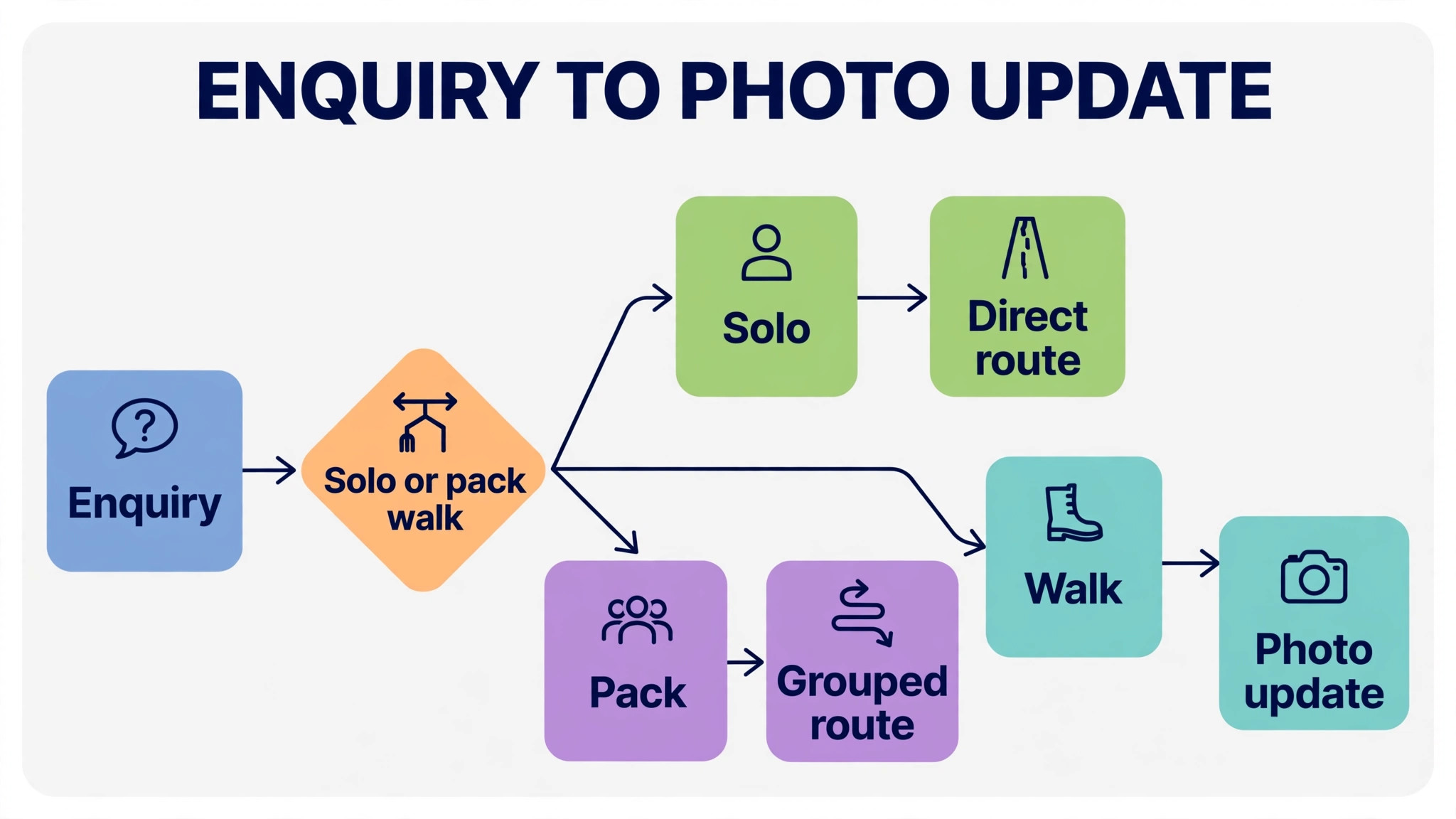
The pattern is simple. Solo walkers need a cheap, simple route list with photo updates. Small teams need staff assignment and GPS tracking. Multi-route crews need dispatch level control, so a manager can reassign a route midday without calling every walker. The sections below match each tool to the business shape it fits, then give a key and photo checklist that works with any of them.
This guide is written for owners as well as walkers. An owner needs to see route completion, photo update quality, invoice accuracy and staff workload in one place, and the tool that gives that view without extra messaging apps will save management hours every week.
At a glance comparison
The table below compares the 8 tools at a glance, including the best route software for dog walking businesses for solo, team and crew use.
| Tool | Best for | Starting price | Standout strength |
|---|---|---|---|
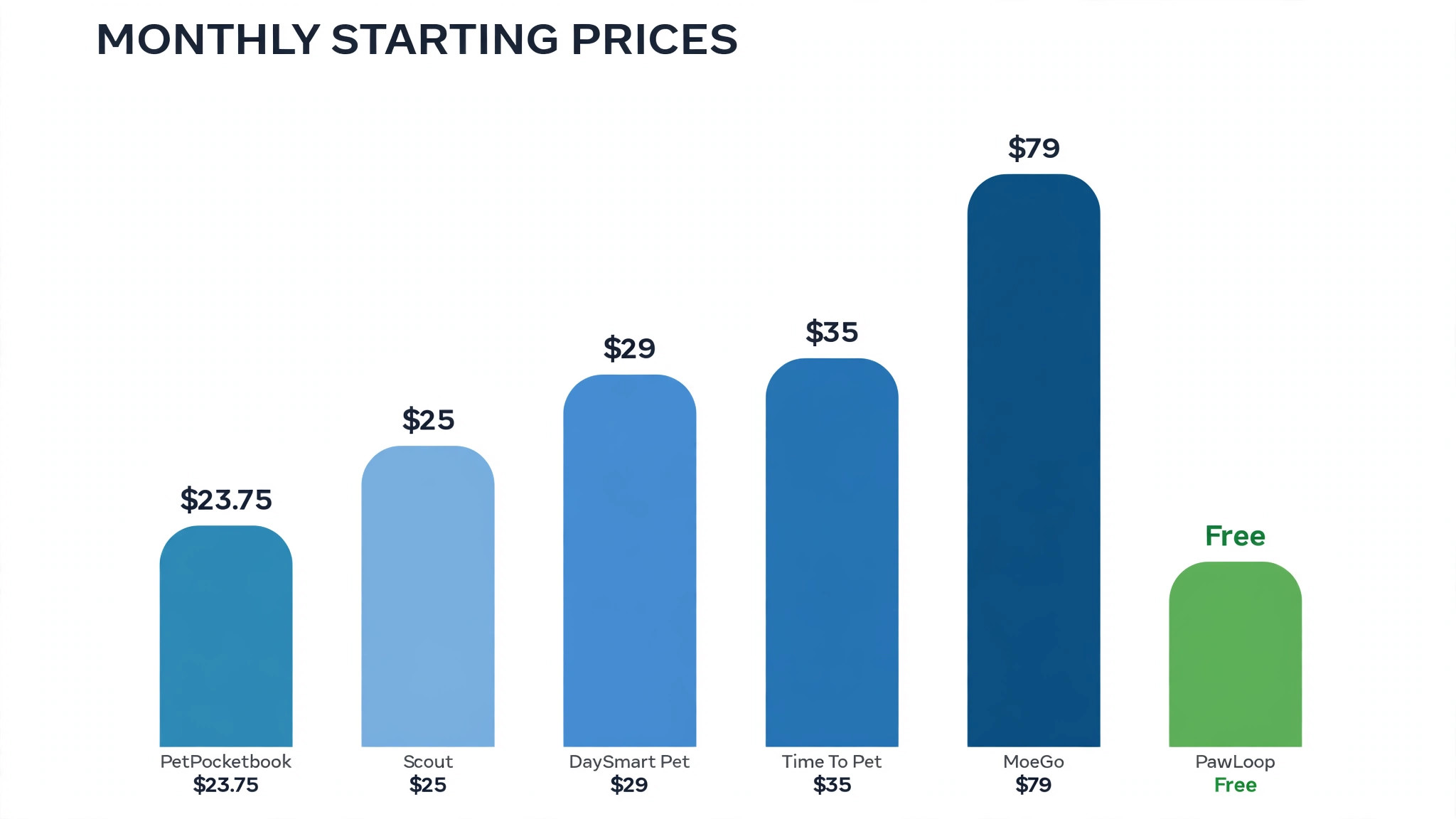
| Time To Pet | Solo walkers and growing teams | From $35 per month for solo use, with team pricing from $25 per month plus $13 per active staff member, as listed on a review site. Check the vendor’s current pricing page | GPS tracked walks, report cards and client communication in one app |
| MoeGo | Multi-service pet businesses and larger teams | From $79 per month as listed in a 2026 guide. Check the vendor’s current pricing page | One platform for walking, grooming, boarding and daycare |
| PetPocketbook | Budget conscious walkers and sitters | From $23.75 per month as listed in a 2026 guide. Check the vendor’s current pricing page | Lightweight scheduling, billing and team tools at a low price |
| Scout | Walkers who want a modern, easy app | From $25 per month as listed in a review listing. Check the vendor’s current pricing page | A modern app experience built for walking and sitting teams |
| PawLoop | New walking businesses testing software | Free starter plan as listed in a review listing, with paid plans to confirm. Check the vendor’s current pricing page | A walking specific platform with a free starting tier |
| DaySmart Pet | Appointment driven pet businesses | From $29 per month as listed in a 2026 guide. Check the vendor’s current pricing page | Appointment scheduling with integrated payments |
| WagTracker | UK sole traders who want low cost simplicity | From £9.99 per month as listed in a 2026 comparison. Check the vendor’s current pricing page | Simple scheduling, client records and invoicing for one walker |
| My Pet Walker | UK walkers who want a proven local platform | From £19.99 per month as listed in a 2026 comparison. Check the vendor’s current pricing page | A full featured UK platform for walkers and sitters |
Prices marked quote only mean the vendor does not publish a starting price on its pricing page at the time of research. Use the trial to confirm total cost, including payment fees and add-ons, before comparing monthly figures directly.
The tools in detail
Each tool below is judged on route work first, including route order, walker assignment, GPS tracking and midday changes, then on scheduling, payments and client updates. A tool that books well but cannot reorder a route quickly will fail on the first disrupted day. Judging tools this way is the fairest test of the best route software for dog walking businesses.
Time To Pet
Time To Pet is the most complete starting point for a dog walking business, because it covers scheduling, invoicing, payments, client and staff apps, GPS tracking and messaging in one system. A walker can start a walk, track the route, send a photo report card and log the visit without switching apps, which matters when hands are full and dogs are waiting.
Route work benefits from that completeness. Recurring walks can be grouped into regular routes, staff see their day in order, and clients see where their dog went and when. The cost grows with active staff, so a solo walker should start on the solo plan and move to team pricing only when hiring makes the extra seat charges worthwhile.
Before you commit, run Time To Pet on a disrupted week, including a late cancellation, a route change at noon and a walker calling in sick. Watch how routes, clients and invoices update, and check whether the manager can reassign a route from a phone in seconds. A system that passes that week will handle ordinary weeks easily.
Ask Time To Pet how walk records, invoices and client details export, and test that export with a real client before you depend on it for tax or dispute records.
MoeGo
MoeGo suits a pet business that does more than walking, since it connects grooming, boarding, daycare and walking in one system. A business that adds grooming or daycare later will not need a second platform, and customer records, payments and messaging stay in one place across services. That breadth is its main advantage over a walking only tool.
For a pure walking business, that breadth can feel heavy. The booking and scheduling screens carry options for other services, and the price reflects a wider platform. A walking only team should trial the daily route view specifically, and check whether staff can run a full walking day without touching grooming or boarding screens.
The question to settle in the trial is client communication, not only scheduling. Ask MoeGo how photo report cards reach clients, how arrival times are shown, and whether a client can see a clear record of every walk. Clients who trust the updates will stay, while clients who chase updates will leave.
Check MoeGo for integration with your accounting tool and payment provider, since a route system that cannot share data will create double entry for the owner.
PetPocketbook
PetPocketbook is a lightweight option for walkers and sitters who want scheduling, billing and team management without paying for a large platform. Its low starting price makes it attractive for a new walker building a client base, and its simple screens keep daily admin short.
Lightweight tools need a route check. Confirm how walks are grouped into routes, how staff see route order, and how photo updates reach clients, since those are the daily jobs that decide whether the tool saves time. If route grouping is manual, a larger tool may still be cheaper in staff hours.
Cost control matters as much as route order. Ask PetPocketbook for a written list of per staff charges, GPS fees and messaging costs, then model the cost at your current team size and at the team size you plan to reach. The cheapest solo plan can still be the dearest system once staff charges are added.
Trial PetPocketbook with your least technical walker, since that walker will show whether route screens and photo updates are truly simple under time pressure.
Scout
Scout positions itself as a modern, easy to learn app for pet sitting and dog walking, which matters when staff turnover is high and training time is short. A new walker should be able to open the day’s route, start a walk and send an update with minimal instruction, and a client should understand the booking screen without a phone call.
Ease of use should be tested with the hardest day, not the easiest. Run a day with late cancellations, a route change midday and a dog that needs a different pickup point, and see whether the app handles those changes cleanly. A simple app that handles changes well beats a feature rich app that confuses staff under pressure.
Finally, check how Scout handles cover. Test a route handed to a walker who has never run it, including key access, dog notes and pickup points, and see whether that walker can complete the route without calling the owner. Cover that works without owner help is what lets a business grow.
Confirm Scout support hours for morning route problems, because a route fault at 7am cannot wait for an afternoon email reply when dogs are waiting.
PawLoop
PawLoop is built specifically for dog walkers, with a free starter plan that lets a new business test scheduling and client management before paying. That low risk start is valuable for a solo walker who is unsure whether software will pay for itself, since the cost of trying is time rather than money.
Free tiers always have limits, so check them before building a client base on the platform. Confirm how many clients, walks or staff the free tier allows, what happens when those limits are reached, and whether route, key and photo features are included or held for paid plans.
Before you commit, run PawLoop on a disrupted week, including a late cancellation, a route change at noon and a walker calling in sick. Watch how routes, clients and invoices update, and check whether the manager can reassign a route from a phone in seconds. A system that passes that week will handle ordinary weeks easily.
Ask PawLoop how walk records, invoices and client details export, and test that export with a real client before you depend on it for tax or dispute records.
DaySmart Pet
DaySmart Pet suits pet businesses built around appointments, with scheduling and integrated payments in one place. A walking business that also offers sitting or grooming appointments can manage those bookings on the same calendar, which reduces double booking risk across services.
Walking specific features need a close look. Check GPS tracking, route ordering, walker assignment and photo report cards, since an appointment first system can handle bookings well while treating the walk itself as a simple time slot. If route and photo tools are weak, staff will fill the gap with separate messaging apps.
The question to settle in the trial is client communication, not only scheduling. Ask DaySmart Pet how photo report cards reach clients, how arrival times are shown, and whether a client can see a clear record of every walk. Clients who trust the updates will stay, while clients who chase updates will leave.
Check DaySmart Pet for integration with your accounting tool and payment provider, since a route system that cannot share data will create double entry for the owner.
WagTracker
WagTracker is built for sole traders, with scheduling, client records and professional invoicing at a low monthly price. For a one person walking business, that simplicity is the point. The owner does not pay for team management, multi-route dispatch or facility tools that a solo walker will never use.
Solo tools need a growth question. If the business plans to hire walkers or run several routes, check whether the platform grows with it or forces a move later. A cheap solo tool that requires a full migration in a year can cost more than a slightly dearer tool that scales.
Cost control matters as much as route order. Ask WagTracker for a written list of per staff charges, GPS fees and messaging costs, then model the cost at your current team size and at the team size you plan to reach. The cheapest solo plan can still be the dearest system once staff charges are added.
Trial WagTracker with your least technical walker, since that walker will show whether route screens and photo updates are truly simple under time pressure.
My Pet Walker
My Pet Walker is a UK built platform for dog walkers and sitters, with a comprehensive feature set priced in pounds. For a UK walker, local pricing, support hours and payment options can matter as much as features, and a platform built for the local market often handles those details better than a US priced tool converted by exchange rates.
The trial should focus on routes and clients, not on the feature list. Test a week of recurring routes, a holiday cover change and a client who changes pickup days, and check that invoices and photo updates stay correct through each change. A proven platform should handle those routine changes without owner intervention.
Finally, check how My Pet Walker handles cover. Test a route handed to a walker who has never run it, including key access, dog notes and pickup points, and see whether that walker can complete the route without calling the owner. Cover that works without owner help is what lets a business grow.
Confirm My Pet Walker support hours for morning route problems, because a route fault at 7am cannot wait for an afternoon email reply when dogs are waiting.
Best pick by job
Use this table to shortlist by business shape, then trial the top two in your row on a real disrupted week. The best route software for dog walking businesses for a solo walker is not the best pick for a multi-route crew, because the daily bottleneck changes as walkers are added.
| Job | Pick | Why it fits |
|---|---|---|
| Solo walker | WagTracker or PetPocketbook | A simple route list with invoicing at a low monthly cost |
| Small team | Time To Pet or Scout | GPS routes, staff apps and photo report cards in one system |
| Multi-route crew | Time To Pet or MoeGo | Dispatch control, staff management and service wide records |
Shortlist two tools from your row and trial both on real jobs. The table narrows the field, but only a trial on your own orders, routes or estimates shows which system your team will actually use every day.
If your row offers two picks, choose the one whose staff app your least technical walker finds easiest, since that walker will set the standard for update quality across the team. A system that only the owner enjoys will not survive a busy holiday period.
For a business that plans to add a second location or a franchise style team, choose the tool whose manager view already handles several routes and several walkers cleanly. A solo friendly tool that cannot show a manager view will force a second migration just as growth arrives.
How to choose best route software for dog walking businesses
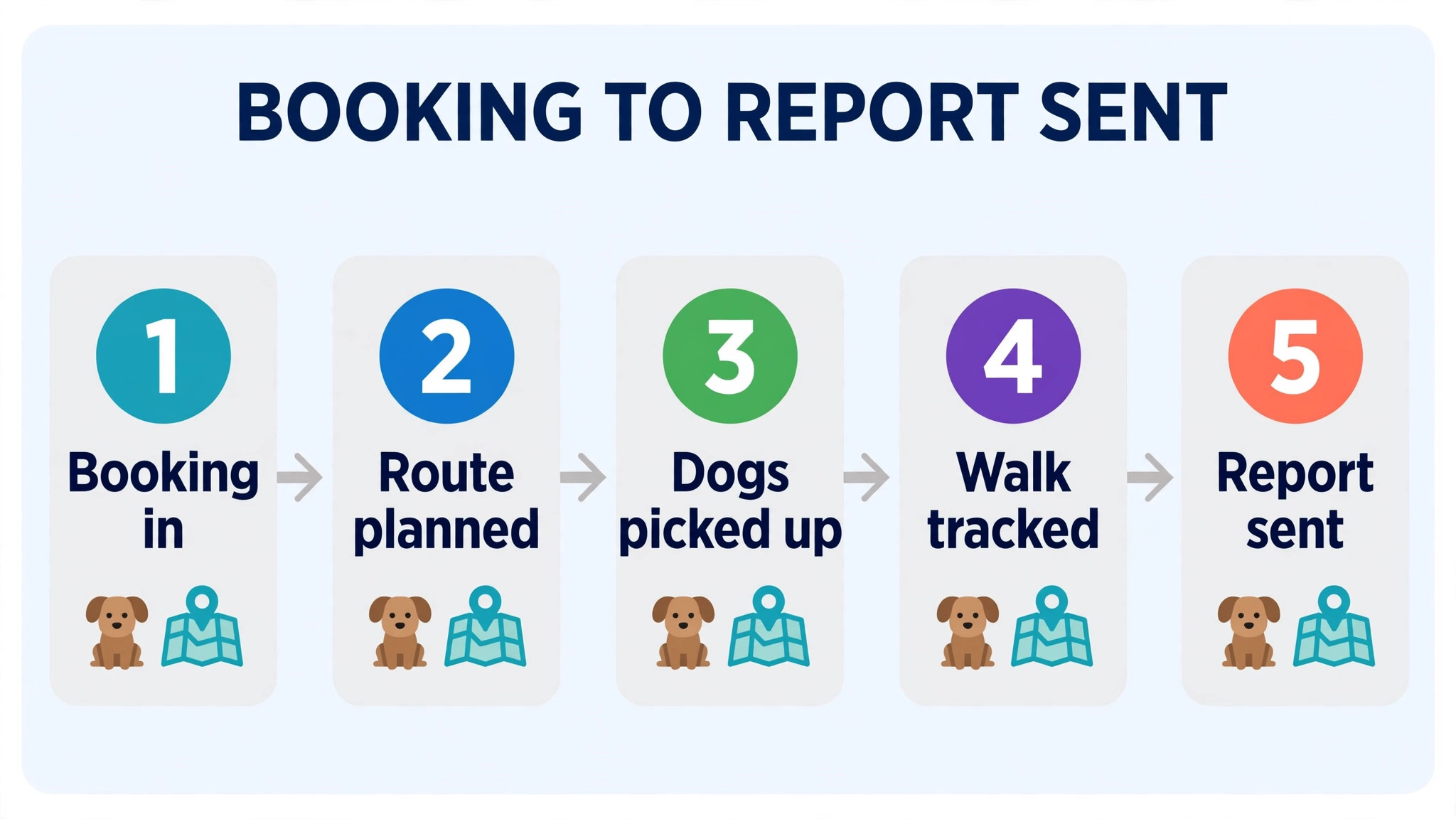
Start with your route shape, not with a feature list. Count how many walks run each day, how many walkers cover them, and how often routes change midday. A solo walker with fixed routes needs a simple ordered list, while a crew with cover changes needs reassignment tools that work from a phone in seconds.
Next, test the route under disruption. Cancel a walk mid-morning, move a pickup point, add an urgent walk and reassign a route to another walker, then check whether clients, walkers and invoices all update correctly. The tools that handle that sequence cleanly are the ones that will survive a real week.
Then check the client side of the route. Clients judge a walking business on photo updates, accurate arrival times and clear invoicing, so test the report card, the GPS view and the invoice for the same walk. A route tool that leaves clients guessing will generate messages that eat the time it saved.
Finally, price the system on staff numbers, not just on the headline plan. Per staff charges, GPS add-ons and messaging fees can change the monthly bill sharply as a team grows. Model the cost at your current team size and at the team size you plan to reach within a year.
When you compare prices, remember that the best route software for dog walking businesses is not the cheapest monthly plan but the system whose total cost per completed walk, including staff and messaging charges, stays lowest across a full year.
Holiday periods deserve special attention in the trial, since demand spikes, regular walkers take leave and new clients arrive at once. A route system that works for a normal week may still fail when cover walkers run unfamiliar routes and clients change holiday dates daily. Test holiday cover, waiting lists and temporary route changes before the holiday season, not during it.
Also check how the system handles dog behaviour and health notes on the route screen. A walker who cannot see at a glance that a dog pulls, reacts to other dogs or needs medication may make a mistake that a paper note would have prevented. The route screen should show the notes that matter for safety, without forcing the walker to open several screens while holding leads.
Pricing transparency should be tested in the same way as routes. Ask for a written list of every charge, including per staff fees, messaging bundles, GPS add-ons and payment processing, then compare the total for a typical month rather than the headline plan price. A tool that looks cheap on its pricing page can still be dear once a growing team is priced in full.
Client onboarding is another job to trial carefully. A new client should be able to share dog details, vet information, key access and walk preferences without a long email exchange, and the walker should see those details on the route screen from the first walk. If onboarding still needs several phone calls, the software has not removed the admin it promised to remove.
Weather and emergency planning also matter for walking businesses. A route system should let the owner cancel, shorten or reassign walks quickly when heat, storms or illness disrupt the day, and should notify affected clients at once. Test that emergency flow in the trial, since a system that handles normal days well can still fail on the one day when speed matters most.
Mistakes to avoid
– Building routes by postcode alone. Dogs, pickup times and walk lengths matter more than postcode order. A route that looks tidy on a map can still fail if it groups incompatible dogs or impossible timings. – Keeping keys outside the system. Key codes and access notes held in personal phones or notebooks create risk when a walker is sick. Keep access notes in the system with clear permission controls. – Sending photo updates from personal phones. Personal messaging mixes business updates with private chats and leaves no record if a client disputes a walk. Use the platform report card for every walk. – Forgetting cover walkers. Routes built for named walkers break when someone is ill. Test cover assignment in the trial, including a route handed to a walker who has never run it before. – Ignoring invoice accuracy after route changes. A cancelled or swapped walk that still invoices at full price creates disputes. Check that every route change flows through to the invoice before launch. That invoice check is also the best way to judge the best route software for dog walking businesses without trusting a demo.
Most of these mistakes share one cause. The tool was chosen from a demo rather than from a real week of work, so the trial should always use real orders, real routes or real estimates.

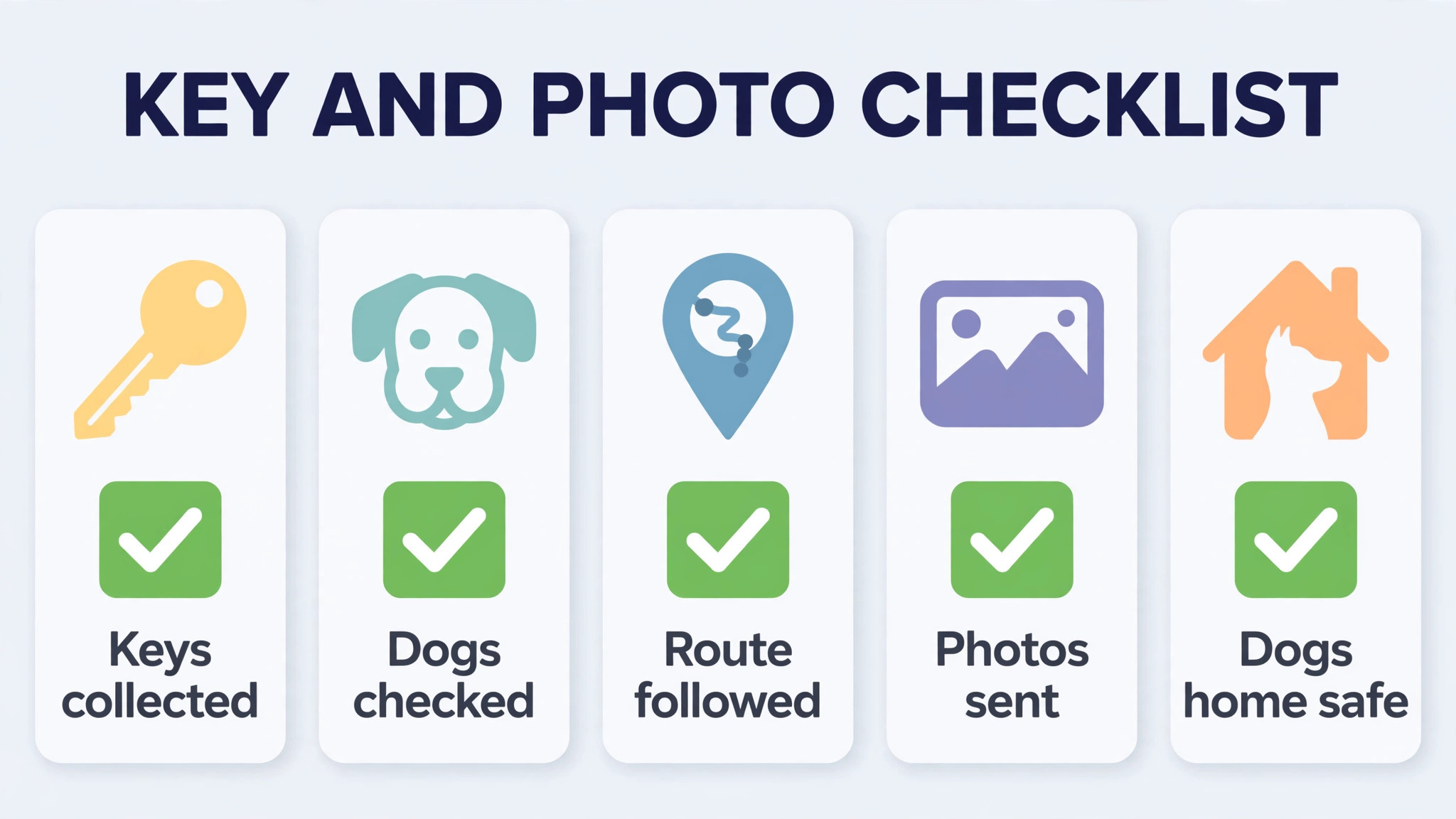
Key handling and photo update checklist
Use this checklist on every job in the category below, and keep it inside the order record so a second team member can follow it without asking the owner. A business that follows this list will get more value from the best route software for dog walking businesses than a business that buys better software but keeps informal habits.
– Record the key location, code and access notes in the system, with access limited to walkers assigned to that client. – Log every key handover, including who held the key last and when it was returned, so a missing key is traced at once. – Confirm the pickup point, dog details and any behaviour notes on the route screen before the walker leaves. – Take a photo at the start of the walk and one during the walk, and send both through the platform report card. – Note water, toilet, behaviour and any incident on the report card the same day, while details are fresh. – Flag a failed access attempt at once, contact the client through the platform, and record the outcome on the booking. – Review photo updates weekly for quality and consistency, and coach walkers whose updates are late or unclear. – Remove a walker’s access to keys and client details on the day they leave, and confirm the removal in the system.
Frequently Asked Questions

Do I need route software if I only walk a few dogs?
A simple tool still helps, since it keeps bookings, invoices and photo updates in one place. The benefit grows as walks become recurring, because recurring routes are easy to repeat once they are set up correctly.
What does dog walking route software cost?
Published prices in this guide run from a free starter plan to about $79 per month, with UK tools from £9.99 per month. Check the vendor’s current pricing page, since per staff charges can add to the headline price.
Does GPS tracking matter for clients?
Clients value it because it shows where and when their dog walked, which builds trust. It also protects the walker, since a tracked route provides a record if a walk time is ever disputed.
Can routes be changed midday?
Good tools allow reassignment and reordering from a phone, with clients and walkers updated at once. Test a midday change in the trial, since that is the moment a weak tool fails.
How should keys be handled safely?
Keep key details inside the platform with limited access, log handovers, and remove access when a walker leaves. Never share key codes through personal messaging apps or unprotected notes.
What makes a good photo update?
A good update shows the dog during the walk, notes water and behaviour, and arrives the same day. Consistency matters more than style, so clients learn what to expect from every walk.
Can one tool handle walking and sitting?
Yes, most tools in this guide cover both, and some also cover grooming and boarding. Choose by the service that brings most revenue, then check that the second service is handled well rather than as an afterthought.
How long does switching take?
A solo walker can switch in a week, including client and route setup. A team should allow two to three weeks, including staff training and a parallel week where old and new systems run together.
Verdict
For most walking businesses, Time To Pet is the strongest default, because it combines GPS routes, staff apps, photo report cards and payments in one system that grows from solo to team use. Solo walkers on a tight budget should look at WagTracker or PetPocketbook first, since both cover the daily route and invoicing at a lower cost.
Whichever tool you shortlist, trial it on a disrupted week, not a perfect one. The winner will be the system that reorders a route, updates clients and keeps invoices correct when a walker calls in sick and a client changes plans at noon. That is the real job, and it is the test that matters.
A final practical step is to tell regular clients before you switch, and to send them one sample report card from the new system. Clients who know what to expect will trust the first live updates, while clients who are surprised by a new format may message the owner with questions that eat the time the system was meant to save.
More Reading on Stratilyze
– Best Field Service Software for Appliance Repair Companies – Cost of Jobber for a Small Business, Monthly – Use AI for Boat Rental Booking Management – Best Membership Software for Dance Studios – How to Choose a Payment Processor for a Small Business