

The verdict is clear before the detail: the best AI tools for pharmacies are the ones that make dispensing safer, refills easier, and patient care more consistent, without adding clicks to an already busy counter. A pharmacy does not need AI that writes clever marketing copy while prescriptions queue up. It needs reliable workflow, clear adherence support, clean billing, and patient communication that reduces phone calls and missed doses. Everything in this guide is judged against that standard. If a tool does not help safety, adherence, or efficiency in a real pharmacy day, it does not earn a place, no matter how modern it looks in a demo.
This guide compares 15 tools, from pharmacy management systems to adherence, clinical service, and general business helpers. Some suit a single independent pharmacy. Others suit a multi site group, a long term care pharmacy, or a pharmacy building clinical services. Prices change often, and many pharmacy systems price by volume, modules, or contract, so treat every pricing note as an October 2026 starting point and check at checkout or through a vendor quote before you buy. Patient safety, privacy, and local regulations come first in every recommendation, and any tool that touches patient data must be checked against your local requirements before use.
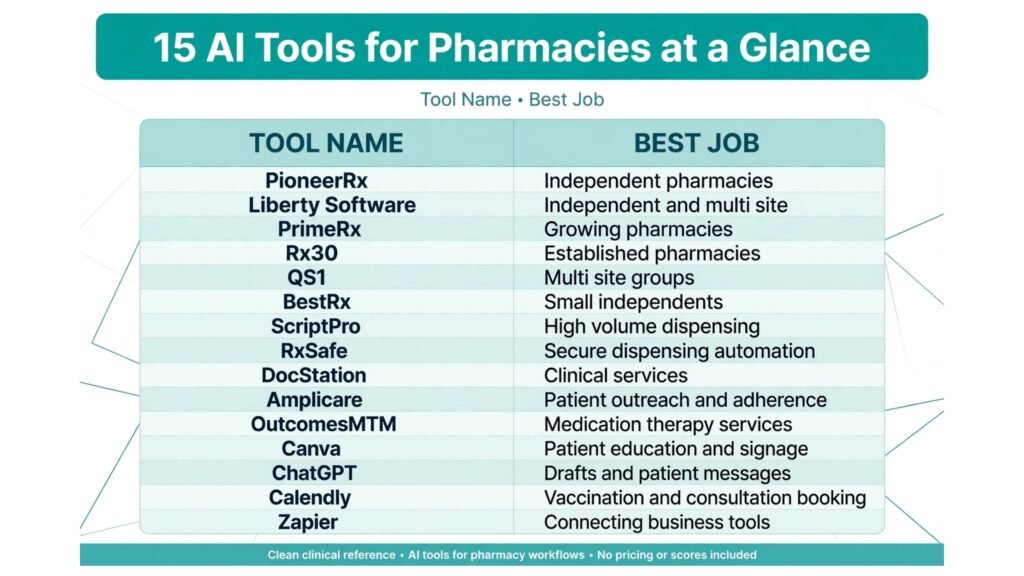
At a Glance: 15 Tools Compared
| Tool | Best for | Main strength | Watch out for |
|---|---|---|---|
| PioneerRx | Independent pharmacies | Modern workflow and reporting | Contract and migration planning needed |
| Liberty Software | Independent and multi site | Strong workflow and e-care plans | Setup depth for large groups |
| PrimeRx | Growing pharmacies | Flexible management and billing | Check integrations for your wholesalers |
| Rx30 | Established pharmacies | Reliable dispensing workflow | Interface feels traditional |
| QS1 | Multi site groups | Enterprise controls and reporting | Heavier for a single small pharmacy |
| BestRx | Small independents | Simple, focused dispensing | Fewer advanced clinical modules |
| ScriptPro | High volume dispensing | Robotics and automation | Capital and space requirements |
| RxSafe | Secure dispensing automation | Accurate pouch and vial handling | Needs workflow redesign |
| DocStation | Clinical services | Care plans and billing for services | Value depends on service volume |
| Amplicare | Patient outreach and adherence | Refill and immunisation targeting | Check data sources for your market |
| OutcomesMTM | Medication therapy services | MTM cases and documentation | Requires trained clinical time |
| Canva | Patient education and signage | Fast, clear patient materials | Check all health claims carefully |
| ChatGPT | Drafts and patient messages | Speed on general writing | Never for clinical advice without review |
| Calendly | Vaccination and consultation booking | Clean patient booking | Needs clear service windows |
| Zapier | Connecting business tools | Automates admin notifications | Never automate clinical decisions |
Pharmacy Management Systems
1. PioneerRx
PioneerRx is a modern pharmacy management system built for independent pharmacies, with a workflow that follows prescriptions from intake through verification, filling, and pickup. Its reporting helps owners see refill rates, workload by hour, payer mix, and inventory patterns, which supports staffing and purchasing decisions. For an independent pharmacy competing with chains, that visibility matters, because margin often hides in workflow waste, slow refills, and inventory that sits too long.
Pricing is contract based, so request a quote and check at checkout for modules, support, and migration costs. Watch out for migration. Moving patient profiles, prescription history, and payer data needs a careful plan, testing, and a go live week with extra staff support. Never migrate during a peak immunisation season or a major payer change. A calm migration protects patients and staff far more than a fast one.
2. Liberty Software
Liberty Software serves independent and multi site pharmacies with dispensing workflow, inventory, billing, and e-care plan tools that support clinical services. Its strength is combining daily dispensing with documented patient care, so a pharmacist who identifies a medication problem can record the intervention, follow up, and in many cases bill for the service where eligible. That link between dispensing and care is increasingly important as pharmacies expand beyond filling prescriptions.
Pricing is contract based, so check at checkout for the modules your pharmacy actually needs. Watch out for underused features. Clinical modules only pay off when pharmacists have protected time to use them. Before adding a module, schedule the clinical hours, train the team, and agree on which services you will offer first. Software without scheduled time becomes an unused menu item.
3. PrimeRx
PrimeRx offers pharmacy management with dispensing, billing, inventory, and reporting for growing pharmacies. It suits owners who want flexibility across retail, specialty, or multi site work without moving to a very large enterprise system immediately. Workflow tools help staff prioritise urgent fills, manage queues, and track third party billing, which reduces the end of day scramble that causes errors and overtime.
Pricing is contract based, so request a quote and check at checkout. Watch out for integration fit. Confirm connections with your wholesalers, e-prescribing networks, and payment systems before signing, and test a full prescription journey, from e-prescription receipt to pickup and billing, during a trial. Integration gaps discovered after go live are expensive to fix under pressure.
4. Rx30
Rx30 is an established pharmacy system known for reliable dispensing workflow and third party management. For pharmacies that value stability and a familiar workflow, Rx30 offers a solid core: prescription processing, inventory control, billing, and reporting, with support for multiple locations. Its long market presence means many pharmacy staff have used it before, which can shorten training for new hires.
Pricing is contract based, so check at checkout. Watch out for interface expectations. Rx30 feels more traditional than the newest cloud systems, so judge it by workflow speed and accuracy, not by visual polish alone. If your team values a modern web interface and remote access above all, compare that priority honestly against workflow reliability and support quality.
5. QS1
QS1 serves larger pharmacy groups and multi site operators with enterprise controls, central reporting, and workflow standardisation. For a group that needs consistent processes across sites, central inventory visibility, and comparable performance data, QS1 provides the governance layer that single site systems often lack. Owners can compare refill rates, inventory turns, and service uptake across locations, and share best practice from stronger sites.
Pricing is contract based and suited to group budgets, so check at checkout. Watch out for small pharmacy fit. Enterprise controls can feel heavy for a single independent pharmacy, with setup and training that outweigh the benefit. QS1 earns its place when you have multiple sites to govern, not when you need a simple single store system.
6. BestRx
BestRx is a focused pharmacy management system for small independent pharmacies that want clear dispensing, billing, and inventory without enterprise complexity. Its appeal is simplicity and a workflow that staff can learn quickly, which matters in a small pharmacy where the pharmacist may also handle billing, ordering, and patient calls in the same shift. A system that staff actually use correctly every time is safer than a powerful system used inconsistently.
Pricing is contract based, so check at checkout. Watch out for advanced clinical depth. If you plan to build large clinical service programmes, compare BestRx modules against systems with deeper care plan tools, and choose based on your next two years of services, not only today’s dispensing needs.

Dispensing Automation and Accuracy
7. ScriptPro
ScriptPro provides robotics and automation for high volume pharmacies, including counting, labelling, and workflow systems that reduce manual handling. For a pharmacy filling hundreds of prescriptions daily, automation can improve consistency, free pharmacists for verification and patient care, and reduce repetitive strain and counting errors. It also creates a clearer audit trail for filled prescriptions, which supports safety reviews.
Pricing involves capital investment and service contracts, so request a detailed quote and check total cost, including installation, maintenance, and consumables. Watch out for space and workflow redesign. Automation works best when the pharmacy layout, intake process, and verification steps are redesigned around it, not when a robot is added to an unchanged workflow. Plan installation during a quieter period and train staff thoroughly before relying on full volume.
8. RxSafe
RxSafe offers secure, automated dispensing for vials and pouches, with a focus on accuracy, controlled access, and inventory control. It suits pharmacies that need tight control over high value or sensitive stock, or that run compliance packaging programmes where patients receive medications sorted by dose time. Automated pouch packaging can improve adherence for patients with complex regimens, because the packaging itself guides correct dosing.
Pricing is contract based with hardware and service costs, so check at checkout. Watch out for packaging workflow. Compliance packaging requires accurate patient regimens, clear labelling, and a check process for regimen changes. Automation does not remove pharmacist verification. It changes where verification happens, so build that check into the daily routine and audit it regularly.

Adherence, Outreach, and Clinical Services
9. DocStation
DocStation helps pharmacies deliver and document clinical services, including care plans, patient assessments, and billing for eligible services. For a pharmacy expanding into diabetes support, hypertension checks, immunisation follow up, or medication reviews, DocStation gives those services a professional structure instead of scattered notes. Documented care also supports collaboration with prescribers, because a clear care plan is easier to share and act on than a verbal update.
Pricing is subscription based, so check at checkout. Watch out for service volume. DocStation pays off when clinical services are a real, scheduled part of the week. Start with one or two services, build referral and booking processes, and expand only when those services run smoothly. A long service menu with no bookings helps nobody.
10. Amplicare
Amplicare helps pharmacies identify patients for refills, immunisations, and adherence outreach, using data to prioritise who needs contact first. Instead of calling every patient in alphabetical order, staff can focus on patients overdue for a refill, due for a vaccine, or at risk of stopping a chronic medication. That targeting makes outreach more effective and less intrusive, because patients receive relevant reminders rather than generic messages.
Pricing is subscription based, so check at checkout. Watch out for data quality. Outreach lists are only as good as your patient and prescription data, and local rules on patient contact and marketing vary. Review lists with a pharmacist before outreach, respect patient preferences, and keep health messages accurate and non alarmist. Outreach should feel like care, not sales pressure.
11. OutcomesMTM
OutcomesMTM connects pharmacies with medication therapy management cases, documentation, and payer programmes. Pharmacists can complete structured medication reviews, document interventions, and submit claims where eligible. For pharmacies in markets with active MTM programmes, this creates a clear route to paid clinical work that also improves patient outcomes, especially for patients on multiple medications.
Pricing and case availability depend on programmes and contracts, so check details directly. Watch out for time. MTM reviews require focused pharmacist time, patient conversation, and prescriber follow up. Protect that time in the rota, or cases will pile up and deadlines will be missed. Start with a realistic case load, build a weekly MTM session, and grow only when completion rates stay high.

Business, Booking, and Patient Communication Tools
12. Canva
Canva helps pharmacies create clear patient education sheets, vaccination posters, opening hour notices, and social posts without a designer. Build templates for common topics, such as how to use an inhaler or what to bring for a vaccination, then have a pharmacist review every health message before printing or posting. Clear design helps patients understand instructions, which supports adherence and reduces repeat questions at the counter.
Pricing includes a free plan and paid plans, so check at checkout. Watch out for health accuracy. Never publish a health claim, dosage instruction, or service claim without pharmacist review, even if a template suggests it. Design tools make publishing easy, which is exactly why a clinical check step must be mandatory.
13. ChatGPT
ChatGPT drafts general business writing for a pharmacy: job posts, staff notices, newsletter drafts, social captions, and first drafts of non clinical patient messages. Give it your services, opening hours, and tone, and it can save time on routine writing. That time can then go to patient care, which is the proper use of AI in a pharmacy.
Access includes a free tier and paid plans, so check at checkout. Watch out for clinical risk. Never use AI to draft personal medication advice, dosage guidance, or clinical recommendations without qualified pharmacist review, and never enter identifiable patient information into a general AI tool. Keep AI use to general, non patient specific writing, and keep clinical communication in your secure pharmacy systems with human verification.
14. Calendly
Calendly simplifies booking for vaccinations, consultations, and clinical services. Patients choose a time, receive a reminder, and arrive prepared, while staff see a clear service schedule separate from dispensing queues. That separation matters, because clinical services fail when they constantly interrupt urgent dispensing work. A booked service slot protects both the patient and the pharmacist.
There is a free tier and paid plans, so check at checkout. Watch out for service windows. Block consultation times away from peak dispensing hours, set realistic appointment lengths, and include intake questions about service type and relevant history, collected through secure channels. A booking link is only helpful when the appointment itself is properly staffed.
15. Zapier
Zapier connects general business tools in a pharmacy, such as forms, spreadsheets, email, and messaging, to automate admin notifications and record updates. A new service inquiry can trigger a staff task. A completed form can create a follow up reminder. A stock alert can notify the ordering team. These flows reduce admin chasing, provided they stay in the business layer and away from clinical decisions.
Pricing is tiered by task volume, so check at checkout. Watch out for privacy and clinical boundaries. Never automate clinical decisions, patient specific advice, or flows that move identifiable patient data through insecure tools. Limit Zapier to non clinical admin, test every flow with test data, and review access permissions regularly. In a pharmacy, a convenient automation that leaks patient data or bypasses a pharmacist check is not an efficiency gain. It is a risk.
Best Pick by Job
| Job | Best pick | Why it wins |
|---|---|---|
| Independent pharmacy core system | PioneerRx | Modern workflow and strong reporting |
| Dispensing plus clinical care | Liberty Software | Workflow with e-care plans |
| Growing pharmacy flexibility | PrimeRx | Flexible management and billing |
| Reliable established workflow | Rx30 | Stable dispensing and third party tools |
| Multi site governance | QS1 | Enterprise controls and central reporting |
| Small independent simplicity | BestRx | Focused, learnable dispensing system |
| High volume automation | ScriptPro | Robotics for counting and workflow |
| Secure compliance packaging | RxSafe | Accurate pouch and vial automation |
| Clinical service documentation | DocStation | Structured care plans and service billing |
| Refill and vaccine outreach | Amplicare | Targeted adherence lists |
| Medication therapy reviews | OutcomesMTM | Structured MTM cases and claims |
| Patient education design | Canva | Fast, clear, pharmacist reviewed materials |
| General business writing | ChatGPT | Speed for non clinical drafts only |
| Service booking | Calendly | Clean vaccination and consultation slots |
| Admin connections | Zapier | Automates non clinical notifications |
How to Choose the best AI tools for pharmacies
Start with your pharmacy model, not a feature list. A single independent retail pharmacy needs a reliable core system, strong inventory control, and simple refill support. A multi site group needs governance and comparable data. A long term care pharmacy needs compliance packaging and facility workflows. A clinical service pharmacy needs care plan documentation and protected service time. The right core system follows from that model, and buying the wrong model first creates years of workarounds.
Next, test the dispensing journey end to end. Receive an e-prescription, verify it, fill it, counsel the patient, and bill it, using real payer and inventory scenarios. Time each step, note every extra click, and ask staff where errors are most likely. A system that looks good in a sales demo but slows verification or hides payer problems will cost safety and margin in daily use. Also test failure modes: what happens when the internet drops, a payer rejects a claim, or a drug is out of stock? The answers to those questions matter more than a new dashboard feature.
Then check total cost and contract terms. Include modules, support, migration, training, hardware, and payment processing where relevant. Ask about data export, contract length, and exit terms before signing, because switching pharmacy systems is difficult and disruptive. Review after 90 days, looking at prescription volume, refill rates, billing rejections, inventory accuracy, and patient complaints. Keep what improves safety and efficiency, and fix or replace what adds clicks without benefit.
Pharmacies that also run strong local marketing can borrow ideas from our guide to the best AI tools for Instagram, and pharmacies building one to one patient services may find useful parallels in the best AI tools for therapists.
Three Pharmacy Workflows That Reduce Risk and Missed Doses
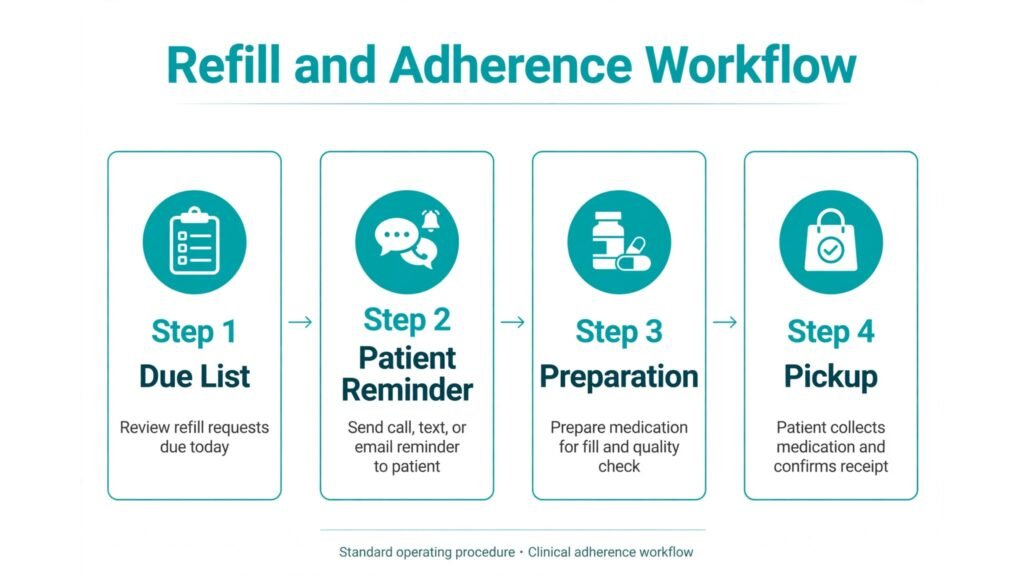
Workflow 1: Refill and adherence without phone tag
Refill work should be proactive, not reactive. Use your core system and outreach tool to list patients due for a refill in the next seven days, prioritise chronic medications, and send a reminder through your secure patient channel. Patients confirm, staff prepare the refill, and pickup is scheduled before the patient runs out. That sequence prevents the Friday afternoon emergency refill, the missed dose weekend, and the phone queue that follows. Track refill rates weekly, and review patients who repeatedly miss refills with a pharmacist conversation about barriers, such as cost, side effects, or packaging, rather than another automated reminder.
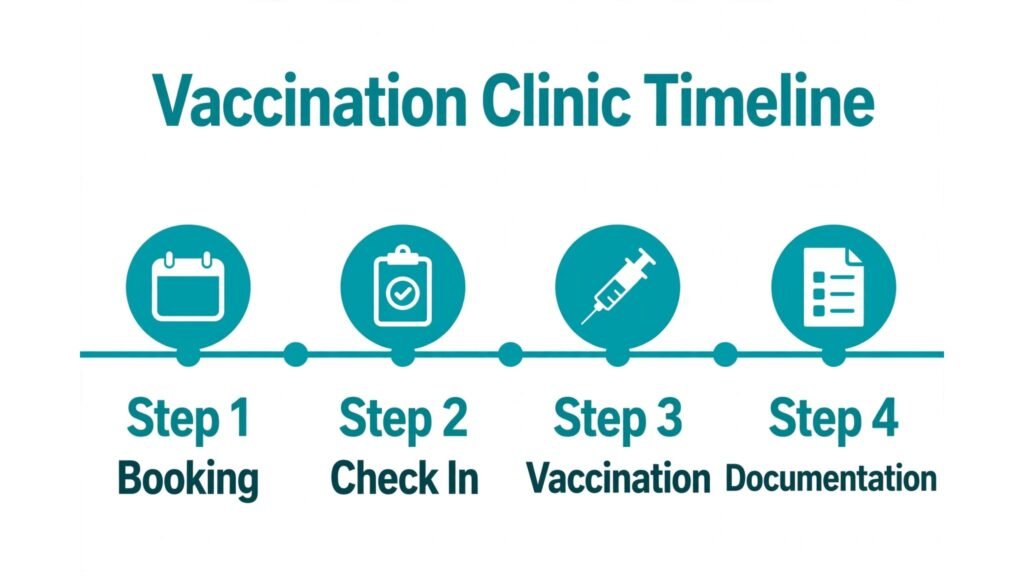
Workflow 2: Vaccination and consultation clinics that run on time
A successful clinic starts with separate scheduling. Block service times away from peak dispensing, set realistic appointment lengths, and use Calendly or your core booking tool to collect service type and consent information in advance. On clinic day, one staff member manages check in and paperwork while the pharmacist focuses on clinical work, so neither task interrupts the other. After the clinic, document vaccinations and consultations promptly in the correct system, send records where required, and follow up with patients who need a second dose. A clinic that runs on time earns repeat bookings. A clinic that keeps patients waiting while dispensing queues grow earns complaints, even when the clinical care itself is excellent.
Workflow 3: Inventory and shortage management
Shortages and overstock both cost a pharmacy money and patient trust. Use your core system reports to review fast moving lines weekly, slow moving lines monthly, and controlled or high value stock with extra care. Set reorder points based on real dispensing patterns, not on supplier suggestions alone, and review them after seasonal changes such as flu season. When a shortage hits, have a clear patient communication plan: which alternatives the pharmacist can discuss with the prescriber, how patients will be notified, and how partial fills will be tracked. A pharmacy that communicates a shortage early, with a plan, keeps patient trust. A pharmacy that discovers a shortage at pickup loses it.

Mistakes to Avoid
The first mistake is adding marketing or outreach tools before core dispensing is reliable. Fix workflow, verification, and billing first, because outreach that brings patients to a chaotic counter harms reputation. The second mistake is entering patient data into general AI tools. Keep patient information in secure, compliant systems, and use general AI only for non patient specific business writing. The third mistake is automating clinical decisions or messages without pharmacist review. Every clinical message, recommendation, and service claim needs a qualified human check. The fourth mistake is buying automation without redesigning workflow. Robots and packaging systems need new layouts, new checks, and staff training, or they simply move the bottleneck. The fifth mistake is ignoring contract and exit terms. A pharmacy system is a long term commitment, so understand data export, support, and migration costs before signing, not when you want to leave.
Frequently Asked Questions
What are the best AI tools for pharmacies on a small budget?
Start with a focused core system such as BestRx or PioneerRx, depending on your service plans, plus Canva and Calendly for patient materials and bookings. Add adherence or clinical tools only when service volume justifies them, and keep general AI use to non clinical business writing.
Can AI replace pharmacist verification?
No. AI can support workflow, prioritisation, and documentation, but final verification, clinical judgment, and patient counselling remain pharmacist responsibilities. Any tool that suggests otherwise should be treated with caution, and local regulations always take precedence over vendor claims.
How do I improve refill adherence safely?
Use proactive reminders, clear pickup scheduling, compliance packaging where appropriate, and pharmacist conversations about barriers. Track refill rates, review repeat non adherence personally, and coordinate with prescribers when a regimen or cost issue blocks adherence.
Should a small pharmacy invest in dispensing automation?
Only when volume, accuracy, or packaging needs justify the capital and workflow change. Many small pharmacies gain more from a better core workflow, inventory control, and refill process than from robotics. Calculate volume, error rates, and pharmacist time saved before committing.
How do I choose between pharmacy management systems?
Test the full dispensing journey with real scenarios, check wholesaler and payer integrations, review contract and exit terms, and speak to similar pharmacies using the system. Choose the system that staff use accurately under pressure, not the one with the longest feature list.
What patient data rules should I check before using a new tool?
Check local privacy and healthcare regulations, vendor security practices, data storage location, staff access controls, and data export options. When in doubt, ask your compliance adviser before entering patient data, and keep general AI tools separate from patient records.
Final Verdict: Safety First, Then Speed
The conclusion from these 15 tools is straightforward. A pharmacy should build around one reliable core system that fits its model, add automation only where volume or packaging justifies it, and add adherence and clinical tools where they create real patient benefit. PioneerRx and Liberty Software suit many independents building modern workflow and clinical services. PrimeRx, Rx30, QS1, and BestRx cover growth, stability, multi site, and small pharmacy needs respectively. ScriptPro and RxSafe suit high volume and compliance packaging work. DocStation, Amplicare, and OutcomesMTM turn clinical services and outreach into structured, billable work. General tools support the business around that core, provided patient data stays secure and clinical judgment stays human. Judge the final stack by fewer errors, higher refill rates, clearer billing, and pharmacists who have time to counsel patients properly. When those measures move together, technology is serving the pharmacy, not the other way around. Review the stack each quarter with staff feedback and real dispensing data, keep the tools that reduce risk and save pharmacist time, and remove anything that adds clicks without improving care. A lean, well governed toolkit will support patients better than a large collection of half used systems, and it will leave pharmacists free for the work only they can do: checking safely, counselling clearly, and caring for the people behind every prescription. Start with the core system, add one adherence or clinical tool at a time, and let patient outcomes decide what stays. That measured approach protects safety, controls cost, and builds a service patients can rely on week after week.