

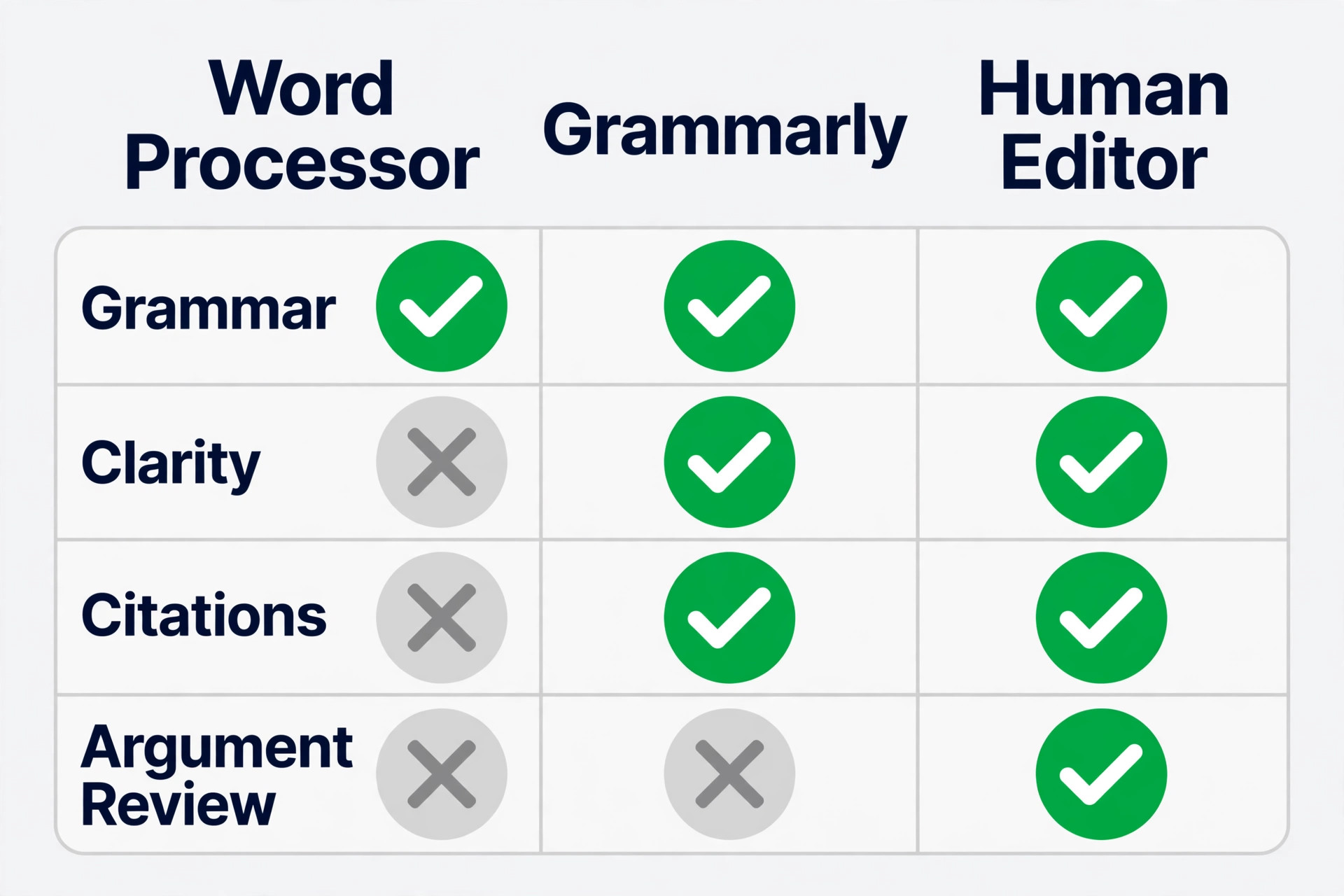
A thesis chapter edited only in a word processor and a thesis chapter edited by a human specialist sit at opposite ends of the same trade off. The word processor catches spelling and basic grammar at no extra cost, but it misses wordy sentences, inconsistent tone, and citation slips that examiners notice at once. A human editor catches those problems and asks sharp questions about argument and structure, but a full thesis edit can cost hundreds or thousands of dollars and take weeks, which is why writers use Grammarly for academic editing.
When you use Grammarly for academic editing, you land in the middle ground most writers actually need, with fast, consistent checks on grammar, clarity, tone, and citations for every draft, while you keep judgment about evidence, argument, and originality for yourself.
This guide gives you a complete workflow for that middle ground, built for theses, dissertations, journal papers, and coursework essays. You will set Grammarly up for academic writing, run a staged edit that separates correctness from clarity and from style, work through a thesis chapter by chapter, take a paper from first draft to submission, run a full editing checklist, and handle citations in a way that survives a supervisor or reviewer check.
The Comparison That Decides Your Editing Setup
Start with what each option actually does, because the choice is not between good editing and bad editing. It is between speed, depth, and cost, and different drafts need different mixes. A built in word processor checker is fast and free, and for a short note it is enough. For a thesis, it is thin.
Grammarly sits between those poles. It checks grammar, spelling, and punctuation across Word, Google Docs, and the browser, it suggests clearer phrasing and stronger word choices, it flags tone shifts, and on the paid plan it checks for plagiarism and helps with citations in APA, MLA, and Chicago styles. It works in minutes, not weeks, and it applies the same rules to chapter one and chapter five, which matters when a thesis is written over months and your own standards drift. The sensible setup for most academic writers is therefore layered.
Set Up Grammarly for Academic Work Before You Edit a Word
Setup takes ten minutes and saves hours of undoing wrong suggestions later. Open Grammarly in the editor or in Word or Google Docs, and set the writing goals before you touch a sentence. Choose Academic as the domain, Formal as the tone, and the audience and intent that match the piece, usually Informative for a thesis chapter and a journal paper. Those settings change which suggestions appear.
Next, set your style guide choice. Grammarly lets you pick a format such as APA, MLA, or Chicago in the editor, and that choice shapes citation and formatting suggestions. Pick the guide your department or journal requires, and write it down at the top of your working notes, because switching guides halfway through a thesis is a common source of mixed in text citations and reference lists.
Build a personal dictionary on day one. Add every discipline term, author name, place name, instrument name, and abbreviation that Grammarly will otherwise flag as a spelling error. For a science thesis, that list might include reagent names, species names, and software package names. For a humanities thesis, it might include foreign terms, historical names, and theorists. Add terms as you meet them, and review the dictionary once per chapter, because a term added with a typo will be protected by that typo for the rest of the document.
Decide how you will handle document size. Grammarly documents have a reported limit of about 100,000 characters, roughly 15,000 words, per document. A thesis chapter usually fits, but a full thesis does not, and neither does a long literature review in one file. Split a thesis by chapter, and split a very long chapter into two parts if needed, then edit each part separately and keep a master copy in Word or Google Docs where the full document lives.
How to Use Grammarly for Academic Editing Without Losing Your Voice
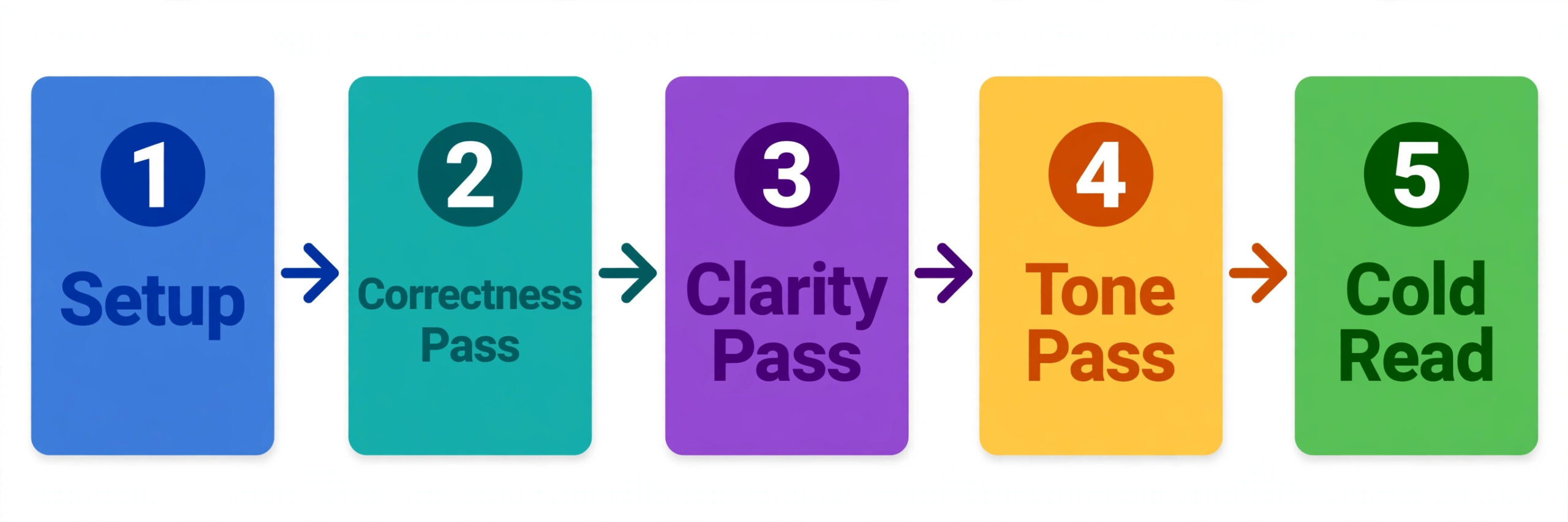
The core method is staged editing, and it is the opposite of clicking accept on every suggestion in one pass. Each pass has one job, and you finish one pass before you start the next. Staged passes feel slower on the first chapter, but they are faster across a thesis, because you stop re-reading the same sentence for grammar, clarity, and tone at the same time, and you stop accepting a clarity rewrite that introduces a grammar slip you then have to fix.
Pass one is correctness. Accept or reject only spelling, grammar, and punctuation suggestions. Ignore clarity and tone suggestions for now, even when they look tempting. Read each flagged sentence and ask whether the correction changes meaning. Grammarly is usually right on subject verb agreement, article use, and comma placement, and it is often wrong on discipline terms, on sentences with complex subordinate clauses, and on quoted material. Never let it edit a direct quotation, a data label, or a formula.
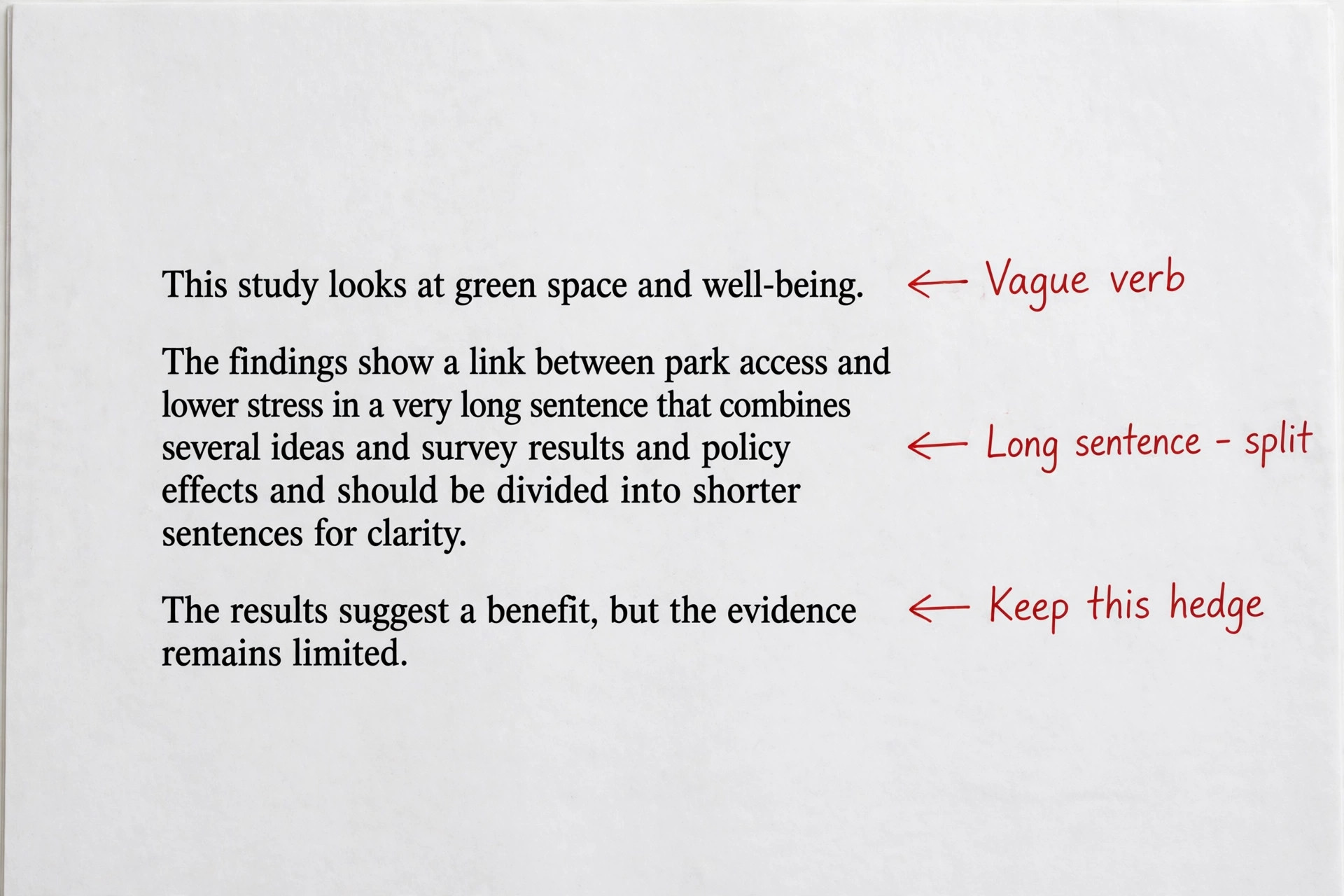
Pass two is clarity. Now read the clarity suggestions, which target wordy sentences, passive constructions, vague wording, and repeated words. Academic writing does need some passive voice, especially in method sections where the action matters more than the actor, so do not accept every passive flag. A sentence like “The samples were heated to 80 degrees for two hours” is clearer and more standard than a forced active version that names a researcher for no reason.
Pass three is tone and consistency. Read the document from the start and check for tone shifts, inconsistent spelling of the same term, inconsistent use of abbreviations, and inconsistent capitalisation of headings. Grammarly tone detection can label a passage as formal, confident, or tentative, and that label is a useful prompt to ask whether the passage should sound that way. A discussion section should sound more tentative than a results section, because results report what happened and discussion interprets what it might mean.
Pass four is a cold read with the tool switched off. Save the edited version, close Grammarly suggestions for an hour or a day, and then read the chapter in a clean view. Read for argument flow, paragraph order, and whether each paragraph earns its place. This pass catches the problems Grammarly cannot see, a repeated point, a missing link between two sections, a table that is mentioned but never discussed, and a conclusion that overstates the findings.
The Thesis Workflow Chapter by Chapter
A thesis is not one document to edit. It is a sequence of different writing jobs, and each chapter needs a different emphasis. When you use Grammarly for academic editing on a thesis, treat the introduction, literature review, method, results, and discussion as separate editing tasks, with their own checklists, and the whole thesis will improve faster than if you apply one generic edit to everything.
Start with the method chapter, even if it is not the first chapter in the document. Method writing is the most standardised, so it is the best place to learn your Grammarly settings, build your personal dictionary, and settle your terminology. Edit the method for precision first. Check that every instrument, reagent, participant group, and procedure is named the same way every time, that units are consistent, and that steps are in an order a reader could follow.
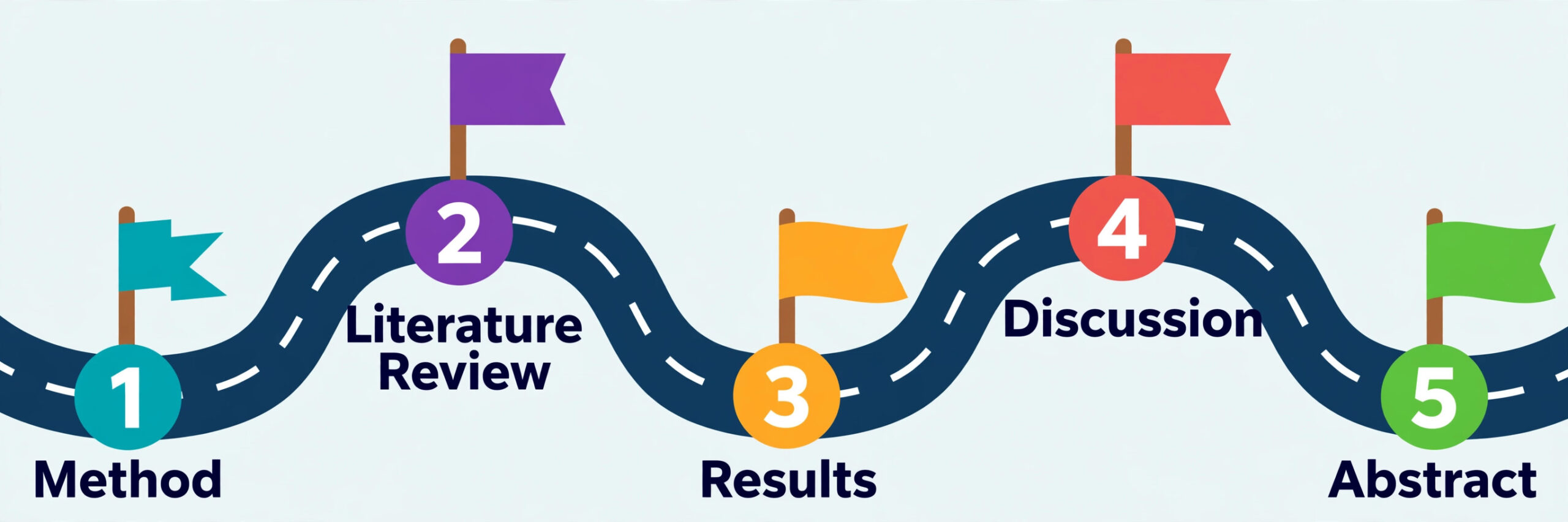
Edit the literature review next, with a focus on citation accuracy and on synthesis rather than summary. Grammarly can flag wordy summaries and repeated sentence openers, such as starting five paragraphs in a row with an author name, but it cannot tell you whether you have grouped studies by theme or merely listed them. After your clarity pass, read the review and ask of each paragraph what point it makes about the field, not just which study it describes.
Edit results chapters for numbers, tables, and figures before you edit sentences. Check that every number in the text matches the table it cites, that percentages and counts agree, that figure captions describe what the figure shows, and that significance statements match the analysis. Only then run Grammarly passes, because a beautifully clear sentence reporting the wrong number is worse than a clumsy sentence reporting the right one. Watch for tone drift in results, where writers slip from reporting into interpreting.
Edit the discussion and conclusion last, and give them a human read before a Grammarly read. These chapters carry your original contribution, and they are where over editing does the most damage. A discussion flattened by accepting every clarity suggestion can lose the careful qualifications that make it credible. Read the discussion aloud, mark the sentences that state your contribution, and protect them from rewrites that strengthen the claim beyond the evidence.
The Paper Workflow From First Draft to Submission
Journal papers move faster than theses and face stricter reviewers, so the workflow is tighter and the citation check is stricter. Start by reading the journal author guidelines before you edit, and note the word limit, abstract limit, heading style, citation style, figure format, and reference limit. Grammarly cannot enforce a journal word limit or a reference limit, so those numbers belong in your checklist.
Draft the paper in full before you run a serious edit. A paper edited sentence by sentence while it is still being written will never reach a complete draft, because every new paragraph reopens decisions you already made. Write the rough draft, including placeholders for numbers or citations you still need, and mark those placeholders clearly so they cannot slip into a submission. Then run the staged passes, correctness, clarity, tone, and a cold read, in that order.
After the staged passes, run a journal fit check. Read the paper as a reviewer would, and ask whether the title promises what the paper delivers, whether the abstract matches the results, whether the introduction states a gap the paper actually fills, and whether the discussion acknowledges limits honestly. Reviewers reject papers for mismatches between title, abstract, and findings far more often than for grammar, so this check deserves a full hour, not a skim.
Next, run the plagiarism and originality check, which the paid plan includes. Run it on the near final draft, not on the rough draft, because early drafts contain quoted material, placeholder text, and notes that will inflate the similarity score and waste your attention. Read every flagged match and sort it into three groups. Properly quoted and cited material needs no change. Paraphrased material that is too close to the source needs rewriting in your own structure, not just swapping a few words.
The Editing Checklist That Catches What a Single Read Misses
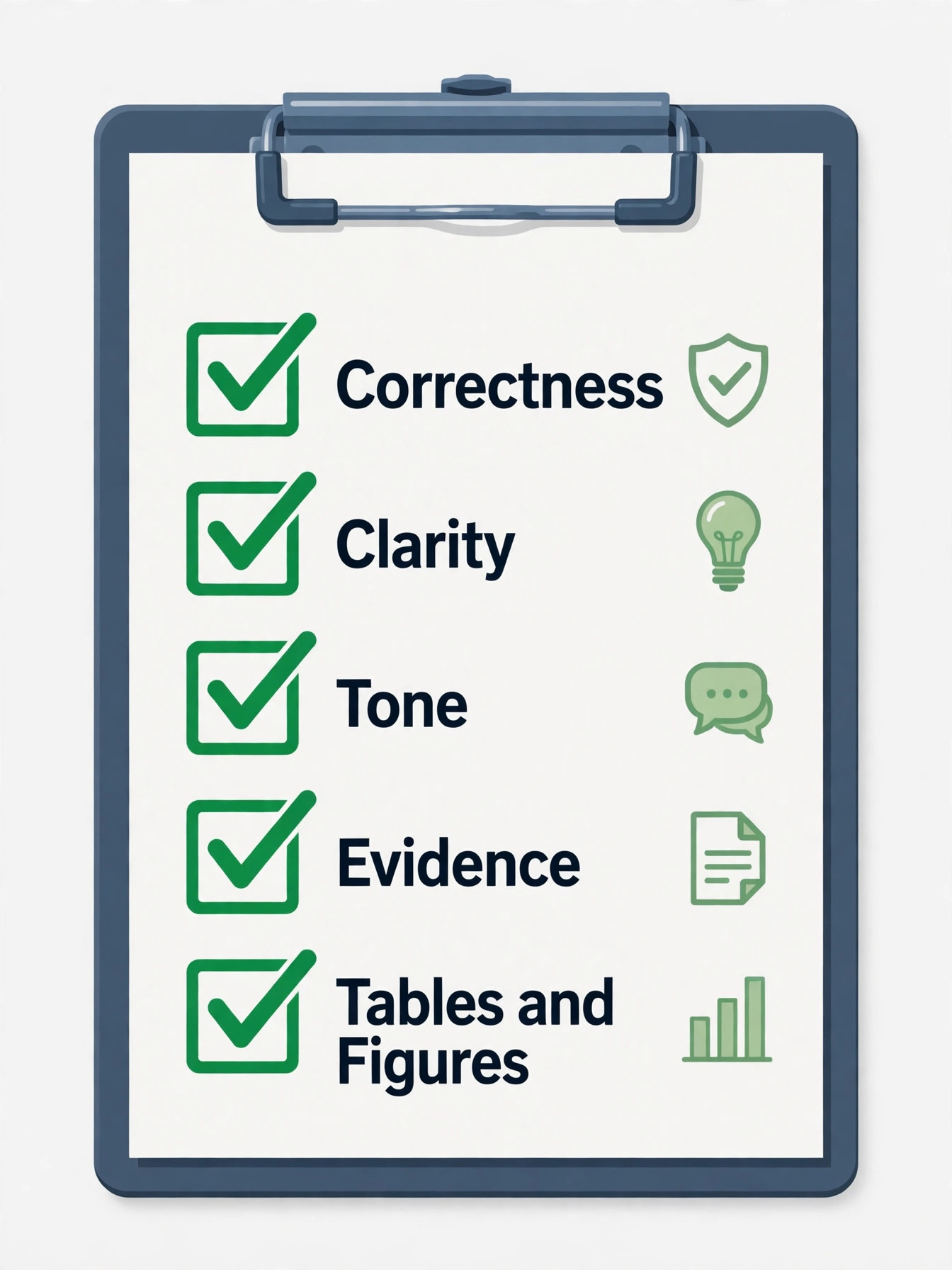
This checklist is the overview proof element of this workflow, and it is designed to be copied into your notes and used on every chapter and paper. Work through it top to bottom, and tick each item only when you have checked it in the document, not when you think it is probably fine. When you use Grammarly for academic editing, the checklist is what stops a clean looking draft from hiding a structural or citation fault, because the tool checks sentences while the checklist checks the document.
Group one covers correctness. Every sentence has a subject and a verb that agree. Articles and prepositions read naturally in academic English. Commas mark clauses without creating comma splices. Spelling is consistent, using one variant of English throughout, usually the variant your department requires. Numbers, units, and symbols are formatted consistently. Direct quotations are exact, with no Grammarly edit applied to quoted wording. Abbreviations are defined at first use and then used consistently.
Group two covers clarity and structure. No paragraph exceeds about 150 words without a good reason, and long paragraphs have been split or tightened. Each paragraph opens with a sentence that states its point, and the rest of the paragraph supports that point. Very long sentences have been split unless their length serves a purpose, such as listing related conditions. Transitions between paragraphs explain the link, rather than relying on a bare “Furthermore” or “In addition”. Headings match the content beneath them, and the heading hierarchy is consistent.
Group three covers academic tone and precision. Contractions are removed unless your style guide allows them. Informal words and chatty transitions are replaced with formal equivalents. Hedges match the strength of the evidence, with “suggests” for tentative findings and stronger verbs only where the data support them. Discipline terms are used precisely and consistently, and general words have not replaced them during editing. The writer voice is consistent across chapters, so the method does not sound like one author and the discussion like another.
Group four covers evidence and argument, and this group needs a human read, not a tool. Every claim that needs a citation has one. Every citation supports the claim it sits beside, not just a nearby topic. Counter evidence or limits are acknowledged where they matter. The discussion does not introduce new data or new literature that the earlier chapters did not prepare the reader for. The conclusion follows from the results, without overstating them.
Group five covers tables, figures, and layout. Every table and figure is numbered, captioned, and mentioned in the text before it appears. Numbers in the text match numbers in tables. Figure labels are legible at the size they will be printed or viewed. Table notes explain abbreviations and symbols used in the table. Page numbers, headers, and footers follow department or journal rules. The reference list is in the required order and format.
The Citation Workflow That Survives a Supervisor Check
Citations are where academic editing most often fails, because a grammar tool can polish a sentence while leaving its citation wrong, missing, or mismatched. The citation workflow below is the second half of the overview proof element, and it should run after the clarity pass, when the text is stable, not while sentences are still being rewritten. When you use Grammarly for academic editing, treat citation help as a drafting aid, never as a final authority.
Start by fixing your style guide and your source list before you format anything. Confirm the guide, APA, MLA, or Chicago, from your department or journal, and confirm whether the guide edition matters, because APA seventh edition and earlier editions differ on details such as author counts and DOI format.
Use Grammarly citation help as a starting point, not as a final authority. The browser extension offers a Get citation button on compatible source sites, including major publishers and databases, and the editor can suggest citation formatting in your chosen style. Use those suggestions to draft a citation quickly, then verify every element against the source itself. Check author spelling, year, title capitalisation, and DOI, because generated citations commonly carry a wrong date, a shortened link, or a title taken from a browser tab rather than the source page.
Next, check the match between in text citations and the reference list in both directions. Every in text citation must have a matching reference list entry, and every reference list entry must be cited in the text, unless your guide allows uncited entries such as a bibliography. Read the reference list alphabetically and tick each entry against the text, and read the text and tick each citation against the list.
Then check formatting details that tools often miss. Check italics for journal titles and book titles according to your guide, sentence case versus title case for article titles, punctuation inside and outside parentheses, and DOI presentation. Check that et al usage follows your guide, including the author count at which et al begins, and that multiple citations in one parenthesis are ordered correctly, usually alphabetically or chronologically depending on the guide. Finally, record how you used editing help if your institution requires it.
For related reading, the guides to best AI academic writing tools, best AI citation generators, and best AI plagiarism checkers compare the wider field, while AI tools for students and grammarly alternatives help if you want a second tool for a specific job such as paraphrasing or research. The best AI paraphrasing tools guide is useful only with a warning, since paraphrasing must stay in your own structure and meaning, not become word swapping to hide a source.

Plagiarism, Originality, and AI Disclosure Done Honestly
Plagiarism checking in Grammarly Pro compares your text against a large database of web pages and academic sources, and it reports matches with links to the source. Use it as a diagnostic tool, not as a pass mark. A low similarity score does not prove originality, and a higher score does not prove plagiarism, because quotations, standard phrases, and reference lists all raise scores legitimately.
The most common originality problem in student and early career writing is patchwriting, where a writer changes a few words in a source sentence but keeps its structure and much of its wording. Grammarly may or may not flag patchwriting, depending on how close the wording is, so you need your own test. If you cover the source and cannot restate its point in a different sentence structure from memory, you have not yet understood it well enough to paraphrase it.
AI disclosure deserves the same honesty. If you used Grammarly generative prompts to rephrase sentences, say so where required, and keep your own record of what the tool changed. Do not use generative AI to write literature summaries, data interpretations, or conclusions and then present them as your analysis. Examiners and reviewers are increasingly alert to text that is fluent but vague, and a paragraph that sounds polished while saying little is a warning sign. Your protection is process.
Grammarly Free Versus Pro for Academic Work
Price is a real decision for students, so compare plans on the features academic work actually uses, not on the full marketing list. Figures below reflect publicly listed prices reported in October 2026, and you should check the official Grammarly plans page and checkout before paying, because prices and plan names change. When you use Grammarly for academic editing, the paid features that change the workflow are full sentence rewrites and the plagiarism checker, so price the plan on those two features first.
Grammarly Free costs nothing and covers basic spelling, grammar, and punctuation checks, tone detection, and a limited monthly allowance of generative AI prompts, reported at 100 prompts a month. For short coursework and for a first correctness pass, Free is genuinely useful, and many students never need more. Grammarly Pro is reported at about 12 dollars per member per month on annual billing, billed as 144 dollars per year, about 20 dollars per month on quarterly billing, and about 30 dollars per month on monthly billing.
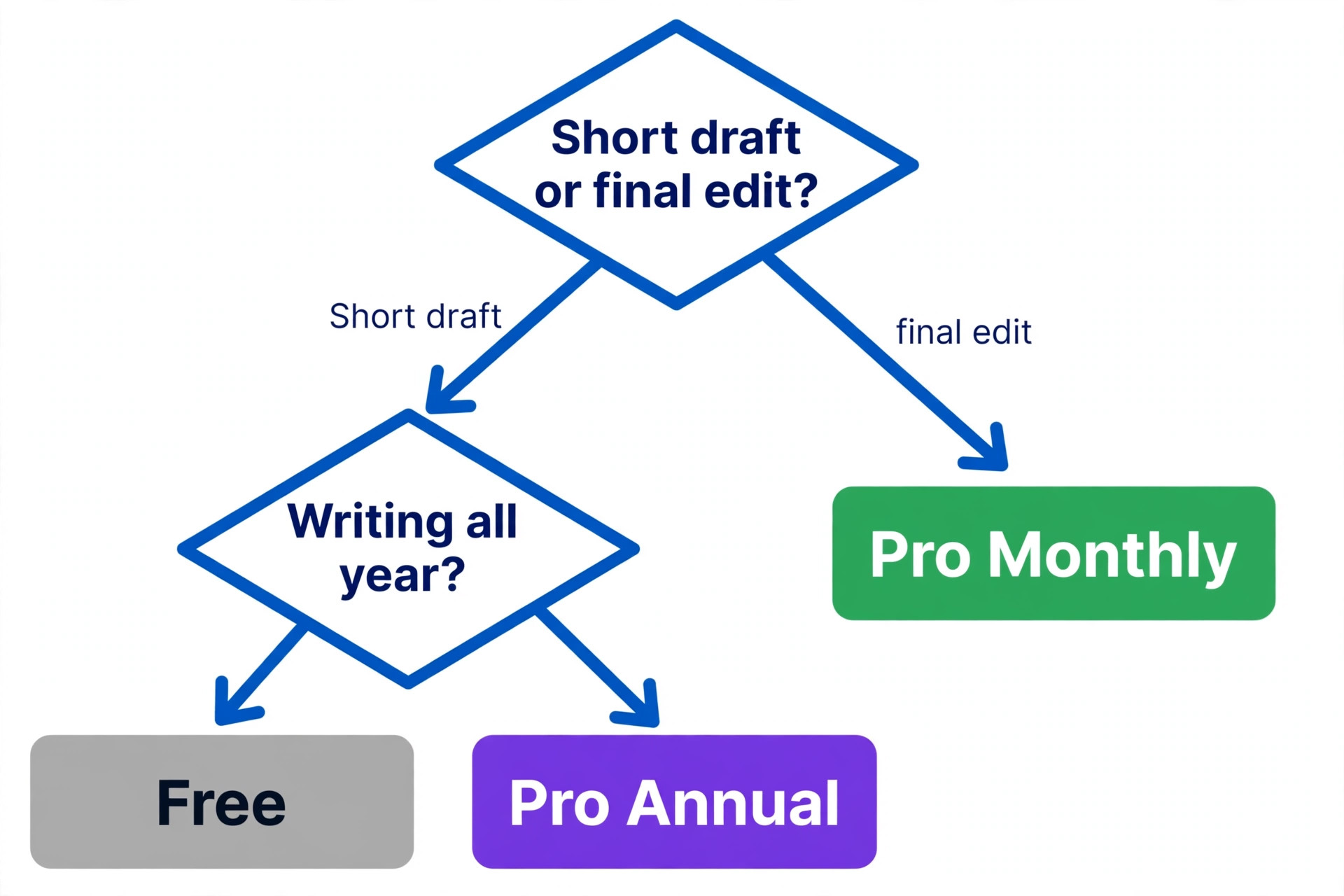
The cheapest sensible strategy for a thesis is to use Free for early drafts and buy Pro for a short period around the final edit, if your budget allows. Monthly billing at about 30 dollars for one or two months costs far less than a full year, and it gives you the plagiarism check when it matters most, on the near final draft. If you are writing papers all year, annual billing at about 144 dollars works out cheaper per month, but only if you will actually use it across the year.
| Plan | Reported price | Academic value |
|---|---|---|
| Free | 0 dollars | Basic grammar and spelling, good for early drafts |
| Pro annual | About 12 dollars per month, 144 dollars per year | Full rewrites, plagiarism check, best for final edits |
| Pro quarterly | About 20 dollars per month | A middle option for a term length project |
| Pro monthly | About 30 dollars per month | Best for a short final edit period |
| Enterprise | Quoted on request | For institutions, not individual writers |
Official details are on the Grammarly research paper page at https://www.grammarly.com/a/research-paper and the citation support page at https://support.grammarly.com/hc/en-us/articles/9182359307917-How-to-generate-citations-and-a-bibliography, and the main Grammarly site at https://www.grammarly.com carries current plan details.
How to Choose Your Editing Mix
Choose by document, deadline, and budget, not by a single rule. For a short coursework essay with a week to deadline, Grammarly Free plus a peer read is usually enough, with one staged pass and the checklist groups on correctness and clarity. For a thesis chapter, add a Pro plagiarism and clarity pass on the near final version, plus a supervisor read for argument. For a journal submission, add the full checklist, the citation workflow, a co author read, and a final format check in the submission preview. When you use Grammarly for academic editing, let stakes decide the mix, not habit.
Mistakes That Ruin Otherwise Good Academic Editing
The first mistake is accepting every suggestion. Accept all is a button that exists for marketing emails, not for theses. Every accepted rewrite that changes a precise term, weakens a hedge, or alters a quoted phrase is a small loss of accuracy, and across a thesis those losses add up to a document that sounds fluent and says less than you meant. Accept suggestions one by one, and reject any that change meaning, even if the replacement reads more smoothly.
The third mistake is trusting the similarity score instead of reading matches. Writers who chase a low score by swapping words produce evasive text, and writers who ignore a high score because “it is just quotations” miss real paraphrasing problems. Read every match, sort it, and fix the ones that need fixing. The score is a prompt for reading, not a verdict.
The fourth mistake is mixing citation styles. This happens when a writer copies a reference from an older paper, imports one from a database in a different style, and lets Grammarly format a third in the chosen style, without a final two direction check. The result is a reference list that mixes formats and an examiner who doubts the care behind the research. Run the citation workflow as a separate job, after the text is stable, and do not skip it because the rest of the paper feels finished.
The fifth mistake is letting the tool set your tone. Academic writing needs a steady, formal, careful voice. If you accept tone suggestions that push every sentence toward confident, punchy business language, your discussion will overclaim, your method will sound like a sales pitch, and your hedges will vanish. Protect hedges, protect precise terms, and protect discipline conventions, even when the tool flags them as wordy or tentative.
Frequently Asked Questions
Can Grammarly edit a full thesis in one document?
No, not comfortably. Reported document limits are about 100,000 characters, roughly 15,000 words, so a full thesis needs splitting by chapter. Edit each chapter as a separate file, keep a master copy in Word or Google Docs, and run a final consistency check across chapters for terminology, spelling variant, and citation style.
Does Grammarly check citations in APA, MLA, and Chicago?
Yes, Grammarly offers citation help and formatting suggestions in APA, MLA, and Chicago, including a Get citation button on compatible source sites. Treat those suggestions as drafts, verify each citation against the original source, and run a two direction check between in text citations and the reference list before submission.
Is Grammarly Pro worth it for a single thesis?
Often yes for a short period, but not always for a full year. Free covers basic grammar for early drafts. A month or two of Pro at the monthly rate gives you full sentence rewrites and the plagiarism check for the final edit, which is where those features matter most. Check first whether your university provides Grammarly free, since that can remove the decision entirely.
Will Grammarly change the meaning of my academic writing?
It can, if you accept suggestions without reading them. Clarity rewrites sometimes replace precise discipline terms with general words, and tone suggestions sometimes remove hedges your evidence requires. Read every suggestion, reject any that change meaning, and never let the tool edit direct quotations, data labels, or formulas.
Can I use Grammarly for a journal paper submission?
Yes, for language, clarity, and citation formatting checks, and for a plagiarism diagnostic on the near final draft. Grammarly cannot judge whether your argument, method, or contribution meets a journal standard, and it cannot enforce journal word limits, figure formats, or reference limits. Pair it with a co author read and a journal fit check before submission.
Does using Grammarly count as academic misconduct?
No, when it is used for language editing and disclosed where required. Problems arise when generative AI writes your argument, analysis, or literature synthesis and you submit it as your own work. Use Grammarly for grammar, clarity, and citation formatting, keep your notes and drafts, and follow your institution rules on disclosure.
The Edit That Keeps Your Argument Yours
A good academic edit does not make your writing sound like everyone else. It removes the surface faults that distract a reader, keeps the precise terms and careful hedges your evidence requires, and leaves your argument intact and easier to follow. That is what this workflow is built to do. Set Grammarly for academic work, edit in staged passes, work chapter by chapter or paper by paper, run the checklist and the citation workflow as separate jobs, and let a human reader judge the argument. When you use Grammarly for academic editing in that layered way, the tool earns its place as a disciplined first reader.