
The average business takes about 47 hours to respond to a new lead, while only about 23 percent respond within five minutes, according to a 2026 benchmark of 939 B2B companies. That gap is the whole opportunity. When you use Zapier for lead follow-up automation, you are not trying to replace a salesperson. You are trying to close the gap between the moment a prospect raises a hand and the moment a human reaches back, before a competitor does. Research on lead response has long pointed in the same direction.
Leads contacted within five minutes have been found far more likely to qualify than leads contacted after 30 minutes, with one widely cited study putting the difference at 21 times on qualification odds. The exact multiplier will vary by industry and lead source, but the direction does not change. Speed wins the first conversation, and persistence wins the sale.
This guide builds a complete system, not a single notification. You will map every step from form submission to first call, build the core Zaps in one focused session, route hot leads to a person at once, and put a backup in place for every point where automation can fail. It also covers pricing and task maths in plain numbers, the mistakes that turn helpful follow-up into spam, and a failure checklist to run before you trust the system with real leads. Prices quoted here reflect Zapier pages checked in October 2026, and you should check checkout before you pay, because Zapier now prices by task tier and the right tier depends on your volume.
Why the First Five Minutes Matter More Than the Perfect Pitch
A lead is not a name on a list. A lead is a person with a problem open in front of them, often while comparing two or three suppliers at the same time. In the first few minutes after a form is sent, that person is still thinking about the problem, still near their phone, and still able to take a call. An hour later, the problem has been pushed aside by the next meeting, the next email, or a competitor who called first. A day later, your follow-up can feel like a cold call, even though the prospect contacted you.

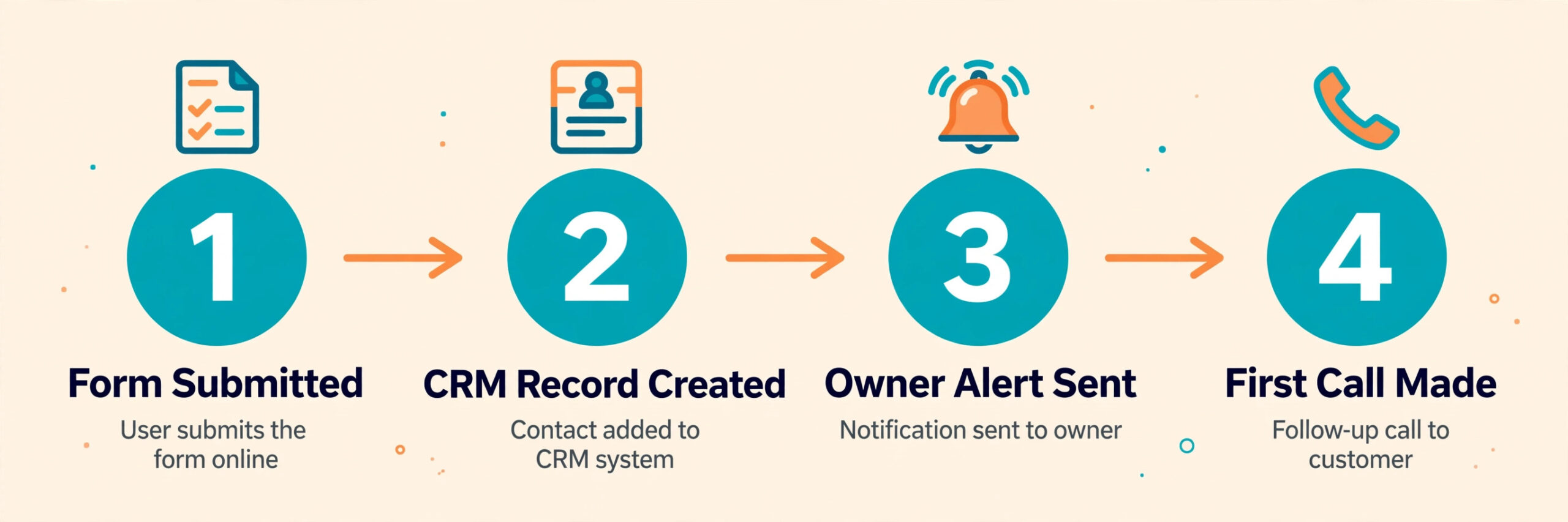
That is why the first job of automation is reliable speed. It records the lead in one place, alerts the right person, sends a short acknowledgement, and creates a task with a deadline. If any one of those four fails, leads go cold.

What a Good Follow-Up System Looks Like
A good system has five parts, and Zapier only handles the connections between them. First comes capture, which is the form, lead ad, booking page, or chat tool where the prospect enters details. Second comes storage, which is usually a CRM or a simple table where every lead has one record, one owner, and one status. Third comes alerting, which is the Slack message, SMS, or email that tells a human to act now. Fourth comes the first contact, which is the call, text, or personal email from a person. Fifth comes the sequence, which is the planned set of later touches if the first contact does not connect.
Most small teams already have capture and storage, but struggle with alerting and ownership. That is the gap Zapier fills best, by moving data, alerting the owner, and starting the sequence without copying and pasting between apps.
Before you build, agree one owner per lead, one status system, and one source of truth in the CRM.
How to use Zapier for lead follow-up automation in one afternoon
The simplest way to use Zapier for lead follow-up automation is to start with one source and one destination, prove it works, and then add steps. Do not try to automate five lead sources, three CRMs, and a nurture sequence in a single afternoon. Pick the source that brings most of your leads, usually a website form or a lead ad, and pick the destination your team already checks, usually a CRM or a shared sheet. Build that path first, test it with your own details, and only then add alerts and follow-up steps.
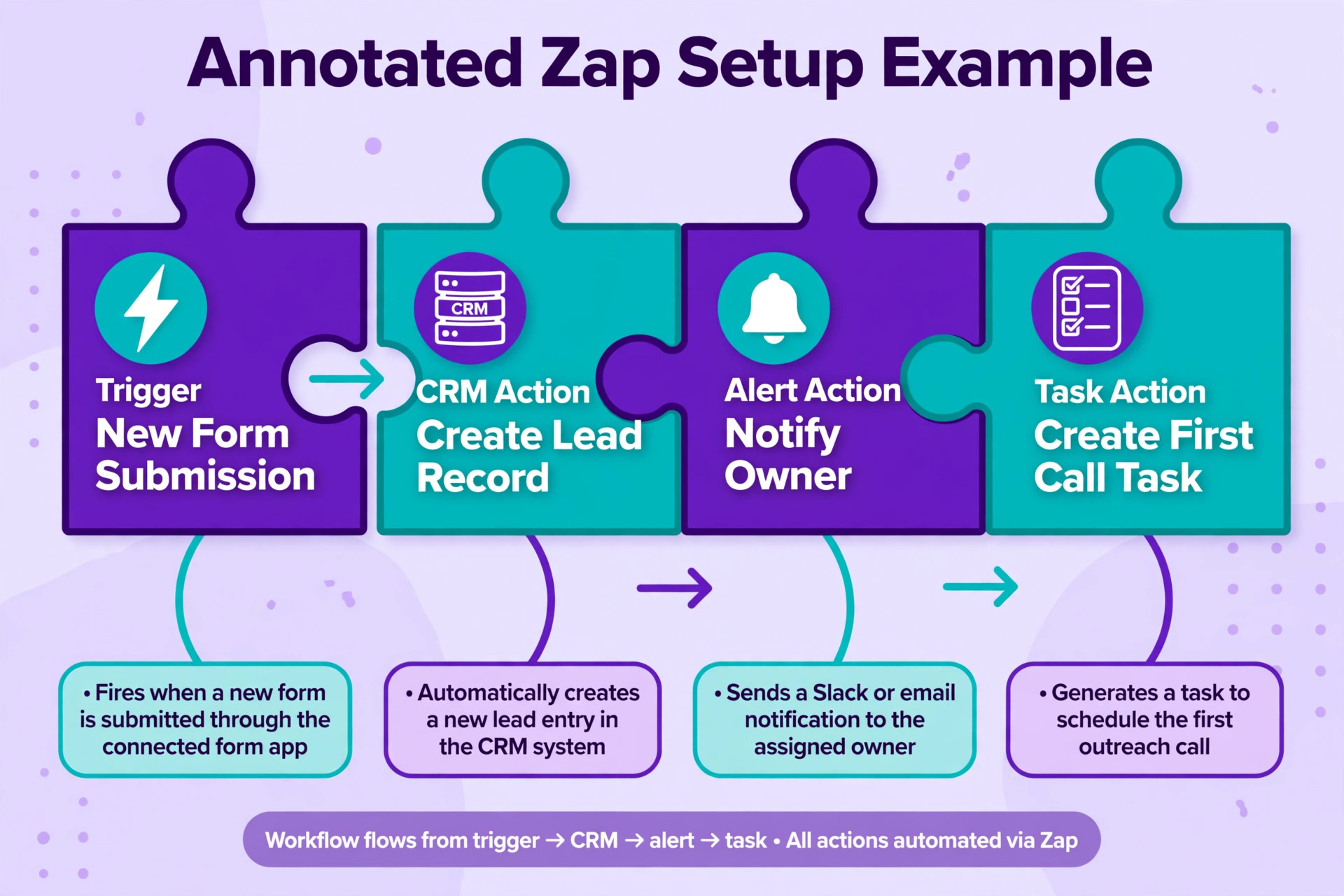
Start by creating a Zap with a trigger from your form tool. Common triggers are a new form submission, a new lead from a lead ad, or a new booking. Test the trigger with a real sample, not a blank test, because field names matter. A form field labelled phone on the website might arrive as phone_number or mobile in Zapier, and mapping the wrong field is the most common reason a later SMS step fails. Check each field in the sample data before you map it, especially name, email, phone, service interest, and source.
Next, add the action that creates or updates the lead in your CRM, mapping name and contact details first, then source, service interest, and submission date. Turn the Zap on, submit a test lead from a different device, and confirm the record appears within a few minutes. If it does not, check Zap history, which will show whether the trigger fired and which step failed.
Once the core path works, add alerting. A Slack channel message or an SMS to the owner works better than an email alert, because email alerts drown in an inbox. Keep the alert short and useful. It should carry the name, phone number, service interest, source, and a direct link to the CRM record, so the owner can call in one tap without searching. Avoid alerts that only say a new lead arrived, because an alert without a phone number or link is a delay disguised as speed. Finally, add a task for the first call, with a due time that matches your promise, such as within 30 minutes during business hours or first thing next morning for after-hours leads.
The Automation Map
An automation map is a one-page plan of every trigger, action, owner, timing, and fallback in your system. It is the document that stops automation from becoming a mystery that only one person understands. If you use Zapier for lead follow-up automation without a map, you will not know what should happen when a step fails, who should be told, or which Zap to fix. Build the map before you add a second lead source, and keep it updated whenever you change a Zap.
| Stage | Trigger or step | Owner | Timing | If it fails |
|---|---|---|---|---|
| Capture | Form submitted or lead ad created | Marketing | At once | Check form tool, then Zap history |
| Storage | Lead created or updated in CRM | Sales owner | Within 2 minutes | Owner checks history and enters lead by hand |
| Alert | Slack message or SMS to owner | Sales owner | Within 2 minutes | Backup alert by email to team lead |
| First contact | Call from owner | Sales owner | Within 30 minutes in hours | Task stays open and escalates after 2 hours |
| Acknowledgement | Short email or SMS to prospect | Automated | Within 5 minutes | Owner sends personal message on first call |
| Sequence | Follow-up emails and call tasks | Sales owner | Days 1, 3, 7 and 14 | Owner reviews uncontacted leads each morning |
| Handover | Qualified lead moved to pipeline | Sales owner | After first call | Weekly review of leads stuck in new status |
Read the map left to right for a normal lead, and right to left when something goes wrong. Assign a backup owner for alerts and the morning review, so holidays and sick days do not pause follow-up.

The map also forces an after-hours decision. Decide whether after-hours leads get a morning-call promise, a booking link, or an on-call rota, write the acknowledgement to match it, and create the morning task automatically.
Build the Core Zaps in Order
Build in this order, because each Zap depends on the one before it. First, the capture to CRM Zap. This is the foundation, and it must run before anything else. Second, the alert Zap, or the alert step inside the same Zap if your plan allows multi-step Zaps. Third, the acknowledgement message, which can be an email from your mail tool or an SMS from a messaging tool. Fourth, the task creation Zap, which sets the first call task and its due time. Fifth, the nurture and reminder Zaps, which handle leads that do not answer.
Keep the acknowledgement short and human. It should say you received the enquiry, name the service asked about, give a clear next step, and give a real way to reach you. Avoid promising a call time you cannot meet, and avoid asking the prospect to repeat information already given on the form.
For leads that do not answer, build a short sequence. Call on day one, send a short personal email or text on day two or three, call again on day five, and check in on day ten or fourteen. If a prospect replies asking for more time, stop the sequence and set a dated task for that time.
Routing, Scoring and Speed Without Overbuilding
Routing is the decision about who calls which lead. The simplest routing rule that works for most small teams is routing by service and location. A web design lead goes to the designer, a plumbing lead in one town goes to the engineer who covers that town, and everything else goes to the general owner. Zapier can route by a field value, such as service interest or postcode area, using a filter or a path step. Keep the routing table in your automation map, so a new team member can see who owns what without asking.
Lead scoring inside Zapier should stay simple, using two or three clear signals such as budget range, urgency, or a service you close well. A lead that ticks two signals gets an instant alert and a faster deadline. A full scoring model belongs in the CRM.
Speed also depends on polling. Some triggers fire at once through a webhook, while others are checked on a schedule, and on the free plan that check can be every 15 minutes. Test the real delay from submission to alert, and record it in your map.
Pricing and Task Maths
Zapier prices by tasks, and a task is a successful action step in a Zap. The trigger itself does not use a task, and built-in steps such as filters, formatting, paths, and delays do not use tasks on current plans. That distinction matters for lead follow-up, because a Zap with one trigger, one filter, one CRM action, and one Slack action uses two tasks per lead, not four. Count only the actions that move data or send a message, and you will estimate far more accurately.
The official Zapier pricing page checked for this guide lists a free plan at 0 dollars a month with 100 tasks a month and two-step Zaps, a Professional plan starting from 19.99 dollars a month with multi-step Zaps and premium apps, and a Team plan starting from 69 dollars a month with shared Zaps, shared connections, and up to 25 users. Enterprise pricing is quoted on request. Task tiers on paid plans scale with the tier you choose, so check the tier selector on the pricing page and at checkout for the task allowance that matches your volume, because the starting price alone does not tell you how many leads you can handle.
Work the maths before you choose a tier. Suppose each lead uses three billable actions, such as creating a CRM record, sending an alert, and creating a task. At 100 leads a month, that is 300 tasks. At 300 leads a month, that is 900 tasks. At 1,000 leads a month, that is 3,000 tasks. Add a margin of at least 25 percent for tests, retries, and extra steps, and remember that duplicate leads, spam submissions, and test submissions also use tasks. A filter that drops spam before the CRM step can save real money, because it stops junk leads from using billable actions.
| Leads per month | Actions per lead | Tasks used | Planning note |
|---|---|---|---|
| 50 | 3 | 150 | Free plan will not cover this once tests are included |
| 100 | 3 | 300 | Paid plan needed for multi-step follow-up |
| 300 | 3 | 900 | Leave headroom for retries and a nurture step |
| 1,000 | 3 | 3,000 | Choose a higher task tier or trim steps per lead |
| 1,000 | 5 | 5,000 | Five actions per lead doubles the cost fast |
The cost to use Zapier for lead follow-up automation depends on more than the Zapier bill, because you still pay for your CRM, email or SMS tool, and any enrichment service. Use SMS only for hot leads and email for the rest if SMS costs push the total too high.
Watch for pay-as-you-go overages. Decide in advance whether overage billing keeps leads flowing or a pause protects the budget, and check usage weekly in the first month.
Review task usage at the end of the first month, and compare the real actions per lead with the estimate you made before launch. If one step rarely changes the outcome, remove it and keep the saving for a step that speeds up the first call. If volume grows faster than expected, raise the task tier before the limit is reached, rather than letting Zaps pause during a busy campaign. A short monthly review, with usage, response time, and contact rate on one page, keeps the system honest and prevents a quiet drift toward higher cost or slower follow-up.
How to Choose the Right Setup for Your Team
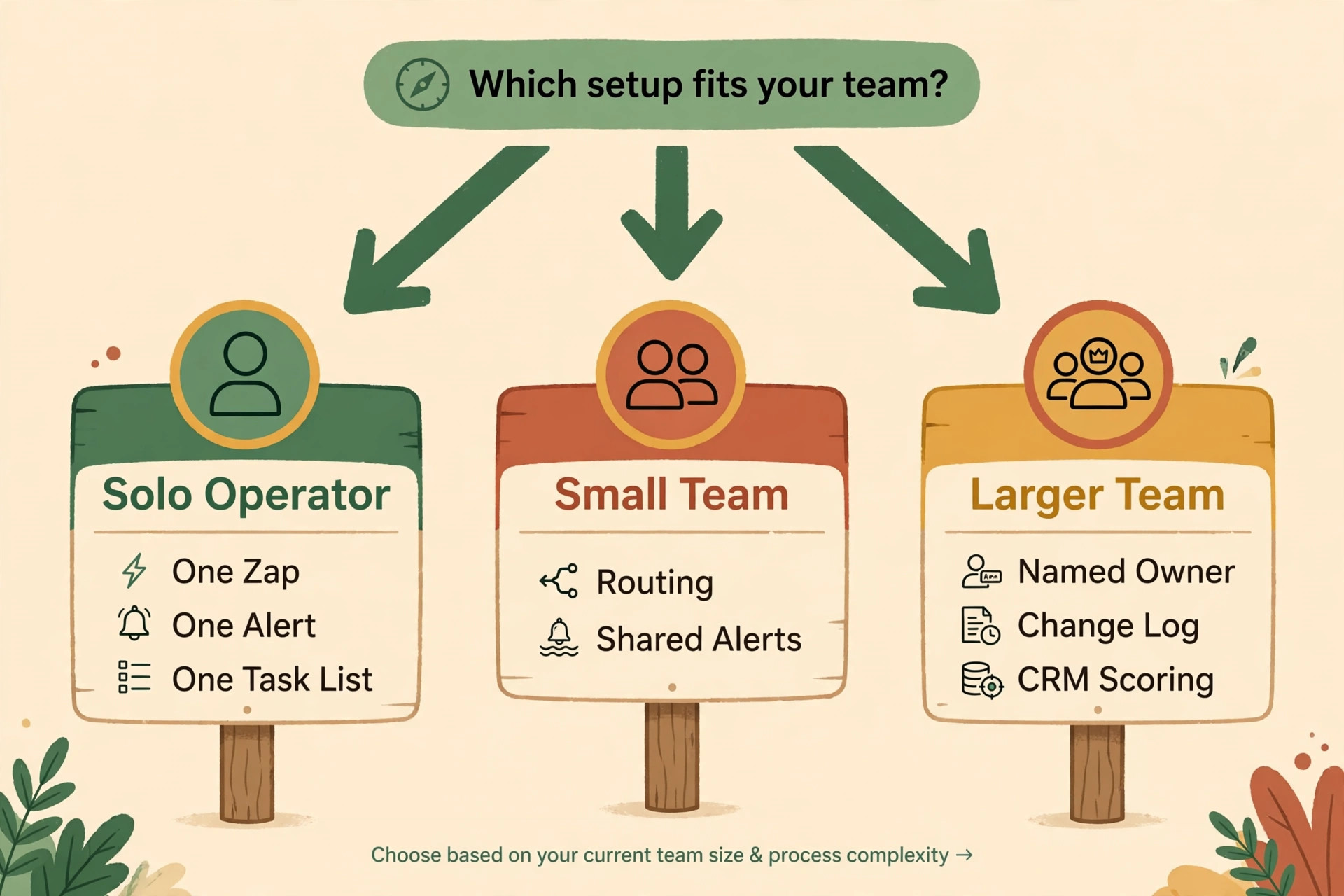
A solo operator needs a different setup from a five-person sales team. A solo operator should build one Zap from form to CRM, one alert to their own phone, and one task list for first calls. That setup can run on a small paid plan, and the main risk is not task volume but missed calls when the owner is busy. A solo owner should add a booking link to the acknowledgement, so a prospect who cannot be called at once can still book a time, rather than waiting for a callback that may slip.
A small team needs routing and a shared view. Add routing by service or location, show uncontacted leads by age in the CRM, and use a shared Slack channel for alerts, so an unclaimed lead is visible to everyone. Reassign any lead unclaimed after two hours.
A larger team needs governance. Name one owner for the Zaps, keep a change log, test changes on a copy first, and let the CRM own scoring and reporting while Zapier owns movement between tools.
Mistakes That Turn Follow-Up Into Spam
The first mistake is sending too many automated messages before a human has spoken to the prospect. A lead who asked for a quote does not need five emails in three days. They need one acknowledgement, one call, and then a short sequence only if the call does not connect. Teams that use Zapier for lead follow-up automation often add steps because they can, not because the prospect needs them. Every step should answer a simple question. Does this step help the prospect get a faster answer, or does it only make the sender feel busy?
The second mistake is copying form data into messages without checking it. A first name field that arrives blank, a service field that arrives as a code, or a phone number with a missing digit will all show up in a message if the Zap maps them blindly. Use fallback text for blank fields, such as a greeting without a first name, and test with incomplete form submissions, not just perfect ones. A message that reads as if it was written for someone else is worse than a plain message with no personalisation at all.
The third mistake is ignoring consent. A quote form does not necessarily mean agreement to marketing emails, SMS offers, or a newsletter. Keep transactional follow-up separate from marketing consent, and only add prospects to marketing lists when consent is clear.
The fourth mistake is letting automation hide a broken sales process. If leads are stored, alerted, and tasked, but nobody calls because the team is overloaded, the problem is staffing or prioritisation, not automation. Automation will make the failure visible faster, because uncontacted leads will pile up in one view, but it will not fix the failure. Review uncontacted leads every morning, agree on a maximum response time, and track it. A system that nobody owns will drift, no matter how well the Zaps are built.
The Failure Checklist
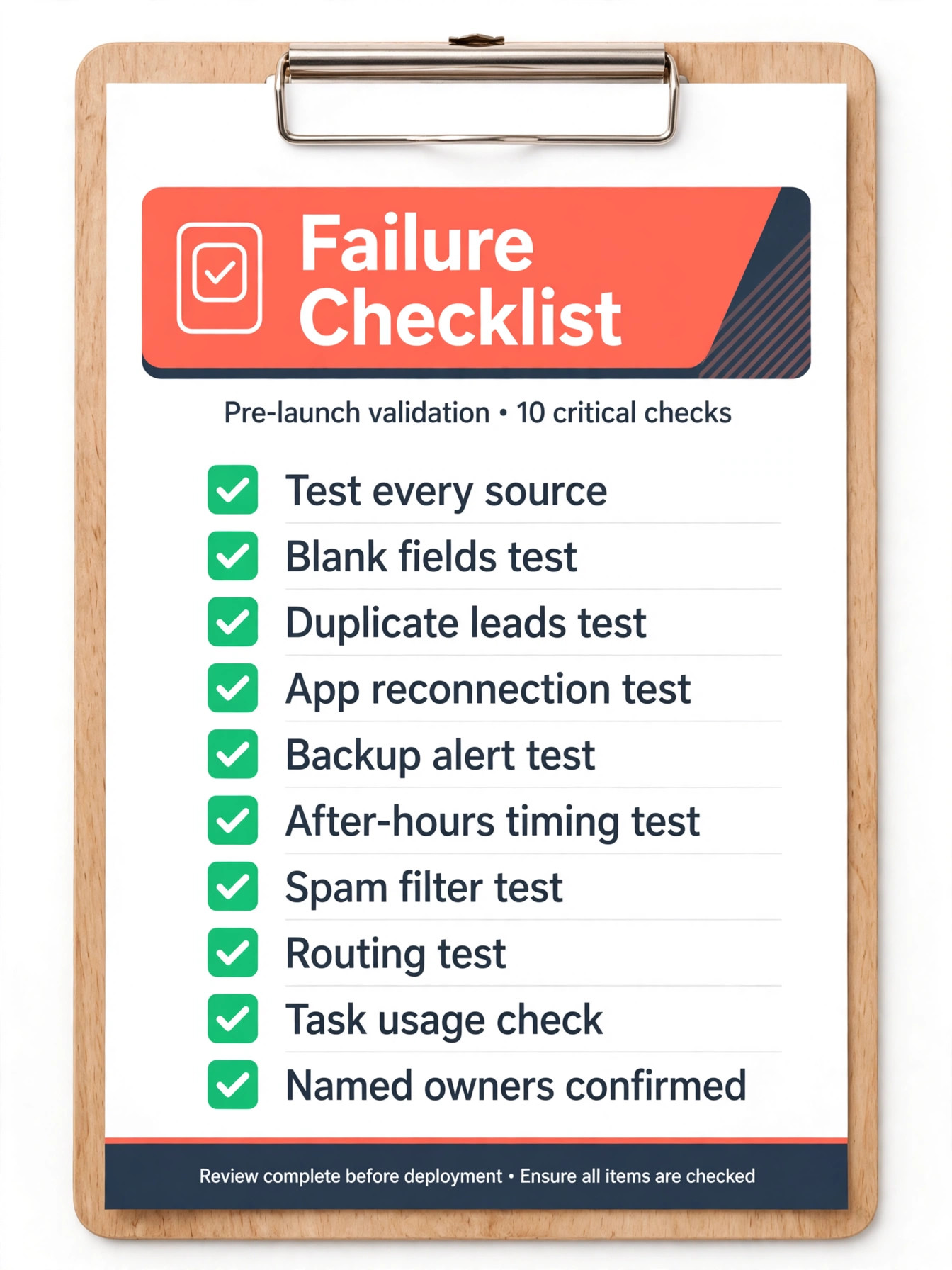
A team that plans to use Zapier for lead follow-up automation should run this checklist before trusting the system with a full week of leads, and again after any change to a form, a CRM field, or a Zap. A checklist that lives only in one person’s head is not a checklist. Copy it into your team document, and tick each item with a real test, not with a guess.
First, test each source end to end, then test blank phone and name fields, duplicate leads, app reconnection, and the backup alert. Next, test after-hours timing, spam filtering, routing for a new service, and task usage after a week. Finally, confirm named owners for the Zaps, the morning review, and the backup alert.
Sixth, test after-hours timing by submitting a lead outside business hours and confirming the acknowledgement promises a morning call, not an immediate call. Seventh, test a spam submission and confirm it is filtered before it uses billable actions or creates a CRM record. Eighth, test a lead from a new service or location and confirm routing sends it to the right owner. Ninth, check task usage after a week of real leads and compare it with your estimate, so the next month tier is chosen on data, not on hope. Tenth, confirm one person owns the Zaps, one person owns the morning review, and one person owns the backup alert, with names written in the automation map.
If any item fails, fix it before you add more lead sources. A system that fails on a test lead will fail on a real lead, and a real lead will not tell you it failed. The cost of a failed test is a few minutes. The cost of a failed real lead is a lost sale and a prospect who may never return.
Testing, Measuring and Improving
Testing does not end when the Zaps are turned on. For the first two weeks, check Zap history every morning for failed runs, filtered runs, and odd data, fix the cause rather than just the single run, and do not replay a message-sending run without checking whether the prospect already received it.
Measure three numbers weekly. First response time to first human contact, first contact rate, and uncontacted lead age. If response time falls but contact rate does not rise, the problem is call timing or staffing, not the Zaps.
Improve one thing at a time, record each change in the map with a date, and review the prospect experience monthly by reading five acknowledgements, testing the booking link, and checking the reply address.
When Zapier Is Not the Right Tool
Zapier is a strong choice when your tools are standard and your logic is clear. It is less strong for complex branching or heavy data processing, where another automation tool or a direct integration may fit better.
Native CRM automation is also worth checking, because many CRMs now include workflows for assignment, tasks, and sequences. Zapier earns its place when leads come from outside the CRM and need to move into it reliably.
If you run a small business and want the wider automation picture, automate small business with AI sets out where automation helps most and where it does not. For sales teams, AI tools for sales teams covers the tools that sit around follow-up, while best AI agents for lead generation looks at generation itself. If scoring is your gap, best AI lead scoring tools compares scoring options, and best CRM software for small business helps you pick the storage layer that Zapier will feed.
For official pricing and task details, see the Zapier pricing page, and check the tier selector at checkout before you commit, because task allowances and starting prices can change with the tier you choose.
Frequently Asked Questions
Can I use Zapier for lead follow-up automation on the free plan?
Yes, for a very small test, because the free plan includes 100 tasks a month and two-step Zaps. That is enough to prove that a form can create a CRM record, but it is not enough for a real follow-up system with an alert, a task, and an acknowledgement, because those steps need a multi-step Zap on a paid plan. Start free to test the core path, then move to Professional when you add alerts and tasks.
How fast will a lead reach my team after a form is submitted?
It depends on the trigger type. A webhook trigger can fire within seconds, while a polling trigger is checked on a schedule, and on the free plan that check can be every 15 minutes. Test the real delay from submission to alert with your own form, and record it in your automation map. If a five-minute response matters to your business, choose a trigger and plan that can deliver it, and do not promise a speed your setup cannot meet.
How many tasks does one lead use?
Count only successful action steps, not the trigger and not built-in filter or delay steps. A lead that creates a CRM record, sends a Slack alert, and creates a task uses three tasks. A lead that only creates a CRM record uses one task. Work out your actions per lead, multiply by leads per month, add at least 25 percent for tests and retries, and choose a task tier with that total in mind.
What happens if a Zap fails on a real lead?
Zapier keeps a history of runs, including failed runs and the error returned by the destination app. Check that history first, fix the cause, such as an expired connection or a changed field, and only then replay the run if it is safe to do so. Replaying a run that sends a message can send a duplicate, so check whether the prospect already received a message before you replay. Your failure checklist and backup alert exist for exactly this case.
Should the first message be automated or written by a person?
The acknowledgement can be automated, but the first real contact should be personal. An automated message should say you received the enquiry, name the service asked about, and give a clear next step and a real reply route. The call or personal email that follows should be written and delivered by a human, with details from the form used naturally, not copied in a block. That split gives you speed without making the prospect feel handled by a machine.
Does Zapier replace a CRM?
No. Zapier moves data between tools, while a CRM stores the lead, tracks pipeline stages, and holds the history of calls and messages. Use Zapier to feed the CRM, alert the owner, and create tasks, and use the CRM as the source of truth for status, scoring, and reporting. A team that tries to use Zapier as a CRM will end up with data spread across Zaps, sheets, and chat messages, with no single record to trust.
The First Call Wins, So Build the System That Makes It Happen
Lead follow-up is not a software problem first. It is a speed and ownership problem, and Zapier is a practical way to fix the speed part. Map the path from form to first call, build the core Zaps in order, route hot leads to a person at once, and run the failure checklist before you trust the system with real volume. Price the system on tasks per lead, not on the starting price alone, and keep the first contact human, even when everything around it is automated.
Start this week with one source, one CRM, one alert, and one task rule. Test with real submissions, including blank fields and after-hours timing, and measure first response time for two weeks. Fix routing, staffing, or the acknowledgement before adding more automation.