

Announcements get lost. A school posts a timetable change in a WhatsApp group and it drowns under 80 replies before parents see it. A club posts an event date on social media and the algorithm shows it to a fraction of followers, days late. A small business emails an offer and it sits unread in a promotions tab. Members are not ignoring you on purpose. They are overloaded, and every channel you use to reach them is either noisy, filtered, or both. When you use Telegram for community announcements, you get a different shape of problem to solve. The message reaches subscribers directly, in order, without an algorithm deciding who sees it.
The work shifts from fighting for attention to earning it, by posting less often, posting more clearly, and building a routine members can trust.
This guide builds that routine from scratch. You will set up a channel that stays readable, link a discussion space so replies do not pollute announcements, add bots that handle welcomes, reminders, and moderation, and run a weekly schedule you can keep with a small team. It also covers the limits that matter, like message length, file size, and what Telegram does not do well, so you do not discover them on the day of an important announcement. Prices and limits change, so check the official Telegram pages and the price shown in your own app before you pay for anything mentioned here.
Why a Channel Beats a Group for Announcements
A group and a channel look similar in the app, but they serve opposite jobs. In a group, every member can post, which is excellent for discussion and terrible for announcements. One urgent update can be buried under greetings, questions, and side conversations within an hour. In a channel, only admins post. Subscribers read, react, and, if you link a discussion group, comment in a separate space. The announcement itself stays clean, in order, and easy to find later.
That separation is the main reason teams use Telegram for community announcements instead of a busy group chat. Members who join late can scroll the full history and catch up without asking what they missed. Admins can pin the current announcement so it stays at the top. Each post shows a view count, which gives you a rough read on reach without a separate analytics tool. Channels have no subscriber limit, while groups are capped at 200,000 members, so a channel also scales further if your community grows beyond a local club or a school cohort.
There are trade offs to be honest about. A channel is one way by design, so members who want to ask a question must go to the linked group, reply in comments if you enable them, or message an admin directly. That friction is a feature for announcements, but it can feel distant if your community expects conversation on every post. Telegram also has no built in email style subject line, no read receipt per subscriber, and no guarantee that a member with muted notifications will open a post on time.
For genuinely urgent alerts, like a venue closure an hour before an event, you still need a second route, such as a phone call to key volunteers or a pinned message plus a short message in the discussion group. Treat the channel as the single source of truth, not as the only way a message can ever travel.

Channel, Group, or Both
Most healthy communities end up running two linked spaces, not one. The channel carries announcements. The group carries conversation. Telegram lets you link them, so each channel post can show a comment thread that lives in the group. Members who want to discuss can tap through. Members who only want updates never have to open the group at all.
Start with the channel alone if your team is tiny and your announcements are simple, like a weekly class timetable or a monthly newsletter summary. Add the linked group once questions start arriving as direct messages to admins, because that is the signal that discussion needs a home. Do not start with a group alone and hope announcements survive there. They rarely do once membership passes 50 people and conversation picks up.
Use this simple test before you build anything else. If a message must be found again next week, it belongs in the channel. If a message invites replies, debate, or photos from members, it belongs in the group. If a message is a question to one person, it belongs in a direct message. That one rule prevents most of the clutter that kills community channels.
Set Up a Channel Members Can Trust
Setup takes minutes, but the choices you make in those minutes shape whether members trust the channel for months. Start in the Telegram app by creating a new channel, choosing a clear name, and adding a short description that says who the channel is for and what kind of posts to expect. A name like Riverside Runners Announcements tells a new subscriber far more than a clever name that only insiders understand. If the channel is public, choose a short username that matches the name, because that username becomes the shareable link. If the channel is private, you will share an invite link instead, and you can revoke that link later if it leaks.
Set the channel type with care. Public channels can be found in search and anyone with the link can join, which suits a club, a course, or a local project that wants new members. Private channels suit a school class, a paid membership, or a workplace team, where membership should stay controlled. You can change a public channel to private later, but the public link history and search visibility make a clean switch harder than starting private, so decide on day one.
Add at least two admins before you publish anything important. A channel with one admin is one lost phone or one sick week away from silence. Give the second admin posting rights but hold back the right to add or remove other admins until you trust the routine. Write the admin rules down in a private note, even for a two person team. Who posts, who checks facts, who replies to corrections, and what happens if a post contains an error. That note sounds formal for a volunteer group, and it is exactly what stops a rushed correction from making an error worse.
Your first three posts set the tone. Post a welcome message that states the purpose, the posting rhythm, and where discussion happens. Post a pinned message with the essential links, like the timetable, the sign up form, or the contact route for urgent help. Then post one real announcement, short and complete, so new subscribers see the format they should expect. Do not fill the channel with backdated history on day one. A new subscriber who joins to find ten old posts will assume the channel is noisy, even if those posts are weeks old.

How to use Telegram for community announcements in a small team
Small teams fail on Telegram for a predictable reason. Everyone can post, so no one owns the post. Fix that with roles, even if the team is only three people. One person drafts, one person checks facts and links, and one person posts or schedules. On a busy week the same person can do two of those jobs, but the check should never be skipped for a date, a price, a venue, or a link. Most community announcement errors are not dramatic. They are a wrong day, a broken link, or a price from last term, and each one costs trust that takes weeks to rebuild.
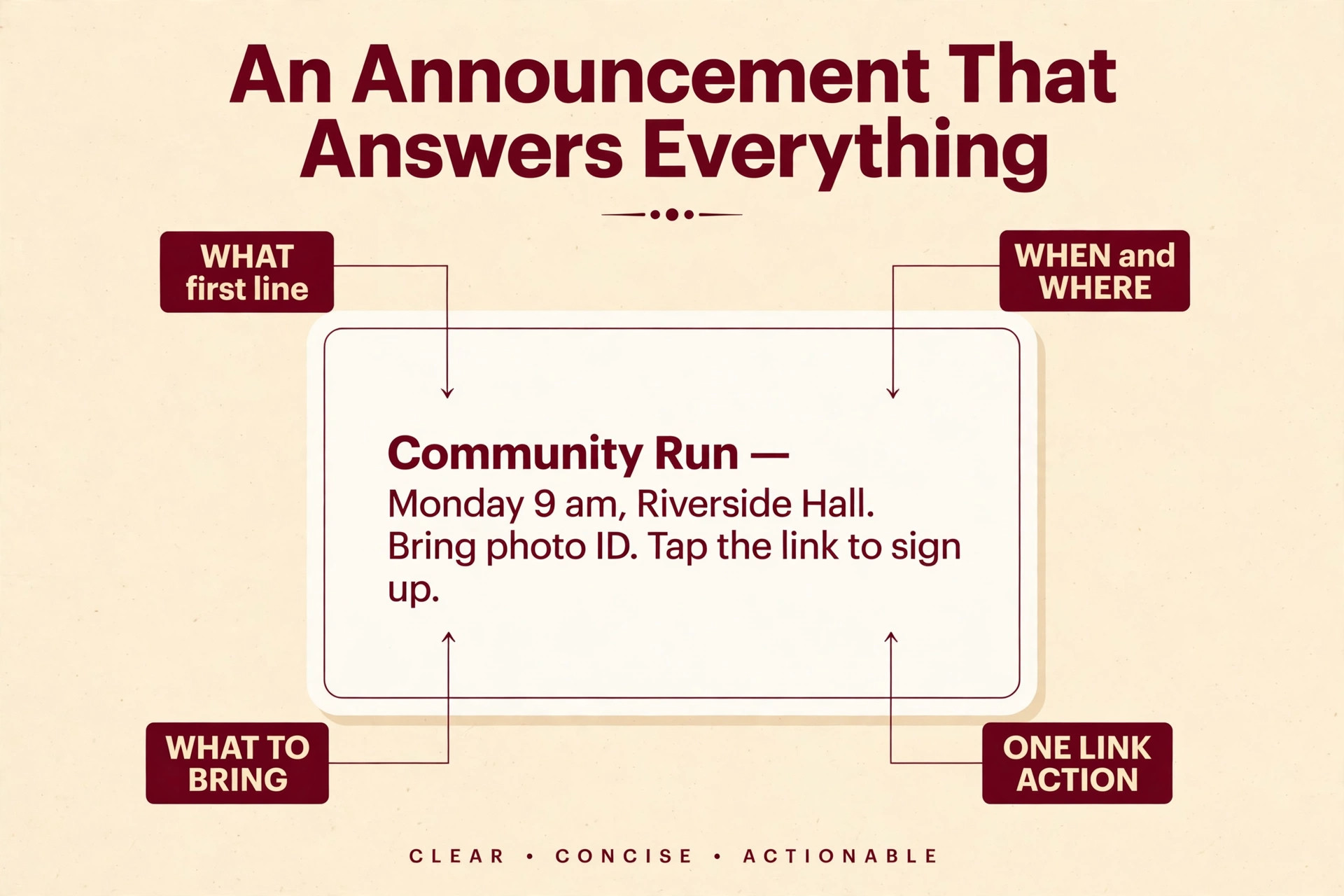
Agree a house style before volume grows. Keep announcements short at the top, with the decision or date in the first two lines, then the detail below. Use one link per post where possible, because a post with four links forces the reader to choose and often leads to no click at all. If a post needs more detail, link to a single page that holds it, rather than pasting a long document into the channel. Use plain language for dates, times, and places. Write Monday 9 am, Riverside Hall, and bring photo ID, rather than assuming members know the shorthand your committee uses.

Bots That Do the Routine Work
A bot is an automated account that can post, reply, moderate, or collect information inside Telegram, and it is one reason small teams use Telegram for community announcements without adding staff. You do not need to code to use the common ones, and the Telegram Bot API itself is free to use. The skill is choosing bots that remove routine work without turning the channel into an automated feed that members stop reading.
Start with the official route for creating a bot. Search for BotFather inside Telegram, start it, and follow its prompts to create a bot and receive a token. Treat that token like a password. Anyone with it can control the bot, so store it in a password manager, never paste it into a channel post, and revoke it through BotFather if it leaks. Add the bot as an admin of your channel with only the permissions it needs, usually Post Messages, and test it with a private test channel before you let it near the real one.
The most useful bots for announcement channels fall into four groups. Welcome bots greet new group members and point them to the channel rules and the pinned post. Moderation bots delete spam, block repeated links, and warn members who break group rules, which matters far more in the linked discussion group than in the channel itself. Poll and quiz bots run quick votes, like choosing between two event dates, without moving the vote to an external form. Scheduling and cross posting bots queue posts, repost from another source, or send a reminder before an event. Pick one bot per job, test each for a week, and remove any bot that members complain about or that posts more than it helps.
Be careful with bots that promise growth, auto invites, or mass messaging to strangers. Those tools can get a channel flagged, annoy people who never asked to join, and damage the trust you are building. A bot should serve people who already chose to subscribe, not chase people who did not. If a bot asks for broad admin rights, access to member lists, or payment before you can test it, pause and check its reviews and its privacy policy first. Free does not mean safe, and a cheap automation that spams your members is far more expensive than the time it saves.
For teams that want a no code start, Telegram scheduling tools also exist outside the app. Fedica lists Telegram scheduling on its free plan, and PostEverywhere lists a Lite plan at 9 dollars a month that includes Telegram, with a 7 day free trial. Check the current plan page before you commit, because free tiers change and limits on connected accounts or scheduled posts are often where the real cost sits. For most small communities, the built in Telegram scheduler described below is enough, and a paid tool only earns its fee once you manage several channels or need a shared calendar view.
The Built In Scheduler and Its Limits
Telegram has a built in scheduler that many people who use Telegram for community announcements miss at first. On mobile, type a message, hold the send button, and choose Schedule Message. On desktop, right click the send button for the same option. Scheduled posts live in a server side queue, so they send even if the phone that scheduled them is off. You can view, edit, reschedule, send now, or delete a scheduled post from the clock icon at the top of the channel. That one feature turns announcement work from a daily scramble into a weekly batch.
Know the limits before you rely on it. A text message can hold up to 4,096 characters, while a caption on a photo or video is limited to 1,024 characters, so long announcements with an image need a shorter caption plus a linked page or a follow up text post. Files can be up to 2 GB per file on a free account, rising to 4 GB with Premium, which is generous for PDFs, timetables, and short videos. Telegram also reports a cap of 100 scheduled messages per chat in third party scheduler guides, so a huge backlog queued months ahead can hit a ceiling. In practice, a weekly batch of 5 to 10 posts stays well inside it.
Repeating scheduled messages, where the same post resends on a daily or weekly interval, is a Premium feature, according to scheduler guides. That matters for a weekly reminder like a class time that never changes. Without Premium, you can still schedule each instance by hand in a batch, which takes a few extra minutes but keeps the content editable week by week. That manual step is often a benefit, because a repeated post that never changes can go stale when a term ends or a venue changes and no one notices the automation still running.
Telegram itself is free for channels, groups, and bots. Telegram Premium is the optional subscription for higher limits and extra features, and its price varies by store, country, and billing route. Recent public guides list store billed Premium at about 4.99 dollars a month or about 35.99 dollars a year in the United States, with direct billing through the PremiumBot route often lower because it avoids store fees. Do not quote those figures as fixed. Open Settings, then Telegram Premium in your own app, and read the price shown for your account before you subscribe. Most announcement channels never need Premium, and buying it for a single admin does not upgrade the channel for subscribers.
A Channel Setup and Posting Schedule Template
This is the overview proof element of this guide, a setup and schedule you can copy into a document and adapt to your community. It works for a school, a club, a course cohort, a local project, or a small business audience. Change the days and counts to fit your rhythm, but keep the structure. One announcement type per slot, one owner per slot, and one rest day where nothing is scheduled unless it is genuinely urgent.
Start with the setup checklist. Create the channel with a clear name and description. Choose public or private and record the decision. Add two admins and set their permissions. Link a discussion group, or note that discussion will happen by direct message until the group is needed. Write and pin a welcome post and an essential links post. Create a private test channel and add your bot there first. Set up a shared folder for approved images, PDFs, and links, so a post never depends on a file that lives only on one admin phone. Finally, write the correction rule and the urgent alert rule, and share both with every admin.
Then use a weekly schedule like the one below. It assumes a community that needs two to three announcements a week, which is the right pace for most groups. More than five posts a week usually trains members to mute the channel, while fewer than one post a week makes members forget it exists.
| Day | Slot | Post type | Owner | Notes |
|---|---|---|---|---|
| Monday | Morning | Week ahead | Lead admin | Dates, venues, deadlines only |
| Wednesday | Afternoon | Reminder or update | Second admin | One change or one reminder, not both |
| Friday | Morning | Recap and next steps | Lead admin | Results, thanks, and what happens next |
| As needed | Any time | Urgent alert | Any admin | Pin it, then unpin after the event |
| Monthly | First Monday | Roundup | Lead admin | Links to the month ahead, in one post |
Batch the work. Draft Monday, Wednesday, and Friday posts in one sitting, ideally the previous Friday or on Sunday evening. Schedule them with the built in scheduler, then check the scheduled list once before the week starts. That check catches the wrong date, the draft that was meant for the group, and the link that points to last term form. During the week, only urgent alerts break the schedule. Everything else waits for its slot, which protects members from notification fatigue and protects admins from the pressure to post every time someone asks a question.

Write Announcements Members Actually Read
A good Telegram announcement answers five questions in order. What is happening, when is it, where is it, what must the reader do, and where can they get more detail. If any of those answers is missing, replies will flood the discussion group asking for it, and the admin time you saved by posting once will be spent answering the same question ten times. Put the answer to the first question in the first line, because Telegram previews show only the opening lines in a busy chat list.
Measure What Matters, and Ignore the Rest
Channel statistics are available once a channel passes 50 subscribers, according to Telegram guides. If you use Telegram for community announcements regularly, track three numbers each week from those statistics. That is enough for most communities. Track three numbers each week. Views after 48 hours, new subscribers minus unsubscribes, and replies or questions in the linked group that show a post was unclear. Those three numbers tell you whether posts are being seen, whether the audience is growing, and whether the writing is clear.
Mistakes That Quietly Kill a Channel
The first mistake for teams that use Telegram for community announcements is posting too often. A channel that posts daily for a month, then goes silent, trains members to mute it during the busy phase and forget it during the quiet phase. A steady two to three posts a week, kept for three months, builds more trust than a burst of daily posts that cannot be sustained. If you have more news than slots, save the smaller items for the monthly roundup instead of breaking the rhythm.
The second mistake is mixing announcements with discussion in the channel itself. Admins sometimes post a question in the channel, then answer it there, then post a poll, then post a chatty update, until the channel reads like a group with only admins talking. Keep the channel for announcements and move conversation to the linked group. Members who want to chat will follow the link. Members who only want updates will stay subscribed because the channel respects their time.
The third mistake is letting one admin become the only person who knows how anything works. That admin holds the bot token, the link list, the schedule, and the password to the shared folder, all in their head. When they go on holiday, the channel stalls. Write the routine down, share the log, add a second admin, and test a handover once, by letting the second admin run a full week while the first admin only checks. That test reveals gaps while there is still time to fix them.
The fourth mistake is never cleaning up. Pinned posts go stale, links break when forms move, and old announcements about last term stay searchable and confuse new members who find them through search. Unpin a post once its event passes. Update the pinned essential links post at the start of each term. Delete or edit posts that contain a broken link or an outdated price, rather than leaving them to mislead. A short monthly cleanup, done in the same sitting as the monthly roundup, keeps the channel trustworthy.
The fifth mistake is treating Telegram as a replacement for every other channel too soon. Some members do not use Telegram, some use it rarely, and some need an accessible format that a chat app does not provide well. Keep a simple fallback for important announcements, like an email summary or a notice on a website, until you know what share of your community actually reads Telegram reliably. The goal is a channel members trust, not a channel that becomes the only place information exists and therefore excludes people.

When Telegram Is the Wrong Tool
Telegram is strong for announcements, but it is not the right home for every kind of community work. If your announcements need formal approval trails or proof that each member read a safety notice, a dedicated system or email with tracking fits better, because Telegram view counts are aggregate and do not prove who read what. If your members are mainly on another app and will not install a second one, meet them where they already are for urgent messages, and use Telegram to build a cleaner routine for members who are willing to move.
Pick a Setup That Fits Your Team Size
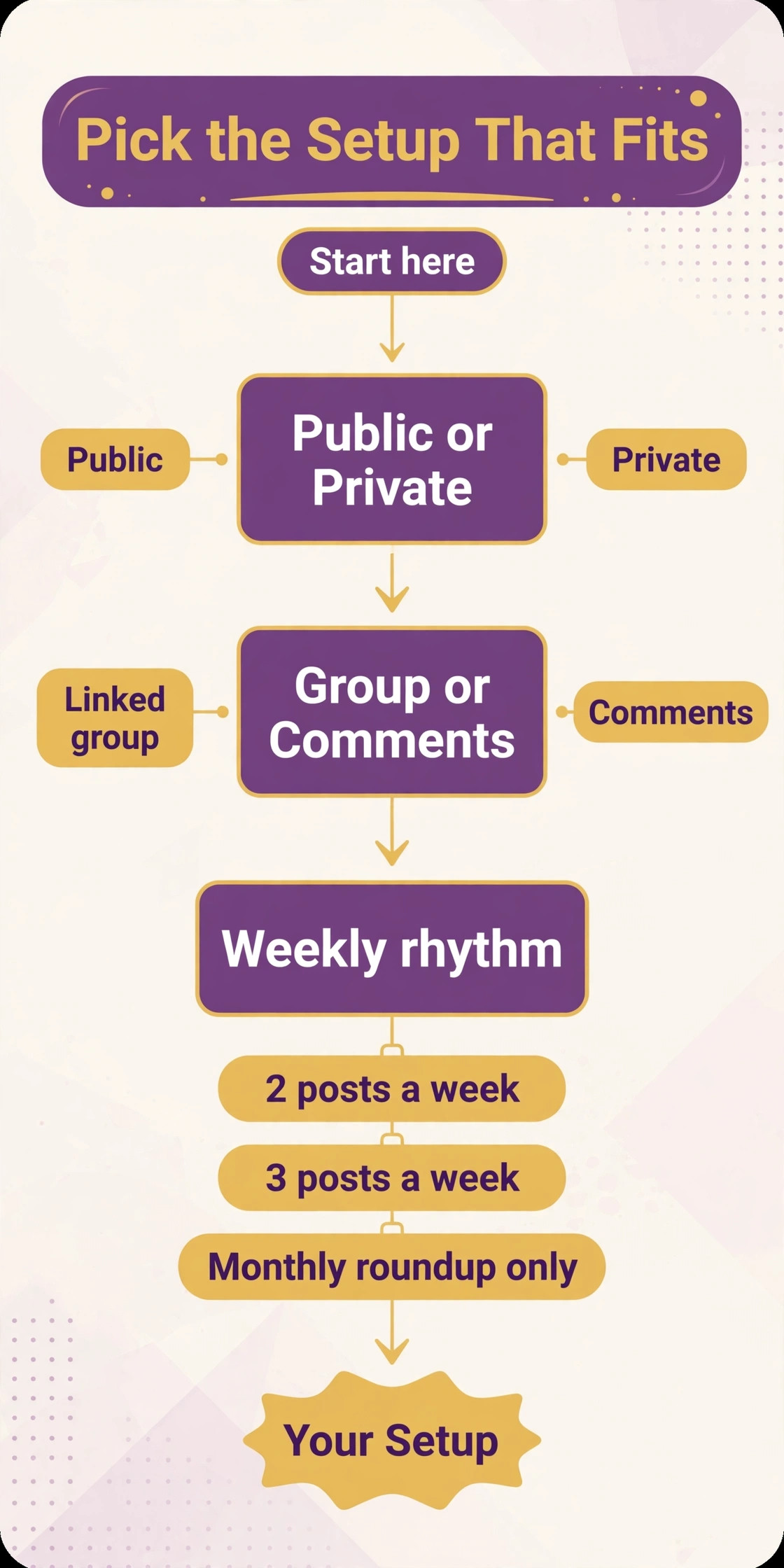
Work through these choices in order when you use Telegram for community announcements, and you will have a setup you can defend to any member who asks why things are organised this way. First, decide public or private, based on who should be able to find and join without asking. Second, decide whether discussion lives in a linked group, in comments, or by direct message, based on how many questions you expect. Third, decide the weekly rhythm, two posts, three posts, or a monthly roundup only, based on how much genuine news you have. Fourth, decide who drafts, who checks, and who posts, and write those names down. Fifth, decide which bot, if any, you need in the first month.
Most teams need none in month one, and that is a good sign, not a gap.
For related reading, this site guide to best AI tools for social media management helps if you also schedule posts beyond Telegram, and best AI tools for WhatsApp Business is useful if part of your audience stays on WhatsApp. If you plan a month of posts across channels, how to plan a month of social media content with AI shows a batching routine that works well alongside the Telegram schedule above. For teams that also use email for important notices, best AI tools for email marketing covers tools that pair with a channel, and best team communication software helps you compare Telegram with other team tools before you commit.
Frequently Asked Questions
Can I use Telegram for community announcements for free?
Yes. Creating a channel, posting, scheduling one off posts, linking a discussion group, and using the Bot API are free. Telegram Premium is optional and mainly raises limits for individual accounts, like larger file uploads and more joined channels. Most announcement channels run well without it, and you should check the price in your own app before paying, since it varies by store and country.
Should I use a channel or a group for announcements?
Use a channel for announcements and a linked group for discussion. A channel keeps announcements in order, visible to new subscribers, and free from reply clutter. A group alone buries announcements under conversation once membership grows. Link the two so members can discuss a channel post without polluting the announcement feed.
How often should a community channel post?
Two to three posts a week suits most communities, plus urgent alerts as needed and a monthly roundup. Daily posting usually leads to mutes and burnout, while posting less than once a week makes members forget the channel exists. Keep the rhythm steady for at least a month before you judge it, and save smaller items for the roundup rather than breaking the schedule.
Can I schedule Telegram channel posts in advance?
Yes, with the built in scheduler. Hold the send button on mobile or right click it on desktop, choose Schedule Message, and pick a date and time. Scheduled posts send from Telegram servers even if your device is off, and you can edit, reschedule, or delete them from the scheduled list before they send. Repeating posts on an automatic interval are a Premium feature, so without Premium you schedule each instance by hand in a batch.
Do I need a bot to run a Telegram announcement channel?
No, not at first. A channel, a linked group, and the built in scheduler cover the core routine. Add a bot only when a repeated job justifies it, like welcoming new group members, running a poll, or moderating spam in the discussion group. Create bots through BotFather, test them in a private test channel, give them only the permissions they need, and keep the token private.
How do members find and join a private Telegram channel?
Private channels are joined through an invite link, not through search. Share that link in a welcome email, on a poster, on your website members page, or in person at an event, with one sentence saying what subscribers will receive. You can revoke and replace the link if it spreads beyond the intended members. Public channels, by contrast, can be found in search once they have a username, which suits open clubs and courses.
Run It Like a Newsroom, Not a Noticeboard
A noticeboard gets pinned up and forgotten. A newsroom has an editor, a schedule, a correction policy, and a sense of what readers need next. That is the standard to aim for when you use Telegram for community announcements. Set up a clean channel, link discussion elsewhere, give two admins clear roles, batch posts with the built in scheduler, and review the log once a month. Those habits matter more than any bot or paid tool, and they are what turn a channel from another noisy feed into a place members check first.
Start this week with the smallest version that still works. Create the channel, write the welcome and pinned posts, schedule the next two announcements, and invite ten real members to test the route. Ask them what confused them, fix those points, and only then promote the channel widely. In a month, you will have a rhythm you can keep, a log that shows what worked, and a community that trusts the next announcement because the last ones arrived on time, in full, and in one place. That trust is the real result, and it is built one clear post at a time.