
Buy the watch for sleep only if you will wear it every night, charge it on a routine, and judge it on two weeks of trends rather than one morning score. That is the verdict in one line. If you want to use smartwatch for sleep tracking well, the watch is a useful pattern finder, not a sleep laboratory on your wrist. It is usually good at telling you when you slept and roughly how long you slept. It is much weaker at telling you exactly how much deep sleep or REM sleep you got, and it can mistake quiet wakefulness in bed for sleep. Used with that limit in mind, it can still change behaviour in a useful way.
It can show a late bedtime habit you had not noticed, a restless stretch after late caffeine, or a slow slide in sleep regularity during a busy month. Used as a nightly grade to worry about, it can do the opposite and make sleep worse.
This guide explains what the sensors actually measure, what independent tests found, how to set the watch up so the data is cleaner, and how to read the morning report without chasing a perfect score. It covers which watches suit different buyers, the mistakes that ruin good data, and the warning signs that mean a doctor, not a watch, should look at the problem. Prices quoted here reflect retailer and vendor listings seen in October 2026. Check the checkout page before you buy, because prices change often.
The Short Verdict on Watch Sleep Data
Trust a watch most for sleep timing and duration. Trust it less for sleep stages, and trust a single night score least of all. A watch does not watch your brain. It watches movement, pulse, pulse variation and, on many models, skin temperature and blood oxygen. From those signals, software infers whether you are likely asleep and which stage that sleep resembles. The broad sleep or wake call is often right. The finer split between light, deep and REM sleep is harder, because the wrist signals for those stages overlap. If you want to use smartwatch for sleep tracking as a habit tool, that distinction is the one to remember.
That limit does not make the data useless. It changes the job the data should do. A watch is strong at pattern questions. Are you going to bed at a similar time each night. Are you getting seven hours most nights or five hours with a long lie in at the weekend. Is your resting heart rate higher on nights after alcohol. Those patterns are where behaviour change happens. A watch is weak at exact stage minutes.
The practical rule is simple. Look at seven night and fourteen night averages before you change anything important. Ignore a single low score unless you also felt bad, woke often, or can point to an obvious cause such as a late flight or illness. If the trend is stable and you feel rested, a mediocre score is not a problem to fix. If the trend is falling and you feel tired during the day, the watch has flagged a pattern worth acting on.
What a Watch Actually Measures
A modern sleep watch combines several sensors, and each one adds a different clue. The accelerometer tracks wrist movement. Long still periods suggest sleep, while frequent movement suggests wakefulness. The optical heart rate sensor estimates pulse from blood flow changes. Heart rate usually falls as you fall asleep and becomes more variable in REM sleep, though the overlap between stages is large. Some watches add temperature and blood oxygen sensors, and a few estimate breathing disturbances over many nights. That last feature is a screening style feature, not a diagnosis.
Phone and watch settings shape the result more than most buyers expect. If bedtime mode, sleep schedule and sleep focus are off, the watch may split a night into naps or miss the start of sleep. If the watch is loose, worn over a sleeve, or removed halfway through the night with low battery, the data will have gaps that software fills with estimates. Sleep tracking is a system made of sensor, fit, schedule settings and habit, and a weak link in any part lowers the quality of the whole report.
Battery life is part of accuracy in a practical sense. A watch that needs charging every night will miss nights. Apple Watch Series 11 is listed from $399 for the 42 mm GPS model and $429 for the 46 mm model in October 2026 listings, with up to 24 hours of normal use. Samsung Galaxy Watch 8 starts at $349.99 for the 40 mm Bluetooth model and $379.99 for the 44 mm model in United States listings, with roughly a day of battery in reviewer testing. Garmin vivoactive 6 is listed at $299.99 on the Garmin product page, with up to 11 days in smartwatch mode.
Fitbit Charge 6 appears in retailer listings in a broad $140 to $160 range in October 2026, with up to seven days of battery, and some detailed sleep insights sit behind a Fitbit Premium subscription.

How Accurate Is a Smartwatch, Really
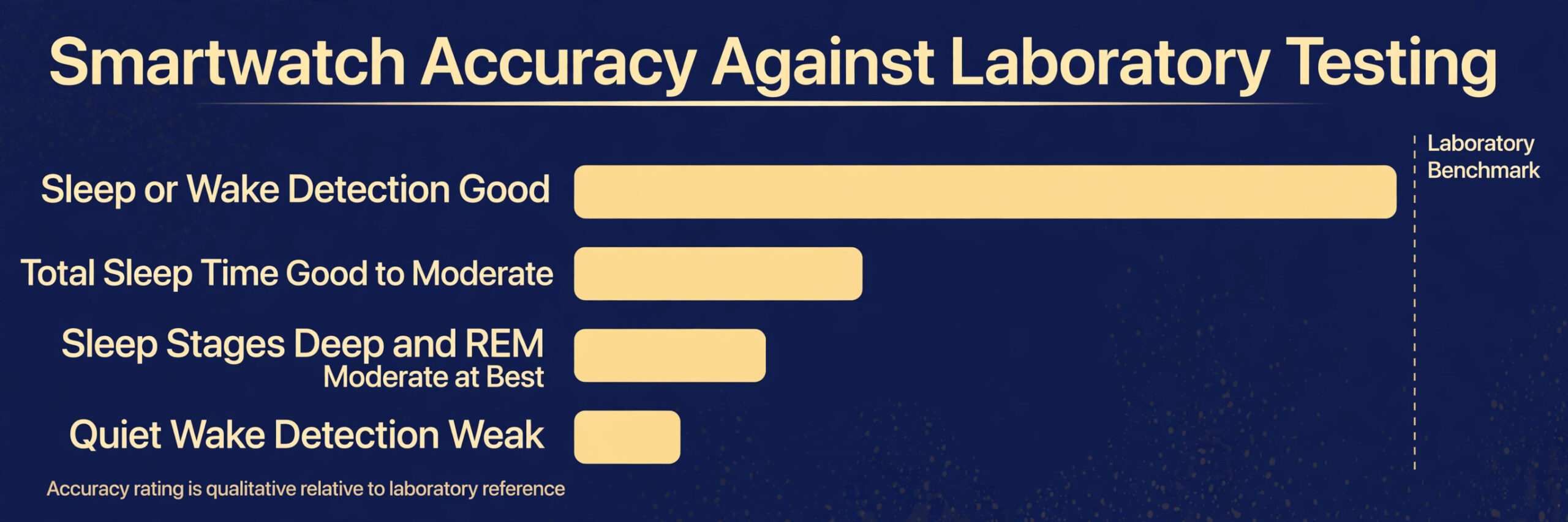
The honest answer is that accuracy depends on what you ask it to do. For the simple sleep or wake question, consumer watches perform well in laboratory comparisons. For sleep stage detail, they perform moderately at best, and for people with fragmented sleep or a sleep disorder, performance drops further. That pattern repeats across studies, which is why it is worth trusting more than any single marketing claim. Anyone who plans to use smartwatch for sleep tracking should start with that ranking in mind.
One laboratory study compared a Huawei Watch GT2 with polysomnography, the overnight laboratory test that records brain waves, eye movement, muscle activity, breathing and oxygen. The watch showed 95.9 percent sensitivity for sleep, 87.3 percent accuracy for sleep or wake classification, and only 47.9 percent specificity for wake. It was good at spotting sleep, but poor at spotting quiet wakefulness. It overestimated total sleep time by 28.7 minutes on average and underestimated wake after sleep onset by 37 minutes. Agreement was weaker again for people with obstructive sleep apnoea or insomnia.
A second study compared Fitbit Sense with home based polysomnography in 53 people with knee osteoarthritis and insomnia over 62 nights. Fitbit Sense showed 85.76 percent accuracy and 95.95 percent sensitivity for detecting sleep, but only 50.96 percent specificity. Again, quiet wake time was the weak point. Agreement was better on nights with longer total sleep time and fewer awakenings. The device often misclassified deep and REM sleep as light sleep. The authors still called it useful for duration, timing and regularity, while warning that stage data should be read with caution.
A third study tested Oura Ring Gen3, Fitbit Sense 2 and Apple Watch Series 8 against laboratory polysomnography in 35 healthy adults aged 20 to 50. For sleep versus wake detection, sensitivity was 95 percent or higher for all three devices. For sleep stages, sensitivity ranged from 50 percent to 86 percent. Fitbit overestimated light sleep by 18 minutes and underestimated deep sleep by 15 minutes. Apple underestimated deep sleep by 43 minutes and overestimated light sleep by 45 minutes. All three were similar to polysomnography for total sleep duration in healthy adults.
| What you want to know | How good wrist tracking usually is | How to read it |
|---|---|---|
| Bedtime and wake time | Good, when worn all night and schedule is set | Trust the pattern over two weeks, not one night |
| Total sleep time | Good to moderate, often overestimated by 15 to 30 minutes | Treat the number as approximate, watch the trend |
| Time to fall asleep | Moderate, often overestimated | Compare with your own sense of how long it took |
| Wake time during the night | Weak, quiet wake is often scored as sleep | If you remember waking often, believe your memory over the chart |
| Light, deep and REM minutes | Moderate at best, errors of 15 to 45 minutes are common | Look at proportions over weeks, never chase one stage |
| Resting heart rate and heart rate variability trend | Useful for trends on the same watch | A rising resting rate over days deserves attention, a single odd night usually does not |
| Possible breathing disturbance pattern | Screening style only, over many nights | A repeated flag is a reason to see a doctor, never a diagnosis on its own |
Two other limits matter. Most validation studies use healthy adults or small samples, often for one night in a laboratory. Your bedroom, movement habits, medication and health conditions can shift results. Software updates also change algorithms, so a watch can become slightly more or less accurate after an update. Judge trends on the same device.
How to Use Smartwatch for Sleep Tracking Without Bad Data
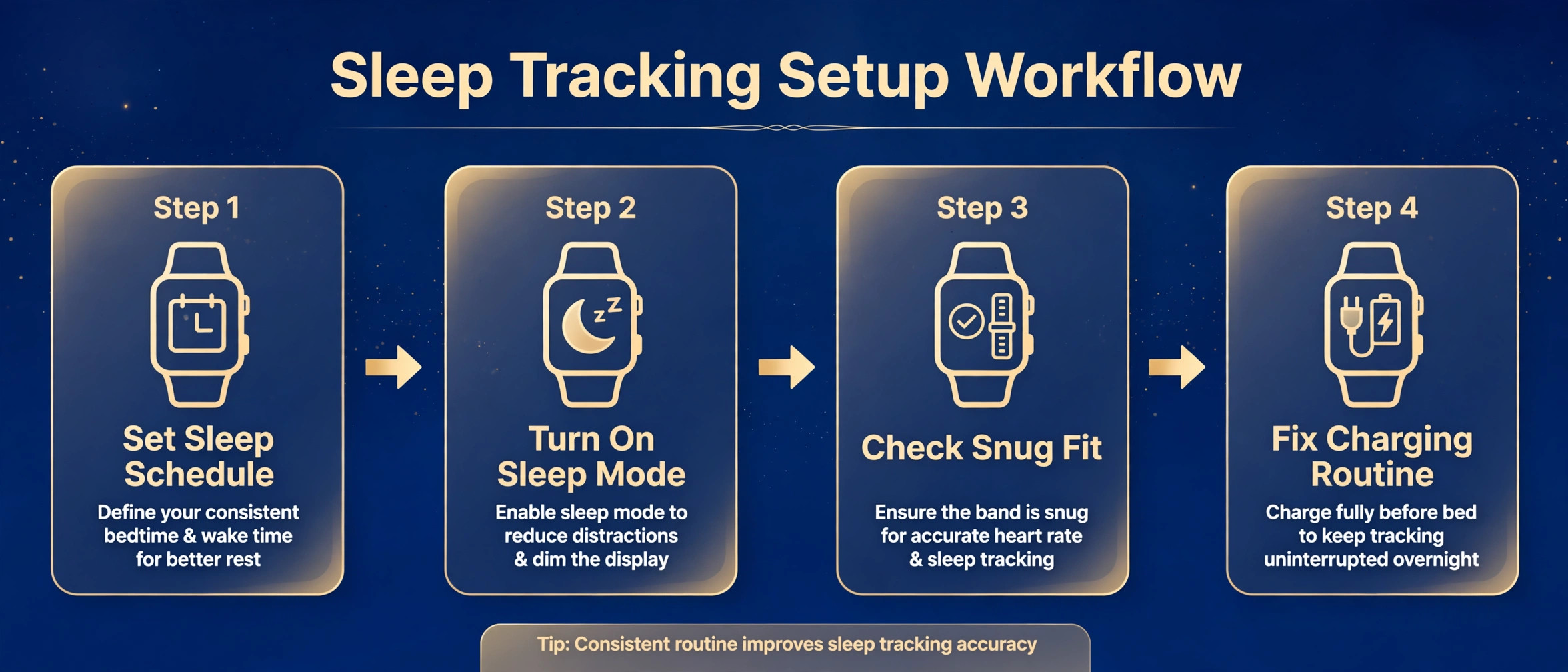
Good setup takes about twenty minutes, and it prevents most of the confusing reports new owners complain about. Work through the checklist below in order, then give the watch at least seven nights before you judge it. A single first night is often the worst night, because the strap is new and the settings are unfinished. When you use smartwatch for sleep tracking for the first time, a clean first week matters more than a perfect first night.
First, set a sleep schedule in the watch and phone app, even if your bedtime varies. Pick a target bedtime and wake time that reflects your real life. Turn on sleep focus, do not disturb or bedtime mode so notifications and bright screens do not wake you. On Apple Watch, that means setting Sleep in the Health app and Sleep Focus. On Samsung Galaxy Watch, that means setting a sleep schedule and Bedtime mode in Samsung Health. On Garmin, that means setting your normal sleep window in Garmin Connect. On Fitbit, that means setting a sleep goal and bedtime reminder.
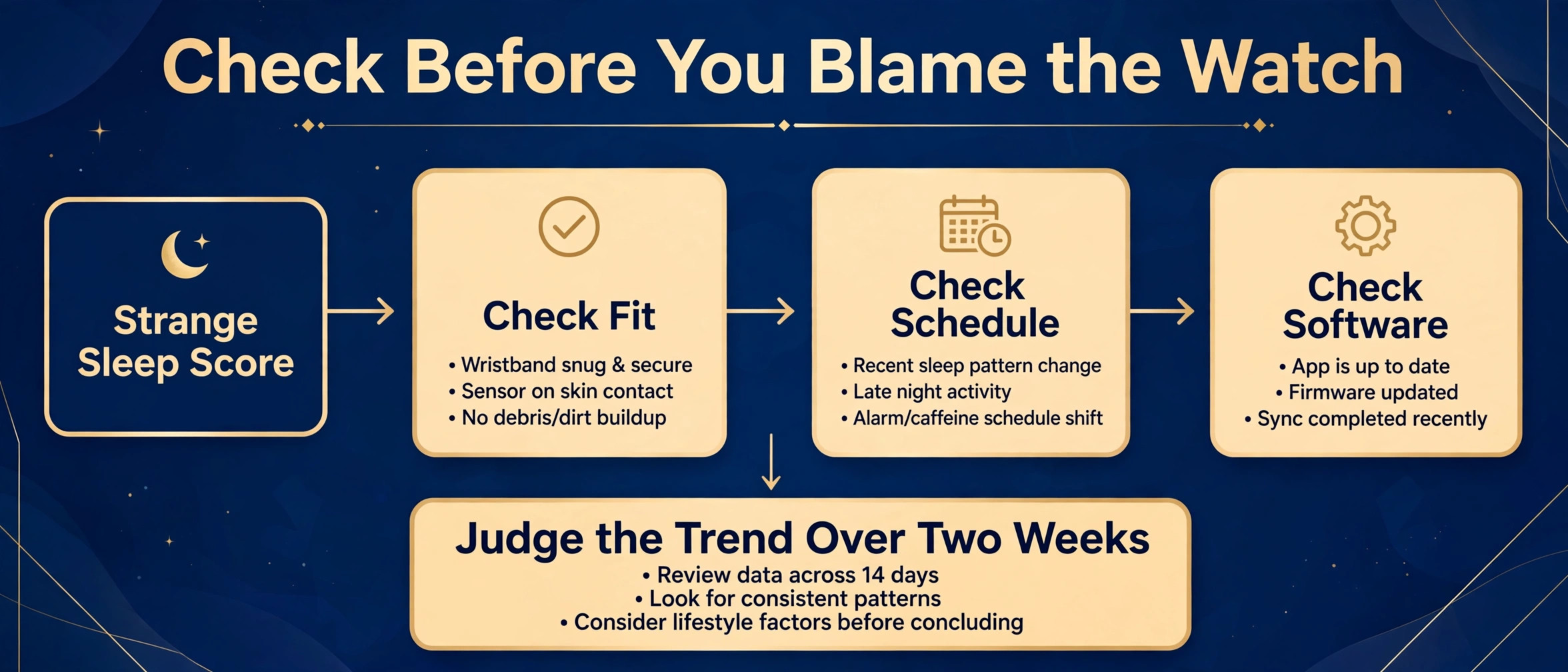
Second, fix the fit. Wear the watch snug, not sliding up and down the forearm, and not over a sleeve or a tight cuff. A loose watch lets light leak into the optical sensor and creates movement noise. A very tight watch is uncomfortable and can disturb sleep. If the strap irritates your skin, change to a soft sport or fabric band before you blame the data.
Third, build a charging routine that does not eat into sleep. Charge while you shower, eat breakfast, or wind down in the evening, and put the watch back on at least 30 minutes before bed. If your watch lasts many days, charge it on a fixed day, for example Sunday evening. If your watch lasts about a day, a short top up in the evening is better than a full charge overnight that costs you a whole night of data.
Fourth, keep the phone out of the sleep window as much as possible. Charge the phone outside the bedroom if you can, or at least face down and on silent. Late scrolling delays sleep, and it creates a long period of still, awake time in bed that a watch can score as light sleep. If you must use the phone in bed, note it in the morning, because that note will explain a strange chart far better than a score will.
Here is the setup checklist to complete before your first tracked week ends.
- Sleep schedule set with a realistic bedtime and wake time in the watch and phone app.
- Sleep focus or bedtime mode turned on, with notifications silenced for the night.
- Watch fit checked, snug but comfortable, on bare skin, with a comfortable band.
- Charging routine fixed, with the watch back on at least 30 minutes before bed.
- Phone charging spot chosen outside the bed, or phone set face down and silent.
- Health permissions checked, so heart rate, sleep and, where available, temperature and oxygen are turned on.
- One week of wear planned, with no brand or strap change midweek.
- A short morning note habit started, one line on caffeine, alcohol, late meals, illness, or waking during the night.
Reading the Morning Report Like an Expert
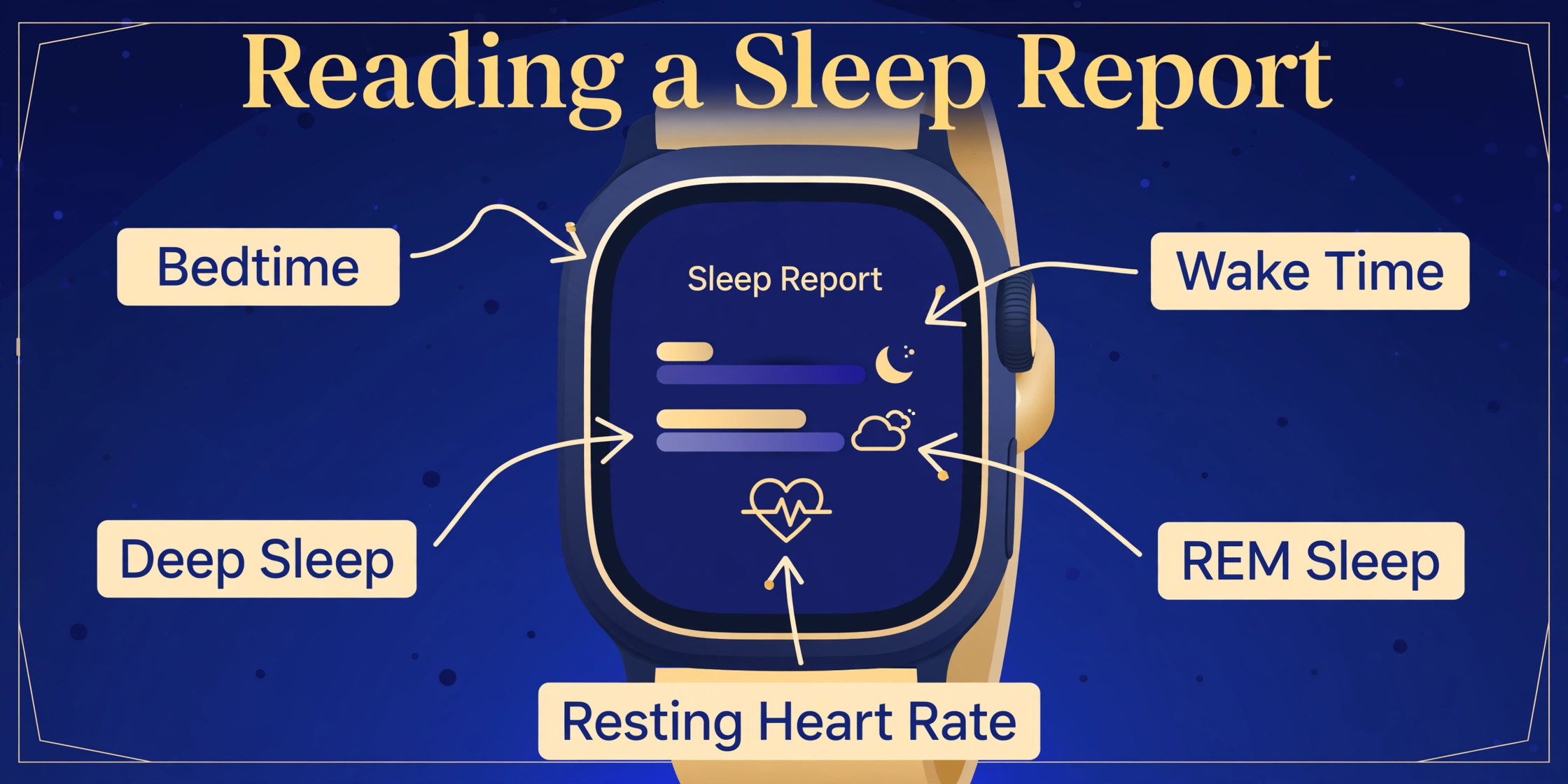
Start with duration and regularity, not the score. When you use smartwatch for sleep tracking, open the week view and ask three questions. How many hours did you sleep on most nights. How similar were bedtimes and wake times. How often did you wake for long stretches. If duration is steady and regularity is good, you have a strong base, even if the stage split looks uneven. If bedtimes swing by two hours between weekdays and weekends, that shifting body clock is often more important than any single stage number.
Next, look at resting heart rate and heart rate variability as trends, not as grades. Resting heart rate is usually lowest during deep sleep and in the early morning. A gradual rise over several days can follow illness, heavy training, stress, alcohol, or poor sleep. A single high night after a late meal or hard workout is normal noise. Heart rate variability varies a lot by age, fitness and device, so compare yourself with yourself over weeks, not with a stranger online. Garmin Body Battery, Samsung Energy Score and Apple Sleep Score compress these inputs into one morning figure. Check the inputs behind the score at least once a week.
Sleep stages deserve a calmer reading. Light sleep is the largest share for most adults. Deep sleep is usually concentrated in the first half of the night and supports physical recovery. REM sleep is usually concentrated in the second half and is linked with dreaming and memory work. If your watch shows almost no deep sleep or almost no REM sleep every night for two weeks, treat that as a prompt to check fit, schedule and health factors, not as proof of a disorder. Raise loud snoring, waking gasping, or daytime sleepiness with a doctor.
Blood oxygen and breathing disturbance features need extra care. A watch oxygen sensor is not a medical pulse oximeter, and readings can be affected by fit, movement, skin tone, tattoos and cold hands. A single low reading is not a diagnosis. A repeated pattern of low overnight oxygen, or repeated breathing disturbance flags over 30 days, is a reason to seek medical advice and ask about a proper sleep test. Do not adjust medication or change treatment based on a watch flag alone.
Finally, learn what not to do with the report. Do not check the score first thing and decide the day is ruined before you have had water, light and breakfast. That habit, sometimes called orthosomnia, is where worry about perfect sleep makes sleep worse. Do not compare your numbers with a partner or an influencer, because age, health, medication and device all change the numbers. Move bedtime earlier by 15 minutes for a week, cut caffeine after midday for a week, or keep wake time fixed for a week, then look at the trend.
How to Choose a Watch for Sleep
Before you use smartwatch for sleep tracking on a new device, choose by phone, battery, comfort and budget, in that order, because those four factors decide whether the watch stays on your wrist. An iPhone owner gets the fullest experience from Apple Watch, including Sleep Score and sleep apnoea notifications on supported models. An Android owner, especially a Samsung phone owner, gets the fullest experience from Galaxy Watch, including Advanced Sleep Coaching and Bedtime Guidance. Garmin works well with both iPhone and Android, and it suits buyers who want long battery life and training data in the same app.
Fitbit works with both phone systems and suits buyers who want a light, low cost tracker rather than a full smartwatch, provided they accept that some insights need a subscription.
Comfort deserves a shop test if you can manage one. Wear the watch for at least ten minutes, move your wrist, and imagine it at 3 am. A heavy case, a stiff strap, or a bright screen that lights up with every notification will cost you nights, even if the specification sheet looks excellent. Smaller and lighter usually wins for sleep, which is why a 40 mm or 42 mm case often suits sleep tracking better than a large rugged case.
Budget is easier to judge once you separate hardware price from ongoing cost. Apple Watch Series 11 from $399 and Galaxy Watch 8 from $349.99 are full smartwatches with no required sleep subscription, though extra services and cellular plans cost more. Garmin vivoactive 6 at $299.99 also has no required sleep subscription, which makes its long battery life good value for sleep focused buyers. Fitbit Charge 6 in the $140 to $160 retailer range looks cheaper at first, but check Fitbit Premium pricing, because a tracker plus a yearly subscription can close the gap with a Garmin over two years.
If you already own a watch, do not upgrade for sleep alone unless your current watch misses nights or has a battery that cannot survive the night. A new sensor rarely fixes a bad schedule, a loose strap, or a habit of scrolling in bed. Spend two weeks on setup and routine first, and only upgrade if the data is still patchy after that test.
Mistakes That Ruin Otherwise Good Sleep Data
The most common mistake when you use smartwatch for sleep tracking is wearing the watch too loosely or only on some nights. A loose watch creates gaps and false movement, while missing nights break the trend and make the week average meaningless. Wear it every night for at least two weeks before you draw conclusions, and note any night you remove it so you can exclude that night from your judgement.
The second mistake is reading stages as exact minutes. A watch that reports 41 minutes of deep sleep is not claiming laboratory precision, even if the display looks precise. Round the number in your head to about 40 minutes. A move from 84 to 79 on a sleep score is usually noise. A move from the low 80s to the low 60s over two weeks, with more waking and more daytime tiredness, is a pattern worth acting on.
The third mistake is changing too many things at once. A new mattress, a new supplement, a new bedtime, no caffeine, and a new workout plan in the same week makes it impossible to know what helped or hurt. Change one variable, hold it for seven to fourteen nights, and compare the before and after week averages.
The fourth mistake is ignoring daytime clues. A watch cannot measure how you feel at work or whether you need caffeine to stay awake after lunch. Those clues are data too, and they should outweigh a good score. If the watch says you slept well but you feel exhausted every afternoon, believe your body and look for causes the watch cannot see.
The fifth mistake is using the watch as a medical device. A consumer watch is a wellness tool. It can flag a pattern, but it cannot diagnose sleep apnoea, insomnia, narcolepsy, or restless legs. It also cannot rule those conditions out. A clean watch report does not mean a sleep problem is absent if symptoms persist, and a messy report does not mean a disorder is present if you feel fine.
The sixth mistake is letting the watch disturb the sleep it measures. Bright screens, vibration alerts, and a habit of checking the score at 3 am all fragment sleep. Turn on sleep mode properly, silence non urgent alerts, and resist the urge to check the watch during the night. The night data will still be there in the morning.
A Fourteen Night Test You Can Actually Use
A structured test beats a vague plan to sleep better. Use the next fourteen nights as a trial, with the same watch, same strap, and same schedule settings throughout. Do not change brand, strap, or sleep target mid trial. Keep wake time fixed if you can, even at the weekend, because a fixed wake time is the strongest anchor for a regular body clock. Allow bedtime to move a little, but aim for a window of no more than 30 minutes variation on most nights. This test is the fairest way to use smartwatch for sleep tracking before you judge a device.
Each morning, record four things in a note, not just the score. First, total sleep time and bedtime from the watch. Second, how many times you remember waking. Third, how rested you feel on a simple scale from one to five. Fourth, one line on the previous day, such as caffeine after 2 pm, alcohol with dinner, late workout, stress, or illness. After seven nights, look at the week average. After fourteen nights, compare week one with week two.
This test also helps you decide whether to keep a watch, return it, or switch brands. A watch that gives you a clean fourteen night record, with few gaps and a trend you can read, is doing its job, even if stage numbers look imperfect. A watch that misses nights is not doing its job for you. Return windows are usually short, so run this test in the first two weeks of ownership.
For readers who also track daytime activity, the same discipline applies. Related reading on daily planning includes best AI daily planner apps for building a morning review habit, and best AI tools for fitness coaches for how coaches use wearable trends with clients. If bedroom light, noise, or temperature is part of the problem, best smart home devices 2026 covers controls that can make the sleep environment more consistent.

When a Watch Flag Means See a Doctor
Some patterns should prompt medical advice even if the watch score looks acceptable. Loud, nightly snoring with pauses in breathing, waking gasping or choking, morning headaches, and strong daytime sleepiness despite seven to nine hours in bed can point to sleep apnoea. Difficulty falling asleep or staying asleep three or more nights a week for three months, with daytime impact, can point to insomnia that needs proper treatment.
Bring useful information to the appointment. A two week summary from the watch, with bedtimes, wake times, duration, remembered waking, and daytime tiredness notes, is more helpful than a single screenshot of a bad night. Note medication, caffeine, alcohol, shift work, and any breathing or heart conditions. Ask whether a home sleep test or a laboratory study is appropriate.
Safety comes before data. If you feel dangerously sleepy while driving, stop driving and seek advice before you drive again. If a watch flags a possible heart rhythm problem, breathing problem, or low oxygen pattern repeatedly, treat the flag as a prompt to contact a clinician, not as a reason to wait for a perfect chart.

Frequently Asked Questions
Is smartwatch sleep tracking accurate enough to rely on?
For bedtime, wake time, total sleep time and regularity, yes, with the limits in this guide. For exact deep and REM minutes, no, because laboratory studies show stage errors of 15 to 45 minutes are common, and quiet wake time is often scored as sleep. Use the watch for trends over one to two weeks, and use symptoms and daytime function alongside the numbers.
How do I use smartwatch for sleep tracking for the first time?
Set a realistic sleep schedule, turn on sleep focus or bedtime mode, wear the watch snug on bare skin, fix a charging routine that leaves the watch charged before bed, and wear it every night for at least seven nights. Do not judge the first night, and do not change strap or brand midweek. After a clean week, read the week average for duration and regularity before you look at stages or scores.
Why does my watch say I slept well when I feel tired?
A watch measures movement and heart signals, not how refreshed you feel. Long time in bed with broken sleep, stress, medication effects, or a medical issue can leave you tired despite a reasonable duration figure. Quiet wake time can also be scored as sleep, which inflates the total. If tiredness persists despite long sleep, keep a two week note of symptoms and raise it with a doctor.
Why does my watch show almost no deep sleep?
Check fit, schedule and software first, because a loose watch, a split sleep window, or a missing schedule can distort stages. Stage estimates also vary by age and individual, and laboratory studies show watches often misclassify deep sleep as light sleep. If low deep sleep persists for two weeks and you have other symptoms such as loud snoring or daytime sleepiness, seek medical advice rather than trying to force deep sleep with supplements.
Should I wear my smartwatch every night, or is that unhealthy?
Wearing a watch every night is generally fine if the strap is comfortable, clean and not too tight, and if you turn on sleep mode so alerts do not disturb you. Wash or wipe the strap regularly, and give the skin a break if you notice irritation. If worry about the score is making sleep worse, take a break from tracking for a week and focus on a fixed wake time and a calm wind down routine instead.
Can a smartwatch diagnose sleep apnoea?
No. Some watches can flag a pattern of breathing disturbances over many nights and prompt you to seek evaluation, but that flag is not a diagnosis and it does not measure apnoea events directly. A home sleep test or laboratory polysomnography is needed for diagnosis. A repeated flag, loud snoring with breathing pauses, or waking gasping are reasons to contact a doctor, not reasons to self diagnose from the watch.
Make the Next Two Weeks the Test
A smartwatch will not fix sleep on its own, and no score will tell you the whole truth about a night. What it can do, when set up well and read calmly, is make invisible habits visible. A bedtime that drifts later every week, a regular 3 am wake that follows late alcohol, or a resting heart rate that climbs during a stressful fortnight, those patterns are hard to see without a record. If you use smartwatch for sleep tracking with that discipline, a $300 watch can be as useful as a $400 watch, provided you wear it, charge it, and judge it on trends.
Start tonight with the setup checklist, not with a purchase. Set the schedule, silence the night, fix the fit, and commit to fourteen nights of clean data. Read duration and regularity first, stages second, and the score last. Change one habit at a time, compare week averages, and keep the habits that move both the numbers and how you feel during the day. If a repeated flag or persistent symptoms appear, take the two week summary to a doctor.