
Posting the same update by hand on five platforms feels productive for about a week. Then the copying starts to slip. A link gets left off LinkedIn, a hashtag block lands on X where it eats half the character limit, and an image sized for Facebook arrives on Instagram cropped at exactly the wrong place. When you use Zapier for social media crossposting, that manual copying disappears, and the work shifts to a different problem. You now have to design the automation so it posts the right version, in the right format, to the right account, exactly once.
This guide covers that design work. You will build a flow that starts from one approved source, adapts each post to its platform, blocks duplicates and loops, and stays inside your task limit, plus a testing plan to run before any follower sees an automated post.
Manual Posting Versus Automated Posting
Manual crossposting has one real advantage. A human notices context. You would not paste a casual joke into a LinkedIn company update, or a formal announcement into a short video caption without trimming it first. Automation wins on speed, consistency, and volume. It loses the moment you treat every platform as the same surface with a different logo.
The embarrassment cases are predictable. A post goes out twice because two triggers fired on the same source. A video posts to one platform but silently fails on another. A link shortener breaks, and three platforms carry a dead link. These are design failures, and they are all preventable with a source of truth, per platform formatting, and a log you actually check.
Before you automate anything, decide what crossposting is for. If the goal is distribution of owned content, such as blog posts, product updates, or event announcements, automation is a strong fit. If the goal is conversation or replies, automation is a poor fit and will read as one. Keep automated posts to announcements and distribution, and keep replies manual.
Start with one source of truth. Every post that goes out through automation must originate in exactly one place, and that place must be the only trigger for the workflow. Good sources include a new row in a content sheet, a newly published blog post, a new RSS item, or a card moved to an approved column in a project board. Bad sources include two sheets, or a folder that two people edit without telling each other.
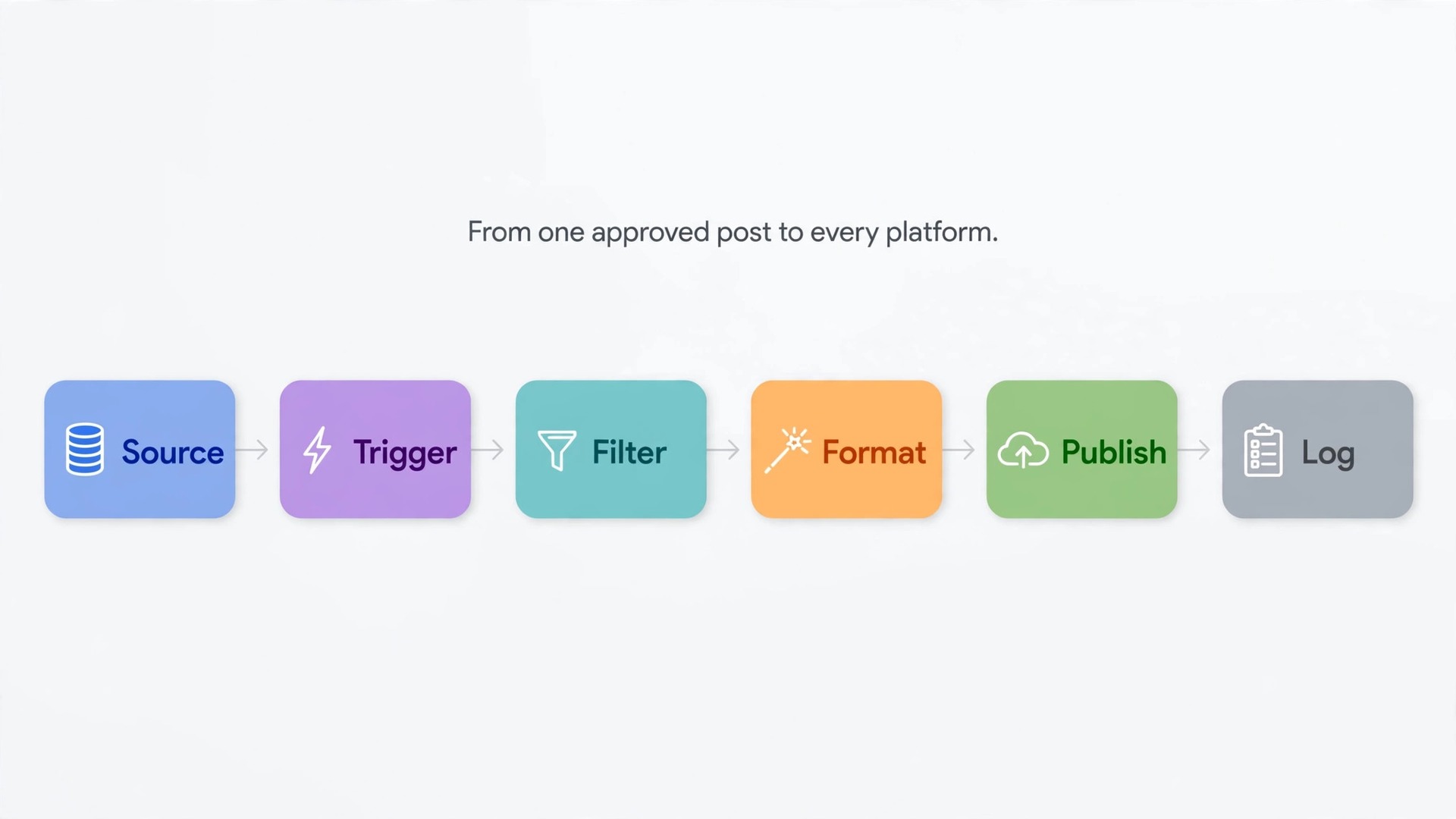
The automation map below shows the full flow for a typical small team. Each row is a stage, and the right hand column names the failure that stage exists to prevent.
| Stage | What happens | Failure it prevents |
|---|---|---|
| Source | One approved post is created in the content sheet or blog | Two versions of the same post competing with each other |
| Trigger | Zapier detects the new item and pulls its fields | A draft or an edit firing the workflow early |
| Filter | The Zap checks that status equals approved and that a publish date is set | Drafts and half finished posts going live |
| Format | Formatter steps trim text, shorten links, and build per platform captions | A caption that overflows on X or looks bare on LinkedIn |
| Queue check | The Zap checks a log sheet for the post ID before posting | The same post going out twice |
| Publish | One action per platform posts its own version | Identical copy landing everywhere |
| Log | Each successful post writes its platform, link, and time back to the log | No record of what went out, where, or when |
| Alert | Failures send a message to one owner, not to the whole team | A silent failure discovered days later |
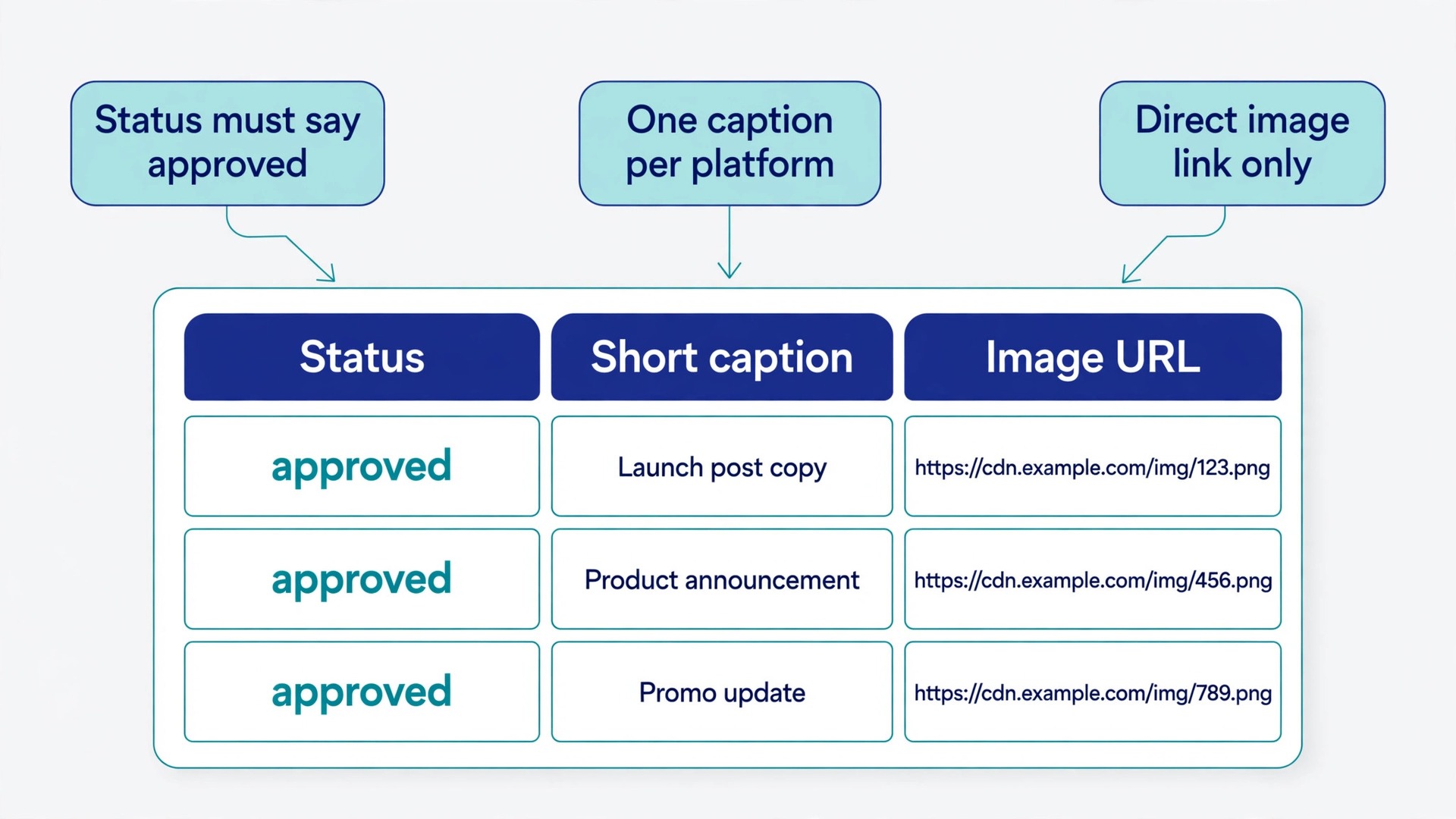
When you use Zapier for social media crossposting in this shape, the workflow is not one giant Zap. It is a chain with checks between stages. The filter step is the most skipped and the most valuable. Without it, every edit, draft save, or test row can become a public post. Add a status field to your source and require the value approved before anything publishes.
A second design choice matters just as much. Decide whether each platform gets its own action inside one Zap, or its own Zap fed by the same source. One Zap with many actions is simpler to read, but one failed action can complicate the rest of the run. For teams that use Zapier for social media crossposting to three or more platforms, separate Zaps per platform is usually the better structure, because you can turn off one platform without touching the others. For a solo creator posting to two platforms, one Zap is fine.
Pick a Trigger That Matches How You Actually Work
Triggers fall into three families. Pick the one that matches the place where finished content already lives, rather than inventing a new place just for automation.
The first family is content publication triggers. A new WordPress post, a new RSS item, or a new YouTube video fires the Zap when content goes public. This family suits blogs and video channels, because the source and the announcement stay in sync. The risk is timing. A post published and then edited will not re fire in most setups, so corrections made after publication need a manual announcement. Test this behaviour with a draft before you rely on it.
The second family is sheet and database triggers. A new row in Google Sheets, Airtable, or a similar tool fires the Zap when a row appears or reaches a chosen stage. This family suits teams that plan content in advance, because the sheet doubles as the calendar and the approval record. The risk is accidental triggers. A teammate who adds a row to test a formula, or copies a row to reuse it, can fire the workflow. Protect the sheet with a status column and a rule that only rows marked approved trigger anything.
The third family is scheduler and queue triggers. A new item in Buffer, a scheduled post in another tool, or a webhook from your own system fires the Zap. This family suits teams that already schedule in a dedicated tool. The risk is duplication. If the scheduling tool already posts to a platform and Zapier also posts there, you get two copies. Map every platform to exactly one publisher before you connect anything.
Polling delay is the detail most people discover too late. Many Zapier triggers check for new data on a schedule rather than instantly. On the free plan that check runs every 15 minutes, and paid plans check more often. That means a post approved at 10.00 may not go out until 10.15. If your content is time sensitive, plan around that delay or trigger from a webhook instead. Webhooks fire when your source sends them, which removes the polling wait, but they need a source that can send one.
Platform Formatting Differences You Must Handle
No two platforms want the same post. The table below lists the differences that cause the most visible problems, and the fix for each one. Build these fixes into your Zap as formatting rules, because the whole point of automation is that nobody applies them by hand.
| Platform | What breaks if you copy blindly | Formatting fix |
|---|---|---|
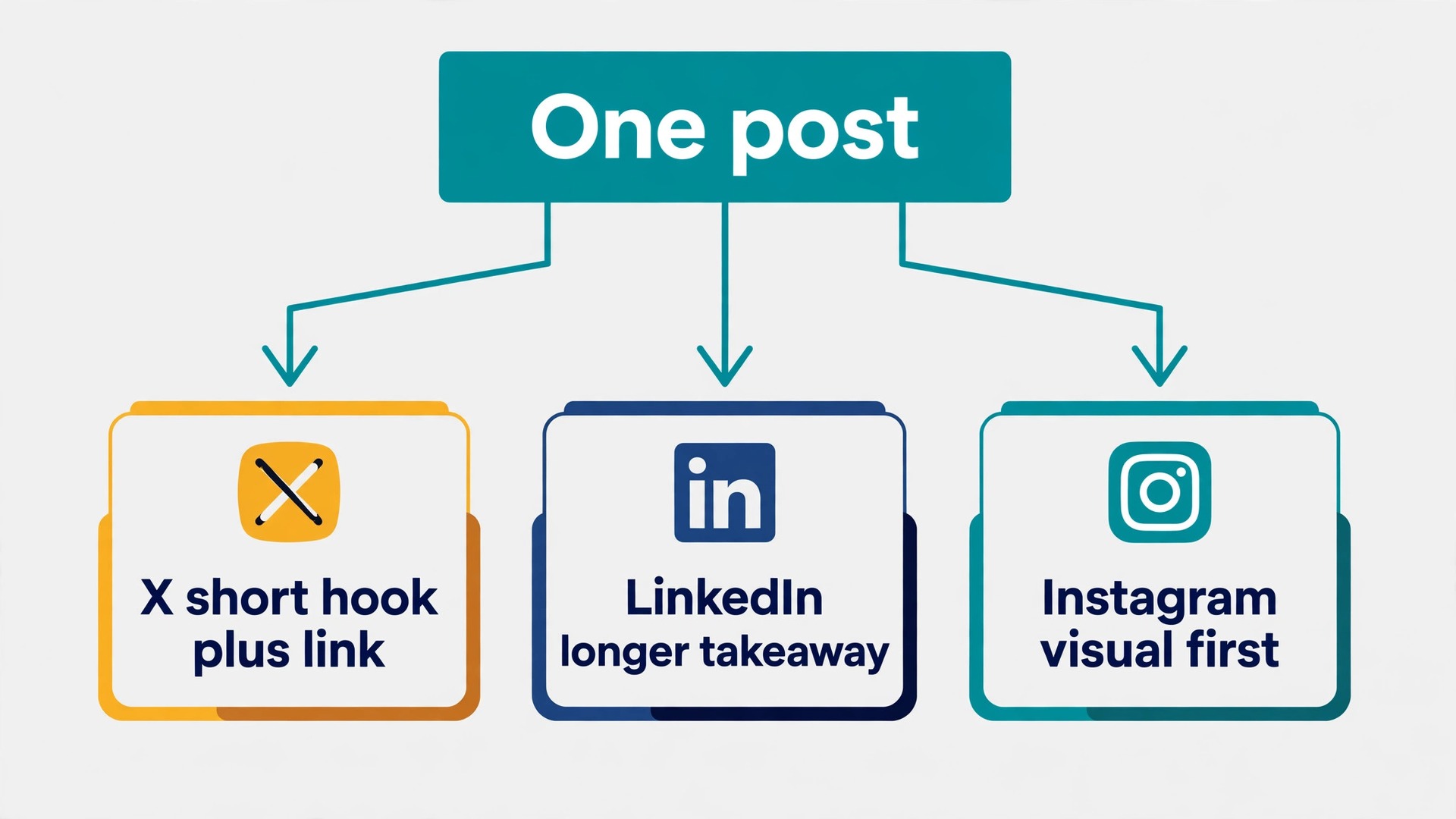
| X | Long captions get cut off, and hashtag blocks eat the message | Trim to a short hook plus link, keep hashtags to two or three, put the link early |
| Short casual copy looks thin, and bare links get weak reach | Write a longer opening line, add one clear takeaway, place the link after the first paragraph | |
| Facebook Page | Hashtag heavy copy looks noisy, and long text gets hidden behind a read more cut | Lead with the news, keep hashtags to a few, keep the key point in the first two lines |
| Links in captions are not clickable, and portrait images get cropped | Put the link in bio or use a link page, design images for the feed ratio, keep captions visual first | |
| A caption written for X reads as a slogan with no search value | Write a descriptive title with real search words, add the destination link, use a vertical image | |
| Threads | Formal announcement copy reads stiff next to conversational posts | Shorten the tone, keep one idea per post, drop the corporate phrasing |
| Bluesky | Long link heavy posts look like spam in a text first feed | Lead with the idea, add the link at the end, keep hashtags minimal |
Character limits are only part of the story. Tone, link placement, and image shape matter just as much. A practical way to handle this when you use Zapier for social media crossposting is to store four caption fields in your source, not one. Keep a short caption for X and Threads, a standard caption for Facebook, a professional caption for LinkedIn, and a visual caption for Instagram and Pinterest. That sounds like more work, and it is, slightly, at writing time. It saves far more work at fixing time, because you stop rewriting captions after they have already gone out wrong.
Hashtags deserve their own field too. Store hashtags separately from the caption so each platform action can include, trim, or drop them independently. X and Instagram tolerate hashtags differently, and LinkedIn rewards a small number of relevant tags. When hashtags live inside the main caption, every platform inherits the same block, and at least one platform will look wrong.
Links need the same treatment. Store the full destination URL in its own field, and let each action decide where it goes. Some platforms reward a link early, others bury a post that leads with a link, and Instagram needs a bio link strategy instead. If you shorten links, use one shortener consistently and keep the mapping in your log.
Images and Video Without the Usual Damage
Images cause more crossposting complaints than captions do, because a bad crop is visible in a way a weak caption is not. Each platform crops differently, and an image designed for one ratio will lose its edges somewhere else. Design for the strictest platform first, then derive the rest.
Start by checking what each connected app in Zapier can actually publish. Instagram publishing through Zapier requires a Business account linked to a Facebook Page, with the right permissions granted during connection. Personal and Creator accounts do not work the same way for direct publishing, and missing permissions produce errors that look like file problems. If you hit a media error on Instagram, check the account type and the Page role before you re export the file.
For image files, use a direct public URL that Zapier can fetch, not a link to a page that contains the image, and not a file behind a login. Drive links that require permission, and links to preview pages, are the most common cause of posts that publish with no image or fail outright. Test the URL in a private browser window, and confirm it loads without signing in. If the image lives in a sheet, store the direct file URL in its own column.
Video adds a second layer of limits. File size, length, and format rules differ by platform, and a video fine on one platform can be rejected on another. Zapier added a publish video action for Instagram Business accounts, but older guides still describe photo only publishing, so check the current action list in your own Zapier account before you promise video support. Where a platform cannot accept a video through Zapier, route it to a manual step or a scheduling tool that supports it, and record that exception in your automation map.
For important posts, keep three image versions. Keep a wide version for Facebook and LinkedIn, a square or portrait version for Instagram, and a vertical version for Pinterest. Reserve that extra work for posts that matter, and use a single safe ratio with generous margins for everyday posts, keeping titles, faces, and key text away from the edges.
Alt text is easy to forget in an automated flow, and it matters for accessibility and for search. When you use Zapier for social media crossposting with images, map alt text from your source where the platform action supports it, instead of leaving it blank. Write one plain sentence that describes what the image shows, and reuse it across platforms.
Duplicate and Loop Prevention
Duplicates are the fastest way to lose trust in an automation system. One duplicate post is a joke. Two in a week make followers mute the account. Three make the team turn the automation off, which wastes all the setup work. Prevention has to be built into the workflow, not added after the first incident.
The most common duplicate causes each have a concrete fix. A Zap that triggers on both a new post and an updated post will fire twice when a post is edited shortly after publication. Fix this by triggering on publication only, or by blocking runs where the post was already logged. A sheet row copied for reuse will fire again with a new row ID but the same content. Fix this by logging a content ID, not just a row ID, and checking it before posting. Two Zaps covering the same platform will each post a copy. Fix this by keeping the platform ownership map and reviewing the Zap list before adding a new one.
Loops are the nastier cousin of duplicates. A loop happens when an automated post becomes the trigger for another automation, which posts again, which triggers again. The classic version is a Zap that watches a feed or an account and reposts everything it sees, including its own output. The fix is to keep triggers and actions on different feeds where possible, and to add a filter that blocks items from your own accounts. If a loop ever starts, turn the Zap off first and diagnose second.
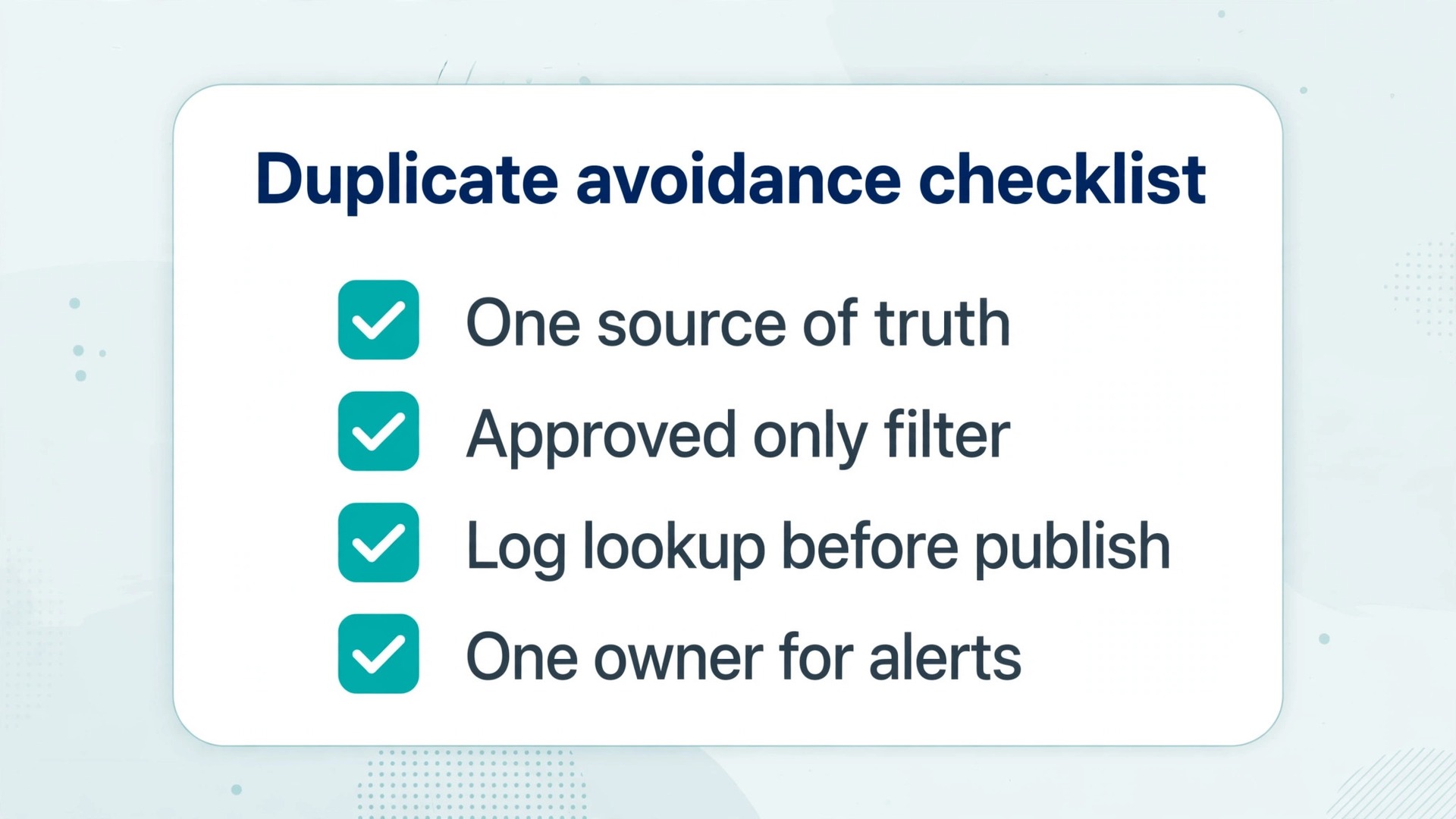
Run through the duplicate avoidance checklist below before you turn any crossposting Zap on, and again whenever you add a platform or change a trigger.
- One source of truth is named, and no second source feeds the same platforms.
- Every platform is owned by exactly one Zap or one tool, and the ownership list is written down.
- The source has a status field, and the Zap filters for approved only.
- The log sheet records a content ID, a platform, a post link, and a timestamp for every success.
- A lookup step checks the log for the content ID before each publish action.
- Triggers fire on publication or on a new approved row, never on every edit.
- The Zap filters out items posted by your own accounts, so automated output cannot retrigger itself.
- Test rows and copied rows carry a test flag that the filter blocks.
- One owner receives failure alerts, and that owner knows how to pause the Zap.
- A weekly log review is scheduled, even if it takes only ten minutes.
If you use Zapier for social media crossposting with every item ticked, duplicates become rare. If you cannot tick the log lookup item, accept that duplicates remain possible until it is built. A crossposting system without a log is a system you cannot debug.
Error Handling and Task Usage
Every automated post will fail sometimes. A platform token expires, a file host goes down, or a caption exceeds a limit after an edit. The difference between a professional setup and a fragile one is not whether failures happen. It is whether failures are visible, contained, and cheap to fix.
Start with failure visibility. Teams that use Zapier for social media crossposting daily should treat Zapier run history as the first check when a post does not appear. Check it before you repost by hand, because a hand repost on top of a delayed automated post creates a duplicate. Set up an alert step for failed runs that sends a message to one owner with the post title, the platform, and the error message.
Next, contain failures by platform. When one platform action fails, the other platforms should still post, and the failed one should be retried on its own. Separate Zaps per platform make this natural. In a single Zap with many actions, use filters or paths so a failure in one branch does not block the rest, and test that behaviour by disconnecting one platform during testing.
Token expiry deserves special attention. Social connections in Zapier depend on permissions granted through the platform, and those permissions can expire or be revoked when a password changes or a Page role changes. When a post fails with a permission error, reconnect the account in Zapier before you change anything else. Reconnecting fixes a large share of mysterious failures. After reconnecting, run a test post to a test account if possible, rather than pushing the next real post straight through.
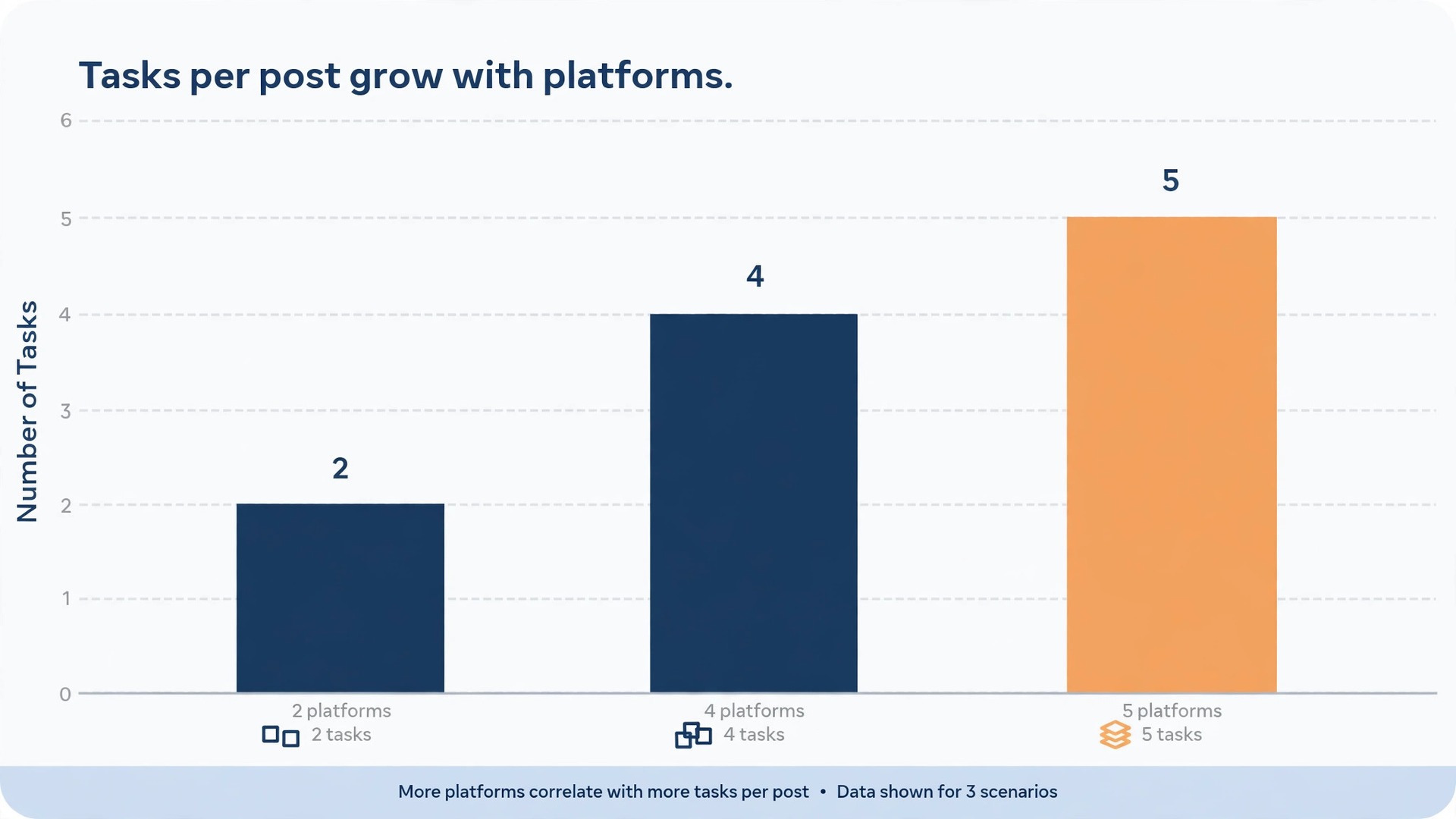
Task usage is where crossposting budgets quietly disappear. Zapier charges by task, and a task is an action that runs successfully in a Zap. Triggers, filters, and formatter steps do not cost tasks, which is good news, because the checks in this guide are mostly free. What costs tasks is every publish action. A Zap that posts to five platforms uses five tasks per post, not one. Ten posts a week across five platforms is about 200 tasks a month, before retries.
The pricing picture at the time of writing makes that math concrete. The free plan includes 100 tasks per month and supports two step Zaps, which is enough to test one platform but not to run a multi platform system. The Professional plan starts at 19.99 dollars per month billed annually, or 29.99 dollars per month billed monthly, with 750 tasks per month and multi step Zaps, premium apps, and webhooks. The Team plan starts at 69 dollars per month billed annually, with 2,000 tasks per month and shared workspaces. Prices change, so check the official Zapier pricing page before you commit, and size your plan from your real post count.
Worked example helps. Suppose you publish 12 posts a month and crosspost each one to four platforms. That is 48 publish tasks per month, or near 60 with log writes. That fits the free plan in theory, but a multi step Zap with per platform formatting needs a paid plan anyway, and retries add tasks too. Suppose instead you publish 40 posts a month to five platforms. That is 200 publish tasks, plus log writes and retries, which lands near 250 tasks. That still fits Professional, but it leaves less headroom than people expect. Count retries and test runs in your budget, and review actual usage after the first month.
Three habits keep task usage under control. First, filter early, so unapproved rows and test rows never reach a publish action. Second, batch where the platform allows it, rather than firing a Zap for every small edit. Third, turn off Zaps for platforms you no longer use, because a forgotten Zap connected to a live source keeps spending tasks.
Testing Plan Before Going Live
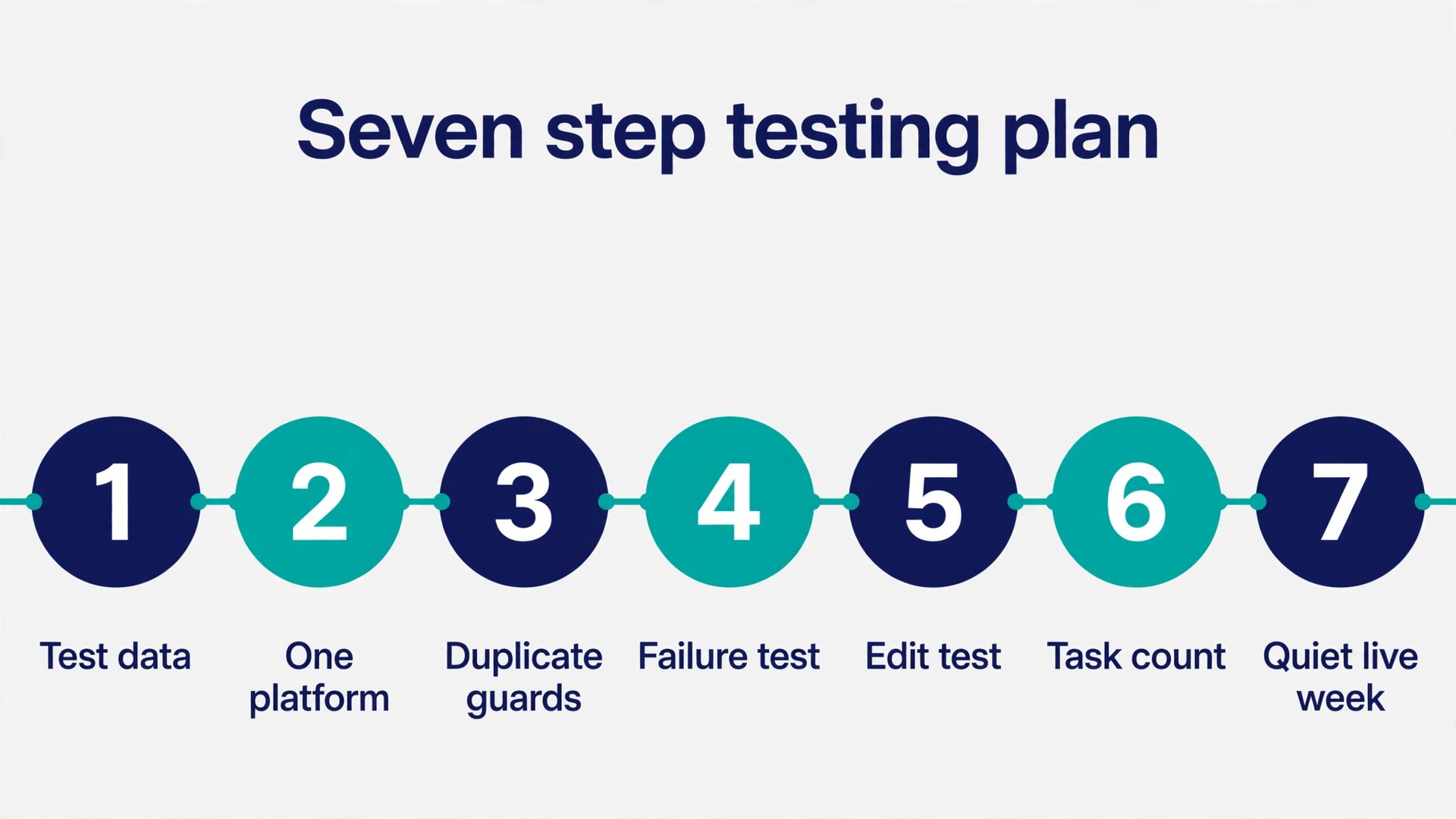
Never turn a crossposting Zap on for a real audience without a test run. The testing plan below takes about an hour for a first setup, and it catches failures that are embarrassing in public and trivial in private.
Step 1. Build the source with test data. Create three test posts. Make one short with a link, one long with hashtags, and one with an image. Mark all three as test, not approved, and confirm the Zap does not fire. Then change one to approved and confirm only that one fires.
Step 2. Test each platform in isolation. Turn on one platform action at a time, and check the live post on that platform itself, not just in Zapier’s success message. Check the caption, the link, the image crop, and the hashtags.
Step 3. Test the duplicate guards. Run the same approved post through the workflow a second time, by re triggering or duplicating the row, and confirm the log lookup blocks the second publish. If a duplicate goes out during testing, fix the lookup before going live.
Step 4. Test failure behaviour. Break one platform on purpose, for example by revoking a test connection, and confirm the other platforms still post and the owner receives an alert. Then reconnect and confirm the failed platform can be retried cleanly without duplicating the posts that already succeeded.
Step 5. Test an edit after publication. Edit the source post after it has published, and confirm the Zap does not repost it. If it does, tighten the trigger or filter until edits are safe.
Step 6. Test the task count. Run your three test posts through the full workflow, then check Zapier’s usage for those runs. Multiply that per post task count by your real monthly post count and platform count, and compare the result with your plan limit. If the number is close to the limit, reduce platforms or move up a plan before launch, not after the first overage.
Step 7. Run a quiet live week. Turn the system on for real posts, but review the log every day for a week. Check each post on each platform, and fix the formatting rules in the Zap rather than fixing individual posts by hand.
A note on test accounts. Where a platform allows it, test against a private or secondary account first, so test posts never reach your main audience. Where that is not easy, test with a clearly labelled post at a quiet time, and delete it immediately after checking.
If crossposting is part of a wider content system, the planning step matters as much as the automation step. A monthly content plan gives Zapier a steady supply of approved posts instead of a last minute scramble, and a comparison of social management tools helps you decide which parts belong in a dedicated scheduler and which parts belong in Zapier. Start with the plan, then build the Zap, then let the log tell you what to improve next.
For a practical next step, read the guide on planning a month of social media content with AI and the comparison of AI social media management tools. If your team also automates lead follow up, the guide on Zapier lead follow up automation shows the same filter and log pattern in a different workflow, and the workflow automation tools for small business guide helps you judge when Zapier is the right tool.
Frequently Asked Questions
Can Zapier post to Instagram directly?
Yes, with conditions that matter. Direct publishing to Instagram through Zapier requires a Business account linked to a Facebook Page, with the correct permissions granted when you connect. Personal accounts do not support the same direct publishing, and missing Page roles cause errors that look like file problems. Check the account type and Page role first, then check the file. Video support has also changed over time, so confirm the current action list in your own account before building a video workflow.
How many tasks does crossposting use per post?
One task per publish action that runs. A post sent to five platforms uses five tasks, not one, and retries and log writes can add more. Triggers, filters, and formatter steps do not consume tasks. To estimate monthly usage, multiply your monthly post count by your platform count, then add a margin for retries and tests.
Why did my Zap post the same update twice?
The usual causes are a trigger that fires on edits as well as new posts, a copied sheet row that creates a second trigger, or two Zaps that both publish to the same platform. The fix is a log lookup that checks a content ID before every publish action, a filter that only allows approved items, and a platform ownership list that gives each platform exactly one publisher. Test the duplicate guard deliberately before going live, by re triggering a published post and confirming the second run is blocked.
Can I schedule posts with Zapier instead of posting immediately?
Yes, with a delay step or a scheduling field in your source. A delay step holds the Zap for a set period before the publish action runs, which works for simple timing needs. For a real calendar, store a publish date and time in your source and let a scheduled trigger pick up posts when they are due. Polling triggers also add delay, so a post approved at a set time may go out up to 15 minutes later on the free plan.
What happens when one platform fails but the others succeed?
In a well designed setup, the other platforms still post, the failed platform is logged as failed, and one owner receives an alert with the post title, the platform, and the error message. The owner then fixes the cause, usually a token or permission problem, and retries only the failed platform. In a fragile setup, one failure blocks everything or goes unnoticed until someone checks the feed. Test failure behaviour on purpose before launch, by breaking one platform connection and confirming the rest still work.
It depends on the job. A dedicated scheduler is usually better for visual planning and bulk scheduling. When you use Zapier for social media crossposting, the advantage appears when the trigger lives outside social media, such as a new blog post or a new row in a content system, and you want that event to fan out automatically. Many teams use both, with the scheduler owning planning and Zapier owning distribution. Each platform must have exactly one publisher, whichever tool that is.
One Post Out, Every Version Right
Crossposting is not about posting more. It is about posting once, well, in as many places as your audience actually reads. The teams that get value from automation are not the ones with the most Zaps. They are the ones with a single source of truth, per platform formatting, a log they check, and a duplicate guard they tested before launch. That setup takes an afternoon to build, and it replaces a daily chore that used to eat attention in small pieces across the whole day.
Start small. Pick one trigger, two platforms, and ten real posts. Build the filter, the log, and the duplicate check before you add a third platform. Review the log every day for the first week, fix the formatting rules inside the Zap, and only then expand. When the system runs clean for a month, add platforms one at a time. Done that way, automation stops being a risk to your reputation and becomes the quiet part of publishing that simply works. That is the standard to hold when you use Zapier for social media crossposting at any volume.