
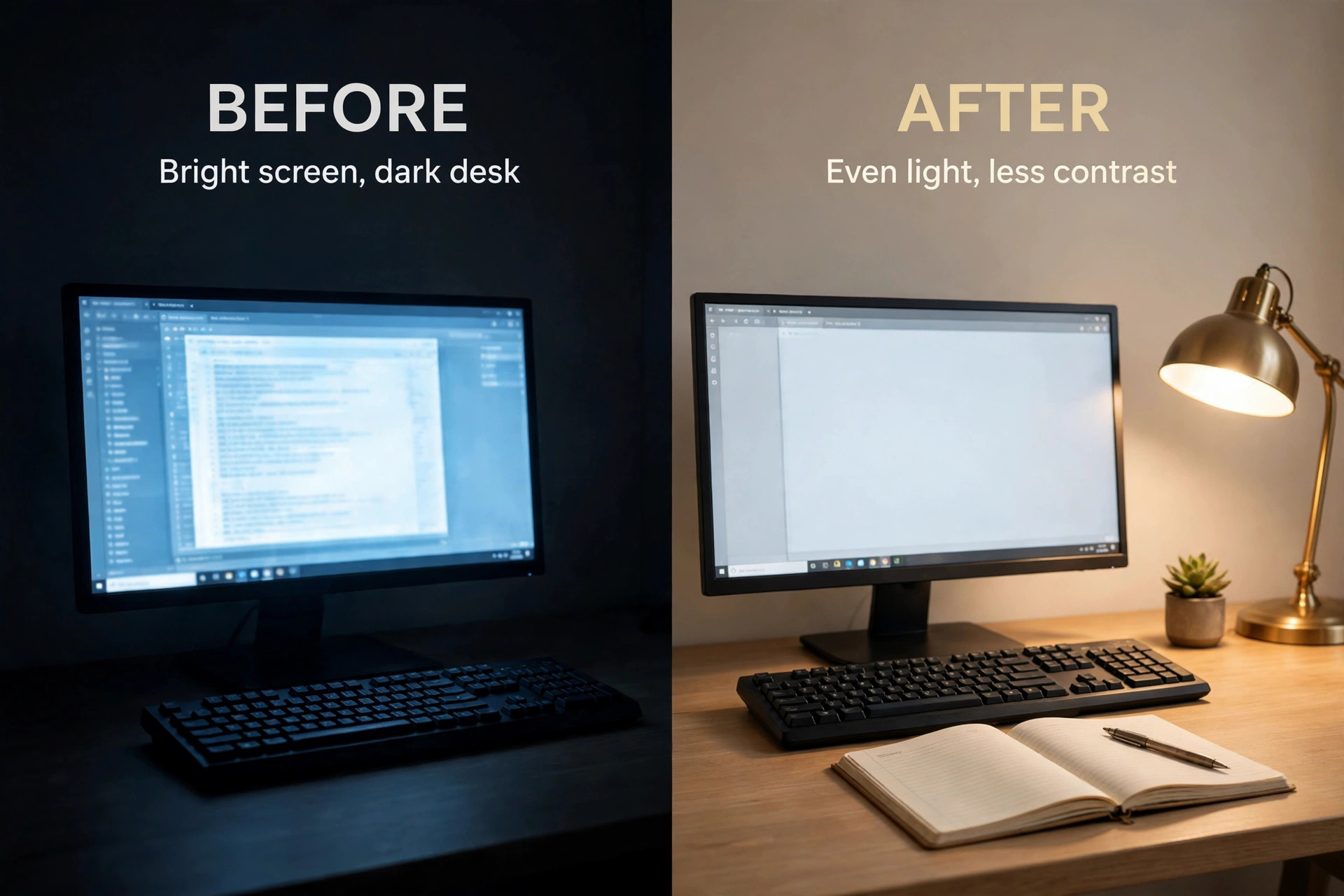
An overhead ceiling light throws light from behind you, leaves your keyboard in shadow and forces your eyes to jump between a bright screen and a dark desk. A task lamp aimed at the work surface does the opposite. It lifts the desk to near screen brightness, cuts that harsh contrast and lets your eyes settle. That single difference is why finding the best desk lamp for home office eye strain matters more than buying a brighter bulb for the ceiling, and why the wrong lamp can leave you just as tired as no lamp at all.
This guide compares 12 lamps you can actually buy, with brightness, colour temperature range, arm adjustability, price and the worker each one suits. You will also get a comparison table, an eye strain checklist, a ten minute setup routine and a best pick by job table. Prices are typical ranges seen in October 2026 listings, so check the vendor page at checkout before you pay.
The Short Verdict for Tired Eyes
If your work is mostly on screen, start with a monitor bar. A bar sits above the screen, throws light down onto the keyboard and never shines into your eyes or onto the screen itself, which removes the two most common glare sources. If your work mixes paper, notebooks and a screen, start with a wide headed desk lamp on a swing arm instead, because a bar cannot light a page beside the keyboard.
Brightness matters, but evenness matters more. A lamp that gives 500 lux across the whole keyboard beats a lamp that gives 1,500 lux in one hot spot with dark edges, because your eyes keep adjusting as they move across that uneven pool. Colour range matters next. A range from warm white near 2700K to daylight near 6500K gives cooler light for detailed morning work and warmer light in the evening. The search for the best desk lamp for home office eye strain is therefore a search for even light, a useful colour range and an arm that holds its position, not a search for the highest lumen number on the box.
How to Choose the Best Desk Lamp for Home Office Eye Strain
Start with the numbers that predict comfort. Lumens describe total light output, while lux describes light falling on a surface at a given distance. A lamp quoting 800 lumens tells you little until you know the beam width and the head to desk distance. A lamp quoting 500 lux at 45 centimetres tells you far more, because that figure matches the distance from a typical lamp head to a keyboard.
Colour temperature is measured in Kelvin, written as K. Low numbers near 2700K look warm and yellow. Mid numbers near 4000K look neutral. High numbers near 6500K look cool and daylight like. For eye comfort, the useful test is whether you can shift temperature through the day without touching the lamp head or swapping a bulb. Stepless or multi step adjustment wins over a fixed temperature lamp, unless you already know you only ever want one temperature.
Colour rendering, written as CRI or Ra, describes how true colours look under the light. A CRI of 90 or above keeps skin tones and printed colour looking natural, which matters for designers and crafters. A CRI near 80 is fine for plain text, but coloured work can look flat. Flicker is the quiet comfort factor. Good LED lamps use a steady driver that keeps light constant. If a cheap lamp gives you an unexplained headache, flicker and uneven light are the first suspects.
The arm decides whether the lamp helps every day or only on day one. A swing arm with two joints and a tilting head covers a keyboard, a notebook and a second monitor without moving the base. A gooseneck bends anywhere but can droop over time. A monitor bar has no arm at all, which saves desk space but cannot light paper to the side. Check the base or clamp as well. A heavy base stays put, while a clamp frees surface but needs a desk edge of the right thickness, so measure the edge before you order.
Room light completes the picture. A task lamp in a pitch dark room still leaves a bright island in darkness, and that contrast strains eyes late at night. A soft background light, even a small ambient lamp or a bar with a rear glow, lifts the wall behind the monitor and softens the edge of the bright zone. Treat room light as part of the lamp decision, not an afterthought.
The 12 Lamps Compared
The table below puts the 12 lamps side by side on the five facts that matter for eye comfort. Brightness figures mix lumens and lux because makers quote them differently, so read the lamp notes that follow for the distance each lux figure was measured at. Prices are typical ranges seen in October 2026 listings, so check the vendor page at checkout. This table is the fastest way to compare the best desk lamp for home office eye strain options on the five facts that matter.
| Lamp | Brightness | Colour | Arm | Typical price | Suits |
|---|---|---|---|---|---|
| BenQ ScreenBar Halo 2 | 500 lux front | 2700K to 6500K | Monitor clamp, tilting bar | 130 to 160 dollars | Screen workers in dark rooms |
| BenQ ScreenBar Pro | Over 1000 lux centre | 2700K to 6500K | Monitor clamp, touch bar | 110 to 130 dollars | Bright desks and dual monitors |
| BenQ e-Reading Desk Lamp | 1600 lux maximum | 2700K to 5700K | Ball joint swing arm | 212 to 249 dollars | Paper plus screen workers |
| Quntis ScreenLinear Pro | Stepless dimming | 3000K to 6500K | Monitor clip, remote puck | About 40 dollars | Budget screen workers |
| Quntis Light Bar Glow | 900 lux centre | 3000K to 6500K | Monitor clip, front plus backlight | About 50 dollars | Evening workers on a budget |
| Xiaomi Mi Smart LED Desk Lamp Pro | 700 lumens | 2500K to 4800K | Three axis folding arm | 60 to 110 dollars import | App and smart home users |
| Dyson Solarcycle Morph Desk | 850 lumens, 1546 lux average | 2700K to 6500K undocked | Rotating head, pivoting arm | About 650 dollars | Daylight tracking and detail work |
| Humanscale Nova | 7 watts, 14 percent to 100 percent dimming | Fixed 3000K or 4000K | Counterbalance arms, 180 degree rotation | 378 to 497 dollars | Offices and video calls |
| LEPOWER 800LM Desk Lamp | 800 lumens | Five steps, warm to cool white | 360 degree gooseneck | 24 to 27 dollars | Budget buyers and crafters |
| Philips Hue Go | Modest, fill light level | Colour changing, warm to cool whites | Portable, no fixed arm | About 90 dollars | Ambient wind down light |
| Anglepoise Original 1227 | Depends on bulb, 6 watts LED included | 2700K with included bulb | Spring arm, 90 cm reach | From about 183 pounds UK | Design lovers and paper tasks |
| Glocusent A31 Clip-On | 5 to 220 lumens | 2700K, 4200K, 6000K | Bendable gooseneck, clip mount | 20 to 35 dollars | Tiny desks and renters |
Read the table as a set of trade offs, not a ranking. The monitor bars win on glare control and desk space, the swing arm lamps win on paper coverage and aiming freedom, and the budget lamps still cover the basics of dimming and temperature choice. Match the row to your desk, not to the brightest row.
The Eye Strain Checklist
Run this checklist before you order, with your real desk in front of you. It takes five minutes and it prevents the most common mistake when choosing the best desk lamp for home office eye strain, which is buying for a photo of a desk rather than your own desk.
- Measure the desk depth and the distance from the lamp position to the keyboard. A bar needs a monitor to sit on. A desk lamp needs a base spot that does not push the keyboard toward you.
- Check the monitor thickness and the desk edge thickness if you are buying a bar or a clamp lamp. Bars suit flat monitors about 1 to 3 centimetres thick, and clamps need an edge inside their stated range.
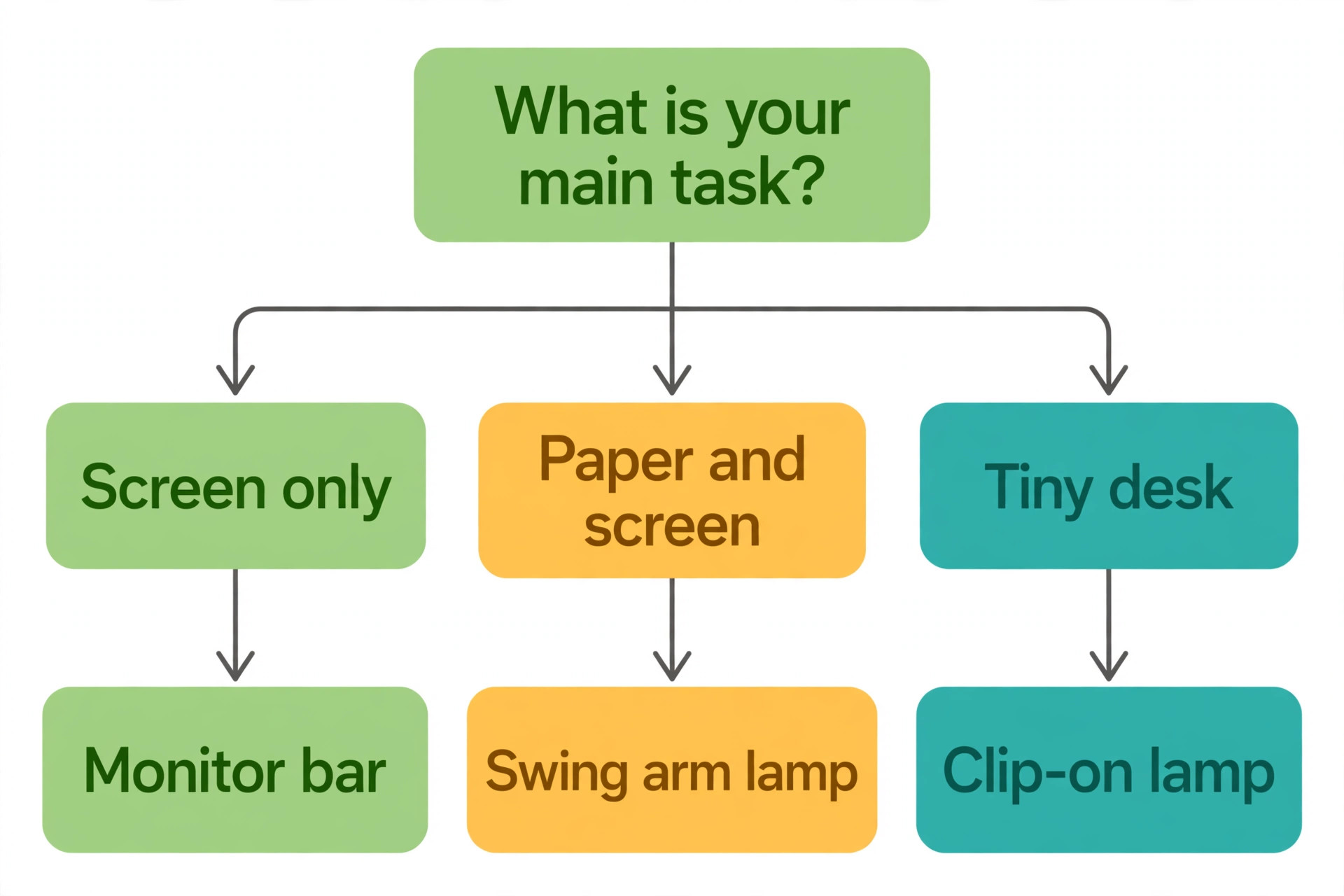
- Note your main task mix. Screen only work points to a bar. Paper plus screen work points to a wide swing arm lamp. Craft and detail work points to the brightest even lamp you can afford.
- Decide your evening pattern. If you work after dark, favour a lamp with a backlight, a warm low end near 2700K and a room light plan, not just a bright task light.
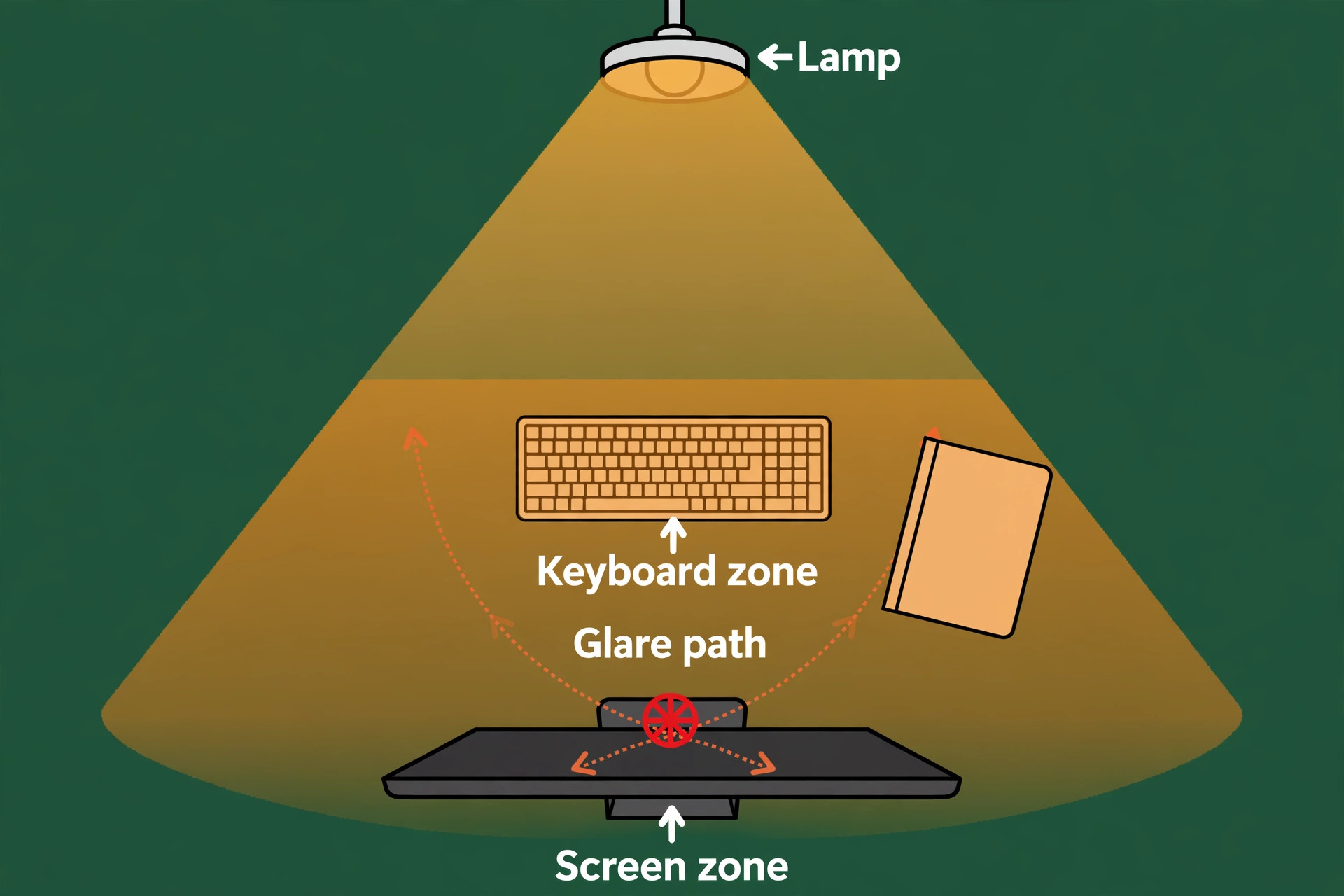
- Check glare sources. A glossy screen, a window behind you and a white desk all bounce light back at your eyes, so a lamp with an asymmetric beam or a diffuser matters more on those desks.
- Check controls. If you adjust light through the day, a remote puck or a desk dial beats touch controls on the lamp head, which force you to reach and re-aim.
- Check power. Monitor bars run on USB power, so confirm your USB port can supply the stated power, since some bars need a stronger port or a dedicated adapter.
- Check the return window. Light comfort is personal, so buy from a seller that lets you test the lamp for a week at your real desk and return it if headaches or glare persist.
If any checklist item fails, change the lamp type before you order. A bar that cannot grip a curved ultrawide monitor, or a clamp on a desk edge that is too thick, will frustrate you daily.
12 Desk Lamps, One by One
1. BenQ ScreenBar Halo 2
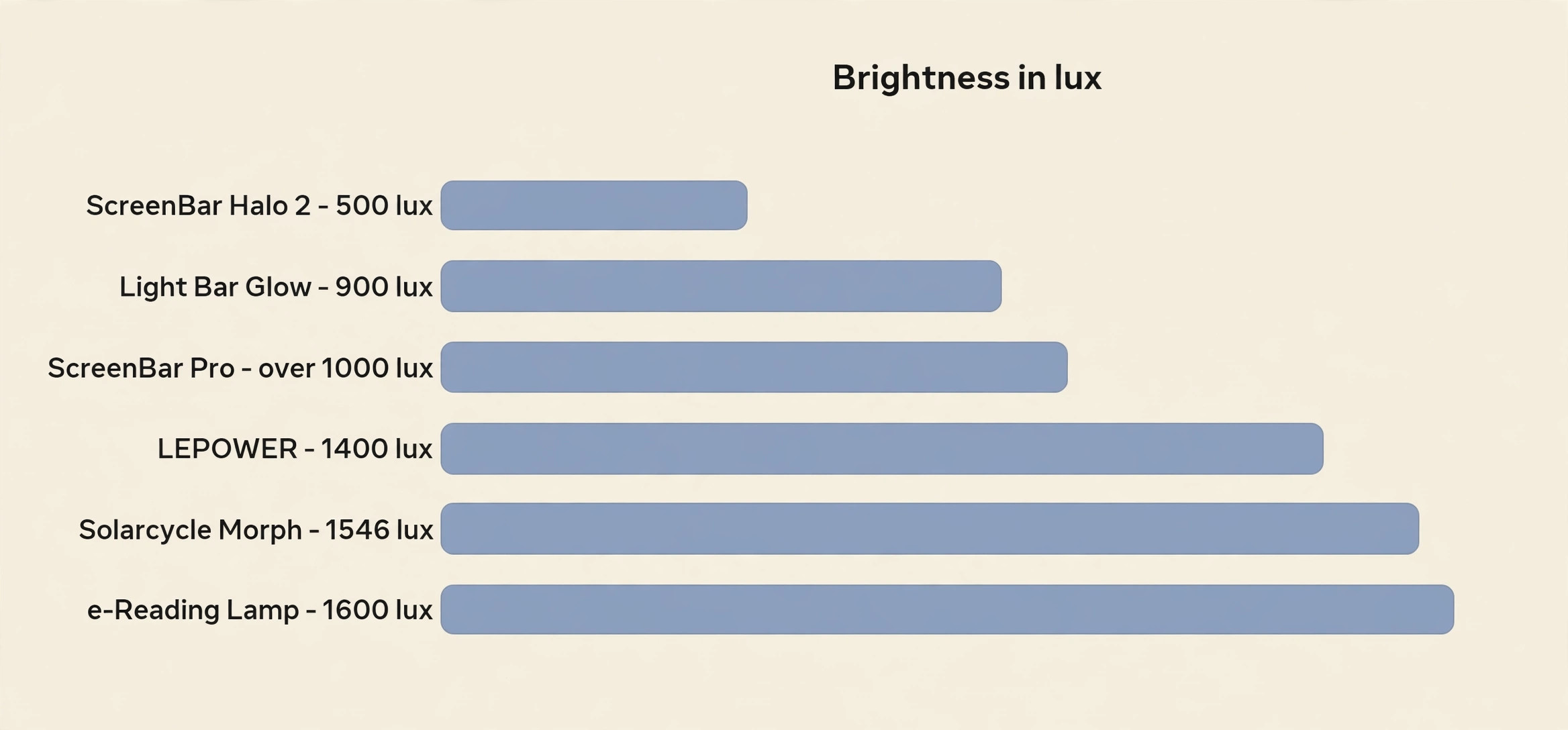
Brightness. The front bar gives 500 lux at 45 centimetres, with a rear backlight that washes the wall behind the monitor to cut evening contrast. Colour. The range runs from 2700K to 6500K with stepless adjustment, so you can move from warm evening light to cool daylight white without steps. Arm. The bar clamps onto the monitor with a weighted mount, tilts to aim the beam down at the desk, and the wireless puck controller sits on the desk for brightness and temperature changes. Price. Typical listings put it at 130 to 160 dollars. Suits. Screen first workers in dim rooms who want strong glare control without giving up desk space.

2. BenQ ScreenBar Pro
Brightness. The centre output passes 1000 lux, for large desks and dual monitor setups. Colour. The range runs from 2700K to 6500K, matching the Halo 2, with touch controls on the bar itself. Arm. A gravity clamp rests on top of the monitor rather than gripping it hard, which suits thin bezel monitors, and the bar angle adjusts to keep light off the screen. Price. Typical listings put it at 110 to 130 dollars. Suits. Dual monitor workers and bright room workers who do not need a backlight or a wireless remote.
3. BenQ e-Reading Desk Lamp
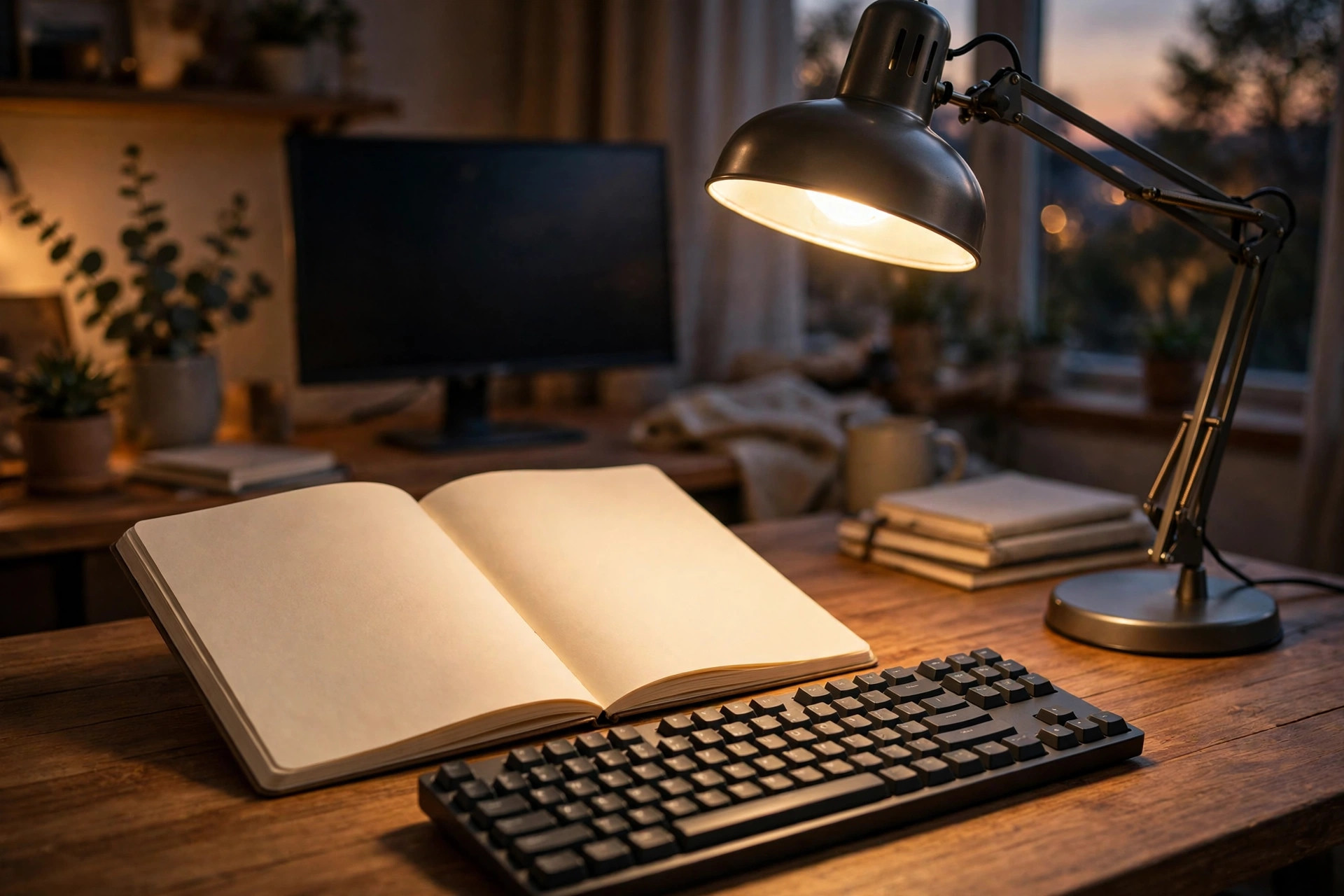
Brightness. Maximum illuminance reaches 1600 lux at about 45 centimetres, with a wide curved head that spreads light across a broad desk area. Colour. The range runs from 2700K to 5700K with 13 colour steps and 23 brightness steps, plus screen and paper modes. Arm. A ball joint head on a swing arm with torque springs holds its angle, and the height adjusts to suit tall monitors and stacked books. Price. Recent listings put it at 212 to 249 dollars. Suits. Workers who split time between paper and screen and want one lamp that handles both without moving the base.
4. Quntis ScreenLinear Pro
Brightness. Output is stepless and asymmetric, aimed down at the desk so the screen stays free of reflected light, with auto dimming that reads room light and adjusts. Colour. The range runs from 3000K to 6500K, which covers warm evening work through to cool daylight white, with a high colour rendering rating near Ra95 in common listings. Arm. A monitor clip holds the bar above the screen, and a remote puck on the desk handles brightness, temperature and a timer without touching the bar. Price. Typical listings put it at about 40 dollars. Suits. Budget screen workers who want most of the premium bar experience, including auto dimming.
5. Quntis Light Bar Glow
Brightness. Centre illuminance reaches 900 lux, with a rear backlight adding ambient glow behind the monitor. Colour. The range runs from 3000K to 6500K with stepless dimming from about 20 percent to full brightness. Arm. The bar clips onto monitors in common flat sizes, and the wireless remote puck controls front light, backlight, brightness and temperature from the desk. Price. Typical listings put it at about 50 dollars. Suits. Evening workers who want a premium style backlight without the premium price, and who accept a battery powered remote.
6. Xiaomi Mi Smart LED Desk Lamp Pro
Brightness. Output reaches 700 lumens across an effective area of about 1.2 square metres, with a round head that spreads light evenly. Colour. The range runs from 2500K to 4800K with stepless adjustment and a colour rendering rating of Ra90, which keeps printed colour and skin tones looking natural. Arm. A three axis folding arm adjusts at several pivots, so the head can sit high for a wide desk or low for close reading, and the lamp folds down for storage. Price. Import listings vary, often in the 60 to 110 dollar band, so check shipping cost at checkout. Suits. App and smart home users who want schedules, voice control and colour accurate light in a folding lamp.
7. Dyson Solarcycle Morph Desk
Brightness. Output reaches 850 lumens with an average lux level of 1546 lux in Dyson testing, and flicker stays under 1 percent. Colour. Undocked task light runs from 2700K to 6500K and tracks local daylight, while docked ambient mode runs from 1800K to 3400K. Arm. The head rotates and the pivoting arm moves between task and ambient positions, and the app adds study, relaxation and bright boost modes. Price. United States listings put it at about 650 dollars. Suits. Detail workers and daylight tracking fans who want automation to handle temperature and brightness and who accept a luxury price.
8. Humanscale Nova
Brightness. A 7 watt LED head dims from 14 percent to full brightness with one touch dimming, with even light and no visible hot spot. Colour. You choose one fixed temperature at purchase, either 3000K warm white or 4000K cool white, with a colour rendering rating above 91. Arm. Counterbalance arms rotate up to 180 degrees, reach about 32.75 inches and hold position without bounce, and an occupancy sensor switches the lamp off when you leave. Price. Retailer listings put it at 378 to 497 dollars depending on mount and finish. Suits. Office workers and video call heavy workers who want one hand adjustment, a steady arm and a 10 year warranty.
9. LEPOWER 800LM Desk Lamp
Brightness. Output reaches 800 lumens with a claimed 1400 lux across a wide panel area, which suits larger desks and craft tables. Colour. Five colour temperature steps run from warm to cool white with ten brightness levels, giving 50 combinations through a touch slide control with memory. Arm. A 360 degree gooseneck bends to aim light precisely, and a weighted base keeps the lamp steady when the neck is bent far to one side. Price. Typical listings put it at 24 to 27 dollars. Suits. Budget buyers, crafters and readers who want granular control and strong light without paying for a monitor bar or a smart app.
10. Philips Hue Go
Brightness. Output is modest and best treated as fill light rather than a main task light, so pair it with a bar or a desk lamp if you need strong keyboard light. Colour. The lamp changes across millions of colours plus warm to cool whites, with app recipes for morning and evening light, and a built in battery lasting about three hours unplugged. Arm. There is no fixed arm. The portable puck shape sits on the desk, a shelf or the floor and points light at a wall for a soft glow. Price. A major retailer listing put it at about 90 dollars, with a bridge sold separately. Suits.
Workers who want evening ambient light, a portable wind down lamp and smart home scenes, rather than a single lamp to light a whole desk.
11. Anglepoise Original 1227
Brightness. Output depends on the bulb you fit, and the lamp ships with a 6 watt LED bulb rated at 2700K with a colour rendering rating of 80, which is warm and gentle. Colour. The included bulb fixes the temperature at warm white, but swapping the bulb changes the temperature for detail work. Arm. The classic spring arm reaches 90 centimetres from the base, holds any position within that reach and stays put without drooping, with a cast iron base that anchors it. Price. United Kingdom listings start at about 183 pounds, with finishes and editions priced higher. Suits. Design lovers and paper workers who want a lamp that lasts decades, with a lifetime guarantee on current models.
12. Glocusent A31 Clip-On
Brightness. Output adjusts from 5 to 220 lumens, which suits a small desk, a bedside table or a single notebook zone. Colour. Three steps cover 2700K mild warm, 4200K warm white and 6000K natural white, with five brightness levels at each step. Arm. A bendable gooseneck on a sturdy clip grips desk edges up to 2.36 inches thick, so the lamp takes no base space. Price. Common listings put it in the 20 to 35 dollar band. Suits. Tiny desk workers, renters and students who need a cheap, portable lamp that clips on, aims anywhere and packs away when the desk must serve another purpose.
Set Up the Lamp So It Actually Helps
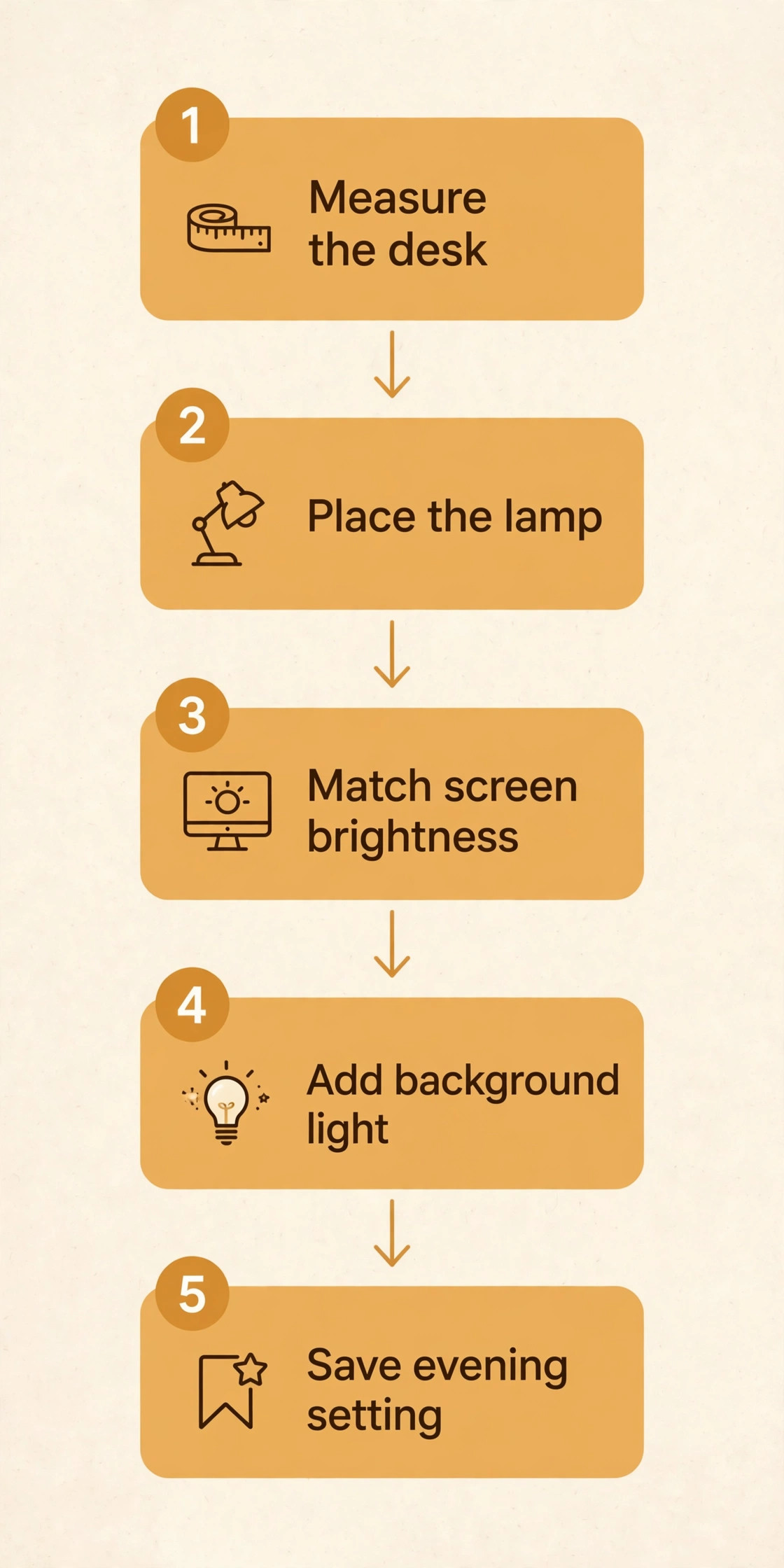
A good lamp aimed badly still strains eyes, so spend ten minutes on placement once the lamp arrives.
- Place the lamp to the side of your dominant hand for paper work, so your hand never casts a shadow over what you are reading, and centre it above the keyboard for screen only work.
- Set the head about 40 to 50 centimetres above the desk for a desk lamp, or directly above the monitor for a bar, then check that no direct light reaches your eyes when you sit normally.
- Match desk brightness to screen brightness. Turn the lamp up or down until a white document on the desk looks about as bright as a white page on screen, not far brighter or far dimmer.
- Add background light. Switch on a low room light or a backlight so the wall behind the monitor is softly lit, then recheck the match, because background light changes how bright the desk needs to be.
- Set the temperature for the time of day. Use cooler light near 5000K to 6500K for detailed morning work, neutral light near 4000K for general afternoon work and warm light near 2700K to 3000K in the evening.
- Test for glare. Tilt the screen slightly, move glossy items out of the beam and adjust the head angle until reflections clear.
- Save the setting. If the lamp has memory or a preset, store your morning and evening settings now.
Recheck the setup after any desk change, since a new monitor or chair height changes the angles.
Mistakes That Keep Eyes Tired
The most common mistake is buying brightness without evenness. A narrow spotlight that leaves the edges of the desk dark forces constant eye adjustment, so favour a wide head or a bar over a small bright spot. The second mistake is working in a dark room with only a task light, so add background light even if it feels unnecessary at first. The third mistake is fixing the temperature at one setting all day. Cool daylight white late at night feels harsh, while warm light in the morning can feel dim for detail work, so change temperature with the day.
The fourth mistake is placing the lamp behind the monitor, which throws your shadow over the keyboard and puts the lamp in your line of sight on video calls. Keep the light source above or beside the work. The fifth mistake is ignoring the screen itself. A lamp cannot fix full screen brightness in a dark room, a monitor sitting too close or text set too small, so pair the lamp with sensible screen brightness, an arm’s length viewing distance and regular breaks. If headaches, blurred vision or eye pain persist after a week with a good setup, see an eye professional rather than buying another lamp, because no lamp corrects an uncorrected vision problem.
Best Pick by Job
The table below matches the best desk lamp for home office eye strain pick to each common home office job, so you can skip to your row and check only that lamp in detail.
| Job | Pick | Why it wins the row |
|---|---|---|
| Screen only work in a dim room | BenQ ScreenBar Halo 2 | Backlight plus glare free beam |
| Dual monitors or a bright room | BenQ ScreenBar Pro | Strong centre output, simple clamp |
| Paper plus screen work | BenQ e-Reading Desk Lamp | Wide head with screen and paper modes |
| Tight budget screen work | Quntis ScreenLinear Pro | Auto dimming near 40 dollars |
| Evening work on a budget | Quntis Light Bar Glow | Backlight near 50 dollars |
| Smart home and app control | Xiaomi Mi Smart LED Desk Lamp Pro | Schedules, voice control, Ra90 colour |
| Detail work and daylight tracking | Dyson Solarcycle Morph Desk | Daylight tracking, low flicker, high lux |
| Office and video calls | Humanscale Nova | One hand adjust, steady arm, sensor |
| Budget crafting and reading | LEPOWER 800LM Desk Lamp | 800 lumens and 50 settings near 25 dollars |
| Ambient evening light | Philips Hue Go | Portable colour and warm recipes |
| Design led paper desk | Anglepoise Original 1227 | Spring arm reach, lifetime guarantee |
| Tiny desk or rented room | Glocusent A31 Clip-On | Clip mount, no base space used |
If your work is mostly on screen, buy the BenQ ScreenBar Halo 2, because its backlight solves the evening contrast problem behind most late work eye fatigue. If your work mixes paper and screen, buy the BenQ e-Reading Desk Lamp instead, because its wide head and paper mode cover both tasks without a second lamp. Budget buyers lose little by starting with the Quntis ScreenLinear Pro.
For readers setting up a full desk, the lamp decision sits beside the monitor and desk decisions. A dual monitor desk setup changes where light must fall, because a second screen widens the lit zone and a single narrow lamp leaves one screen edge dark. A standing desk for a small apartment changes lamp height through the day, because the desk rises and falls, so a bar that moves with the monitor or an arm with long reach suits a sit stand desk better than a short fixed lamp. Smart lighting fans can also read about smart home devices before adding app controlled lamps to a wider home setup.
Together they help you place the best desk lamp for home office eye strain in a full desk setup.
Frequently Asked Questions
How bright should a desk lamp be for eye strain?
Aim for roughly 300 to 500 lux on the keyboard and papers, with the room around the desk lit to at least a third of that level. A lamp quoting 500 lux at 45 centimetres is a useful benchmark when you compare the best desk lamp for home office eye strain options, because that distance matches a normal lamp head height. More brightness helps only if the light stays even. A harsh hot spot with dark edges strains eyes more than a slightly dimmer but even pool of light.
What colour temperature is best for home office work?
There is no single best temperature for the whole day. Cooler light near 5000K to 6500K suits detailed morning work, neutral light near 4000K suits general afternoon work and warm light near 2700K to 3000K suits evening work. A lamp with a wide range lets you shift through the day. If you must pick one fixed temperature, neutral 4000K is the safest compromise for mixed work.
Is a monitor light bar better than a desk lamp for eye strain?
A bar wins for screen only work, because it lights the desk without shining onto the screen or into your eyes, and it uses no desk space. A desk lamp wins for paper, notebooks and craft work, because its arm aims light sideways and covers a wider area. Many home workers end up happiest with a bar for the screen plus a small ambient light for the room.
Do I still need a lamp if my room has a bright ceiling light?
Often yes, because a ceiling light sits behind you and lights the keyboard poorly, while the screen still floats in a darker zone. A task lamp lifts the work surface to near screen brightness and cuts the contrast your eyes must bridge. If your ceiling light already gives even, glare free light across the desk, a task lamp adds less, but most home offices have a single ceiling fitting that cannot do that job alone.
Can the wrong desk lamp cause headaches?
A poor lamp can contribute to headaches through glare, flicker, uneven light and harsh evening colour temperature, especially during long sessions. Screen brightness, viewing distance, text size and uncorrected vision all play a part too. If headaches persist after a week with an even, flicker free setup and sensible screen settings, see an eye professional instead of buying another lamp.
How do I stop screen glare when using a desk lamp?
Keep the lamp above or beside the work, never behind the screen facing you, and use a lamp with an asymmetric beam or a diffuser that aims light down at the desk. Tilt the screen slightly, move glossy objects out of the beam and check for reflections at your normal sitting position. A monitor bar removes most glare by design, because its beam never hits the screen surface at all.
Settle the Light, Then Stop Shopping
Light comfort comes from a short list of decisions, not from endless comparison. Pick the lamp type that matches your task mix, pick a brightness that covers the whole work zone evenly, pick a colour range that shifts through the day and pick an arm that holds its aim. The best desk lamp for home office eye strain in this guide for most screen workers is the BenQ ScreenBar Halo 2, with the BenQ e-Reading Desk Lamp as the paper friendly alternative and the Quntis ScreenLinear Pro as the budget starting point. Order one, run the ten minute setup, live with it for a week and judge it by how your eyes feel at the end of a long day.