
Grant writing rewards preparation more than prose. Funders reject strong programs for weak budgets, missing attachments, and deadlines that slipped by a week. The best AI grant writing tools in 2026 help with the unglamorous middle of the work: finding grants that actually fit, turning scattered notes into a coherent proposal, keeping the budget honest, and tracking every report after the award lands. They do not replace judgment about whether a grant is worth chasing. They make the chasing faster and less error prone.
This guide tests each tool against one question: does it save a real hour without creating a new compliance problem? A discovery tool that floods you with irrelevant matches fails that test. A drafting tool that invents outcomes fails it harder. The thirteen tools below are grouped by the job they do best, with pricing, limits, and the point where each one stops being useful.
The 13 best AI grant writing tools at a glance
| Tool | Best for | Free option |
|---|---|---|
| Instrumentl | Grant discovery and deadline tracking | Free trial |
| GrantWatch | Browsing a large grant database | Paid only, check checkout |
| GrantStation | Vetted grant listings for nonprofits | Paid only, check checkout |
| Grantable | AI assisted proposal drafting | Free trial |
| ChatGPT | First drafts and plain language rewrites | Free tier |
| Jasper | Polished narrative sections at scale | Free trial |
| QuickBooks Online | Grant budgets and expense tracking | Free trial |
| FreshBooks | Simple budgets and invoicing for small teams | Free trial |
| Smartsheet | Budget timelines and deliverable tracking | Free trial |
| Fluxx | Grant lifecycle and compliance management | Check checkout |
| Foundant | Grant management and reporting | Check checkout |
| Submittable | Applications, reviews, and reporting in one place | Check checkout |
| AmpliFund | Grant lifecycle, compliance, and reporting | Check checkout |

Best pick by job
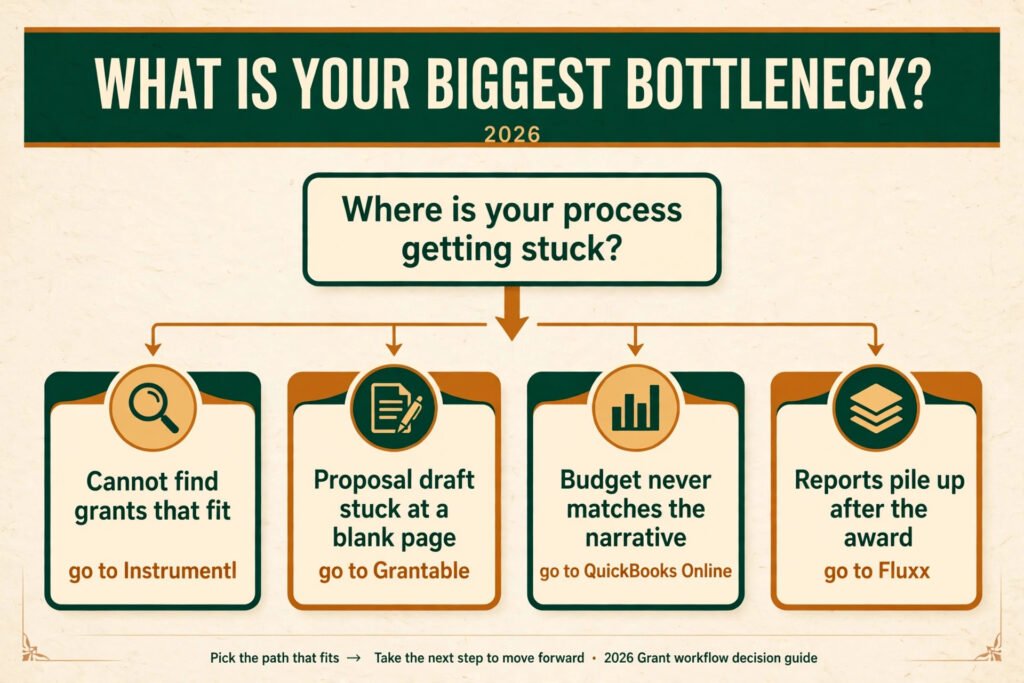
| Your bottleneck | Start here | Why |
|---|---|---|
| You cannot find grants that fit | Instrumentl | Fit scoring and deadline alerts cut the search short |
| Your proposal draft is stuck at a blank page | Grantable | It structures answers around funder questions |
| Your budget never matches your narrative | QuickBooks Online | Real expense categories keep numbers consistent |
| Reports pile up after the award | Fluxx | Milestones and documents live in one system |
| You write many applications a year | Submittable | Intake, review, and reporting share one workflow |
Grant discovery: find grants worth your time
1. Instrumentl
Instrumentl combines a grant database with tracking. You build a profile of your organization, your mission, and your funding needs, and it surfaces opportunities ranked by fit. Deadline alerts and funder profiles show past grantees, typical award sizes, and application history, which helps you judge whether a grant is realistic before you invest a week in it.
Pricing: Subscription, check checkout for current plans. A free trial is available.
Best for: Nonprofits and consultants who track dozens of opportunities and need to see deadlines before they arrive.
Watch out for: Fit scores are a starting point, not a verdict. Read the funder guidelines yourself before committing to an application.
Try it at: https://www.instrumentl.com/

2. GrantWatch
GrantWatch lists grants across categories including education, health, arts, and community development. Its strength is breadth and straightforward filtering by location, category, and deadline. It is less of a workflow tool than Instrumentl and more of a well organized listing service.
Pricing: Subscription, check checkout for current plans.
Best for: Teams that want a wide view of what is open and are comfortable managing tracking elsewhere.
Watch out for: Listings vary in detail. Some entries link out to funder pages where the real requirements live, so budget time to verify eligibility.
Try it at: https://www.grantwatch.com/
3. GrantStation
GrantStation focuses on vetted listings for US nonprofits, with funder profiles and a searchable database. It also publishes guidance on proposal writing and funding strategy, which makes it useful for smaller organizations that are still building their grants process.
Pricing: Subscription, check checkout for current plans.
Best for: Small nonprofits that want curated listings plus learning material in one subscription.
Watch out for: The database leans toward US funders. International organizations will find thinner coverage.
Try it at: https://grantstation.com/
Proposal drafting: turn notes into a fundable narrative
4. Grantable
Grantable is built specifically for grant writing. It stores your past answers, organizational details, and boilerplate, then drafts responses to new funder questions using that library. The result reads like your organization, not like a generic template, because it draws on material you have already approved.
Pricing: Subscription, check checkout for current plans. A free trial is available.
Best for: Organizations that apply to many funders and keep answering the same questions in slightly different words.
Watch out for: Your library is only as good as what you put in it. Weak source answers produce weak drafts, and every draft still needs a human edit before submission.
Try it at: https://www.grantable.co/

5. ChatGPT
ChatGPT is the most flexible drafting helper on this list. It turns rough notes into structured prose, rewrites jargon into plain language, tightens long sections to a word limit, and suggests outlines for narrative sections. For grant writers, its best use is the first draft and the rewrite, not the final submission.
Pricing: Free tier available, paid plans check checkout.
Best for: Small teams and freelance writers who need a fast first draft and a second pair of eyes on clarity. Freelance grant writers will find the same drafting workflow useful in related writing work covered in our guide to the best AI tools for freelance writers.
Watch out for: It can invent statistics, citations, and program outcomes with complete confidence. Never submit a figure, quote, or claim you have not verified against your own records.
Try it at: https://chatgpt.com/
6. Jasper
Jasper produces polished marketing and narrative copy at volume, with tone controls and templates for common document types. For grants, it works best on sections that need clean, professional prose: organizational background, program descriptions, and community need statements that you will then customize for each funder.
Pricing: Subscription, check checkout for current plans. A free trial is available.
Best for: Teams that write many proposals and want consistent tone across sections written by different people.
Watch out for: Jasper is a general writing tool, not a grant specialist. It will not check your answers against funder criteria, and it will not flag a claim that contradicts your budget.
Try it at: https://www.jasper.ai/
Budgets: make the numbers match the story
7. QuickBooks Online
QuickBooks Online is the budget backbone for many small nonprofits. You set up expense categories that mirror your grant budget, track spending against each award, and pull reports that show exactly where the money went. When a funder asks how the grant was spent, you answer with records, not memory.
Pricing: Subscription, check checkout for current plans. A free trial is available.
Best for: Organizations that manage several grants at once and need clean, auditable expense tracking.
Watch out for: Setup takes time. Categories must be planned before spending starts, or your reports will need painful cleanup later.
Try it at: https://quickbooks.intuit.com/

8. FreshBooks
FreshBooks is lighter than QuickBooks and easier for a small team to adopt. It handles invoicing, expense tracking, and simple project budgets, which covers the financial side of smaller grants and consulting engagements. The interface is simple enough that a program lead can use it without accounting training.
Pricing: Subscription, check checkout for current plans. A free trial is available.
Best for: Small teams and solo consultants who need tidy budgets without a full accounting system.
Watch out for: It is not built for complex multi year grant accounting. If you manage restricted funds across many programs, you will outgrow it.
Try it at: https://www.freshbooks.com/
9. Smartsheet
Smartsheet sits between a spreadsheet and a project tool. You build budget timelines, deliverable checklists, and reporting calendars in a familiar grid, then share them with program staff who never need to learn accounting software. It is particularly useful for the planning side of a grant: who delivers what, by when, and at what cost.
Pricing: Subscription, check checkout for current plans. A free trial is available.
Best for: Teams that need shared visibility into grant timelines, deliverables, and budget milestones.
Watch out for: Smartsheet tracks plans, not money movement. Pair it with an accounting tool for actual expense records.
Try it at: https://www.smartsheet.com/
Compliance and reporting: survive the award
10. Fluxx
Fluxx manages the full grant lifecycle for funders and grantees: applications, approvals, payments, milestones, and reports. For a grantee, its value is centralization. Every document, deadline, and report for an award lives in one place, so nothing depends on one person’s inbox.
Pricing: Subscription, check checkout for current plans.
Best for: Organizations with many active grants and formal reporting requirements.
Watch out for: Fluxx is often chosen by the funder, not the grantee, so you may use it because a funder requires it. Learning its workflow is worth the time either way.
Try it at: https://www.fluxx.io/

11. Foundant
Foundant serves nonprofits and foundations with grant management, scholarship management, and community foundation tools. Its reporting features help teams show outcomes against the goals promised in the proposal, which is exactly what renewal decisions turn on.
Pricing: Subscription, check checkout for current plans.
Best for: Community foundations, scholarship programs, and nonprofits with structured reporting cycles.
Watch out for: Pricing and packaging are quote based, so budget a sales conversation before you commit. Smaller teams should confirm the plan fits before signing.
Try it at: https://www.foundant.com/
12. Submittable
Submittable handles submissions, review, and reporting in one platform. Applicants submit through branded forms, reviewers score in the system, and administrators track awards and reports without juggling email attachments. For organizations that run their own grant programs, it replaces a patchwork of forms and spreadsheets.
Pricing: Subscription, check checkout for current plans.
Best for: Organizations that award grants, run competitions, or collect applications at scale.
Watch out for: If you only apply for grants rather than run a program, Submittable is a tool you will use as an applicant on someone else’s portal, not a system you buy.
Try it at: https://www.submittable.com/
13. AmpliFund
AmpliFund is a grant management platform built for the full grant lifecycle. It covers applications, awards, subrecipient management, performance tracking, and reporting in one system, with an emphasis on compliance for government and public sector grant programs. For a grantee organization, its value is control: award terms, spending, milestones, and reports stay connected, so a renewal or audit does not depend on reconstructing history from scattered files.
Pricing: Subscription, check checkout for current plans.
Best for: Government agencies, public sector grantees, and organizations managing complex awards with strict compliance and subrecipient requirements.
Watch out for: AmpliFund is geared toward public sector grant programs, so a small nonprofit with one or two simple awards may find it heavier than it needs. Confirm the plan fits your award complexity before committing.
Try it at: https://www.amplifund.com/
Pricing compared
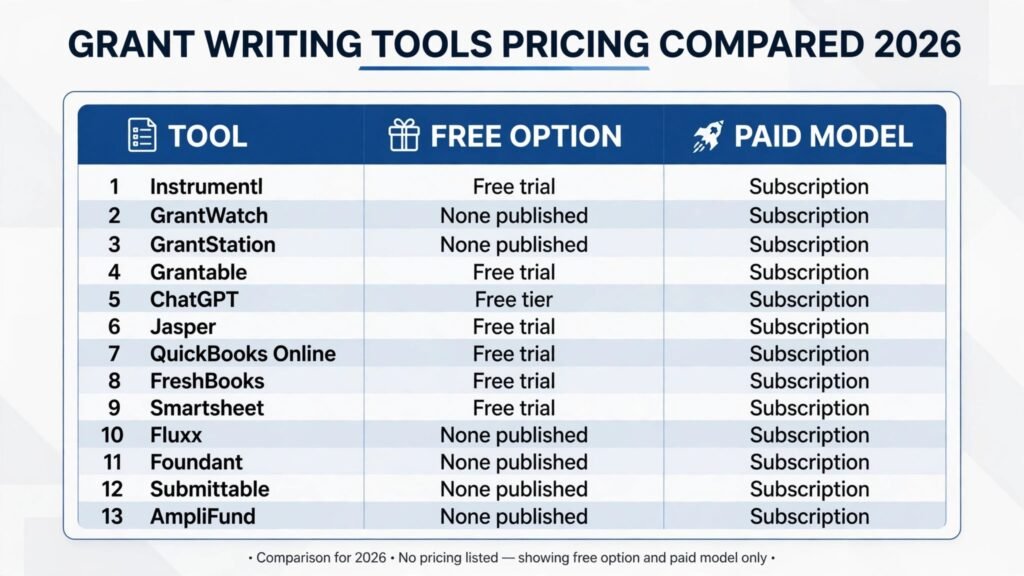
| Tool | Free option | Paid model |
|---|---|---|
| Instrumentl | Free trial | Subscription, check checkout |
| GrantWatch | None published | Subscription, check checkout |
| GrantStation | None published | Subscription, check checkout |
| Grantable | Free trial | Subscription, check checkout |
| ChatGPT | Free tier | Subscription, check checkout |
| Jasper | Free trial | Subscription, check checkout |
| QuickBooks Online | Free trial | Subscription, check checkout |
| FreshBooks | Free trial | Subscription, check checkout |
| Smartsheet | Free trial | Subscription, check checkout |
| Fluxx | None published | Subscription, check checkout |
| Foundant | None published | Subscription, check checkout |
| Submittable | None published | Subscription, check checkout |
| AmpliFund | None published | Subscription, check checkout |
The honest cost of a grant tool is not the subscription. It is the subscription plus setup time, training, and the hours spent moving old data into a new system. A discovery tool that saves ten hours of searching pays for itself in one cycle. A compliance system that prevents one missed report pays for itself in one renewal. Price the tool against the grant it helps you win or keep, not against the cheapest alternative on this list.
How to Choose the best AI grant writing tools for your organization
Start with your bottleneck, not with a feature list. If you miss deadlines, buy discovery and tracking first. If your drafts stall, buy drafting help. If your reports are late, buy compliance tooling. One tool that fixes your actual problem beats three tools that duplicate each other.
Next, run a small test. Pick one real grant, not a hypothetical one, and run it through the tool end to end. Check three things: does the discovery match fit your eligibility, does the draft sound like your organization, and does the budget report match your books? If any answer is no, the tool is not ready for your team, whatever its marketing claims.
Then check who owns the data. Your past answers, funder notes, and award history are valuable. Prefer tools that let you export everything in a usable format. A tool that locks your grant history inside its own system becomes expensive to leave, and grants work spans years, not months.
Finally, assign one owner. Tools fail when everyone can use them and nobody maintains them. One person should own the grant calendar, the answer library, and the reporting schedule. Teams that skip this step end up with the same chaos in a nicer interface. Hiring and onboarding help for that owner is a separate problem, and our guide to the best AI tools for HR teams covers tools that support that side of the work.
A realistic grant writing workflow that uses these tools together
Most teams do not need all thirteen tools at once. They need a sequence that matches how a grant actually moves from idea to report. Here is a workflow that works for a small nonprofit applying to eight to twelve grants a year.
Start the month with discovery. Spend one focused morning in Instrumentl or GrantStation reviewing new matches and updating deadlines. Score each opportunity on three questions: does it fit the mission, does the award size justify the work, and can the team meet the deadline without dropping current programs? Anything that fails two of the three goes on a watch list, not an application list. This single discipline prevents the most common failure in grant writing, which is spending a week on a grant that was never winnable.
Move to drafting only after the fit is confirmed. Pull your answer library from Grantable or your own documents, and draft the sections the funder asks for in the funder’s order, not yours. Reviewers score against their criteria, so a proposal organized around their questions scores better than a beautiful essay organized around your history. Use ChatGPT or Jasper for the first pass on narrative sections, then rewrite the draft in your organization’s voice. Read it aloud once. If a sentence sounds like it could belong to any nonprofit, rewrite it with a specific fact about your program, your community, or your results.
Build the budget in parallel with the narrative, not after it. Open QuickBooks Online or FreshBooks and map each narrative promise to a budget line. If the narrative mentions two program coordinators, the budget must fund two program coordinators. If the budget includes equipment, the narrative must explain what it does and why it matters. This cross check catches the mismatches that reviewers notice first, and it takes about an hour per proposal once the habit is set.
Submit through the funder’s system, then immediately set up reporting. Record the award in Fluxx, Foundant, or Submittable on the day it arrives, with milestones, report dates, and the person responsible for each one. Collect outcome data as the program runs, not at the end of the grant period. A team that tracks outcomes monthly writes a renewal report in a day. A team that starts at the deadline writes it in a panic, and reviewers can tell the difference.
Finally, review the cycle every quarter. Which tools saved time, which ones duplicated work, and which grants were worth the effort? Drop the tool nobody opens. Keep the one that owns the calendar. Grant writing improves through this kind of honest review more than through any single new subscription.
Mistakes to avoid
Submitting AI invented numbers. This is the most serious mistake on this list. Funders check outcomes, budgets, and citations. An invented statistic in a proposal is not a shortcut, it is a credibility problem that follows your organization to the next application. Verify every number against your own records.
Chasing grants you cannot win. Discovery tools make it easy to apply to everything. Resist that. A grant that does not fit your mission, geography, or budget size costs a week of work and a rejection that teaches you nothing. Ten well fitted applications beat thirty hopeful ones.
Letting the draft drift from the budget. Reviewers notice when the narrative promises staff, equipment, or activities that the budget does not fund. Read the narrative and the budget side by side before submission, and fix the mismatch in whichever document is wrong.
Ignoring reporting until the deadline arrives. Reports are part of the grant, not an afterthought. Set reporting milestones when the award starts, collect outcome data as the program runs, and write the first draft of the report months early. Renewals are won during the grant period, not in the final week.
Buying tools before fixing the process. A drafting tool will not fix a team that starts proposals the week they are due. Set a calendar, a review step, and a single owner first. Tools amplify a working process; they do not create one.
Frequently asked questions
Can AI write a whole grant proposal?
It can draft one, but it should not submit one. AI is strong at structure, clarity, and first drafts. It is weak at your organization’s facts, your community’s needs, and your funder’s criteria. Use it to draft, then edit every claim against your records and your guidelines.
Are AI grant writing tools allowed by funders?
Most funders do not ban AI assistance, but some require disclosure, and a few restrict it for specific sections. Check the funder guidelines for each application. When in doubt, disclose that AI assisted drafting and confirm that all facts were verified by your team.
How much do grant writing tools cost?
Most tools on this list are subscription priced, with free trials or free tiers for the lighter options. Check checkout for current pricing, since grant tools frequently change plans. Budget setup and training time on top of the subscription.
Which tool should a small nonprofit start with?
Start with discovery and tracking, usually Instrumentl or GrantStation, because finding the right grant matters more than polishing the wrong one. Add a drafting tool like Grantable or ChatGPT once you apply regularly.
Do these tools work for government grants?
Discovery tools cover government listings to varying degrees, and drafting tools work for any narrative section. Government applications often have rigid forms and portals, so expect to paste drafted text into the official system rather than submitting from the tool.
What happens to my data if I cancel?
It depends on the tool. Before subscribing, confirm you can export your answer library, funder notes, and award history. Your grant history is an asset built over years, and losing it on cancellation is a real cost.
Conclusion
The best AI grant writing tools do not win grants by themselves. They win back the hours that used to go to searching, reformatting, and chasing paperwork, and they leave your team with more time for the work funders actually fund: programs, evidence, and relationships. Start with your bottleneck, test on one real grant, verify every number, and keep one person in charge of the calendar. Do that, and the tools on this list will make your next application stronger, faster, and easier to defend when the report comes due.