
A literature review dies slowly. You open fifty tabs, read forty abstracts, and by Friday you cannot remember which paper said what, and that is the exact pain the best ai tools for literature reviews are built to remove. The work is not reading. The work is organising what you read into an argument your supervisor will accept.
This guide compares eight tools that researchers actually use in 2026, judged on paper coverage, extraction quality, citation checking, and price. Prices here come from vendor pages and comparisons checked in late 2026, so confirm the current price before you commit, because academic tool pricing changes often.
The eight tools split into three jobs. Elicit and Consensus find and summarise the evidence. Scite and Litmaps check whether that evidence still holds up. Research Rabbit, Connected Papers and Semantic Scholar map the field so nothing important goes missing. Zotero keeps the whole pile organised and cited.
Why Literature Reviews Eat Whole Semesters
A review starts with a question and turns into a pile. A typical systematic review screens hundreds of papers, and each one needs the same details pulled out. Population, method, outcome, limitation. Done by hand, that extraction takes weeks, and the notes drift in format from the first paper to the fiftieth.
The second problem is trust. A paper that looked solid in 2022 may have been contradicted or retracted since, and a review that cites it without checking is built on sand. General chatbots make this worse, because they invent references that look real and pass a quick glance.
The third problem is coverage. A keyword search finds the papers that match your words, not the papers that matter. Whole branches of a field hide behind different terminology, and a review that misses them reads as thin to anyone who knows the area.
The fix is a stack, not a single tool. One tool finds papers, one extracts data from them, one checks the citations, and one manages the references. Each tool below is judged on the one job it does best, and the guide shows how they fit together.
The best ai tools for literature reviews below are judged on the job each tool does, not on the demo it shows.
The 8 AI Tools for Literature Reviews at a Glance
The table below is the short version. Read it to narrow the list to two or three tools, then read the detail section before you pay for anything. Use it to shortlist the best ai tools for literature reviews worth testing on your own work.
| Tool | Main job | Best for | Starting paid price |
|---|---|---|---|
| Elicit | Paper search and extraction | Systematic reviews | about 10 dollars a month billed yearly |
| Consensus | Evidence backed answers | Fast evidence checks | about 9 dollars a month billed yearly |
| Scite | Citation checking | Verifying claims | about 12 dollars a month billed yearly |
| Semantic Scholar | Free paper search | Discovery on a budget | free |
| Research Rabbit | Citation mapping | Expanding a reading list | free |
| Litmaps | Citation alerts and maps | Staying current | about 10 dollars a month |
| Connected Papers | Visual paper graphs | Finding similar work | about 3 dollars a month billed yearly |
| Zotero | Reference management | Organising sources | free |
The table above narrows the field, but the right answer for most readers is a pair of tools, not one. The detail section shows what each tool actually does, what it costs, and where it falls short, so the choice follows the job rather than the marketing.
Best Pick by Job
| Job type | First pick | Second tool | Why this pair works |
|---|---|---|---|
| Systematic review, 100+ papers | Elicit | Scite | Extraction tables plus citation checks cover the two hardest parts of a big review |
| Quick evidence check before writing | Consensus | Semantic Scholar | A grounded answer in minutes, then free search to verify it yourself |
| Thesis with a long timeline | Litmaps | Zotero | Alerts keep the review current while reference management keeps it clean |
| Finding a missed branch of the field | Research Rabbit | Connected Papers | Citation maps from both directions surface papers keyword search misses |
| Tight student budget | Semantic Scholar | Research Rabbit | Both free, and together they cover discovery and mapping |
| Final check before submission | Scite | Zotero | Citation verification plus clean references is the last line of defence |
A researcher running the best ai tools for literature reviews as a stack gets further than one running a single tool hard. Elicit builds the extraction table, Scite checks the references in it, and Zotero turns the result into a cited draft. That combination covers the three jobs that decide whether a review survives peer review.
Budget changes the answer. A student with no funding should start with Semantic Scholar and Research Rabbit, both free, and add Scite for one month before submission. A funded lab should buy Elicit and keep it for the whole project, since the extraction tables save more in researcher hours than the subscription costs.
How to Judge the Best AI Tools for Literature Reviews
Judge every option on paper coverage and source quality first. The best ai tools for literature reviews are only as good as the papers they can see, so test each tool on your own topic before you trust its index. A tool that misses half your field will give you a confident answer built on half the evidence.
Next, test extraction accuracy on your own papers on your own work. A tool that looks strong on a feature list but stumbles on extraction accuracy on your own papers will cost more time than it saves, so run it on a real task before you compare anything else. The test should use your files, your audience and your deadline, not the vendor demo data.
Then weigh citation checking and retraction alerts against export and reference manager integration. A tool that wins on citation checking and retraction alerts but fails on export and reference manager integration is a bad buy, and a tool that handles both is worth paying for. Check the citation checking and retraction alerts first, because a failure there shows up in the first week, while a failure on export and reference manager integration shows up in the first month.
Finally, model the cost across the whole review, not one month. A three month review on a 10 dollar plan costs 30 dollars, which is less than a day of a research assistant. A tool that looks expensive per month is cheap per review, and a free tool that wastes your time is the expensive one.

What to Check Before You Pay for a Literature Review Tool
Check the free tier on your real work first. A free tier that covers a full week of real tasks tells you more than any demo, and a free tier that runs out in a day tells you the paid plan is the real price. Run the trial on the job you will actually do, not on the sample data the vendor provides.
Read the licence and the export rules before you buy. A tool that keeps your work locked inside its own format costs you every time you switch, and a tool that limits commercial use on the plan you bought costs you when you publish. The licence page is short, and reading it takes ten minutes.
The 8 AI Tools for Literature Reviews in Detail
1. Elicit
Elicit reads like a research assistant that never sleeps. You ask a question in plain language and it returns papers as a table, one row per study, with columns for population, method, outcome and limitation that you choose yourself.
The free Basic plan covers search and a limited number of reports, which is enough to test it on a real review. Paid plans start at about 10 dollars a month billed yearly, and the higher tiers add screening and full text extraction for large reviews.
Elicit fits systematic reviewers and thesis writers who need structured data across dozens of papers. The trade off is that it works best in empirical fields, and humanities topics with thin empirical literatures get less from the extraction tables.
Put Elicit on the next review you actually have to deliver. Ask your real research question, let it build the extraction table for thirty papers, and time screening against your usual manual pass. If the columns match your protocol and screening moves faster, the ten dollar plan pays for itself. If you keep rereading every cell by hand, stop paying and use a tool that keeps you closer to the source text.
2. Consensus
Consensus answers a direct question by synthesising findings from peer reviewed papers, with a meter that shows how much of the evidence agrees. It is the fastest way to learn what the literature actually says before you read a single full paper.
Basic searches are free, and Pro costs about 9 dollars a month billed yearly, with a student discount for academic email addresses. The paid tier adds deeper reviews and more advanced messages each month.
Consensus fits the early stage of a review, when you are scoping a question and need a grounded answer fast. The trade off is that it summarises rather than extracts, so it cannot replace the structured tables Elicit builds for a full review.
Use Consensus the way a review actually starts. Bring it three questions you are still scoping, read the agreement meter and the cited papers behind it, and see whether the answer changes what you search next. If the meter settles a question in minutes that would have taken an afternoon of skimming, Pro is worth its nine dollars. If the summaries stay too shallow to cite, keep the free searches and spend the money on a tool that extracts rather than summarises.
3. Scite
Scite shows how later papers cite a study, classified as supporting, mentioning or contrasting it. That single view catches retracted work and disputed findings before they reach your review, which is a risk no other tool in this list covers as well.
There is no permanent free plan, only a short trial, and paid plans start at about 12 dollars a month billed yearly. The price is easy to justify for one review cycle, since a single bad citation can cost a submission.
Scite fits the final check before submission, when every reference must hold up. The trade off is that it is a verification tool, not a discovery tool, so it adds the most value after you have already found your papers.
Run Scite over the reference list of a draft that is close to submission, not over a fresh search. The supporting, mentioning and contrasting flags should surface at least one citation you would have regretted, and the retraction check should clear the rest. That single catch is what the twelve dollar plan is for. If a full pass turns up nothing you did not already know, let the trial lapse and run the check again only when a new draft is ready.
4. Semantic Scholar
Semantic Scholar is a free search engine over more than 200 million papers, with citation graphs and short AI summaries of each paper. It is the database behind several paid tools in this list, and using it directly costs nothing.
There is no paid plan and no paywall on the core search, which makes it the best starting point for any reviewer. The trade off is that you do the organising yourself, with no extraction tables or review workflow built in.
Semantic Scholar fits students and independent researchers who need broad discovery without a subscription. The trade off is time, since screening and organising hundreds of results falls on you rather than on the tool.
Judge Semantic Scholar on discovery, since that is all it promises. Take a topic you know well, search it here, and count how many relevant papers surface that your usual database missed, especially through the citation graphs. If the graphs keep turning up clusters you would have missed, it earns a permanent place at no cost. If you spend more time organising results than reading them, pair it with a tool that builds the tables for you.
5. Research Rabbit
Research Rabbit maps the papers around your seed collection, showing what your key papers cite and what cites them. It turns a handful of good papers into a full reading list in an afternoon, which is exactly the job a literature review starts with.
The core tool is free, with an optional paid tier at about 12 dollars a month for extra features. For most reviewers the free tier covers the mapping work completely, and the paid tier is easy to skip.
Research Rabbit fits the discovery phase, when you need to be sure you have not missed a whole branch of the literature. The trade off is that it maps connections, it does not read papers for you, so extraction still needs another tool.
Start with five papers you already trust and let Research Rabbit map the field around them for an afternoon. A good map shows you a branch of the literature you had not found, plus the papers that cite your seeds most. If that afternoon fills gaps in your reading list, the free tier has done its job and the paid tier can wait. If the map only returns papers you already knew, your search was already thorough and this tool adds nothing.
6. Litmaps
Litmaps builds visual citation maps and watches them for you, sending alerts when new papers cite your key sources. A review stays current while you write, instead of going stale the week you submit.
Paid plans start at about 10 dollars a month, with a free tier for basic maps. The alerts are the feature worth paying for, since manual re-checking is the part of a review most people skip.
Litmaps fits long reviews and theses, where months pass between the first search and submission. The trade off is a smaller feature set than the full review platforms, so it works best as a companion rather than a main tool.
Set Litmaps watching the key papers of a review you will still be writing in three months, then check what lands in your inbox. The alerts should catch new citations without you remembering to research again, which is the whole point of paying for it. If a month passes and the alerts only repeat papers you already have, the free maps are enough. If the alerts keep your review current while you write, the ten dollar plan is cheaper than the afternoon a stale review costs you.
7. Connected Papers
Connected Papers draws a graph of papers similar to one you already trust, so you can see the field around a key study at a glance. It is the quickest way to check whether your search missed an important cluster.
A few graphs a month are free, and the academic plan costs about 3 dollars a month billed yearly. That price makes it a cheap addition to any review stack, and most reviewers need only a handful of graphs per project.
Connected Papers fits the moment you find one strong paper and need its neighbours. The trade off is that a graph is a starting point, not evidence, so every paper it surfaces still needs a proper read.
Take the single strongest paper in your review and build one graph from it. The test is whether the graph shows you a cluster you had missed, and whether every paper in that cluster survives a proper read. At three dollars a month the academic plan is nearly free, so the decision is not the price, it is whether the graphs change your reading list. If they only confirm what you already found, skip it. If they keep revealing neighbours worth citing, keep it beside your main search tool.
8. Zotero
Zotero collects, organises and cites your sources, with browser capture and Word integration that inserts references as you write. Every review needs a reference manager, and Zotero is the free standard that most researchers already know.
The software is free and open source, with cheap cloud storage if you need more than the free allowance. It does not search or summarise papers, so it pairs with a discovery tool rather than replacing one.
Zotero fits every reviewer, because a review without clean references is a draft, not a submission. The trade off is that it manages papers, it does not evaluate them, so the judgment work stays with you.
Load Zotero with the references for a review in progress and write a section with it, capturing sources from the browser and inserting citations as you go. Citations should land correctly, the library should stay tidy without effort, and nothing should break when you switch machines. If that week of real writing feels smoother, it stays, and it costs nothing. If you only ever need a place to store PDFs, any reference manager will do, but Zotero is the one your collaborators already know.
A Review Workflow That Holds Up Under Scrutiny
The order matters. Discovery first, extraction second, verification third, and writing last. A tool used out of order creates rework, so run the steps in sequence. The best ai tools for literature reviews that fit your work are the ones that survive this order.
| Step | Job | Best tool | What good looks like |
|---|---|---|---|
| 1 | Scope the question | Consensus | A grounded answer plus a list of key papers to seed the search |
| 2 | Map the field | Research Rabbit | Citation maps that show the branches keyword search misses |
| 3 | Screen and extract | Elicit | One table, one row per paper, same columns every time |
| 4 | Verify citations | Scite | Every reference checked for support, contrast and retraction |
| 5 | Stay current | Litmaps | Alerts when new papers cite your key sources |
| 6 | Write and cite | Zotero | Clean references inserted as you draft |
Run the workflow on ten papers before you scale it. Scope the question, map the field, extract the data, verify the citations, and write one section. The workflow that produces a clean section in a day will produce a clean review in a month. The workflow that produces a mess on ten papers will produce a bigger mess on two hundred.
What a Review Stack Costs at Real Volume
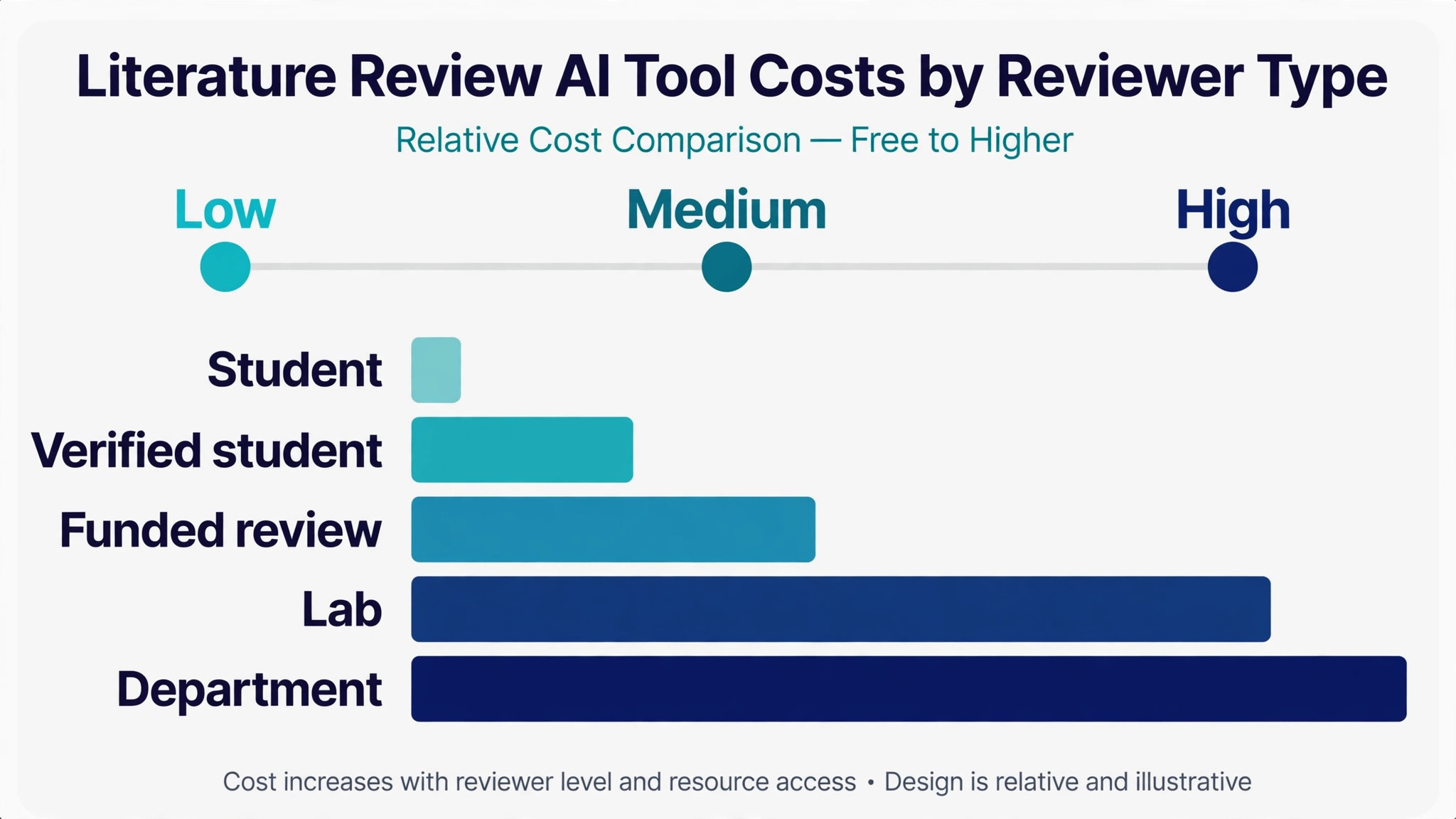
Prices below use annual billing where it is cheaper, and they assume one reviewer working on one review. Add a second reviewer and the per seat tools double. The best ai tools for literature reviews below are priced at real volume, not at headline rates.
| User type | Volume | Tool stack | Monthly cost |
|---|---|---|---|
| Student, one thesis | 3 months | Semantic Scholar plus Research Rabbit plus Zotero | 0 dollars |
| Student, one thesis, verified | 3 months | Free stack plus one month of Scite | About 20 dollars |
| Funded review, 100 papers | 6 months | Elicit Plus plus Scite | About 132 dollars |
| Lab, several reviews a year | 12 months | Elicit Plus plus Scite plus Litmaps | About 384 dollars |
| Department, shared licences | 12 months | Elicit Pro plus Scite plus Zotero storage | Pricing on the vendor site |
If your thesis hinges on clean extraction and verified citations, that is where the money goes, because a single wrong quote can cost you a chapter. If it does not, the free stack will carry you through the whole thesis, so leave the paid tools alone until an error would actually hurt you.
Three Researchers Setups That Actually Work
A single tool rarely covers the whole job, and the setups below are the pairs that readers actually run. Each one costs less than a single enterprise platform, and each one is easier to learn than a tool that tries to do everything.
Setup 1 fits systematic review, 100+ papers. Elicit does the heavy work, and Scite covers the gap it leaves. Extraction tables plus citation checks cover the two hardest parts of a big review. Run this setup for a month before you add anything else, because most readers never need a third tool, and the money saved is better spent on the work itself.
Setup 2 fits quick evidence check before writing. Consensus does the heavy work, and Semantic Scholar covers the gap it leaves. A grounded answer in minutes, then free search to verify it yourself. Run this setup for a month before you add anything else, because most readers never need a third tool, and the money saved is better spent on the work itself.
Setup 3 fits thesis with a long timeline. Litmaps does the heavy work, and Zotero covers the gap it leaves. Alerts keep the review current while reference management keeps it clean. Run this setup for a month before you add anything else, because most readers never need a third tool, and the money saved is better spent on the work itself.
The common thread across all three setups is the same. Buy the pair that matches the job you do most often, learn it properly, and add a third tool only when a real gap appears. A stack that grows with the work beats a stack bought all at once.
Mistakes to Avoid With Literature Review AI
The best ai tools for literature reviews fail in the same few ways, and each mistake below costs time or money. Avoid them and the stack works.
Trusting an AI summary without opening the paper. A summary is a claim about a paper, not the paper itself. Open the full text for every paper that shapes your argument, and check the numbers the tool extracted against the results section. A review built on summaries reads like one, and examiners notice.
Running a review on one keyword search. One search string finds one slice of a field. Seed a citation map from your best papers, then run two or three different searches with different terms. The papers that appear in the map but not in your search are the ones your review was about to miss.
Skipping the citation check until the end. A contradicted paper found in week two costs one replacement. The same paper found the night before submission costs a rewrite of a whole section. Run Scite on your references as you add them, not after the draft is finished.
Letting the tool choose your argument. An AI synthesis is a starting point, and it leans toward the majority view. Read the dissenting papers yourself, because the interesting argument in a review usually lives in the disagreement, not in the consensus the tool reports.

First Week Setup Checklist for Your Review
Use this checklist when you set up your stack, and keep a copy with your project notes. It turns the best ai tools for literature reviews into a working setup in a week.
- Write your review question in one sentence and pin it above your desk.
- Run the question through Consensus and save the five strongest papers it returns.
- Seed Research Rabbit with those five papers and export the map.
- Set up Zotero, install the browser connector, and create one collection per theme.
- Test Elicit on ten papers you know well and check every extracted cell.
- Run Scite on your twenty most important references and flag any contrasts.
- Set up Litmaps alerts on your five key sources so new work reaches you.
- Draft one section from the extraction table before you screen paper fifty.
Related Guides
Keep exploring with these guides on Stratilyze:
Frequently Asked Questions
Which literature review tool should a PhD student start with?
Start with Elicit on the free Basic plan, plus Semantic Scholar and Zotero. Elicit handles the extraction tables that make a review manageable, Semantic Scholar covers free discovery, and Zotero keeps the references clean. Add Scite for one month before submission to check every citation, since that is the cheapest insurance a thesis has.
Can AI tools replace reading the papers in a literature review?
No, and any tool that promises that is selling a shortcut that examiners will spot. AI tools find papers, extract structured data and flag problems, but the argument in a review comes from reading the important papers yourself. Use the tools to cut the mechanical work, then spend the saved time on the twenty papers that actually shape your conclusions.
How do I check whether a paper in my review was retracted?
Run your reference list through Scite, which classifies later citations as supporting, mentioning or contrasting, and flags retractions and editorial notices. Do it as you add papers, not at the end, because a retracted paper found early costs one replacement and the same paper found late costs a rewrite.
Is Elicit or Consensus better for a systematic review?
Elicit is better for a systematic review, because it builds structured extraction tables across many papers and supports screening at scale. Consensus is better for scoping a question quickly, because it answers in plain language with cited evidence. Most reviewers use Consensus first to scope, then Elicit for the full review.
What does a literature review AI stack cost a student?
Nothing to start with. Semantic Scholar, Research Rabbit and Zotero are free, and Elicit has a free Basic plan. A realistic paid stack for one thesis is about 20 dollars for one month of Scite before submission, or about 10 dollars a month for Elicit Plus if the review runs long.
How many papers should a literature review cover?
There is no fixed number, and examiners judge coverage, not count. A narrow review can rest on forty strong papers, while a broad systematic review may screen hundreds. The test is whether a knowledgeable reader finds the important work present and the argument fair to the disagreements in the field.
Our Call for Literature Reviews, and When the Runner-Up Wins
Our call is Elicit for most reviewers, because extraction tables are the bottleneck in a real review, and no other tool in this list does them as well. Pair it with Scite for citation checks and Zotero for references, and the stack covers the whole job from first search to submission. That is what the best ai tools for literature reviews are for, a stack that ships rather than a list that impresses.
The runner-up is Consensus, and it wins when the job is scoping rather than reviewing. If you need to learn what the evidence says this week, before committing to a full review, Consensus gives you a grounded answer in minutes. Start there, then move to Elicit when the review itself begins.