

HeyGen is the best ai video generators for small businesses pick for most owners, because its Creator plan costs 24 dollars a month on annual billing and covers avatar presenters, video translation in 175 plus languages and 1080p export in one tool. Synthesia is the pick for training and onboarding videos, with 125 plus stock avatars and a Starter plan at 14 dollars a month on annual billing. The eight tools below compare price, video type and output limits, so a small business can pick the generator that matches the videos it actually posts.
Video is the hardest content for a small business to make. A camera, lights and editing time cost more than most owners can spare, and hiring a videographer for every social post is out of reach. AI video generators change that math, because a script becomes a finished video in minutes, with a presenter, a voiceover and captions included.
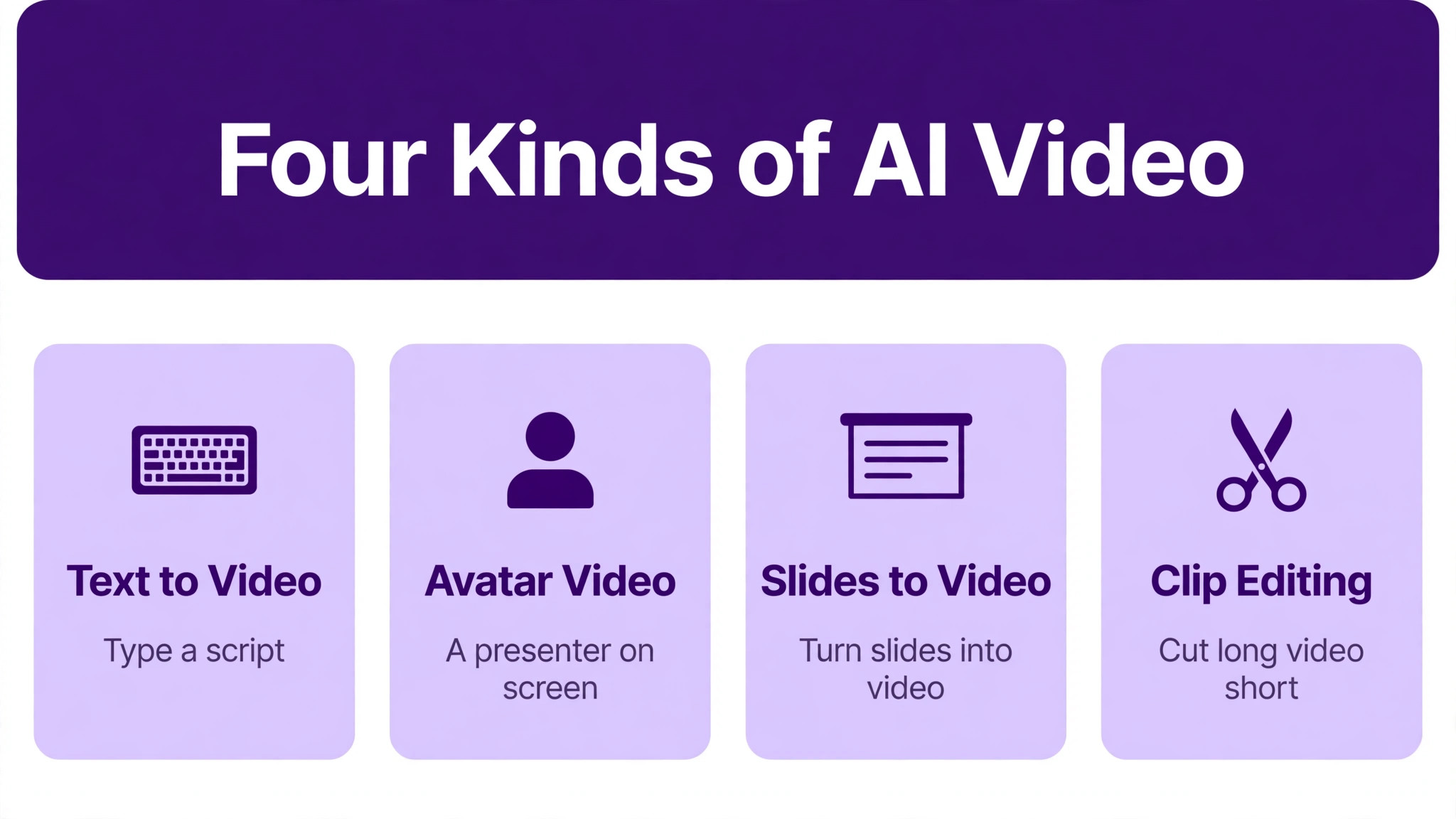
The tools split into four kinds. Avatar presenters like HeyGen and Synthesia put a talking person on screen. Script to video tools like Pictory and InVideo turn text into stock footage videos. Generative tools like Runway create original shots from a prompt. Editors like Descript and CapCut polish footage the owner already filmed. A business should pick the kind that matches its videos, not the tool with the longest feature list.
The 8 Tools at a Glance
| Tool | Main job | Best for | Starting price |
|---|---|---|---|
| HeyGen | Avatar video and translation | All round business video | 24 dollars a month |
| Synthesia | Avatar training videos | Training and onboarding | 14 dollars a month |
| Pictory | Script to stock video | Blog and webinar repurposing | 25 dollars a month |
| InVideo AI | Prompt to promo video | Social ads and promos | 20 dollars a seat a month |
| Descript | Text based video editing | Editing recorded video | 16 dollars a month |
| Runway | Generative video footage | Ads and creative shots | 12 dollars a month |
| CapCut | Quick social editing | Short form social video | 9.99 dollars a month |
| Canva | Design and simple video | Branded social clips | 10 dollars a month |
Entry prices run from free to 25 dollars a month on annual billing, but the sticker price misleads, because one vendor bills by credits, another by video minutes and another by seats. A business that posts four videos a month should compare the cost per finished minute, not the monthly price, because a cheap plan with a small allowance costs more than a dearer plan that covers the whole month.
Best Pick by Job
| Job type | First pick | Second tool | Why this pair works |
|---|---|---|---|
| All round business video | HeyGen | Synthesia | HeyGen covers most jobs, Synthesia owns training |
| Training and onboarding | Synthesia | HeyGen | Synthesia has the avatars, HeyGen adds translation |
| Repurposing blogs and webinars | Pictory | InVideo AI | Pictory turns text into video, InVideo adds promos |
| Editing footage you filmed | Descript | CapCut | Descript edits by transcript, CapCut is faster for social |
| Creative ads and footage | Runway | Canva | Runway generates shots, Canva brands them fast |
HeyGen wins the all round pick because it does the most jobs well in one subscription. The Creator plan costs 24 dollars a month on annual billing, or 29 dollars month to month, with 600 credits a month, videos up to 30 minutes, 1080p export, watermark removal and voice cloning. The free plan makes up to three videos a month, each up to a minute long, so an owner can test the avatars before paying.
Synthesia wins for training because it is built for repeatable presenter videos. The Starter plan costs 14 dollars a month on annual billing, or 19 dollars month to month, with 125 plus stock avatars, AI dubbing and downloads without the Synthesia logo. That focus on training is the reason a business with staff to onboard should look here first, and it is the sharpest contrast in this look at the best ai video generators for small businesses for a team that records the same kind of video every week.
Which AI Video Generator Is Best for Weekly Social Posts?
InVideo AI is the best pick for weekly social posts, because it turns a prompt into a finished promo with script, voiceover and captions in one pass. The Starter plan costs 20 dollars per seat a month, and the template library covers the ad formats every platform wants. An owner with no editing experience can get an ad ready video the same afternoon, which is the whole point of a weekly posting habit.
CapCut is the better pick for short form video filmed on a phone. The free plan covers most editing, and Pro costs 9.99 dollars a month for the full template and effects library. The speed is the advantage, because a phone clip becomes a captioned reel in minutes, and the templates match the trends on TikTok and Instagram without any design work.
Pictory is the third option for a business that already writes. It turns a blog post, a script or a webinar into a stock footage video with captions and music, and the Starter plan costs 25 dollars a month on annual billing. A business with a blog archive can turn every article into a video without filming anything, which is the cheapest way to fill a posting calendar.
A fourth path suits a business that films real footage. Descript edits that footage by transcript, so a recorded testimonial or a product demo becomes a polished video without timeline editing. The Hobbyist plan costs 16 dollars a month on annual billing, and the filler word removal alone saves an hour on every long recording.
How to Choose the Best AI Video Generators For Small Businesses
Start with the video type. A talking head explainer needs an avatar tool like HeyGen or Synthesia, a product promo needs a prompt to video tool like InVideo, and a filmed testimonial needs an editor like Descript or CapCut. Buying the wrong kind means paying for a tool that cannot make the video the business actually needs.
Next, check the output allowance. Synthesia Starter allows up to 120 minutes of video a year on annual billing, HeyGen Creator gives 600 credits a month, and Pictory Starter gives 200 video minutes a month. A business that posts four one minute videos a month needs only a small allowance, while a business that posts daily needs the higher tier. Count the finished minutes per month before comparing prices.
Then check the commercial rights and the watermark. Free plans usually watermark the video or limit commercial use, while paid plans remove the watermark and grant commercial rights. A video with a vendor watermark looks unprofessional on a business page, so the paid plan is the real price for most owners. Finally, test the voice and the avatar on a real script, because a voice that sounds wrong will cost more in lost trust than any subscription saves.
One more check matters for a team. Ask how many seats the plan includes, because InVideo charges per seat and Canva Pro charges per person, so a team of three pays three times the headline price. A solo owner can ignore the seat math, while a small team should compare the price for the whole team rather than the price for one user.
The 8 Tools in Detail
The eight tools below cover avatar presenters, script to video, generative footage and editing. Each one is judged on video type, price, output allowance and ease of use, so this roundup of the best ai video generators for small businesses stays honest about credits, minutes and watermarks.
1. HeyGen
HeyGen is the all round AI video tool in this guide, with avatar presenters, video translation and generative models in one subscription. The free plan makes three videos a month up to a minute each, Creator costs 29 dollars a month or 24 dollars on annual billing with 600 credits, and Pro costs 49 dollars a month with 4K export. The translation feature clones the speaker voice into 175 plus languages with lip sync, which is the standout for a business selling across borders.
The avatar realism is the best in this guide, and the custom avatar option lets an owner record a short clip and use their own face as the presenter. The Business plan at 149 dollars a month adds SSO and SCORM export for training teams, though most small businesses will never need it. The credit system takes a little learning, because different video lengths and features consume credits at different rates.
It suits a small business that wants one video tool for promos, explainers and translated versions. Start on the free plan, make three test videos, and upgrade to Creator when the posting habit sticks.
2. Synthesia
Synthesia is the avatar training specialist, built for businesses that make the same kind of presenter video again and again. The free plan gives 10 minutes a month with a watermark, Starter costs 19 dollars a month or 14 dollars on annual billing with 125 plus stock avatars and AI dubbing, and Creator costs 89 dollars a month or 64 dollars on annual billing. The platform supports 140 plus languages and exports SCORM on the Enterprise plan for learning systems.
The strength is consistency, because every training video uses the same presenter, the same voice and the same branding, which is what a training library needs. The drawback is the narrow job, because Synthesia makes presenter videos and little else, so a business that also needs promos and social clips will need a second tool. It suits training, onboarding and FAQ videos.
It suits a business with staff to train or customers to onboard. Start on the free plan, record one training video, and check whether the avatar style suits the brand before paying.
3. Pictory
Pictory turns scripts, blog posts, slides and long recordings into short branded videos with stock footage from Getty Images and Storyblocks. The Starter plan costs 29 dollars a month or 25 dollars on annual billing with 200 video minutes a month, a brand kit for fonts, colours and logo, and ElevenLabs voices. The 14 day trial gives 15 video minutes to test the workflow.
The strength is repurposing, because a business with a blog or a webinar library can turn every piece into video without filming. The drawback is the stock look, because the footage is generic and two businesses can end up with similar looking videos. It suits marketers turning articles and scripts into short branded videos for social feeds.
It suits a content led business with a blog archive. Start with the trial, turn three old articles into videos, and judge whether the stock footage fits the brand before subscribing.
4. InVideo AI
InVideo AI turns a plain prompt into a finished promo, ad or social video with the script, voiceover and captions included. The Starter plan costs 20 dollars per seat a month, with 400 credits, and higher tiers add more credits and longer videos. The template library covers the ad formats for every major platform, and the editor lets an owner change the text, the voice and the scenes after generation.
The strength is speed, because a promo can go from idea to finished video in one sitting. The drawback is the credit model, because a business that makes many videos will burn credits fast, and the per seat price adds up for a team. It suits solo marketers assembling stock led videos from a prompt and a script.
It suits a small business that posts ads and promos weekly. Start on the free watermarked plan, make one real ad, and upgrade when the ad runs.
5. Descript
Descript edits video by editing the transcript, so an owner can cut a filler word by deleting it from the text. The free plan gives one media hour a month at 720p with a watermark, Hobbyist costs 24 dollars a month or 16 dollars on annual billing, and higher tiers add more hours and 4K export. The tool also records, transcribes and removes filler words automatically.
The strength is the editing model, because text based editing is faster than timeline editing for talking head video. The drawback is the scope, because Descript edits footage the owner already filmed and does not generate video from a prompt. It suits podcasts, webinars, tutorials and any video that starts with a recording.
It suits a business that films its own videos and wants fast editing. Start on the free plan, edit one recorded video, and upgrade when the monthly hours run out.
6. Runway
Runway is the generative video tool in this guide, creating original footage and transforming existing shots with AI models. The free plan gives 125 one time credits, Standard costs 15 dollars a month or 12 dollars on annual billing with 625 credits a month, and Pro costs 35 dollars a month or 28 dollars on annual billing with 2,250 credits. The output suits ads and creative footage that stock libraries cannot provide.
The strength is originality, because the footage is generated rather than licensed, so no other business has the same shot. The drawback is control, because generated video needs several tries to match a brief, and the credit cost of those tries adds up. It suits ads, product shots and creative campaigns where a unique look matters.
It suits a business with a creative lead who enjoys experimenting. Start on the free credits, generate a few shots for a real ad, and upgrade only when the workflow proves itself.
7. CapCut
CapCut is the quick social editor in this guide, built for short form video on phones and desktops. The free plan covers most editing with templates, effects and auto captions, and Pro costs 9.99 dollars a month for the full library and cloud storage. The tool is the fastest way from a phone clip to a captioned reel, and the templates track the current trends on TikTok and Instagram.
The strength is speed and price, because the free plan does most of the job and Pro is the cheapest paid plan in this guide. The drawback is the depth, because CapCut has no avatar presenter, no translation and no script to video, so it edits rather than creates. It suits short form social video, reels and TikTok clips.
It suits an owner who films on a phone and posts daily. Start free, post five videos, and pay for Pro only when the templates or the cloud storage run short.
8. Canva
Canva is the design tool that also makes simple videos, with templates, brand kits and a huge stock library in one subscription. The free plan covers basic video, and Pro costs 15 dollars a month or 10 dollars on annual billing per person, with the full template library, brand kit and background remover. The video editor is simple, with drag and drop scenes, text and music.
The strength is the brand kit, because every video uses the same fonts, colours and logo as the rest of the business design. The drawback is the video depth, because Canva has no avatar presenter, no translation and no generative footage, so it suits simple branded clips rather than full video production. It suits a business that already designs in Canva and wants video in the same place.
It suits a small business that needs branded social clips fast. Start on the free plan, make a branded clip, and upgrade to Pro when the brand kit becomes essential.
Synthesia vs HeyGen, Training Avatars Against Marketing Avatars
The video type is the first difference. Synthesia is built for training and onboarding, with a library of 125 plus stock avatars, AI dubbing and SCORM export for learning systems. HeyGen is built for marketing and sales, with avatar presenters plus video translation, voice cloning and generative models. A business that trains staff will use Synthesia daily, while a business that sells across borders will use HeyGen daily.
The second difference is the allowance. Synthesia Starter allows up to 120 minutes of video a year on annual billing, which suits a business that makes a few training videos a month. HeyGen Creator gives 600 credits a month, which suits a business that makes many short videos. A training library grows slowly, while a social feed needs new video every week, so the allowance should match the posting habit.
The deciding factor is the main video job. A business whose videos are mostly training and onboarding should take Synthesia, because the avatar consistency and the learning system export repay the subscription. A business whose videos are mostly promos, explainers and translated versions should take HeyGen, because the broader toolset covers more jobs. That split is the cleanest way to read the best ai video generators for small businesses when the choice narrows to these two.
A third difference is the free plan. Synthesia gives 10 minutes a month with a watermark and a share link only, while HeyGen gives three videos a month up to a minute each. Neither free plan suits a business page, but both are enough to test the avatar style, and the test should use a real script from the business rather than a demo line.
What Will AI Video Cost Each Month at Real Volume?
A business that posts four one minute videos a month can stay on the entry plans. Synthesia Starter at 14 dollars a month on annual billing covers 120 minutes a year, HeyGen Creator at 24 dollars covers 600 credits a month, and Pictory Starter at 25 dollars covers 200 video minutes a month. Any of those plans covers four short videos with room to spare, so the monthly cost is 14 to 25 dollars, and that low entry cost is why the best ai video generators for small businesses are within reach of a one person business.
A business that posts daily will pay more. Daily posting burns through credits and minutes fast, so the mid tiers matter, with HeyGen Pro at 49 dollars a month, Synthesia Creator at 64 dollars on annual billing, and Pictory Team at 119 dollars a month on annual billing. A daily poster should budget 50 to 120 dollars a month for video generation, plus the time to write scripts and review output.
The hidden cost is the re-render. AI video rarely matches the brief on the first try, so a business should budget two to three generations per finished video. A plan that covers four finished videos a month may only cover two if every video needs three tries, so the allowance should be twice the finished output. That rule keeps the monthly bill honest.
The other hidden cost is the music and stock licence. Most generators include stock footage and music in the plan, but a business that uses its own music or a licensed track should check the terms, because a video taken down for a music claim costs more than the subscription saved.
How Do I Judge an AI Video Before Posting It?
Watch it on a phone with the sound off first, because most social video is watched muted. The captions must carry the message alone, the visuals must make sense without audio, and the first three seconds must show the product or the promise. A video that fails the muted test will fail on the feed, no matter how good the voice sounds.
Then watch it with the sound on, and listen for the voice. AI voices have improved, but a flat or mispronounced voice will cost trust, especially on a training video where the viewer must listen for minutes. Check the brand too, because the fonts, colours and logo must match the rest of the business, and a video that looks like a template will not build a brand.
Finally, check the facts in the script. AI video tools do not check claims, so a wrong price, a wrong feature or a wrong date in the script becomes a wrong video. Read the script aloud before generating, and check every number against the business own records. That check takes two minutes and saves a public correction.
A One-Week Video Sprint for a Small Business
Day one is the plan. Pick one video format, write three scripts, and choose the tool that makes that format best. A talking head explainer needs HeyGen or Synthesia, a blog repurpose needs Pictory, and a phone clip needs CapCut. One format and one tool keep the sprint simple, and that focus is what makes the best ai video generators for small businesses pay off in a single week.
Days two to four are the making. Generate one video a day, review it on a phone with the sound off and on, and fix the script rather than the tool when the result looks wrong. Most bad AI videos are bad scripts, not bad tools, so the script rewrite is the skill that improves fastest.
Days five to seven are the posting and the review. Post the three videos, watch the view and click numbers, and keep the format that performed best. A sprint that ends with one proven format is worth more than a month of random videos, because the business now knows what to make next week.

Frequently Asked Questions
Which AI video generator is cheapest?
Runway Standard at 12 dollars a month on annual billing is the cheapest paid plan in this guide, followed by Synthesia Starter at 14 dollars. CapCut Pro costs 9.99 dollars a month, but it edits rather than generates video, so the cheapest generator depends on whether the business needs generated footage or edited footage, and that distinction is the first filter when owners compare the best ai video generators for small businesses.
Can HeyGen translate my video into Spanish?
Yes. HeyGen translates video into 175 plus languages and dialects, cloning the speaker voice with lip sync. The Creator plan at 24 dollars a month on annual billing includes translation, and Pro at 49 dollars a month adds 4K export for the translated versions.
Does Synthesia have a free plan?
Yes. Synthesia has a free plan with 10 minutes a month, watermarked, with a share link only. The Starter plan costs 14 dollars a month on annual billing and adds downloads without the Synthesia logo, 125 plus stock avatars and AI dubbing.
Is Pictory good for turning blog posts into video?
Yes, that is its best job. Pictory turns a blog post, script or URL into a stock footage video with captions and music, and Starter costs 25 dollars a month on annual billing with 200 video minutes a month. The footage is generic, so a business with a strong visual brand should check the output carefully.
Do AI video tools own the commercial rights?
Most paid plans grant commercial use, while free plans often limit it or add a watermark. HeyGen, Synthesia and Pictory all remove the watermark on paid plans, but the exact rights differ by vendor, so a business should read the plan terms before using a video in a paid ad.
How many videos can I make on the cheapest plans?
It depends on the allowance. Synthesia Starter allows up to 120 minutes of video a year on annual billing, HeyGen Creator gives 600 credits a month, and Pictory Starter gives 200 video minutes a month. A business posting four one minute videos a month fits comfortably on any of those plans.
Start With One Video Format
A small business should start with one format and one tool. A training heavy business should start with Synthesia, a marketing heavy business should start with HeyGen, and a blog heavy business should start with Pictory. One format, posted weekly for a month, proves whether AI video works for the business before any bigger spend.
The best ai video generators for small businesses are the ones that match the videos the business actually posts, and the cheapest way to find out is a one week sprint with a free plan. Make three videos, post them, and let the numbers decide the subscription.