

The best AI website builder in 2026 can take a one-paragraph description of your business and hand back a complete website — pages, copy, images, contact form — in minutes. What the marketing pages don’t tell you is how different the results are: one builder’s “AI site” is a polished, search-ready site you can grow for years; another’s is a pretty placeholder you’ll rebuild within the quarter. And the price on the signup page is rarely the price you’ll actually pay after introductory terms and renewals.
So we built the same small-business site in five builders — Wix, Hostinger, Durable, Framer, and 10Web — scored the results on design quality and SEO basics, and verified October 2026 pricing, including what happens at renewal and whether you can ever leave.
Bottom line: For most small businesses, Wix is the safest all-round choice. For the lowest honest price, Hostinger. For the best-looking site, Framer. For owning your site outright (WordPress), 10Web. For sheer speed with business tools attached, Durable.
Quick Answer
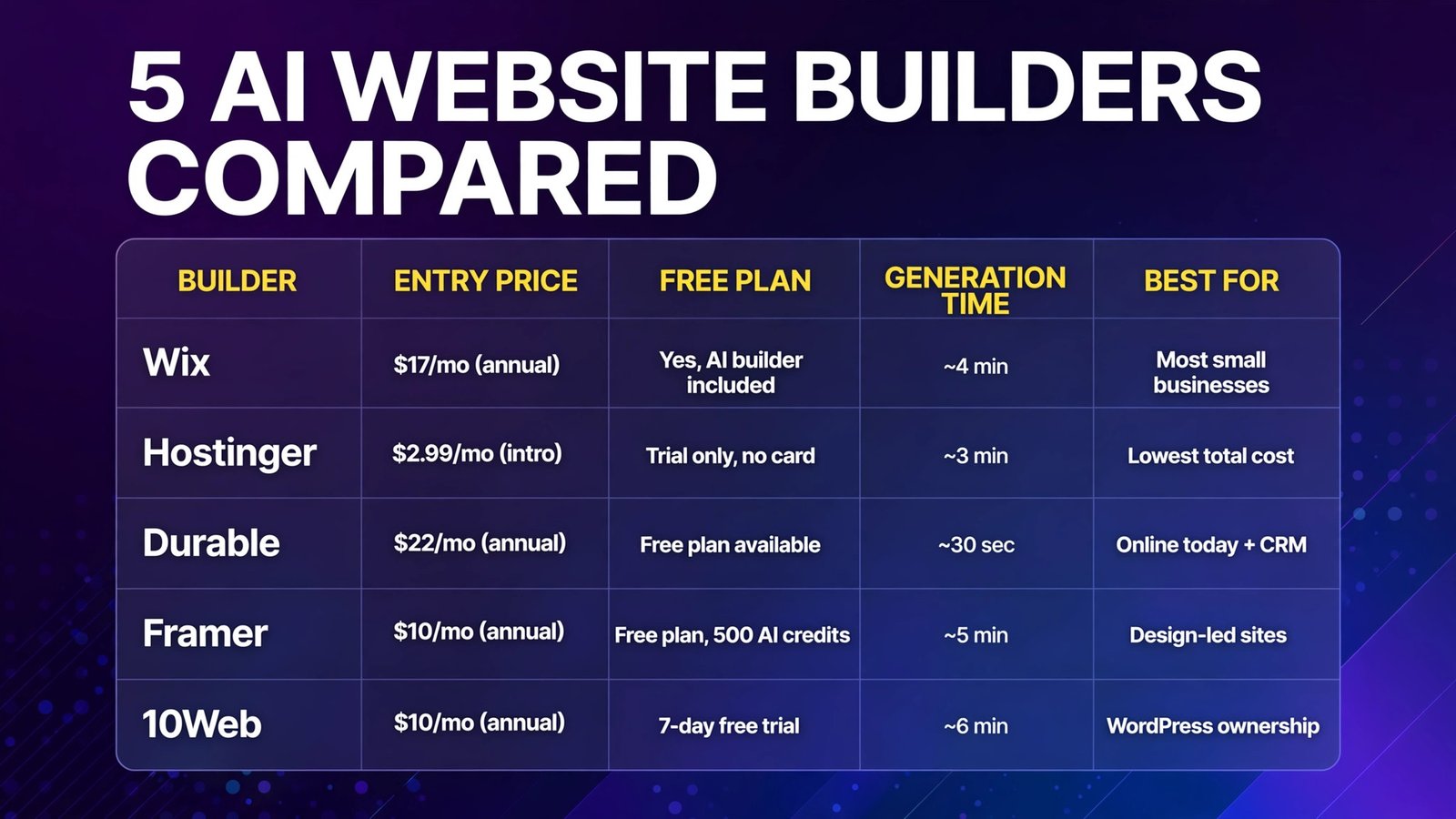
| Builder | Entry price (Oct 2026) | Free plan | Generation time (our test) | Best for |
|---|---|---|---|---|
| Wix | Light $17/mo (annual) | Yes — AI builder included | ~4 min | Most small businesses; room to grow |
| Hostinger | From $2.99/mo (intro term) | Trial only, no card needed | ~3 min | Lowest total cost of a real site |
| Durable | Launch $22/mo (annual) | Free plan available | ~30 sec | Being online today, plus built-in CRM |
| Framer | Basic $10/mo (annual) | Free plan, 500 AI credits | ~5 min | Design-led marketing sites and landing pages |
| 10Web | AI Starter $10/mo (annual) | 7-day free trial | ~6 min | AI speed with real WordPress ownership |
The Test Site: One Brief, Five Builders
Every builder got the identical description:
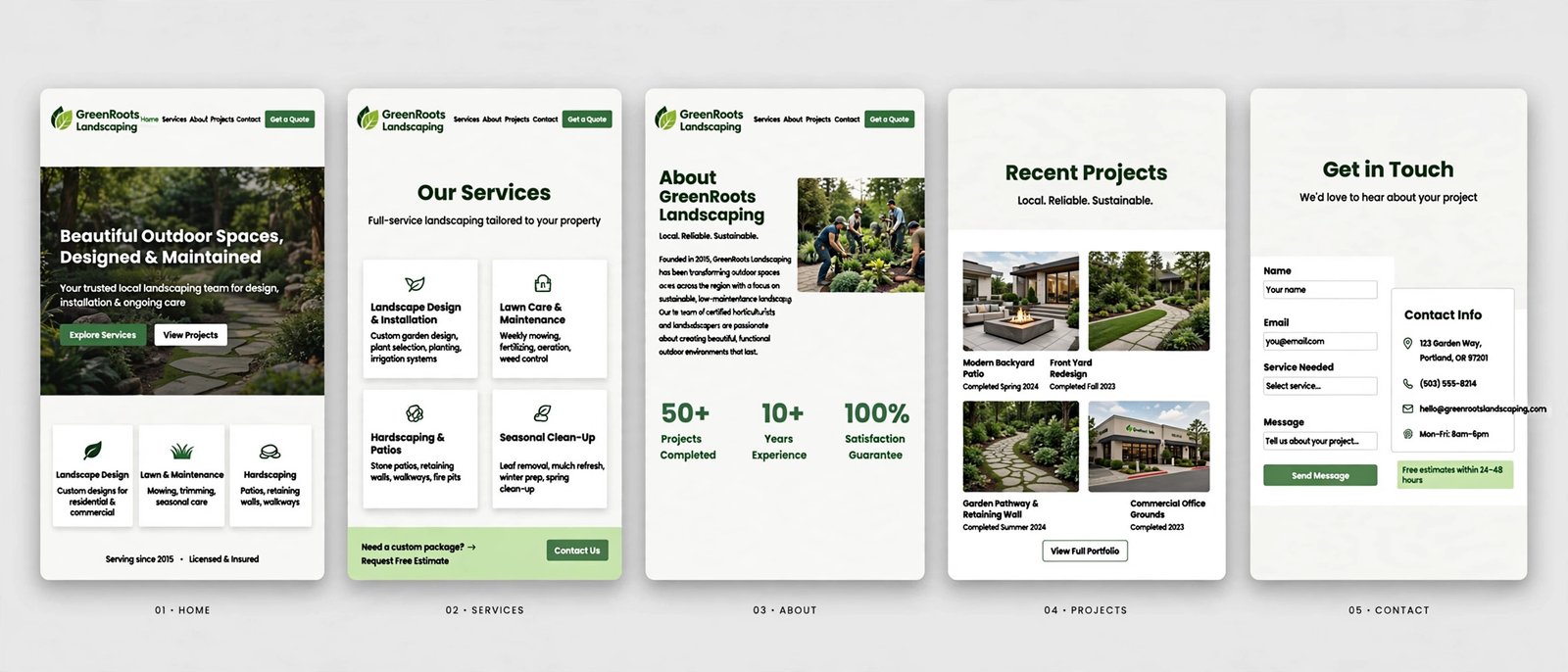
Harbor & Pine Landscaping: A landscaping company serving homeowners within 25 miles. Pages: Home, Services (design, maintenance, seasonal cleanup), Gallery, About, Contact with a quote-request form. Phone number prominent; friendly, local tone; green-and-earth palette. Must collect quote requests by email.
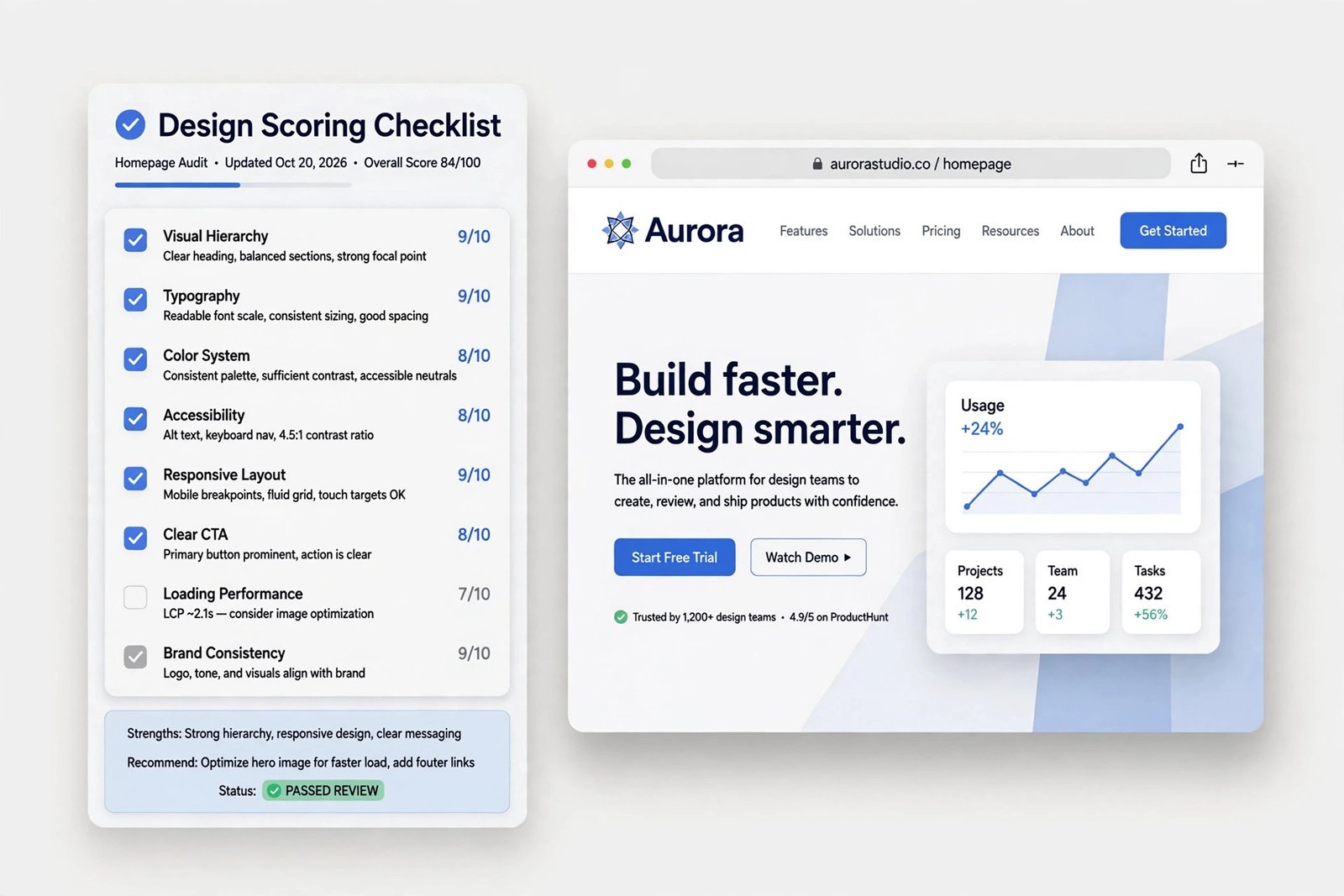
We scored each result on design quality (does it look like a designer touched it?), SEO basics (editable title/meta, sitemap, mobile behavior, page speed signals), content quality (how much of the AI copy we’d keep), and time to publish-ready.
1. Wix — The All-Rounder Most Businesses Should Start With
What it is: Wix’s AI site builder (now part of the Wix Harmony experience) interviews you in chat — business type, services, tone — then generates a complete site you refine in Wix’s drag-and-drop editor, backed by the largest app market and template library (2,000+) in the category. An AI assistant (Aria) continues helping after generation: SEO suggestions, copy fixes, settings.
2026 pricing (verified): Free plan with the AI builder included (Wix subdomain and branding). Paid (annual billing): Light $17/month (custom domain, 2 GB storage), Core $29/month (50 GB, accept payments, basic e-commerce, bookings), Business $39/month, Business Elite $159/month. Wix’s notable pricing virtue: renewals stay at the advertised rate rather than jumping — what Core costs in year one is what it costs in year two.
Our test: The AI interview asked genuinely useful questions (service area, seasonal services), and the generated site was the most complete of the five — booking-adjacent contact flow, sensible services pages, a gallery that didn’t use stock photos of the wrong climate zone. Design quality was good rather than stunning; the editor let us fix that, at the cost of time. SEO basics were all present: editable meta per page, automatic sitemap, mobile version handled.
Pros:
- Most complete generated site in our test, not just a homepage
- Deep growth path: e-commerce, bookings, email marketing, app market
- Flat renewal pricing — no year-two shock
- Free plan includes the AI builder, so the test drive is honest
Cons:
- Total lock-in: a Wix site cannot be exported or moved to another host, ever
- The editor’s power means beginners can spend hours nudging
- AI copy was competent but generic — budget time to rewrite
- Plan ladder (Light vs Core) confuses first-time buyers
Verdict: The default recommendation. Only avoid Wix if “I must be able to move my site someday” is a hard requirement — in which case, 10Web.
2. Hostinger — The Cheapest Honest Route to a Real Site
What it is: Hostinger bundles its AI website builder with its real business: fast hosting. You describe the business, the AI generates the site (copy, images, structure), and you edit in a clean drag-and-drop builder — with domain, SSL, hosting, and email under one bill. A newer agentic mode can also build small web apps from prompts, but the classic builder is what most small businesses will use.
2026 pricing (verified): No permanent free plan (a no-card free trial exists, plus a 30-day money-back guarantee). The Website Builder Premium plan runs from $2.99/month on a long introductory term (48 months), renewing at ~$10.99/month — the intro/renewal gap is the catch to budget for. Even at renewal, it’s the cheapest full package here: builder + hosting + free first-year domain + SSL in one line item. AI generation runs on monthly AI credits on some plans, so heavy regeneration is metered.
Our test: Generation was quick (~3 minutes) and the result was clean and professional, if less visually ambitious than Framer’s. The AI invented one claim not in our brief (a “licensed arborist” line) — a reminder to read everything before publishing. SEO basics were surprisingly solid for the price: server-side rendering means title/description tags, robots.txt, and a sitemap are generated automatically, and load performance on Hostinger’s infrastructure is genuinely good.
Pros:
- Cheapest total cost of ownership in this comparison, even post-renewal
- Hosting, domain, SSL, and builder in one predictable bill
- Strong performance fundamentals (fast hosting, SSR, automatic sitemap)
- Multilingual site support is better than rivals at this price
Cons:
- Headline price is an introductory term price — renewals roughly triple it
- Design polish is a notch below Wix and Framer
- AI can invent business claims — proofread everything it writes
- Locked into Hostinger’s builder (the site doesn’t export as portable code)
Verdict: If the budget question dominates, Hostinger wins and it isn’t close. Just write the renewal price ($10.99/month) in your spreadsheet, not the $2.99 teaser.
3. Durable — A Website in 30 Seconds, With a CRM Attached
What it is: Durable is the speed extremist of the category: type your business name and type of business, and it generates a complete site in roughly 30 seconds — then keeps going, with a built-in CRM, invoicing, and AI tools for reviews, blog posts, and lead replies. It targets service businesses that need to exist online today.
2026 pricing (verified): A free plan exists (Durable subdomain, limited CRM and AI usage). Launch: ~$22/month billed annually ($25 monthly) — custom domain, unlimited CRM contacts, core AI tools. Grow: ~$41/month billed annually ($49 monthly) — higher AI limits and more business features. No e-commerce to speak of; this is a services-business tool.
Our test: The 30-second claim is essentially real — our landscaping site existed before the coffee poured. Quality was the surprise: relevant services, local tone, correct structure. It was also clearly a starting point: design customization is shallow, the gallery looked generic, and within 10 minutes we’d hit the edges of what the editor allows you to change. The CRM, though, is a genuine differentiator — the quote-request form fed straight into a contact record with an AI-drafted follow-up, a workflow Wix charges add-ons to approximate.
Pros:
- Fastest generation in the category — a real site in about 30 seconds
- Built-in CRM and invoicing: the form-to-follow-up loop works out of the box
- AI extras (review replies, blog drafts) suit service businesses specifically
- Free plan to test with your actual business name
Cons:
- Shallowest design control of the five — your site will resemble other Durable sites
- No real e-commerce; stores should look elsewhere
- AI content allowances are plan-capped in ways that take reading to understand
- Locked-in platform with no export path
Verdict: For a tradesperson, consultant, or local service that needs a credible site and a simple CRM this week, Durable is the pragmatic pick. Design-driven brands will outgrow it.
4. Framer — The Best-Looking Sites, If Design Is the Priority
What it is: Framer is a designer’s site builder with AI generation bolted on top of a genuinely powerful visual canvas — breakpoints, animations, CMS, and effects that make sites look agency-made. Its AI can generate a polished marketing page from a prompt, and the editor then gives you more design control than any rival here.
2026 pricing (verified): Free plan (Framer subdomain, 500 AI credits). Basic: $10/month billed annually (custom domain, 1,000 AI credits) — enough for most small sites. Pro: $30/month — more pages, CMS capacity, and AI credits. Per-site pricing, so agencies pay per project.
Our test: Framer’s generated homepage was the best-looking result of the five — typography, spacing, and motion all felt intentional, the only output we’d have shipped nearly as-is. But it was also the least “small-business complete”: the quote form needed manual wiring, the Services structure required real editor work, and the learning curve for a non-designer is the steepest here. SEO basics are well handled (meta controls, sitemap, excellent performance scores), but you must know to go set them — Framer assumes a more technical user.
Pros:
- Best design quality of the five, and it isn’t close
- Sites are fast — excellent page-speed and Core Web Vitals behavior
- Real CMS and localization for sites that will publish content
- $10/month Basic is remarkable value for this design tier
Cons:
- Steepest learning curve; non-designers will feel the canvas’s power as friction
- Business plumbing (forms, bookings, CRM) is thinner than Wix/Durable
- AI generation is page-led, not whole-business-led like Wix’s interview
- Per-site pricing adds up for multi-site owners
Verdict: Choose Framer when how the site looks and moves is the business case — portfolios, studios, startups, premium services. For a plumber who needs quote requests by Friday, it’s overkill.
5. 10Web — AI Generation on Real WordPress (You Own the Site)
What it is: 10Web generates websites with AI but builds them as actual WordPress sites — Elementor-based editing, Google Cloud hosting, automated backups, and the entire WordPress plugin ecosystem (60,000+ plugins) available. It’s the only builder in this comparison whose output you fully own and can migrate to any host.
2026 pricing (verified): AI Starter: $10/month billed annually ($20 monthly) — 1 site, hosting, 5,000 AI words/month, 10K monthly visitors. AI Premium: $15/month annual ($30 monthly) — 50K AI words, 50K visitors. AI Ultimate: $23/month annual ($45 monthly) — unlimited AI words, 100K visitors. A 7-day free trial applies. Headline prices reflect annual/commitment discounts; month-to-month doubles them.
Our test: Generation took the longest (~6 minutes) and produced the most conventional result — a perfectly respectable WordPress business site with the least visual flair of the five. Two things then flipped our assessment. First, SEO: WordPress’s bones (permalinks, meta control, plugin depth via tools like Rank Math) give 10Web the highest SEO ceiling here. Second, ownership: the site is a WordPress install we could back up, move, or hand to any developer — no other builder in this test can say that. Editing, though, means learning Elementor/WordPress concepts the other tools hide from you.
Pros:
- You own a real WordPress site — exportable, portable, developer-friendly
- Highest SEO ceiling (WordPress + plugin ecosystem + full meta control)
- Hosting, backups, security, and speed optimization (90+ PageSpeed target) bundled
- WooCommerce path for real e-commerce later
Cons:
- Plainest generated designs of the five; distinctiveness takes editing work
- Elementor/WordPress editing is more to learn than Wix or Durable
- Monthly (non-annual) prices double the headline numbers
- AI word allowances on lower tiers are modest for content-heavy sites
Verdict: The ownership pick. If your site is a long-term business asset — SEO content, e-commerce plans, “my developer might take this over” — 10Web’s WordPress foundation justifies its plainer first draft.
Scored Results: The Same Site Brief in All Five Builders
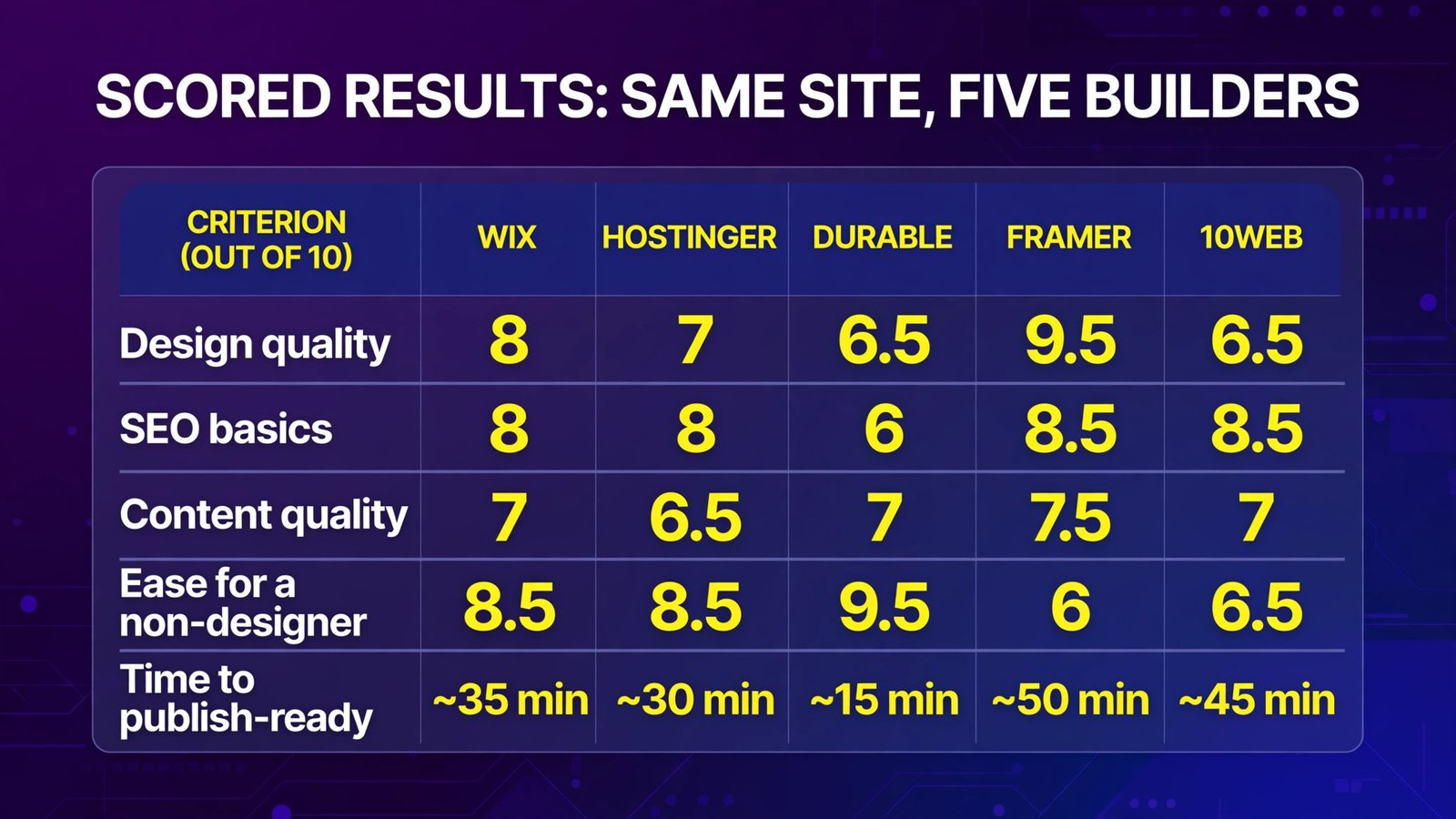
| Criterion (out of 10) | Wix | Hostinger | Durable | Framer | 10Web |
|---|---|---|---|---|---|
| Design quality | 8 | 7 | 6.5 | 9.5 | 6.5 |
| SEO basics out of the box | 8 | 8 | 6 | 8.5 | 8.5 |
| Content quality of AI copy | 7 | 6.5 | 7 | 7.5 | 7 |
| Ease for a non-designer | 8.5 | 8.5 | 9.5 | 6 | 6.5 |
| Time to publish-ready | ~35 min | ~30 min | ~15 min | ~50 min | ~45 min |
Two honest notes on these scores: Framer’s design lead is real but comes with the slowest path to business-ready (the form and services structure needed manual work), and 10Web’s SEO score reflects ceiling, not defaults — WordPress rewards those who configure it.
Pricing and Lock-In Compared (October 2026)
| Builder | Entry price | Renewal behavior | Export / exit path |
|---|---|---|---|
| Wix | Free; Light $17/mo (annual) | Renews at advertised rate | None — site cannot be moved |
| Hostinger | $2.99/mo intro (48-mo term) | Renews ~$10.99/mo | Builder-locked; content is yours but not portable code |
| Durable | Free; Launch ~$22/mo (annual) | Standard plan pricing | None |
| Framer | Free; Basic $10/mo (annual) | Standard plan pricing | Code export limited; largely platform-hosted |
| 10Web | AI Starter $10/mo (annual) | Monthly billing is 2× headline | Full WordPress site — migrate anywhere |
Full Comparison Table
| Wix | Hostinger | Durable | Framer | 10Web | |
|---|---|---|---|---|---|
| Best for | All-round SMB site | Lowest total cost | Speed + CRM | Design-led sites | Ownership + SEO |
| AI generation | Chat interview → full site | Prompt → full site | Name + type → 30-sec site | Prompt → pages | Prompt → WordPress site |
| E-commerce | Core plan and up | Available on higher plans | Not a focus | Limited | WooCommerce |
| Built-in extras | Bookings, email marketing, apps | Email, hosting stack | CRM, invoicing | CMS, localization | WP plugin ecosystem |
| SEO controls | Good | Good (auto sitemap/SSR) | Basic | Very good | Excellent (with plugins) |
| Learning curve | Low-medium | Low | Lowest | Medium-high | Medium |
How to Choose
- Answer the ownership question first. If you might ever move hosts, hire a developer, or sell the business with the site as an asset, only 10Web (real WordPress) qualifies. If “the site lives where I built it” is fine, everything else opens up.
- Budget with renewal prices, not teasers. Hostinger’s $2.99 becomes ~$10.99; 10Web’s $10 becomes $20 month-to-month. Wix is the exception — the advertised annual rate holds. Compare year-two costs, not signup screenshots.
- Match the tool to the job the site must do. Quote requests + follow-up CRM → Durable. Looking expensive → Framer. Selling products and booking appointments later → Wix. Pure information site on a tight budget → Hostinger.
- Generate your real site in two builders before paying. Wix’s AI builder is free, Durable has a free plan, and Hostinger offers a no-card trial plus money-back window. Use your actual business name and services — AI quality varies a lot by industry, and you’ll see it in five minutes.
- Read every word the AI wrote about your business. In our test, builders invented credentials and services we never claimed. Publishing an AI-invented “licensed and insured” badge you don’t hold is a legal problem, not a typo.
Frequently Asked Questions
What is the best AI website builder overall?
For most small businesses, Wix — the most complete AI-generated site in our test, a growth path into e-commerce and bookings, and renewal pricing that doesn’t jump. Hostinger wins on budget, Framer on design, 10Web on ownership.
Can an AI website builder handle SEO?
Yes, at the basics level: all five generate mobile-friendly sites with sitemaps and editable meta. Hostinger’s server-side rendering and Framer’s speed give them a technical edge; 10Web + WordPress plugins have the highest ceiling. No builder’s AI writes content that ranks by itself — the copy still needs your expertise (and our guide to ranking in AI search applies to AI-built sites too).
How much does an AI website builder cost per month?
Realistic entry costs in October 2026: Hostinger from $2.99/month on a long introductory term (~$10.99 at renewal), Framer Basic $10/month and 10Web AI Starter $10/month (both annual billing), Wix Light $17/month, Durable Launch ~$22/month. Add a domain (often free year one) and business email if you need them.
Wix vs Hostinger: which should I choose?
Wix if the site will grow — store, bookings, marketing tools — and you want no renewal surprises. Hostinger if the site is mostly informational and total cost matters most; it’s dramatically cheaper even after the renewal increase. Both generated good sites in our test; Wix’s was more complete, Hostinger’s was faster and cheaper.
Can I move my website to another host later?
Only with 10Web, whose output is a standard WordPress site you can migrate anywhere. Wix, Durable, and Framer sites are platform-locked (leaving means rebuilding), and Hostinger’s builder output isn’t portable code. If there’s any chance you’ll outgrow your builder, this is the question to settle before you start.
Is a free AI website builder enough for a real business?
For testing, yes — Wix’s free plan includes the AI builder, and Durable’s free plan builds a real (subdomain) site. For an operating business, no: a custom domain and no platform branding require a paid plan everywhere, and that’s the right spend — a business on a yourname.wixsite.com address undermines the credibility the site exists to create.
Conclusion
Every AI website builder here produced a real, presentable small-business site from the same paragraph — the technology is past the demo stage. The differences that matter are the old-fashioned ones: Wix for completeness and pricing honesty, Hostinger for total cost, Durable for speed plus a working CRM, Framer for design quality, 10Web for owning a WordPress site you can take anywhere.
Our practical recommendation: build your actual site in Wix (free) and in the one alternative that matches your priority — Framer for looks, 10Web for ownership, Hostinger for price. Compare the two results side by side, check the renewal price twice, and only then connect your domain.
Next step: paste your business description into Wix’s free AI builder and Durable’s free plan today — in under 10 minutes you’ll have two real candidate sites to judge, which beats reading another comparison (including this one).