
A certificate run follows the same four jobs every time, which are design the page, put the right name on every copy, print it cleanly, and get it into the recipient’s hands. The best certificate makers handle all four without forcing a second tool into the middle, and the gap between a good one and a bad one shows up when a name is spelled wrong on copy number 87. A free design tool covers the job when the run is ten certificates for a school assembly, while an issuing platform earns its keep at 500 course completions with a verification link on every copy.
The money question is not which tool is cheapest on its pricing page. It is what a year of certificates costs once design time, printing, reprints and the hours spent fixing names are added in. A tool that merges names from a spreadsheet saves an afternoon of manual typing. A tool that exports a clean print file saves a reprint. This guide follows the whole workflow from a blank page to a printed certificate, then prices all eight tools that way, so the pick for ten certificates and the pick for five hundred are never confused.
From Blank Page to Printed Certificate in 7 Steps
Every certificate job, from a school assembly to a corporate training cohort, runs through the same seven steps. The best certificate makers make each step shorter, and the steps below show where the time actually goes.
- Pick the size and orientation first. Letter size in landscape suits a framed certificate on a wall, and A4 landscape suits most offices and schools outside the United States. Decide before designing, because a portrait design rebuilt for landscape wastes an hour.
- Choose a template that matches the occasion. A graduation certificate, a course completion and an employee award all carry different words, and a template built for the occasion already has the right lines in the right places.
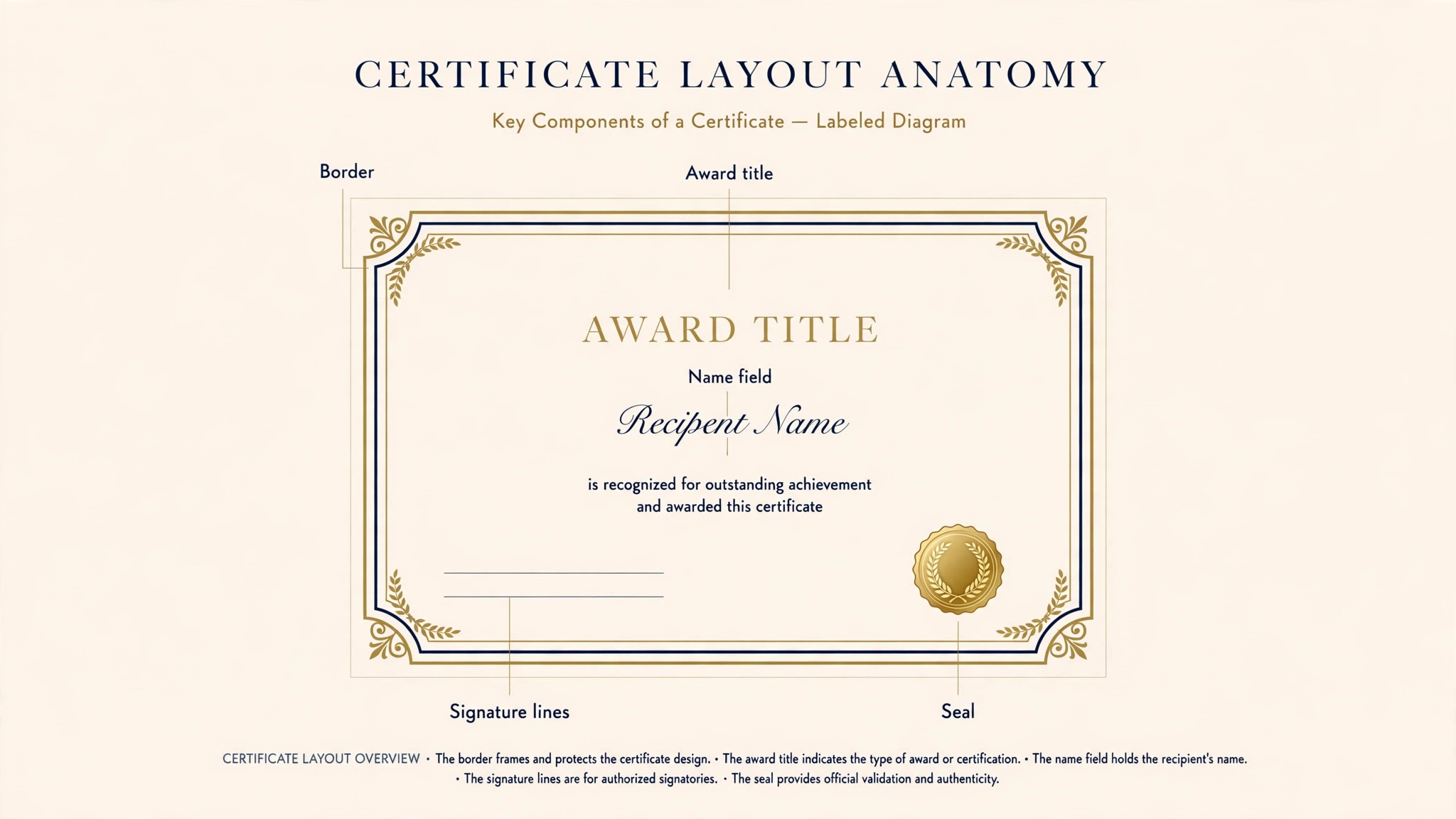
- Set the border, the seal and the signature lines. The border frames the page, the seal sits at the bottom left or centre, and the signature lines sit at the bottom right. Get these three in place before typing any names.
- Write the fixed words once and check them twice. The award title, the organisation name and the date appear on every copy, so a typo here repeats on the whole run.
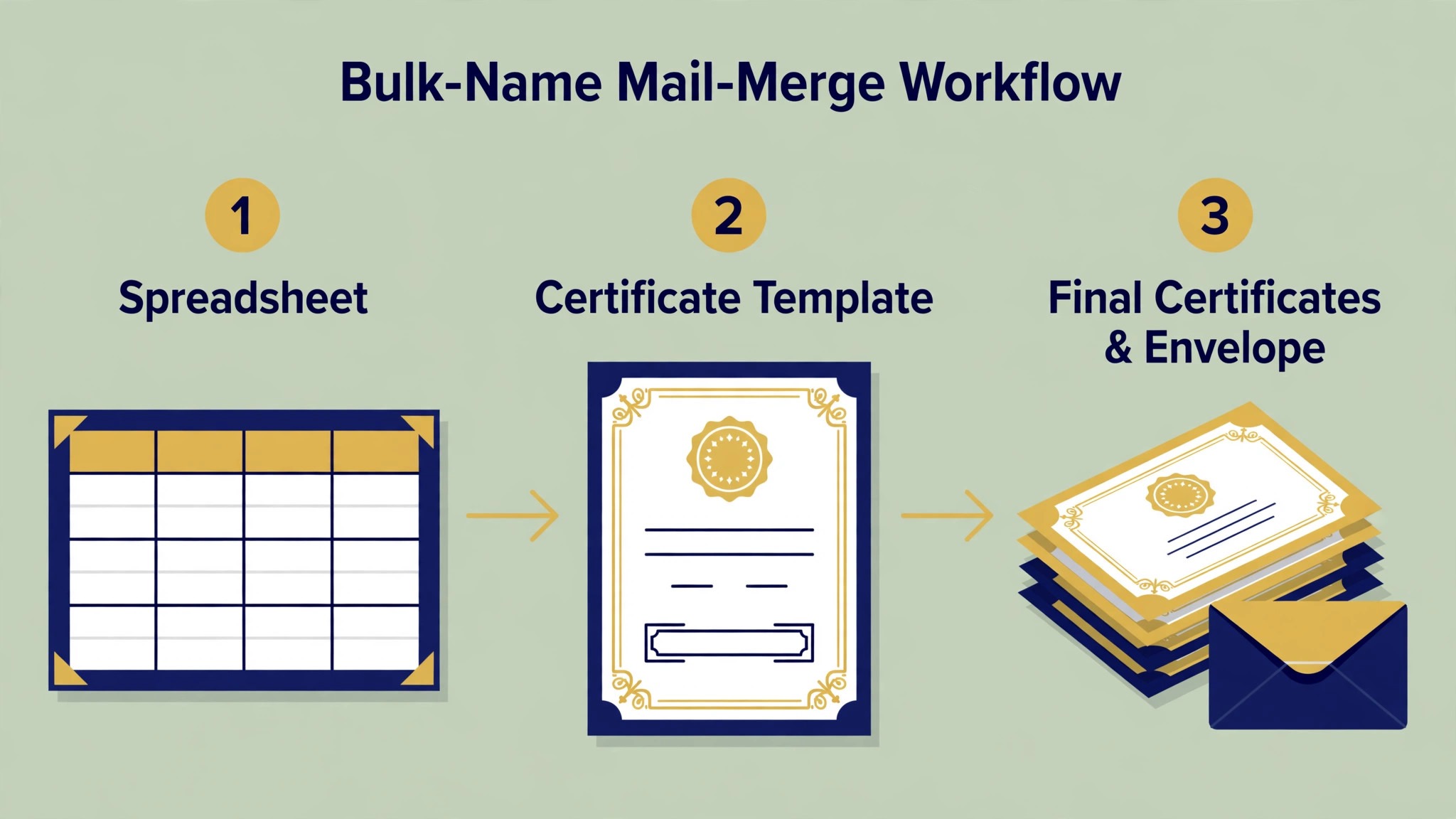
- Merge the names from a spreadsheet. Export the recipient list as a CSV file, map the name column to the name field, and preview five copies before generating the full run. One wrong column mapping misspells every name.
- Print one proof copy and read it from arm’s length. Check the name spelling, the date, the seal position and whether the ink smudges on the paper you plan to use. Fix it now, because a reprint of 200 copies costs more than the tool.
- Send or hand out the finished certificates. Print the run for a ceremony, email the PDFs for an online course, or share verification links when the certificates need to be checked later.
The steps look simple on paper, and they are, until step five. Merging names is where a design-only tool and a dedicated issuing platform part ways. A design tool makes one beautiful certificate and asks you to change the name by hand for every copy.
How Were the 8 Best Certificate Makers Priced and Tested?
Every one of the best certificate makers below was judged on the same five questions. First, what a full year adds up to at the annual rate, once the monthly teaser figure is set aside. Second, can the tool put different names on hundreds of copies without manual editing, or does it make one certificate at a time. Third, whether a certificate built free still prints crisp enough to frame, or arrives watermarked and too soft for a large print. Fourth, how strong are the certificate templates at real print sizes, not just screen sizes. Fifth, can the finished certificate be verified later, through a link, a QR code or a recipient portal.
Every price below was read from the vendor’s own pricing page or an independent comparison during November 2026. Prices move during the year, and two sources disagreed on Certifier, listing paid plans from $49 a month on one page and $67 a month on another, so the figure used here is $49 a month on annual billing, which is the lower published figure. Before you pay, open the vendor’s own pricing page and confirm the figure there. A number in this guide can drift after publication, and the live page is the one that bills you.
The 8 Tools at a Glance
The eight tools below cover every way to make a certificate, from a free template editor to a platform built to issue and verify thousands of credentials.
| Tool | Best for | Starting paid price | Free plan | Watch out |
|---|---|---|---|---|
| Canva | All-round certificate design | Pro $120 a year | Yes | No built-in verification |
| Certifier | Issuing at scale | From $49 a month billed annually | Yes, 250 a year | Design is simpler than Canva |
| Adobe Express | Fast branded certificates | Premium $9.99 a month | Yes | Smaller certificate range |
| Design.com | Certificate plus brand in one place | From about $3 a month | Yes | Less depth per tool |
| SimpleCert | Low-cost bulk issuing | Basic $19 a month | Yes, 50 credits | One design per account on free |
| VistaCreate | Budget team certificates | Pro $10 a month billed annually | Yes | No verification tools |
| Accredible | Verified digital credentials | Launch $45 a month | No | Price is per recipient |
| Visme | Certificates with data and charts | Starter $12.25 a month billed annually | Yes | Certificate is one feature |
Canva leads the table on design range, and Certifier leads it on issuing, since its free plan alone covers 250 certificates a year. SimpleCert is the cheapest route to a real bulk run, and Accredible is the only tool here built around verification first and design second.
Best Pick by Job
Every common certificate job has one pick from the best certificate makers in the rows below, so start with the row that fits your certificate.
| Job | Pick | Why it wins here |
|---|---|---|
| Everyday certificates | Canva | Largest template range, print-ready export |
| Issuing hundreds at once | Certifier | Bulk merge, delivery and verification built in |
| Certificate in a hurry | Adobe Express | Simplest editor, quick brand setup |
| Certificate plus logo and website | Design.com | One account, one shared brand kit |
| Cheapest bulk run | SimpleCert | Pay-as-you-go credits that never expire |
| Team certificates on a budget | VistaCreate | Low Pro price, shared templates |
| Credentials employers can verify | Accredible | Verification links, badges and pathways |
| Certificate with charts or data | Visme | Charts, tables and data widgets |
The 8 Best Certificate Makers in Detail
Canva leads on design and Certifier leads on issuing, Adobe Express follows on speed, and the rest hold their places on single jobs instead of overall power.
1. Canva — The All-Round Certificate Default
For most certificate work, Canva is where the search ends. No other tool here offers as many certificate designs, and the route from editor to printed page is already built in. The free tier opens hundreds of certificate templates, stock graphics and 5GB of storage, enough for ten or twenty. Pro costs $120 a year on annual billing and adds the brand kit, background removal, one-click resize and 1TB of storage. The brand kit is the part that matters for certificates: school or company colours and fonts must match on every copy, and a locked kit keeps a rushed user from drifting off palette.
Bulk Create decides a large run. This Pro feature takes a CSV of names and turns each row into a finished certificate, so a 200-name list becomes a ten-minute job instead of an afternoon of copy and paste. What Canva cannot do is issue credentials. Its output is a PDF or an image, with no verification link, no recipient portal and no way for an employer to confirm it is genuine. For a school assembly, a workshop or a volunteer award, that gap never shows. For a paid course that sells the certificate as proof, it does.
Print ordering happens inside Canva, so a certificate can go from editor to delivered print without a separate shop visit, although a local print shop is often cheaper for one big run on heavy paper. The real risk with Canva is sameness. Its templates are so widely used that a certificate can end up looking like the one handed out at the last event. A real photo of the venue or the team, plus one deliberate change to colour or border, keeps a Canva certificate from blending in.
2. Certifier — The Bulk Issuing Platform
Certifier is the only tool on this list built around issuing first and designing second, and the focus shows in every feature. The free plan covers 250 credentials a year, which is enough for a small course provider or a school running termly awards. Paid plans start from $49 a month on annual billing for 1,000 recipients, and add custom domains, branded recipient pages, analytics and API access. The platform designs the certificate, merges the names from a CSV file or an API call, emails each recipient a personal link, and keeps a public verification page for every certificate issued.
The design editor is simpler than Canva, and a user who wants a highly custom border or an unusual layout will feel the limits. The AI designer builds a certificate from a written prompt, which covers most standard occasions well, and the template range covers graduation, course completion, training, participation and employee recognition. The strength is the workflow after design. A course provider that issues 500 certificates a month does the whole job in Certifier, from the name list to the delivery email to the LinkedIn share button, without touching a second tool.
Verification is the reason to pay. Each certificate carries a QR code and a public link, so an employer can check it in seconds, and the recipient portal keeps every certificate a person has earned in one place. A training business that sells certificates as proof of completion should weigh this feature above design range, because a certificate nobody can verify is worth less than a plain one that checks out.
3. Adobe Express — The Fast Branded Certificate
When a certificate is due today and still has to look on-brand, Adobe Express is the tool to reach for. Premium is $9.99 a month or $99.99 a year, covering the certificate maker, brand kits, 250 generative credits a month and one-click resize. The free tier holds up well, offering core templates, Adobe Fonts and background removal with no credit cap, which helps when every event photo needs a clean cutout.
A first-time user finishes a certificate here faster than anywhere else on this list, because the editor stays out of the way. The trade-off is range: fewer certificate templates, spanning completion, appreciation, participation, graduation, training, school and internship designs, and thinner collaboration tools, so a team that designs together every week will feel the pinch. Anyone already using Adobe fonts will find the type choices stronger here, and $99.99 a year sits about $20 below Canva Pro.
Bulk creation from a CSV file works on the free plan, which is generous, although delivery and verification are thinner than Certifier’s. Adobe Express suits a business that needs a beautiful certificate quickly and sends it by email or prints it for a ceremony. It is the wrong choice for a course provider that needs hundreds of verified credentials every month.
4. Design.com — The Certificate Plus Brand Kit Pick
Design.com takes fourth place because a certificate is rarely the only thing a new business needs, and one subscription here carries the certificate, the logo, the brand kit and the website. The Starter tier opens at roughly $3 a month on yearly billing, and the pricier tiers bring in the website builder along with more tools. A business launching a course, a workshop or a service gets its certificate, its logo and its site from the same colours and fonts, so the certificate handed out at the event matches the website on the phone.
The certificate maker itself is solid, not standout. It builds a clean certificate from a template and a handful of choices, offers designs that fit training, appreciation and completion, and exports in the formats a print shop asks for. Canva designs better and Certifier issues better. The value sits in the shared kit. One payment covers the whole identity, with the certificate as a single piece of it, which makes the certificate itself very cheap for a business that needs the rest anyway.
The limits show on a large run. There is no bulk merge to rival Certifier, no verification portal and no recipient tracking, so a course provider issuing hundreds of certificates a month will outgrow it. For a new business issuing about ten certificates a month that also needs a logo and a website, Design.com is the cheapest route to all three.
5. SimpleCert — The Cheapest Bulk Run
SimpleCert is the clearest low-cost certificate-first choice on this list, and its pricing is built for irregular issuers. The free plan includes 50 introductory credits, and one credit creates one personalised certificate. Paid monthly plans start at Basic, which is $19 a month for 150 credits, then Advanced at $29 a month for 250 credits, Professional at $49 a month for 500, and Enterprise at $79 a month for 1,000.
The feature that sets it apart is the pay-as-you-go credit pack. A pack of 150 credits costs $29 once, 250 costs $39, 500 costs $69 and 1,000 costs $119, and the credits never expire, which suits a seasonal sender who issues certificates twice a year.
The workflow is plain and practical. Design the certificate in the drag-and-drop editor, upload the recipient list as a spreadsheet, generate the personalised PDFs in bulk, and email them from the account. Downloading, printing and resending cost nothing extra, and the custom SMTP setting lets the emails come from the organisation’s own address. QR code authenticity arrives on the Advanced plan and higher, and an API is available on all plans without a separate charge.
The design range is narrower than Canva, and one account includes one certificate design and one notification email design, with each extra design costing $29 once. A school that issues the same certificate design every term will never notice that limit. A training company with ten different courses will pay for ten designs. For a small issuer who wants the cheapest possible route to a real bulk run, SimpleCert is hard to beat.
6. VistaCreate — The Budget Team Certificate
VistaCreate is the closest like-for-like rival to Canva at a lower team price. Pro costs $13 a month, or $10 a month on annual billing, which comes to $120 a year, and one Pro plan covers the whole team. The no-cost Starter tier opens up a library past 100,000 templates, 10GB of storage and social scheduling. Upgrading unlocks the premium template set, background removal, one-click resizing and brand kits.
Anyone who has used Canva will find the editor familiar, and the certificate templates cover the standard occasions. The brand lock is looser, so a hurried user can drift off palette, and there is no bulk merge or verification layer, so a large issuing run needs a second tool. The value is the team price. A small training company with three people making certificates pays $120 a year once, where Canva would charge per person. For a team that wants a fresh look every season, VistaCreate is the cheapest way to get there.
7. Accredible — The Verified Credential
Accredible is the only tool on this list that treats verification as the product and design as the support act. The Launch plan is $45 a month on a 12-month term for 50 unique recipients, with unlimited credentials to each recipient, and higher plans add pathways, white labelling and deeper analytics. There is no free plan, which is the first thing to weigh, because every other tool here lets a user test the design before paying.
The platform issues digital certificates and open badges, builds learning pathways that stack several credentials into one journey, and gives every credential a public verification page that an employer can check without an account. The design tools are capable rather than inspiring, with clean templates and brand controls, and the strength is the trust layer. A university, a bootcamp or a professional body that issues credentials employers rely on will find that trust layer worth the price.
The pricing is per recipient rather than per certificate, which changes the maths. A course with 50 students who each earn three certificates costs the same as a course with 50 students who each earn one. A school issuing one certificate to 500 students pays far more than it would on SimpleCert. Pick Accredible when the credential must be checked by a stranger, and pick a cheaper issuer when the certificate only needs to look good on a wall.
8. Visme — The Certificate With Data
Visme is built for visual documents, with strong charts, tables and data widgets, so a certificate that carries a grade, a score or a course breakdown will look stronger here than in a pure design tool. The Starter plan is $12.25 a month per person on yearly billing, and the Pro plan is $24.75 a month, with a free plan that handles occasional use but limits downloads.
The certificate is one feature among many, with templates thinner than Canva. A business that only makes certificates will pay for features it never uses, and the editor takes longer to learn than Adobe Express or VistaCreate. The strength is layout. A certificate with a results table, a skills breakdown or a course schedule reads clearly here, because the data tools keep the numbers aligned and readable. For a training provider whose certificate doubles as a transcript, Visme is the right pick. For a plain award certificate, Canva or Adobe Express will serve better.
Which Wins for a Small Business, Canva vs Certifier?
Small businesses end up comparing Canva and Certifier, and the two win in different places. Canva wins when the certificate needs the widest template choice and a print-ready file, and the $120 a year Pro plan pays for itself once certificates go out every week. Certifier wins when the certificate has to be issued to hundreds of people and checked later, because the free plan alone covers 250 credentials a year and the paid plans add delivery, analytics and verification.
The deciding question is what happens after the design is finished. If the certificate is printed and handed over at a ceremony, Canva is the better tool. If the certificate is emailed to a list and an employer may check it in six months, Certifier is the better tool. A small business that does both can use Canva for the design and Certifier for the issuing, though paying for two tools only makes sense once the volume passes a few hundred a year.
How to Choose the Right Certificate Maker for Your Next Batch
Start from the job, not the price list, because the best certificate makers differ more on workflow than on cost. Count the certificates first, then check whether the names need merging from a spreadsheet, because a tool without bulk merge turns a 200-name run into a day of copying and pasting. Check the free plan for watermarks and low-resolution exports at print size, since a watermark on a framed certificate ruins the whole run.
If certificates go out every month, pay for the brand kit and the bulk merge, since those two features save more time than any discount. If the certificate is a credential that an employer will check, pay for verification, because a certificate nobody can verify is worth less than a plain one that checks out. If the run is a one-off for a school assembly, stay free and spend the money on one good proof print instead.
Is a Free Certificate Maker Enough for a Real Ceremony?
A free plan covers a real ceremony when the run is small and the certificate is printed, not verified. Canva free, Adobe Express free and VistaCreate free all include certificate templates and print-ready export, and Certifier free covers 250 credentials a year, which is a whole term of awards for most schools. The free plan falls short in two places. Watermarks and low-resolution exports show on a large print, so print one test copy first. And no free design tool verifies a certificate, so a paid course that sells the certificate as proof needs a paid issuing platform.
The honest test is to print one copy before printing fifty. Export the certificate from the free plan, print it at the size it will hang, and read it from arm’s length. If the name stays sharp and no watermark shows, the free plan is enough.
Should Certificates Go Out as Print, PDF, or Both?
Print suits a ceremony, a wall and a framed award, because the recipient holds something real. A home printer handles a letter-size certificate for roughly $1 to $3 a copy, while a print shop charges about $3 to $8 for a heavy-stock certificate with a clean finish. PDF suits an online course, a remote team and any certificate that travels by email, because it costs nothing to send and the recipient can print it at home.
Both is the safest answer for most issuers. Print the certificates for the ceremony and email the PDF the same day, so the recipient has the framed copy and a digital copy. A dedicated issuing platform sends the PDF automatically and keeps a verification link live, which is the third format worth having when the certificate acts as proof.
Do You Need a Verifiable Credential, or Just a Nice PDF?
A verifiable credential is a certificate with a public link or a QR code that a stranger can check without calling the issuer. It matters when the certificate gates a job, a licence or a course credit, because the employer needs proof that cannot be faked in an afternoon. Accredible and Certifier both issue verifiable credentials, and SimpleCert adds QR code authenticity on its Advanced plan.
A nice PDF is enough when the certificate marks an achievement rather than proving one. A school award, a volunteer thank you and a workshop completion all work as PDFs, because nobody checks them against a database. The mistake is paying for verification when the audience never checks, and the opposite mistake is issuing a plain PDF for a paid professional course, then finding out employers cannot confirm it. Match the tool to the audience, and the price follows.
Frequently Asked Questions
Should I pay for a certificate maker or stay free?
Stay free when the run is under 50 certificates and the certificates are printed for a ceremony, because Canva free, Adobe Express free and Certifier free all cover that job. Pay when the run passes a few hundred a year, when names must merge from a spreadsheet, or when the certificate needs a verification link. A paid plan costs $19 to $49 a month on the issuing platforms, and it pays for itself the first time a manual name merge goes wrong.
How much should I budget for my first certificate run?
Budget $0 for design on a free plan, $1 to $3 per copy for home printing on heavy stock, and $3 to $8 per copy at a print shop. A first run of 50 certificates at a print shop costs about $150 to $400, plus the design time. Start with one proof copy, read it from arm’s length, and only then order the full run.
Can I make certificates for free?
Yes, and seven of the eight tools on this list offer a free plan that covers a certificate for print or digital use. Canva free, Adobe Express free and VistaCreate free all include certificate templates and export, Certifier free covers 250 credentials a year, and SimpleCert free includes 50 credits. The free plan falls short on verification and on bulk delivery, so a paid course that sells certificates as proof needs a paid plan.
What size should a certificate be?
Letter size in landscape suits a framed certificate in the United States, and A4 landscape suits most offices and schools elsewhere. Pick the size before the design starts, because a design built for letter size will not scale cleanly to A4 without adjusting the border and the type. Print one proof copy at the final size before the full run.
Which certificate maker is best for a school?
Schools wanting the fewest surprises should start with Canva. The template range is widest, the brand kit keeps every certificate matching, and the free plan covers a term of awards. Certifier is the pick for a school that issues certificates to hundreds of students and wants each one verifiable, because its free plan covers 250 credentials a year. SimpleCert is the pick for a school on a tight budget, because the pay-as-you-go credits never expire.
How do I put different names on hundreds of certificates?
Export the recipient list as a CSV file, open the bulk tool in Certifier, SimpleCert or Canva Pro, map the name column to the name field, and preview five copies before generating the full run. Check the preview for spelling, middle names and special characters, because one wrong column mapping misspells every name. Never type names by hand for a run over 50, because the error rate climbs with every copy.
Getting the Next Certificate Run Out the Door
Cost decides the certificate tool more honestly than features do, and the best certificate makers prove it. A one-off run costs nothing on a free plan plus the price of paper, and Canva free or Adobe Express free will cover it. A monthly issuing habit costs $19 to $49 a month for the tool and far more for printing. Canva is the default for most issuers at $120 a year, Certifier is the issuing pick with 250 free credentials a year, and SimpleCert is the cheapest bulk run with credits that never expire.
Start with the certificate that is due soonest. Set its size first, pull the names in from a spreadsheet, print a single proof copy, and read it from arm’s length before ordering the run. Use one template for every certificate after this one, change only the names and the date, and let the brand kit hold the colours. Judge a tool by whether the second certificate takes less time than the first, and the hundredth less than the tenth. The best certificate makers earn their place by making each run quicker than the last. A certificate routine that stays quick is one that survives the year.