
A birthday card, a wedding card and a thank-you card ask for different things, and the wrong tool makes all three look the same. The best greeting card makers handle that split, with photo designs for birthdays, formal layouts for weddings and fast digital thank-you notes. A free tool covers a single card with no fuss, while a paid plan earns its keep for monthly cards and the same design has to look right in print and on a phone. This guide prices all twelve tools that way, keeping print, digital and time costs separate.
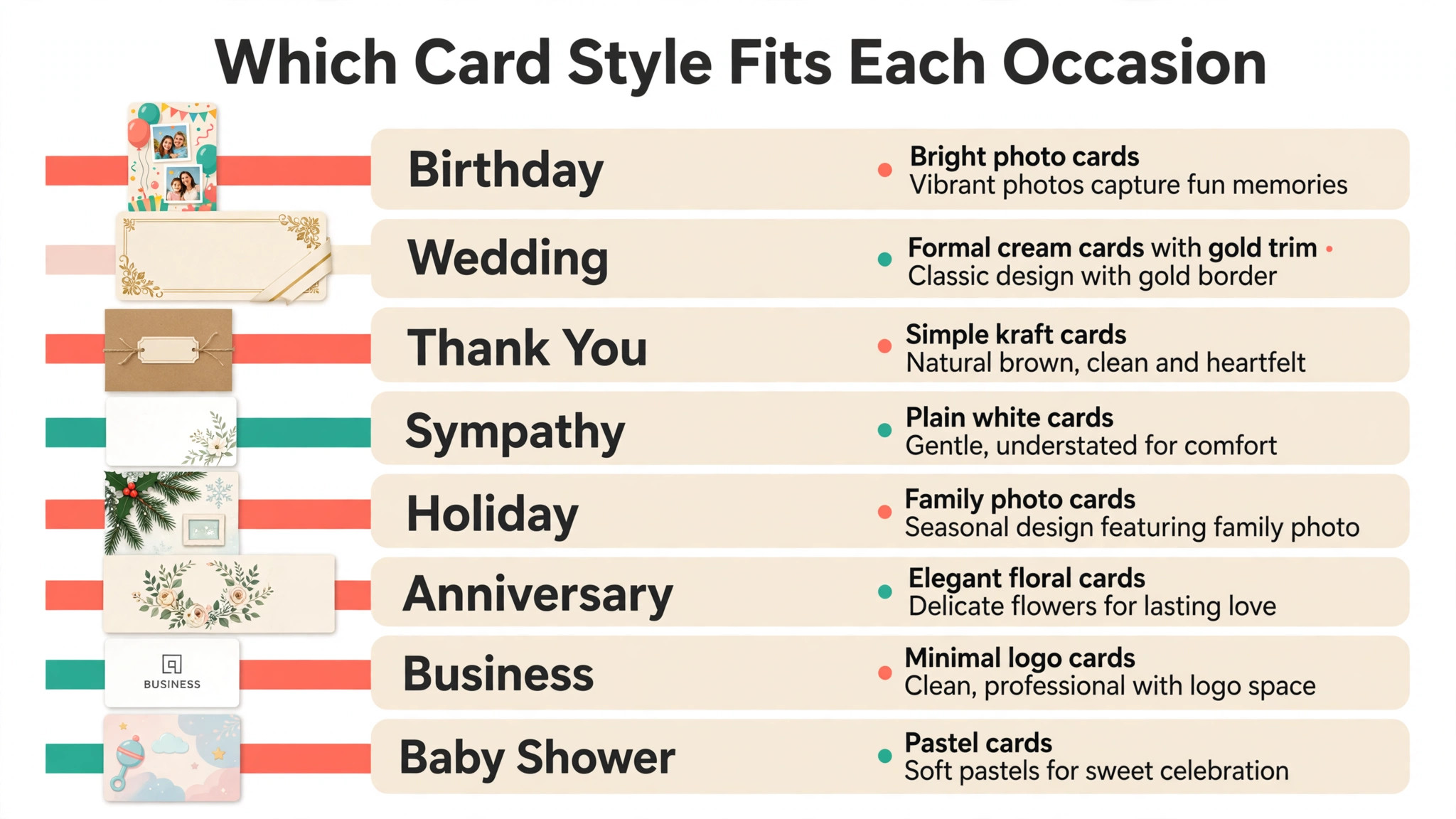
The mistake most people make is choosing a card maker before choosing the occasion. A birthday card wants a big photo and a short joke. A wedding card wants restrained type and thick paper. A sympathy card wants almost nothing on it at all, just space and a plain, honest line. Start from the event on the calendar and the person who will open the envelope, and the tool choice gets easy, because only a few tools on this list do each job well.
Pick by Occasion First, Because the Card Follows the Event
Every card on this list starts with the same question, which is who it is for and what the day means to them. A card for a child wants bright colour and a character or a photo they will laugh at. A card for a grandparent wants large type and a photo they can see without glasses. A card for a client wants the company name small and the message warm, never a sales line dressed up as a greeting.
That split is why the best greeting card makers on this list are judged by occasion first and by features second. A tool with a thousand templates is no help if none of them fit a sympathy card. A tool with beautiful wedding layouts is no help for a funny birthday card sent by text. The table below sorts the occasions before any tool is named, so the right row can be found in seconds.
| Occasion | What the card needs most | Print or digital | Best starting point |
|---|---|---|---|
| Birthday, child | Bright colour, a photo, a joke | Print or digital | Greetings Island, Canva |
| Birthday, adult | A real photo, short message | Print or digital | Canva, Adobe Express |
| Wedding | Formal type, thick paper, no clutter | Canva, Paperless Post | |
| Thank-you | Quick send, personal line | Digital first | Punchbowl, Smilebox |
| Sympathy | Plain design, space, honest words | Canva, Greetings Island | |
| Holiday, family | One photo card for many people | Greetings Island, Canva | |
| Business, client | Logo small, message warm | Print or digital | Design.com, VistaCreate |
| Anniversary | A photo from the year, few words | Canva, Blue Mountain |
A printed card still carries more weight than a digital one for weddings, sympathy notes and anniversaries, because the person holds it and keeps it. A digital card wins for thank-you notes and last-minute birthdays, because it arrives in minutes and the sender can still add a photo taken that morning. The tools below cover both, and the detail section says plainly which side each tool leans toward.
What Does a Year of Cards Actually Cost?
Start with the three bills every card carries. The first is the tool, and it runs from $0 on a free plan to about $120 a year for Canva Pro, with most paid plans sitting between $27 and $120 a year. The second is printing. A home printer handles a folded card for roughly $0.50 to $1.50 a copy including paper and ink, while a print shop charges about $1 to $3 a card for a short run on good card stock.
The third is postage and time. A stamped envelope costs about $0.73 in the United States in 2026, so fifty cards a year add about $36 in stamps alone. A first card in an unfamiliar tool takes one to two hours, while the same card in a tool you know takes 15 minutes.
Digital cards change the maths. A membership of about $36 a year covers unlimited sends on JibJab and Blue Mountain, and a digital card costs nothing more to send. The trade is feeling. A digital card is fast and cheap, and a printed card is kept.
| Cost item | One card | Fifty cards a year |
|---|---|---|
| Design software | $0 on a free plan | $27 to $120 a year on a paid plan |
| Home printing, folded card | $0.50 to $1.50 | $25 to $75 a year |
| Print shop, folded card | $1 to $3 | $50 to $150 a year |
| Postage, United States | About $0.73 | About $36 a year |
| Digital sending | $0 after membership | About $36 a year for a membership |
| Your time, first card | 1 to 2 hours | 15 minutes once the template is set |
The table shows why the free plan suits a single card and fails a year of cards. Fifty printed cards cost far more in paper and stamps than any tool on this list, so the tool that keeps the print file clean and the template reusable is the one that saves real money.
How Were the 12 Best Greeting Card Makers Priced and Tested?
Every tool below was judged on the same five questions. First, what twelve months of cards really add up to once the yearly price replaces the monthly headline figure. Second, does the free plan produce a clean card, or does it watermark the design or lock the best templates away. Third, how fast does a first card go from a blank page to a finished file. Fourth, how strong are the card templates for real occasions, not just generic birthdays. Fifth, does the tool handle both print and digital sending, or does it force a second tool for one of them.
The prices below were taken from vendor pricing pages and independent comparisons during November 2026. Prices move during the year, and two sources disagreed on Punchbowl, listing Plus from $2.99 a month on one page and $3.49 on another, so the figure used here is $2.99 a month on annual billing with the regular price noted beside it. Recheck the live pricing page before paying, since a figure printed here can change and binds nobody.
The 12 Tools at a Glance
The twelve best greeting card makers below cover every way to make a card, from a free template editor to a membership library of animated ecards.
| Tool | Best for | Starting paid price | Free plan | Watch out |
|---|---|---|---|---|
| Canva | All-round card design | Pro $120 a year | Yes | Templates look common |
| Adobe Express | Fast branded cards | Premium $9.99 a month | Yes | Smaller card range |
| Greetings Island | Free cards for any occasion | Premium $26.99 a year | Yes | Watermark on free cards |
| Punchbowl | Digital cards and invites | Plus from $2.99 a month | No, 7-day trial | Ads on cheaper plans |
| Design.com | Card plus brand in one place | From about $3 a month | Yes | Less depth per tool |
| VistaCreate | Budget team cards | Pro $10 a month billed annually | Yes | Looser brand lock |
| Paperless Post | Polished digital cards | Coins, 25 for $12 | Yes | Cost per recipient |
| Smilebox | Animated photo cards | Club about $39.99 a year | Yes | Billing needs care |
| Fotor | Photo-led cards | Pro $8.99 a month | Yes | Weaker text tools |
| PicMonkey | Photo editing plus cards | Basic $7.99 a month | No, 7-day trial | No permanent free plan |
| Blue Mountain | Classic ecard library | $35.99 a year | Limited, trial | Print is not the focus |
| JibJab | Funny video ecards | $36 a year | Limited | Video only, no print |
Canva leads the table on range, and Adobe Express leads it on speed, since its editor finishes a branded card fastest. Greetings Island is the most generous free option of the twelve, and JibJab is the funniest, because a face on a dancing elf still gets a laugh every December.
Best Pick by Job
Every common card job has one pick from the best greeting card makers in the rows below, so start with the row that fits your card.
| Job | Pick | Why it wins here |
|---|---|---|
| Everyday cards | Canva | Largest template range, print and digital |
| Card in a hurry | Adobe Express | Simplest editor, quick resize |
| Free card, any occasion | Greetings Island | Thousands of free designs |
| Digital card with tracking | Punchbowl | Send, track opens, RSVP tools |
| Card plus logo and website | Design.com | One account, one shared brand kit |
| Team cards on a budget | VistaCreate | One Pro plan covers up to 10 seats |
| Polished card to a list | Paperless Post | Envelopes, liners, open tracking |
| Animated photo card | Smilebox | Slideshows, music, video cards |
| Card built around a photo | Fotor | Photo editing built in |
| Photo editing before design | PicMonkey | Deep photo tools, then design |
| Classic ecard library | Blue Mountain | Huge library, $35.99 a year |
| Funniest card of the year | JibJab | Face-swap video ecards |
The 12 Best Greeting Card Makers in Detail
Canva leads on range and Adobe Express on speed, Greetings Island follows on free value, and the rest hold their places on single jobs instead of overall power.
1. Canva — The All-Round Card Default
For most people sending cards, Canva is where the search ends. No other tool here offers as many birthday, wedding and holiday layouts, and the same screen that designs the card also orders the printed copies, so nothing has to be exported to a separate shop. The free plan opens thousands of those layouts plus stock photos and 5GB of storage, which handles one card for free. Pro costs $120 a year when billed annually and brings the brand kit, background removal, one-click resize and 1TB of storage with it.
That resize feature earns its keep on cards more than anywhere else, because one design usually has to work as a folded print, a square post and a phone-screen image, and redrawing it three times swallows an evening. The drawback is familiarity. Canva layouts turn up everywhere, so a card can end up looking like the one the recipient got last year. One genuine photo of the person, plus a bold change to colour or layout, stops that happening.
2. Adobe Express — The Fast Branded Card
When a birthday is tomorrow and the card still needs to exist, Adobe Express is the tool to open. Premium costs $9.99 a month or $99.99 a year, and covers the card maker, brand kits, 250 generative credits a month and one-click resize. Even without paying, the free plan holds its own: core layouts, Adobe Fonts and background removal with no credit cap, which helps when family photos need their backgrounds cut away cleanly.
A newcomer gets a finished card out of this editor sooner than anywhere else here, because there is simply less to learn. The trade is a narrower shelf of card layouts and slimmer tools for designing together, so a team that builds cards jointly every week will notice the gaps. At $99.99 a year, Premium sits about $20 below Canva Pro.
3. Greetings Island — The Free Card Library
Greetings Island is the most generous free card maker on this list, with thousands of designs that cost nothing to create, download or print at home. Premium is $3.49 a month or $26.99 a year, and unlocks more than 10,000 premium designs, removes the watermark, drops the ads and adds scheduled sending. A single premium design can be unlocked for $4.49, which suits a person who needs one wedding card and nothing else.
The free designs carry a small watermark, so a printed card from the free plan shows the Greetings Island mark. Premium removes it, and at $26.99 a year it is the cheapest paid plan on this list. The editor is simple and fast, with no sign-up needed for most features, and the card range covers birthdays, weddings, baby showers, holidays and thank-you notes.
4. Punchbowl — The Digital Card and Invite Maker
Punchbowl is built for digital cards and invitations, with licensed character designs that children love and delivery by email or text. There is no free plan, only a 7-day trial that needs a card upfront, and Plus starts from $2.99 a month on annual billing, or $5.99 a month at the regular price, for up to 50 guests per event. Premium and Platinum tiers add more guests and remove ads.
The strength is sending. Punchbowl tracks who opened the card, collects replies and handles RSVPs, which matters for a party invitation more than for a simple birthday card. The weakness is print, because Punchbowl is a digital-first tool and a printed card needs another app. A parent planning a birthday party will find the character designs and the reply tracking worth the subscription, and a person who only needs one printed card will find Canva cheaper.
5. Design.com — The Card Plus Brand Kit Pick
Fifth place goes to Design.com, and the reason sits outside the card itself. A new business usually needs more than cards, and a single subscription here covers the card, the logo, the brand kit and the website in one go. Starter begins at roughly $3 a month on annual billing, while higher tiers bring in the website builder and extra tools. For a shop, a stall or a service just opening, that means the card in the envelope and the website on the phone share the same colours and fonts.
As a card maker alone, the tool is solid rather than standout. It turns a template and a few choices into a tidy card, suits shop, holiday and client thank-you designs, and exports in the file types a print shop asks for. Canva draws the prettier card and Adobe Express finishes one sooner, so Design.com wins on the bundle, not the editor. Pay once for the whole identity and the card comes along almost free, which is a bargain for a business that needs the rest anyway.
6. VistaCreate — The Budget Team Card
For a small business sending cards as a team, VistaCreate is the nearest rival to Canva at a kinder group price. Pro costs $13 a month, or $10 a month on annual billing, which comes to $120 a year, and that one plan seats up to 10 people. The free Starter plan opens over 100,000 templates, 10GB of storage and social scheduling. Moving to Pro brings premium templates, background removal, one-click resizing and brand kits.
Anyone who has built a card in Canva will find their way around in minutes. Brand control is looser, so a rushed user can wander off palette, but the team price is the point: three people in a small shop pay $120 a year between them, where Canva bills each person separately.
7. Paperless Post — The Polished Digital Card
Paperless Post is the pick when the card has to look expensive and arrive in an inbox with an envelope, a liner and a stamp. Free designs exist, and premium touches are paid in Coins per recipient, with 25 Coins for $12 and larger packs cheaper per Coin. A 3-Coin card uses about $1.44 of Coins, so a card to fifty people costs about $72 in Coins, which is why volume senders should look at the Paperless Pro annual subscription instead.
The designs are the draw, with polished layouts from real designers and tracking that shows who opened the card. The cost per recipient is the catch, because a long guest list turns a free tool into a real bill fast. A wedding couple sending save-the-dates to a hundred guests will find Paperless Post beautiful and pricey in equal measure.
8. Smilebox — The Animated Photo Card
Smilebox turns photos and music into animated cards, slideshows and scrapbooks, which suits a birthday or anniversary card that wants movement. The free version covers basic designs, and Club Smilebox is about $39.99 a year for unlimited premium designs. Read the checkout screen with care, because buyers have reported being billed the full annual amount when they expected a monthly charge, so confirm whether the price shown is monthly or yearly before paying.
The animated cards are the reason to use Smilebox, and a photo slideshow set to music will beat a still card for a milestone birthday. The editor feels older than Canva, and printing is not the focus, so a printed card needs an export and a print shop. For a digital card that plays like a small film, Smilebox is the right pick, and for a printed card, Canva will serve better.
9. Fotor — The Photo-Led Card
Fotor pairs a design editor with a photo editor, so a person who photographs their own family, food or events can edit the photo and drop it straight into the card without a second app. Pro is $8.99 a month, or $39.99 a year on the annual plan quoted by several comparisons, which makes it one of the cheapest paid tools on this list. The free Basic plan covers occasional use.
Typography here is not as polished as Canva’s, and the greeting-card library is slimmer than the big names, so a message-heavy card that leans on its wording needs extra attention. What Fotor does best is keep the picture and the card in one place, with AI photo editing such as background removal and retouching folded in, so there is no need to open a second app. For a holiday card built around one great family photo, Fotor is the right pick. A card where the message does the heavy lifting belongs in Canva or Adobe Express instead.
10. PicMonkey — The Photo Editor Turned Card Maker
PicMonkey is the only design-first tool on this list with no permanent free plan, offering a 7-day trial instead, and Basic is $7.99 a month or $72 a year. The trial must be used deliberately, with a real card ready to design before it starts. What the money buys is deep photo editing first and design second, with brand kits, templates and touch-up tools that suit a photo-first household or business.
A photographer, a maker or a food business that edits every image before it goes on a card will get more from PicMonkey than from a template-first tool. The card templates are fewer than Canva, and the absence of a free plan means a casual user cannot test it at leisure. The photo tools are the reason to pay, because a card with a well-edited photo of the real person will beat a card with a stock photo every time. Budget $72 a year only if the photo editing will be used weekly.
11. Blue Mountain — The Classic Ecard Library
Blue Mountain is one of the oldest ecard libraries on the web, and the $35.99 a year membership opens a huge collection of animated and musical cards for every occasion. A small free set exists, and a trial lets a new user test the library before paying. The cards are classic in style, with hand-drawn art and gentle animation, which suits grandparents and long-time ecard senders more than it suits a teenager.
Print is not the focus here, because Blue Mountain is a digital card service and a printed card needs another tool. The value is the library. A person who sends a dozen digital cards a year pays about $3 a card on the membership, and the cards arrive by email with no postage and no printing. For a household that sends digital cards every month, Blue Mountain is the cheapest way to keep them varied.
12. JibJab — The Funniest Video Ecard
JibJab puts the recipient face on a dancing elf, a singing reindeer or a birthday superhero, and the result is the funniest card on this list. Membership is $36 a year on the web, or $6.99 a month in the apps, and a handful of cards are free. The video cards are made for sharing by text, email or social media, and a December elf video still gets forwarded around offices every year.
The limit is scope, because JibJab makes video ecards and nothing else. There is no print path, no formal wedding card and no sympathy card, and the humour will not suit every recipient. For a birthday or a holiday card where a laugh is the whole point, nothing else on this list comes close. For a serious occasion, pick Canva or Greetings Island instead.
Which Wins for a Birthday Card, Canva vs Adobe Express?
For a birthday card, the shortlist comes down to Canva and Adobe Express, and each one wins a different half of the job. Canva wins when the card needs the widest template choice and a print order in one place, and the $120 a year Pro plan pays for itself once cards go out every month. Adobe Express wins when the card has to be finished today, because the simpler editor and the $99.99 a year Premium plan get a branded card out the door faster, even though the template range is smaller.
How to Choose the Right Card Maker for Your Next Card
Start from the occasion, because the best greeting card makers differ more on workflow than on price. Pick the format first, print or digital, then check the free plan for watermarks and locked templates at that format. If cards go out every month, pay for the brand kit and one-click resize, since those two features save more time than any discount. If the card is a one-off, stay free and spend the money on one good print instead.
Should You Send a Printed Card, a Digital Card, or Both?
Home printing wins for a test copy and for a run under ten cards, because the cost is ink and paper and the turnaround is minutes. A print shop wins for a run of ten to fifty cards, because the colour is true, the paper is heavier, and the price per card falls as the run grows. Ask for one proof copy before the full run.
Digital sending wins when the card has to reach several people at once, because the order sends to each address without a shop visit. A digital card arrives in minutes, and the sender can still add a photo taken that morning. The best answer for a big occasion is often both, with a printed card for the closest people and a digital card for everyone else. Whichever tool you choose, the proof copy is the step that saves the reprint.
What Card Size and Fold Should You Pick?
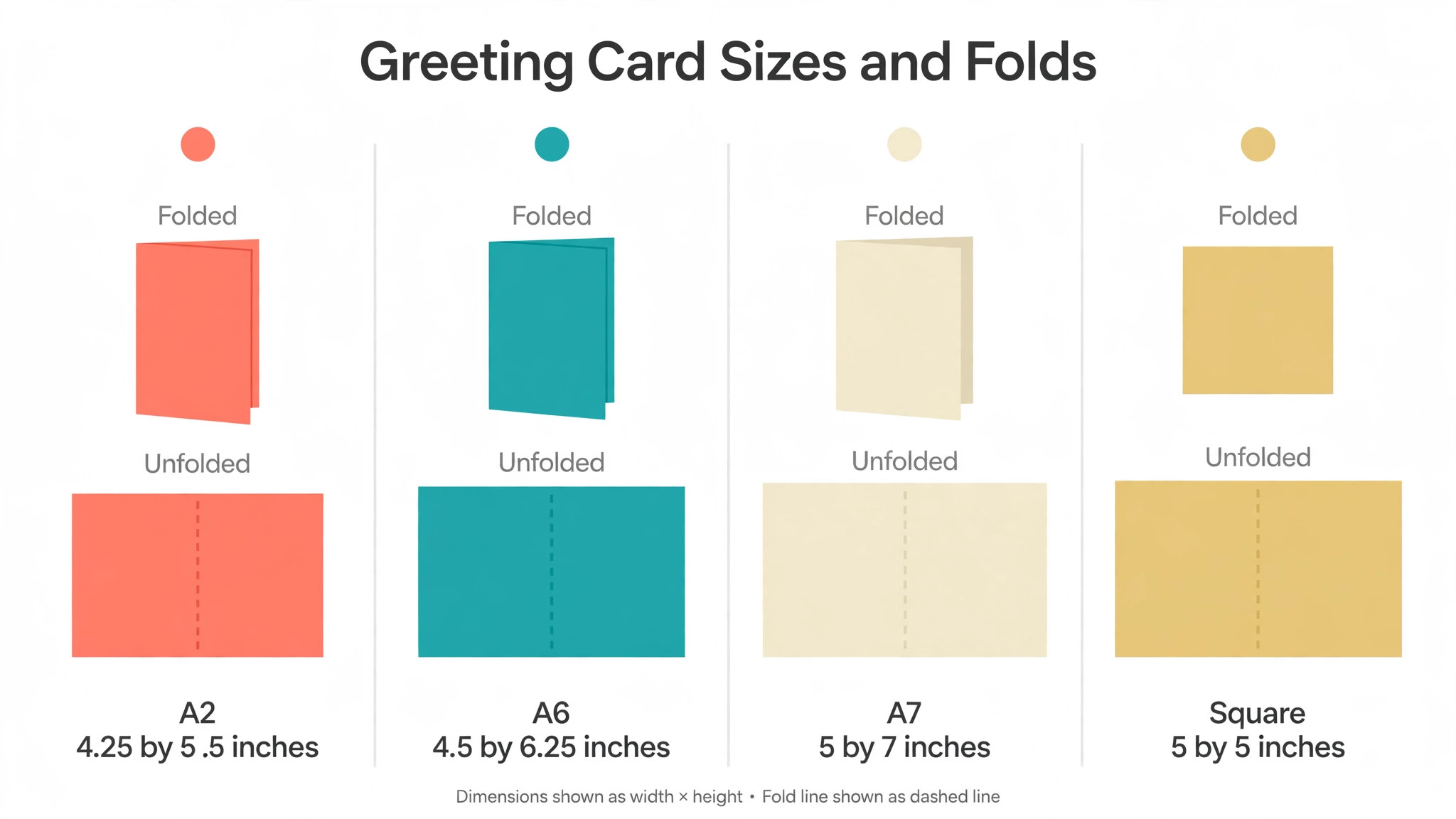
A card that reads well follows one rule, which is that the message does the work and everything else supports it. The A2 size, 4.25 by 5.5 inches folded, is the most common greeting card in the United States and fits a standard envelope. The A7 size, 5 by 7 inches folded, suits a wedding or a holiday card with a big photo. The A6 size, 4.5 by 6.25 inches, sits between the two and suits a thank-you note. A square card, 5 by 5 inches, suits a photo card but needs a square envelope.
Print one copy first, fold it, put it in the envelope and read it at arm’s length. If the message reads clearly and the photo sits straight, the design is ready for the full run. If the words are small or the photo crowds the fold, remove words rather than adding them.
Frequently Asked Questions
Which card maker should I pick for a wedding card?
Canva is the safest choice, because the wedding templates are formal, the print ordering is built in and the paper choices suit a keepsake card. Paperless Post is the pick for a digital wedding card, because the envelope and liner presentation looks expensive in an inbox. Greetings Island is the pick when the budget is zero, because the free wedding designs print cleanly once Premium removes the watermark.
Can I make a greeting card for free?
Yes, and most tools on this list offer a free plan that covers a card for digital use. Canva free, Adobe Express free and Greetings Island free all include card templates, photos and export, and VistaCreate free covers more than 100,000 templates. The free plan falls short on print, because watermarks and locked premium templates show on a printed card, so print one test copy first.
How much should I budget for a year of cards?
Budget $0 for design on a free plan, $0.50 to $1.50 per card for home printing, and about $0.73 per card for postage in the United States. A year of fifty printed cards costs about $60 to $150 all in, plus the design time. A year of digital cards costs about $36 for a membership on Blue Mountain or JibJab, with no printing and no postage at all.
Is a digital card as good as a printed card?
A digital card is faster and cheaper, and a printed card is kept longer. A thank-you note and a last-minute birthday card work well digitally, because speed matters more than paper. A wedding card, a sympathy card and an anniversary card work better in print, because the person holds the card and keeps it. For a big occasion, send a printed card to the closest people and a digital card to everyone else.
Which card maker is best for a small business?
Most small businesses will be fine starting with Canva. It has the widest template range, its brand kit keeps every card matching, and print ordering is built in. VistaCreate is the pick for a team on a budget, because one Pro plan covers up to 10 seats. For a new business needing a logo and a website as well as cards, Design.com bundles the lot under one subscription.
How do I write a message that sounds like me?
Write the message first, before opening the tool, in the words you would say out loud. Keep it to two or three sentences, name one real detail from the year, and sign it by hand on a printed card. A short honest line beats a long borrowed verse, because the person reading it can tell which one you meant.
What to Remember Before the Next Birthday
Price tells the truth about a card tool faster than any feature list, and the best greeting card makers in this guide show why. One card costs nothing to design on a free plan, only the paper, and Canva free or Greetings Island free handles that. A full year runs $27 to $120 for the tool, with printing and stamps on top, while a year of digital cards runs about $36 for a membership.
Begin with whichever card is due first. Settle its occasion, then whether it goes out on paper or by screen, and print a single proof before ordering the rest. Reuse one base design for later cards, swapping only the words and the photo while the brand kit keeps the colours in line. The best greeting card makers are the ones that make the second card quicker than the first, and the tenth quicker than the second.