
A hiring manager spends about six seconds on a first scan, and the software that reads your resume before any human sees it is even less patient. I took one real resume, built it in two different tools, and ran both versions through a free ATS parser to see what the software actually reads. The designed version lost two job titles and a date range, while the plain version kept every field, and that gap is why the best resume makers on this list were judged on what a parser reads first and what a hiring manager sees second.
The Same Resume, Two Tools — What the Parser Actually Reads
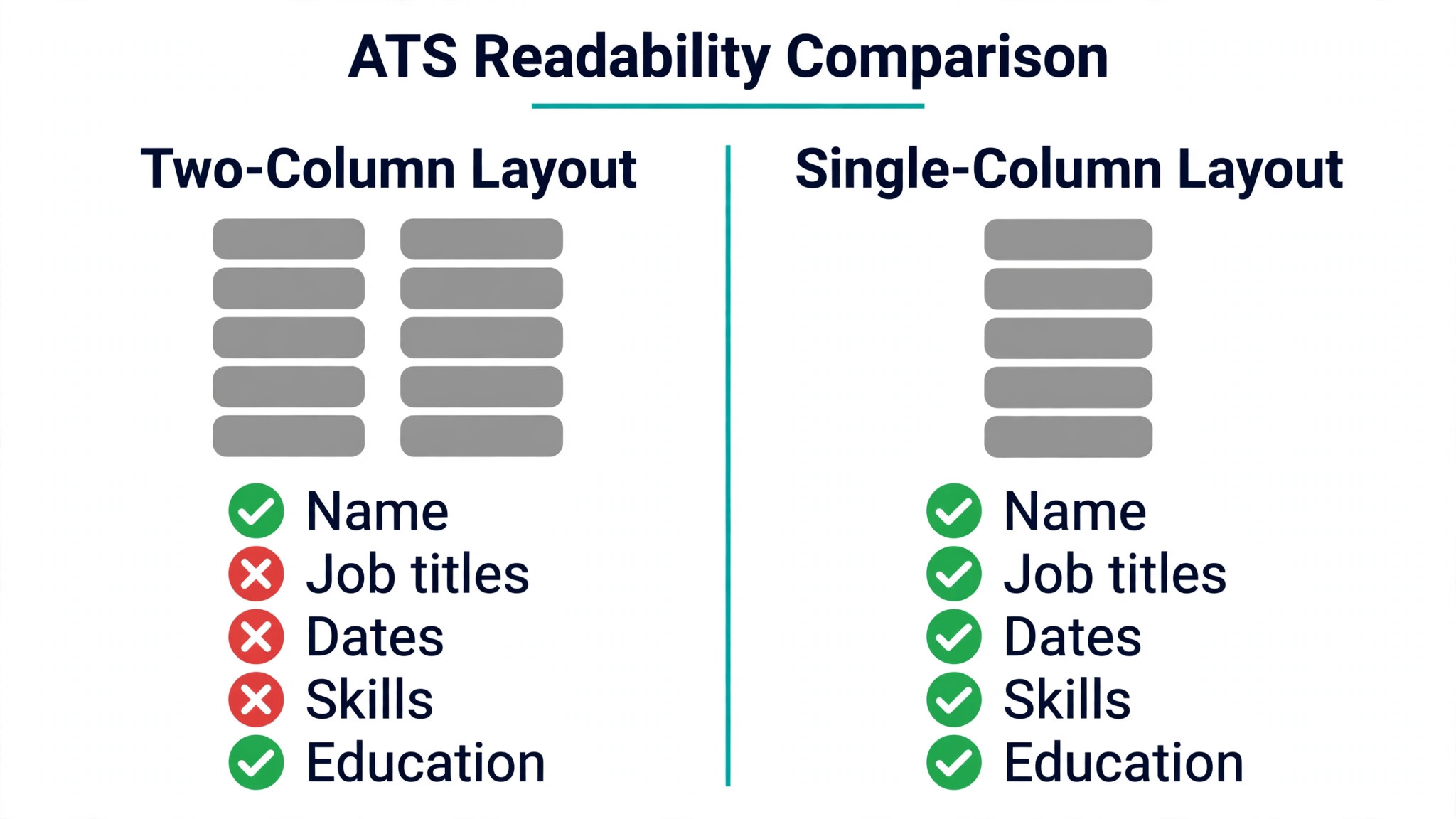
The test used one real work history, a marketing manager with four jobs, a degree and twelve skills, built twice with the same words. The first version used a two-column designed template with a coloured sidebar, skill bars and a photo placeholder. The second used a plain single-column template with standard headings and no graphics. Both versions were exported as PDF and run through a free ATS checker, and the parser results were different enough to change which tool I would trust with a real application.
| Resume field | Designed two-column version | Plain single-column version |
|---|---|---|
| Name and contact | Read correctly | Read correctly |
| Job titles | 2 of 4 read | 4 of 4 read |
| Employment dates | One date range lost | All dates read |
| Skills | Read, order scrambled | Read in order |
| Education | Read correctly | Read correctly |
The designed version failed on the two fields that matter most to a recruiter, because the parser read the sidebar first and mixed the job titles with the skill list. The date range disappeared where the template stored it inside a text box, which the parser skipped entirely. The plain version kept every field in reading order, so the parser could match each job title to its dates and each skill to the right section.
The lesson is not that design is bad. It is that a resume has two readers, and the software reader is the stricter one. Use a plain single-column export for any application that goes through a company portal or a job board, because that is where a parser decides whether a human ever sees the file. Keep the designed version for applications sent by email to a named person, where a human opens the file first.
How the 10 Tools Were Tested
Every one of the best resume makers below was judged on the same five questions. First, does the exported PDF survive a parser, or do columns, text boxes and graphics eat job titles and dates. Second, what does a real download cost, because several tools build the resume for free and charge only when you try to save it as a PDF.
Third, how fast does a first resume go from a blank page to a finished file. Fourth, how strong are the templates at one page, since a resume that spills onto a second page for no reason looks unfinished. Fifth, how honest is the billing, because the trial-led tools on this list renew automatically and the difference between a $1.95 trial and a $29.95 renewal catches people out.
Every price in this guide was read from the makers’ own pricing pages and cross-checked against independent comparisons during November 2026. Prices move during the year, and two sources disagreed on Novoresume, listing Premium at $19.99 a month on one page and $23.99 on another, so the figure used here is $23.99 for one month paid once, which matches the vendor page most comparisons cite. Look at the maker’s own checkout page before you pay for a resume download, because a figure printed here is a guide to what you will likely pay, not a promise of the final charge.
The 10 Tools at a Glance
The ten tools below cover every way to build a resume, from a free visual editor to a parser-first scoring tool.
| Tool | Best for | Starting paid price | Free plan | Watch out |
|---|---|---|---|---|
| Resume.io | Fastest polished resume | $2.95 trial, then $29.95 every 4 weeks | TXT download only | Trial auto-renews |
| Zety | Guided step-by-step build | $1.95 trial, then $25.95 every 4 weeks | TXT download only | Trial auto-renews |
| Novoresume | Honest one-time pricing | $23.99 for one month, paid once | One-page PDF free | Fewer templates |
| Design.com | Resume plus brand in one place | From about $3 a month | Yes | Less depth per tool |
| Canva | Visual control and design | Free, Pro $144 a year | Yes, PDF free | Fancy layouts hurt ATS |
| Kickresume | Design plus AI writing | $24 a month | 4 free templates | Most templates paid |
| Enhancv | Creative layouts | $39 a month | 7-day free plan | Branding on free exports |
| Resume Genius | Prompt-led first draft | $2.95 trial, then $23.95 every 4 weeks | TXT download only | Trial auto-renews |
| MyPerfectResume | Guided builder, big phrase library | $2.95 trial, then $23.95 every 4 weeks | TXT download only | Trial auto-renews |
| Rezi | ATS-first scoring | $29 a month, $149 lifetime | 1 resume, 3 downloads | Pricey per month |
Resume.io leads the table on speed, and Novoresume leads it on billing honesty, since its Premium plans never renew on their own. Zety leads it on guided writing, and Rezi leads it on parser scoring, since it grades the resume against a job description in real time.
Best Pick by Job
Every common resume job has one pick from the best resume makers in the rows below, so start with the row that fits your search.
| Job | Pick | Why it wins here |
|---|---|---|
| First resume ever | Zety | Step-by-step prompts, no blank page |
| Fastest finished resume | Resume.io | Template, fill in, export in under 30 minutes |
| One resume, one payment | Novoresume | $23.99 once, no renewal to cancel |
| Resume plus logo and website | Design.com | One account, one shared brand kit |
| Most visual control | Canva | Free editor, hundreds of templates |
| Design with AI writing help | Kickresume | AI bullets plus ATS feedback |
| Creative or design role | Enhancv | Layouts that stand out, guided checks |
| Stuck on what to write | Resume Genius | Deep phrase library, prompt-led |
| Guided builder with extras | MyPerfectResume | Phrases, checker and career tools |
| Beating the parser | Rezi | Live score against each job ad |
The 10 Best Resume Makers in Detail
Resume.io leads on speed and Zety on guidance, Novoresume follows on honest billing, and the rest hold their places on single jobs instead of overall power.
1. Resume.io — The Fastest Polished Resume
Resume.io is the quickest route from a blank page to a finished resume on this list, because the editor is clean, the templates are strong, and nothing in the flow slows you down. Pick a template, fill in the sections, and a professional-looking resume is ready in under half an hour. The library covers the standard formats a recruiter expects, and the paid plans add unlimited resumes and cover letters, plus a job tracker and interview preparation tools.
The billing works like Zety, and it needs the same care. A $2.95 seven-day trial renews automatically at $29.95 every four weeks, and the free plan only exports plain text, so the PDF costs money from the start. Longer commitments are much cheaper, with a three-month plan at about $49.95 and an annual plan near $74.95. The free ATS checker with 16 checks and a score is a genuine help before you pay, so run your resume through it first.
2. Zety — The Guided Step-by-Step Build
Zety is the pick when a blank page freezes you, because the builder walks through each section with prompts, tips and suggested bullet points based on your job title. The 18 templates balance clean design with parser readability, and the content suggestion library is one of the deepest available, which matters when you know what you did but not how to phrase it. Granular control over margins, spacing and date formats lets a careful user fit a long career onto one page without shrinking the type.
The pricing model is the thing to understand before you start. The $1.95 fourteen-day trial converts automatically to $25.95 billed every four weeks, and the free plan only exports plain text. The annual plan at $71.40 a year works out near $5.95 a month, which is far cheaper if the search runs longer than a month. Set a calendar reminder for the day the trial ends, because the renewal is the most common complaint about this tool.
3. Novoresume — The Honest One-Time Price
Novoresume stands out for one reason, and it is the reason it ranks third here. Its Premium plans never renew on their own. You pay $23.99 for a month, $49.99 for three months, or $199.99 for a year, once, and that is the end of the transaction. No trial converts quietly in the background, and no cancellation call is needed. For a job seeker who only needs one resume, that single $23.99 payment is the cheapest honest price on this list.
The free plan is genuinely useful too, with a one-page resume and predefined layouts that export as a PDF when only basic features are used. Premium adds more templates, the AI suggestions that turn duties into achievements, and a free ATS score from 0 to 100 with a job matcher. The template range is smaller than Resume.io or Zety, and the designs lean plain, but a plain resume that parses cleanly beats a pretty one that loses a job title.
4. Design.com — The Resume Plus Brand Kit Pick
Design.com earns fourth place because a resume is rarely the only thing a person starting out needs, and one subscription here carries the resume, the logo, the brand kit and the website together. The price starts from about $3 a month with annual billing for the Starter tier, with higher tiers adding the website builder and more tools. A freelancer or a new graduate launching a small service gets a resume, a logo and a site from the same colours and fonts, so the resume handed to a client matches the website the client visits next.
The resume maker itself is workmanlike rather than exceptional. It builds a clean resume from a template and a few choices, offers designs that suit freelancers, graduates and local services, and exports in the formats a recruiter needs. Resume.io builds faster and Zety guides better. The value is the shared kit. One payment covers the identity, and the resume is one piece of it, which makes the effective cost of the resume itself very low for someone who needs the rest anyway.
5. Canva — The Most Visual Control
Canva is the pick when the look of the resume matters as much as the words, because the editor gives more visual control than any dedicated resume tool on this list. Hundreds of resume templates, free fonts, colour control and drag-and-drop layout mean a designer or a creative professional can build a resume that looks like their portfolio. The free plan exports a PDF at no cost when only free assets are used, which makes Canva one of the few tools here where a finished, formatted resume costs nothing.
The risk is the one this guide opened with. A two-column layout with a sidebar, icons and text boxes can confuse a parser, so a Canva resume built for looks needs a plain version for portal applications. Pro is $144 a year and adds premium templates, background removal and the brand kit, but the free plan covers most resumes. Use Canva when a human opens the file first, and keep a single-column version ready for the portals.
6. Kickresume — Design With AI Writing Help
Kickresume pairs a design-led builder with AI writing and parser feedback in one editor, so the same tool that writes the bullet points also checks whether a parser can read them. Premium is $24 a month, $54 every three months, or $96 a year, and the free plan covers four basic templates with downloads. The AI tailoring rewrites the summary and the bullets for a specific job description, which is the feature that earns the subscription once the search gets serious.
The free tier is honest about its limits, and most templates plus the deeper customisation sit behind Premium. The editor runs on web, iOS and Android, so a resume can be edited on a phone between interviews. For a job seeker who wants design, writing help and parser feedback without juggling three tools, Kickresume is the most complete package at this price, and the quarterly plan at $54 is the sensible way to buy it.
7. Enhancv — The Creative Layout Pick
Enhancv is built for resumes that need to stand out visually, with customisable layouts, guided content feedback and a design-first editor that suits creative and marketing roles. The editor combines templates, design controls, resume checks and a job-description match score, so the resume is checked against the role while it is being written. A short guided sprint builds the first draft, and the tailored suggestions help turn a list of duties into results a hiring manager can picture.
The pricing is the highest on this list for a monthly plan. Pro is $39 a month, $69 a quarter, or $99 for six months, and the free plan lasts seven days with Enhancv branding on the exported file. That price only makes sense for a short, focused search in a creative field where the layout itself is part of the application. A job seeker in a traditional field will get the same result cheaper from Novoresume or Zety.
8. Resume Genius — The Prompt-Led First Draft
Resume Genius is designed for beginners and first-time job seekers, because the builder leads with prompts and a phrase library instead of a blank form. The content help is backed by one of the largest ready-made bullet libraries available, so a school leaver or a career changer can describe real experience in words a recruiter recognises. The templates are clean and single-column, which keeps the parser happy, and the free resume checker flags issues before the file goes out.
The billing follows the trial pattern, so read it before starting. A $2.95 fourteen-day trial renews at $23.95 every four weeks unless cancelled, and the free plan only downloads plain text. The annual plan at $95.40 a year works out near $8 a month. The tool earns its place for the writing help alone, and a first-time job seeker who struggles to phrase their experience will finish faster here than anywhere else on this list.
9. MyPerfectResume — The Guided Builder With Extras
MyPerfectResume is the most guided builder on this list after Zety, with prewritten content suggestions, a resume checker and career preparation tools bundled into one account. The builder walks through each section with prompts, and the phrase library covers most common roles, so a user who has never written a resume can finish one without guessing at wording. Unlimited resumes and cover letters can be built for free, though the free download is plain text and the PDF needs Premium.
Premium starts with a $2.95 fourteen-day access period, then renews at $23.95 every four weeks, or $95.40 a year. The refund window is 14 days, which is fair for a trial-led tool. The extras are the reason to pick it over Resume Genius, since the checker and the career tools stay useful after the resume is done. The two tools share a billing model, so the choice comes down to which phrase library fits your field better.
10. Rezi — The Parser-First Scorer
Rezi is the only tool on this list built around the parser rather than the page, and it shows in the workflow. The editor grades the resume against a job description in real time, with a Rezi Score and a 0 to 100 match score per job, plus AI keyword targeting that adapts the resume to each ad. The templates are deliberately plain, because Rezi treats readability as a feature, and a resume built here is the one most likely to survive the parser test this guide opened with.
The free plan covers one resume, limited AI tools and three PDF downloads, which is enough to test the scoring on a real application. Pro is $29 a month, and the lifetime plan at $149 once is the best value for a long search, since it pays for itself in about five months against the monthly price. The monthly price is steep for a single resume, but for a job seeker applying to dozens of roles through portals, the live score is worth more than a prettier template.
Resume.io vs Zety — Which Trial Actually Costs Less?
First-time builders comparing the best resume makers usually start with Resume.io and Zety, and the real difference shows up when the trial ends and the renewal lands. Resume.io starts at $2.95 for seven days, then charges $29.95 every four weeks, which works out to about $389 a year if it keeps renewing. Zety starts at $1.95 for fourteen days, then charges $25.95 every four weeks, which works out to about $337 a year on the same pattern. Zety also gives a full fortnight to decide, while Resume.io gives one week.
The cheaper path for either tool is the longer plan, not the trial. Resume.io charges about $49.95 for three months and near $74.95 for a year, while Zety charges $71.40 for a year. A three-month search costs roughly $50 on Resume.io against about $78 on Zety renewals, so Resume.io wins a short search and Zety wins a long one. Either way, cancel the trial on the day the resume is finished, because the renewal is where both tools earn their money.
How to Choose the Right Resume Maker for Your Next Application
Start from the job ad, not the price list, because the best resume makers differ more on billing and parser safety than on design. Pick the application route first. If the resume goes through a company portal, choose a single-column template from Novoresume, Rezi or Resume Genius, and run it through a free parser before sending. If it goes by email to a named person, a designed Canva or Enhancv version is safe, and the layout can do more work.
Then check the free plan for the PDF trap. Several tools on this list build the resume for free and charge only for the download, so a tool that looks free can cost $24 before the file exists. If the search is one resume only, pay once with Novoresume and stop. If the search runs for months, buy the quarterly or annual plan, since a monthly renewal costs more than a year of the same tool.
Can a Free Resume Maker Get You Past the ATS?
Yes, and the free plans that do it best are the plain ones. Canva free exports a formatted PDF at no cost, Novoresume free exports a one-page PDF when only basic features are used, and Kickresume free covers four basic templates with downloads. The common thread is a single-column layout with standard headings, which is exactly what a parser reads best. A free resume fails the parser when the template hides dates in text boxes or splits the page into columns, so test the export through a free checker before sending it anywhere.
Is One Page Still the Rule in 2026?
One page is still the rule for most job seekers, and it holds up to about ten years of experience. A recruiter reads the first page and decides in seconds, so a second page only earns its place when the career behind it needs the room. Senior roles, academic posts and technical roles with long project lists are the exceptions, and even then the first page must carry the summary, the current role and the strongest results. If the second page holds only early jobs and a degree, cut it and keep one page.
Should You Pay Monthly or Buy Once?
Buy once when the search is short, and buy quarterly when it is not. Novoresume charges $23.99 once for a month with no renewal, which is the cheapest honest price for a single resume. Kickresume charges $54 for three months, which beats three monthly payments of $24. The monthly plans on this list run from $24 to $39, so a three-month search on a monthly plan costs $72 to $117 before any renewal is counted. A trial-led tool looks cheapest on day one and costs the most by month three, so read the renewal line before the trial line.
Frequently Asked Questions
Which resume maker should I choose if I only need one resume?
Novoresume is the pick for a single resume, because $23.99 buys one month of Premium with no renewal to cancel, and the free plan already exports a one-page PDF. Canva free is the pick when the resume needs a designed look and a human opens the file first, since the formatted PDF costs nothing. Avoid the trial-led tools for a single resume, because the trial renews before the search ends.
Can I build a resume for free and still download a PDF?
Yes, on three tools on this list. Canva free exports a formatted PDF when only free assets are used, Novoresume free exports a one-page PDF with basic features, and Kickresume free downloads four basic templates. Zety, Resume.io, Resume Genius and MyPerfectResume only export plain text for free, so the PDF needs a paid plan there. Check the export before spending an hour on the design.
Will a designed resume pass an ATS scan?
A designed resume passes when the layout stays single-column with standard headings and no text boxes, because the parser reads in order and skips what it cannot place. It fails when columns, sidebars, skill bars and graphics split the content, since the parser mixes job titles with skills and drops dates stored in boxes. Build the designed version for email applications and keep a plain version for portals.
How much does a resume maker cost for a three-month job search?
A three-month search costs $23.99 once on Novoresume, $54 on Kickresume quarterly, about $50 on Resume.io with a three-month plan, and about $78 on Zety if the trial renews twice. The monthly plans cost $72 to $117 for the same three months. The cheapest path is a one-time or quarterly payment, and the most expensive is a trial that renews unnoticed.
Is one page still the rule?
One page is still the rule up to about ten years of experience, because a recruiter decides in seconds from the first page. Senior, academic and technical roles can run to two pages when the career needs the room, but the first page must still carry the summary, the current role and the strongest results. Cut early jobs and extra detail before adding a second page.
Do I need a cover letter tool too?
Most tools on this list include a cover letter builder, so a separate tool is rarely needed. Resume.io, Zety, Novoresume, Resume Genius and MyPerfectResume all build cover letters in the same account, and Canva covers them with templates. A cover letter matters most for career changes and senior roles, where the story behind the resume needs room. For most applications, a short tailored letter beats a long generic one.
Start With the Job Ad, Not the Template
The parser test at the top of this guide is the whole argument in miniature. A resume that a parser cannot read never reaches a human, no matter how good it looks, and the best resume makers are the ones that keep every job title and date readable while still looking like they were made by a professional. Novoresume is the pick for a single resume at $23.99 once, Resume.io is the pick for speed, and Zety is the pick for guidance. Canva is the pick when a human opens the file first, and Rezi is the pick when the application goes through a portal.
Start with the job ad that matters most. Build the resume for that role first, run it through a free parser, and only then spend time on the design. Keep one template for every application that follows, change only the words that match each role, and let the plain version do the work on the portals. The best resume makers are the ones that make the second application faster than the first, and the tenth faster than the second, because a job search that stays fast is a job search that lasts.