
Fifty die-cut stickers cost about $60 at Sticker Mule, which works out to $1.20 a sticker, while two hundred of the same stickers cost about $95, or $0.48 each. A run of 1,000 drops the unit price to roughly $0.27 to $0.37. That slide from $1.20 to under $0.40 is the whole story here, because the best sticker makers are not separated by how pretty their editors look. They are separated by what one sticker costs at the quantity you actually need.
The mistake most buyers make is to compare subscription prices when they should compare unit prices. A design tool that costs $144 a year is cheap if it feeds a shop that sells 500 stickers a month, and it is wasted money if the job is 50 stickers for a school fair. A print specialist with no subscription at all can be the dearest option on a small run and the cheapest on a large one. This guide prices all eleven tools that way, keeping design cost, print cost and run size separate.
What a Sticker Actually Costs
Start with the three bills every sticker carries. The first is design, and it runs from $0 on a free plan to $144 a year for Canva Pro, with most paid design plans sitting between $96 and $144 a year. The second is printing, and it is the bill that moves most, because one sticker falls by two thirds or more as the run grows from 50 to 500. The third is shipping and time, the bill people forget. A $45 order with $12 shipping costs more in real terms than a $60 order with free shipping.
Size moves the print bill more than anything else. A 2 inch sticker costs far less than a 4 inch one at the same quantity, because the printer fits more small stickers on one sheet. Finish moves it next. A plain white vinyl sticker is the cheapest option on every price list here. A holographic or glitter finish adds a premium at every quantity, and a clear vinyl finish sits between the two. Pick the size and the finish before picking the tool, because a tool that only prints one finish will force a second order later.
The table below shows the unit-cost slide for three print specialists on the same job, a standard die-cut vinyl sticker. Prices were read from vendor pages and independent comparisons in November 2026, and they move during the year, so check the live page before ordering. The pattern is what matters, not the exact cents. Every printer here gets much cheaper per sticker as the run grows, and the gap between printers shrinks too.
| Printer | 50 stickers | 100 stickers | 500 stickers |
|---|---|---|---|
| Sticker Mule, 3 by 3 inch die-cut | $60, $1.20 each | $73, $0.73 each | $152, $0.30 each |
| StickerYou, 2 by 2 inch die-cut | $49.72, $0.99 each | $55.25, $0.55 each | $137.10, $0.27 each |
| StickerApp, 2 by 2 inch die-cut | $45, $0.90 each | $69, $0.69 each | $165, $0.33 each |
The table shows why a first order should stay small. Fifty stickers from StickerYou cost under $50, which is a fair price to test a design, a size and a finish before committing to a run of 500. Once a run passes 500, the unit price on all three sits between $0.27 and $0.33, so the choice turns on finish, turnaround and shipping.
Is the Cheapest Sticker Always the Best Deal?
A cheap sticker that peels off a water bottle in a week is not a bargain. It is a wasted order, and the replacement order costs more than the first one saved. The cheapest vinyl on a price list is usually thin, lightly laminated or unlaminated, and it fades in sun and lifts at the edges when wet. A sticker on a car bumper, a water bottle or a market stall sign needs thick vinyl and a proper laminate, and that costs more at every quantity.
The honest test costs almost nothing. Order the smallest run first, stick one on a bottle, run it through the dishwasher twice, and leave one on a sunny windowsill for a week. If the colours stay bright and the edges stay flat, the printer is good enough for a large run. If the ink fades or the corners lift, the saving was an illusion.
How Were the 11 Tools Priced and Tested?
Every one of the best sticker makers below was judged on the same five questions. First, what does one sticker cost at 50, 100 and 500 units, using the published price for a standard die-cut vinyl sticker. Second, can the free plan export a print-ready file, or does a watermark appear on it. Third, how fast does a first sticker go from a blank page to a finished file. Fourth, how wide is the choice of material and finish. Fifth, does the tool handle both design and printing, or only one half of the job.
Prices here come from vendor pages and independent comparisons checked in November 2026, so check the live page before ordering.
The 11 Tools at a Glance
The eleven tools below cover every way to make a sticker, from a free template editor to a print specialist that only prints.
| Tool | Best for | Starting paid price | Free plan | Watch out |
|---|---|---|---|---|
| Canva | All-round sticker design | Pro $144 a year | Yes | No printing built in for stickers |
| Sticker Mule | Known-price bulk runs | 50 die-cut from $60 | No, free proofs | No permanent free plan |
| StickerYou | Single test stickers | 1 die-cut from $5.34 | No, pay per order | Small orders cost more per sticker |
| Adobe Express | Fast branded stickers | Premium $9.99 a month | Yes | Print goes through a partner |
| Design.com | Sticker plus brand in one place | From about $3 a month | Yes | Less depth per tool |
| StickerApp | Special finishes | 50 die-cut from $45 | No, pay per order | Shipping adds up on small orders |
| VistaCreate | Budget team stickers | Pro $10 a month billed annually | Yes | Design only, no printing |
| StickerGiant | Very large runs | Bulk from about $0.26 each at 2,000 | No, pay per order | Not built for small orders |
| Fotor | Photo-led stickers | Pro $8.99 a month | Yes | Weaker text tools |
| Printful | Selling stickers without stock | From about $2.20 a sticker on demand | No, pay per order | Dearest per sticker on this list |
| Avery | Print-at-home sheets | Packs from about $10 | Yes, free design tool | You supply the printer and the ink |
Canva leads the table on design range, and Sticker Mule leads it on published pricing. StickerYou is the only printer here with no minimum order.
Best Pick by Job
Every common sticker job has one pick from the best sticker makers in the rows below, so start with the row that fits your sticker.
| Job | Pick | Why it wins here |
|---|---|---|
| Everyday sticker design | Canva | Largest template range, print-ready export |
| Bulk run at a known price | Sticker Mule | Published ladder, thick vinyl, fast proof |
| One test sticker | StickerYou | No minimum order, widest material range |
| Branded sticker in a hurry | Adobe Express | Simplest editor, quick resize, Adobe fonts |
| Sticker plus logo and website | Design.com | One account, one shared brand kit |
| Holographic or glow finish | StickerApp | 13 materials, specialty finishes |
| Team stickers on a budget | VistaCreate | One Pro plan covers up to 10 seats |
| Run of 2,000 or more | StickerGiant | Bulk pricing, dedicated support |
| Sticker built around a photo | Fotor | Photo editing built in |
| Selling stickers without stock | Printful | Print on demand, ships to the buyer |
| Stickers printed at home | Avery | Free design tool, sheets for home printers |
The 11 Best Sticker Makers in Detail
Canva leads on design range, Sticker Mule on published pricing, StickerYou on flexibility, and the rest on single jobs.
1. Canva — The All-Round Sticker Default
Most sticker jobs start here. No other editor on this list offers as many ready-made sticker layouts, and its file is ready for a printer without extra conversion. The no-cost plan opens thousands of layouts, stock photography and 5GB of space. $144 a year, or $18 month to month, unlocks the brand kit, cutout removal, single-click resizing and 1TB of space. That resizing matters, since one artwork has to work as a 2 inch die-cut, a 3 inch die-cut and a full sheet.
Canva prints nothing itself, so the finished artwork goes out as a high-resolution file: to Sticker Mule for a large run, StickerYou for a lone test, or Avery sheets at home. The trap is familiarity. So many people draw from the same layout pool that a sticker can end up looking like the one already on the same laptop. A genuine product photograph, plus one change to colour or arrangement, stops it blending in.
2. Sticker Mule — The Bulk Run Benchmark
Sticker Mule is the benchmark every other sticker printer is measured against, and the reason is the published price ladder. At the default 3 by 3 inch die-cut size, 50 stickers cost $60, 100 cost $73, 200 cost $95 and 500 cost $152, which works out to $1.20, $0.73, $0.48 and $0.30 each. No other printer here shows its prices that plainly before an order starts. The vinyl is thick and the laminate is proper, and the stickers survive water bottles, laptops and car bumpers without lifting at the edges.
The ordering flow is built for people with finished artwork. Upload the design, approve the free proof, and the run goes to print. The proof matters, because it shows the exact cut line, and a bad cut line is the most common fault on a first order. The limits are the minimums and the range. Fifty stickers is the smallest standard run, and the finish range is narrower than StickerYou or StickerApp. For a bulk run at a known price, nothing on this list beats it.
3. StickerYou — The No-Minimum Specialist
StickerYou is the pick when the run size is unknown, because it has no minimum order on most products. A single 2 by 2 inch die-cut sticker costs $5.34, ten cost $15.77, fifty cost $49.72, a hundred cost $55.25 and five hundred cost $137.10. That ladder makes StickerYou the dearest option for one sticker and one of the cheapest for a hundred, which is the trade-off a buyer should understand before ordering. The material range is the widest here, with die-cut, kiss-cut, holographic, glitter, clear, eco-safe and glow-in-the-dark vinyl, plus sheets, rolls and iron-on transfers.
The online editor is practical rather than beautiful. It handles uploads, shapes, sizes and finishes well, and every file is checked by a person before printing, which catches low-resolution artwork first. The weakness is the cost per sticker on small orders, since a single sticker at $5.34 is a test, not a product. For a first design or a test of a new finish, StickerYou is the right first stop.
4. Adobe Express — The Fast Branded Sticker
When a sticker is due the same day and still has to carry the brand properly, this is the editor to reach for. Premium costs $9.99 a month or $99.99 a year, covering the sticker maker, brand kits, 250 generative credits each month and single-click resizing. The free plan is still worth using: core layouts, Adobe Fonts and cutout removal are all available, with no credit cap on the cutout tool, which counts when every product photograph needs its background stripped first.
A first-time user finishes a sticker sooner here than anywhere else on this list, because there are fewer panels and fewer decisions in the way. Printing is handled by a partner press, so double-check size, material and finish at ordering. Type looks especially strong for a business already set in Adobe fonts, and at $99.99 a year Premium comes in roughly $44 below Canva Pro.
5. Design.com — The Sticker Plus Brand Kit Pick
A sticker is seldom all a fresh business needs, so one subscription here holds the sticker, logo, brand kit and website together. Starter begins at roughly $3 a month on annual billing, and the dearer tiers bring the website builder into the same account. For a new shop, stall or service, the sticker on the parcel and the site on a phone then share the same colours and fonts.
As a sticker maker alone it is solid rather than standout: pick a layout, make a handful of choices, and it turns out a tidy sticker for shops, events and local services, exported in printer-ready formats. On pure design range Canva goes further, and on sheer speed Adobe Express gets there sooner. What you are paying for is the shared kit: one payment covering the whole identity, the sticker as one piece of it.
6. StickerApp — The Specialty Finish Pick
StickerApp is the pick when the material is part of the design. The range covers 13 materials, including white vinyl, holographic, glitter, mirror, prismatic, brushed aluminium, pixie dust, kraft paper and glow-in-the-dark, plus die-cut, kiss-cut, sheets and transfer stickers. A 2 by 2 inch die-cut order starts at about $45 for 50 stickers, $69 for 100 and $165 for 500, which works out to $0.90, $0.69 and $0.33 each. The European printer ships in the United States, Europe, Japan and Canada, with free standard shipping in those regions.
The online maker handles design and proofing in the browser, and the cut options cost the same, so choosing die-cut, kiss-cut or a custom cutline does not change the price. The price depends on quantity, size and material only. The weakness is the small-order total, since shipping can push a 50 sticker order above the product price, and the turnaround runs longer than the fastest American printers. For a holographic, mirror or glow finish, StickerApp is the strongest option on this list.
7. VistaCreate — The Budget Team Sticker
For a small group making stickers together, this is the closest Canva match at a lower team cost. Pro is $13 a month, dropping to $10 a month on annual billing, which comes to $120 a year, and a single Pro plan seats up to 10 people. The no-cost Starter plan opens over 100,000 layouts, 10GB of storage and social scheduling. Moving to Pro brings the premium layouts, cutout removal, single-click resizing and brand kits.
Anyone who has worked in Canva finds their way around at once, since the layout and controls feel close to home. The trade-offs are a looser brand lock, so a rushed user can wander off palette, and slimmer AI tools. It makes stickers only, so the finished file still goes to a printer such as Sticker Mule or StickerYou. The saving is the team maths: three people in a small shop share one $120 a year plan instead of each paying separately, as Canva would.
8. StickerGiant — The Big Run Printer
StickerGiant is built for runs that other printers price awkwardly, and its published comparison shows the gap clearly. At 2,000 stickers its price is $520, or $0.26 each, against $566.20 at StickerYou for the same quantity. At 5,000 the price is $1,000, or $0.20 each, and at 10,000 it is $1,700, or $0.17 each. Those are the cheapest unit prices here, and they are the reason a brewery, a festival or a national brand orders here rather than from a design-first tool.
The service is built around large orders, with dedicated support and a quoting flow for runs above the published ladder. That is also its limit. A buyer who needs 50 stickers will find no small-order ladder and no single-sticker option, and finished artwork is expected. Order here when the run is 2,000 or more and the unit price decides it. Order elsewhere when the run is small or the design is not finished yet.
9. Fotor — The Photo-Led Sticker
Fotor pairs a design editor with a photo editor, so a business that photographs its own products, food or events can edit the photo and drop it straight into the sticker. Pro is $8.99 a month, or $39.99 a year on the annual plan quoted by several comparisons, which makes it one of the cheapest paid tools here. The free Basic plan covers occasional use.
Lettering controls fall short of Canva’s, and the ready-made sticker layouts are slimmer than the leaders’, so a design that depends on crisp wording deserves extra attention here. The appeal is the photo workflow. Its photo tools, with background removal and retouching built in, mean no separate editor is needed. For a restaurant, a photographer or a market stall whose photos carry the sticker, Fotor is the right pick. When words do most of the work, Canva or Adobe Express wins.
10. Printful — The Sell Without Stock Pick
Printful is the only tool on this list that sells a sticker to a customer without the seller holding any stock. A buyer orders from the seller’s shop, Printful prints one sticker and ships it to the buyer, and the seller keeps the margin. The per-sticker cost runs from about $2.20 to $5.05 on demand, the dearest per sticker here, and that is the price of holding no stock and taking no risk on an unsold run.
The catalogue covers stickers alongside apparel, mugs and posters, so a creator can sell a sticker next to a matching shirt from one shop. The quality is solid, and fulfilment is handled end to end. The maths only works when the sticker sells at a premium, because a $2.20 cost on a $3 sticker leaves almost nothing after the platform fee. Use Printful to test whether a design sells at all, then move to Sticker Mule or StickerGiant once it sells in the hundreds.
11. Avery — The Print-at-Home Pick
Avery is the pick for stickers printed at home, and it has been in that job longer than any other tool here. The free design tool, Avery Design and Print, covers labels and stickers with templates sized to Avery sheets, and the sheets sell by the pack from about $10. The buyer supplies the printer, the ink and the paper, so the cost of one sticker is the sheet price divided by the stickers on the sheet, plus ink.
The quality depends entirely on the home printer. A good inkjet on Avery vinyl sheets makes a sharp sticker that survives a laptop lid for months. It will not survive a dishwasher or a car bumper the way a laminated vinyl sticker will. The strength is control. A teacher, a market stall or a small shop can print ten stickers tonight, change the design tomorrow, and print ten more, with no minimum order and no shipping wait.
Which Wins for a Small Shop, Sticker Mule vs StickerYou?
A small shop starts with Sticker Mule and StickerYou; each wins where the other is weak. Sticker Mule wins when the design is finished, the run is 50 or more, and the buyer wants one published price before ordering. The ladder is plain, the vinyl is thick, and the proof shows the cut line. StickerYou wins when the design is still being tested, the run is one to fifty, or the finish is unusual. The no-minimum rule and the wide material range make it the better test bench, even though one sticker costs $5.34.
A small shop that sells stickers should use both. Test the design and finish on StickerYou, order ten, and watch how they wear for a week. Then move the winning design to Sticker Mule for the run of 200 or 500, where the unit price falls below $0.50.
How to Choose the Best Sticker Makers for Your Run
Start from the run size, not the price list, because the best sticker makers differ more on quantity than on cost. Pick the size first, then the finish, then the quantity, and only then the tool. Under 50, use StickerYou for a single test or Avery for a home-printed sheet. From 50 to 500, use Sticker Mule for a known price or StickerApp for a special finish. At 2,000 or more, use StickerGiant and get a quote first.
Check the free plan or the proof step before paying anything. A design tool should export a high-resolution file with no watermark, and a printer should show a proof with the exact cut line before the run starts. If either step is missing, the order is a gamble. Always price the delivered total, with shipping included, because the cheapest unit price here can still be the dearest order once shipping is added.
Does Material Matter More Than Price?
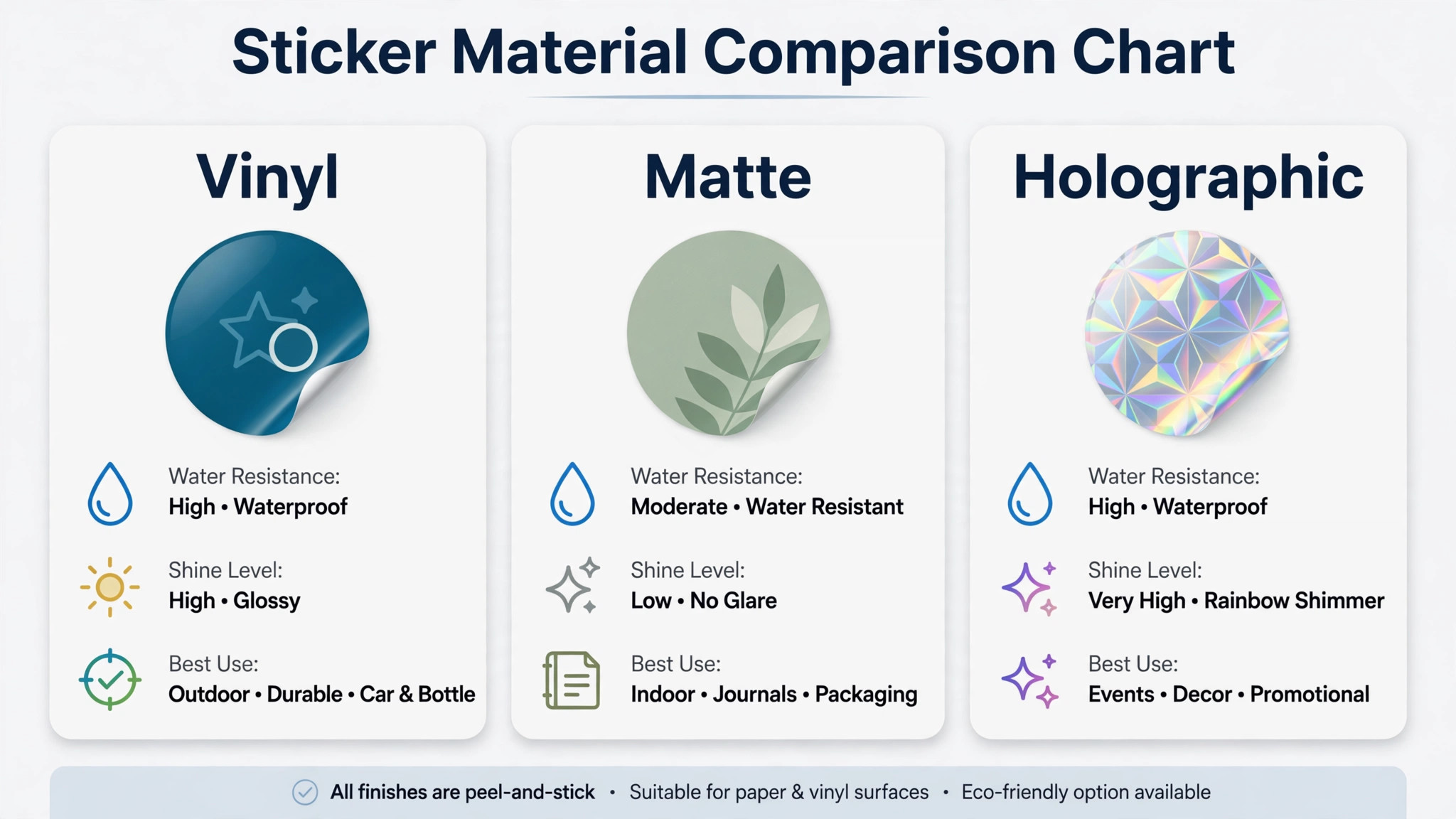
Material matters more than price whenever the sticker has to survive weather, water or handling. A white vinyl sticker with a laminate survives a water bottle, a car bumper and a sunny window for years. A paper sticker fades in a week outdoors and lifts the first time it gets wet. The finish is part of the material choice too. A matte finish reads well indoors and never glares in a photo. A holographic finish catches the eye at a market stall. A clear vinyl finish suits glass and windows, where a white border would look wrong.
The rule is simple. Match the material to the surface and the life the sticker will lead. A laptop sticker can be thin vinyl, a bottle sticker needs thick laminated vinyl, and a window sticker needs clear vinyl or a static cling. A sticker for children needs a safe adhesive that peels cleanly. Price the material first and the design second, because a beautiful design on the wrong material ends up in the bin.
Should You Print at Home or Order Online?
Home printing wins for a test batch and for a run under twenty stickers, because the cost is a sheet and some ink and the turnaround is minutes. Avery sheets make this easy, and the free design tool sizes everything to the sheet. A home printer struggles past that point, because the ink cost climbs and the colours drift from the screen, and the stickers have no laminate.
Ordering online wins for a run of fifty or more, because the unit price falls below $1.20, the vinyl is thicker, the laminate is real, and the cut is exact. A shop that sells stickers every week should keep both habits. Print ten at home to test a design tonight, then order 200 online once the design proves itself.
What Size Sticker Sells Best?
A sticker that sells well follows one rule, which is that it fits the surface it was made for. The 2 inch size fits a laptop lid, a phone case and a water bottle, and it is the cheapest size to print here. The 3 inch size fits a car bumper, a shop window and a parcel box, and it reads from a few feet away. The 4 inch size dominates a laptop lid or a market stall sign, and it needs a bold design with few words.
Frequently Asked Questions
How much should I budget for 100 custom stickers?
Budget $55 to $75 for the stickers themselves, plus shipping. StickerYou lists 100 die-cut stickers at $55.25, Sticker Mule lists them at $73, and StickerApp lists them at $69, all before shipping. Add $10 to $18 for shipping, and order one single sticker first if the design is new. A first run of 100 stickers at 2 to 3 inches should land between $65 and $95 delivered.
Are die-cut stickers worth the extra cost over kiss-cut?
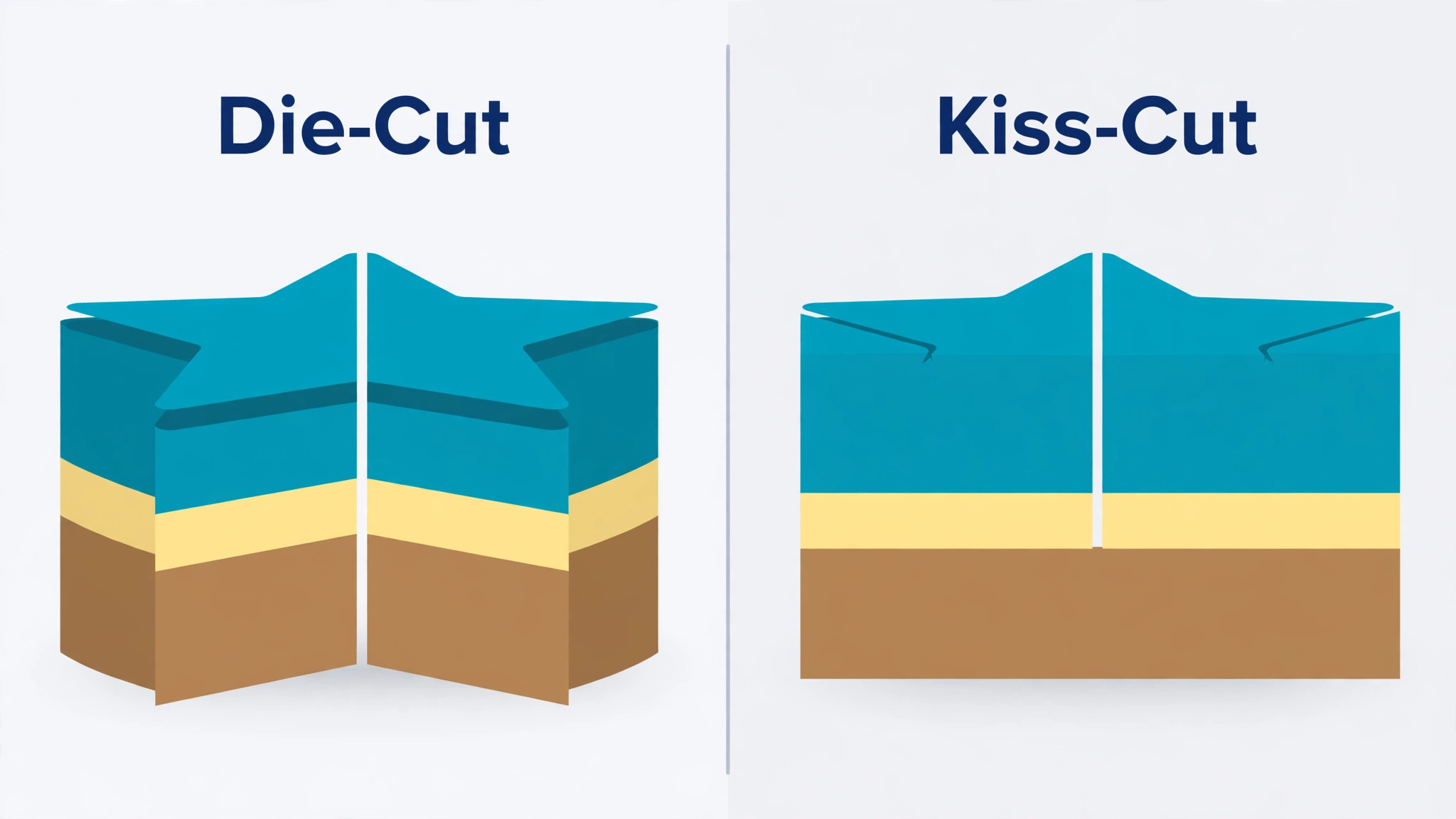
Yes, when the sticker will be handed out, stuck on a product, or sold on its own. A die-cut sticker is cut through every layer, so each sticker is a separate piece that follows the exact shape of the design and peels cleanly with no border. A kiss-cut sticker is cut only through the top vinyl layer, so it stays on a backing sheet with a border around it, which suits sheets and packs. Die-cut costs more per sticker at small quantities, and the gap shrinks as the run grows.
Can I design stickers for free and only pay for printing?
Yes, and most of the design tools on this list offer a free plan that covers a sticker design. Canva free, Adobe Express free and VistaCreate free all include sticker templates, photos and export, and Avery offers a free design tool sized to its sheets. The free plan falls short on brand kits and background removal, so a weekly sticker habit still wants a paid plan for those two features.
Which sticker material lasts longest outdoors?
Thick white vinyl with a laminate lasts longest outdoors, and it is the default material at Sticker Mule, StickerYou and StickerGiant. It resists sun, rain and washing, and it keeps its colour for years on a car bumper or a bottle. Holographic vinyl lasts well too, though its shine fades a little faster in strong sun. Paper stickers and unlaminated vinyl should stay indoors, because water and sun fade and lift them within weeks.
How many stickers should I order for a first run?
Order 50 for a first run, or one single sticker if the design is untested. Fifty is the smallest standard run at Sticker Mule and StickerApp, and it costs $45 to $60. StickerYou sells a single sticker for $5.34, the cheapest way to check the colours and the cut line before committing. Never order 500 of a design that has not been stuck on a real surface first.
Which sticker maker is best for a small business?
For most small businesses, Canva is the low-risk start. The template range is widest, the brand kit keeps every sticker matching, and the export is print-ready. Sticker Mule is the pick for a bulk run at a known price, because its published ladder shows the cost before ordering. Design.com suits a new business that wants a logo and a website alongside its stickers, since a single subscription covers all three.
What to Order First, and What It Will Cost You
Unit price decides the sticker tool more honestly than features do, and the best sticker makers prove it. A test run of one sticker costs $5.34 at StickerYou, a first run of 50 costs $45 to $60, and a run of 500 costs $137 to $165, or $0.27 to $0.33 each. Canva is the default for design at $144 a year, Adobe Express is the faster pick at $99.99 a year, and VistaCreate is the team pick at $120 a year.
Start with the sticker due soonest. Pick its size first, then its finish, then its quantity, and only then the tool. Order one test sticker, stick it on the real surface, and watch it for a week before the full run. Reuse a single layout for each sticker after that, swapping only the words and the photograph while the brand kit keeps the colours steady. The best sticker makers are the ones that make the second sticker faster than the first, because a sticker habit that stays fast is a sticker habit that lasts.