
A plain glass jar of honey with a handwritten label sells for about $6 at a market stall. The same jar with a printed label, a clear brand name, a neat ingredient list and a barcode sells for $9 or $10, and buyers pick it up first. That $3 gap is what the best label makers are really selling, not software. This guide compares nine tools on price, print quality and ease of use, so you can close that gap without paying for features you will never use.
What Changes When the Label Changes
Put the two jars side by side and the difference is obvious before anyone reads a word. The handwritten jar looks like a hobby. The printed jar looks like a product, and a product is what a buyer trusts with their money. The label does not change the honey inside, yet it changes the price a buyer will accept, the shelf it sits on and whether a shop will stock it at all.
The change runs deeper than looks. A printed label carries the same name, the same colours and the same type on every jar, so the tenth jar looks like the first one. A handwritten label drifts from jar to jar, and a buyer who liked the first jar cannot be sure the second one came from the same maker. Consistency is what turns a one-time sale into a repeat customer, and a label is the cheapest place to buy it.
Shops judge the same way. A buyer for a small grocery or a gift shop will turn a jar over, check the ingredient list, look for a barcode and decide in seconds. A label without a barcode cannot be scanned at a till, which rules the product out of most shops before the taste is ever discussed. Among the best label makers on this list, even the free ones include a barcode generator, so there is no reason to leave that door closed.
| Before | After |
|---|---|
| Handwritten name, different on every jar | Printed name, identical on every jar |
| No ingredient list or barcode | Full ingredient list plus a scannable barcode |
| Looks homemade, sells for about $6 | Looks like a brand, sells for $9 or $10 |
| Shops turn it down | Shops can scan it and stock it |
The table shows the whole argument in four rows. Nothing about the product changed, yet the label moved it from a stall table to a shop shelf. That is the return on a label tool, and it is why the cheapest tool on this list can pay for itself in a single market day.
How Much Does a Label Run Really Cost?
A label run has three bills, and the software is usually the smallest of them. The first bill is the label stock itself. A pack of blank sheet labels for a home printer costs about $10 to $25 for 100 sheets, and each sheet holds between 6 and 30 labels depending on size, so the stock for one jar label works out to a few cents. A roll of thermal labels for a dedicated printer costs about $15 to $40, and a roll holds several hundred labels.
The second bill is printing. A home inkjet or laser printer handles sheet labels for the cost of ink and paper, which most makers already own. A thermal printer costs $100 to $300 to buy, then prints each label for a cent or two, which suits a business printing hundreds of labels a week. A print shop charges about $0.30 to $1 per custom label in a small run, which suits a business that needs waterproof vinyl or foil and does not want to buy the printer.
The third bill is the software, and it runs from $0 to about $379 in the first year across the nine tools below. The free tools cover a home business completely. The paid tools earn their price when labels carry barcodes, batch data or waterproof stock, because a misprinted batch of 500 labels wastes more stock than a year of software costs.
| Cost item | Small run, 100 labels | Steady run, 500 labels a month |
|---|---|---|
| Blank sheet labels | $10 to $25 a pack | $10 to $25 a pack |
| Thermal label roll | $15 to $40 a roll | $15 to $40 a roll |
| Home printing | Ink and paper you own | Ink and paper you own |
| Print shop custom labels | $30 to $100 | $150 to $500 |
| Label software | $0 on a free plan | $0 to $379 in year one |
Read the table from the bottom up. Software is the smallest line, yet it decides whether the bigger lines are wasted. A tool that locks the design to the exact sheet size saves a misprinted pack, and a tool that pulls names from a spreadsheet saves an evening of typing.
How Were the 9 Tools Priced and Tested?
Every one of the best label makers below was judged on the same five questions. First, the true yearly bill, worked out from the annual rate instead of the low monthly figure shown up front. Second, does the tool lock the design to the exact label size, or does it leave alignment to luck. Third, can it print a barcode and a QR code that scan on the first try. Fourth, does it pull names, prices and batch numbers from a spreadsheet, or must every label be typed by hand. Fifth, does it handle the stock you actually print on, from office sheets to thermal rolls to waterproof vinyl.
Every price below was taken from the vendor’s own pricing page or an independent comparison reviewed in October and November 2026. Prices shift during the year, and two sources disagreed over Labeljoy, one listing the old Basic licence at $199 and the other the new Business licence at $379, so this guide uses the June 2026 figure from the vendor’s own page. Look at the live page before you pay, since a price printed here is a guide, not a promise.
The 9 Tools at a Glance
The nine tools below cover every way to make a label, from a free sheet-label designer to a warehouse barcode platform.
| Tool | Best for | Starting paid price | Free plan | Watch out |
|---|---|---|---|---|
| Avery Design & Print | Sheet labels on office printers | Free | Yes | Avery sheets only |
| Canva | Pretty product labels | Pro $144 a year | Yes | No barcode focus |
| Adobe Express | Fast branded labels | Premium $9.99 a month | Yes | No thermal printing |
| Design.com | Label plus brand in one place | From about $3 a month | Yes | Less depth per tool |
| Maestro Label Designer | OnlineLabels stock | Free with $9.95 purchase | Trial, watermarked | Watermark without a code |
| ZebraDesigner Essentials | Zebra printer owners | Free | Yes | Zebra printers only |
| BarTender | Warehouse barcode labels | Starter $199 a year | 30-day trial | Windows only |
| NiceLabel | Regulated and multi-site labels | Quote only | Trial | Price on request |
| Labeljoy | Small business barcode labels | Flex $14.90 a month | Trial | One PC per licence |
Avery leads the table on free sheet labels, and Canva leads it on design range, since its template library is the largest of the nine. ZebraDesigner is the obvious pick for anyone who already owns a Zebra printer, and BarTender is the pick when labels carry regulated barcodes across a warehouse.
Best Pick by Job
Every common label job has one pick from the best label makers in the rows below, so start with the row that fits your labels.
| Job | Pick | Why it wins here |
|---|---|---|
| Sheet labels at home | Avery Design & Print | Exact templates, mail merge, free |
| Prettiest product label | Canva | Largest template range, brand kit |
| Label in a hurry | Adobe Express | Simplest editor, quick export |
| Label plus logo and website | Design.com | One account, one shared brand kit |
| OnlineLabels stock | Maestro Label Designer | Locked to the exact sheet size |
| Zebra thermal printer | ZebraDesigner Essentials | Free, built for the printer |
| Warehouse barcodes | BarTender | 6,000 plus printer models, database links |
| Regulated labels, many sites | NiceLabel | Central control, audit trail |
| Barcode labels, one PC | Labeljoy | One-time licence, barcode first |
The 9 Best Label Makers in Detail
Avery leads on free sheet labels and Canva on design, Adobe Express follows on speed, and the rest hold their places on single jobs instead of overall power.
1. Avery Design & Print — The Free Sheet Label Default
Avery Design & Print is the safest pick for anyone printing labels on sheets with a home or office printer, because the tool is free and the templates match Avery sheets exactly. Enter the product number from the pack, and the layout, margins and spacing are already set, which removes the most common failure in home label printing, which is misalignment. The tool runs in the browser, with a downloadable offline version, and it covers address labels, shipping labels, product labels and name badges.
Mail merge is the feature that matters most at volume. A spreadsheet of names or product details fills a whole sheet in one pass, so 30 jars get 30 correct labels without retyping. A built-in barcode generator adds scannable codes, and designs save to a free Avery account. The limit is the stock. Everything assumes Avery sheets in a laser or inkjet printer, so there is no thermal printer story and no database connection beyond spreadsheets. For an office or a home business printing on sheets, it costs nothing and does the job properly.
2. Canva — The Prettiest Product Label
Canva turns a jar into a shelf-ready brand faster than any other tool here, which suits a product label over a plain form. Thousands of label and sticker templates, stock photos and 5GB of storage come free, enough to cover a first product run. Pro costs $144 a year when billed annually, or $18 a month on monthly billing, and unlocks the brand kit, background removal, one-click resize and 1TB of storage. For labels the brand kit earns its keep, holding the same colours and fonts on the jar, the shipping box and the social post.
A non-designer will find this the friendliest editor of the nine, with a first label ready in minutes, not after an evening of fiddling. Finished labels export as PDF for print, for any sheet stock at home or a print shop run. Barcodes are the weak spot. Canva offers no barcode-first route, so a label that must scan needs one more step in a different tool. Its templates also appear everywhere, so put a real photo of the product on the label and change at least one colour, or the jar will blend in with every other Canva label on the shelf.
3. Adobe Express — The Fast Branded Label
When the market stall opens tomorrow and the labels are not ready, Adobe Express gets them printed tonight without the brand looking rushed. Premium runs $9.99 a month or $99.99 a year, covering the label maker, brand kits, 250 generative credits a month and one-click resize. The free plan stands on its own, with core templates, Adobe Fonts and background removal with no credit cap, handy when every product photo needs a clean cutout.
The editor asks less of a first-time user than Canva does, so a debut label usually finishes sooner here than anywhere else. Free exports come as PNG and PDF with no watermark, and one click spreads the logo, fonts and palette across every label in seconds. The label template range is narrower than Canva’s, with no thermal printing and no barcode workflow, so warehouse labelling is beyond it. A business already set on Adobe fonts will like the type choices here, and $99.99 a year sits about $44 below Canva Pro.
4. Design.com — The Label Plus Brand Kit Pick
A label is rarely the only thing a new business needs, which is why Design.com takes fourth place here. A single subscription carries the label, the logo, the brand kit and the website together. The Starter tier begins at roughly $3 a month on annual billing, with higher tiers adding the website builder and more tools. A business launching a jam, candle or sauce gets its label, logo and site from one set of colours and fonts, so the jar and the phone show the same brand.
Judged as a label maker alone, it is solid rather than outstanding. Pick a template, make a few choices, and a clean label comes out, styled for food, craft and local services, in the formats a print shop asks for. Canva turns out prettier labels and Adobe Express turns them out quicker. The real value sits in the shared kit. One payment buys the whole identity, the label included, so the label itself costs very little for a business that needs the rest anyway.
5. Maestro Label Designer — The OnlineLabels Stock Pick
Maestro Label Designer is the free web designer from OnlineLabels, one of the largest suppliers of blank label sheets in the United States, and its strength is template accuracy. Pick the label size and the layout, margins and spacing are already correct, which is the same promise Avery makes, tied to a different stock catalogue. It adds thousands of pre-designed templates, clipart, mail merge, and barcode and QR code generators, and the finished labels can be printed at home or ordered printed and shipped.
The pricing model needs understanding before use. The software is free with any label purchase of $9.95 or more, which supplies an activation code that removes watermarks. Without a code, the free trial works but prints with a watermark across the design, and codes are time-limited and renew when more labels are bought. A maker who already buys OnlineLabels stock gets a capable designer for nothing extra. A maker who buys stock elsewhere will find the watermark a real obstacle.
6. ZebraDesigner Essentials — The Free Zebra Pick
ZebraDesigner Essentials is the manufacturer’s own software for Zebra printers, and it is free with no expiry date. It runs on Windows and covers basic barcode label and tag design with a Microsoft Office style interface, text, barcodes, images, fixed and variable data, date and time fields, counters and a GS1-128 barcode wizard for retail compliance. It speaks ZPL, EPL and CPCL natively, so the output is tuned for Zebra printers rather than translated through a generic driver.
The limit is the hardware. Essentials only prints on Zebra printers, and it does not connect to external databases, so data must be typed at print time or entered by hand. The Professional edition adds database connectivity and RFID encoding as a one-time licence bought through a distributor, with a 30-day trial. If a Zebra printer already sits on the desk, stop shopping and download Essentials first, because it covers most small-business labelling for nothing. If the printer is another brand, this tool does not apply.
7. BarTender — The Warehouse Barcode Standard
BarTender by Seagull Scientific has been the standard label platform in warehouses, factories and hospitals for decades, and the depth shows. Starter starts at $199 a year, Professional at $299 a year, and Automation, the edition with the API and integrations, at $575 a year, all billed annually. It supports more than 6,000 printer models, over 100 barcode types, RFID encoding, database connections and regulatory compliance templates, which is why regulated industries keep choosing it.
The cost is real, and so is the learning curve. BarTender runs on Windows only, and the desktop editions need a Windows PC, though browser-based Cloud editions start from $390 a year for teams that need Mac access. Licensing is tied to the number of printers, so costs grow as printers are added. A small business printing product labels will never use this depth and should not pay for it. A warehouse printing thousands of barcoded labels a day, across several printers and a database, will find nothing else on this list that holds up.
8. NiceLabel — The Regulated Multi-Site Pick
NiceLabel, from Loftware, is built for businesses where a wrong label is not a cosmetic problem but a compliance failure. It centralises label templates, controls who can change them, keeps an audit trail of every edit and print, and pushes approved designs to printers across many sites. Food, pharmaceutical and medical device companies use it because a recalled product can be traced to the exact label version that shipped with it.
Pricing is quote only, with no public price list, and trials are available on request. That alone rules it out for a home business, and the setup assumes an IT team rather than a single maker. The strength is control. Where BarTender wins on printer breadth and raw barcode power, NiceLabel wins on governance, because no one prints an unapproved label by accident. A business with one printer and one person does not need it. A business with five sites and a quality manager does.
9. Labeljoy — The One-Time Barcode Licence
Labeljoy is a Windows label and barcode program built for small businesses that want to own their software outright. The June 2026 pricing overhaul replaced the old editions with three models. Flex is a subscription at $14.90 a month with annual billing and no setup fee. Business is a one-time purchase at $379 with one year of updates and support included. Enterprise is a one-time purchase at $1,799 for larger teams. A free trial covers testing before any payment.
The program is barcode first, with text, shapes, images, barcodes and QR codes on a visual canvas, plus batch printing from spreadsheets on the paid plans. Over 35,000 businesses use it, and the appeal is the fixed cost. A business that prints labels every week for years pays once and stops thinking about subscriptions. The limits are the platform and the licence. It runs on Windows, and each licence covers one PC, so a two-computer setup needs two licences. For a single Windows PC printing barcode labels daily, the one-time price is honest value.
Which Wins for a Jam Jar, Avery vs Canva?
For a home food business, Avery and Canva are the two label tools that matter most, and they win on opposite strengths. Avery wins when the label must fit the sheet exactly and the run is large, because the templates match the stock, mail merge fills the sheet, and the whole job costs nothing beyond the paper. Canva wins when the label must look like a brand, because the template range is wider, the brand kit holds the colours steady, and the finished label looks designed rather than filled in.
The practical answer is to use both. Design the label in Canva for the look, export it as a PDF, and print it on Avery sheets sized through Avery Design and Print when alignment matters. A maker selling jam at one market a month needs Avery alone. A maker selling jam, sauce and chutney in three shops needs Canva for the brand and Avery for the printing.
How to Choose the Right Label Maker for Your Next Batch
Start from the printer and the stock, not the price list, because the best label makers differ more on workflow than on cost. Check the label size first, then check whether the tool locks the design to that size. If labels carry barcodes, check that the barcode scans on a phone before printing the batch. If labels carry names or batch numbers, check the spreadsheet link, since typing 200 labels by hand is where most evenings disappear.
If the run is a one-off, stay free and spend the money on one good proof sheet instead. If labels go out weekly, pay for the brand kit and the spreadsheet link, since those two features save more time than any discount. If the labels go on food, drink or anything that lives in a fridge, pay for waterproof stock before paying for software, because no tool can make paper survive condensation.
Do Waterproof Labels Really Survive the Fridge?
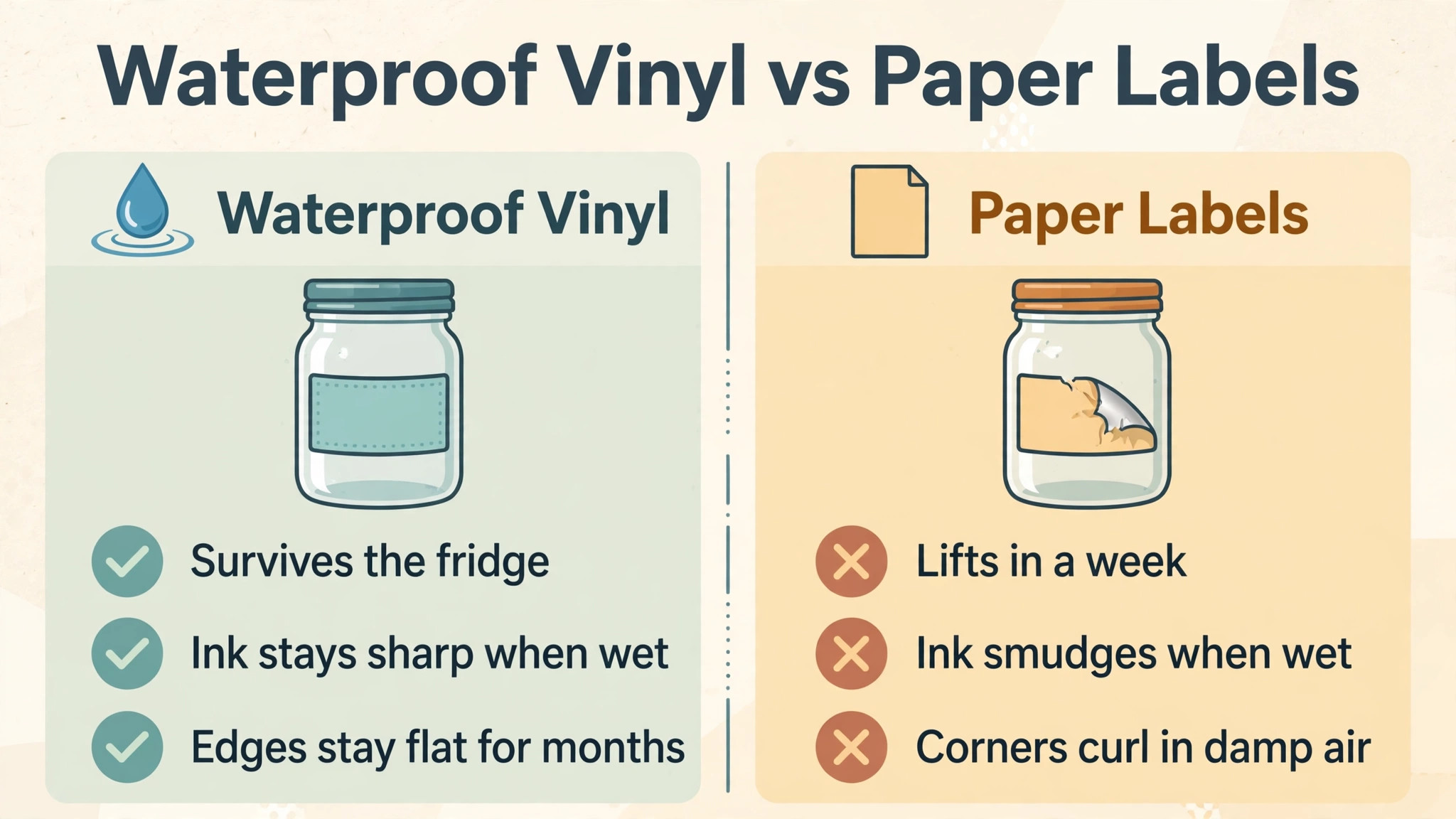
A paper label in a fridge lasts about a week before the edges lift and the ink smudges, because condensation forms on a cold jar every time the door opens. A waterproof vinyl label survives months in the same fridge, because the face stock and the adhesive are built to resist water. The difference is the material, not the design, and a beautiful paper label on a jam jar will still fail in a fridge.
Test before committing to a run. Print one label on the stock you plan to use, stick it on a jar, fill the jar with cold water and leave it in the fridge overnight. Read it the next morning. If the edges are flat and the ink is sharp, the stock is right. If the corners lift, switch to vinyl before printing 500 labels, because reprinting a batch costs more than the vinyl upgrade.
What Size Label Fits a Jar, a Bottle and a Box?
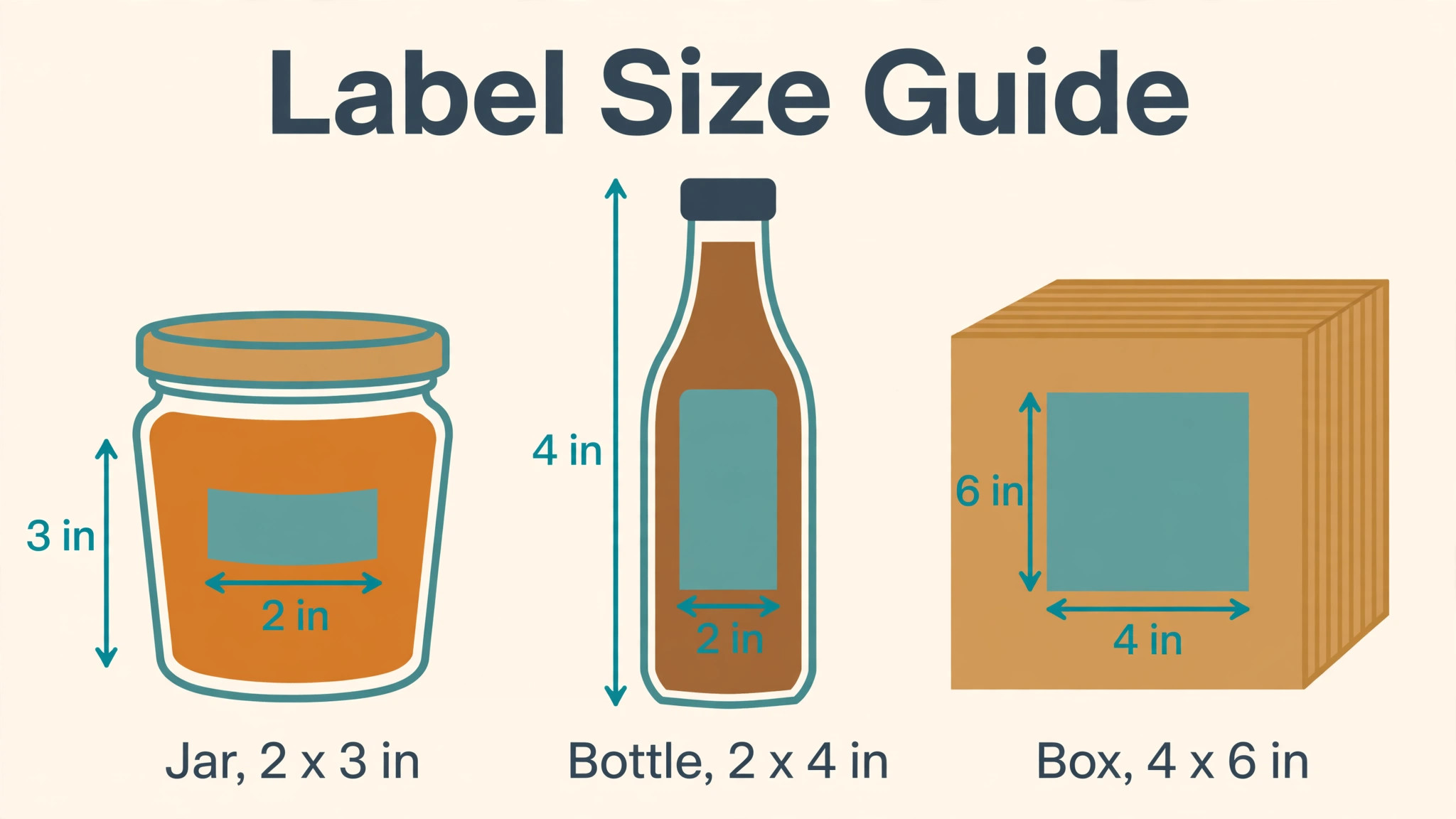
A jar label needs room for the name, the flavour and the weight, and a 2 by 3 inch rectangle fits most jam and honey jars without wrapping around the curve. A bottle label needs height more than width, and a 2 by 4 inch rectangle fits most sauce and drink bottles, with the brand at the top and the ingredients below. A shipping box label needs a barcode that scans at arm’s length, and a 4 by 6 inch label is the standard size for couriers.
The mistake is choosing the size after the design is finished. A design built for a jar will not stretch to a box without larger type and a simpler layout, and a design built for a box will look empty on a jar. Pick the container first, measure the flat area, and design inside it. Print one copy on plain paper, cut it out and wrap it around the jar before printing the real run.
Is a Free Label Maker Enough for a Small Business?
Yes, for most small businesses, and the free tools on this list are not demos. Avery Design and Print is fully free and covers sheet labels, mail merge and barcodes. ZebraDesigner Essentials is fully free and covers thermal labels on Zebra printers. Canva free and Adobe Express free both cover a branded product label with watermark-free export. A business printing a few hundred labels a month can run entirely on free tools and spend the money on better stock instead.
Free plans run into three walls. They cannot pull data from a database, they cannot keep label versions under control across a team, and they cannot print to a thermal roll from a browser. A business that runs into any of those three walls has outgrown free tools, and the paid step is BarTender for barcodes, NiceLabel for control, or Labeljoy for a one-time licence. Until then, free is not a compromise. It is the right price.
Frequently Asked Questions
Should I buy a label printer or print on sheets?
Print on sheets if the run is under a few hundred labels a month, because a home printer and a $10 to $25 pack of sheets cover the job. Buy a thermal printer if the run passes 500 labels a month, because the per-label cost drops to a cent or two and the speed is far higher. A thermal printer costs $100 to $300, so the payback comes in the first few months at that volume.
Can I make labels for free?
Yes, and three of the nine tools on this list are free for the whole job. Avery Design and Print is free for sheet labels, ZebraDesigner Essentials is free for Zebra thermal printers, and Maestro Label Designer is free with a $9.95 label purchase. Canva free and Adobe Express free also cover a branded label with no watermark on export, so a first product run can cost nothing beyond the stock.
What label size should I use for jam jars?
A 2 by 3 inch rectangle fits most standard jam and honey jars, with room for the brand name, the flavour and the net weight. Measure the flat area of your own jar before ordering stock, because a jar with a strong curve needs a smaller label or the edges will lift. Print one copy on plain paper and wrap it around the jar first.
Do I need a barcode on my product label?
Yes, if the product will sell in a shop, because a till cannot scan a label without one and most shops will not stock unscannable products. Avery, Maestro, BarTender, NiceLabel and Labeljoy all generate barcodes, and a GS1 barcode is the standard for retail. A product sold only at your own market stall can skip the barcode, though adding one costs nothing and keeps the shop door open.
Which label maker is best for a small business?
Avery Design and Print is the safest choice for most small businesses, because it is free, the templates match the sheets exactly, and mail merge handles a whole run. Canva is the pick when the label must look like a brand, because the template range is widest and the brand kit keeps every label matching. For a new business that also needs a logo and a website, Design.com fits best, since one subscription covers all three.
How do I make a label that survives the fridge?
Use waterproof vinyl stock, not paper, and test one label overnight in the fridge before printing the run. Print with a laser printer or a thermal printer rather than an inkjet, because inkjet ink runs when it gets wet. Keep the design simple, with large type and no fine detail at the edges, since edges are where a wet label fails first.
Your Label Maker, Decided Before Market Day
Price sorts label tools more honestly than features do, and the best label makers show it. A home business printing a few hundred labels a month can run entirely free on Avery or ZebraDesigner, stock aside. A brand-led product calls for Canva at $144 a year or Adobe Express at $99.99 a year, paying for the design range and the brand kit. A warehouse calls for BarTender from $199 a year, and a regulated business calls for NiceLabel on a quote.
Begin with the jar or box that is due soonest. Settle its size first, print one proof label, stick it on the real container and leave it in the fridge overnight before the full run. Use one template for every label after that, changing only the words and the photo, and let the brand kit keep the colours steady. The best label makers are the ones that make the second batch quicker than the first, and the tenth quicker than the second, because a quick labelling habit is one that lasts.