
For most vintage and antique shops, Square is the safest first pick. It handles one of a kind items without forcing a barcode on every piece, it sells online and in store from the same inventory, and a new shop can start without a long setup project. That verdict matters because the best POS system for vintage and antique shops is not the system with the longest feature list. It is the system that copes with stock that cannot be reordered, prices that change by negotiation, and sellers who need to be paid when their piece sells.
A vintage shop rarely sells the same item twice. A mid century chair, a signed print, or a brass lamp may sit for three months and then sell in a single afternoon, and once it is gone there is no reorder button. That reality changes what a point of sale system must do. It must record a unique item once, describe it well enough that staff can find it again, hold it for a customer without losing track of it, and remove it from every sales channel the moment it sells. A system built for repeatable retail stock can do the first part and fail badly at the rest.
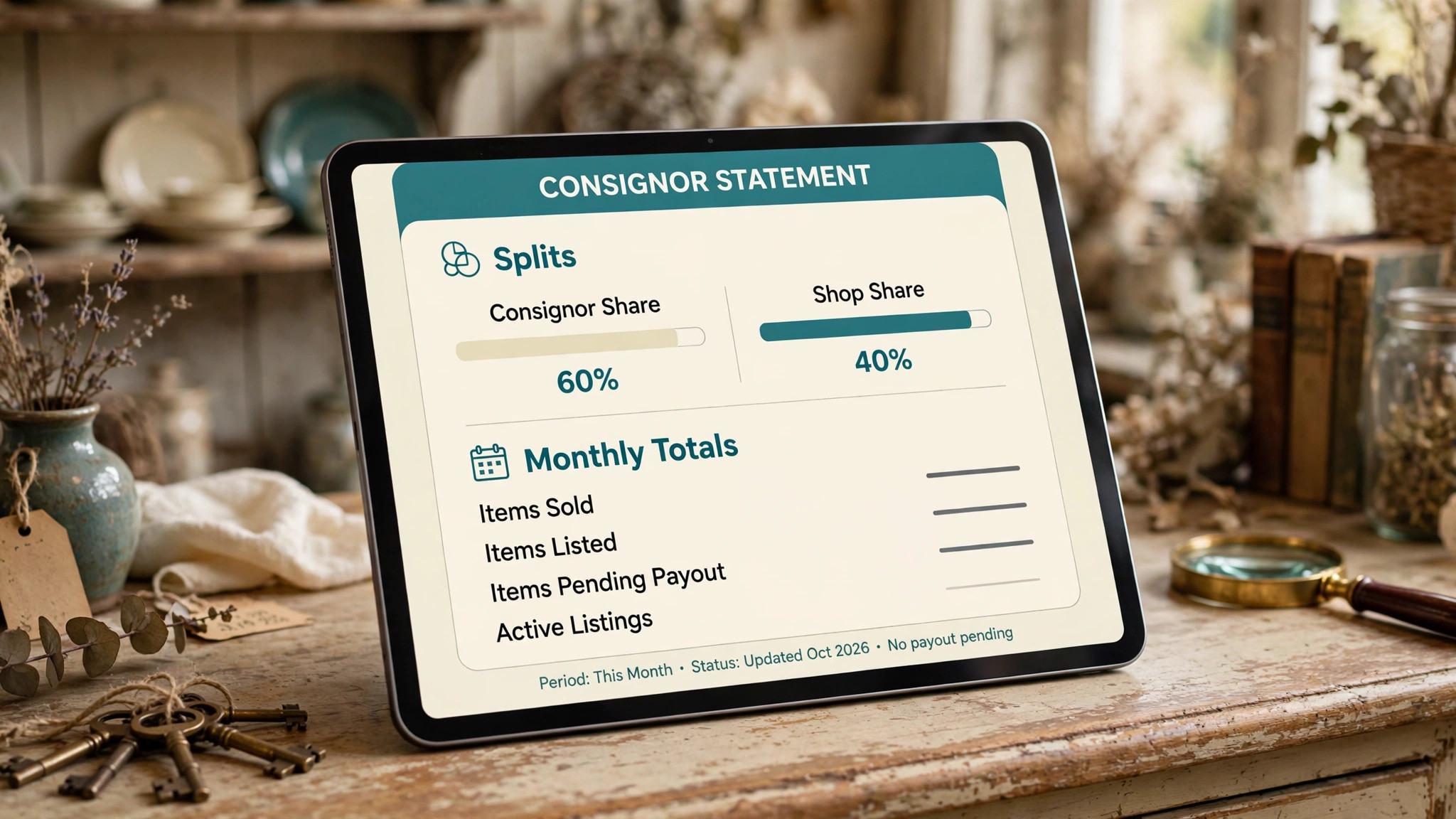
Consignment adds a second layer. Many antique shops sell pieces owned by dealers, estates, or individual consignors, and the shop takes a percentage when a piece sells. The system must remember who owns each item, what split was agreed, and what is owed at the end of the month. A spreadsheet can hold that information for twenty items. It becomes a source of arguments at two hundred items, especially when a piece is discounted, returned, or moved between a booth and the shop floor.
This guide compares twelve tools, from simple card readers that suit a single booth to full retail platforms that run a shop, a website, and a consignment ledger together. Prices are starting prices where published. Where a price is not confidently known, the note reads Check the vendor pricing page, because hardware bundles, payment rates, and monthly tiers change often enough that a stale figure would mislead a buyer.
Why Vintage and Antique Shops Break a Standard Checkout
A standard retail checkout assumes that every product has a SKU, a fixed price, and a supplier who can send more. A vintage shop breaks all three assumptions on a normal day. Items arrive one at a time from estates, auctions, flea markets, and walk in sellers. Prices are set by judgment, by condition, and by what the local market will bear, not by a wholesale cost plus a fixed margin. And a discount is often a conversation, not a coupon code, with the shop owner approving ten percent off a sideboard after a customer has walked around it twice.
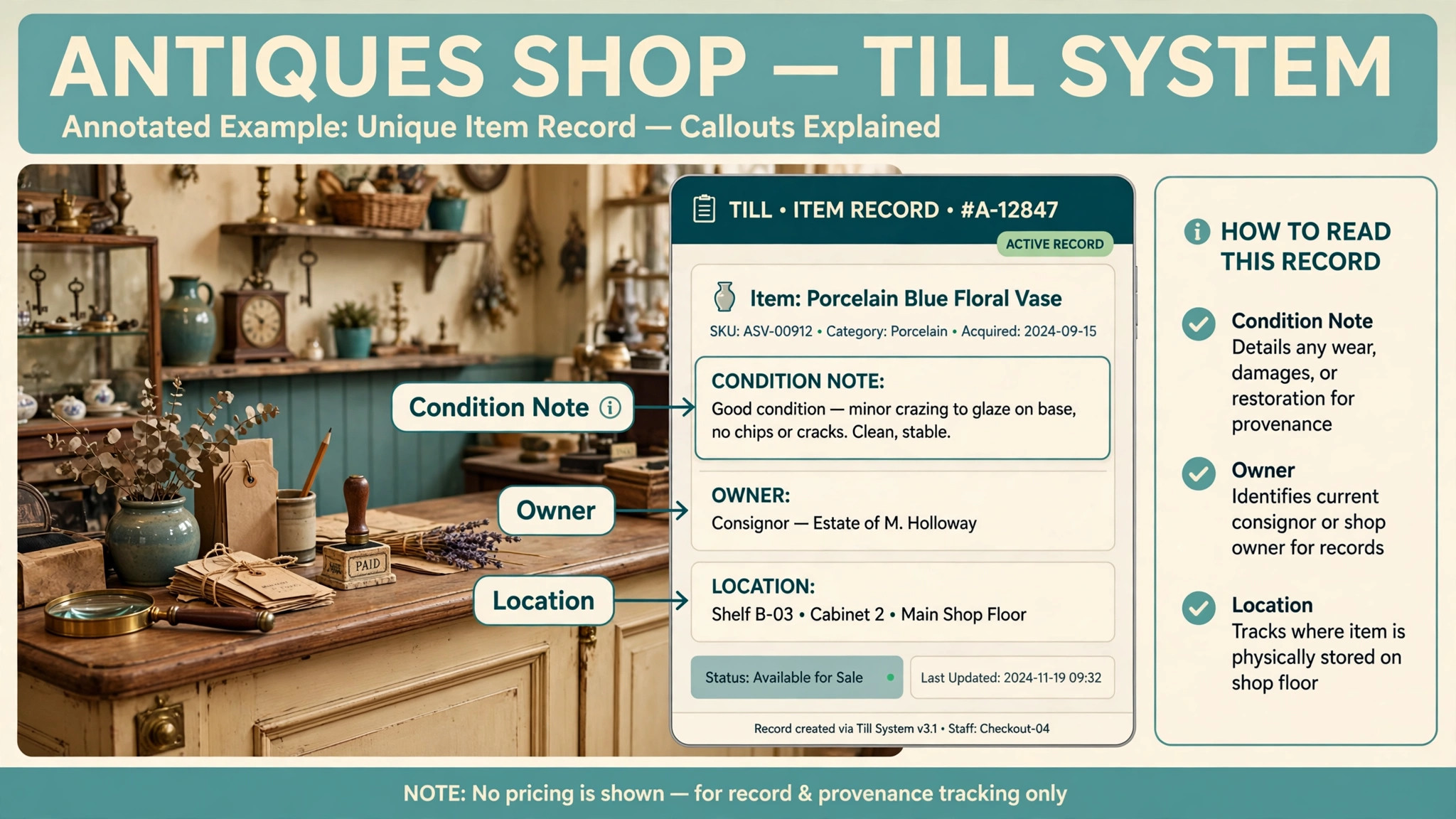
Condition and provenance also matter at the till in a way they do not for new goods. A buyer of a 1930s oak dresser wants to know about a repaired drawer or a refinished top before paying, and staff need that note at the till rather than in a notebook in the back room. A good system lets staff attach a description, a condition note, and photos to a unique item, so the counter team can answer questions without fetching the owner.
The shop floor itself creates a third problem for any buyer comparing the best POS system for vintage and antique shops. Vintage shops are rarely one tidy room. They have booths rented to dealers, a back room of unpriced stock, a window display, and sometimes a stall at a weekend market. An item can move between those places in a day, and the system must follow it. If the booth inventory, the shop inventory, and the online store are three separate lists, the same lamp can sell twice, once in the shop and once online, and the apology that follows costs more than any software subscription.

The 12 Tools at a Glance
| Tool | Starting price | Best for | Vintage shop depth |
|---|---|---|---|
| Square | Check the vendor pricing page | Booths and small shops starting out | Good |
| Shopify POS | Check the vendor pricing page | Shops with serious online sales | Good |
| Lightspeed Retail | Check the vendor pricing page | Full shops with varied stock | Strong |
| Clover | Check the vendor pricing page | Counter sales with hardware choice | Good |
| Epos Now | Check the vendor pricing page | Shops wanting a full till package | Good |
| Revel Systems | Check the vendor pricing page | Multi location shops | Good |
| Heartland Retail | Check the vendor pricing page | Shops needing strong inventory control | Strong |
| Rain POS | Check the vendor pricing page | Small shops with repair and special orders | Good |
| Springboard Retail | Check the vendor pricing page | Shops with detailed reporting needs | Good |
| Korona POS | Check the vendor pricing page | Shops with complex pricing rules | Good |
| Hike | Check the vendor pricing page | Shops selling in store and online | Good |
| NCR Counterpoint | Check the vendor pricing page | Larger shops with deep inventory needs | Strong |
Pricing in this market is rarely a single number. Hardware, payment processing, and monthly software tiers are often priced separately, and a cheap monthly plan can carry a higher card rate that costs more once sales grow. That is why a comparison of the best POS system for vintage and antique shops should be priced on a full month of real trading, including card fees, rather than on a headline subscription figure alone. Ask each vendor for a written quote that covers your booth count, your online channel, and your expected card volume before you compare totals.

Best Pick by Job
| Job type | First pick | Why it fits | Watch out for |
|---|---|---|---|
| Single booth | Square | Low setup effort and simple unique item sales | Limited consignment depth |
| Full shop | Lightspeed Retail | Strong inventory and multi location control | Setup effort and monthly cost |
| Shop with online sales | Shopify POS | One inventory list for store and website | In store features need add ons |
| Consignment heavy shop | Heartland Retail | Detailed inventory and reporting control | Confirm consignment workflow in trial |
| Budget start | Hike | In store and online selling from one system | Check hardware and support terms |
The job type that matches most of your sales should decide the shortlist for the best POS system for vintage and antique shops. A single booth that buys a full retail platform will pay for reporting and multi location tools it never opens. A full shop with consignment sellers that buys a simple card reader will end the month reconciling splits by hand. Match the system to the job first, then compare price within that shortlist, not the other way around.
Consignment and Pricing Checklist
Use this checklist before you open a new consignment intake or reprice a section of the shop. It turns pricing and ownership into a routine instead of a memory test.
– Record the consignor, the agreed split, and the agreed minimum price for every item before it reaches the floor. – Give every unique item its own record with a description, a condition note, and at least one photo. – Set a review date for each consigned piece, so slow stock is repriced or returned on a schedule rather than by accident. – Record who approved any discount, and whether the discount comes from the shop share, the consignor share, or both. – Tag the location of every item, including booth number, window, back room, or market stall. – Hold an item for a customer only with a dated hold record, so a second buyer is not promised the same piece. – Reconcile online stock with floor stock every day, and remove sold items from every channel at once. – Run a monthly consignor statement from the system, and check it against payouts before money leaves the shop. – Record returns and damage in the item record, so a returned piece does not reappear at full price with no history. – Review slow stock monthly, and decide for each piece whether to reprice, move, discount, or return it.
Software helps this checklist only if ownership, price history, location, and sales live in one item record, which is why the best POS system for vintage and antique shops is judged on its item record first. If ownership lives in a spreadsheet, price history lives in a notebook, and sales live in the till, the checklist becomes a reconciliation exercise at the end of every month, which is exactly the work the software was meant to remove.
The 12 Tools in Detail
1. Square
Square is the most common starting point for small vintage sellers, and for good reason. A seller can take card payments with a reader, ring up a unique item with a custom price and description, and keep a simple inventory list without buying a full till system. The online store option lets a booth or small shop list pieces for sale beyond the local market, and sales in store and online draw from the same stock list when set up that way.
The strength is speed. A new booth can be selling on the first weekend, with receipts, basic sales reports, and a customer record for repeat buyers. The limit is depth on consignment. Square can record custom items and track sales, but a shop with many consignors and complex splits will need careful workarounds or an added tool to produce monthly consignor statements. That gap matters more as consignor count grows.

Best for a single booth or a small shop that sells mostly its own stock, wants low setup effort, and plans to add online sales gradually. Check the vendor pricing page for card rates and any paid inventory or online store tiers before budgeting.
2. Shopify POS
Shopify POS suits a vintage shop that already sells, or plans to sell, a large share of stock online. The shop and the website share one product list, so a chair that sells in the store disappears from the website at once, which is the single most valuable feature for one of a kind stock. Staff can also take in store payments, apply discounts, and look up a customer record at the counter.
The strength is the online channel. Photos, descriptions, and condition notes written once serve both the website and the counter. The limit is the in store experience, built around the Shopify product model, so deep consignment ledgers may need an added app with its own monthly cost.
Best for a shop with online sales at the heart of the business, especially one that photographs and lists most pieces anyway. Check the vendor pricing page for the plan that includes the in store features and apps the shop actually needs.
3. Lightspeed Retail
Lightspeed Retail is a full retail platform with strong inventory control, multi location support, and reporting that suits a larger vintage shop. Staff can track unique items, manage stock across a shop floor and a back room, and run reports by category, vendor, or time period. That reporting depth helps an owner see which categories move, which booths earn, and which price bands sell fastest.
The strength is control at scale. A shop with several staff, locations, or booths can keep one inventory truth instead of several lists. The limit is setup effort and cost, and a very small booth may find that investment hard to justify. Trial it with real stock, not demo stock.
Best for a full shop with varied stock, several staff, or more than one selling location. Check the vendor pricing page for the tier that includes the reporting and multi location features the shop needs.
4. Clover
Clover is a counter system built around hardware choice, with a till, a card reader, and a customer facing display that many small retailers recognise. A vintage shop can ring up custom items, apply discounts, and track basic inventory, and the app marketplace adds features such as loyalty or reporting as the shop grows. That hardware flexibility suits a shop that wants a tidy counter rather than a tablet balanced on a dresser.
The strength is the counter experience. Payments are fast and staff training is short, which matters when weekend help rotates. The limit is vintage depth. Consignment splits, condition notes, and booth accounting need workarounds or added apps, so a heavy consignment shop should test that workflow in the trial.
Best for a shop that values a clean counter setup and fast card payments, with mostly its own stock. Check the vendor pricing page for hardware costs and app fees on top of the monthly plan.
5. Epos Now
Epos Now sells a full till package, with hardware, software, and card payments in one bundle, which appeals to a shop owner who wants one supplier for the counter. The system covers sales, inventory, staff permissions, and reporting, and it can run across more than one till in a larger shop. For a vintage shop, the useful parts are custom item entry, discount control, and sales reporting by category.
The strength is the bundle. One order can deliver the till, the software, and the payment setup. The limit is general retail fit. Consignment accounting and provenance notes are not its centre, so a consignment heavy shop should confirm how splits and monthly statements will be handled before buying.
Best for a shop that wants a complete till package from one supplier and a straightforward counter workflow. Check the vendor pricing page for the bundle contents and any contract length.
6. Revel Systems
Revel Systems is a cloud based point of sale platform aimed at retailers and hospitality businesses with more than one location. A vintage shop group, or a shop with a separate warehouse and market stall, can use it to keep sales, inventory, and reporting in one system across sites. Staff permissions and real time reporting help an owner see what sold, where, and at what margin without waiting for an end of day report.
The strength is multi site control. Stock movements, central reporting, and consistent pricing suit a business that has outgrown a single till. The limit is fit for a small single shop, which will pay for scale it does not use, and unique item handling still needs a careful trial.
Best for a vintage business with more than one selling location, or a shop planning a second site. Check the vendor pricing page for a quote based on location count and till count.
7. Heartland Retail
Heartland Retail, formerly Springboard Retail in some listings, is known for detailed inventory control and reporting, which is why it appears here as a consignment heavy pick. The system supports deep product records, stock tracking across locations, and reporting that can be cut by vendor, category, or location. For a vintage shop, that reporting depth is what turns a consignment ledger from a monthly chore into a routine report.
The strength is inventory discipline. An owner can see slow stock, fast categories, and booth performance in reports that guide buying. The limit is setup effort, since detailed systems reward careful category setup. Trial it with a real consignment intake, including a split, a discount, and a monthly statement.
Best for a consignment heavy shop, or a full shop that wants reporting strong enough to guide buying. Check the vendor pricing page for the tier that includes the reporting depth described here.
8. Rain POS
Rain POS is aimed at small retailers, including shops that handle special orders and repairs alongside normal sales. That mix fits many antique shops, which often take a piece in for repair, order a part, or hold a piece for restoration before it returns to the floor. Rain covers sales, inventory, and customer records, with special order handling that general till systems often lack.
The strength is the special order and repair workflow. A shop that restores furniture or takes repair work can track a job from intake to collection in the same system that rings up a sale. The limit is scale. Rain suits a small shop better than a multi location business, and a shop with serious online sales may need a separate online channel with its own stock reconciliation.
Best for a small shop that mixes sales with repair or special orders. Check the vendor pricing page for the plan that includes the repair and special order features.
9. Springboard Retail
Springboard Retail is a cloud retail platform with a focus on detailed reporting and inventory control for independent retailers. Note that some sources now list this product under the Heartland Retail name, so a buyer should confirm the current product name with the vendor before comparing quotes. The platform covers multi location inventory, customer records, and reporting by category and vendor.
The strength is reporting for buying decisions. A vintage shop owner can see which eras, categories, or price bands earn the best return, and can use that evidence when deciding what to buy at auction or from an estate. The limit is the naming overlap with Heartland Retail, which can confuse a comparison, and the setup effort that any detailed inventory system requires. Confirm the product, the tier, and the included features in writing.
Best for a shop that buys on evidence and wants reporting to guide auction and estate buying. Check the vendor pricing page and confirm the current product name before signing.
10. Korona POS
Korona POS is a cloud point of sale system known for flexible pricing rules, which suits a vintage shop where discounts, offers, and price changes are frequent. Staff can set price rules by category or item, run promotions, and track sales across more than one till. The system also covers inventory and customer records, so a shop can keep its counter and its stock list in one place.
The strength is pricing flexibility. A shop that reprices a section for a sale weekend, or runs a standing trade discount, can set those rules once. The limit is consignment depth, which needs a trial of a split, a trade discount, and a monthly statement together, since pricing and payout rules must agree.
Best for a shop with frequent repricing, sale weekends, or trade pricing. Check the vendor pricing page for the tier that includes the pricing rules the shop needs.
11. Hike
Hike is a cloud point of sale system that sells in store and online from one inventory list, which is the core requirement for one of a kind stock. A small vintage shop can ring up sales at the counter, list pieces on its website, and keep customer records in the same system. The setup is lighter than a full enterprise retail platform, which suits a shop with a small team.
The strength is the balance of online and in store selling without enterprise complexity. A shop that lists most pieces online and sells some at the counter gets one stock truth without a large implementation project. The limit is depth at scale. A shop with many consignors, many booths, or complex reporting needs may outgrow Hike, so the buyer should check export options and higher tiers before committing.
Best for a budget conscious shop that needs in store and online selling from one list. Check the vendor pricing page for hardware, online store, and support terms.
12. NCR Counterpoint
NCR Counterpoint is a long standing retail management system with deep inventory control, purchasing, and reporting for larger retailers. A large antique business, or a shop with a warehouse, several departments, and a serious buying operation, can use it to manage stock, vendors, and sales in one system. Its depth suits a business where inventory accuracy is a daily operational concern, not a monthly chore.
The strength is depth. Purchasing, stock control, and reporting suit a business with a large catalogue and many suppliers. The limit is cost and complexity. Counterpoint is not a weekend setup for a single booth, and it belongs on a shortlist only when scale demands it.
Best for a larger antique business with a warehouse or several departments. Check the vendor pricing page for a quote based on user count and location count, and confirm implementation support.
How to Choose the best POS system for vintage and antique shops
Start with ownership, not with hardware. List every consignor, every booth renter, and every piece of shop owned stock, and ask how each system records ownership, splits, and monthly payouts. If a system cannot produce a consignor statement from its own sales records, it will cost the shop hours every month, and it will create disputes that damage dealer relationships. Ownership handling is the test that separates a vintage fit from a general retail fit.
Next, test the online and in store stock link with a real listing. Put one piece online, sell it in the shop, and check that the website removes it without staff intervention. Then reverse the test, selling a piece online and checking the shop floor list. A system that needs a daily manual reconciliation will eventually allow a double sale, and a double sale of a one of a kind piece cannot be fixed by sending another unit.
Then price the full counter stack. Add hardware, card processing, online store fees, and any added apps for consignment or reporting to the monthly subscription. A low subscription with a high card rate can cost more than a higher subscription with a better card rate once monthly sales pass a modest level. Get the monthly total for your real sales volume in writing, and confirm whether the card rate is fixed or tiered.
Finally, check the exit. Confirm that item records, customer records, and sales history can be exported in a usable format, and that photos and condition notes export with the items rather than staying locked in the system. A vintage shop builds its catalogue over years, and that catalogue is a business asset. A system that holds it hostage is a poor choice, however good the till looks on day one.

Common Mistakes When Buying a Vintage Shop POS
The first mistake is buying for new retail and hoping it fits vintage stock. A system built for repeatable products will handle barcodes and reorders well and handle unique items badly. The test is not whether it can sell a chair. The test is whether it can sell that chair once, record its condition, pay its consignor, and remove it from every channel.
The second mistake is ignoring the consignor statement. Shops often choose a system on till speed and discover the consignment problem at the first month end, when dealers ask for statements the system cannot produce. Run a full monthly cycle in the trial, including a discount and a return, before signing.
The third mistake is running the website and the shop on separate stock lists. Separate lists feel manageable with twenty listings and become unmanageable at two hundred. One stock truth for every channel is not a luxury for one of a kind goods. It is the core requirement.
The fourth mistake is letting discounts bypass the split. A ten percent discount agreed at the counter must flow through to the consignor payout, or the shop will absorb discounts it never agreed to absorb. Test a discounted consignment sale end to end, and read the resulting statement before judging the system.
The fifth mistake is skipping staff training for weekend help. The owner may master a system quickly, but the Saturday team rings up most sales. If weekend staff cannot enter a unique item, set a hold, or find a condition note without help, the system will be bypassed, and bypassed systems produce bad data that nobody trusts.

Frequently Asked Questions
What is the best POS system for a single vintage booth?
For many single booths, Square is a strong starting point, because it offers low setup effort, simple unique item sales, and an online store option from one account. A booth that sells mostly its own stock and has few consignors will rarely need more. A booth inside a larger antique mall should also check what the mall requires for booth reporting, since some malls ask for sales reports in a specific format.
Can a POS system track consignment splits for antique dealers?
Yes, but depth varies widely across the tools in this guide. Some systems record ownership and produce consignor statements from sales records, while others need workarounds or an added tool. The reliable test is to enter a consigned piece, sell it at a discount, and read the resulting statement. If the statement matches the agreed split on the discounted price, the system handles consignment well enough to trust.
How do vintage shops handle one of a kind inventory in a POS?
They give each piece its own record, with a description, a condition note, photos, a location tag, and an ownership record. That record is created once, sold once, and then closed, rather than being reordered like a repeatable product. The system must also remove the piece from every sales channel at the moment of sale, so it cannot be sold twice.
Should a vintage shop sell online and in store from the same system?
Yes, in almost every case. One of a kind stock makes a double sale likely when channels run on separate lists, and a double sale cannot be fixed by shipping a replacement. A single stock list for the shop and the website removes that risk, and it also saves the duplicate data entry of writing each piece up twice.
How much does a vintage shop POS cost per month?
Monthly software cost ranges from a low tier or pay as you go card model to a mid priced retail platform, with hardware and card processing on top. The total depends on till count, online store needs, and card volume. The best POS system for vintage and antique shops for a given shop is the one whose full monthly total, including card fees, fits the shop margin, not the one with the lowest headline subscription alone.
A Shortlist You Can Act On
Start with Square for a booth or small shop, Shopify POS if online sales lead, and Lightspeed Retail or Heartland Retail for a full shop with a serious consignment book. Trial two on real stock for two weeks, run a consignor statement and a double sale test, and let the Saturday team vote on ease of use. The system that survives with clean reports and no workarounds is the right buy. The best POS system for vintage and antique shops is the one that keeps unique piece records and dealer trust accurate the first time.
More Reading on Stratilyze
– Best POS System for Brewery Taprooms – Best POS System for Independent Bookstores – Best POS System for Jewelry Stores – Best Inventory Software for Furniture Retailers – Use AI for Consignment Shop Inventory Pricing