

CampMinder prices per camper by suite and only on quote. UltraCamp charges per reservation with an annual minimum. Regpack sells an annual license plus a percentage per transaction. Three platforms, three completely different ways to pay for the same job, and none of them publishes a simple monthly price a camp director can compare in five minutes. That pricing fog is the first thing to understand about the best registration software for summer camps, because the cheapest headline can become the most expensive season once camper volume, health records, and payment fees are counted.
A summer camp is a short, intense business. Registration opens for a few weeks, hundreds of families register at once, health forms arrive late, cabins must balance, staff must be hired and background checked, and payments arrive in deposits and installments. Then camp runs for eight weeks, and the whole cycle starts again. Software that handles the registration rush, the health paperwork, and the money flow in one system earns its fee. Software that only handles one of those jobs leaves the director stitching the rest together with spreadsheets.
This guide compares 5 platforms across registration forms, payment plans, health records, cabin and group assignment, staff tools, parent communication, and total cost. Prices come from vendor pages and recent published comparisons checked in late 2026, and camp vendors change prices often, so check the vendor pricing page and get a written quote before you sign. Shortlist two or three tools, test each one with your real session structure, and judge the winner on a full family registration, a health form, and a payment plan, not on a sales demo.
Why camp registration is harder than it looks
A camp registration is not a ticket sale. One family registers two children for different sessions, with different dietary needs, different medications, and different pickup permissions. A sibling discount applies to one child and not the other. A deposit is due now, an installment is due in May, and a balance is due before arrival. A waitlist opens when a session fills, and a cancelled spot must go to the right child at the right age.
The table below gives a fast first sort for the best registration software for summer camps. Use it to remove tools that clearly do not fit your camp, then read the full sections for the survivors. Where a vendor quotes only, this guide says so plainly and gives the reported range instead of inventing a number.
| Tool | Best for | Standout strength | Price note |
|---|---|---|---|
| CampMinder | Established residential camps | Health centre, parent app, full back office | Per camper by suite, quote only, reported 13 to 24 dollars per camper |
| CampBrain | Full suite camps and retreat centres | Hands on support and conference rentals | Quote only, check the vendor page |
| UltraCamp | Budget conscious camps | Pay per reservation model | Per reservation with annual minimum, reported from about 250 dollars a month |
| Regpack | Complex forms and payment plans | Conditional forms and installments | Annual license plus a percentage, reported from about 99 to 125 dollars a month |
| CampDoc | Health first camps | Electronic health records and medication log | Quote by camp size, reported from about 250 to 340 dollars a month |

What camp registration must handle
Conditional forms come first, because no two campers need the same questions. A day camper does not need a cabin preference, an overnight camper does, and a camper with asthma needs a medication form that a healthy camper never sees. The platform should show each family only the questions that apply to their children, and it should collect health information securely, with permissions that match who needs to see it.
Payment plans come second. Families expect to pay a deposit now and the balance in installments, and the camp expects that money to arrive on schedule without chasing. The platform should schedule deposits and installments automatically, send reminders before each charge, and handle failed payments with retries and clear messages. Ask for the processing rate in writing, because a low platform fee with a high processing rate can cost more than a higher platform fee with a low one.
Cabin and group assignment comes third. A camp director balances age, gender, session, friendship requests, and counselor ratios, and the software should make that puzzle visible rather than hiding it in a list. Test the assignment flow during a trial with your real session structure, including a late registration, a session change, and a waitlist move. A platform that handles those three cases cleanly will handle most of the season.
Best pick by job
The table below names a lead pick for each segment in this guide to the best registration software for summer camps, with a second option worth testing. Test the lead pick on your hardest real workflow, whether that is a family with two children in different sessions, a health form with medications, or a session that fills and opens a waitlist, before signing.
| Segment | Lead pick | Also test | Why it fits |
|---|---|---|---|
| Day camps | Regpack | UltraCamp | Conditional forms and installments suit day programs |
| Overnight camps | CampMinder | CampBrain | Health records and cabin tools suit residential camps |
| Specialty camps | CampDoc | CampMinder | Health first design suits medical and specialty programs |
Day camps run on speed and volume. Registration must be fast, forms must be short, and payment plans must be simple, because parents compare day camps on price and convenience. Regpack handles complex forms and installments without camp specific overhead, while UltraCamp adds camp specific registration at a per reservation price. A day camp should judge both on the parent flow for a single child, not on the depth of the back office.
Overnight camps run on trust and paperwork. Parents hand over their child for a week or more, and they expect health records, medications, cabins, and communication to be handled with care. CampMinder covers health, cabins, transport, and a parent app in one suite, while CampBrain adds a conference centre module for off season rentals. Test the health workflow first, because that is where an overnight camp earns parent trust.
Specialty camps, including medical, therapeutic, and high adventure programs, need health records at the center. CampDoc is designed by doctors and nurses around electronic health records and a medication log, while CampMinder offers the same depth inside a full camp suite. A specialty camp should test the medication administration flow with its nurse before judging any other feature.

The 5 tools in detail
1. CampMinder
CampMinder is the most comprehensive camp management system in this list, built for established residential camps that want a parent app with photos and a full back office. Registration, health centre and electronic medication administration, cabins, transportation, staff hiring, and parent communication sit together in one system. The parent app keeps families informed during camp, which matters when a child is away from home for a week.

Pricing is per camper, by suite, and quote only. Published listings report about 24 dollars per camper for 200 enrolled and about 13 dollars per camper for 500 enrolled on the Standard Suite plan, which shows how sharply the per camper rate falls with volume. Other listings show monthly figures that conflict with the per camper model, so treat those as unreliable and get a written quote for your camper count and suite. A camp with 300 campers and a quote near 15 dollars per camper should budget roughly 4,500 dollars for the season on software alone, before processing.

CampMinder suits a medium to large residential camp that will use its depth daily. A small day camp will pay for health, cabin, and transport tools it never opens, and should test Regpack or UltraCamp first. Ask for the full quote in writing, including setup, training, and any per camper minimum, before comparing it with a monthly priced rival.
2. CampBrain
CampBrain is a web based camp management platform popular with overnight and residential camps across North America, with a particularly strong presence in Canada. It covers registration, billing, health centre records, a camp store, staff management, and a conference centre rental module for the off season.
Pricing is quote only, with no published starting price, so a camp cannot model the cost without a sales conversation. Published comparisons put CampBrain in a similar annual range to CampMinder, roughly 1,500 to 6,000 dollars a year depending on camp size, but those are third party estimates, not vendor prices. Get a written quote for your camper count, sessions, and modules, and confirm what the health centre module includes before budgeting.
CampBrain suits a camp or retreat centre that wants a full suite with hands on support. Reviewers note that household setup and reporting can feel cumbersome at first, and that there is no mobile app, so test the director workflow on a real registration day before committing. A camp that needs a parent app should compare CampMinder alongside it.
3. UltraCamp
UltraCamp is a cloud based camp management platform for camps and recreation programs that want to pay per registration rather than per camper or per month. It covers online registration, payments, camper records, program scheduling, health and medication logs, staff hiring, and retreat booking, with strong analytics and customizable reporting. A director who makes decisions from data will find its reporting more useful than a platform that only lists registrations.
Pricing is per reservation with an annual minimum, plus add on modules, and the vendor does not publish a fixed rate. Listings report a starting figure near 250 dollars a month, but that figure comes from review sites, not the vendor, so treat it as a planning signal and get a written quote. UltraCamp does not use fixed length contracts, which suits a camp that wants flexibility year to year.
UltraCamp fits a budget conscious camp that wants camp specific tools without a large annual license. It is a weaker fit for a camp that needs a parent app with photos, where CampMinder is stronger, or for a program whose forms are the hard part, where Regpack is stronger. Test its reporting on your real session data, because that is where UltraCamp earns its fee.
4. Regpack
Regpack is an online registration and payment platform built for programs, not subscriptions, and it is the strongest tool in this list for complex forms. Forms branch based on who is filling them out and what they have already answered, so families see relevant questions instead of a static generic form. Billing runs on the same principle, with deposits, installments, and recurring charges collecting automatically against whatever schedule you set.
Pricing runs on tiered annual plans by organization size, with unlimited forms, admins, and reports on every tier, and no per registration fee. Published figures report plans from about 99 to 125 dollars a month per admin, with payment processing as low as 1.5 percent in the vendor own listing. That processing rate is notably lower than the 2.5 to 3.5 percent most camp platforms charge, so a camp with high tuition volume should model the processing saving carefully. There is no free trial, so ask for a demo on your real forms before signing.
Regpack suits a camp or program where conditional forms and payment plans are the main work. It is not camp specific, so there are no health records, cabin assignments, or facility booking tools, and a residential camp will need a second system for those jobs. A day camp or specialty program with complex enrollment logic will get more value here than from a full camp suite it never fully uses.
5. CampDoc
CampDoc is the leading camp management and electronic health record system for camps and youth programs, designed by doctors and nurses. Its secure web based solution manages online registration, health forms, allergies, medications, and illness and injury tracking, with an electronic medication administration record that a camp nurse uses daily. Online registration lets families register campers and pay deposits and tuition by card or electronic check.
Pricing is a quote by camp size, with no published rate card. Review listings report a starting figure near 250 dollars a month, while other comparisons cite a floor near 340 dollars a month, so sources conflict and the vendor quote is the only reliable number. Ask for a written quote for your camper count and health record needs, and confirm what the registration module includes, because CampDoc is health first and registration second.
CampDoc suits a camp where health records come first, including medical, therapeutic, and overnight programs with a camp nurse. It has no memberships, facility booking, leagues, or volunteer tools, so a camp that needs those jobs will need a second system. A camp with a nurse on staff should test the medication log with real camper records before judging any other feature.
Health records and the camp nurse
Health paperwork is where a camp earns or loses parent trust, and it is also where a mistake carries real risk. Allergy lists, medication schedules, immunization records, and illness logs must be accurate, current, and visible only to the people who need them. A platform with a real electronic health record, including a medication administration log, lets the nurse see who needs what, when, and whether it was given. A platform that stores health forms as uploaded PDFs leaves the nurse searching files at the moment a child needs help.
CampMinder and CampDoc both keep electronic health records with a medication log, CampBrain offers a health centre module, and UltraCamp keeps health and medication logs. Regpack has no health tools at all, which is a clear line for any overnight camp. Test the health workflow with your nurse, using a camper with two medications, a food allergy, and a parent note that contradicts the form. The platform that handles that case cleanly is the one to trust with a hundred campers.
Privacy deserves the same attention as function. Health data must be stored securely, access must be limited by role, and parents must be able to update a form without emailing a scan. Ask each vendor how health data is stored, who can see it, and how long it is kept after camp ends. A clear answer is a good sign. A vague answer is a warning that the vendor has not thought about the risk your camp carries.
The parent experience during enrollment season
Parents judge a camp on the registration flow, not on the admin dashboard. They want to register two children, answer only the questions that apply, pay a deposit, set up installments, and upload health forms from a phone, without calling the office. A flow that makes those jobs easy fills sessions early. A flow that hides them behind menus creates phone calls, and phone calls during enrollment season consume the staff who should be preparing camp.
Communication after registration matters as much as the form itself. Parents want to know what to pack, when to arrive, who the counselor is, and how the first day works. A platform that sends timely, plain messages in the weeks before camp reduces anxiety and reduces the email volume that swamps a small office. CampMinder parent app adds photos during camp, which is a genuine differentiator for an overnight camp, because a photo of a happy child is worth more than any status update.
Reviews and referrals complete the picture. A family whose child came home happy is the cheapest source of next year enrollments, and a platform that requests reviews at the right moment, after camp ends and the glow is fresh, builds that pipeline. Do not automate review requests for every family at the same time. Time them to a positive moment, and follow up personally when a parent reports a problem, because a fast human response after a bad camp experience often saves the relationship and the next enrollment.
Staff hiring, training, and the off season
A camp is a seasonal employer, and the software has to handle hiring as well as registration. Staff applications, background checks, references, contracts, and training records sit alongside camper records in CampMinder, CampBrain, and UltraCamp. A camp that hires fifty counselors every spring will feel the difference between a platform that tracks that pipeline and one that leaves it to email.
Training records matter for the same reason health records do. A counselor who needs a lifeguard certification, a first aid course, or a background check renewal should be flagged before camp starts, not discovered on the first day. Test the staff workflow during a trial with a real hiring season in mind, including a late hire, a failed background check, and a counselor who changes sessions. A platform that handles those cases cleanly will handle most of the season.
The off season is the other half of the business. A camp that rents its site to retreats, weddings, and school groups needs facility booking and billing for those events, and CampBrain conference centre module is built for that job. UltraCamp also covers retreat booking.
How to choose a camp registration tool
Start with your camp model, because that choice filters the best registration software for summer camps faster than any feature table. A day camp needs fast forms and simple payments. An overnight camp needs health records, cabins, and parent communication. A specialty camp needs health depth above all else. Write that model down before any demo, and score each tool against it.
Next, run a realistic trial registration. Register a test family with two children in different sessions, apply a sibling discount, complete a health form with a medication, set up installments, fill a session and open a waitlist, then move a child from the waitlist into the freed spot. Then run billing and check that the invoice, the payment, and the parent portal all agree. A tool that passes that week will handle most of enrollment season.
Finally, price the full season, not the first month. Add the per camper or per reservation cost at your real camper count, processing fees, setup and training, and any per admin charge, and model the price at your expected enrollment. Ask about contract length, notice period, and data export, because switching tools later is far harder than choosing well now. A short contract with clean data export is worth more than a small first season discount.

What the best registration software for summer camps really costs
Pricing for the best registration software for summer camps is harder to compare than gym or class software, because the vendors use different models. CampMinder charges per camper by suite, CampBrain quotes by camp size, UltraCamp charges per reservation with an annual minimum, Regpack sells an annual license plus a percentage per transaction, and CampDoc quotes by camp size. A camp cannot compare those models on a headline number. It must model each one at its real camper count and tuition volume.
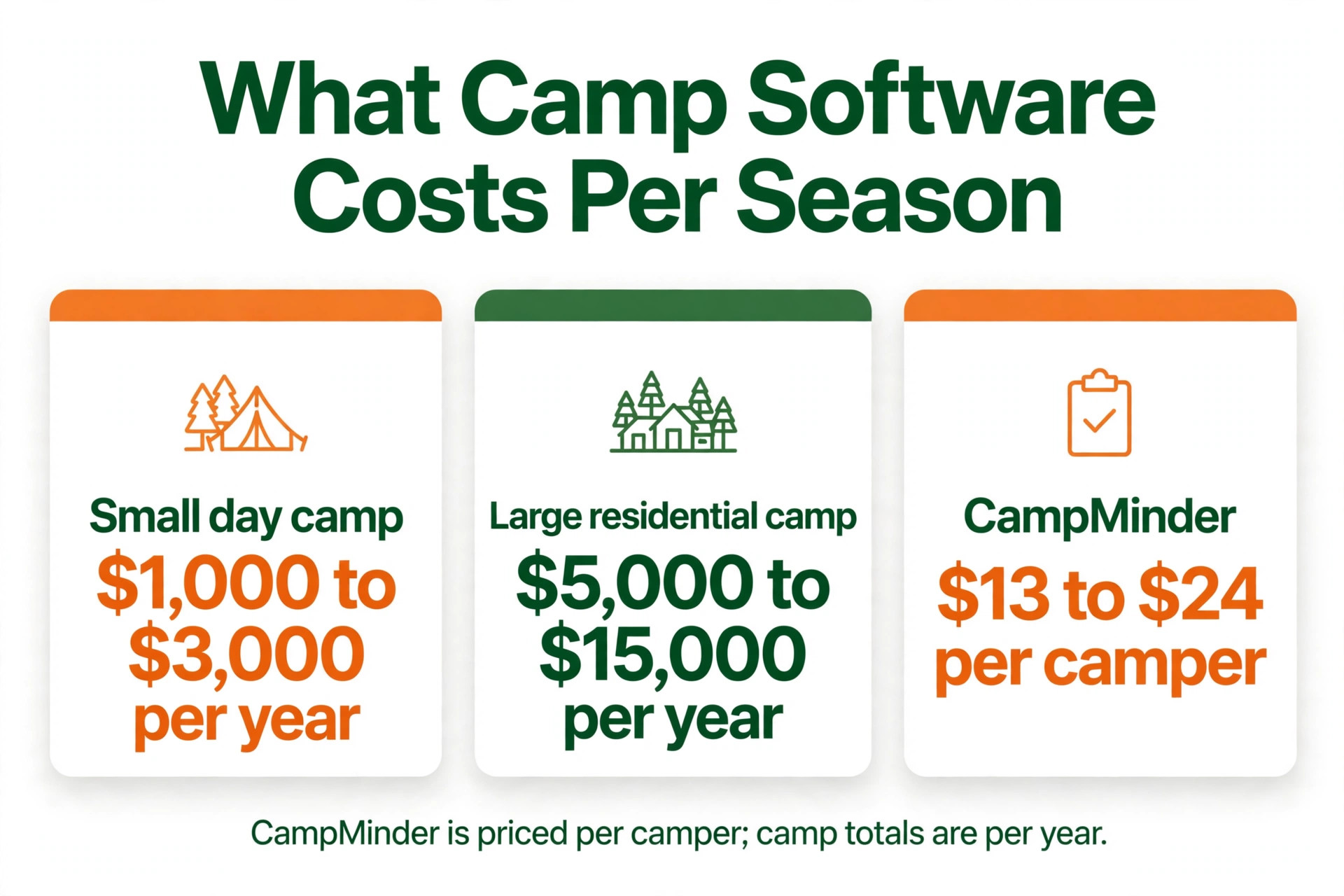
Published comparisons put small day camps at roughly 1,000 to 3,000 dollars a year for software, and large residential camps at roughly 5,000 to 15,000 dollars a year, before processing. CampMinder at about 13 to 24 dollars per camper, Regpack at about 99 to 125 dollars a month per admin, and UltraCamp at a reported 250 dollars a month all sit inside those bands at different camper counts. The right comparison is the total season cost for your camp, including setup, training, processing, and any per camper minimum.
Processing is the second line, and it deserves the same attention as the platform fee. Most camp platforms charge 2.5 to 3.5 percent for card payments, while Regpack lists processing as low as 1.5 percent. A camp taking 200,000 dollars in tuition pays roughly 3,000 dollars at 1.5 percent and roughly 6,000 dollars at 3 percent, so the processing gap alone can exceed the software subscription. Compare processing rates with the same care as platform prices, and get both in writing before signing.
Rollout checklist for a camp
Use this sequence when you move to the best registration software for summer camps you chose, and do not skip the payment test. A camp cannot close for a software switch, so the rollout must run alongside live registration, health forms, and payments.
- Export campers, families, sessions, balances, and health records, then check a sample by hand for duplicate families and incorrect balances.
- Build your session structure first, including session dates, age ranges, capacity, and cabin assignments.
- Set registration rules next, including sibling discounts, early bird offers, deposit amounts, installment dates, and waitlist rules.
- Connect payments and run a test charge with a real card, then refund it, to confirm the full payment flow.
- Invite a small group of returning families to register, pay, and upload health forms in the new portal before a full launch.
- Train office staff on waitlists, session changes, and health form follow up, because those three jobs cause most support questions.
- Keep the old system read only for one full enrollment season, so no payment or health record is lost in the move.
A careful switch protects trust. Parents forgive a new portal quickly if payments are correct and registration is easy. They do not forgive a lost payment, a double charge, or a health form that vanished. Test payment and health forms twice, and launch only when both are clean.
Mistakes that cost camps enrollments
The first mistake is choosing on headline price alone. A per camper platform that looks cheap at 200 campers can cost more than a monthly platform once enrollment passes 500, and a monthly platform that looks cheap can cost more than a per reservation platform for a small camp. Model each price at your real camper count and tuition volume, not at the headline rate, and include processing, setup, and training in the total.
The second mistake is launching registration before health forms are ready. Families who register easily and then hit a confusing health form will stall, and stalled families are the ones who never finish. Build the health form before registration opens, test it with a real family, and send reminders that explain exactly what is needed and when. A health form that is clear on day one fills faster than a health form that is fixed in week three.
The third mistake is ignoring the waitlist. A session that fills without a working waitlist loses the families who would have taken a cancelled spot, and a waitlist that is never worked loses them twice. Test the waitlist flow during a trial, including a cancellation, a session change, and a family with two children where only one spot opens.
The fourth mistake is switching during enrollment season. Registration season is the worst time to change software, because forms, payments, and health records all peak at once. Plan the switch for the off season, run a small test registration with returning families, and keep the old system read only until the first full enrollment run is clean.

Related Guides
Keep exploring with these guides on Stratilyze:
- Best Class Management Software for Art Studios (5 Tools)
- Best Class Management Software for Gymnastics Studios (12 Tools)
- Use AI for Art Studio Class Enrollment
Frequently Asked Questions
How much should a summer camp pay for registration software
Most camps pay between 1,000 and 3,000 dollars a year for the best registration software for summer camps for a small day camp, and between 5,000 and 15,000 dollars a year for a large residential camp, before processing. Per camper, per reservation, and monthly models all sit inside those bands at different camper counts. Model the total season cost at your real camper count and tuition volume, not the headline rate.
Does camp registration software handle health records
Full camp suites such as CampMinder, CampBrain, and UltraCamp handle health records and medication logs, and CampDoc is built around electronic health records with a medication administration log. Regpack has no health tools, so a residential camp needs a second system for health if it chooses Regpack. If a camp nurse works on site, put health records on the shortlist criteria before price.
Can parents register two children in different sessions
Yes, when family accounts, session specific forms, and sibling discounts are all turned on. Parents can register each child for a different session, answer only the questions that apply, and pay one deposit per child or one combined payment. Test the full family flow during a trial, including a sibling discount that applies to one child and not the other, because that case reveals whether the system truly understands families.
What is the difference between per camper and per reservation pricing
Per camper pricing rises with enrollment, which is fair when revenue grows with it. Per reservation pricing rises with the number of bookings, which can be similar for a camp with one session per camper and different for a camp with multiple sessions per camper. CampMinder charges per camper, UltraCamp charges per reservation, and Regpack charges an annual license plus a percentage. Model each model at your real camper and session counts.
Should a day camp choose a full camp suite
Not always. A day camp that needs fast forms, simple payments, and clear communication will often get more value from Regpack or UltraCamp than from a full residential suite it never fully uses. Choose a full suite when health records, cabins, transport, and staff hiring are real weekly jobs. Choose a lighter tool when registration speed and payment plans are the daily work.
How long does it take to switch camp registration software
Most camps can switch in four to eight weeks, including data import, session setup, payment testing, and staff training. Plan the switch for the off season, and keep the old system read only until the first full enrollment run is clean. Avoid switching during enrollment season unless the old system has failed, because a registration error at peak season affects every family at once.
Enrolment first, software second
Day camps should test Regpack first, with UltraCamp as the camp specific alternative. Overnight camps should test CampMinder first, with CampBrain as the full suite alternative with off season rentals. Specialty camps should test CampDoc first, with CampMinder as the full suite alternative that adds cabins and a parent app. In every case, the deciding test is a real family journey from online registration to health form to payment plan to cabin assignment, plus one full enrollment run. The best registration software for summer camps for your camp is the platform that handles that journey cleanly, at a written total season cost you can defend.