
OpenAI’s Sora set the standard for text to video in 2025, then priced many creators out of using it daily. Access is gated and the cost per finished clip stays high for teams that publish every week. The best Sora alternatives close that gap without forcing a quality compromise. They generate realistic footage, stylised animation, social shorts and product video from a text prompt or an image, and several of them cost less per month than a single Sora credit pack did at launch.
This guide compares 12 tools grouped by the job each one does best: realistic text to video, stylised and animation video, short form and social video, and long form and product video. Prices are October 2026 figures in US dollars. Where a vendor does not publish pricing, or where sources disagreed, the guide says check checkout rather than guessing. One rule runs through this guide: judge a generator by its worst clip, not its demo reel. The tools worth paying for produce good video consistently, with faces, hands and motion that hold up on a second viewing.
The 12 best Sora alternatives at a glance
| Tool | Best job | Free option | Paid from |
|---|---|---|---|
| Google Veo 3 | Most realistic clips | Limited | Bundled, check checkout |
| Kling | Realistic motion and physics | Free tier | Around $10 per month |
| Runway Gen-4 | Realistic clips with editing control | Free tier | Around $12 per month |
| Hailuo (MiniMax) | Realistic clips on a budget | Free tier | Around $15 per month |
| Pika 2 | Stylised and social animation | Free tier | Around $10 per month |
| Luma Dream Machine | Fast stylised clips | Free tier | Around $10 per month |
| Kaiber | Music and art driven animation | Free tier | Around $10 per month |
| InVideo AI | Short form video at scale | Free plan | Around $28 per month |
| Pictory | Shorts from text and articles | Free trial | Around $25 per month |
| Opus Clip | Clips cut from long video | Free tier | Around $15 per month |
| Synthesia | Presenter led training video | Free demo | Around $29 per month |
| HeyGen | Avatar product and sales video | Free tier | Around $29 per month |
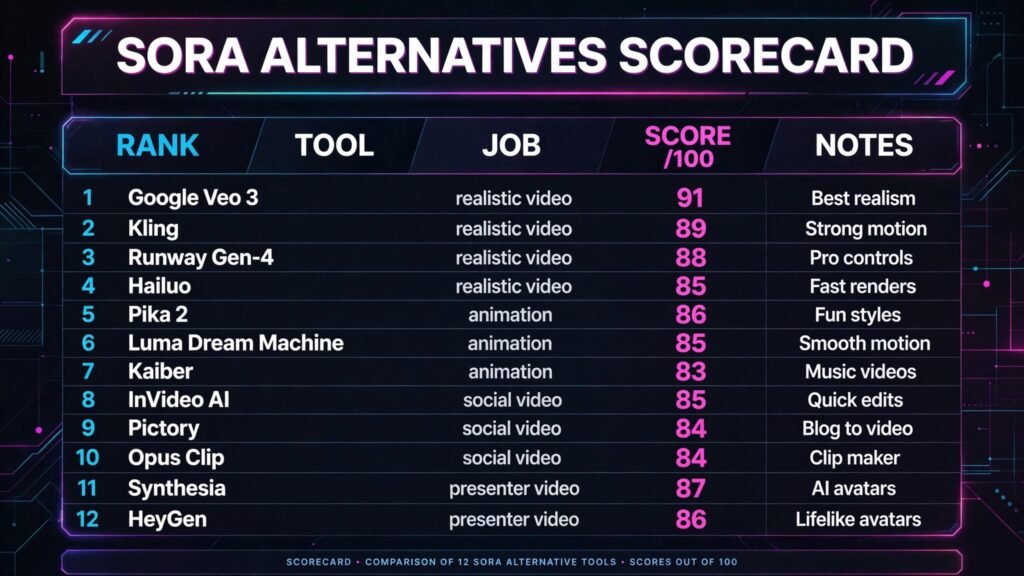
Best pick by job
| Your job | Start with | If that fails, try |
|---|---|---|
| Most realistic single clip | Google Veo 3 | Kling |
| Realistic motion and camera moves | Kling | Runway Gen-4 |
| Realistic clips you can edit after | Runway Gen-4 | Veo 3 |
| Realistic clips on the lowest budget | Hailuo | Kling |
| Stylised animation and social clips | Pika 2 | Luma Dream Machine |
| Fast stylised clips from images | Luma Dream Machine | Pika 2 |
| Music video and art animation | Kaiber | Pika 2 |
| Many social shorts every week | InVideo AI | Pictory |
| Turn articles into short video | Pictory | InVideo AI |
| Cut viral clips from long video | Opus Clip | Pictory |
| Training video with a presenter | Synthesia | HeyGen |
| Product demos with an avatar | HeyGen | Synthesia |
Realistic text to video: closest to camera footage
This is the group buyers mean when they search for Sora alternatives: footage that can pass as camera shot at first glance. It is also the group where the gap between demo and daily output is widest, so test each tool with your own prompts, not the vendor’s showcase.
1. Google Veo 3
Veo 3 is the strongest realism pick in this guide, and the closest direct answer to Sora. It generates 1080p clips with synchronised audio, dialogue, sound effects and ambient sound built in, which removes the separate voiceover and sound design step most rivals still need. Physics, lip movement and scene consistency hold up better than any other tool here over an 8 second clip, and it handles complex prompts with multiple subjects and camera directions.
Pricing: Veo 3 is sold through Google’s AI plans rather than as a standalone subscription. Google AI Pro is reported at $19.99 per month and includes Veo 3 access with monthly generation limits, while higher tiers raise those limits. Check checkout for the current credit allowance, since Google has changed AI plan bundles several times.
Best for: Creators and agencies that need the most realistic single clips, with audio included, and teams already inside Google’s ecosystem.
Watch out for: Generation limits are the constraint. A Pro plan covers testing and occasional clips, not a daily publishing schedule, and longer or more complex prompts fail more often than simple ones. Budget for failed generations when you cost a project.
Try it at: deepmind.google

2. Kling
Kling, from Kuaishou, is the motion specialist. Where other generators produce a pretty first frame that drifts, Kling keeps movement coherent: a person walking keeps walking, a camera pan stays smooth, and objects behave with plausible weight across 5 to 10 second clips. Its newer models also handle image to video well, turning a product photo into a moving shot without warping the product.
Pricing: A free tier is offered with limited daily credits. Paid plans are reported from around $10 per month for the Standard tier, with higher tiers adding faster generation and more credits. Check checkout for the current credit pricing, since Kling prices by credits and prices have shifted between model releases.
Best for: Creators who need believable motion, product shots from still images, and realistic clips at a lower monthly cost than Veo 3 or Runway.
Watch out for: Faces at a distance can still soften, and text inside a scene is unreliable. Kling is also weaker than Runway at editing a generated clip after the fact, so plan to regenerate rather than fix.
Try it at: klingai.com
3. Runway Gen-4
Runway Gen-4 is the editor’s choice among realistic generators. It keeps characters, objects and visual style consistent across scenes, which matters when a video needs more than one shot of the same person or product. It also pairs generation with a real editing timeline, so a clip can be trimmed, extended and composited without leaving the platform.
Pricing: A free tier is offered with limited credits. Standard is reported at $12 per month on annual billing, with Pro at $28 per month adding more credits and faster generation. Check checkout for the current credit allowance per plan.
Best for: Agencies and creators producing multi shot video, brand work where the same character or product must look identical across scenes, and teams that want generation and editing in one place.
Watch out for: Credit burn. High quality generations and longer clips consume credits fast, and the monthly allowance covers fewer finished minutes than the marketing suggests. Track credits per project, not per month.
Try it at: runwayml.com
4. Hailuo (MiniMax)
Hailuo, from MiniMax, is the budget realism pick and the emerging tool most likely to surprise. It generates sharp, cinematic 6 second clips with strong prompt following, including its popular subject reference feature that keeps a person or product consistent across generations. For creators priced out of Veo and Runway, it is the first tool to try.
Pricing: A free tier is offered with daily credits. Paid plans are reported from around $15 per month, with higher tiers adding faster generation and more credits. Check checkout for the current plan prices, since MiniMax has adjusted pricing between model versions.
Best for: Independent creators and small teams that need realistic clips on a tight budget, and anyone testing whether AI video earns its place in their workflow before committing to a premium plan.
Watch out for: Generation queues on the free and lower tiers can be slow at peak hours, and complex multi subject scenes still break down more often than on Veo 3. Keep prompts to one subject and one action for the best hit rate.
Try it at: hailuoai.video
Stylised and animation video: look designed, not filmed
Not every video should look like camera footage. Product launches, explainers, music content and social posts often work better with a distinct visual style, and stylised frames hide small errors that would ruin a photorealistic shot.
5. Pika 2
Pika 2 is the most versatile stylised generator, with a large library of effects, templates and community styles that make it fast to produce a finished social clip. Its ingredients feature lets creators drop in a character or object and keep it consistent across clips, which is the hardest part of stylised video. It also handles sound effects and lip sync on shorter clips.
Pricing: A free tier is offered with limited credits. Paid plans are reported from around $10 per month for Standard, with Pro tiers adding more credits and faster generation. Check checkout for the current credit allowance, since Pika prices by credits.
Best for: Social creators, small brands and musicians who need stylised clips fast, and teams that want effects and templates rather than starting from a blank prompt.
Watch out for: Realism is not Pika’s job. Photorealistic prompts come out looking illustrated, and longer clips drift in style. Use it for stylised work and pick Veo or Kling when footage must look filmed.
Try it at: pika.art

6. Luma Dream Machine
Luma Dream Machine is the speed pick for stylised video. It generates clips in under a minute on paid tiers, with strong image to video that turns a single illustration or photo into a moving scene. Its Ray model improved character consistency and camera control, making it a practical choice for storyboards, concept clips and social posts that need to ship the same day.
Pricing: A free tier is offered with limited generations. Paid plans are reported from around $10 per month for Lite, with higher tiers adding more generations and faster queues. Check checkout for the current generation limits per plan.
Best for: Creators who need fast turnaround on stylised clips, storyboard and concept video, and image to video from artwork or product shots.
Watch out for: Clip length is short, typically 5 to 10 seconds, and complex action still warps. Luma suits single shots and social clips better than narrative scenes with dialogue.
Try it at: lumalabs.ai
7. Kaiber
Kaiber is the music and art driven animator. Upload a song, an image or a short clip, and Kaiber animates it in a chosen style, with motion that follows the beat. It is the tool behind a large share of AI music videos, lyric videos and visualisers, and it suits creators whose video starts from audio rather than from a script.
Pricing: A free tier is offered with limited credits and watermarked output. Paid plans are reported from around $10 per month for Explorer, with higher tiers removing watermarks and adding credits. Check checkout for the current credit pricing.
Best for: Musicians, lyric video creators and brands making visualisers, and anyone animating artwork to music rather than generating footage from text alone.
Watch out for: Kaiber is a specialist, not a general generator. Text to video from scratch is weaker than Pika or Luma, and output needs an audio track to make sense. Buy it for music led work, not as a Sora replacement for general clips.
Try it at: kaiber.ai
Realistic and stylised generators make one clip at a time. Social teams need ten clips a week, cut, captioned and formatted for vertical feeds. These three tools are built for volume: they script, generate, caption and format in one workflow, as covered in our best AI tools for TikTok guide.
8. InVideo AI
InVideo AI turns a prompt, a script or a URL into a complete short video: footage, voiceover, captions, music and transitions, ready for vertical or widescreen export. Its stock library fills gaps where generation would be slow, and its templates keep a consistent brand look across dozens of posts.
Pricing: A free plan is offered with watermarked exports. Paid plans are reported from around $28 per month for Plus on annual billing, with higher tiers adding generative credits and removing limits. Check checkout for the current generative credit allowance.
Best for: Social teams, agencies and creators publishing short video daily, and small businesses that need finished posts without an editing skill set.
Watch out for: Generated footage inside InVideo is weaker than a dedicated generator like Kling or Veo. Use its stock library and templates for speed, and bring in dedicated generator clips when a hero shot must look premium. Teams comparing free options should also see our best free AI video generators guide.
Try it at: invideo.io

9. Pictory
Pictory converts text into short video: paste an article, a blog post or a script, and it selects scenes, adds captions and voiceover, and exports a finished clip. It is the most practical tool on this list for repurposing written content, and it suits marketers sitting on a back catalogue of articles that never became video.
Pricing: A free trial is offered. Paid plans are reported from around $25 per month for Standard on annual billing, with higher tiers adding more video minutes and voices. Check checkout for the current minute allowance, since Pictory prices by video minutes.
Best for: Content marketers, bloggers and agencies turning articles, newsletters and scripts into social shorts and YouTube videos.
Watch out for: Scene selection is automatic and sometimes literal in the wrong way, so review every clip before publishing. Pictory is a repurposing tool, not a creative generator, and its footage will not match a dedicated text to video model for original scenes.
Try it at: pictory.ai
10. Opus Clip
Opus Clip does a different job from every other tool here: it watches a long video and cuts the best short clips from it, with captions, hooks and virality scoring.
Pricing: A free tier is offered with limited processing minutes. Paid plans are reported from around $15 per month for Starter on annual billing, with higher tiers adding more minutes and faster processing. Check checkout for the current minute allowance.
Best for: Podcasters, YouTubers, coaches and streamers repurposing long recordings into TikTok, Reels and Shorts.
Watch out for: Opus Clip needs good source material. A rambling recording with poor audio produces weak clips no matter how good the cutting is. It also cannot invent footage, so creators without long form recordings should start with InVideo or Pictory instead.
Try it at: opus.pro
Long form and product video: presenters and demos
Some video needs a person on screen: training, onboarding, product demos and sales outreach. These two avatar tools generate presenter led video from a script, and they update in minutes when a product or policy changes.
11. Synthesia
Synthesia is the enterprise presenter platform. Pick an avatar, paste a script, and it generates a studio quality training or explainer video in over 140 languages, with screen recording and slides built in. Large companies use it for onboarding, compliance and product training because a script change means regenerating a video, not rebooking a studio.
Pricing: A free demo is offered. Paid plans are reported from around $29 per month for Starter on annual billing, with higher tiers adding more video minutes, avatars and collaboration. Check checkout for the current minute allowance, since Synthesia prices by video minutes.
Best for: Companies producing training, onboarding and compliance video at scale, and teams that need the same script in many languages.
Watch out for: Avatars still read as avatars on close inspection, and emotional delivery is flat compared with a human presenter. Synthesia suits instructional video, not advertising where performance carries the message.
Try it at: synthesia.io
12. HeyGen
HeyGen is the faster, more flexible avatar tool, popular with startups and sales teams for product demos, personalised outreach and social video. Its avatars are more expressive than most rivals, its voice cloning is strong, and its editor supports interactive elements like clickable calls to action inside the video.
Pricing: A free tier is offered with limited credits. Paid plans are reported from around $29 per month for Creator on annual billing, with higher tiers adding more credits and longer videos. Check checkout for the current credit pricing.
Best for: Startups, sales teams and creators making product demos, personalised outreach video and avatar led social content. Agencies packaging avatar demos for clients should also see our best AI tools for content agencies guide.
Watch out for: Credit costs rise fast on longer videos and voice cloning, and avatar video still underperforms real presenters for trust heavy messages like fundraising or executive announcements. Test audience reaction on a small batch before committing a whole campaign to avatars.
Try it at: heygen.com
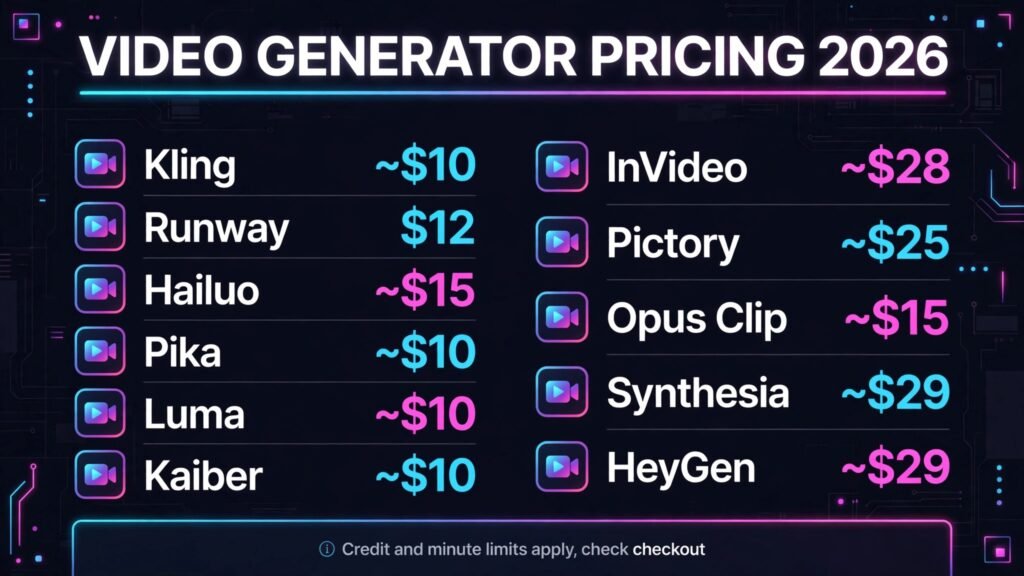
Pricing compared: what video generation really costs
| Tool | Free option | Paid from | Pricing note |
|---|---|---|---|
| Google Veo 3 | Limited | Bundled, check checkout | Google AI Pro around $19.99 per month |
| Kling | Free tier | Around $10 per month | Credit based |
| Runway Gen-4 | Free tier | Around $12 per month | Credit based |
| Hailuo | Free tier | Around $15 per month | Queues slower on low tiers |
| Pika 2 | Free tier | Around $10 per month | Credit based |
| Luma Dream Machine | Free tier | Around $10 per month | Generation limits apply |
| Kaiber | Free tier | Around $10 per month | Watermark on free tier |
| InVideo AI | Free plan | Around $28 per month | Generative credits limited |
| Pictory | Free trial | Around $25 per month | Priced by video minutes |
| Opus Clip | Free tier | Around $15 per month | Priced by processing minutes |
| Synthesia | Free demo | Around $29 per month | Priced by video minutes |
| HeyGen | Free tier | Around $29 per month | Credit based |
A realistic starter budget is $10 to $30 a month: one realistic generator such as Kling or Hailuo for hero clips, plus a free tier tool for volume. A social publishing stack lands around $40 to $70 a month by adding InVideo or Pictory for daily shorts. An agency stack with Veo 3, Runway and an avatar tool runs $80 to $150 a month before credit top ups, so price per finished minute, not per month, when comparing plans. In every case, budget for failed generations: a 50 percent usable rate doubles the real cost of every plan on this list.
How to Choose the right Sora alternative
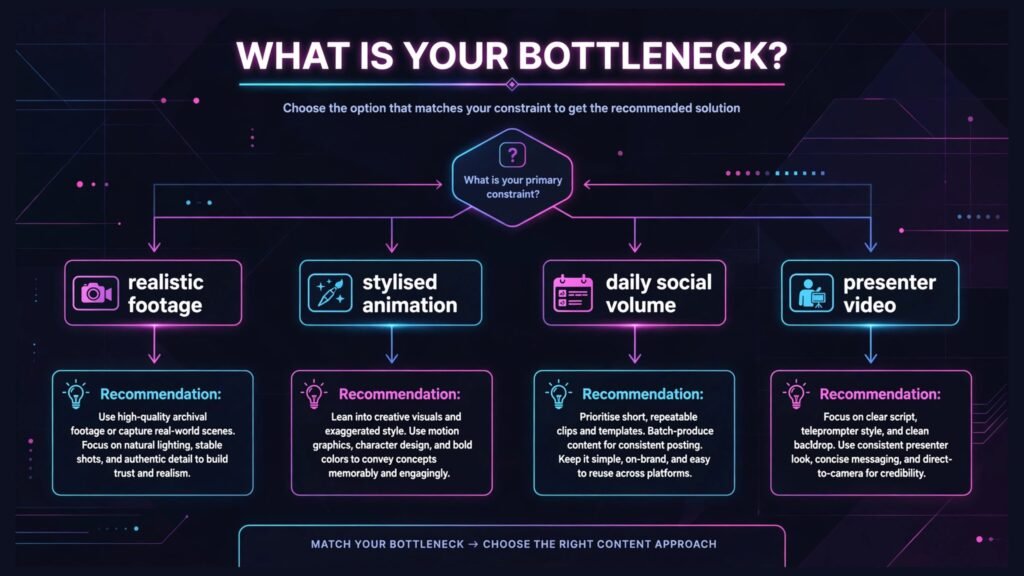
Start with the job, not the demo. If the job is one realistic hero clip, start with Veo 3 or Kling. If the job is a stylised social post, start with Pika 2 or Luma. If the job is ten shorts a week, start with InVideo AI or Pictory. If the job is training video, start with Synthesia or HeyGen.
Next, test with your own material before paying. Generate the same prompt in two tools, using your product, your character and your setting, not the vendor’s showcase scene. Check hands, faces, text and motion on a second viewing, on a phone, at full screen. The tool that survives that test is the tool to buy.
Then check the cost per finished minute: credits per generation, usable rate, and minutes per plan. A cheap plan with a 30 percent usable rate costs more than a premium plan with a 70 percent usable rate.
Finally, check the rights before publishing commercially. Most tools grant commercial use on paid plans, but stock footage, music and avatar likeness rules differ by vendor. Read the licence for the plan you actually buy, not the headline on the pricing page.
Frequently Asked Questions
Is there a free Sora alternative?
Yes, several. Kling, Hailuo, Pika 2, Luma Dream Machine and HeyGen all offer free tiers with credits, and InVideo AI offers a free plan with watermarked exports. Free tiers suit testing and occasional clips, but daily publishing needs a paid plan.
Which Sora alternative looks the most realistic?
Google Veo 3, for single clips, with synchronised audio and the strongest physics and lip movement here. Kling is close behind on motion and costs less, and Runway Gen-4 leads when several shots must keep the same character or product consistent.
Can AI video generators make long videos?
Not in one generation. Most tools generate 5 to 10 second clips, and longer videos are assembled from many clips in an editor. Avatar tools like Synthesia and HeyGen are the exception, generating minutes of presenter video from a script in a single pass.
Do I own the videos I generate?
On paid plans, generally yes, but the exact licence differs by vendor and plan. Check the terms for commercial use before using generated video in paid advertising or client work.
Why do my AI videos look wrong on hands and faces?
Hands, faces and text are the hardest details for video models, and errors increase with clip length and complex action. Shorter clips, simpler prompts, one subject per shot, and image to video from a clean reference image all raise the usable rate.
Which tool should a small business start with?
Kling, for most small businesses, because it balances realistic quality, motion and monthly cost, and its image to video turns existing product photos into moving shots. Teams publishing daily social video should add InVideo AI, and teams making training video should start with Synthesia.
Conclusion
The best Sora alternatives win on a specific job: Veo 3 on realism, Kling on motion and value, Runway on consistent multi shot work, Hailuo on budget realism, Pika and Luma on stylised speed, Kaiber on music led animation, InVideo and Pictory on daily volume, Opus Clip on repurposing, and Synthesia and HeyGen on presenter video.
Start with the job, test two tools on your own material, and measure cost per finished minute. The creators winning with AI video in 2026 are not the ones with the most tools. They are the ones whose clips survive a second viewing.