A small business posts a Short, watches it sit at a few hundred views, posts another, and watches the same thing happen again. The owner checks the subscriber count, the posting time, and the hashtags, changes one of them, and gets the same result. The real problem is usually earlier and simpler. The Short does not earn its first seconds, so the feed stops showing it, and no amount of hashtag tweaking can rescue a video that strangers swipe away. To fix YouTube Shorts not getting views small business owners face, start with the first second, then the retention curve, then the topic, in that order, and test one change at a time.
Shorts work differently from long videos, and that difference explains most of the frustration. In the Shorts feed, viewers do not click a title and thumbnail to choose your video. The video is placed in front of them, and they either keep watching or swipe away, over and over, with strangers making that decision in roughly the first second.
YouTube’s own creator guidance describes the system as looking at whether people choose to keep watching versus swipe past, along with how much of the clip they watch and what they do after watching. Subscriber count does not entitle a Short to views, because the feed tests content against non-subscribers by default. Every Short re-earns its distribution from zero, which is good news for a new channel and hard news for a channel that expected loyalty to carry weak videos.
That testing loop also explains why view counts swing wildly from post to post while subscriber counts stay flat. A Short that holds strangers gets shown to a larger batch, then a larger batch again. A Short that loses strangers in the first second stops at the first batch, no matter how good the middle or ending was, because most viewers never reached them. The fix, therefore, is not to post more of the same Shorts and hope for a different batch. It is to make Shorts that strangers choose to keep watching, about topics strangers already want, in a format that fits the vertical feed.
Read the Retention Curve Before You Blame the Feed
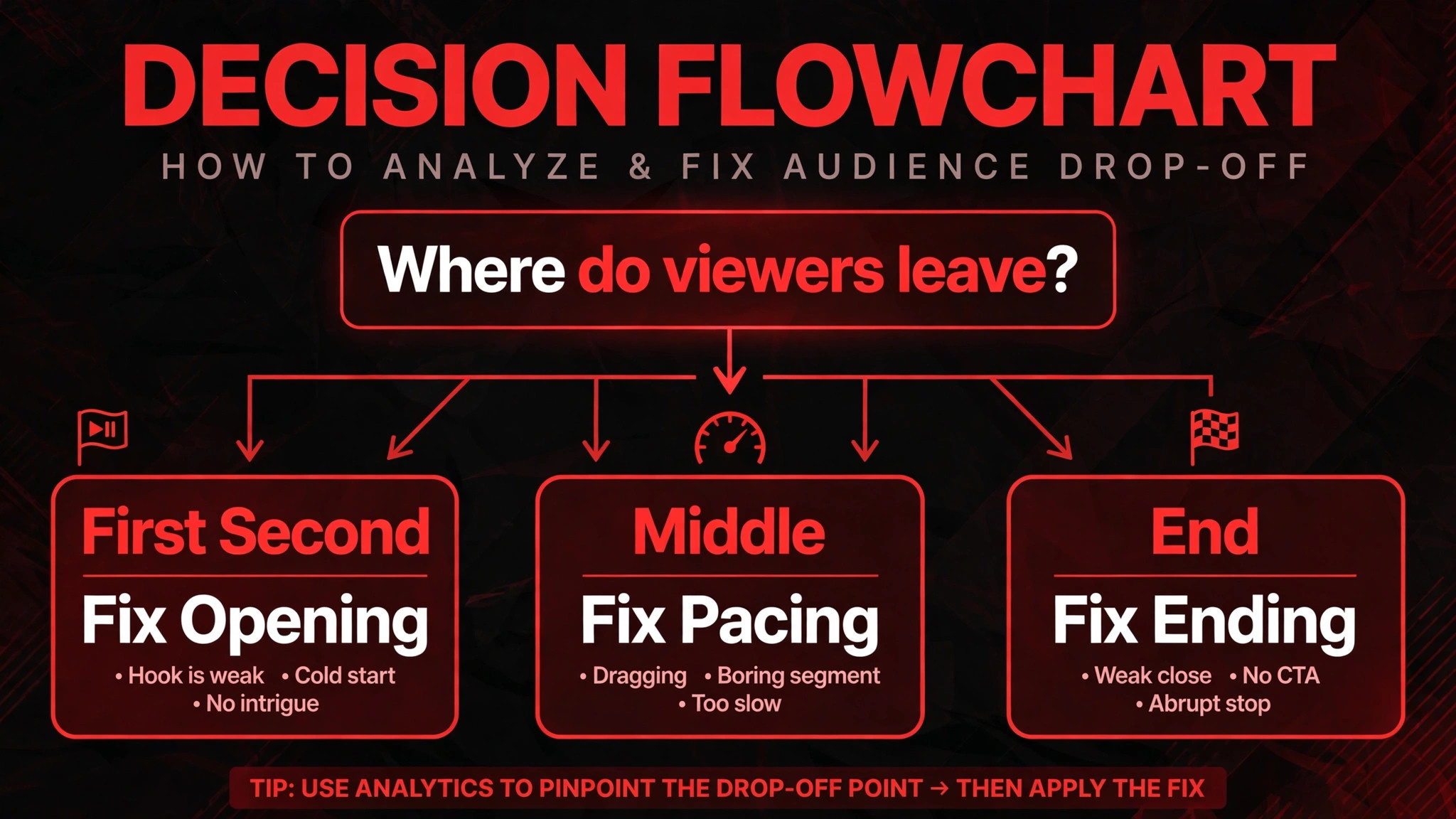
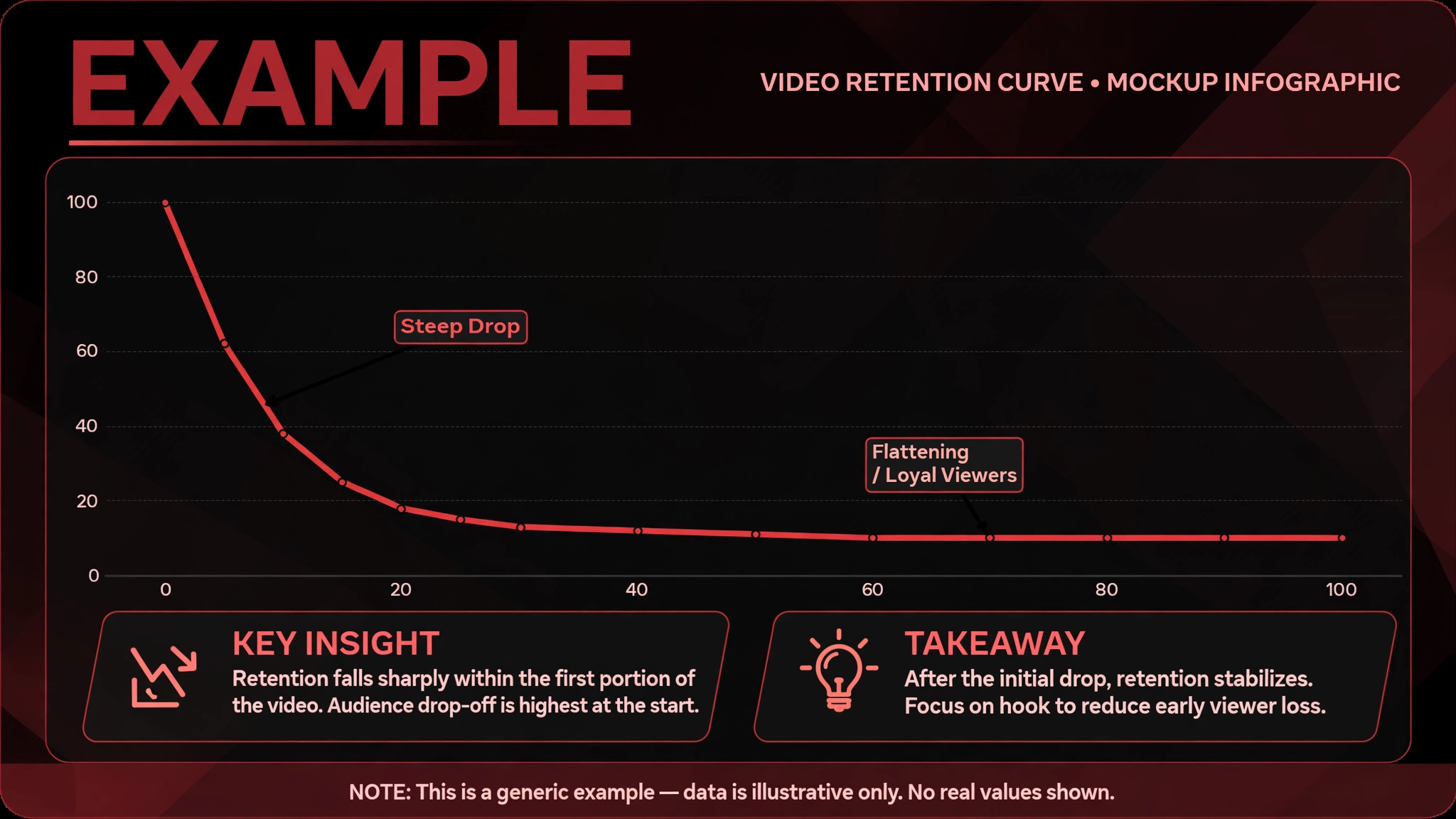
Open YouTube Studio, choose a Short, and look at the retention graph and the viewed versus swiped away data, where Studio shows it. Those two views tell you where the problem lives. If most viewers swipe away immediately, the opening frame and first line failed. If viewers watch most of the Short and leave just before the end, the ending is weak, or the Short is longer than the idea needs.
If viewers watch to the end but do not like, comment, or share, the Short may be watchable but not worth passing on, which limits its second wave of distribution. Each pattern needs a different edit, and a single tip applied to all three patterns will fix at most one of them.
Compare your last ten Shorts on the same measures, which are views, average view duration, average percentage viewed, viewed versus swiped away, likes, comments, and shares. Note the length, the opening line, the topic, and the format for each, including whether it was filmed vertically, whether it used captions, and whether it used music. A pattern will usually appear. Shorts that open on the result, the problem, or a striking visual tend to hold better than Shorts that open on a greeting, a logo, or a slow establishing shot. Shorts that are as short as the idea allows tend to finish better than Shorts padded to a round length, because finishing is easier when the video is short.
Also check the basics that can quietly block a Short from the feed. A horizontal video uploaded as a Short will show black bars and will not fit the vertical feed well, so film and export in vertical 9 by 16 format, at a resolution suitable for phones, such as 1080 by 1920 where your tools allow. A Short with copyrighted music that triggers a restriction, or a Short with a policy issue from a previous strike, may also see limited distribution, so check Studio for any restriction or claim on underperforming Shorts before you rewrite the hook. A technical block and a creative problem look identical in view counts, but they need completely different fixes.
How to Fix YouTube Shorts Not Getting Views Small Business Channels Diagnose First
When you fix YouTube Shorts not getting views small business owners report, work through these checks in order, and do not move to topic strategy until the format and the opening are clean.
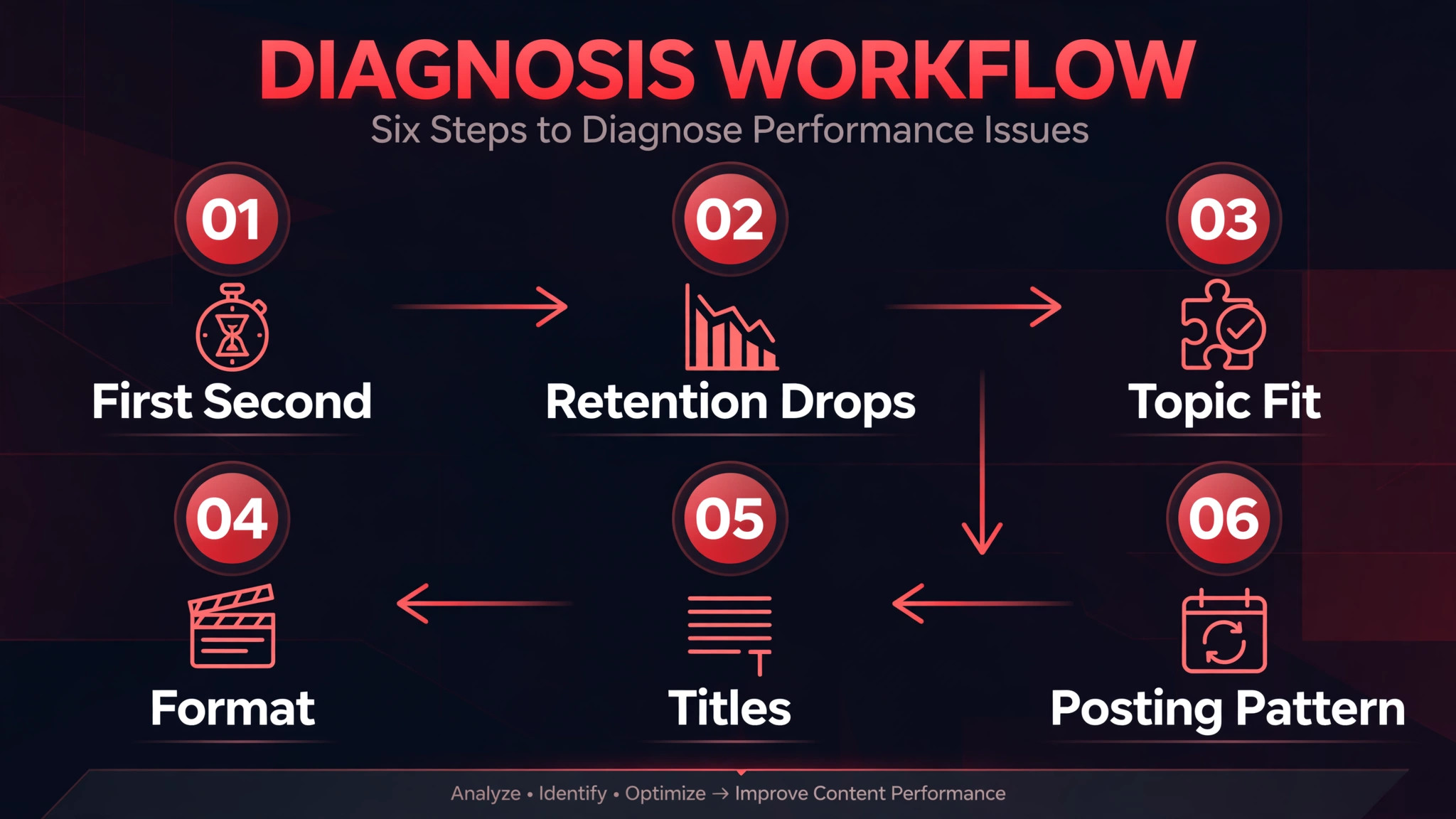
Step 1, check the first second, not the first minute
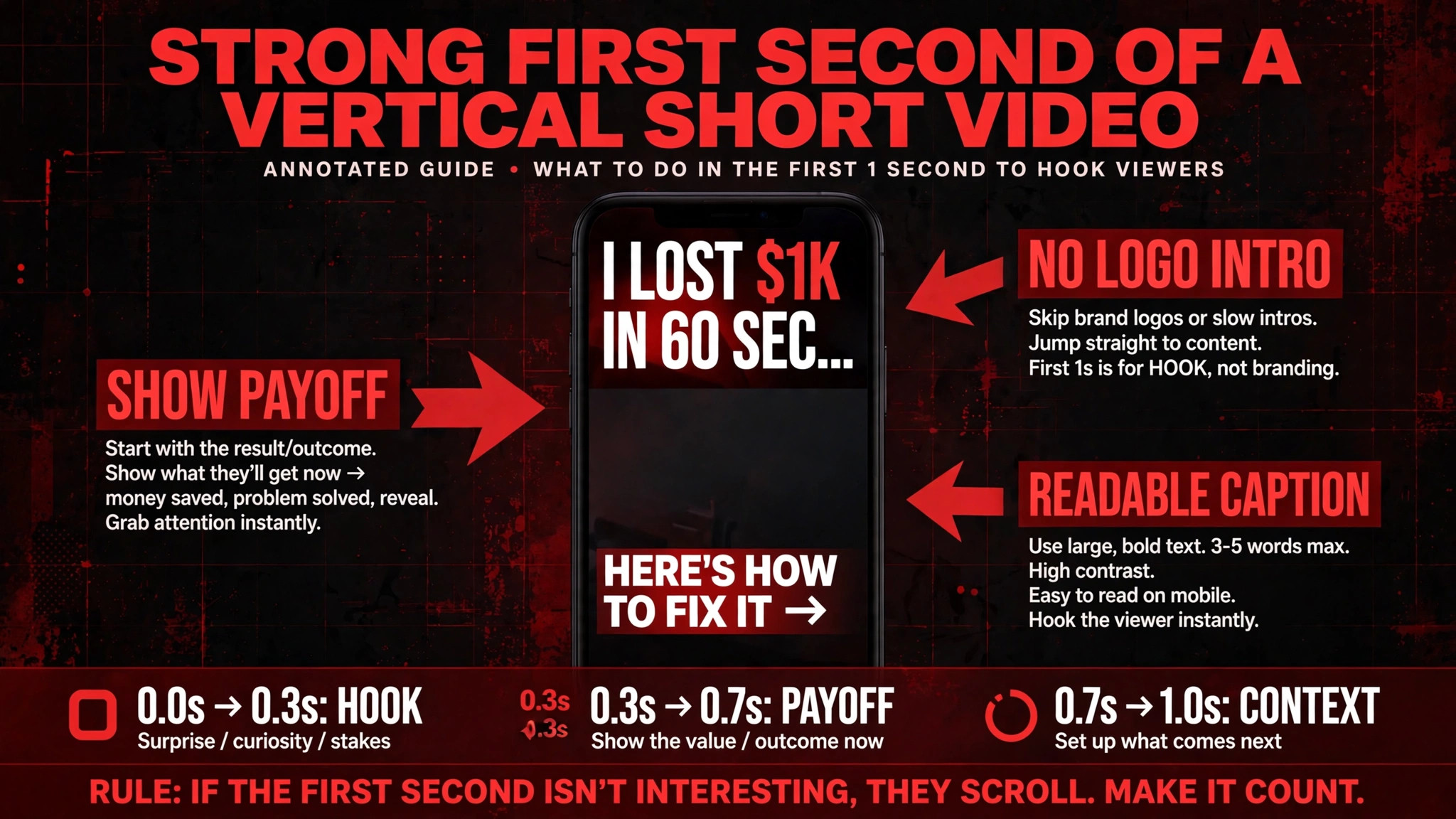
When you fix YouTube Shorts not getting views small business channels show, the first second is a visual and a verbal decision. The viewer sees a frame and hears a line, and decides whether to stay. A strong first second shows the payoff, the problem, or the most striking moment, with a caption that a muted viewer can read.
A weak first second shows a person saying hello, a shop front, a logo fading in, or a sentence that promises value later. Later value does not exist for a viewer who has already swiped away, so move the payoff to the front, even if it feels abrupt. Cut everything before the point where the Short becomes interesting, and test the cut version against the original, because the difference is often a single edit, not a new video.
Sound matters in the first second too, but many feed viewers watch on mute, so captions are not optional for a business Short. Caption the opening line and the key points, in large, readable text, and check the captions on a phone, not only on a desktop editor. A caption that is readable on a large screen may be tiny on a phone, and a muted viewer who cannot read the opening will swipe away for a reason that has nothing to do with your idea. Keep captions short, keep them on screen long enough to read, and keep them accurate, because a wrong caption undermines trust in the rest of the Short.
Step 2, check retention drops, not just total views
When you fix YouTube Shorts not getting views small business owners face, a total view count hides where viewers leave, while a retention curve shows it. Look for the steepest drop in each Short, and note what was on screen at that moment. A drop when the visual changes to a static shot, a talking head that stays still, or a long explanation without a visual change, points to a pacing problem.
A drop when a new topic appears mid Short points to a structure problem, because the viewer came for one promise and got a different video halfway through. A drop at the very end, just before a call to action, points to an ending problem, where the Short ran out of energy before it asked for anything.
Fix retention drops by editing, not by explaining. If a static section loses viewers, add a visual change, a cut, a demonstration, or a text overlay that moves the idea forward. If a mid Short topic change loses viewers, split the Short into two Shorts, each with one promise, instead of one Short with two promises. If the ending loses viewers, shorten the ending, move the call to action earlier, or end on the result rather than on a summary. Judge each edit by the retention curve of the next Short, not by whether the edit felt clever in the editor, because the curve is the audience vote.
Step 3, check topic mismatch and audience fit
If openings are strong and retention is healthy, but views are still low, the topic may not match what feed viewers want from your niche. A Short about a business process that only existing customers care about will struggle to find strangers, even if it is well made. A Short that answers a question strangers actually search for, or that shows a result strangers want, has a larger test audience from the start. Creator and retention analysts report that search driven topics, with clear keywords in titles and descriptions, are becoming a more important discovery surface for Shorts, especially for how to and educational topics, so topic choice is not just a creative preference. It is a distribution choice.
Test topic fit by looking at which of your Shorts strangers actually finished and shared, not which Shorts you enjoyed making. A Short with high percentage viewed and healthy shares, even with modest total views, is a topic signal worth repeating with new examples. A Short with low percentage viewed, even with a strong opening, may be a topic that strangers do not want, or a promise that the Short does not deliver. Repeat winning topics with new angles, and retire losing topics after three honest attempts with different openings, because a topic that fails three times is telling you something, even if you believe in it.
Step 4, check format, length, and music
When you fix YouTube Shorts not getting views small business channels show, format errors are easy to fix and easy to overlook. Confirm every Short is vertical, that text is inside the safe area where feed buttons do not cover it, and that the Short is not a cropped horizontal video with black bars. Keep Shorts as short as the idea allows, because a viewer who watches forty seconds of a forty five second Short gives a far higher percentage viewed than a viewer who watches the same forty seconds of a sixty second Short, and percentage viewed is part of what the feed measures.
That does not mean every Short should be fifteen seconds. It means every second should earn its place, and a Short that needs forty five seconds should use all forty five well, not pad to sixty.
Music and audio need the same care. Copyrighted music can trigger visibility restrictions, and a muted or restricted Short will not travel, so use music you have a right to use, original audio, or a voiceover you recorded yourself. Original audio has a second benefit, because a voiceover that explains a process or a result is original by definition, and it helps a stranger understand the Short without knowing your business. A trending track over generic footage gives the feed no reason to prefer your Short over a hundred similar Shorts, while a clear voiceover over a real demonstration gives it a reason to stay.
Step 5, check titles, descriptions, and search fit
Titles and thumbnails matter far less in the Shorts feed than in long form, because viewers do not click to choose a Short, but titles and descriptions still matter for search discovery and for telling YouTube what the Short is about. Write titles that state the result, the question, or the problem in plain words a stranger would search for, and write descriptions that add context, not hashtags alone. Avoid clickbait titles that promise a result the Short does not deliver, because a viewer who feels misled will swipe away and may not return to your next Short, and a pattern of misleading promises will hurt retention across the channel.
Hashtags should be few and relevant, not a long list of broad terms. A handful of tags that describe the topic, the trade, and the local area, where relevant, help YouTube understand the Short without looking like spam. Check Studio search traffic for Shorts that did get views, and note which search terms brought viewers, because those terms are a clue to what strangers want from your niche. Build the next batch of Shorts around those terms, with different angles, rather than guessing a new topic each week. Search fit is slow, but it compounds, because a Short that ranks in search can keep finding viewers after its feed push fades.
Step 6, check posting pattern and patience
A single Short tells you almost nothing, and thirty Shorts tell you what your audience swipes past. Judge a Short after it has had time to test, which creator guidance often puts at twenty four to forty eight hours for an initial read, and judge a pattern after a month of consistent posting, not after one viral attempt or one flop.
Posting pattern matters because the feed needs enough Shorts to test, and a channel that posts once a month gives the system little to learn from. That does not mean posting daily at the cost of quality. It means posting often enough to learn, with a sustainable rhythm, such as three Shorts a week, each with a strong opening and one clear topic, and logging the results.
Patience also matters because Shorts distribution can be uneven. Some analysts report a recency pattern in which Shorts older than about a month see a sharp drop in feed impressions, though YouTube has not officially confirmed that pattern as policy, so treat it as a reported observation, not a rule. If that pattern holds for your channel, it means a steady flow of fresh Shorts matters more than a library of old Shorts, and it means you should not judge a channel by its oldest videos. Keep posting fresh, keep testing openings, and keep retiring topics that fail three times, rather than waiting for an old Short to revive on its own.
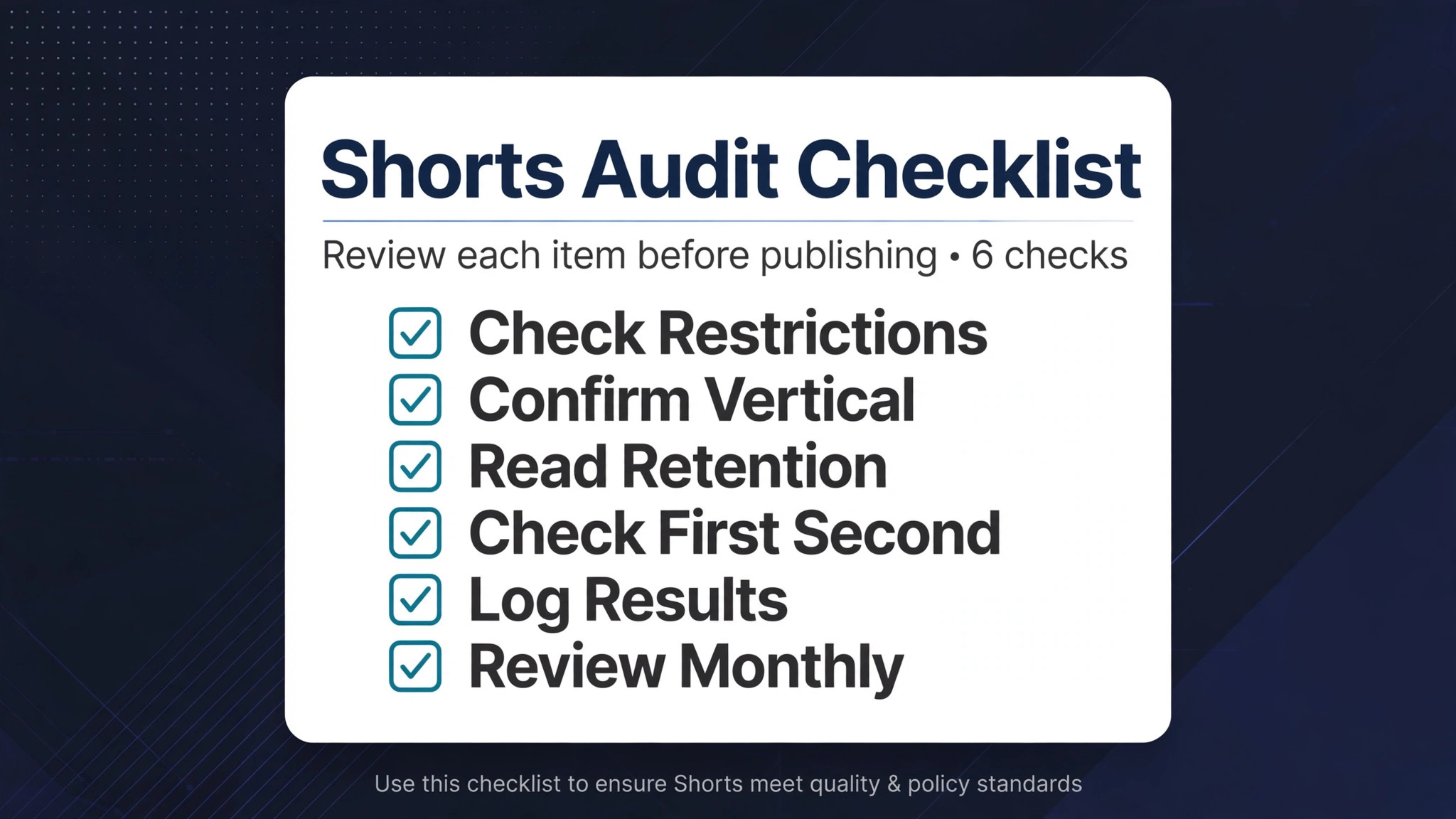
The Shorts Audit Checklist
Use this checklist for every underperforming Short, and monthly for the channel. It is the overview-proof core of this guide, because it turns a vague complaint about views into a dated, checkable routine.
– Open YouTube Studio, check the Short for restrictions, claims, or strikes, and note any issue before judging content. – Confirm the Short is vertical 9 by 16, with text inside the safe area and captions readable on a phone. – Read the retention curve, mark the steepest drop, and note what was on screen at that moment. – Record viewed versus swiped away, average percentage viewed, likes, comments, and shares for the Short. – Check the first second on mute, and confirm a stranger can understand the promise from frame and caption alone. – Compare the Short with your last ten, and note whether the topic, opening, or length explains the result. – Check the title and description for search fit, and note any search terms that brought viewers to similar Shorts. – Test the next version with a new opening, a tighter edit, or a single topic split, and log the result. – Post at a sustainable rhythm, judge a Short after twenty four to forty eight hours, and judge a pattern after a month. – Keep a dated log of every test, so a later improvement can be traced to a fix, not to luck.
Rebuilding Views With a Thirty Short Test
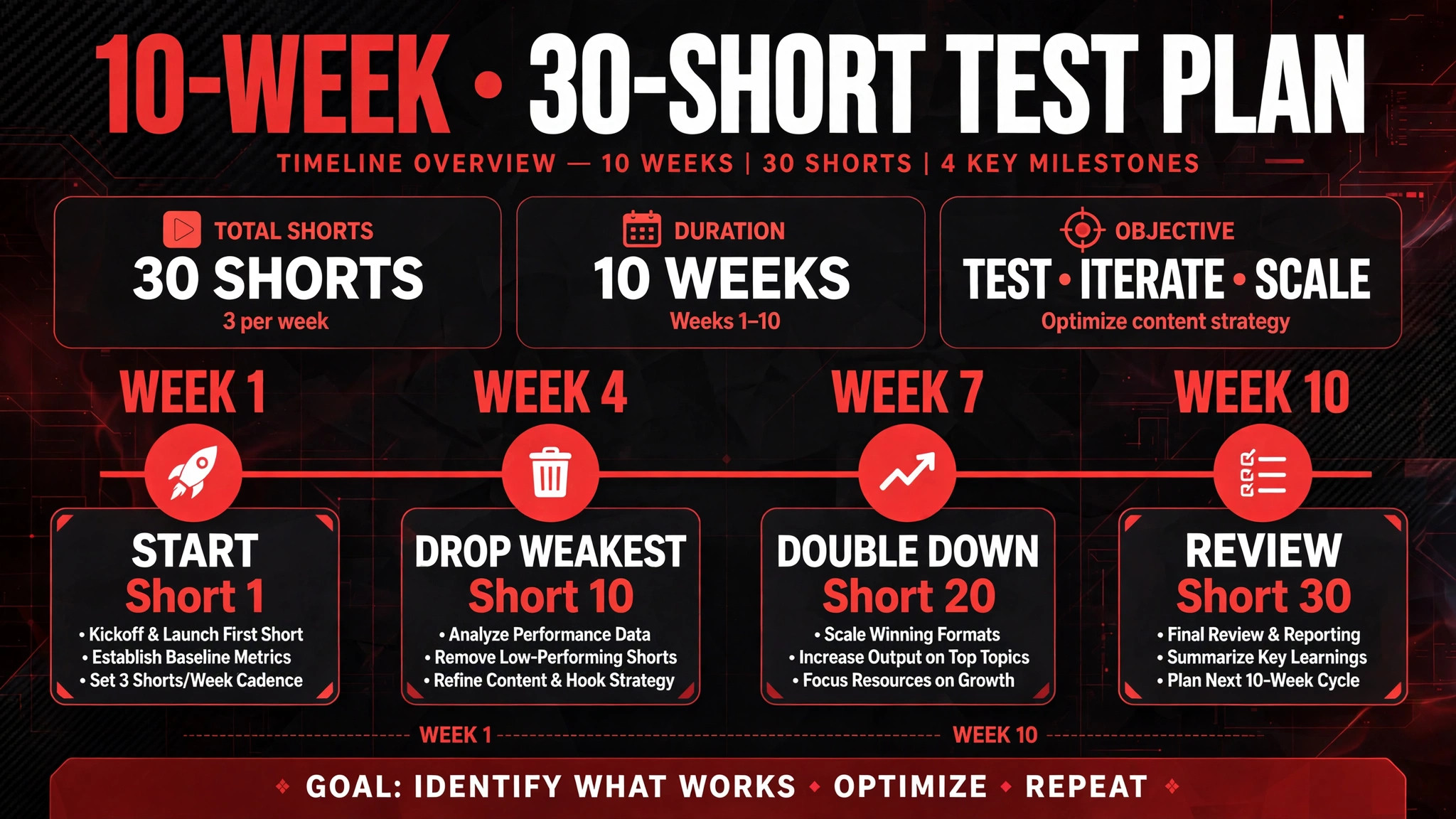
Rebuilding views, when you fix YouTube Shorts not getting views small business owners report, is a volume and learning job, not a single video job. Commit to thirty Shorts over about ten weeks, at a rhythm you can sustain, each with one topic, one promise, and one strong opening. Before you start, list ten topics strangers in your niche actually want, based on search terms, customer questions, and your best performing Shorts so far.
For each topic, write three different openings, which are a result opening, a problem opening, and a question opening, and film the topic three times if needed, so you are testing openings, not just topics. That structure gives you thirty tests that actually teach you something, instead of thirty random videos that teach you nothing.
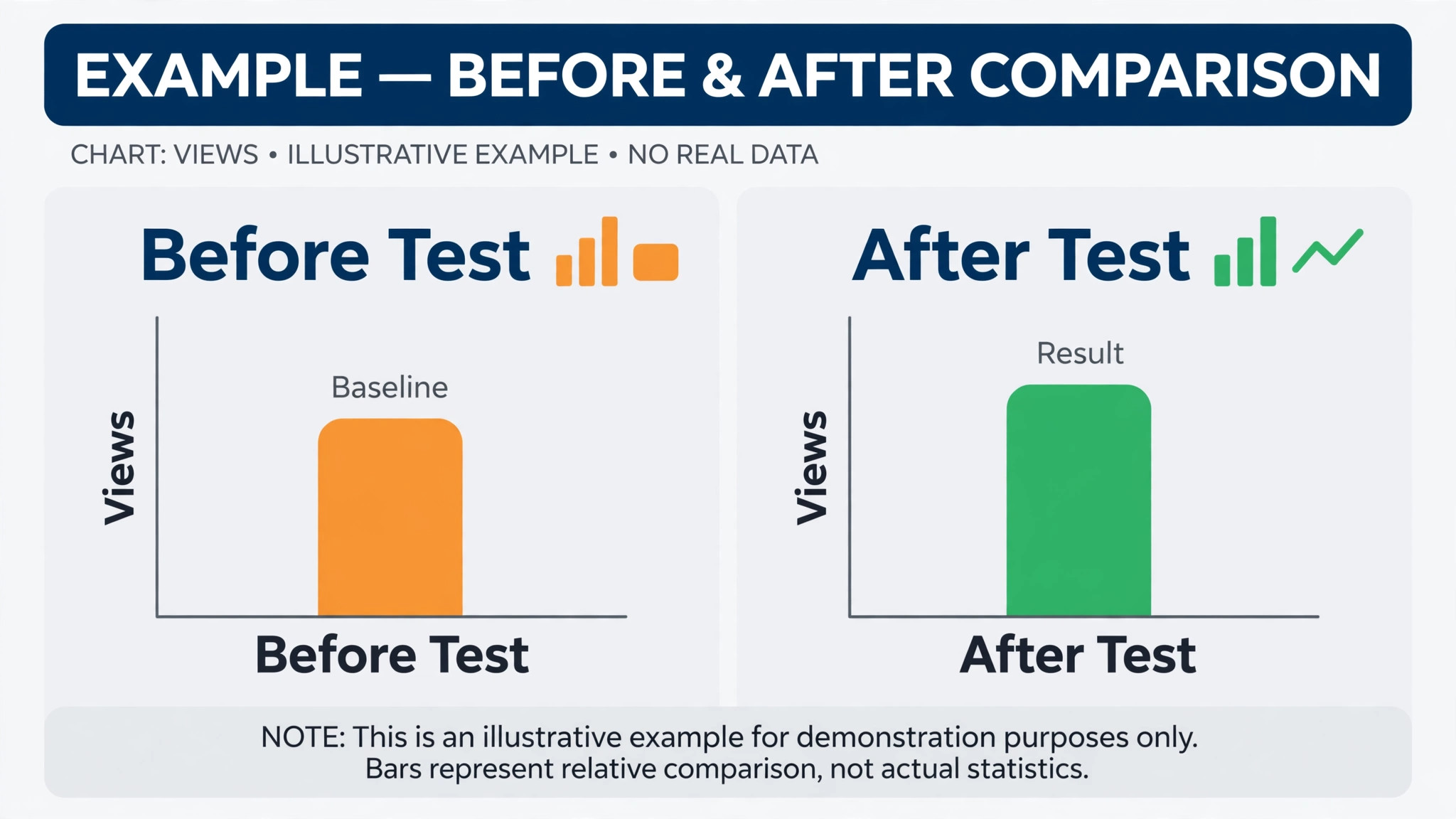
Log every Short in the same table, with date, topic, opening type, length, viewed versus swiped away, average percentage viewed, likes, comments, shares, and views after seven days. After ten Shorts, drop the weakest opening type and double down on the strongest. After twenty Shorts, drop the weakest topic group and double down on the strongest. After thirty Shorts, you will have a clear picture of what your audience watches, what they share, and what they swipe past, and you will have a repeatable format for the next thirty. That log is the asset, because it turns a channel from guessing into testing, and testing is what the feed rewards.
A small business does not need expensive equipment for this test. A phone, good light, clear sound, and a quiet room are enough for most service and retail Shorts, because the feed rewards a clear demonstration and a strong opening more than polished production. Spend your time on the first second, the retention curve, and the topic list, and spend your money, if you spend any, on better light and sound, not on a studio you will use once. A Short filmed in a real shop, showing a real result, will usually outperform a polished Short filmed in a studio that shows nothing real.
Mistakes That Keep Shorts Small
The first mistake when you fix YouTube Shorts not getting views small business owners report is treating a Short like a short advertisement. A polished corporate video chopped into sixty seconds, with a logo, a slogan, and a slow build, will be swiped away in the feed, because feed viewers did not choose to watch an advertisement.
Show the work, the result, or the answer first, and let the business name appear naturally, not as an opening title card. The second mistake is reposting the same Short with a new title and expecting a different result. A reposted Short with the same opening will likely get the same swipe rate, and it wastes a test slot that could have tested a new opening.
The third mistake is judging a Short by subscriber views alone. Shorts are tested against non-subscribers by default, so a Short that your subscribers love but strangers swipe past will still stall, and a Short that strangers love but subscribers ignore can still travel. Judge Shorts by viewed versus swiped away and by percentage viewed among strangers, where Studio shows that split, not by how many existing subscribers watched. The fourth mistake is stopping after a few flops. A channel with five Shorts has not tested anything yet, and a channel that stops at five will never learn which opening, topic, or length works for its audience. Commit to thirty, log them, and let the log decide.
When Views Stay Low Despite a Clean Audit
If format is clean, openings are strong, retention is healthy, and views are still low after thirty tested Shorts, the problem may be niche size or offer clarity, not the feed. A very narrow niche, such as a specialist trade in a small town, may simply have a smaller feed audience, and growth may come from search and local discovery rather than from viral feed pushes. In that case, measure success by enquiries, bookings, and local search views, not by total Shorts views, because a hundred local viewers who book are worth more than ten thousand distant viewers who never will.
Offer clarity matters too. If a stranger cannot tell what you sell, who it is for, and what to do next, from your last five Shorts alone, the fix is not more Shorts. It is one clear offer, stated in plain words, repeated in different demonstrations. A business that tries to sell everything to everyone in every Short will confuse the test audience, and confused viewers swipe away. Rewrite the offer in one sentence, build the next thirty Shorts around that sentence, and test again, because a clear offer, shown in a strong opening, is the most reliable way to turn a stranger into a viewer, and a viewer into a customer.
For related reading, see content marketing strategy for a small service business, fix Meta Business Suite not loading for a small business, how to set up a client feedback loop for a small business, how to set up a waitlist for a small service business and local SEO strategy for a small service business. Those posts cover nearby content, platform, and feedback problems, and the same lesson applies when you fix YouTube Shorts not getting views small business owners report. Fix the first second, read the retention curve, test topics honestly, and let audience response decide.
Frequently Asked Questions
Why do my Shorts get a few hundred views and then stop?
That pattern usually means the Short was shown to a first test batch, and too many viewers in that batch swiped away, so the feed did not expand it to a larger batch. Check viewed versus swiped away and the retention curve for that Short, and note what was on screen in the first second. A new opening, a tighter edit, or a clearer promise, tested on the same topic, is the fix to try first, because the feed stops a Short that strangers do not choose to keep watching.
How long should a YouTube Short be?
A Short should be as long as the idea needs, and no longer, because percentage viewed matters, and a viewer who finishes a short video gives a stronger signal than a viewer who watches the same number of seconds of a longer video. YouTube allows Shorts up to three minutes in current guidance, but many strong business Shorts work in thirty to forty five seconds, where finishing is easy. Judge length by average percentage viewed for your own audience, not by a universal ideal, and cut any second that does not earn its place.
Do subscribers matter for Shorts views?
Subscribers matter less for Shorts than for long videos, because the Shorts feed tests content against non-subscribers by default, and every Short re-earns its distribution from zero. A Short from a small channel can outperform a Short from a large channel if strangers choose to keep watching it, and a Short from a large channel can stall if strangers swipe away. Build for strangers first, with a clear opening and a clear topic, and let subscribers be a bonus audience, not the main test.
Should I delete Shorts that got no views?
Not automatically. A single low view Short does not damage a channel in the way a policy violation or a pattern of misleading titles does, and deleting it removes the data you need to learn from it. Keep low view Shorts in your log, study their openings and retention drops, and delete or edit only Shorts with wrong information, restricted audio, or content you no longer stand behind. The log, not the delete button, is the learning tool.
How many Shorts should I post before judging my channel?
Commit to thirty Shorts at a sustainable rhythm, log each one with viewed versus swiped away, percentage viewed, and shares, and judge patterns after ten, twenty, and thirty Shorts, not after one post. A single Short tells you almost nothing, because feed testing varies by batch and by topic, while thirty Shorts show which openings, topics, and lengths your audience actually watches. If a pattern fails three times with different openings, retire it and test a new topic.
Does music choice affect Shorts views?
Yes, because copyrighted music can trigger visibility restrictions, and a muted or restricted Short will not travel, so use music you have a right to use, original audio, or a voiceover you recorded yourself. Original audio also helps a stranger understand the Short, because a voiceover that explains a result or a process is original by definition. Check Studio for any restriction or claim on underperforming Shorts before you rewrite the hook, because a technical audio block and a creative problem need different fixes.
A Direct Closing
Views follow a simple chain, and that chain is the heart of how you fix YouTube Shorts not getting views small business channels face. and every link in it can be checked. A stranger sees a frame and hears a line, and either stays or swipes. A viewer who stays either watches to the end or leaves at a drop, and either shares the Short or does not. A Short that wins the first second, holds attention to the end, and earns a share will be shown to more strangers, and a Short that loses any link in that chain will stop.
Fix the first second, read the retention curve, choose topics strangers want, and test thirty Shorts with a log. Channels that do that work will not win every time, but they will learn every time, and learning, repeated, is how a small business channel grows.