

What are you actually leaving Gemini for? That question matters more than any ranking, because Gemini is not one product. It is a chatbot, a Docs and Gmail helper, a research tool, and a video generator, all wearing the same name. The person who is annoyed by bland writing in Docs needs a different replacement from the person who wants every claim sourced, and both need something different from the person who simply does not want another Google subscription.
So this guide does not rank 13 tools from best to worst. It groups them by the reason people leave, and names the strongest pick inside each group. Prices are October 2026 list prices in US dollars, and where sources disagreed, the draft says so rather than printing a false exact figure. Check your checkout before you pay, because these prices move.
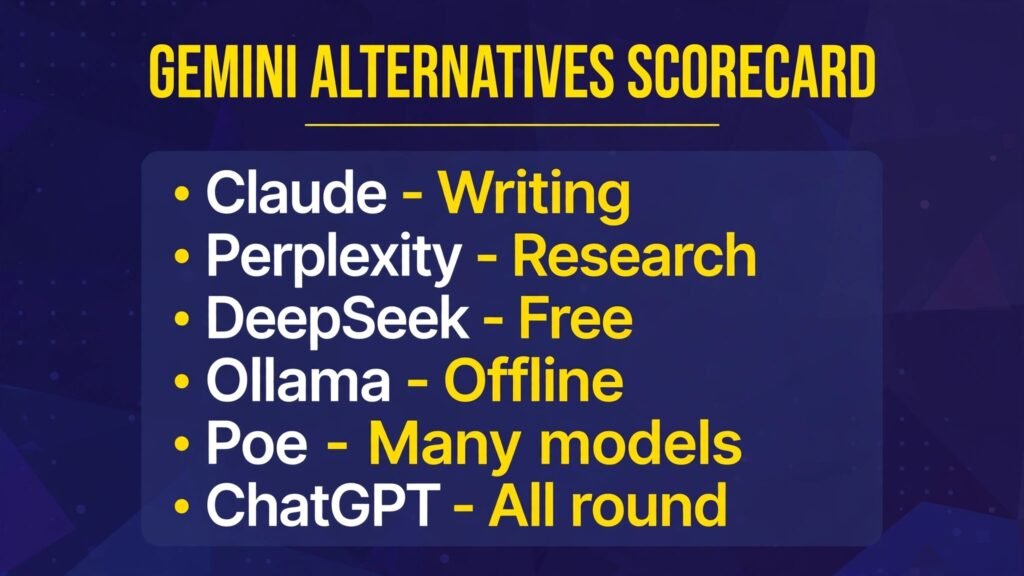
The 13 Gemini alternatives at a glance
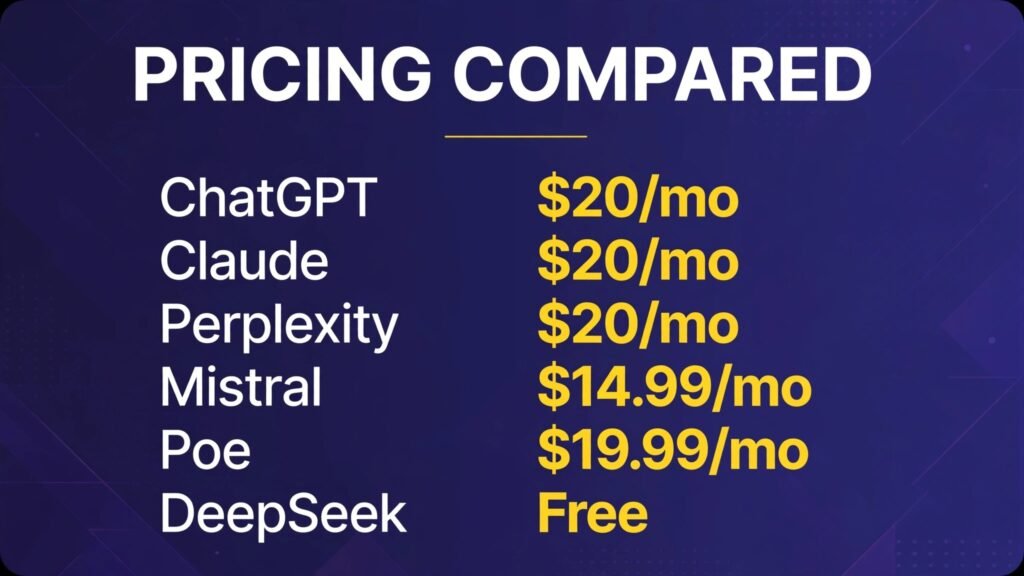
| Tool | Leave Gemini for | Free tier | Paid from |
|---|---|---|---|
| ChatGPT | Better all round writing and images | Yes | $8 a month (Go), Plus $20 |
| Claude | Better long writing and documents | Yes | $20 a month (Pro) |
| Jasper | On brand marketing copy | 7 day trial only | $69 a seat a month |
| Perplexity | Research with sources | Yes | $20 a month (Pro) |
| You.com | Search style answers with sources | Yes | Check checkout, around $20 |
| Kimi | Long documents and agent tasks | Yes | $19 a month (Plus) |
| DeepSeek | Strong reasoning for nothing | Yes, no paid chat tier | Free |
| Meta AI | A capable free assistant | Yes | Free |
| Microsoft Copilot | Free help inside Office | Yes | $19.99 a month (M365 Premium) |
| Ollama | Private, offline AI on your own machine | Yes, fully free locally | Free |
| Mistral Le Chat | European privacy at a lower price | Yes | $14.99 a month (Pro) |
| Poe | Many models in one subscription | Yes | $4.99 a month |
| Grok | Live news and social context | Yes | $10 a month (Lite), $30 (SuperGrok) |
If you want better writing
1. ChatGPT
ChatGPT is the obvious first stop, and obvious for a reason. It is the strongest all rounder in this list: drafting, rewriting, brainstorming, image generation, voice, and file analysis in one place. If Gemini’s writing feels flat to you, ChatGPT’s drafts tend to land closer to a human first draft, and its editing suggestions are easier to act on.
Pricing: Free tier with limits. Go costs $8 a month. Plus costs $20 a month with no annual billing option.
Best for: Anyone who wants one assistant for writing, images, and everyday questions.
Watch out for: The free tier carries ads in the US now, and Plus still has usage limits on the most powerful models.
Try it at: chatgpt.com
If you want the wider field of ChatGPT style tools, our ChatGPT alternatives guide covers 15 of them. For the direct head to head, see ChatGPT vs Gemini.
2. Claude
Claude is the writer’s pick. Where ChatGPT is broad, Claude is careful. Long documents hold together better, tone stays consistent across a 3,000 word piece, and its editing notes read like they came from an editor rather than a thesaurus. It also handles large files well, so pasting a full report and asking for a rewrite is a normal task, not a struggle.
Pricing: Free tier with daily message caps. Pro costs $20 a month, or about $17 a month billed annually.
Best for: Long form writing, reports, careful rewrites, and document analysis.
Watch out for: No image generation, and limits run on a rolling five hour window, so heavy days hit a wall sooner than you expect.
Try it at: claude.com

3. Jasper
Jasper is not a general chatbot. It is a marketing workspace, and it charges like one. Brand Voice training, campaign templates, and team workflows are the point. If you publish a lot of on brand copy and your problem with Gemini is that every draft sounds like every other company’s draft, Jasper earns its fee. If you just want a blog draft now and then, it does not.
Pricing: No free plan, only a 7 day trial. Pro costs $69 per seat a month, or $59 per seat a month billed annually. The older $49 Creator tier was retired in 2026, so ignore articles that still quote it.
Best for: Marketers and small teams who publish at volume and need a consistent brand voice.
Watch out for: The price is triple the chatbot standard, and some features you might expect, like Surfer SEO integration, cost extra.
Try it at: jasper.ai
If you want research with sources you can check
4. Perplexity
Perplexity is the single clearest answer to one specific complaint about Gemini: answers without sources you can open. Every Perplexity answer carries citations, and its Pro searches dig deeper than a quick web lookup. If your work involves checking facts before you repeat them, this is the tool that changes your habit, because verifying takes one click instead of a second search.
Pricing: Free tier with a few Pro searches a day. Pro costs $20 a month, or $200 a year.
Best for: Research, fact checking, and exploring topics you do not know yet.
Watch out for: It is a research tool first. For creative writing or long drafting, ChatGPT or Claude will serve you better.
Try it at: perplexity.ai

5. You.com
You.com sits in the same search first camp as Perplexity, with cited answers and a choice of underlying models on paid plans. It is less famous, which is part of its appeal: fewer people, less noise, and a clean research focused interface. The free tier covers casual research well.
Pricing: Free tier available. Paid pricing has varied across listings, so treat around $20 a month as the working figure and check checkout before you commit.
Best for: Search style research with sources, especially if you like switching models.
Watch out for: Smaller community and fewer third party guides than Perplexity, so troubleshooting takes longer.
Try it at: you.com
6. Kimi
Kimi, from Moonshot AI, is the long document specialist in this group. Its headline strength is context: paid tiers handle up to 1 million tokens, which means whole books, long transcripts, and thick reports in one conversation. It also leans into agent style tasks, running multi step jobs like research sweeps and document work with less hand holding.
Pricing: Free tier with basic agent credits. Paid tiers start at $19 a month (Plus), then $39, $99, and $199, with annual billing roughly 20 percent cheaper. Note that Moonshot paused new subscriptions for a period in 2026 when demand spiked, so a tier may not be open the day you check.
Best for: Long documents, file heavy research, and agent style multi step tasks.
Watch out for: Kimi’s privacy terms are less generous than the European options here, and its flagship model trails the top Western models on some benchmarks.
Try it at: kimi.com
If you want to spend less, or nothing
7. DeepSeek
DeepSeek is the strongest free chatbot in this list, full stop. Web chat is free with no subscription tier at all, and its reasoning is genuinely strong on maths, logic, and coding. If your reason for leaving Gemini is the price of the paid tier rather than the quality of the free tier, DeepSeek removes the bill entirely.
Pricing: Free for web chat. Developers pay per token for API use, but chat users pay nothing.
Best for: Reasoning, coding help, and anyone who wants a capable assistant for zero cost.
Watch out for: It is a China hosted service, so think before pasting sensitive work into it. It also lacks the app ecosystem and image tools of the bigger names.
Try it at: deepseek.com
8. Meta AI
Meta AI is free and everywhere Meta is: WhatsApp, Instagram, Facebook, Messenger, and a standalone app. That distribution is the point. You do not need a new account or a new habit, and for casual questions, quick drafts, and image ideas, it is good enough that many people never need a paid chatbot at all.
Pricing: Free. Reports of paid tiers around $7.99 to $19.99 a month have circulated, but no global paid rollout was confirmed as of October 2026, so treat Meta AI as free for now.
Best for: Casual everyday use inside apps you already open.
Watch out for: A weekly usage cap refreshes weekly, and it is not the tool for long documents or serious research.
Try it at: meta.ai
9. Microsoft Copilot
Copilot’s free tier is genuinely useful for chat and images, but its real case is Office. If your work lives in Word, Excel, Outlook, and PowerPoint, Copilot inside those apps is the closest thing to what Gemini does inside Google Workspace, without paying Google.
Pricing: Free tier with daily caps. The old standalone Copilot Pro at $20 a month was retired for new subscribers, and Microsoft now points individuals to Microsoft 365 Premium at $19.99 a month, which bundles Office apps and advanced Copilot. A higher Microsoft 365 Pro tier costs $99.99 a month.
Best for: Office users who want AI inside Word, Excel, and Outlook.
Watch out for: Outside Office, Copilot is noticeably thinner than ChatGPT or Claude, and only the account owner gets the Copilot AI on a family Premium plan.
Try it at: copilot.microsoft.com
If you want privacy, or AI that runs offline
10. Ollama
Ollama is the only tool here that changes the privacy question completely, because it runs models on your own computer. Once a model is downloaded, nothing you type leaves your machine. No account, no usage log on someone else’s server, no training on your prompts. For contracts, patient notes, unpublished manuscripts, or proprietary code, that is a difference in kind, not degree.
Pricing: Free and open source for local use. Your only costs are electricity and disk space. An optional cloud tier exists, but local use is the point.
Best for: Sensitive work, offline use, and anyone whose employer or client forbids cloud AI.
Watch out for: You need a decent machine, small models run on an ordinary laptop but large ones need serious memory, and answers trail the best cloud models on hard reasoning.
Try it at: ollama.com

11. Mistral Le Chat
Mistral is the European answer. Le Chat runs on Mistral’s own models, hosted in Europe, with a clear privacy story and an opt out from training on Pro. It is also the cheapest premium chatbot from a major provider, which makes it the natural pick if you want a paid assistant but dislike both the price and the data policies of the American giants.
Pricing: Free tier with limited messages and searches. Pro costs $14.99 a month, and verified students pay $5.99 a month.
Best for: Privacy conscious professionals, European users, and budget conscious power users who mostly need text.
Watch out for: Image generation and voice are thinner than ChatGPT’s, and deep integration with Office or Workspace is not its game.
Try it at: mistral.ai
If you want to leave Google entirely, or try many models at once
12. Poe
Poe is the sampler. One subscription gives you access to models from many providers, including GPT, Claude, Gemini itself, and smaller specialist bots, plus the ability to compare answers side by side. If you are leaving Gemini but are not sure what you want instead, Poe lets you test the field for the price of one subscription instead of three.
Pricing: Free tier with daily limits. Paid plans start at $4.99 a month for a basic tier, with the standard tier at $19.99 a month. Points govern how much of each model you can use, and frontier models eat points faster.
Best for: People who want to compare models, or who use different models for different jobs.
Watch out for: The points system takes a week to understand, and heavy use of the best models can cost more than a single direct subscription.
Try it at: poe.com

13. Grok
Grok’s case is live information. Built by xAI and tied to X, it is strongest on breaking news, social sentiment, and fast moving topics, where a chatbot trained months ago is guessing. If your Gemini frustration is stale answers on current events, Grok is the sharpest change.
Pricing: Free tier with limits. Paid tiers have changed repeatedly through 2026 as X reshaped its subscription bundles, with Lite around $10 a month and SuperGrok around $30 a month in recent listings. Treat those as working figures and check checkout, because this is the fastest moving price in the list.
Best for: News, social trends, and unfiltered takes on current events.
Watch out for: Weaker on long careful writing than Claude, and its answers on sensitive topics are less filtered, which is a feature to some and a problem to others.
Try it at: grok.com
What Gemini still does well, honestly
A guide about alternatives should say when not to switch. Gemini remains strong inside Google Workspace. If your day runs on Gmail, Docs, Drive, and Sheets, Gemini’s integration is genuinely convenient: summarising a thread in Gmail, drafting in Docs, and pulling numbers from Sheets without exporting files anywhere. Its video generation and very long context window are also real strengths, and the entry paid tier at $4.99 a month is the cheapest on ramp in this whole comparison.
The honest test is whether your complaint is about Gemini itself or about one feature. If only the writing bothers you, keep Gemini for Workspace tasks and add Claude for drafts. If only sourcing bothers you, add Perplexity for research. Replacing a tool you already pay for, and already know, only makes sense when the whole package no longer fits.
Switching in one afternoon
Switching assistants is easier than switching banks, but a messy move still wastes a week. Do it in this order. First, export anything you want to keep from Gemini, because chat history does not move between providers. Second, pick one finalist, not three, and run your five most common prompts through it. Third, move one workflow at a time: drafts this week, research next week, not everything on Monday. Fourth, cancel the old subscription only after the new tool has survived a full work week. People who switch everything at once usually bounce back to the old tool by Friday, not because the new one was worse, but because too much changed at once.
How to choose: start from the reason, not the ranking
If you only remember one section, make it this one. Match your reason to the pick, and you will be happy faster than any ranked list can make you.
| Your reason for leaving | Start with | If that fails, try |
|---|---|---|
| Writing feels bland | Claude | ChatGPT |
| Answers lack sources | Perplexity | You.com |
| Long documents break it | Kimi | Claude |
| The paid tier costs too much | DeepSeek | Meta AI |
| You work in Office, not Workspace | Microsoft Copilot | ChatGPT |
| Privacy rules forbid cloud AI | Ollama | Mistral Le Chat |
| You want a cheaper premium plan | Mistral Le Chat | Poe |
| You cannot decide between models | Poe | ChatGPT Plus |
| News answers feel stale | Grok | Perplexity |
A practical way to test: run your five most common prompts through two finalists for one week. Keep the one whose answers you actually reuse. Most people find the decision makes itself by day three.
Price warning: AI prices changed fast through 2026. Copilot Pro was retired, Grok’s tiers were reshaped, and Kimi paused signups at one point. Every price in this guide was checked against October 2026 sources, but your checkout is the final source of truth.
For small business use specifically, our best AI chatbots for small business guide covers team plans and support in more depth. And if writing is your main job, the best AI writing tools for bloggers and free AI writing tools guides go deeper on drafting workflows.

Frequently Asked Questions
Is there a free Gemini alternative that is actually good?
Yes. DeepSeek is the strongest fully free option, and Meta AI covers casual use well. If you need sources, Perplexity’s free tier handles a few deep searches a day. The free tier that fits depends on what you do most, not on which app is most famous.
Which Gemini alternative is best for writing?
Claude, for long and careful writing. ChatGPT if you also want images and voice in the same subscription. Jasper only if you publish marketing copy at volume and will use its brand voice features.
Which alternative is best for research with citations?
Perplexity. Its answers link to sources by design, and Pro raises the daily deep search limit from a handful to hundreds. You.com is the closest second choice.
Can I use an AI chatbot completely offline?
Yes, with Ollama. Download a model once, then chat with no internet at all. Quality depends on your machine and the model size, but for everyday writing, summarising, and questions, a small local model is more capable than most people expect.
Is Mistral Le Chat really cheaper than ChatGPT Plus?
Yes. Pro costs $14.99 a month against Plus at $20, a saving of about $60 a year. The tradeoff is thinner image and voice features and no deep Office or Workspace integration.
Do I need to pay for Microsoft Copilot to use it in Word?
The free Copilot chat works outside Office, but the deep Word, Excel, and Outlook integration sits behind Microsoft 365 Premium at $19.99 a month. If you already pay for Microsoft 365, check whether your plan already includes it before buying anything extra.
Should I keep Gemini and add a second tool instead of switching?
Often, yes. Gemini’s free tier remains useful inside Google apps, and pairing it with Perplexity for research or Claude for writing covers the gaps for less than replacing everything. Switching fully only makes sense when the ecosystem itself is the problem.
Conclusion
Gemini is a good default that is easy to outgrow in one specific direction. The writers leave for Claude. The researchers leave for Perplexity. The budget conscious leave for DeepSeek and never look back. The privacy minded leave for Ollama, and the undecided leave for Poe, which lets them try everything else first.
So do not ask which alternative is best in general. Ask what Gemini fails at for you, pick the tool in that group, and run it against your real work for a week. That test beats any ranking, including this one. Start with one tool, not five, and let the work decide.