
A customer orders a product your shop does not have, pays in good faith, and then hears nothing for three weeks. That silence, not the wait itself, is what turns a backorder into a refund request, a chargeback, or a public complaint. Most customers will wait for a product they want, provided they knew it was out of stock before they paid, they were given an honest time window, and they heard from you again before the window closed. If you want to learn how to handle backorders small online shop customers accept, fix the communication first, and fix the stock system second.
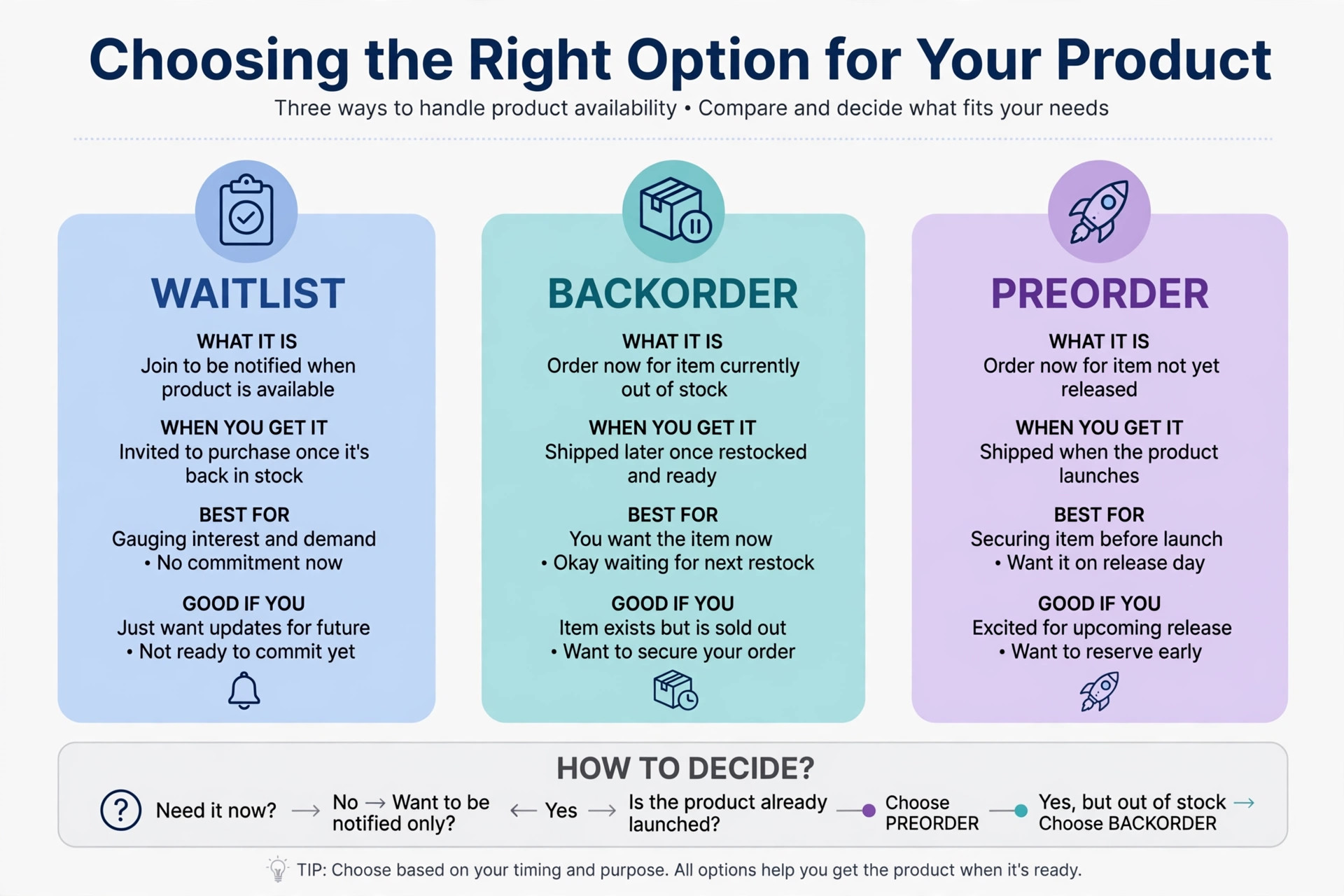
A backorder means a customer buys an item that is not currently in stock, with the order to be shipped at a later date. Shopify guidance describes backorders as typically taking from a couple of weeks to a couple of months to fulfil, depending on the product and supplier, and that range should shape your promises. A backorder is different from a preorder for a product that has never been released, and different from a waitlist, where the customer leaves an email and buys only when stock returns. Each option suits a different situation, and this guide helps you choose between them instead of accepting every backorder by default.
This guide shows how to handle backorders small online shop owners can run, giving you a complete backorder system for a small shop. It covers when to accept a backorder and when to close the product instead, what to show on the product page, the exact notice scripts to send at each stage, waitlist rules, partial shipping, refunds and cancellations, supplier communication, and the tools that keep the queue visible. Where a practice is reported from a third party guide rather than a vendor page, this guide says so plainly, and tool features and prices should be confirmed on the vendor page before you buy.
How to Handle Backorders Small Online Shop Owners Can Run Without Losing Trust
A trustworthy backorder system follows five steps, and the order matters, because a customer who discovers a delay after payment has already lost confidence before your first update arrives. Put the decision, the page wording, and the email sequence in place before you switch backorders on for any product.
- Decide for each product whether backorders are allowed at all, based on supplier reliability, the likely wait, and the margin after extra shipping and support time.
- Show the backorder status, the estimated shipping window, and the cancellation rule on the product page, in the cart, and in the order confirmation, not only in a help page.
- Send an order confirmation that repeats the backorder status and window, so the customer has the promise in writing in their own inbox.
- Send a midpoint update even when nothing has changed, and send a delay notice at once when the window moves, with a new window and a simple cancellation choice.
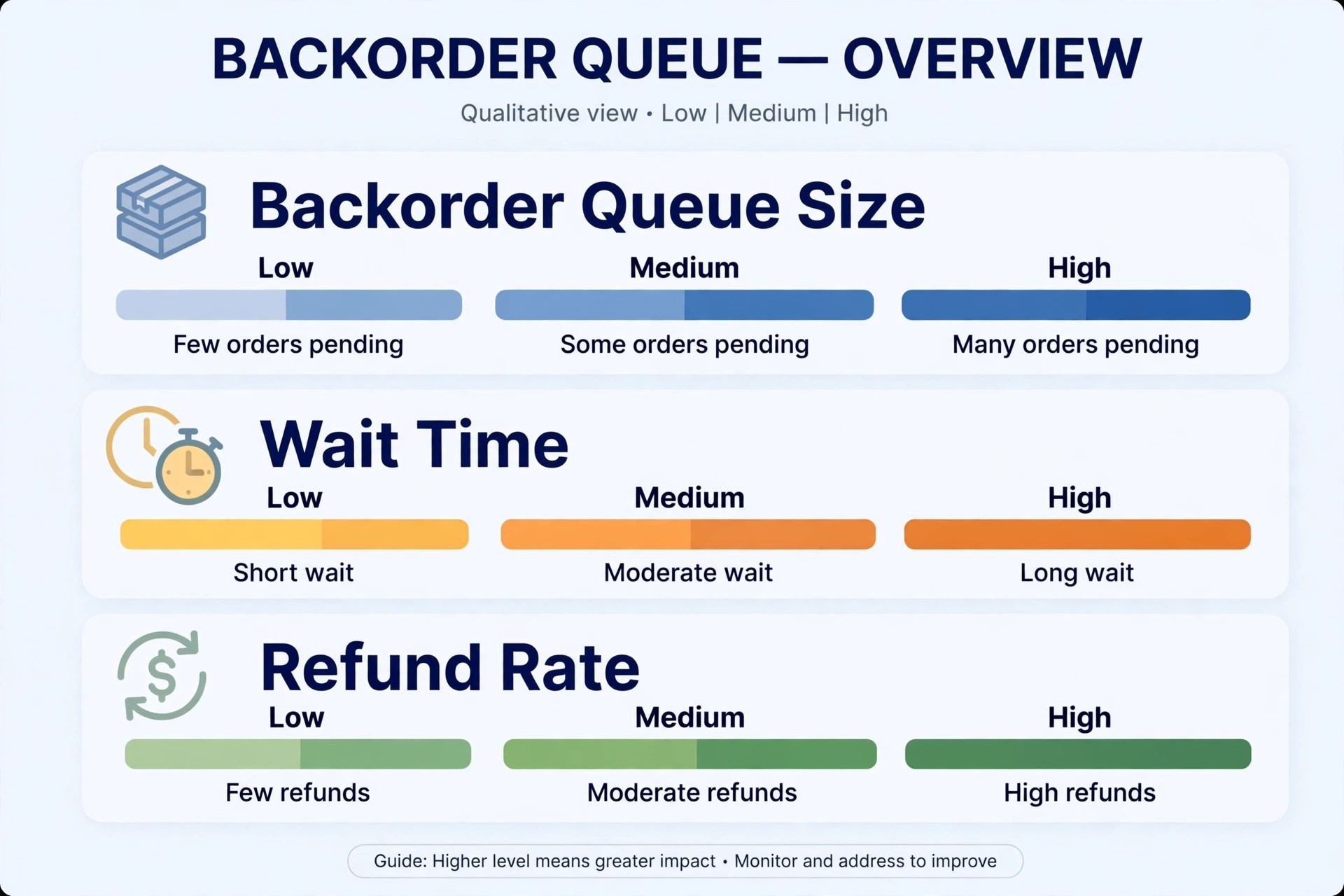
- Ship with tracking and a thank you, then review the backorder queue weekly and close any product whose wait has grown beyond what customers will reasonably accept.
That sequence works because it treats information as part of the product. A customer who chose to wait, who was told the window honestly, and who heard from you during the wait is far more likely to stay, to buy again, and to leave a fair review. A customer who was surprised by a delay, and then left to chase you for news, will not give you a second chance, even if the product eventually arrives in perfect condition.
Decide When a Backorder Is Worth Accepting
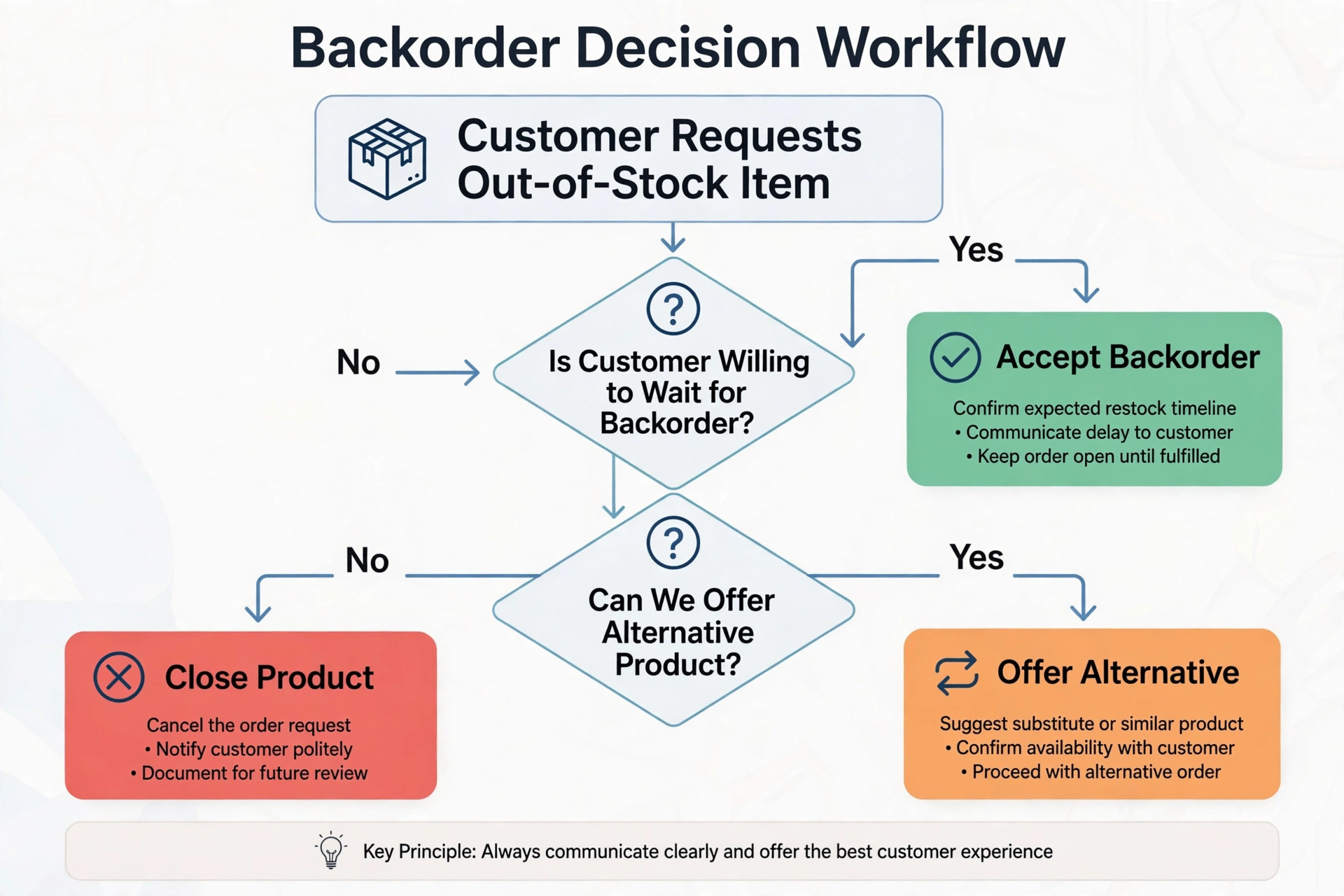
Not every sold out product, in learning how to handle backorders small online shop owners must judge, should accept backorders. A backorder is worth accepting when demand is real, the supplier has given a credible restock date, the wait is short enough that most customers will still want the product, and the margin covers the extra support, the extra shipping if you split the order, and the refunds you will inevitably process. If any of those conditions fails, a waitlist or a closed product page is the honest choice, and it protects both revenue and reputation.
Set a maximum wait and stick to it
Set a maximum wait for your shop, for example four weeks for most products, and a shorter limit for seasonal or gift products where a late delivery misses the occasion entirely. When a product passes that limit, stop accepting new backorders, even if orders are still coming in, because each new backorder at that point is a future complaint. Move new customers to a waitlist, offer a close alternative, or close the product until stock is confirmed. A shop that keeps accepting backorders into an eight week queue is not capturing demand, it is borrowing trust it will have to repay.
Consider the product type before you set the limit. A made to order item, where the customer expects a production wait, can carry a longer window than a standard item the customer expected to arrive in days. A spare part that keeps a machine running deserves a different conversation from a decorative item, because the cost of waiting is higher, and the customer may need the part urgently. Write the limit per product category, not as one shop wide rule, and review it after any backorder that produced a cluster of refunds, because that cluster is telling you the limit was too generous.
Know when to close the product instead
Close the product when the supplier cannot give a date, when the product may be discontinued, when the wait has already passed your maximum, or when the product is a one off that will not be restocked. In those cases, mark the item as unavailable, remove the buy button, and redirect the page to the closest alternative where that helps the customer, following the approach Shopify guidance suggests for permanently out of stock items. A closed page disappoints a visitor once, while a backorder that never ships disappoints a paying customer repeatedly, and the second disappointment costs far more in refunds and support time.
Show the Backorder Honestly on the Product Page
The product page is where trust is won or lost, in learning how to handle backorders small online shop product pages must show, because it is the last place a customer can choose to wait with full information. A page that shows a normal buy button, a normal delivery estimate, and no mention of stock is not selling a backorder, it is selling a surprise. Every element of the page must tell the same story, from the badge to the button to the shipping note, so a customer who skims still understands the wait.
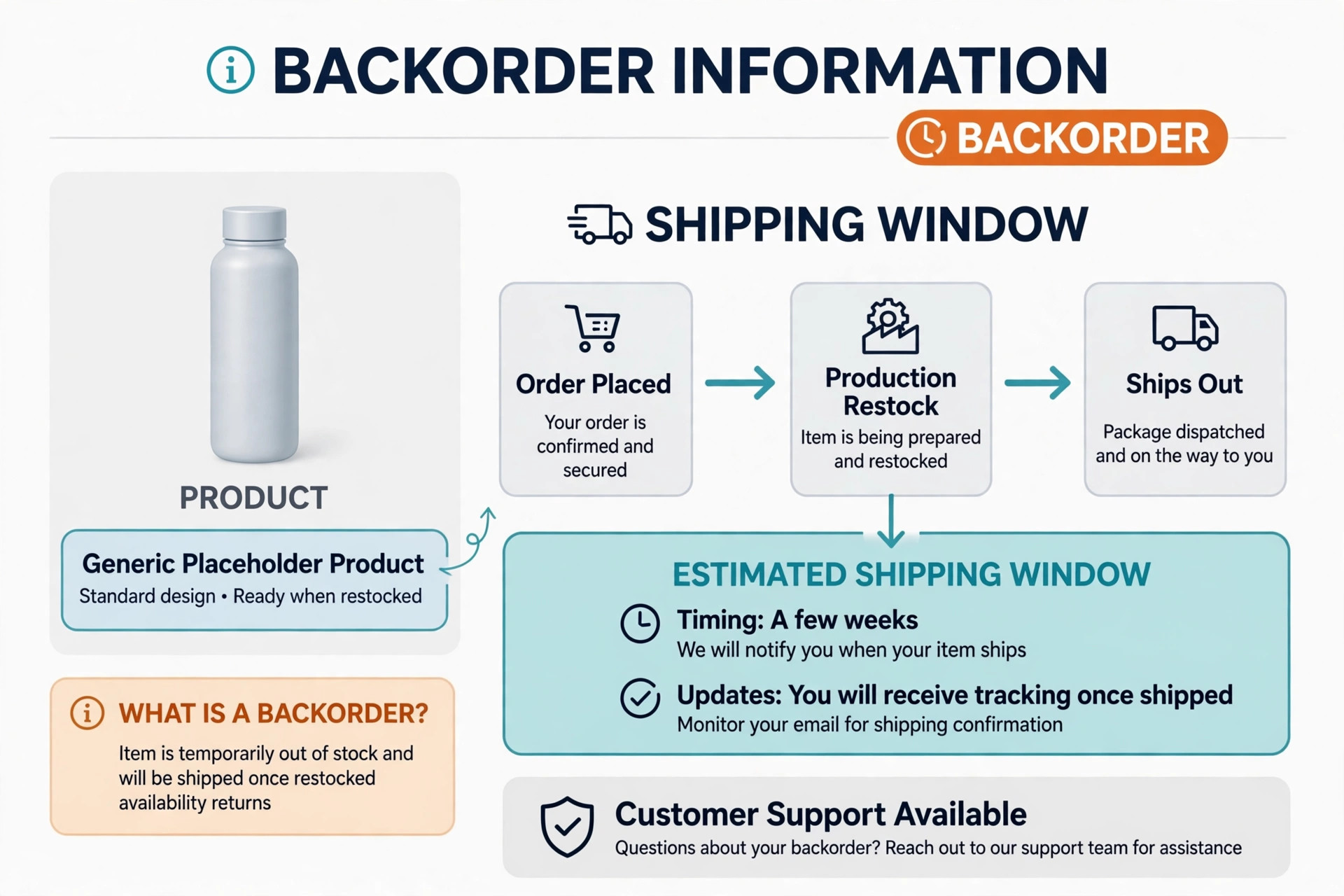
Use a clear badge on the product image and beside the price, with words such as backorder or ships in a stated window, rather than a vague phrase such as shipping soon. Change the button text where your platform allows it, so the button itself says backorder or reserve, rather than a standard add to cart that implies immediate dispatch.
Place the estimated shipping window directly under the button, in the same size as the price, not hidden in small print at the foot of the page. Guides on Shopify backorders warn against generic messages such as shipping soon, against promising dates you have not confirmed with the supplier, and against hiding the wait in a help page, and that warning is worth following exactly.
Give a window, not a single date, unless the supplier has confirmed a single date in writing. A window such as shipping between two stated dates gives you room when a delivery slips by a few days, and it still gives the customer a real plan. Add one sentence that you will update the customer by email if the window changes, because that sentence turns a passive wait into a monitored wait. Repeat the same window in the cart and at checkout, because a customer who sees the wait only on the product page may forget it by the time they pay, and a surprise at checkout produces abandoned carts as well as complaints.
Alternatives, bundles and honest scarcity
Offer a genuine alternative beside every backordered product, with a clear comparison of what differs, so a customer who cannot wait has a real choice rather than a dead end. Do not push a more expensive alternative as the only option, and do not describe a backordered item as almost gone when the truth is that it will be gone for weeks, because scarcity language that misleads a customer into a wait they did not want will return as a refund.
If you offer a bundle that includes an in stock item and a backordered item, state plainly whether the in stock item ships at once or waits for the full order, because that single choice decides whether the customer feels helped or held hostage by the bundle.
The Backorder Checklist and Notice Scripts
This checklist is the overview proof element for this guide to how to handle backorders small online shop owners can copy. Use it as a build list for every backorder, and treat a missing step as a gap in the system, not as a detail to catch up later. The scripts are starting points, so replace the bracketed details and adjust the tone to match your shop before you send them.
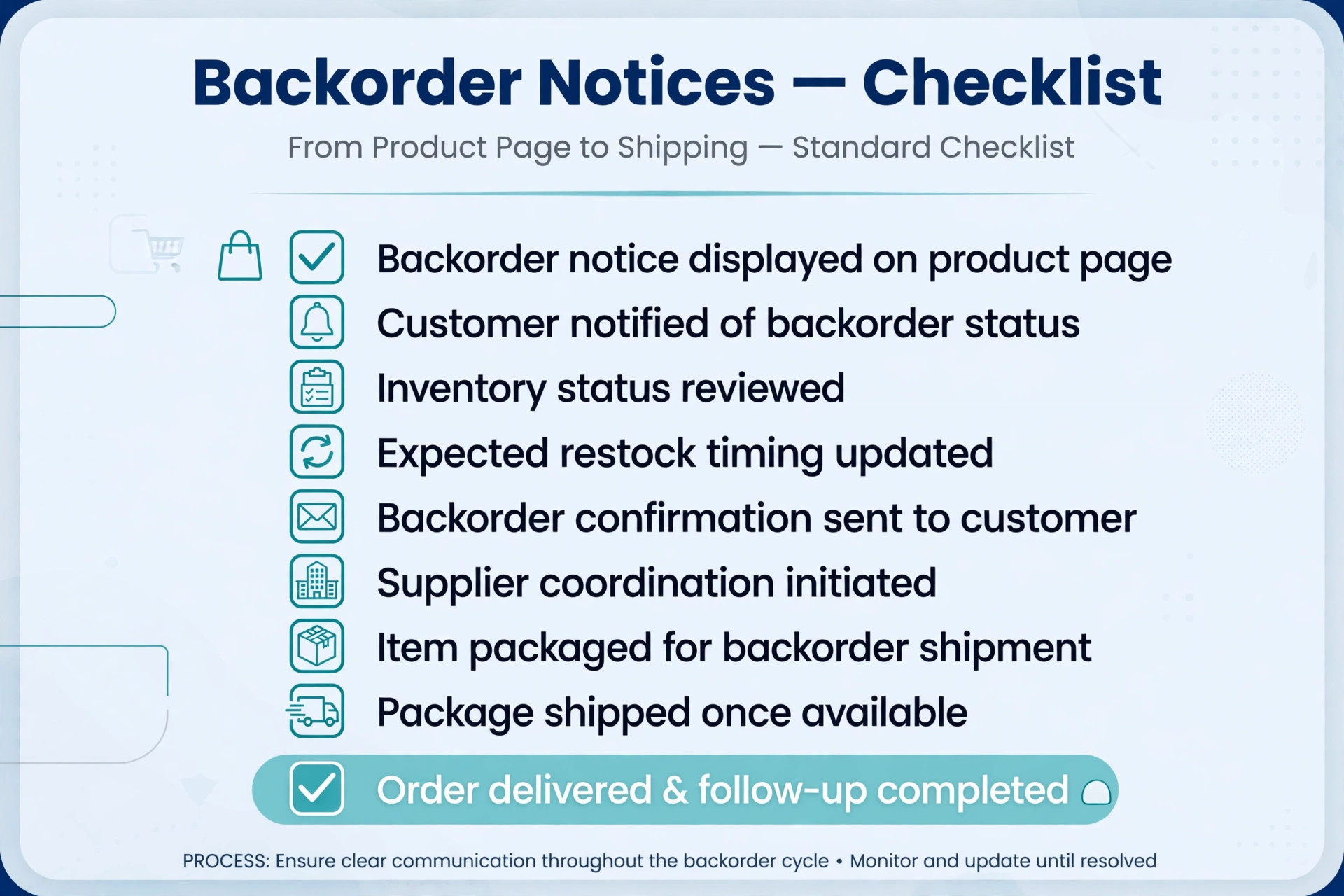
- Product page notice. This item is on backorder and is estimated to ship between [date] and [date]. You may cancel for a full refund at any time before dispatch by replying to your order email.
- Order confirmation notice. Thank you for your order. Your [product] is on backorder and is estimated to ship between [date] and [date]. We will email you an update by [midpoint date], and again at once if that window changes. You may cancel for a full refund before dispatch.
- Midpoint update notice. A quick update on your backordered [product]. Your order is still on track to ship between [date] and [date]. We will email you as soon as it ships, with tracking. If you would rather cancel, reply to this email and we will refund you in full.
- Delay notice. We need to update the shipping window for your backordered [product]. The new estimated window is [new date] to [new date], because [short honest reason]. If you would like to wait, no action is needed. If you would rather cancel, reply to this email and we will refund you in full.
- Shipping notice. Good news. Your backordered [product] has shipped, and your tracking link is [tracking link]. Thank you for waiting, and please reply to this email if anything about the delivery needs attention.
- Waitlist notice for closed products. This item is currently out of stock and is not accepting backorders. Join the waitlist and we will email you as soon as it is available to order, with no obligation to buy. We will remove your email from the waitlist if you ask us to.
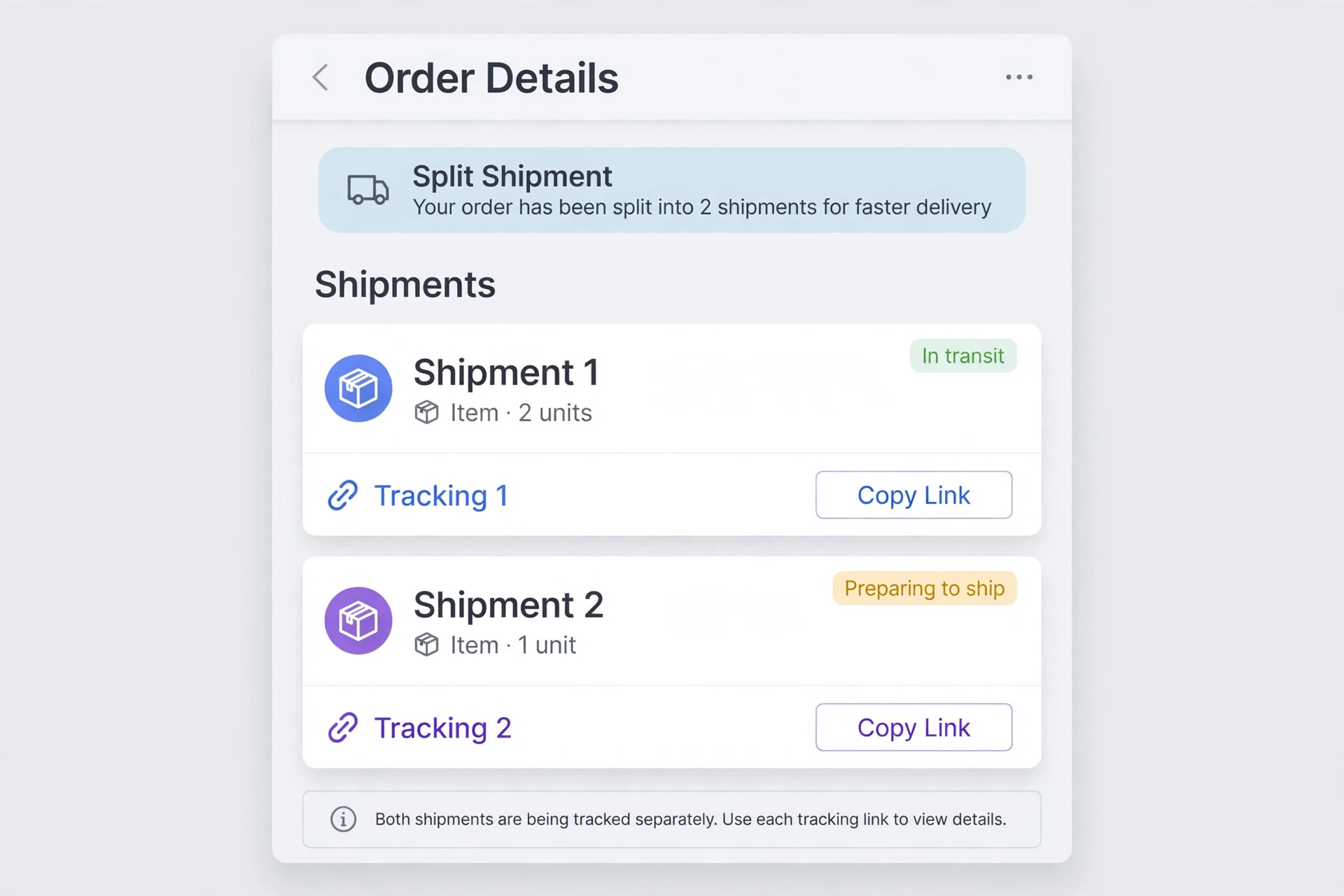
- Partial shipment rule. When an order contains an in stock item and a backordered item, ship the in stock item at once unless the customer chose to wait for a single delivery, and do not charge extra shipping for the second parcel unless the customer agreed to that charge at checkout.
- Refund and cancellation rule. Cancel a backorder at any time before dispatch for a full refund to the original payment method, process the refund within [number] business days, and confirm it by email with the refund amount and the expected timing from the payment provider.
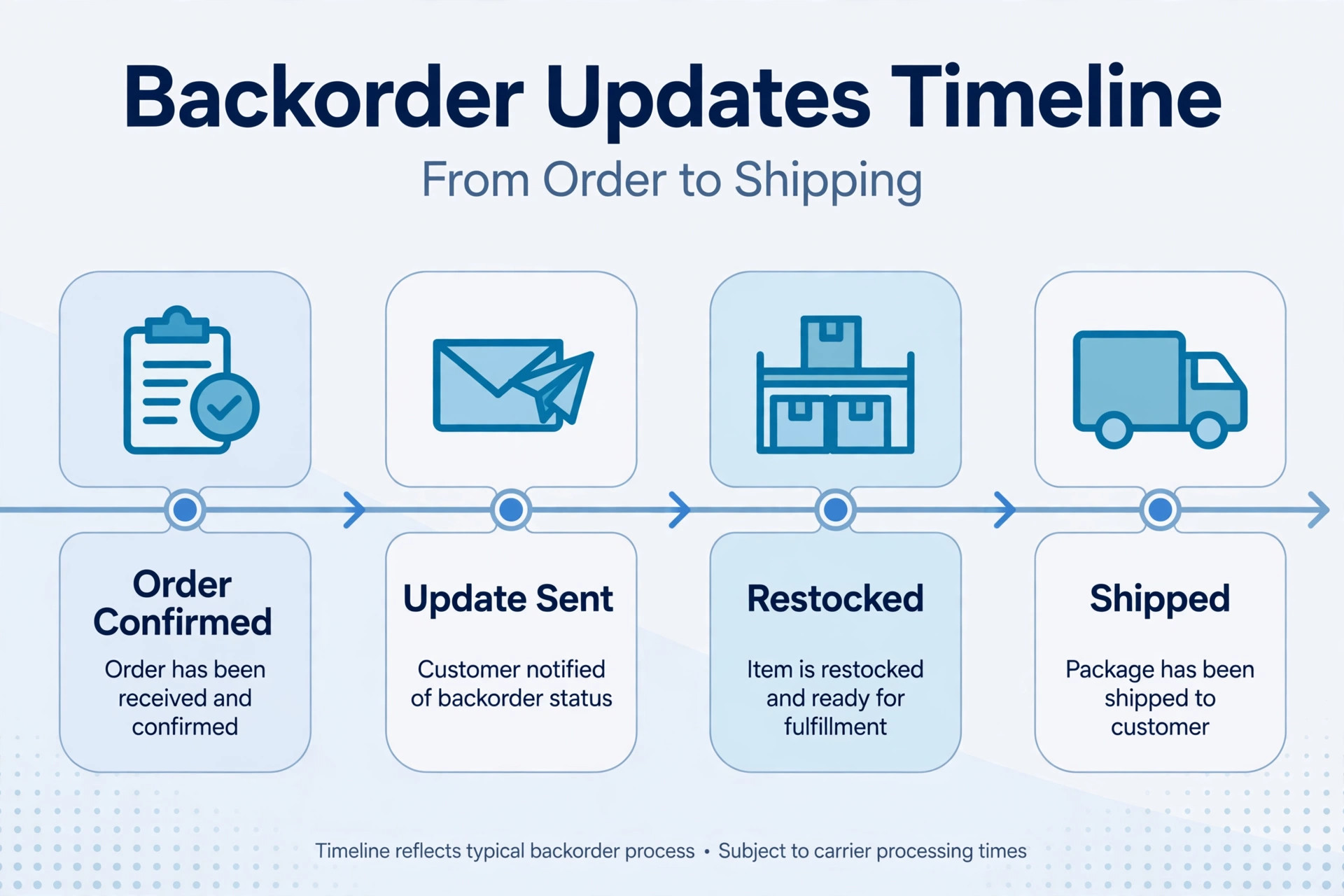
Send the midpoint update even when there is no news, because silence is read as trouble. A short email that says the order is still on track does more for trust than a perfect product arriving after a month of silence, and it gives the customer a chance to cancel early, when a refund is simple, rather than late, when the parcel is already in transit. Keep every notice short, specific, and free of apologies that blame the customer for asking, because the customer did nothing wrong by ordering a product you offered for sale.
Waitlist or Backorder, Which Fits This Product
A waitlist and a backorder solve different problems, in learning how to handle backorders small online shop choices must fit, and choosing the wrong one creates the complaints you were trying to avoid. A backorder takes payment now and promises a future delivery, so it suits products with a credible restock date, a wait within your maximum, and customers who have already decided they want this exact item. A waitlist takes only an email, promises only a notification, and suits products with an uncertain date, a long wait, or a price that may change before restock.
Run a waitlist that customers trust
A waitlist works only if the notification actually arrives when stock returns, and if the customer is not forced to compete in a rush the moment the email lands. Collect the email on the product page, confirm it with a short message, and state whether the waitlist holds a unit, holds a place in a queue, or simply sends a notification with no hold. The distinction matters, because a customer who believes a unit is held will be angry to find it sold out again, while a customer who knew the email was only a notification will accept that risk.
When stock returns, email the waitlist first, give a clear window to buy, and remove customers who ask to leave the list at once.
Use first in, first out fairness for any queue that holds units, and do not jump the queue for a larger order or a louder customer, because fairness is the only asset a waitlist has. If demand exceeds the returning stock, email the remaining waitlist customers honestly, give them the next expected date or a close alternative, and keep them on the list only with their agreement. A waitlist that is managed fairly becomes a source of repeat sales, while a waitlist that feels like a lottery becomes a source of complaints.
When a preorder is the better label
Use the preorder label only for a product that has not yet been released, or for a made to order run with a production schedule, and state the release or production window in the same way you would state a backorder window. Do not relabel an ordinary backorder as a preorder to make a long wait sound intentional, because customers who know the product already exists will see through the label and will trust you less for it. The label matters less than the honesty behind it, and a clear backorder window always beats a fashionable label with a vague promise.
Partial Shipping, Refunds and Cancellations
Partial shipping is the decision that most often surprises customers, in learning how to handle backorders small online shop shipping rules must state, because an order that looked like one delivery arrives as two, or does not arrive at all while the shop waits for one missing item. Decide the rule before the first mixed order arrives, state it at checkout, and apply it the same way for every customer, because an inconsistent partial shipping rule feels like favouritism even when it was only improvisation.
Ship what you have, unless the customer chose otherwise
The default rule that works best for most small shops is to ship in stock items at once, and ship the backordered item when it arrives, with no extra shipping charge for the second parcel unless the customer agreed to that charge at checkout. That rule respects the customer time, it turns part of the order into a delivered success, and it removes the frustration of a complete order sitting in a warehouse while one item is awaited. Offer the alternative clearly at checkout, for customers who prefer a single delivery for gift or environmental reasons, and record the choice on the order, so the packing team does not have to guess.
State the cost consequence of each choice in plain numbers at checkout. If a split shipment costs you extra, decide in advance whether you absorb that cost as a goodwill investment, pass it on transparently, or offer free split shipping only for backorders, as several backorder guides suggest as a way to soften the wait.
A free shipping offer on a backordered item can make a wait feel acceptable, and a small discount or a future use coupon framed as thanks for waiting, rather than as compensation for a problem, can leave a positive impression, as reported in backorder guides. Keep any offer modest and consistent, because a generous offer made to one angry customer and refused to the next will create a new complaint.
Refunds that protect the shop as well as the customer
Allow cancellation for a full refund at any time before dispatch, and process it promptly to the original payment method, with an email confirmation that states the amount and the expected timing. A customer who can cancel easily is less likely to open a chargeback, because the chargeback route exists mainly for customers who feel trapped. After dispatch, apply your normal return policy, and state that policy in the backorder notices as well, so a customer who waited and then changed their mind knows the position before the parcel arrives.
Watch the chargeback and payment provider rules for your platform, because some providers set limits on how long after payment a shipment may occur, and those limits can affect whether a long backorder is viable at all. Check your provider terms before you set a maximum wait, and confirm the current rule on the provider page, because a backorder that breaches a payment rule can cost you both the sale and the processing standing. When a backorder passes a provider deadline, refund and move the customer to a waitlist, rather than holding payment for a delivery you may not be allowed to complete.
Supplier Communication and Fair Allocation
A backorder system is only as reliable as the supplier information behind it, in learning how to handle backorders small online shop supplier dates must confirm, and most backorder failures start with a supplier date that was never confirmed. Build a simple supplier routine, with a named contact, a confirmed date, and a check in schedule, so the date on your product page is a real commitment rather than a hope. When a supplier date moves, update the product page and email affected customers on the same day, because a delay discovered by customers before it is announced by you is a second breach of trust.
Confirm, check in, and keep a backup
Confirm the restock date in writing, including the quantity, the delivery location, and any partial delivery possibility, before you publish a window to customers. Check in at the midpoint of the wait, and again a few days before the expected delivery, so a slip is discovered while you still have time to warn customers. Keep a backup supplier for your key products where one exists, even if the backup costs more, because a backup that can deliver in days is worth more during a backorder than a primary supplier that delivers in weeks. Record supplier reliability over time, including actual delivery against promised delivery, and use that record when you decide which products may accept backorders at all.
Allocate returning stock fairly, in the order customers paid, unless a customer has explicitly chosen to wait longer or to cancel. Do not allocate scarce returning stock to new full price orders ahead of backordered customers who have already paid and waited, because that choice, once discovered, destroys the trust the whole system was built to protect. If returning stock covers only part of the queue, email the remaining customers first, with the next date or a refund choice, before you sell the remaining units to anyone else.
Tools That Keep the Queue Visible
A spreadsheet can run a backorder queue for a handful of orders, but it fails when orders, partial shipments, and supplier dates all move at once, because a spreadsheet does not warn you when a window passes without an update. The tools below are named because small online shops commonly use them to manage backorders and inventory, and their current features and prices should be confirmed on the vendor page before you buy.
Shopify is the platform most small shops in this guide use to sell, and its inventory and order tools, together with backorder apps, can show backorder status, manage purchase orders, and trigger customer emails. Its value is that the product page, the cart, and the order record share the same stock story, so a customer does not see one message on the page and a different message in the order email. ShipStation is commonly used to manage shipping across channels, to split shipments, and to send tracking updates, which matters when a backordered order ships in two parcels and each parcel needs its own tracking.
Cin7 is commonly used by growing product businesses that need purchase orders, warehouse stock, and supplier management in one system, and it suits a shop whose backorder queue has grown beyond what a spreadsheet can track fairly. Zoho Inventory is commonly used by small businesses that already use other Zoho tools, and it offers purchase orders, low stock alerts, and multi channel stock tracking that can keep the backorder queue visible to the whole team. Choose the tool that shows the queue, the window, and the customer notice status in one view, because a queue you cannot see will always be a queue you forget.
Frequently Asked Questions
Should I charge customers at the time of a backorder
Most small shops charge at the time of order for a backorder, and state that clearly on the product page and in the order confirmation, including the cancellation and refund rule before dispatch. Check your payment provider terms first, because some providers limit how long after payment a shipment may occur, and a long backorder may breach that limit. If your provider limit is shorter than your wait, refund and move the customer to a waitlist rather than holding payment for a delivery you may not be allowed to complete.
How long is too long for a backorder
There is no single answer, but a practical maximum for most standard products is about four weeks, with a shorter limit for seasonal or gift products where a late delivery misses the occasion. Shopify guidance reports that backorders typically take from a couple of weeks to a couple of months, and that range shows why a stated maximum matters, because a wait at the long end of that range needs a very clear window and regular updates to remain acceptable. When a product passes your maximum, stop accepting new backorders and move new customers to a waitlist.
What should I say when a backorder is delayed
Tell the customer at once, give the new window, give a short honest reason, and offer a simple cancellation with a full refund, without making the customer argue for it. Use the delay script in this guide, send it on the day you learn of the delay, and update the product page on the same day, so new customers see the same window as existing customers. A delay notice that arrives before the old window closes preserves trust, while a delay notice that arrives after the customer has already chased you does not.
Is a waitlist better than a backorder for an uncertain restock
Yes, when the restock date is uncertain, when the product may be discontinued, or when the wait is likely to pass your maximum. A waitlist takes only an email, promises only a notification, and avoids holding a payment for a delivery you cannot promise. A backorder suits a product with a credible date and a wait within your maximum, where the customer has already decided they want this exact item and is willing to pay now to reserve it.
Can I offer a discount for waiting on a backorder
Yes, and a modest offer framed as thanks for waiting can soften a delay, as reported in backorder guides. Free shipping on the backordered item, or a small discount on a future order, are common choices, and they work best when they are offered consistently to all affected customers rather than only to those who complain. Do not present the offer as compensation for a problem you caused by promising a date you had not confirmed, because that framing invites a negotiation about the size of the offer rather than gratitude for the wait.
What do I do if a backordered product is discontinued
Email every affected customer at once, apologise briefly, offer a full refund, and offer the closest alternative with a clear comparison, without pressuring the customer to accept it. Remove the buy button, mark the product as unavailable, and redirect the page to the alternative where that helps future visitors. A discontinued backorder handled promptly, with a refund and a real alternative, loses a sale but keeps a customer, while a discontinued backorder left in silence loses both.
More Reading on Stratilyze
For related shop operations, read best online ordering software for bakeries and switch Squarespace to Wix for a small store. For payment and store fixes, see fix Stripe payouts on hold for a small business and best point of sale system for coffee shops.