
One camera aimed at the door from face height will tell you more than four cameras bolted to the ceiling ever will. The ceiling cameras will show the tops of heads, washed out by shop lights, while the one good camera shows a face, a direction of travel and what a person was carrying. That difference is why how you set up security camera small shop coverage matters more than how much you spend on it. A small shop does not need a warehouse system. It needs a short list of views that answer real questions, plus a storage and privacy plan that holds up when something actually happens.
Most small shops fail on placement, not on camera quality. A shop owner buys a four camera kit, puts one camera in each corner and then discovers the footage cannot identify anyone at the door, cannot read a till transaction and cannot show what happened in the stockroom doorway. The fix is to decide, before you drill a single hole, which moments you must be able to prove later. A disputed refund, a missing delivery and a break in after hours each need a different view. Once those moments are named, the camera count, the storage choice and the privacy rules almost choose themselves.
How to Set Up Security Camera Small Shop Coverage in Five Decisions
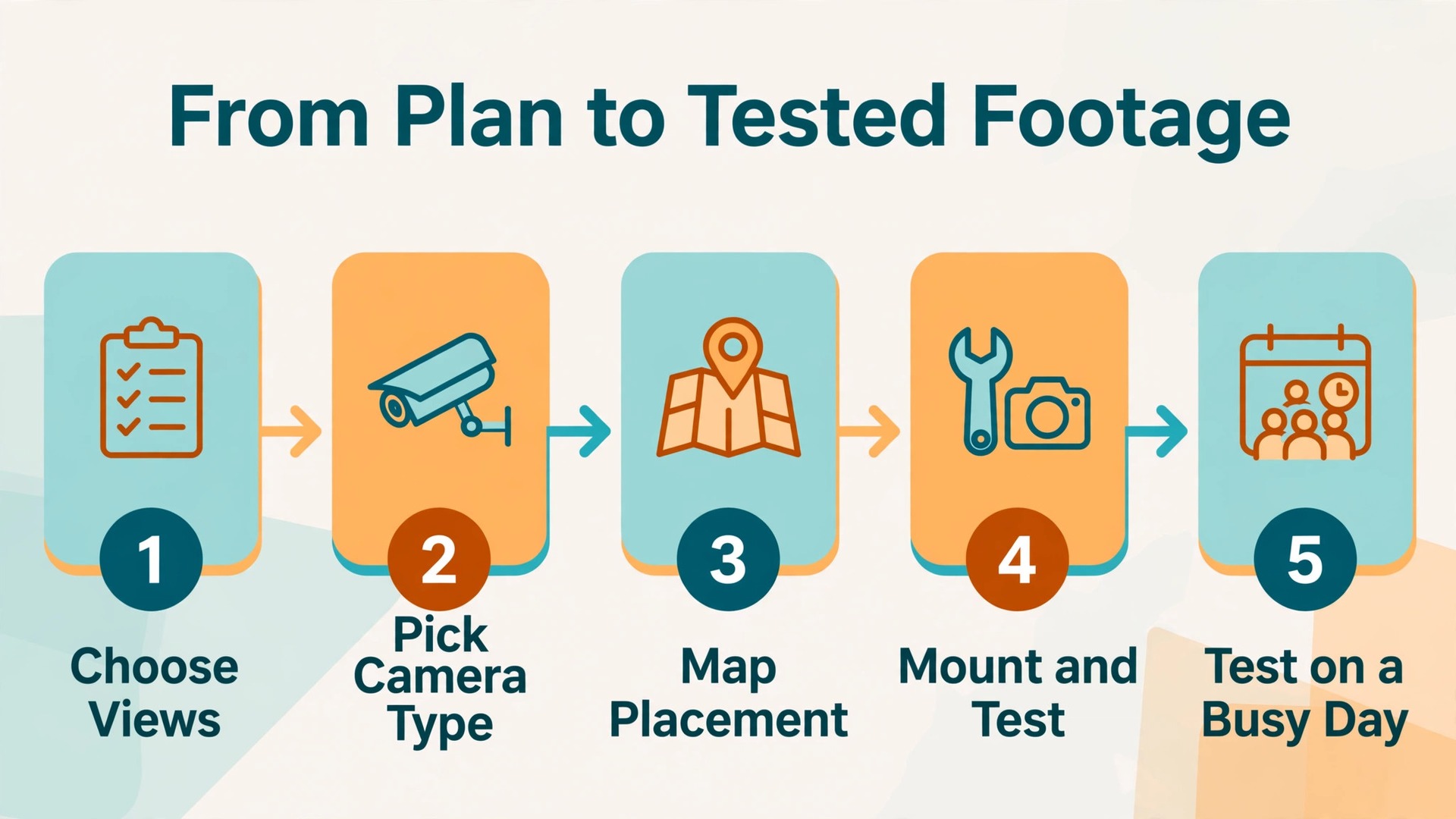
A good shop system answers five questions in order. They are the views you must capture, the camera type for each view, the placement and height for each camera, the storage method and retention period, and the rules for who can watch footage and when. Answer them on paper first. If you start with a kit deal or a subscription offer, you will fit your shop around the product instead of fitting the product around your shop.
Start with the moments that matter. Walk the shop once as a customer and once as a member of staff, and note every point where money, stock or people cross a boundary. For most small shops that list is short. It includes the front entrance, each till, the stockroom door, the back door, the safe or cash counting spot if there is one, and any outdoor area where goods are left. A shop with one till and one stockroom may need only three or four cameras. A shop with two tills, a side entrance and a yard may need five or six. Either number is fine, provided every camera has a job written next to it.
Then decide placement before power and cabling. A camera that needs a socket in exactly the wrong place will tempt you to move it to a worse view. Check each planned position for a power route, a cable route or a Wi-Fi signal strong enough for video. If a position fails on power or signal, change the route first, not the view. A longer cable run is a one time cost. A camera pointed at the wrong wall is a permanent blind spot. Storage and rules follow from those choices, and both are covered in detail later in this guide.
Pick the Right Camera Type for Each Spot
Match each job to a camera type rather than buying one model for every spot. An entrance camera needs to capture faces in changing light. A till camera needs detail at short range. A wide shop floor camera needs a broad view but does not need to read small print. An outdoor camera needs weather protection and night vision that is not blinded by its own infrared light bouncing off a nearby wall.
Fixed bullet cameras suit outdoor walls and entrances where the view never needs to move. They are visible, which helps deterrence, and they are easy to aim once and leave alone. Dome cameras suit indoor ceilings and till areas because they are discreet and harder to grab or redirect by hand. A pan tilt zoom camera can follow movement across a large floor, but it can only look in one direction at a time, so it should never be the only camera covering an entrance or a till. If it is looking left when the incident happens on the right, the footage does not exist.
Wired Power over Ethernet cameras take power and data through one cable to a recorder, giving a stable connection and continuous recording. They suit shops that can run cable through a ceiling void or along a wall. Wi-Fi cameras are faster to place, but each one depends on shop Wi-Fi, and video uses far more bandwidth than browsing. Battery cameras solve power for a remote yard, but they usually record motion events rather than continuous video. For a till or an entrance, a wired or mains powered camera is the safer default. When you set up security camera small shop systems, buy for the hardest view first.
If the entrance face shot and the till detail work, the wide floor view is easy.
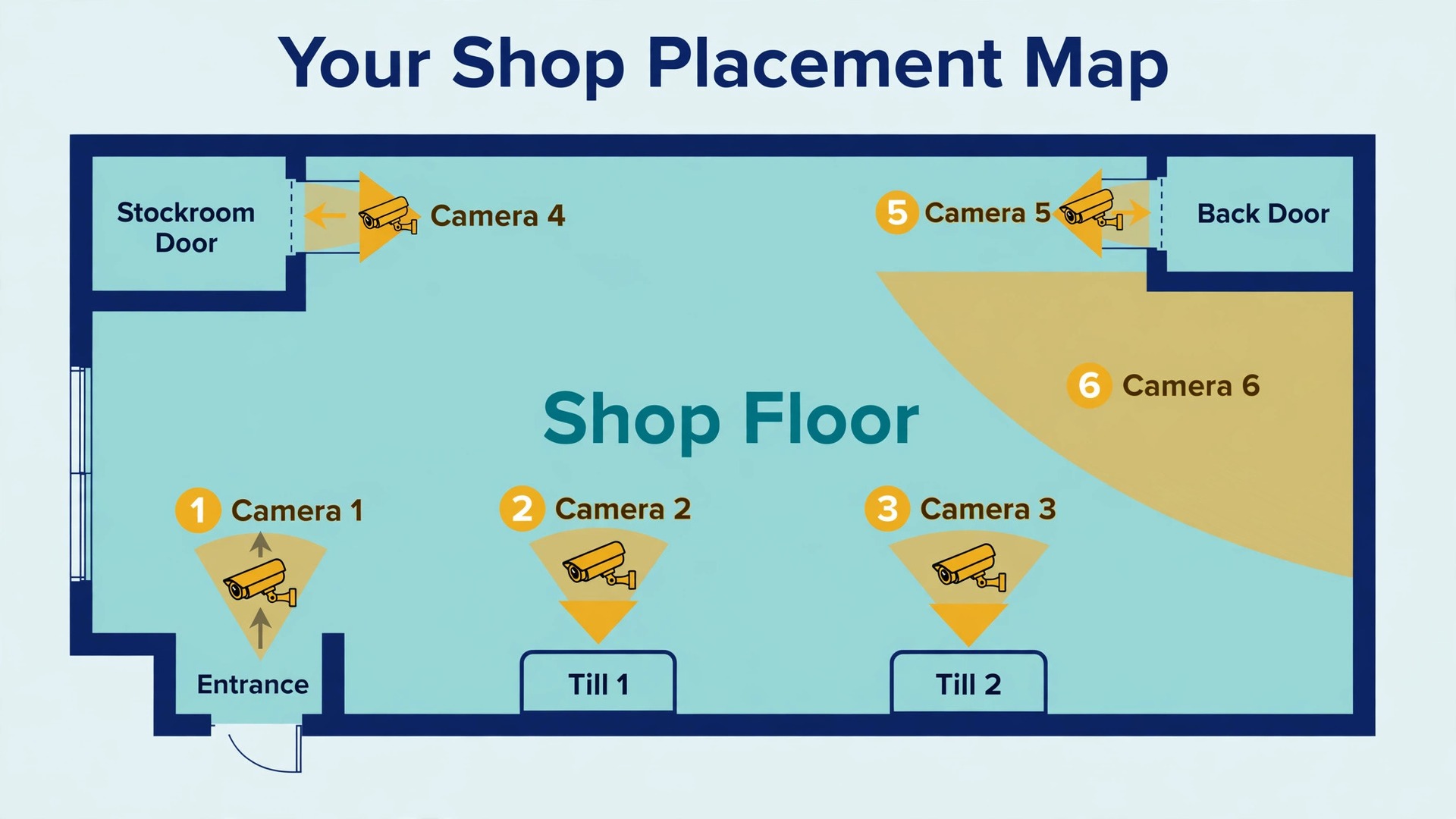
Your Shop Placement Map
A placement map is a simple drawing of your shop with a camera marked for each job, and it is the single most useful document in this project. Mark the doors, the tills, the stockroom, the safe, the windows and the main display units, then mark each camera with an arrow showing what it sees. If two arrows cover the same floor space and no arrow covers the till, the map has just saved you a wasted camera. Start with entrances, then add tills, then the stockroom and back door, then the wide floor view, then any outdoor area.
The table below is a placement map for a typical small shop with one entrance, two tills, a stockroom and a rear delivery door. Adapt the room names to your own shop, but keep the logic. If your shop has only one till, drop the second till camera. If it has a side door used by staff, add that camera job before you add a second floor camera.
| Camera | Primary job | Position and view |
|---|---|---|
| Entrance face camera | Identify everyone entering and leaving | Inside near the door at face height, facing incoming people |
| Till camera 1 | Show hands, cash and card reader at till 1 | Above and to the side of the till, angled down at the counter |
| Till camera 2 | Show hands, cash and card reader at till 2 | Above and to the side of the till, angled down at the counter |
| Shop floor overview | Show movement, queues and aisles | High corner, wide lens, covering the main floor |
| Stockroom door camera | Show who enters and what they carry | Facing the stockroom door from the shop side |
| Back door camera | Show deliveries and after hours access | Covering the back door and approach path |
| Outdoor camera | Show vehicles and approach | Covering the frontage or parking area, avoiding headlight glare |
Height is where most shop installs go wrong. Installer guides put most cameras at about 8 to 10 feet, out of easy reach while still showing faces. Entrance cameras are the exception. Retail guidance recommends about face height, around 6 to 7 feet, angled slightly down, because a ceiling camera photographs the top of a head instead of a face. Put the entrance camera on a wall bracket near the door, just inside the shop, where it is visible but not easy to grab.
Entrances and Tills Deserve Their Own Cameras
Entrances and tills are the two views a shop owner reaches for most often, and they are the two views most often ruined by sharing a camera with something else. Give each one its own camera, its own height and its own test.
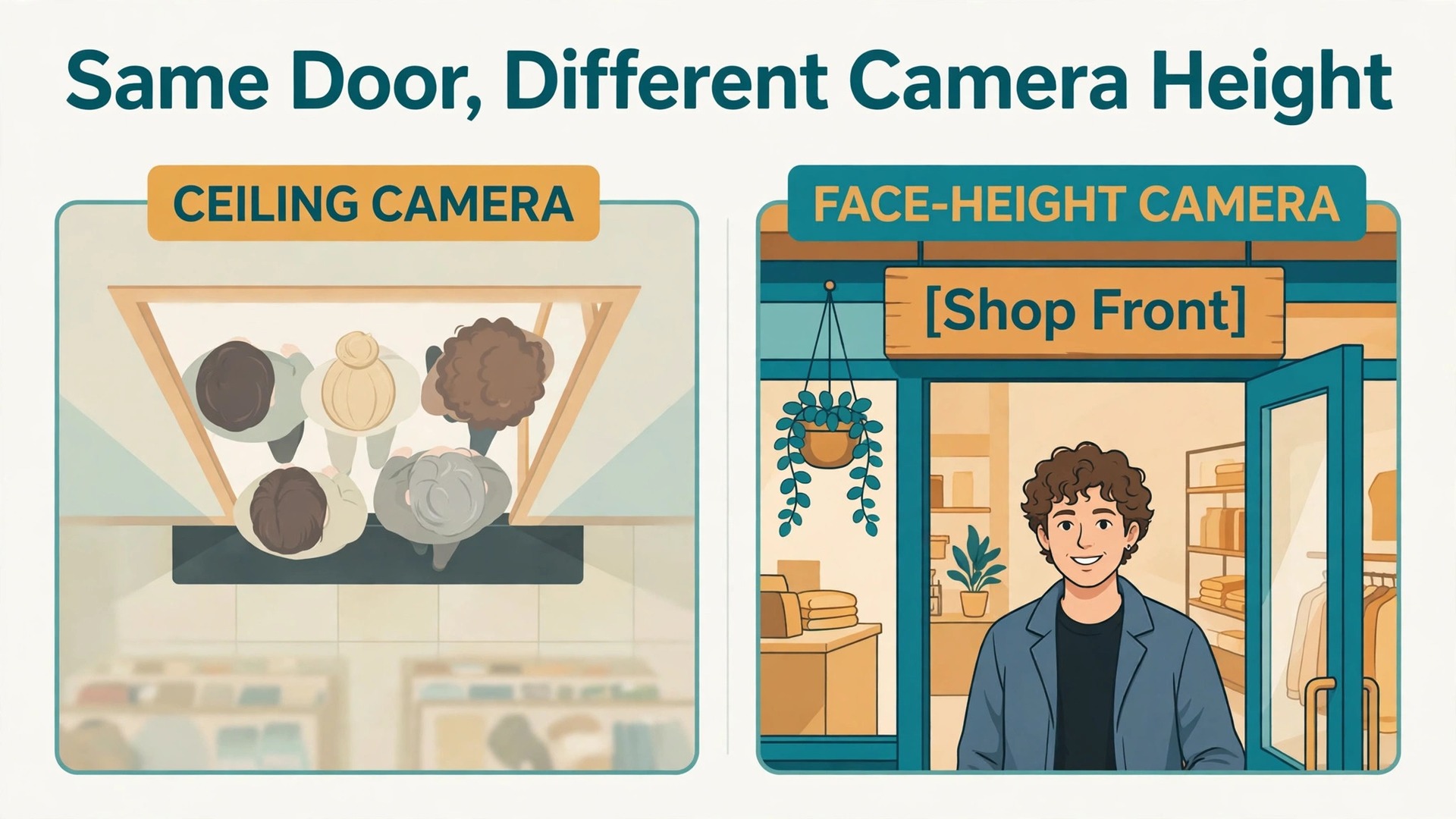
The entrance camera has one job, which is identification. It should capture a clear face image of every person who walks in, in daylight and at night, without being blocked by a door frame, a poster or a display stand. Mount it inside near the door, at about face height, angled slightly down toward the incoming flow of people. If your entrance has a wide shopfront, consider whether one camera can truly cover the full width at face detail, or whether you need a wider overview camera plus a dedicated face camera at the main walking line.
Pair the face camera with a second view that captures height, build, clothing and direction of travel, so that even a poor face image still leaves a usable description.
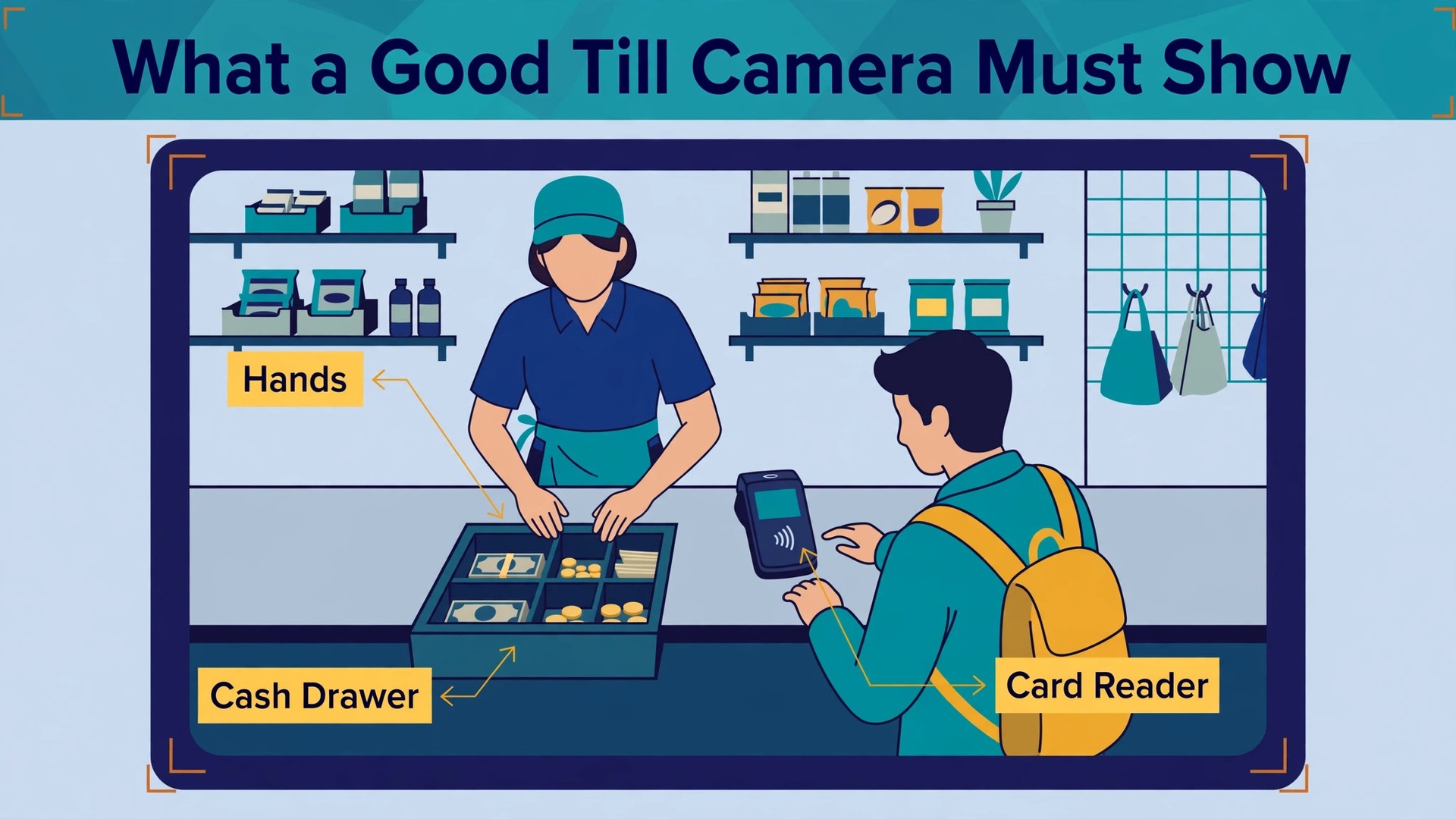
Till cameras have a different job, which is transaction proof. A good till clip shows who served the customer, what was handed over, how payment was made and whether the drawer and bagging matched the sale. That needs detail, not width. Position the camera close enough to show denominations and card handling, and so the cashier body does not block the drawer. Test it with a real transaction while a colleague watches the live feed. Hand over cash, run a card payment, open and close the drawer and bag an item, then play the clip back. If any step is hidden behind a display or a screen, move the camera before you fix it in place.
Till footage also protects staff, because a short change claim or an unauthorised void can be checked in minutes instead of becoming one person word against another.
When you set up security camera small shop coverage, test entrances and tills on a busy day, not a quiet one. A view that works with one customer can fail when a queue forms, when a tall customer stands in front of a short one or when a display unit moves six inches to the left. A busy day test finds those failures while they are still cheap to fix.
Storage That Fits a Shop, Not a Warehouse
Storage is where small shops either overspend on subscriptions they do not need or underspend and lose the footage that matters. The choice is usually presented as local versus cloud, but most good shop systems use a mix, with local storage doing the heavy work and cloud storage protecting the most important clips.
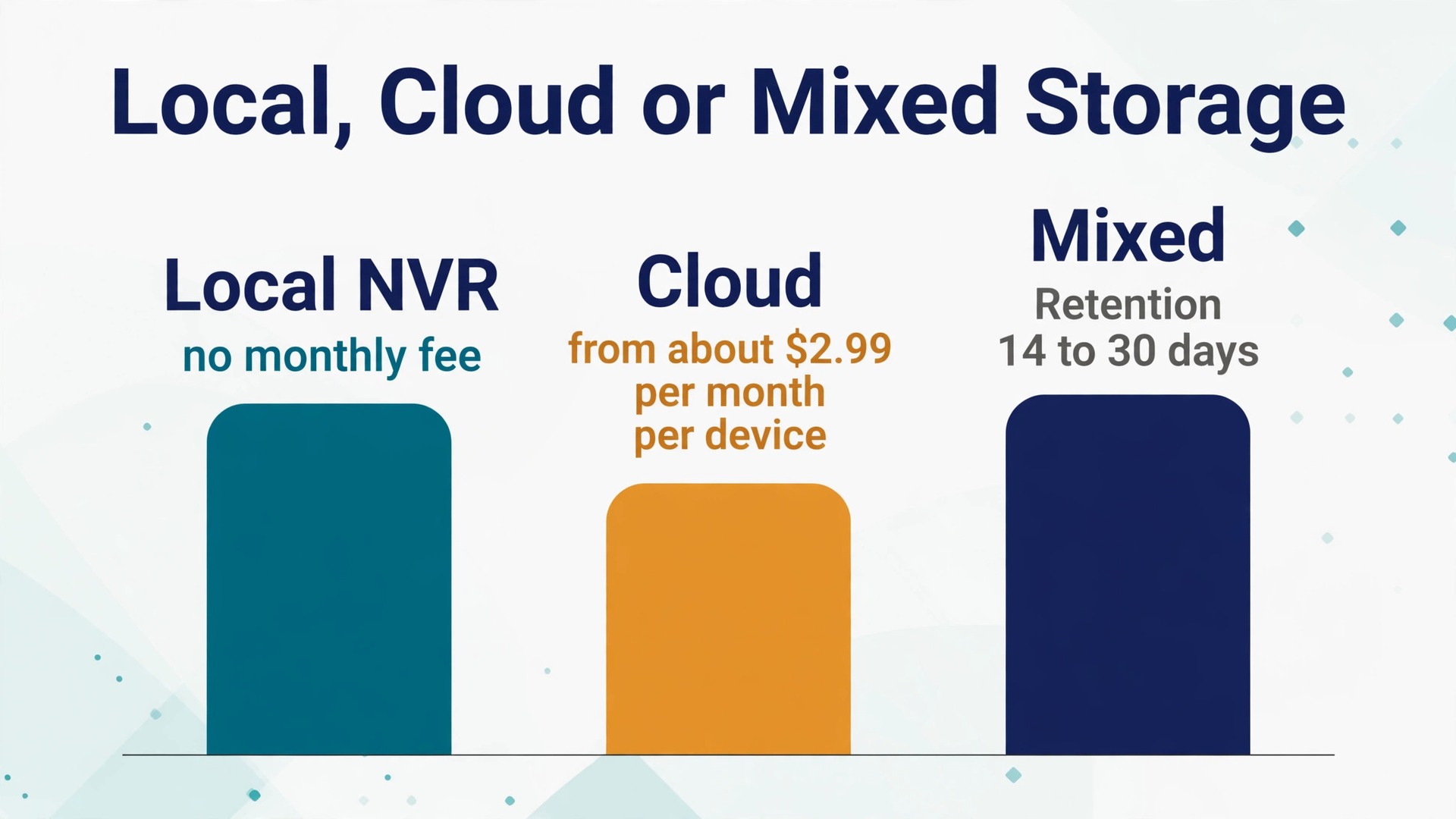
Local storage means footage stays on equipment in your shop, usually a network video recorder, often shortened to NVR, with a hard drive inside, or a hub with built in storage. A wired PoE system with an NVR is the classic small shop setup because it records continuously, keeps all cameras in one place for playback and needs no monthly fee. Reolink lists its 8 channel NVR with a pre installed 2TB hard drive, expandable to 16TB, and its 4K four camera kit built around that recorder at 587.99 dollars at the time of checking. Prices change, so check the vendor page again before you order, and check whether the kit price includes the hard drive size you need.
Hub based wireless storage works differently. Eufy cameras paired with a HomeBase store footage locally on the hub, with no required subscription for core recording, and Eufy lists a 4K four camera kit at 499.99 dollars in its own 2026 camera guide. The hub model suits a shop that wants wireless cameras without Ethernet cables, but it still needs a strong Wi-Fi signal to each camera and a safe indoor spot for the hub. Memory cards in individual cameras are the simplest local option and the weakest for a shop, because playback is slow and the evidence sits inside a camera a thief can take. Use cards as a backup, not as main storage for tills and entrances.
Cloud storage uploads footage to vendor servers, where it survives even if the shop recorder is stolen, but it costs a monthly fee and depends on upload speed. Eufy offers optional cloud plans from about 2.99 dollars per month per device for rolling event history, according to independent plan summaries, with local storage still available without a plan. Arlo paid plans have been restructured more than once, with recent summaries listing a single camera plan around 9.99 dollars per month and an unlimited camera plan around 19.99 dollars per month, with event history measured in weeks depending on the plan. Treat any cloud price as a figure to recheck on the vendor pricing page on the day you buy.
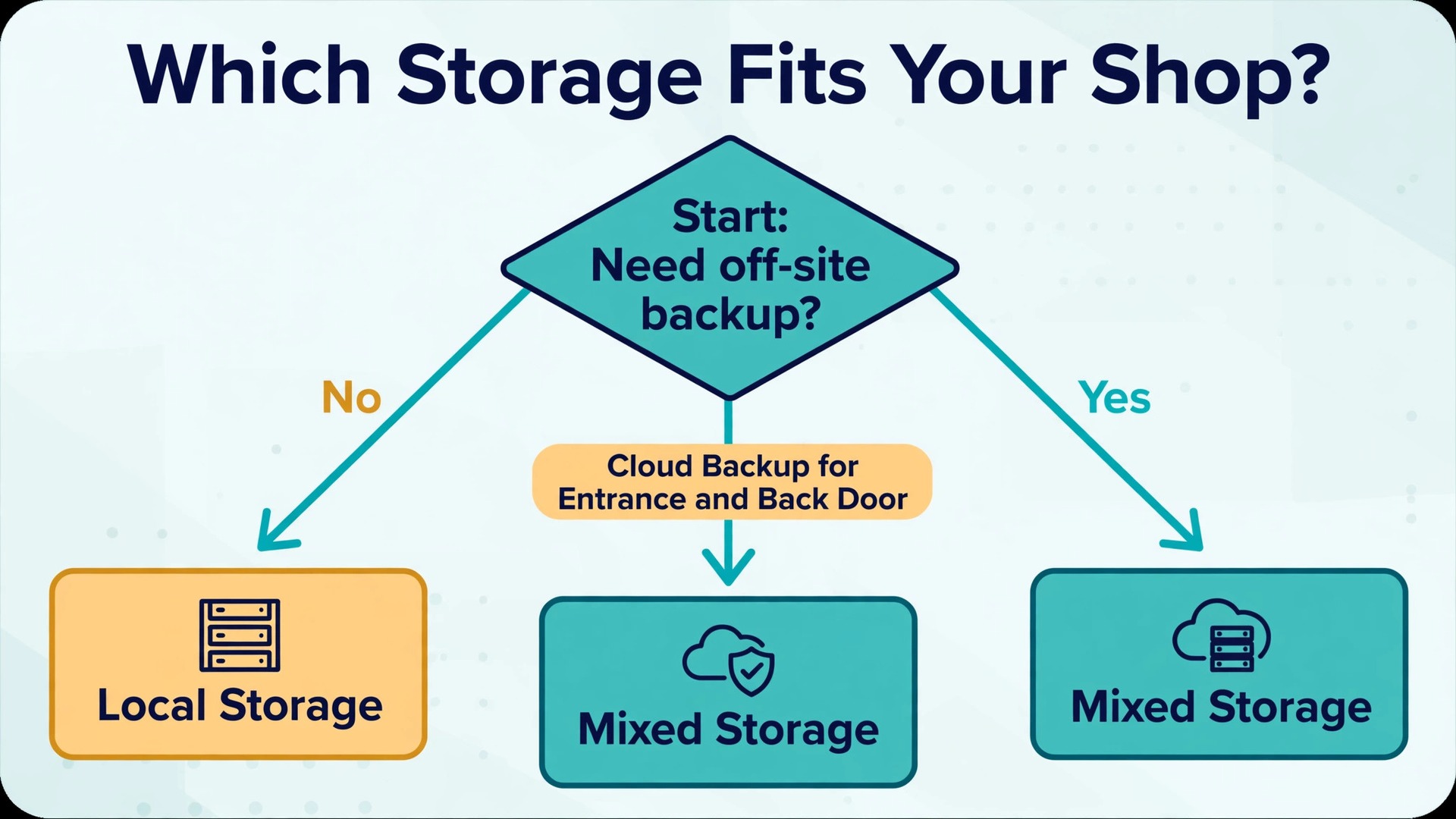
A mixed approach fits most small shops best. Keep continuous local recording for tills, entrances and stockrooms, and use cloud backup for the entrance and back door, where an incident is most likely to involve someone taking equipment. That way a stolen recorder does not take the entrance clip with it, and a broadband outage does not stop local recording. Test cloud upload with all cameras running before you rely on it, because a plan that works for one camera can fall behind with four uploading at once.
Retention needs a decision, not a default. Many shops keep footage for 14 to 30 days, which covers most card disputes, supplier queries and incident reports. A 7 day period may suit a shop with fast turnover and daily cashing up, but it will fail when a customer returns a fortnight later with a claim. A 60 or 90 day period helps slow insurance claims, but it multiplies storage cost and privacy responsibility. Pick a period you can explain in one sentence, write it into the privacy notice, and size storage from a real week of footage. Run the system for a week, check how much drive space that week used, and multiply. Recording mode matters too.
Use continuous recording for tills and entrances, and motion recording overnight for the shop floor, rather than one mode for every camera all day. A plan to set up security camera small shop storage should also include a tested export, so a clip can be handed over without extra work.
Privacy Notices and Staff Rules That Keep You on Safe Ground
A camera system that protects a shop can still cause trouble if customers and staff were never told about it, or if footage is used for purposes nobody agreed to. Privacy rules vary by country and, in some places, by state or region, so this section is practical guidance, not legal advice. Check the rules where your shop operates, and keep a note of the source you relied on.
Start with purpose. Write down, in plain words, why each camera exists. An entrance camera exists to identify people after an incident and to deter theft. A till camera exists to resolve payment disputes and protect staff. A stockroom camera exists to track goods and deliveries. If a camera has no purpose you can state plainly, remove it or reposition it. Purpose is what separates a security system from general watching, and it is the first thing a privacy complaint will test.
Signage should be at every entrance, not hidden near the till. A good sign says cameras are in use, says who operates them, says what the footage is used for and says how to contact the operator. Keep it short enough to read in a few seconds, and keep a longer notice inside the shop or on your website for anyone who wants detail. Staff rules matter as much as customer signs, because staff are filmed for whole shifts. Brief staff before go live, in person and in writing, on which areas are covered, which are not, how long footage is kept, who can view it and what it will not be used for.
Be explicit that till footage is for dispute resolution and incident review, not for timing every movement. Staff who discover a camera above a rest area will rightly lose trust in the system.
Access control is the practical heart of privacy. Give live viewing only to people who need it, such as the owner and a duty manager, and give export rights to fewer people still. Use individual logins, not a shared password taped to the recorder, so every view and export can be traced to a person. Change passwords when a manager leaves, and review the user list every few months. If police, an insurer or a customer asks for footage, log the request, share only the relevant clip and time range, and blur other faces if your tools allow it. A clip of one customer often shows other customers too, and those people have privacy rights of their own.
**Storage and privacy checklist for a small shop**
- Every camera has a written purpose, and no camera films a toilet, changing area or staff rest area
- Signs at every entrance state cameras are in use, the operator, the purpose and a contact route
- Staff received a written briefing before go live, covering areas, retention and access rules
- Retention period is written down, matches the privacy notice, and old footage is checked monthly
- Live viewing is limited to named people with individual logins, and export rights are fewer still
- Passwords change when a manager leaves, and the user list is reviewed every few months
- Exported clips sit in a restricted folder or encrypted drive, logged with date, reason and requester
- Requests are logged, limited to the relevant clip, and other faces are blurred where tools allow
- Audio stays off by default, enabled only for a named purpose stated in the notice and briefing
- Remote viewing uses a unique password and two factor authentication where offered
When you set up security camera small shop privacy rules, aim for the standard a reasonable customer would accept. If you would be uncomfortable explaining a camera position or a footage sharing decision to a customer standing in your shop, change the position or the decision before someone else has to raise it.
Remote Viewing Without Opening Your Network to Everyone
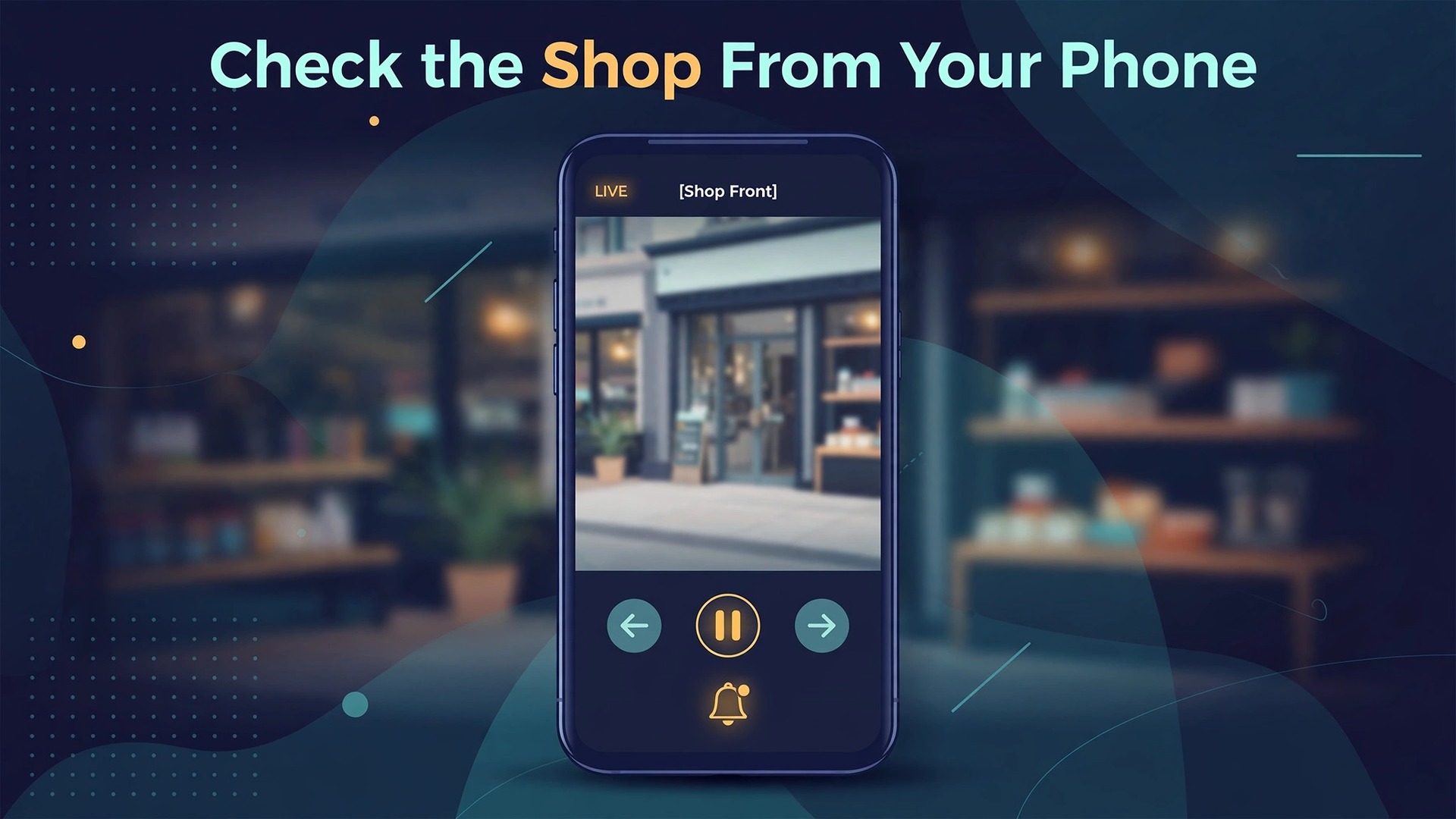
Remote viewing lets the owner check the shop from home and lets a manager confirm the shutters are down after closing, but it is also easy to set up badly. A recorder left reachable from the internet with a default password is an invitation to anyone scanning for open cameras. Start with the vendor app or cloud portal, not with manual network changes. Most current systems from Reolink, Eufy and Arlo offer remote viewing through a vendor account, which avoids opening ports on your router. Create one account per person, use a unique password, and turn on two factor authentication wherever the vendor offers it. A shared shop login defeats the access control you set up for local viewing.
Avoid port forwarding unless you have a specific reason and someone who understands the risk. It opens a path from the internet straight to your recorder, and it needs strong passwords, regular firmware updates and a record of which ports are open and why. For most small shops the vendor cloud route or a virtual private network is safer. Test remote viewing from outside the shop on mobile data, not on shop Wi-Fi, and check that live view and playback both work and that the time stamp matches real time. Then test what happens when broadband goes down. Local recording should continue on an NVR or hub even without internet, while cloud viewing will pause until the connection returns.
When you set up security camera small shop remote viewing, treat the phone app as a key to the shop. It should have its own password and two factor step, and ex staff should be removed from the app account on their last day, not at the next monthly review, because remote access does not end when someone stops coming into the shop.
Installation, Testing and the First Month Checklist
Installation order saves more time than any single tool choice. Start with the placement map, then run cables or test Wi-Fi at each position, then mount one camera and test it fully before mounting the rest. A camera mounted and sealed before testing is a camera you will have to unmount when the view is wrong. Label both ends of every cable with the camera name, so a fault six months later does not become a guessing game in the ceiling void. For Wi-Fi cameras, test signal at the exact mounting height, not at waist height in the middle of the room.
Set mounting angle with a second person watching the live feed. One person adjusts the bracket while the other calls out what is in frame. Check the full frame, not just the centre, because a display unit creeping into one corner will block that corner for every recording. Tighten the bracket, then check again, because many brackets shift slightly when tightened. For outdoor cameras, check the seal and the cable drip loop, where the cable drops below the camera entry point before rising into it, so rain runs off instead of into the housing.
Testing should cover a full trading cycle, not just a quiet install hour. Test in the morning, at midday and after dark, with shop lights on and with only security lighting on, with a queue at the till and with a delivery at the back door. Test playback, not just live view, because a system with a perfect live image but stuttering playback has a storage or network problem that live viewing hides. Test an export, test an alert and test remote viewing from mobile data. Fix every failure before the installer leaves or before you pack the ladder away. A fault found in week one is a fix, while a fault found after an incident is an excuse.
In the first month, check each camera view daily in week one, check storage use against the retention target in week two, review alerts and activity zones in week three, and run a full playback test and access list review in week four. After that, a monthly check is enough for most shops. Common faults have simple fixes. A washed out night image usually means infrared light bouncing off a nearby wall, so move the camera further from the surface. A camera dropping offline at the same time each day often has a power or Wi-Fi issue tied to another device switching on.
A wrong time stamp usually needs the time zone checked in the recorder, not just the app, because recorder time is stamped on exported evidence. A final step to set up security camera small shop installations properly is a full playback test on a different device before the job is signed off.
If the camera system will lean on shop Wi-Fi for wireless cameras or remote viewing, read how to set up a mesh Wi-Fi network in a small house for placement and dead zone ideas that transfer well to a small shop floor, and the best Wi-Fi router guide for router features that matter when video traffic shares the network. For the business side of the same shop, the monthly cost of running a Shopify store helps set a realistic budget alongside camera and cloud costs, and using WhatsApp Business for small shop orders covers customer messaging that often sits alongside the in store experience cameras protect.
Frequently Asked Questions
How many cameras does a small shop really need?
Most small shops need three to six cameras. Start with the entrance, each till, the stockroom door and the back door, then add a wide floor view and an outdoor view if your shop has them. A camera without a named job is usually wasted, while a missing till or entrance camera leaves the two most common disputes without evidence.
Should a small shop use local storage or cloud storage?
Local storage on an NVR or hub suits most small shops because it records continuously without a monthly fee and keeps working during a broadband outage. Cloud storage adds off site protection if the recorder is stolen, but it costs a monthly fee and depends on upload speed. A mix works well, with local continuous recording for tills and entrances and cloud event backup for the entrance and back door.
How long should a shop keep security footage?
Many shops keep footage for 14 to 30 days, which covers most payment disputes, delivery queries and incident reports. Shorter retention risks losing footage before a dispute surfaces, while longer retention increases storage cost and privacy responsibility. Pick a period you can explain, write it in the privacy notice, and check monthly that old footage is overwritten on schedule.
Can a shop put a camera over the till and still respect staff privacy?
Yes, provided the purpose is clear and staff are told before go live. A till camera should cover the transaction area, including hands, cash and the card reader, and its purpose should be dispute resolution and staff protection, not general monitoring of every movement. Tell staff which areas are covered, which are not, how long footage is kept and who can view it, and keep that briefing in writing.
Do shop cameras need signs, and what should the signs say?
Yes, customers should be told cameras are in use before they are filmed. Signs at every entrance should state cameras are in use, who operates them, what the footage is used for and how to contact the operator. Keep the entrance sign short and readable, and provide a longer notice inside the shop or on your website for anyone who wants retention and access detail.
Is remote viewing safe for a small shop?
Remote viewing through the vendor app with individual accounts, unique passwords and two factor authentication is safe for most small shops. Avoid sharing one login, avoid default passwords and avoid opening router ports unless you understand the risk. Test remote viewing from mobile data outside the shop, remove ex staff promptly, and keep camera firmware updated.
Covered, Not Watched Around the Clock
A good shop camera system is quiet, specific and boring in the best sense. It does not watch everything. It watches the door, the till, the stockroom and the back door, it keeps the footage for a stated period, and it lets the right people check a clip quickly when a real question comes up. That restraint is what makes the system trustworthy for customers, fair for staff and useful for the owner. Start with the placement map and the five decisions, test the entrance face shot and the till detail on a busy day, size storage from a real week of footage, and write the privacy rules before go live.
If the budget only stretches to three cameras this month, spend them on the entrance, the main till and the back door, and add the floor overview when funds allow.