

Start with Kling if you want the most free video per month, Google Flow if you want the best looking free clips, and Wan 2.2 if you own a decent graphics card and want no limits at all. Everything else on this list fills a narrower gap: avatars, effects, or turning a script into a finished video. No single free tier gives you unlimited, watermark free, high resolution, commercial ready video. Each one gives you two of those at most, and the trick is picking the tool whose limits do not touch your project.
This guide is different from a general video generator roundup. It only covers tools you can use without paying, and it judges each one on its free tier alone: how much video you actually get, whether a watermark is burned in, what resolution you can export, and whether you are allowed to use the result for work.
One warning up front. Free video quotas are the most volatile numbers in AI. Vendors shrink them without announcement, and several figures below are reported differently by roundups checked in October 2026. Where sources disagreed, this guide says so: check the live plan page before building a project around a number.
The 13 free tiers at a glance
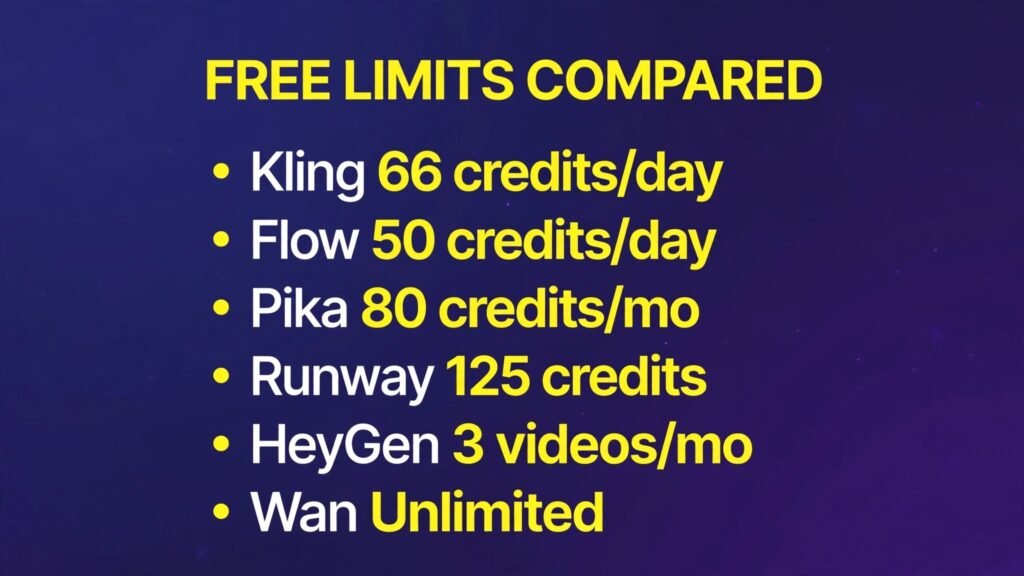
| Tool | Free allowance | Renews | Watermark | Max free resolution | Commercial use |
|---|---|---|---|---|---|
| Kling | About 66 credits a day | Daily | Yes | 720p | No, personal only |
| Google Flow (Veo) | 50 credits a day | Daily | Visible logo per some reports, invisible SynthID | 720p | Check terms |
| Seedance (Dreamina) | Daily credits, about 2 to 3 videos a day | Daily | Reports conflict | 1080p reported | No, personal only |
| Pika | 80 credits a month | Monthly | Reports conflict | 480p | No, personal only |
| Hailuo (MiniMax) | Daily bonus credits, a few clips a day | Daily | Yes | 720p | No, paid only |
| PixVerse | About 60 credits a day plus signup bonus | Daily | Reports conflict | 720p | No |
| Runway | 125 credits, one time | Never | Yes | 720p | No, paid only |
| Luma Dream Machine | Small daily allowance, shrinking | Daily | Yes | 720p | No |
| HeyGen | 3 videos a month | Monthly | Yes | 720p | No |
| Synthesia | About 10 minutes a month | Monthly | Yes | Check checkout | No |
| CapCut | Free editing, limited AI video | Ongoing | No on desktop exports | 1080p desktop | Check terms |
| InVideo | A few videos a week | Weekly | Yes | 720p | No |
| Wan 2.2 (self hosted) | Unlimited, your own hardware | None | No | Hardware limited | Yes, Apache 2.0 |
Read that table as a workflow, not a ranking.

If you want the most free video every day
Kling: the daily workhorse
Kling is the first tool to open every morning, because its free tier refreshes daily. Most October 2026 reports put the allowance at about 66 credits a day, roughly five or six standard clips. One comparison claims 166, so treat the exact number as approximate. Credits expire each day if you do not use them, and free jobs sit in a slower queue that can stretch past 30 minutes at peak times.
What makes Kling worth that queue is motion. Human movement, camera moves and physical action come out more believable than on most free tiers, which is why it suits social clips, b-roll and practice. The limits are plain: output is watermarked, capped at 720p on free, and restricted to personal use.
Free tier: About 66 credits a day, expiring daily, watermarked, 720p, personal use only.
Paid from: About $10 a month for Standard, though some listings quote a lower entry price, so check checkout.
Best for: Daily practice, social b-roll, and learning AI video without paying.
Watch out for: Slow free queue, expiring credits, and no commercial use on free.
Try it at: klingai.com
Seedance (Dreamina): the quality surprise
Seedance, ByteDance’s video model served through Dreamina, is the free tier that most surprised reviewers in 2026. Daily credits support roughly two to three videos a day, and several roundups report 1080p output, which is rare at zero cost. One roundup calls it watermark free at 1080p, others say free exports carry a watermark, so render one test clip and check before planning around it.
Seedance is strongest as an all round text to video and image to video tool rather than a specialist. Prompt understanding is good, motion is clean, and the daily refresh makes it a genuine second daily habit alongside Kling. Commercial use is reported as personal only on free, and new model versions may cost more credits than the daily allowance covers.
Free tier: Daily credits, roughly two to three videos a day, 1080p reported, watermark status disputed, personal use only.
Paid from: Check checkout, since Dreamina pricing is bundled with CapCut family plans and varies by region.
Best for: High quality daily clips when Kling’s queue is slow.
Watch out for: Conflicting watermark reports and changing credit costs for new models.
Try it at: capcut.com
PixVerse is built for speed. It turns a prompt or an image into a short clip quickly, with lip sync and social effects built in, and its free tier hands out about 60 credits a day plus a signup bonus. The tradeoff is resolution and rights. Free renders are capped at 720p, watermark reports conflict across sources, and free output is limited to non commercial use. PixVerse also leans toward trend driven effects and templates rather than cinematic control, so it is a poor pick for a short film and a good pick for a week of social posts.
Free tier: About 60 credits a day plus signup bonus, 720p, watermark status disputed, non commercial use.
Paid from: About $10 a month for Standard, with higher tiers around $30 and $60 reported, so check checkout.
Best for: Fast social clips, effects and daily posting practice.
Watch out for: Lower resolution on free and template heavy output that can look generic.
Try it at: pixverse.ai
If you want the best looking free clips
Google Flow (Veo): the quality ceiling, free
Google Flow is where Veo, Google’s video model, lives for non subscribers. The published free allowance is 50 credits a day, which buys about five Veo 3.1 Lite clips or a couple of faster model clips, at 720p. The reason to bother is quality and native audio: Veo clips look more like camera footage, and sound comes with the picture.
The watermark story needs care. Some roundups report a visible “Made with Veo” mark on free exports, while Google’s own approach embeds SynthID, an invisible watermark, in generated content. Both can be true at once depending on where you export from, so check your own clip. There are also regional limits, and Google’s video tools inside the Gemini app itself are paid only, starting from Google AI Plus at a reported $4.99 a month.
Free tier: 50 credits a day in Flow, about five Lite clips, 720p, watermark status varies by export route.
Paid from: Google AI Plus from a reported $4.99 a month for the wider Google AI bundle, so check checkout.
Best for: Hero shots, cinematic b-roll and clips where sound matters.
Watch out for: Small daily volume, regional availability, and the Gemini app itself not being free for video.
Try it at: google.com

Luma Dream Machine: cinematic, but check the door is still open
Luma’s Dream Machine built its name on natural motion. Early AI video often looked like a slideshow pretending to be footage, and Luma’s output moved convincingly enough to change that impression. Free access is the problem. One review reports a daily allowance of around 80 credits on the Dream Machine web version, roughly one short video a day at 720p, silent and watermarked. Other sources, checking the newer Agents tiers at $30, $90 and $300 a month, report no free tier on the pricing page at all. The direction is clear: free access is shrinking. Do not build a series around Luma free until you have confirmed it in your own account this week.
Free tier: Small daily allowance reported on the web version, about one short clip a day, 720p, watermarked, personal use only. Verify before relying on it.
Paid from: $30 a month for Plus on the Agents ladder, cheaper annually.
Best for: One cinematic image to video shot a day, if free access still works for you.
Watch out for: Shrinking free access and no free tier on the new pricing page.
Try it at: lumalabs.ai
If you want image to video and effects
Hailuo (MiniMax): faces, expressions and sound
Hailuo, from MiniMax, is the image to video pick for character work. It animates a still image with expressive faces and movement, and its newer H3 model adds clips up to 15 seconds at up to 2K with native stereo audio on paid tiers. On free, expect a small daily credit drop worth a few clips a day, at 720p, watermarked.
Hailuo’s free tier changed during 2026. Some roundups describe a daily bonus, others describe signup credits only, with the daily bonus removed. That disagreement is exactly why this guide keeps saying it: free video terms move fast, and Hailuo is one of the fastest movers. Commercial rights sit behind paid plans, so free clips are for testing and personal projects.
Free tier: Small daily or signup credit allowance, a few clips a day, 720p, watermarked, personal use only.
Paid from: $14.99 a month for Standard, with higher tiers to about $199 reported, so check checkout.
Best for: Animating portraits and character images with expressive motion.
Watch out for: Changing free allowance and paid only commercial rights.
Try it at: hailuoai.com
Pika: playful effects that renew every month
Pika is the friendly one. Its effects library turns ordinary ideas into recognisable transformations, and the tools are easy to learn. The free tier is a monthly allowance of 80 video credits, which renews, at 480p on the Pika 2.5 model. That resolution is test grade rather than publish grade, but the monthly renewal makes Pika the strongest option for slow, steady experimentation across a whole month rather than a single afternoon.
Free tier: 80 credits a month, renewing, 480p, watermark status disputed, personal use only. Most roundups say free output is watermarked, so treat that as true until your own export proves otherwise.
Paid from: About $10 a month for Standard, with a lower figure reported by one source.
Best for: Effects, playful transformations and learning prompt craft slowly.
Watch out for: 480p free resolution and disputed watermark status.
Try it at: pika.art
Runway: a one time taste of a pro tool
Runway is the professional tool on this list, and its free tier behaves like a trial, not a plan. You get 125 credits once, never refreshed, which buys roughly three to five short clips on the limited models available to free accounts. The newest models stay locked until you pay, and free video is watermarked.
Why include a one time grant at all? Because Runway’s editing toolkit is the point: those 125 credits let you test generation, masking, upscaling and the editor before committing. If you want ongoing free video, Kling or PixVerse serve you better. Runway free answers a buying question, not a production need.
Free tier: 125 credits one time, no refresh, watermarked, 720p, newest models excluded, personal use only.
Paid from: $15 a month for Standard, or about $12 a month billed annually.
Best for: Testing a professional editing pipeline before paying.
Watch out for: Credits never renew, so the free tier ends after a few clips.
Try it at: runwayml.com
If you want a presenter, not a scene
HeyGen: three presenter videos a month
HeyGen does a different job from every tool above it. Instead of generating a scene, it generates a presenter: an avatar that speaks your script, with voiceover in many languages. The free tier gives you three videos a month, up to a minute each, at 720p, watermarked. That covers a whole video, not just a five second clip.
HeyGen suits training videos, explainers and product walkthroughs where a face talking to camera is the format. It does not suit cinematic b-roll or creative scenes, and its free videos are not a route to a daily posting schedule.
Free tier: 3 videos a month, up to one minute each, 720p, watermarked.
Paid from: Check checkout, since published entry prices vary by billing and region.
Best for: Presenter led explainers, training clips and product walkthroughs.
Watch out for: Only three videos a month and watermarked exports.
Try it at: heygen.com

Synthesia: minutes, not clips
Synthesia works the same way, with a monthly minutes allowance instead of a clip count. One comparison puts the free plan at about 10 minutes a month, watermarked, with presenters only. So a two minute explainer costs five videos from the allowance, while a 30 second social clip is cheaper from a clip based tool.
Synthesia’s strength is corporate polish: clean presenters, many languages and a format that clients recognise. Its weakness, for a free user, is the same as HeyGen’s: you get presenters and nothing else. No scenes, no effects, no b-roll. Pick it when the script is the video, not when the picture is.
Free tier: About 10 minutes a month reported, watermarked, presenters only.
Paid from: Check checkout, since entry prices were not verified in this round.
Best for: Scripted explainers and training videos with a professional presenter.
Watch out for: Presenter only output and a minutes cap that punishes long scripts.
Try it at: synthesia.io
If you want to finish a video, not just a clip
CapCut: free editing around any generator
CapCut is not a prompt to video generator in the same sense as Kling or Veo, and that is exactly why it belongs here. Every free generator hands you isolated clips, usually five to ten seconds, with no captions and often no sound. CapCut’s free desktop tier edits those clips into something publishable at 1080p, with captions, music and transitions, and desktop exports carry no watermark on the free tier according to recent roundups. If you want the wider editing picture, see our AI video editing tools guide.
Its AI video generation itself is limited on free, pooled with every other Magic Studio tool on one shared allowance rather than a video specific credit line. Use CapCut as the second half of a free workflow: generate clips in Kling or Flow, assemble and caption them in CapCut, and you have a finished video without paying either vendor.
Free tier: Free desktop editing at 1080p with no watermark on desktop exports reported, plus a limited shared AI allowance.
Paid from: Standard from $9.99 a month and Pro from $19.99 a month, with app store prices running higher.
Best for: Assembling free clips into finished, captioned videos.
Watch out for: AI generation allowance is shared and small, and 4K export needs a paid plan.
Try it at: capcut.com

InVideo: script to video on a free plan
InVideo starts from the other end: type a script and it builds a video from stock footage, voiceover and text, rather than generating scenes from scratch. The free plan covers a few videos a week at 720p, watermarked, with voiceover in many languages. That suits explainers where stock footage plus narration is the format.
The catch is originality. Stock based video looks stock based, and viewers can tell. InVideo free is a good tool for testing whether script to video suits your channel, and a weak tool for standing out visually.
Free tier: A few videos a week reported, 720p, watermarked.
Paid from: Check checkout, with about $20 a month per seat reported by one source.
Best for: Script to video explainers built on stock footage and narration.
Watch out for: Watermarked output and a stock look that is hard to disguise.
Try it at: invideo.io
If you want no limits at all
Wan 2.2: free, if you bring the computer
Wan 2.2 is the only tool on this list where free has no asterisk, because there is no vendor metering it. It is an open source video model you run on your own hardware: no credits, no watermark, no daily caps, and the Apache 2.0 licence permits commercial use. For owners of a gaming graphics card it is unbeatable value, and nothing leaves your computer.
The catch is obvious and real. You are the cloud. Generation speed depends entirely on your machine, a card around RTX 3060 level or better is the usual recommendation, and setup is a developer style process rather than a signup form. But if you can run it, Wan removes every limit that defines the other twelve entries.
Free tier: Unlimited, no watermark, no caps, commercial use allowed under Apache 2.0.
Paid from: Nothing, beyond your own hardware and electricity.
Best for: Unlimited private generation and commercial projects on your own machine.
Watch out for: Setup effort and generation speed tied to your graphics card.
Try it at: wan.video
What free really means: watermarks, credits and commercial rights
Free video has four taxes, and every tool charges a different mix of them. First, watermarks: most free tiers burn a visible logo into the corner, while Google leans on invisible SynthID and a few tools dispute their status outright. Second, credits: daily allowances like Kling’s expire if unused, monthly ones like Pika’s roll for a month, and one time grants like Runway’s end permanently. Third, resolution: 720p is the free standard, 480p on Pika is test grade, and 1080p on Seedance or Veo is the exception. Fourth, rights: Kling, PixVerse, Hailuo and most others restrict free output to personal use, so client work needs a paid plan even if the clip looks good enough.
Two practical rules follow. Never promise a client a free tier clip, because the licence usually forbids it and the watermark will embarrass you anyway. And never build a series around a single free allowance, because vendors shrink quotas without warning: Luma’s shrinking free door and Hailuo’s changing bonus are the live examples. A free workflow should always have a backup tool that does the same job.
How to choose: start from the job, not the ranking
If you post daily, open Kling first and PixVerse second, and treat their daily credits as a habit, not a binge. Unused daily credits vanish, so a little every day beats a big session once a month. If you need one beautiful shot, spend your Flow credits on it and keep Kling for everything else. If you need a presenter, HeyGen’s three videos or Synthesia’s ten minutes decide the pick by length. If you need a finished video, generate clips anywhere and assemble them in CapCut. And if you own the hardware, install Wan 2.2 before you pay anyone, because it removes the whole credit question. For creators building a channel around short video, our AI tools for YouTubers guide covers the wider workflow.
A good free stack, for zero dollars, looks like this: Kling for daily volume, Flow for hero shots, CapCut for assembly, and Wan for anything you want to use commercially. That combination covers volume, quality, finishing and rights without a single subscription. For the wider creator toolkit around these clips, see our AI tools for content creators guide. Add Pika when you want effects, and Hailuo when a face needs to move. If you need the still image first, our Midjourney alternatives guide covers image generators that feed image to video tools well.

Frequently Asked Questions
Which free AI video generator has no watermark?
None that can be relied on. Wan 2.2 on your own hardware adds none, but every major hosted free tier either watermarks visibly or embeds an invisible mark. Treat “no watermark” claims as unverified until your own export proves them.
Can I use free AI videos commercially?
Usually no. Kling, PixVerse, Hailuo and most others restrict free output to personal use, and paid plans unlock commercial rights. The exceptions are Wan 2.2 under its open licence and Runway, though its free tier is one time and watermarked. Always read the licence for your exact plan.
How long can a free AI video clip be?
Most free generations run five to ten seconds. Veo reaches longer on paid tiers, and some models reach 15 seconds, but free clips cluster at five seconds. Longer videos come from stitching clips together in an editor like CapCut, not from a single generation.
Is there a completely free AI video generator?
Wan 2.2 is the only genuinely unlimited free option, because you run it yourself. Every hosted tool meters something: credits, resolution, watermark or rights. “Free” on a hosted tool means a free allowance, not a free product.
Why do free credits expire?
Because video is expensive to serve. Daily credits that expire push you into a habit, monthly credits give you a slower rhythm, and one time grants are a trial. Expiry is how vendors limit cost without removing the free tier entirely.
Do free AI video generators add audio?
Some do. Veo generates native audio and PixVerse includes lip sync, but most free tiers are silent or limited, so plan to add music and voiceover in your editor.
What happened to Sora’s free tier?
It ended. OpenAI shut down the Sora consumer app in April 2026 and folded video work into its wider products. There is no free Sora route to recommend, and older guides listing one are out of date.
Conclusion
Free AI video in 2026 is genuinely useful, as long as you stop expecting one tool to do everything. Kling gives you volume, Flow gives you quality, Wan gives you freedom, and the specialists fill the gaps around them. Pick by the limit you can live with, not by the headline feature, keep a backup tool for the day a quota shrinks, and pay only when a project needs clean resolution or commercial rights.