
Claude is one of the strongest AI chatbots available, especially for long documents and careful writing. But it is not the right fit for everyone. Some users need live web search, some need a chatbot built into tools they already pay for, and some need code help, lower prices, or a model that runs on their own machine. The best Claude alternatives solve one of those specific problems better than Claude does, and this guide names which one fits which job.
This guide compares 12 tools grouped by the job each one does best: general chatbots, coding help, writing help, research and analysis, and privacy and offline options. Prices are October 2026 figures in US dollars. Where a vendor does not publish pricing, or where sources disagreed, the guide says check checkout rather than guessing. One rule runs through the whole guide: no single chatbot wins every job, so pick the tool that matches the work you actually do most days, not the one with the longest feature list.
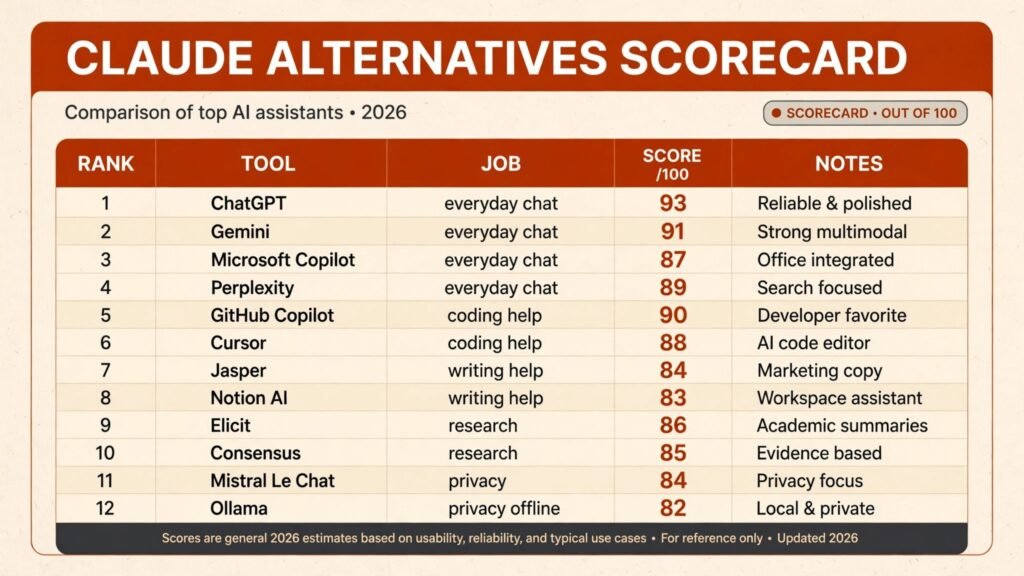
Claude alternatives at a glance
| Tool | Best job | Free option | Paid from |
|---|---|---|---|
| ChatGPT | General chatbot | Free tier | Plus $20 per month |
| Google Gemini | General chatbot | Free tier | Google AI Pro $19.99 per month |
| Microsoft Copilot | General chatbot | Free tier | Copilot Pro $20 per month |
| Perplexity | General chatbot | Free tier | Pro $20 per month |
| GitHub Copilot | Coding help | Free tier | Pro $10 per month |
| Cursor | Coding help | Free tier | Pro $20 per month |
| Jasper | Writing help | No | Check checkout |
| Notion AI | Writing help | Limited | Around $10 per user per month |
| Elicit | Research help | Free tier | Check checkout |
| Consensus | Research help | Free tier | Check checkout |
| Mistral Le Chat | Privacy focused chat | Free tier | Check checkout |
| Ollama | Offline local models | Free | Free |
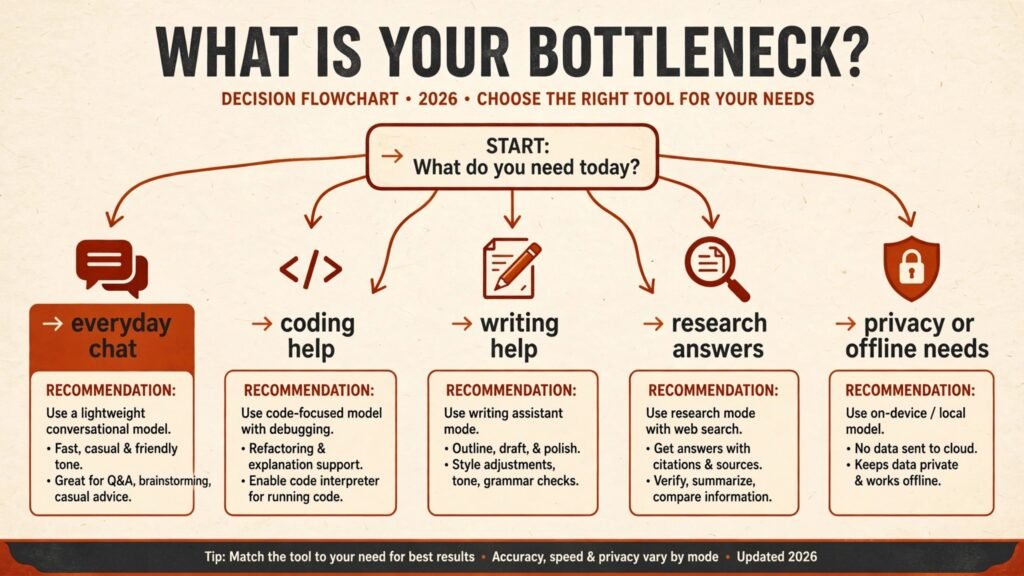
Best pick by job
| Your job | Start with | If that fails, try |
|---|---|---|
| One chatbot for almost anything | ChatGPT | Gemini |
| A chatbot inside Google apps | Gemini | Copilot |
| A chatbot inside Microsoft apps | Copilot | ChatGPT |
| Answers with cited sources | Perplexity | Elicit |
| Code completion in your editor | GitHub Copilot | Cursor |
| An AI first coding editor | Cursor | GitHub Copilot |
| Marketing and brand copy | Jasper | Notion AI |
| Notes, docs and wikis with AI | Notion AI | Jasper |
| Academic literature review | Elicit | Consensus |
| Evidence based answers fast | Consensus | Perplexity |
| European privacy rules | Mistral Le Chat | Ollama |
| Fully offline AI on your machine | Ollama | Mistral Le Chat |
General chatbots: the everyday replacements
These four are the closest direct replacements for Claude. They handle general questions, drafting, summarising and brainstorming, and they differ mainly in ecosystem, search ability and price.
1. ChatGPT

ChatGPT remains the default general chatbot for most users. It handles a wide range of tasks well, from drafting emails to explaining complex topics, and its paid tier adds stronger reasoning models, image generation and file analysis. The app ecosystem is also the largest, with many third party tools built around it.
Pricing: A free tier covers basic chat. Plus is $20 per month. Team and enterprise plans cost more; check checkout for current business pricing.
Best for: Users who want one chatbot that handles almost any everyday task, and who value the widest plugin and integration support.
Watch out for: ChatGPT can still produce confident but wrong answers, especially on niche facts and recent events. Verify important claims before relying on them. For a fuller comparison of ChatGPT rivals, see our ChatGPT alternatives guide.
Try it at: chatgpt.com
2. Google Gemini
Gemini is the strongest choice for anyone already living in Google Workspace. It reads Gmail, Docs and Drive with permission, summarises meetings and documents, and draws on live Google Search for current information. Its multimodal ability, handling text, images and video, is also among the best in this group.
Pricing: A free tier is offered. Google AI Pro is reported at $19.99 per month, with higher tiers for heavy users. Check checkout for the current bundle, since Google has changed AI packaging several times.
Best for: Google Workspace users, students and researchers who need current information and tight integration with Docs, Sheets and Search.
Watch out for: Gemini’s long form writing can feel flatter than Claude’s, and its answers sometimes lean on search snippets rather than deep reasoning. For the wider Gemini rival set, see our Gemini alternatives guide.
Try it at: gemini.google.com
3. Microsoft Copilot
Copilot is the natural alternative for Microsoft 365 users. Inside Word, Excel, Outlook and Teams it drafts, summarises and rewrites in context, and the standalone chat answers general questions with web grounding. For offices already paying for Microsoft 365, it is often the cheapest capable option.
Pricing: A free tier covers basic web chat. Copilot Pro is $20 per month for individuals, and business plans are bundled with Microsoft 365. Check checkout for the current business price.
Best for: Offices, schools and teams standardised on Microsoft 365 who want AI inside the documents and email they already use.
Watch out for: Copilot’s standalone chat is less polished than ChatGPT or Claude for open ended creative work, and the best features require a paid Microsoft 365 plan.
Try it at: copilot.microsoft.com
4. Perplexity
Perplexity is the answer engine of this group. Every answer cites its sources, with links a reader can check, which makes it far more useful than a standard chatbot for research, news and fact checking. Its paid tier adds stronger models and deeper research modes.
Pricing: A free tier covers basic searches. Pro is $20 per month. Check checkout for current team pricing.
Best for: Researchers, journalists and anyone who needs sourced answers and current information rather than creative writing.
Watch out for: Perplexity is weaker at long creative writing and multi step reasoning tasks, where Claude and ChatGPT are stronger. It is a research tool first, a writer second.
Try it at: perplexity.ai
Coding help: chatbots that write and fix code
Claude is popular with developers, but these two tools are built for code from the ground up. They work inside the editor, understand a whole codebase, and handle the repetitive parts of programming.
5. GitHub Copilot
GitHub Copilot is the most widely used AI coding assistant. It completes lines and functions as you type, explains code, writes tests and suggests fixes, all inside VS Code, JetBrains and other editors. Its training on public code makes it strong on common languages and frameworks.
Pricing: A free tier is offered for students and limited use. Pro is $10 per month for individuals, with Pro+ and business plans higher. Check checkout for current team pricing.
Best for: Professional developers and students who want code completion and in editor help across many languages.
Watch out for: Copilot can suggest code that looks correct but contains subtle bugs or outdated library calls, so tests and review remain essential. Teams weighing coding tools should also see our AI tools for learning to code guide.
Try it at: github.com
6. Cursor
Cursor is an AI first code editor built on VS Code. Instead of adding AI to an existing editor, it rebuilds the workflow around it: chat with your codebase, generate whole files, refactor across many files at once, and apply changes directly. For developers who use AI heavily, it feels more integrated than a plugin.
Pricing: A free tier is offered with limited requests. Pro is $20 per month, with higher tiers for heavy use. Check checkout for current request limits, since Cursor prices partly by usage.
Best for: Developers who want AI deeply built into editing, multi file refactoring and codebase wide questions.
Watch out for: Cursor’s usage based pricing can surprise heavy users, and its agent mode sometimes makes broad changes that need careful review. Start with small refactors before trusting large ones.
Try it at: cursor.com
Writing help: chatbots tuned for words
Claude is prized for writing quality, so these two picks are judged on the same standard. They trade some general ability for features writers actually use: tone control, brand voice and structured documents.
7. Jasper

Jasper is built for marketing and business writing. It offers brand voice settings, templates for ads, blogs and emails, and a document editor designed for longer pieces. Teams that publish a lot of content will find its workflow faster than a general chatbot.
Pricing: No free plan, only a trial. Paid plans are not consistently published across regions, so check checkout for the current price for your team size.
Best for: Marketing teams, agencies and content creators who need consistent brand voice across many pieces.
Watch out for: Jasper’s output still needs human editing for accuracy and originality, and its price is high for a single user. Freelancers should compare it with the wider solo stack in our AI tools for freelance writers guide.
Try it at: jasper.ai
8. Notion AI
Notion AI adds writing help directly inside Notion pages, databases and wikis. It summarises long notes, drafts pages, rewrites text and answers questions from your own workspace, which makes it ideal for people whose knowledge already lives in Notion.
Pricing: A limited free use is included for some plans. The full AI add on is reported at around $10 per user per month on top of a paid Notion plan. Check checkout for the current add on price.
Best for: Teams and individuals who plan, document and write inside Notion and want AI that can read their own pages.
Watch out for: Notion AI is only useful inside Notion. If your writing lives elsewhere, a general chatbot will serve you better, and its answers are limited to what is in your workspace.
Try it at: notion.so
Research and analysis: answers you can check
Claude handles long documents well, but research tools add something Claude does not: direct access to academic papers and cited evidence. These two emerging tools are built for that job.
9. Elicit

Elicit is the literature review assistant. Ask a research question and it searches academic papers, extracts key findings into a table, and summarises what the evidence says, with citations to each paper. It is one of the most useful emerging tools for students and researchers.
Pricing: A free tier covers basic searches. Paid plans add more papers, columns and analysis features; check checkout for current pricing, since Elicit has changed its plans before.
Best for: Students, academics and analysts doing literature reviews, systematic summaries and evidence tables.
Watch out for: Elicit only covers papers in its index, so very recent or niche work may be missing, and its summaries still need checking against the original papers.
Try it at: elicit.com
10. Consensus
Consensus answers questions directly from peer reviewed research, with a short verdict and citations. Where Elicit builds tables, Consensus gives a fast consensus view: what the studies agree on, where they disagree, and how strong the evidence is.
Pricing: A free tier covers basic questions. Premium plans add unlimited searches and deeper analysis; check checkout for current pricing.
Best for: Anyone who needs a fast, evidence based answer to a scientific or health related question, with sources attached.
Watch out for: Consensus is narrow by design. It answers research questions well but is poor at general chat, coding or creative writing, so pair it with a general chatbot rather than replacing one.
Try it at: consensus.app
Privacy and offline options: chatbots that keep data close
Some users cannot send sensitive text to a US cloud service, or simply prefer not to. These two options keep more control in the user’s hands, one through a European provider and one through fully local models.
11. Mistral Le Chat
Mistral Le Chat is the European challenger in this list. Built by French company Mistral AI, it offers fast chat, document analysis and web search, with data handling under European rules. Its open weight models are also widely used by developers building their own tools.
Pricing: A free tier is offered. Paid Pro plans are available for heavier use; check checkout for the current price, since Mistral has adjusted its tiers.
Best for: European users, privacy conscious teams and developers who want a capable chatbot outside the US big three.
Watch out for: Le Chat’s ecosystem is smaller than ChatGPT’s, with fewer integrations and plugins, and its long form writing is a step behind Claude’s best work.
Try it at: chat.mistral.ai
12. Ollama
Ollama is the only fully offline option on this list. It runs open models such as Llama, Mistral and others directly on your own computer, with no account and no data leaving the machine. For sensitive documents, air gapped work or tinkering, nothing else offers the same control.
Pricing: Free and open source. The only cost is your own hardware, and larger models need a capable machine with plenty of memory.
Best for: Privacy focused users, developers experimenting with local models, and anyone working with data that must never leave the machine.
Watch out for: Local models are weaker than frontier cloud models, especially on reasoning and long documents, and setup requires some technical comfort. This is a privacy trade, not a capability upgrade.
Try it at: ollama.com
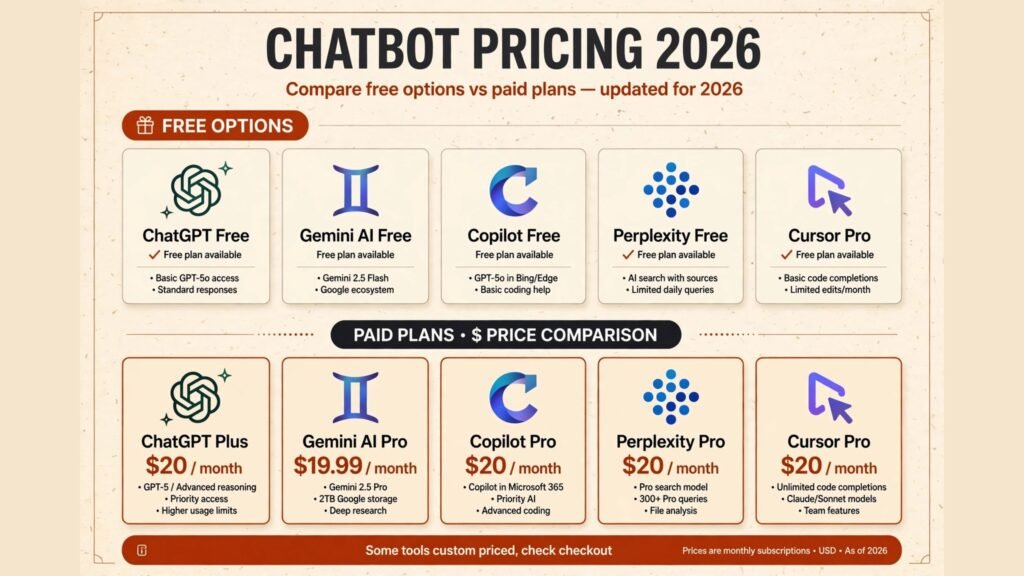
Pricing compared: what a chatbot really costs
| Tool | Free option | Paid from | Pricing note |
|---|---|---|---|
| ChatGPT | Free tier | $20 per month | Plus tier, team plans higher |
| Google Gemini | Free tier | $19.99 per month | Google AI Pro, bundles vary |
| Microsoft Copilot | Free tier | $20 per month | Pro tier, business bundles vary |
| Perplexity | Free tier | $20 per month | Pro tier |
| GitHub Copilot | Free tier | $10 per month | Pro tier, Pro+ higher |
| Cursor | Free tier | $20 per month | Usage based limits apply |
| Jasper | Trial only | Check checkout | Varies by region and team |
| Notion AI | Limited | Around $10 per user per month | Add on to a paid Notion plan |
| Elicit | Free tier | Check checkout | Paid tiers add papers and analysis |
| Consensus | Free tier | Check checkout | Premium adds unlimited searches |
| Mistral Le Chat | Free tier | Check checkout | Pro tier for heavy use |
| Ollama | Free | Free | Hardware is the only cost |
A realistic starter setup costs $0 to $20 a month: a free general chatbot plus Perplexity free for sourced answers, or one $20 subscription if you want the strongest general model. A professional setup lands around $20 to $40 a month by adding a coding or writing tool on top. Pay more only when a specific job, such as team writing or enterprise coding, justifies it. In every case, check checkout for renewal terms, because free tiers and trial limits change often.
How to Choose the right Claude alternative
Start with the job, not the brand. If the job is everyday chat, start with ChatGPT or Gemini and test both free tiers for a week. If the job is code, start with GitHub Copilot or Cursor inside your real editor, on a real project, not a demo. If the job is research, start with Perplexity for general questions and Elicit for academic work.
Next, test the ecosystem fit before you commit. A chatbot that lives inside the apps you already open every day will get used far more than a stronger chatbot that sits in a separate tab. Gemini for Google users and Copilot for Microsoft users win on this test even when their raw answers are close to rivals.
Then check the privacy and data rules for your work. If you handle client, medical or legal documents, read the vendor’s data terms before pasting anything sensitive, and consider Mistral Le Chat or Ollama for the most sensitive material. No answer quality is worth a data leak.
Finally, test the check step. Ask each finalist the same hard question from your own work, then verify the answer against a source you trust. The tool whose answers you can verify fastest is usually the right one, even if another tool writes prettier prose. For a broader view of the chatbot market, see our best AI chatbots in 2026 guide.
Frequently Asked Questions
Is there a free Claude alternative?
Yes. ChatGPT, Gemini, Copilot, Perplexity, Mistral Le Chat and Ollama all offer free tiers, and Ollama is free outright. Free tiers limit model quality or usage, so heavy users will still want a paid plan, but casual use costs nothing.
Which Claude alternative is best for coding?
GitHub Copilot for in editor completion across many languages, and Cursor for an AI first editor with codebase wide refactoring. Developers who mainly ask questions about code rather than writing it may prefer ChatGPT or Claude itself.
Which Claude alternative is best for writing?
Jasper for marketing and brand copy, and Notion AI for writing inside an existing Notion workspace. For general long form writing, ChatGPT and Gemini remain strong, and Claude itself is still hard to beat for careful prose.
Which Claude alternative gives cited sources?
Perplexity for general questions, and Elicit or Consensus for academic research. These three attach sources to their answers, which makes verification far easier than with a standard chatbot.
Can I use a Claude alternative offline?
Yes, with Ollama. It runs open models on your own computer with no internet connection and no data leaving the machine. The trade is capability: local models are weaker than frontier cloud models on reasoning and long documents.
Which single tool should most people start with?
ChatGPT, for most people, because it covers general chat, writing, coding help and file analysis in one place and its free tier lets you test it before paying. Google Workspace users should start with Gemini instead, and Microsoft 365 users with Copilot. Teams comparing ongoing costs should also see our AI subscriptions worth paying for guide.
Conclusion
The best Claude alternatives do not try to beat Claude at everything. They win one job: ChatGPT and Gemini win everyday chat, Copilot wins the Microsoft office, Perplexity wins sourced answers, GitHub Copilot and Cursor win code, Jasper and Notion AI win structured writing, Elicit and Consensus win research, and Mistral Le Chat and Ollama win privacy and offline use.
Start with the job you do most. Test the free tier for a week on real work, verify the answers against sources you trust, and only then pay. The right alternative is the one that fits your apps, your privacy needs and your budget, not the one with the biggest launch headlines.