
The verdict is simple. A small dental clinic should not hire more front desk hours to chase confirmations, and it should not send one generic text the day before and hope for the best. The setup that works best for most clinics is a dental specific messaging platform connected to the practice schedule, with a short sequence of texts and emails, a one tap reply to confirm or reschedule, and a same day list for staff to call. If you use AI for dental clinic patient reminders in that disciplined way, you get fewer empty chairs, less phone tag, and a calmer front desk, without turning patient messages into spam.
This guide gives you the whole setup. You will see which tools fit a solo practice and which fit a multi chair clinic, what a reminder sequence should look like across seven days, and what each message should actually say. You will also see real costs, the consent and privacy checks to make before you switch anything on, and the mistakes that quietly undo good reminder systems. Prices change, so check the vendor page and the checkout page before you pay for any tool named here. This guide is general setup advice only. It is not legal or compliance advice, and every clinic should check its local privacy and consent rules before sending patient messages.
What Good Reminders Actually Do
A reminder is not a nag. It answers three questions in under ten seconds. Do I still have this appointment, when exactly is it, and what do I do if that time no longer works. When a message fails on any of those three points, the patient either ignores it, calls to ask, or simply does not turn up. When it answers all three, confirmation becomes a one tap job rather than a phone call.
How to Use AI for Dental Clinic Patient Reminders Without Losing the Human Touch
The fear that automated reminders will feel cold is reasonable, because many of them do. They feel cold when they use the wrong name, the wrong treatment, the wrong time, or a tone that sounds like a marketing blast. They feel human when they are short, specific, and easy to answer. If a patient forwarded your reminder to a friend, would that friend be able to tell it came from a real clinic that knows this patient, or would it look like a message that could have come from any business.
Start with data quality before you start with clever wording. A reminder system is only as good as the schedule it reads. If appointment types are entered inconsistently, if mobile numbers are out of date, or if family members share one number, even perfect templates will produce wrong messages. Spend the first setup day cleaning those three things. Standardise appointment names, check that every active patient has a mobile number marked as the preferred contact, and fix duplicates where two records exist for one person. That dull work prevents most embarrassing messages later.
Choose the Right Tool for Your Clinic Size
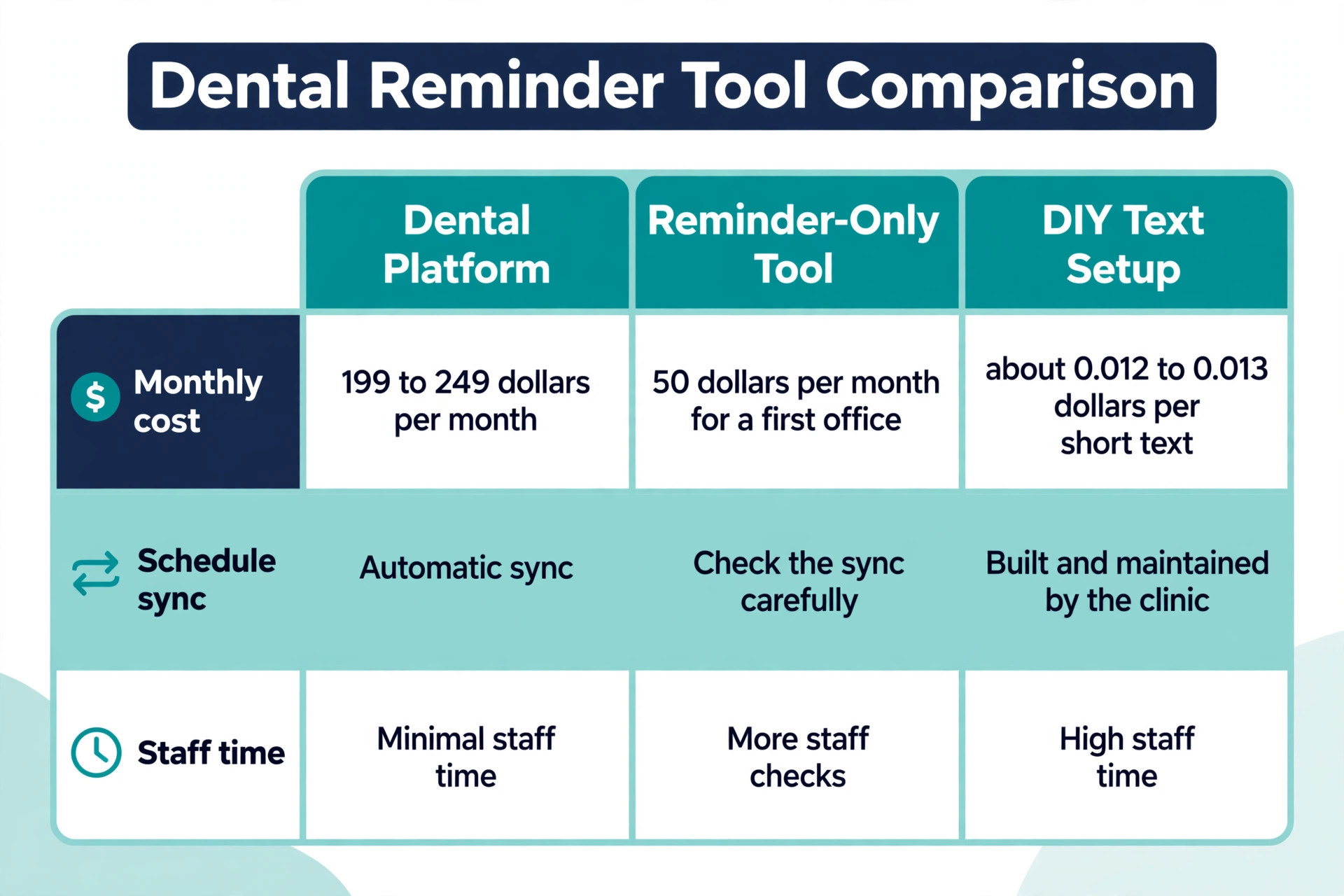
Weave is the best known example, with phone, texting, reminders, missed call texts, and payments in one system. Its dental pages describe reminders that can be customised by appointment date, time, type, and patient name. Weave does not publish a simple public price list, and third party listings in October 2026 report a starting figure around 199 dollars a month, with other guides reporting around 249 dollars a month for a core plan. Treat that range as a starting point for a quote, not as a fixed price, and confirm what is included at checkout, because phone service and payment features can change the bill.
Solutionreach is a second established option, with two way texting, reminders, recall, online scheduling, and patient surveys. Its Essentials package was listed on its own pricing page at 189 dollars a month on an annual plan, or 249 dollars month to month, as a promotional rate with a note that the price could change after the first year. That is a useful benchmark, but it is a promotion, so check the current page before you budget around it. Solutionreach also lists larger packages with higher monthly text allowances, which matters if your clinic sends a lot of recall messages as well as reminders.
A low cost reminder only tool suits a solo practice that already likes its phone and scheduling setup and only wants to fix no shows. ReminderDental lists a first office at 50 dollars a month, with the first 500 texts included and extra texts billed from about 0.031 to 0.04 dollars per text depending on volume. Check two things before you choose it. Does it sync with your exact practice management system, and how often. Does it handle two way replies, recall, and waitlist messages, or only one way reminders. A cheap tool that staff have to work around every day is not cheap.
The third route is a do it yourself text setup built on a messaging API such as Twilio, connected to your schedule through an automation tool. Twilio publishes a United States SMS rate of 0.0083 dollars per message segment, with carrier pass through fees of roughly 0.0035 to 0.005 dollars per message on top, giving an all in planning figure of about 0.012 to 0.013 dollars per short outbound text. A local number costs roughly 1.15 dollars a month in published listings. That route is very cheap per message, but it needs someone to build and maintain the connection, the consent records, the opt out handling, and the reply routing.
For most clinics, the staff time costs more than the saving.
| Tool type | Best for | Indicative monthly cost | Main trade off |
|---|---|---|---|
| Dental platform such as Weave | Clinics that want phone, text, and reminders together | Around 199 to 249 dollars reported, quote based | Higher bill, but less manual work |
| Dental platform such as Solutionreach | Clinics that want recall and surveys too | 189 dollars annual promo, 249 dollars monthly, check current page | Promotional pricing may change |
| Reminder only tool such as ReminderDental | Solo practices fixing no shows only | 50 dollars for a first office, extra texts from about 0.031 dollars | Fewer features, check the sync |
| DIY API such as Twilio | Clinics with in house technical help | About 0.012 to 0.013 dollars per short text, plus number rental | Cheap per message, costly in staff time |
When you use AI for dental clinic patient reminders through a dental platform, ask about four specific features. Can it draft reminder variants for different appointment types. Can it sort incoming replies and suggest a reply for staff to approve. Can it propose alternative times from open slots when a patient cancels. Can it flag high risk appointments, such as long procedures or patients with a history of no shows, for an extra call. If a vendor cannot show those four things working on your schedule, you are buying a texting tool with an AI label, not an AI reminder system.
The Reminder Sequence That Fills Chairs
Seven days before, send an email. This is the planning message. It confirms the date, time, treatment type in plain words, and location, and it links to forms and directions. It also gives a clear reschedule link or reply option. Patients who need to move an appointment would rather do it a week ahead, when the slot can still be filled, than the night before.
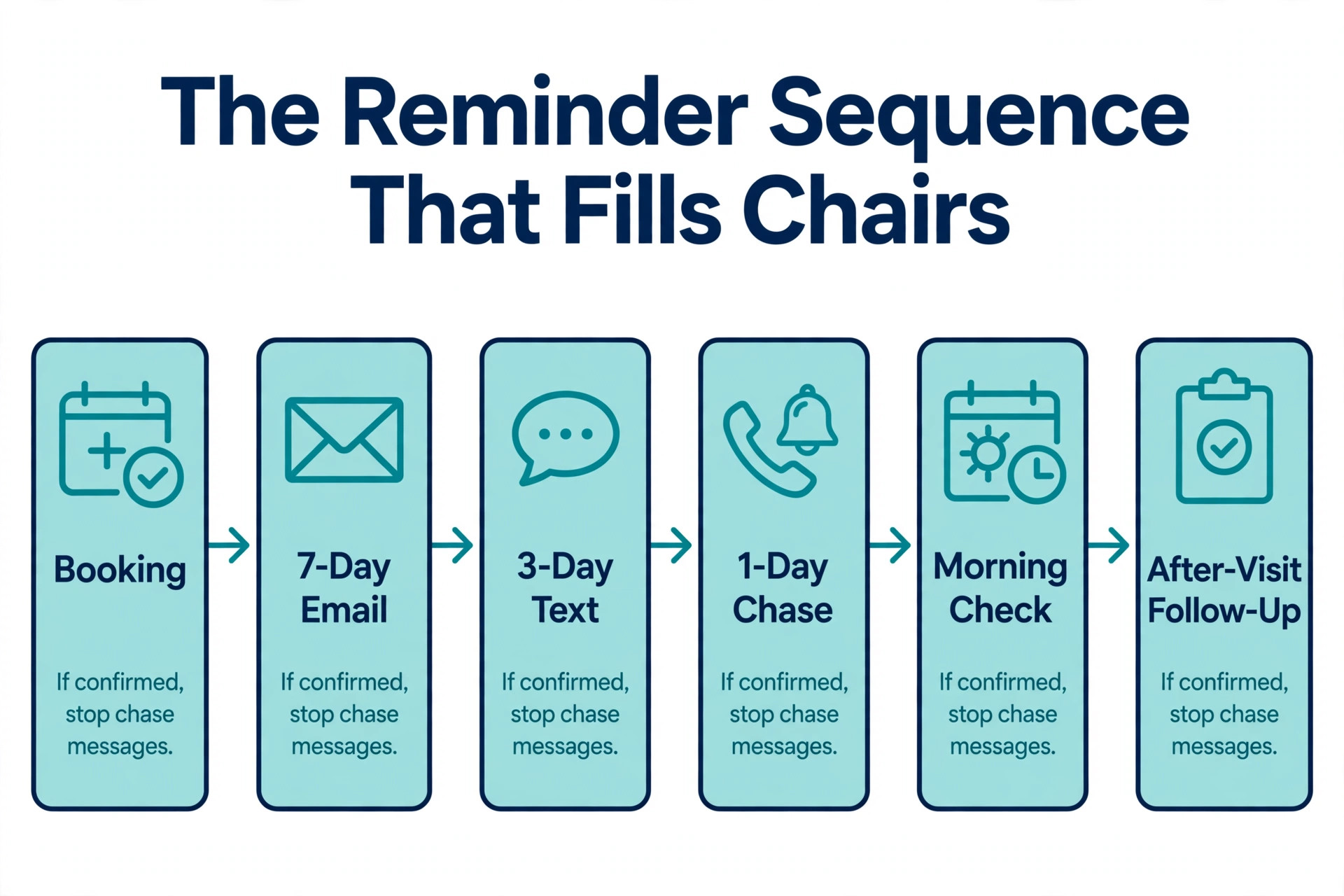
Three days before, send a text. This is the confirmation message. It should be short, name the patient, give the day and time, and ask for a one letter or one tap reply. Do not add prep instructions, payment notes, and recall offers to this message. Its only job is to get a yes or a reschedule. One day before, send a second text only to patients who have not confirmed, plus a prep text to patients with procedures that need preparation. Patients who already confirmed do not need another nudge, and sending them one anyway trains them to ignore your messages.
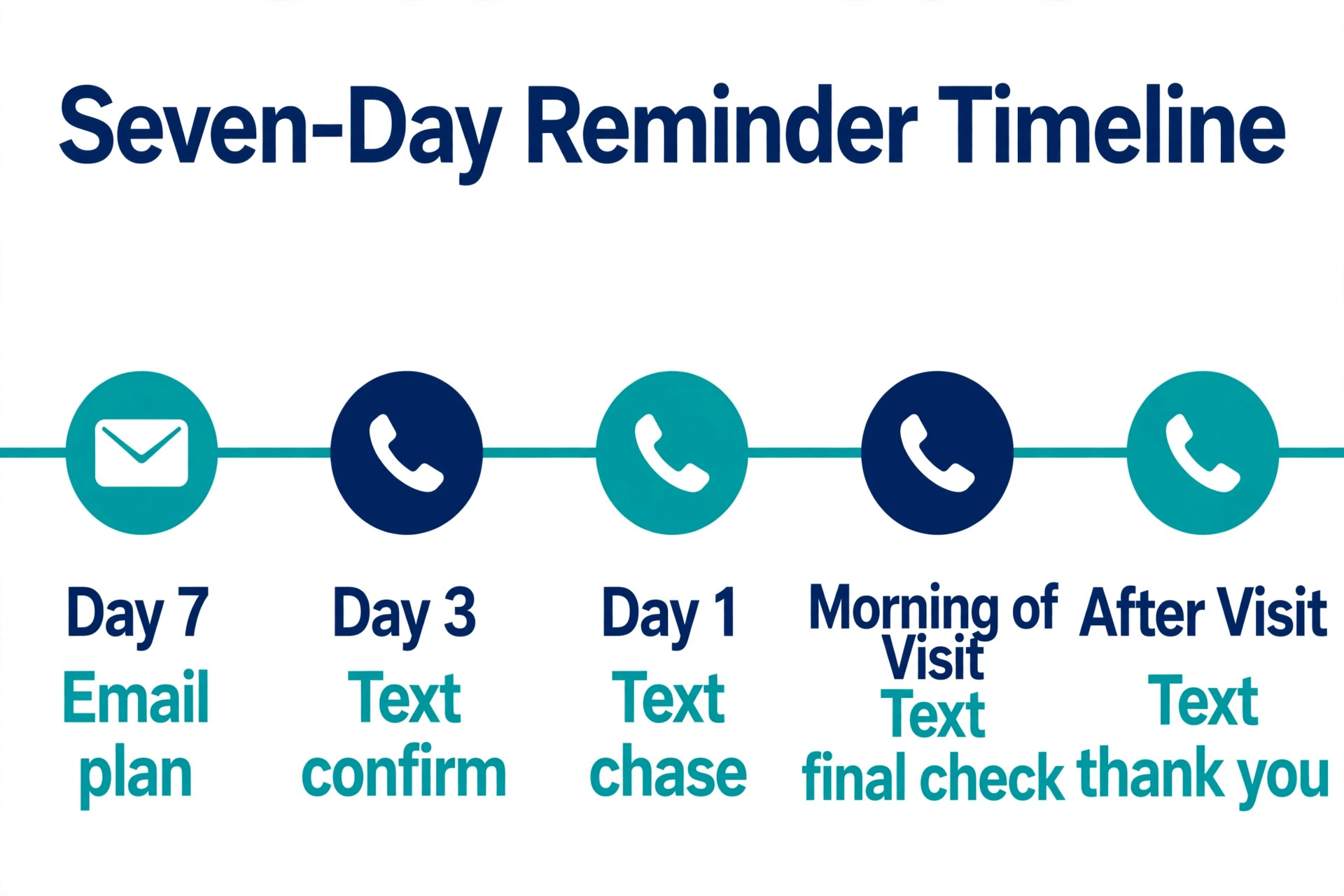
Patients who have not replied need attention, and staff should have their names on a call list by mid afternoon.
| Timing | Channel | Audience | Job of the message |
|---|---|---|---|
| 7 days before | All booked patients | Plan, forms, directions, reschedule link | |
| 3 days before | Text | All booked patients | Confirm with a one tap reply |
| 1 day before | Text | Unconfirmed patients, plus prep patients | Chase confirmation, give prep notes |
| Morning of visit | Text | Unconfirmed and long appointments | Final check, arrival advice, delay reply |
| After visit | Text | All attended patients | Thank you, next step, one follow up job |
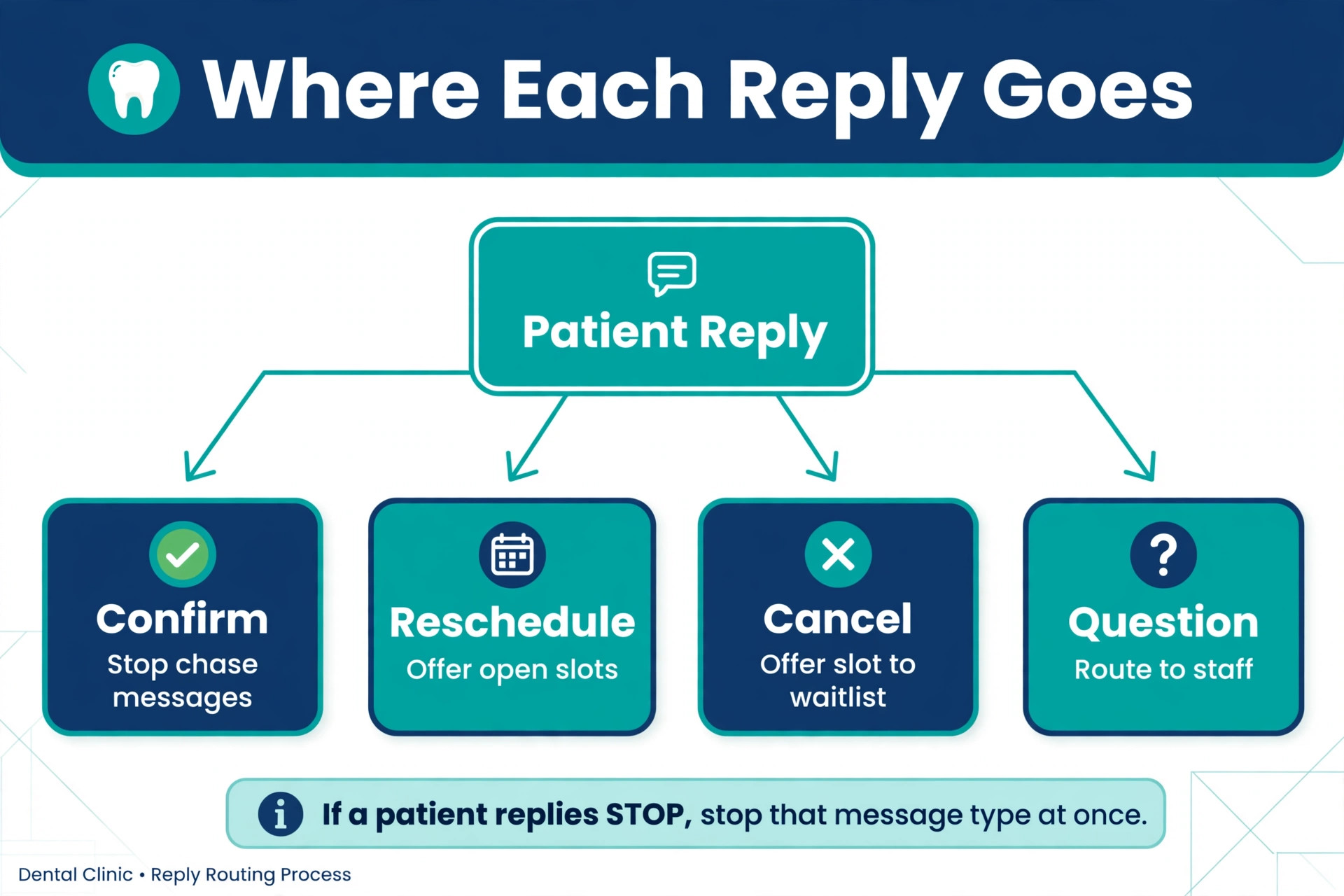
When you use AI for dental clinic patient reminders to run this sequence, set the rules in the tool, not in a spreadsheet that someone has to remember. If a patient confirms, stop the chase messages. If a patient asks to reschedule, offer open slots and hold the new time only after the patient accepts. If a patient cancels, offer the slot to the waitlist within the hour. If a patient does not reply by the afternoon before, add the name to the staff call list. Those four rules, applied every time, are worth more than any clever wording tweak.
Message Templates You Can Copy and Adapt
Template 1, the seven day email. Hello first name, this is a friendly note about your appointment on the day and date at the time for a plain language treatment description. Please arrive a few minutes early and bring your insurance card if anything has changed since your last visit. Complete your forms through the link provided, and use the reschedule link if this time no longer works. We look forward to seeing you.
Template 2, the three day confirmation text. Hello first name, this is clinic name. You have an appointment on the day and date at the time for a plain language treatment description. Reply C to confirm, or reply R to reschedule. Keep this message under 160 characters where possible, so it sends as one segment and stays cheap on a pay per message plan.
Template 3, the one day chase text for unconfirmed patients. Hello first name, a quick check on your appointment tomorrow at the time with clinic name. We still have you booked, and we want to keep that time ready for you. Reply C to confirm, or reply R if you need a different time. Thank you.
Template 4, the reschedule offer text. Thank you for letting us know, first name. We have released your appointment on the original date. Here are open times that may suit you, with two or three options. Reply with the option number to book it, or reply with a day that suits you better and we will check. This template works best when the tool can pull real open slots, because offering times that are already taken creates a second round of messages.
Template 5, the cancellation and waitlist text. Hello first name, a time has opened at clinic name on the day and date at the time for a cleaning or check up. Would you like this time. Reply YES to book it, or reply NO and we will keep you on the list for the next opening. Send waitlist messages one patient at a time, in order, with a short hold window, rather than blasting the whole list at once.
Template 6, the recall text. Hello first name, it has been about six months since your last cleaning and check up at clinic name. Your next visit helps catch small problems early. Would you like us to find you a time next week. Reply YES and we will send options, or reply with a preferred day. Keep recall messages separate from reminder messages, because a patient who is overdue needs an invitation, not a confirmation.
Template 7, the after visit text. Thank you for visiting us today, first name. Your next step is a plain language next step, such as booking a follow up or completing a short care note sent by email. If you have any concerns after your visit, call us at the clinic number. Keep this message short and do not ask for a review and a payment in the same breath.
When you use AI for dental clinic patient reminders to draft variants of these templates, give it the constraints first. State the character limit, the required fields, the tone, the reply options, and the banned content, such as clinical advice, price quotes, and medical questions. Then review every variant before it goes live. AI can produce ten usable variants in minutes, but a human still needs to pick the two that sound like your clinic and reject the eight that sound like a template library.

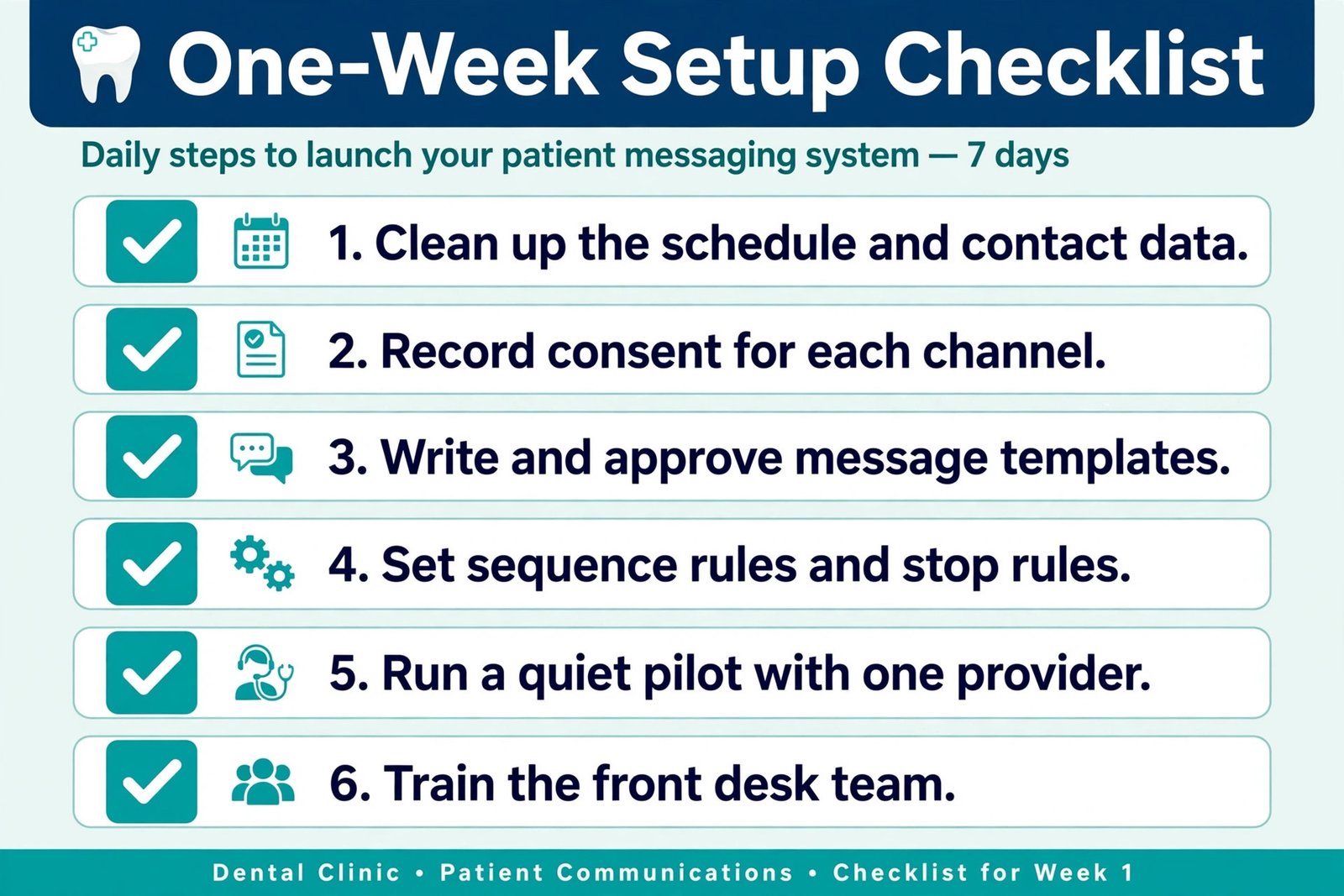
Set Up in One Week
Day 1, audit the schedule and the contact data. List every appointment type, merge duplicates, and agree on plain language names for the ten most common treatments. Check mobile numbers for active patients, mark preferred channels, and note family shared numbers. Decide who owns the reminder system, because a system with no owner drifts within a month. Day 2, choose the tool and confirm the connection. Run a test sync with a small set of real appointments, and check that names, times, appointment types, and provider names arrive correctly. Check that cancellations and reschedules update the reminder tool the same day. If the sync is slow or manual, that is a warning sign, not a minor detail.
Day 3, write and approve the templates. Use the templates in this guide as a starting point, adapt them to your clinic voice, and get sign off from the dentist or practice manager. Send each template to staff phones and read them on a small screen, because that is how patients will read them. Day 4, set the sequence rules and the stop rules. Enter the seven day, three day, one day, morning, and after visit steps, with a confirmation stopping further chase messages, a reschedule offering real open slots, a cancellation triggering a waitlist message within the hour, and a non reply going to a staff call list.
Day 5, run a quiet pilot with one provider or one day of appointments. Watch every message that goes out, watch every reply that comes back, and log every error. Fix the wording, the timing, and the reply routing before you expand. A pilot with twenty patients teaches you more than a planning meeting about two hundred patients. Day 6, train the front desk team on the new daily routine. Morning, check the unconfirmed list and the waitlist. Midday, work the call list for tomorrow. End of day, check that tomorrow morning messages are queued correctly and that unusual replies have been handed to a clinician or manager.
Write that routine on one page and pin it where the team works. Day 7, go live for the full schedule, but keep a daily check for two weeks. Review confirmation rates, reply rates, no show rates, and messages that needed a human correction, and do not judge the system on day one, when patients are still getting used to a new sender number.
When you use AI for dental clinic patient reminders during this setup week, use it for the jobs it does well. Ask it to rewrite a template in three shorter variants, to draft a staff training page from your sequence rules, and to sort pilot replies into confirm, reschedule, cancel, and question groups. Do not ask it to decide consent, privacy, or clinical content. Those decisions stay with the clinic.
Consent, Privacy, and Messages That Stay Safe
Start by recording consent for each channel. A patient who gave a mobile number at booking has not necessarily agreed to receive marketing texts, recall campaigns, and review requests. Keep separate consent records for appointment reminders, for recall and health maintenance messages, and for marketing messages. When a patient opts out of one type, respect that boundary and do not move them to a different message type to get around it.
Keep message content minimal. A reminder needs a name, a date, a time, and a plain language appointment type. It does not need a diagnosis, a treatment plan, a medication name, or a payment balance. The less sensitive detail in a text, the lower the risk if a message goes to a wrong number or is seen on a shared phone. Send detailed forms, instructions, and billing information through a more private channel, such as a secure portal or email, and keep the text as the pointer to that detail.
Handle replies with the same care. If a patient replies with health information, do not let an automated system store that reply in a marketing list or repeat it in a later message. Route health related replies to staff, and keep them in the clinical record system where they belong. If a patient replies STOP, or asks to stop texts, the system must stop that message type at once and record the opt out. Test the opt out path yourself during setup, because a broken opt out is one of the fastest ways to lose trust. Choose vendors with privacy in mind.
Ask whether the vendor will sign a business associate agreement where health privacy rules require one, how data is encrypted, who can access message logs, how long logs are kept, and how data is deleted when a contract ends. If a vendor cannot answer those questions clearly, that is a reason to pause, even if the price looks attractive.
Measure What Matters and Fix What Does Not
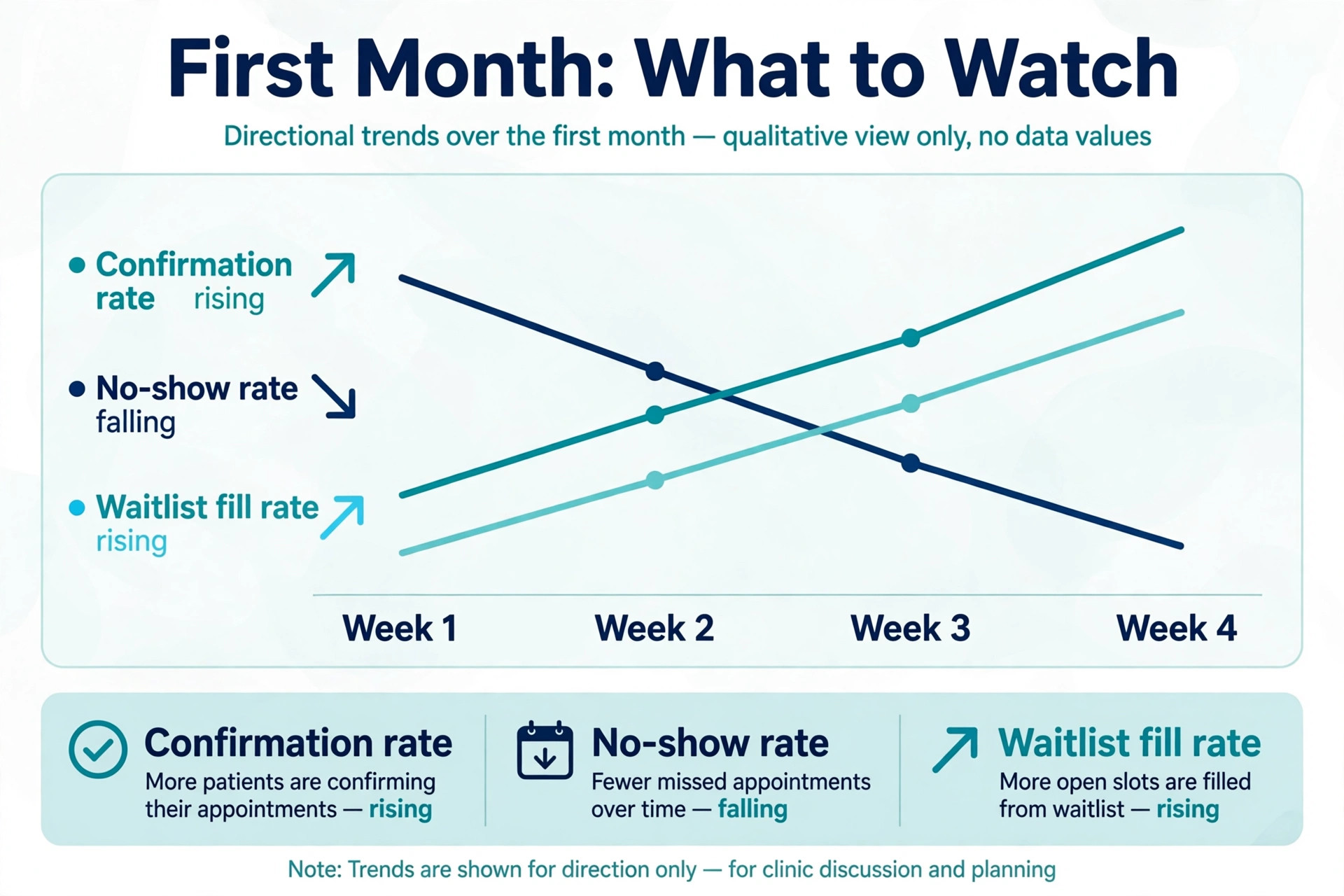
Track confirmation rate, meaning the share of appointments confirmed before the visit, and no show rate, meaning the share of booked appointments where the patient did not arrive and did not cancel in time. Track reply rate, meaning the share of texts that got any reply, and late cancellation rate, meaning cancellations inside 24 hours, because those are the slots that are hardest to refill. Track staff call volume for confirmations, because a good system should reduce routine confirmation calls, not add to them. Track waitlist fill rate, meaning the share of cancelled slots that were refilled before the appointment time.
Review those numbers by appointment type and by provider day, not only as a clinic average. A clinic average can hide a real problem, such as long implant or crown appointments no showing more often, or Friday afternoons filling less reliably than Tuesday mornings. When you find a pattern, change one thing at a time. Change the timing for that appointment type, or add a call for that group, or rewrite that template, and then watch for two weeks before you change something else. Changing five things at once tells you nothing about what worked.
When you use AI for dental clinic patient reminders to review results, keep the review honest. A system that reports only confirmations and hides no shows is not a reporting tool, it is a marketing dashboard. Ask for the full picture, including unconfirmed patients, late cancellations, and messages that failed to deliver, because those are the numbers that tell you where the next fix belongs.
Mistakes That Quietly Kill Confirmation Rates
The first mistake is sending too many messages. A patient who gets a booking email, a reminder text, a prep text, a payment text, a review text, and a recall text in one week will start to ignore all of them. Count messages per patient per week, and set a cap. One job per message and no more than one reminder chase per day is a good rule for most clinics.
The second mistake is using clinical language that patients do not understand. A message about a prophylaxis or a MOD restoration means nothing to most patients, and a confused patient is less likely to confirm. Use plain words, such as cleaning and check up, filling, or crown preparation, and keep the clinical code in the practice system, not in the text.
The third mistake is making rescheduling harder than confirming. If confirming takes one letter and rescheduling takes a phone call during office hours, patients who need to move will simply not reply and then not turn up. Make rescheduling as easy as confirming, with a reply option, a link, or a short list of open times. A rescheduled patient is far better than a no show, because the slot can be offered to someone else.
For related reading, clinics that want to compare wider tool choices can look at best AI tools for dentists, and clinics that use dictation or clinical notes may find best AI scribe tools for clinics useful for cutting admin time elsewhere in the practice. For the broader automation picture, automate small business with AI covers how small teams connect scheduling, messaging, and follow up without adding headcount, and best scheduling apps helps if online booking is the weak link in your reminder chain.
How to Choose Between a Dental Platform and a DIY Text Setup
Choose a dental platform if your schedule lives in a practice management system, if your front desk team is small, and if you want reminders, recall, two way texting, and review requests in one place. The higher monthly bill buys you a tested sync, staff training, and support when a message goes wrong. For most clinics, that trade is worth it, because the cost of one empty dentist hour is often higher than a month of platform fees.
Choose a DIY API setup only if you have reliable technical help, if you need a custom connection that no dental platform offers, or if you run a multi location group with its own engineering support. Budget for building, for consent and opt out handling, for reply routing, for monitoring, and for maintenance when carriers change rules. If that budget is not real, the DIY route will stall after the first version and staff will fall back to phone calls.
When you use AI for dental clinic patient reminders in any of these routes, keep the same test. Does the system confirm more appointments, refill more cancellations, and reduce routine calls, without adding confusing messages or risky content. If the answer is yes on all three, keep it. If the answer is yes on one and no on the others, fix the weak part before you add more features. A reminder system should be judged on chairs filled and staff time saved, not on how many AI features appear on a vendor page.
Frequently Asked Questions
How many reminder messages should a dental clinic send
Send a short sequence, not a single message and not a barrage. A practical starting point is an email seven days before, a confirmation text three days before, a chase text one day before for unconfirmed patients, and a morning text on the day for unconfirmed or long appointments. Stop chase messages once a patient confirms, and keep each message to one job so patients do not tune out.
Do text reminders really reduce dental no shows
Reported results vary, but the direction is consistent. Guides and studies cited in dental press report reductions of roughly a fifth to a third in many cases, with one cited study showing a fall from 31 percent to 14 percent after text reminders were introduced. Your result will depend on appointment type, patient mix, message wording, and whether rescheduling is easy. Track your own no show rate for four weeks before and eight weeks after launch to get a clinic specific answer.
What should a dental reminder text say
Keep it short and specific. Include the patient first name, the clinic name, the day and date, the time, and a plain language appointment type, plus a one tap reply to confirm or reschedule. Avoid diagnoses, treatment plans, prices, and long prep notes in the text itself. Send forms and detailed instructions by email or through a secure portal, and use the text to point patients there.
Is it safe to send patient reminders by text
Text reminders can be safe when consent is recorded, content is kept minimal, opt outs are honoured at once, and health related replies are routed to staff rather than handled by automation alone. Clinics must check their local privacy and consent rules, and ask vendors about encryption, access controls, log retention, and business associate agreements where those apply. This guide is general setup information only, not legal or compliance advice.
How much does a dental reminder system cost
Costs range widely by route. A dental platform is often quoted from around 199 to 249 dollars a month in third party listings, with final pricing by quote. A reminder only tool can start near 50 dollars a month for a first office, with extra texts billed per message. A DIY API route costs about 0.012 to 0.013 dollars per short outbound text in the United States, plus number rental and staff time to build and maintain it. Check the vendor page and checkout before budgeting, because promotions and plan limits change.
Should a small clinic use email, text, or both
Use both, for different jobs. Text is best for confirmation, rescheduling, and same day checks, because patients read it quickly. Email is best for forms, directions, prep instructions, and payment notes, because it can carry detail without making the text unreadable. A clinic that relies on email alone will miss confirmations, and a clinic that puts everything in texts will send messages that patients skim and ignore.
Your First 30 Days With Reminders That Actually Fill Chairs
Start with the sequence, not with the software demo. Write your seven day email, your three day confirmation text, your one day chase text, your morning check, and your after visit note. Clean your schedule data, record consent by channel, and test every template on your own phone. Then choose the tool that fits your clinic size, run a one provider pilot, and watch the replies for a week before you go live for the full schedule.
In the first 30 days, judge the system on four numbers. Confirmation rate, no show rate, late cancellations refilled from the waitlist, and routine confirmation calls saved. If those four move in the right direction, your wording and timing are close enough, and small tweaks will do the rest. If they do not move, look first at data quality, at reply difficulty, and at whether chase messages are reaching the right patients, because those three causes explain most disappointing launches. A good reminder system does quiet work. Patients arrive on time because they knew when to come and could confirm in seconds, and staff spend less of the day on phone tag.
Build that system once, review it quarterly, and it will keep paying for itself long after the setup week is forgotten.