
A Reel can pass 50,000 views and still bring in zero enquiries. The comments say “nice video” and nothing else. Nobody asks about price, nobody books a call, nobody clicks the link in the bio. That gap between attention and action is the real problem for most small businesses on Instagram, and it is exactly what you fix when you use CapCut for Instagram Reels business in a planned way instead of editing whatever clip happens to be on your phone.
This guide treats a Reel as a small sales asset, not a lucky post. You will learn which hooks hold attention in the first three seconds, how to structure a caption so a stranger understands what you sell and what to do next, how to handle trending audio without hurting your brand, and how to edit the whole thing in CapCut in under an hour. You will also get a weekly workflow, a posting cadence you can actually keep, and a simple way to measure which Reels earn enquiries and which ones only earn views.
Why Business Reels Get Views But No Enquiries
Views are a weak signal on their own. Instagram can show a Reel to thousands of people who will never buy from you, especially if the opening is entertaining but vague. A dog running across a shop floor gets watched. A clear explanation of a service, its price range and its next step gets saved, shared and acted on. Both can reach similar view counts. Only one of them builds a pipeline.
The usual failure has four parts, and most struggling business accounts show at least three of them. First, the hook promises entertainment but never names the buyer or the problem. Second, the middle of the Reel shows a process without explaining the result, so viewers enjoy the video and still do not know what changed for the customer. Third, the caption repeats the video instead of adding the offer, the price signal or the call to action. Fourth, there is no next step that a viewer can take in under a minute, so even interested people drift away and forget the account by evening.
Before you edit anything, write one sentence for each Reel. It should name the viewer, the problem and the action. For example, the viewer is a bride planning a small wedding, the problem is finding a cake that looks expensive without a large budget, and the action is commenting “menu” for prices. If you cannot write that sentence, the Reel is not ready to edit yet, because no amount of cutting, captions or music will supply a missing offer. This one sentence will shape the hook, the caption and the call to action, and it will stop you from filming generic content that pleases everyone and converts no one.
How to use CapCut for Instagram Reels business
This section is the core workflow. It turns one idea into a finished Reel in a repeatable order, so you are not reinventing the edit every time you post. The order matters. Script and hook come first, filming second, editing third, caption and cover fourth, and posting and review last. Editing before you know the hook is how businesses end up with beautiful clips that say nothing.
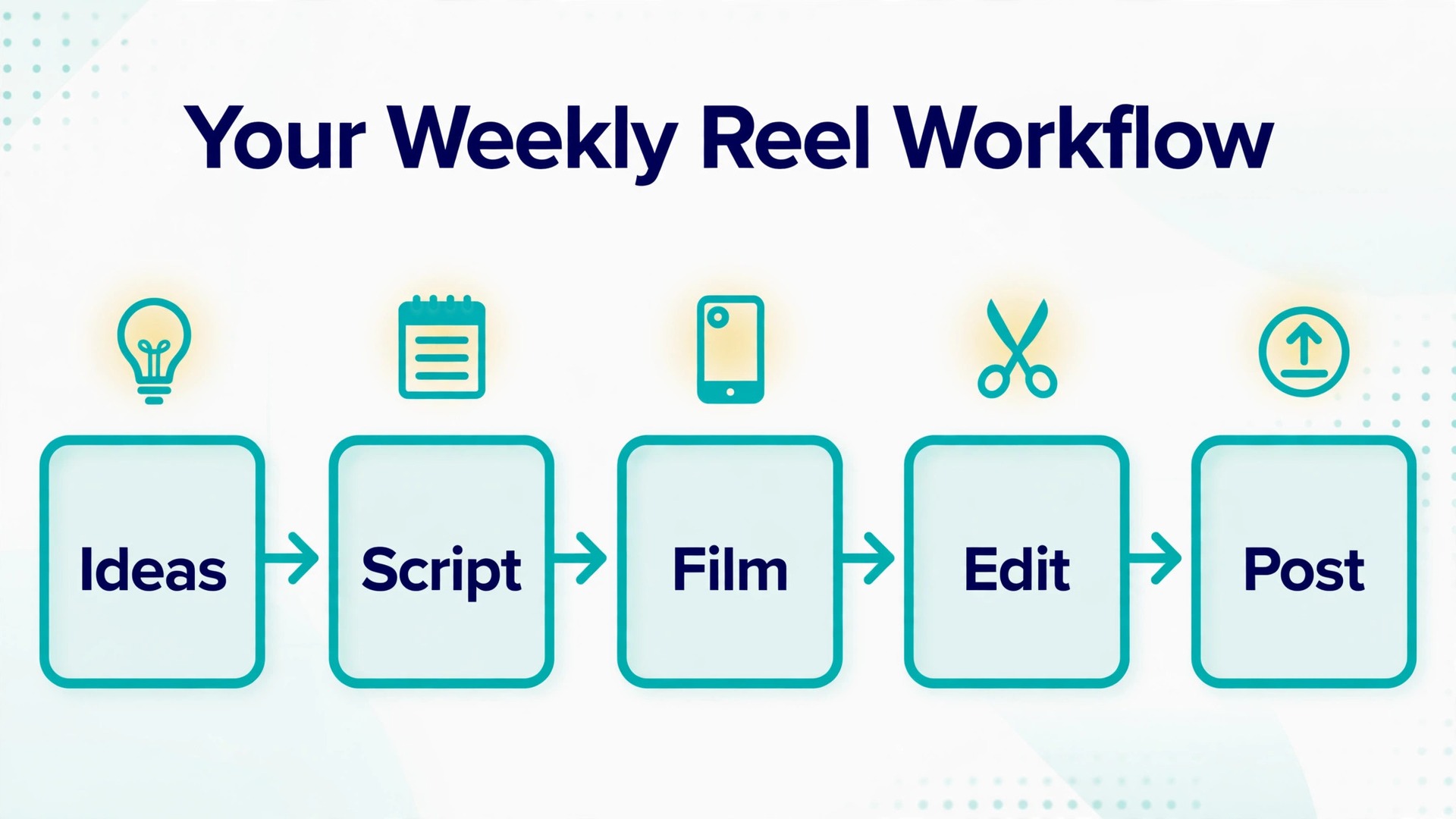
The weekly reel workflow
Start the week with ideas, not with filming. Spend 30 minutes listing ten problems your customers actually ask about, then pick the three strongest for the week. Strong means specific, visual and tied to a service you sell. “How to choose a bouquet that lasts a full wedding day” is strong. “Flowers are beautiful” is not. Write the hook, the three beats and the call to action for each of the three ideas before you touch a camera. This script step takes about 15 minutes per Reel and saves far more time in the edit, because you film only what the script needs.
Film in one block when you can. Set the phone to vertical video at the highest quality your phone handles comfortably, lock the exposure on the subject by tapping and holding on it, and record each beat as a separate clip with a second of stillness at the start and the end. That stillness gives CapCut clean handles for trimming and makes transitions far easier. Record the voiceover separately if the room is noisy, in a quieter corner, close to the phone, and speak slightly slower than feels natural. Fast talking sounds rushed on a phone speaker, and viewers who cannot follow the words will swipe away even if the visuals are good.
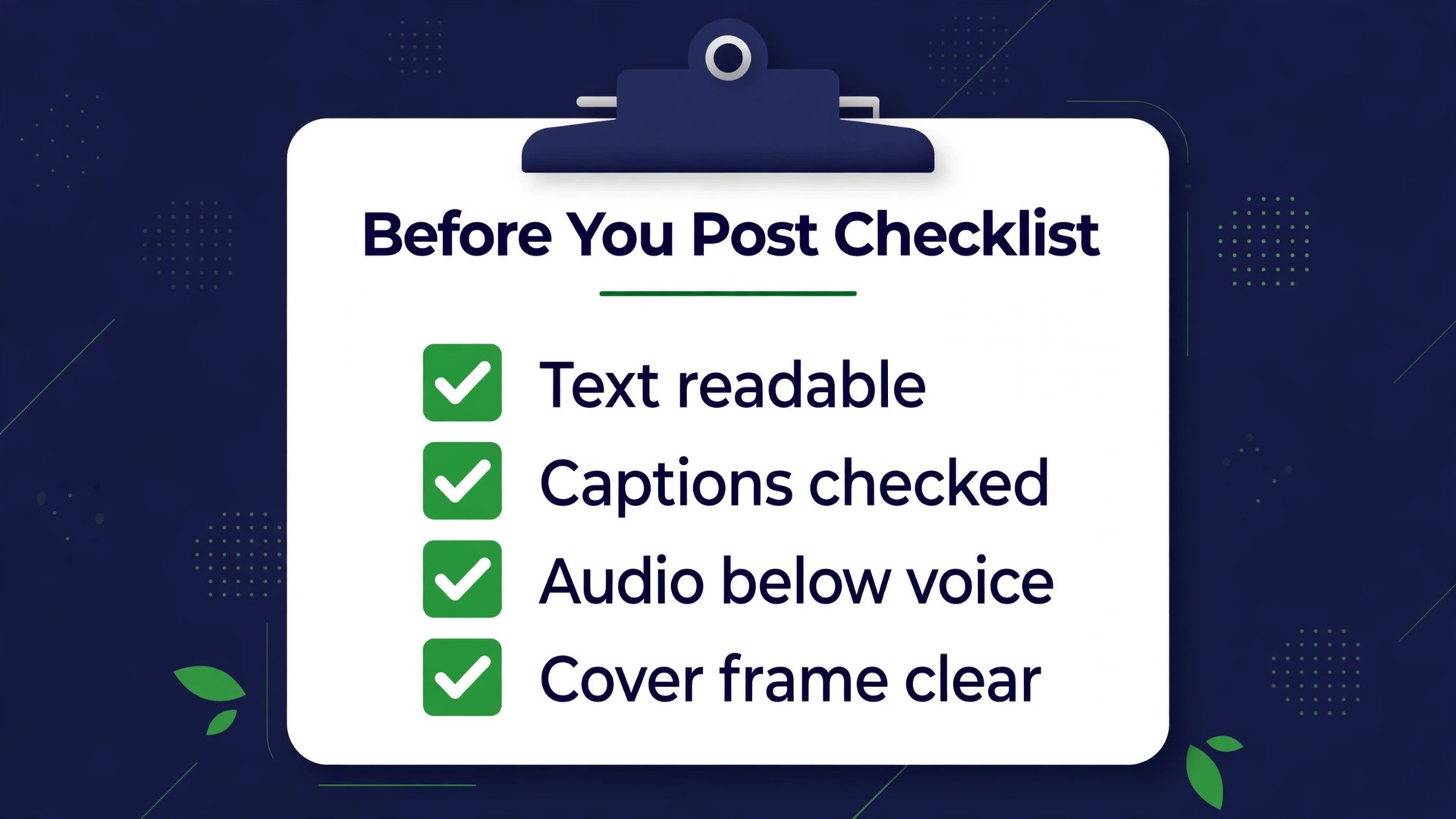
Here is the full sequence in checklist form, ready to reuse every week.
- Pick three customer problems and write one viewer, problem and action sentence for each.
- Write the hook, three beats and call to action for each Reel, in plain words.
- Film each beat as a separate vertical clip, with clean handles at both ends.
- Record a quiet voiceover if the room noise competes with your voice.
- Import into CapCut, order the clips, and cut dead air and weak sentences first.
- Add the hook text on frame one, then short text for each key point.
- Add captions, check every word, and style them for readability.
- Add audio that fits the message, at a level below the voice.
- Choose a cover frame with readable text and check the safe zones.
- Export, watch muted and with sound, fix any issue, then post or schedule.
Hook Patterns That Hold Attention
The first three seconds decide almost everything. Viewers do not watch a Reel and then decide whether the opening was good. They decide in the opening itself, while swiping is still an option. A good business hook does three things at once. It names the viewer or the situation, it promises a specific payoff, and it creates a small gap the viewer wants closed. “Stop paying for this” names a cost problem and promises a saving. “Three mistakes in your shop window” names a place and promises a short list. Both work because the viewer can tell within a second whether the Reel is for them.
| Hook pattern | Best for | What ruins it |
|---|---|---|
| Result first | Product, food, beauty, interiors | Showing the result without naming who it is for |
| Cost or mistake warning | Services, finance, clinics, trades | A vague warning with no number or example |
| Myth correction | Coaching, health, legal, education | Correcting a myth nobody actually believes |
| Before and after | Renovation, cleaning, fitness, design | A weak “before” that looks almost like the “after” |
| Question to the viewer | Local services, retail, hospitality | A question with an obvious or boring answer |
| Process teaser | Making, cooking, crafting, repair | Hiding the process instead of showing a step |
| Objection answer | High price services, bookings, courses | Answering an objection nobody raised |
Result first is the safest pattern for most product businesses, because the finished cake, room or haircut does the persuading before any words are needed. Open on the finished result, hold it for one beat, then add the hook text. Cost or mistake warnings work well for services, but only when the cost is concrete. “This mistake costs most cafés about 20 covers a week” is a hook. “This mistake is costing you money” is background noise, because every business account says some version of it.

Caption Structure for Business Reels
The written caption under a Reel does different work from the on-screen text. On-screen text holds a muted viewer. The caption converts a warm viewer. It should answer three questions in order. What is this about, who is it for, and what should the viewer do next. That discipline is what separates a casual clip from a plan to use CapCut for Instagram Reels business well. A caption that only repeats the video wastes the one place where Instagram gives you room to add price signals, booking details and search terms that help the right people find the Reel later.
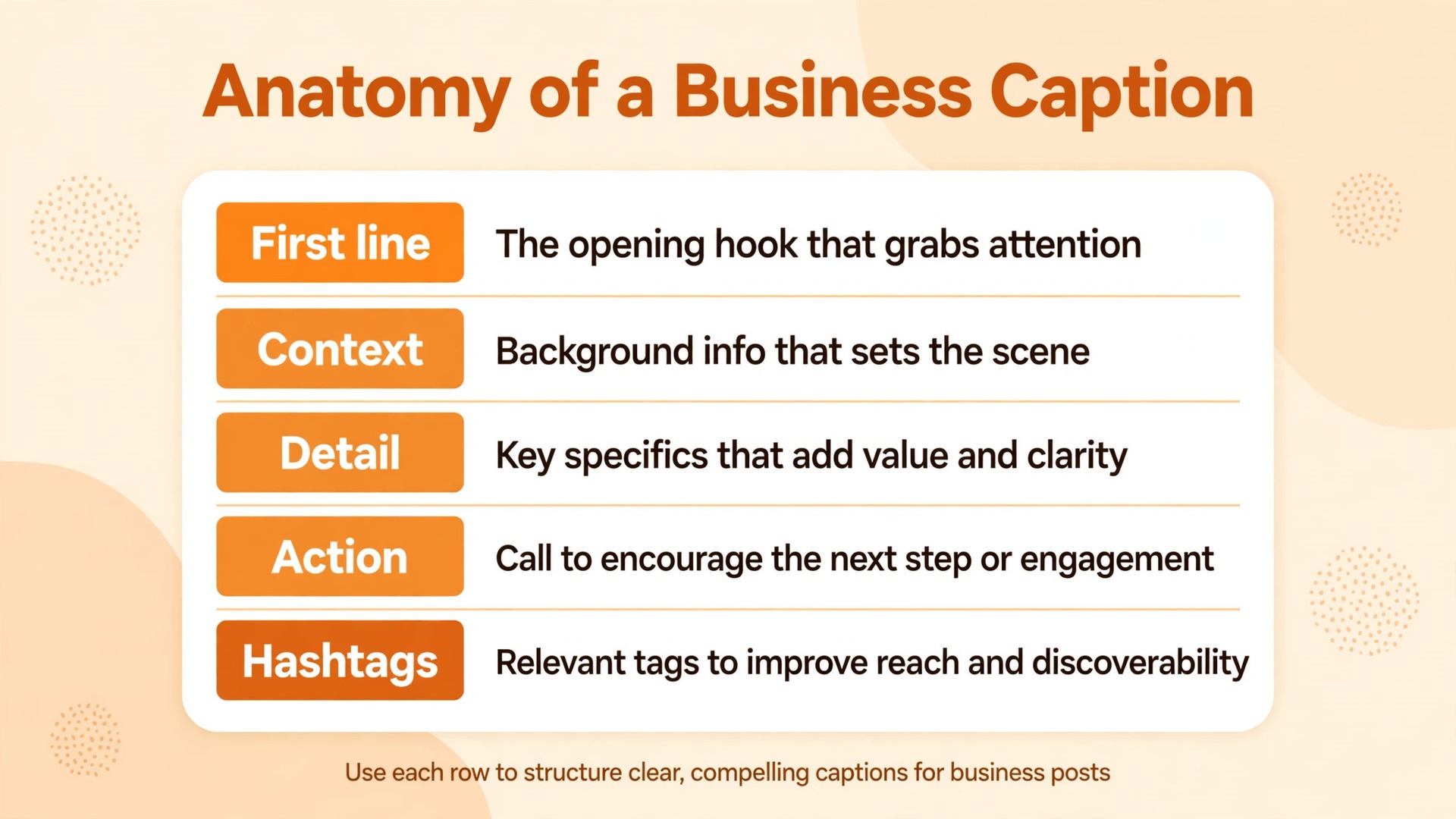
A strong business caption has five parts, and none of them needs to be long. The first line is a second hook, because Instagram shortens captions in the feed and many viewers only read the first line before deciding to tap for more. Write it as a promise or a question that matches the video hook, not as a greeting or a date. The second part is one or two short sentences of context, naming the problem and the result in plain words. The third part is the useful detail, such as a price starting point, a booking window, a location, or the contents of a package. The fourth part is a single call to action, not three competing ones.
The fifth part is a small set of hashtags, three to five, mixing one broad term, two or three niche terms and one branded or local term.
First line. Write the payoff or the question here, in one sentence.
Context. Write one or two sentences that name the viewer and the problem this Reel solves.
Detail. Write the price signal, package contents, booking window or location here. Be specific enough to qualify the enquiry.
Action. Write one clear next step here, such as commenting one word, sending a direct message, or tapping the link in the bio.
Hashtags. Add three to five relevant hashtags here, with at least two niche or local terms.
A filled example for a bakery shows how short this can be. It is a small example of how you use CapCut for Instagram Reels business for a local offer. The first line reads “A wedding cake that looks like a five figure cake, without the five figure quote.” The context says it is for couples planning a small wedding who want a tall, simple design with fresh flowers. The detail gives a starting price and a lead time for orders. The action asks viewers to comment “menu” for the flavour list and prices. The hashtags cover wedding cakes, the city and the bakery name.
Every part earns its place, and a stranger can understand the offer without watching the Reel twice.
Trending Audio Rules for a Business Account
Trending audio helps discovery, because Instagram groups Reels that use the same sound, and viewers browsing that sound can find your Reel. It also carries risks that business accounts often ignore. A sound that is funny for a creator can feel wrong for a clinic, a law firm or a funeral service. A licensed song used in a business Reel can be muted or restricted in some regions, and a sound that is trending today can feel dated within a week. Use audio on purpose, not by default.
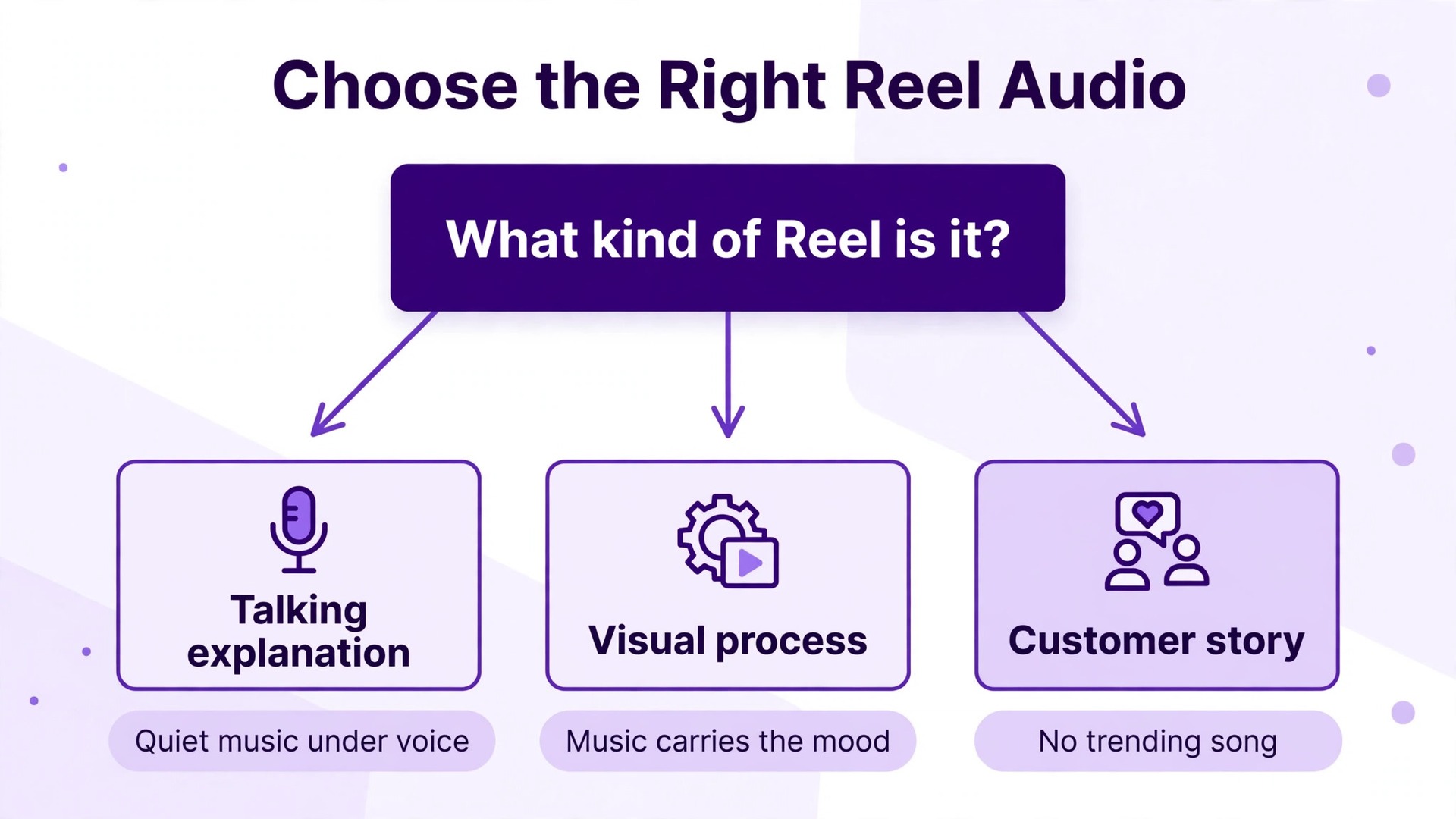
Start with a simple decision rule. If the Reel is a talking explanation, the voice is the audio, and music should sit quietly underneath it, low enough that every word stays clear. If the Reel is a visual process with little talking, music can carry more of the mood, and the beat can guide your cuts. If the Reel is a testimonial or a customer story, use no trending sound at all, because a familiar song competes with a real voice and makes the story feel staged. The sound should serve the message, not borrow attention from it.
Original audio is often the safer long term choice for a business. When you record your own voice, your own shop sounds or a simple voiceover, the Reel stays yours, it cannot be muted for a music licence issue, and other accounts that reuse your sound can send new viewers back to you. Many business owners resist recording their voice, but viewers trust a real voice far more than a trending song laid over stock clips. Record in a quiet room, speak at a natural pace, and accept a slightly imperfect take over a polished but voiceless Reel.
The Editing Flow in CapCut, Step by Step
CapCut suits business Reels because it puts the tools a short video needs, trimming, text, captions, audio and export, in one phone app, with desktop and web versions for longer sessions. You do not need a full desktop editor to make a clean business Reel, and a phone edit has one hidden advantage. You edit on the same screen your viewers will watch on, so text size, safe zones and readability problems show up immediately instead of appearing after posting. That phone-first view is a real advantage when you use CapCut for Instagram Reels business.
Before you pay for anything, check the current plan page on the official CapCut site, because plan names, prices and which features sit behind a paywall have changed more than once and vary by region and by app store. CapCut offers a free plan with core timeline editing, and paid plans that add premium assets, fuller AI tools and higher export options. Auto captions in particular have moved between free and paid tiers in different regions, so confirm whether the caption tool you plan to use is included in your plan before you build a workflow around it. The workflow below works on the free plan with manual captions, and gets faster with automatic captions where your plan includes them.
Set up the project correctly
Create a new project, import your clips in script order, and confirm the project is vertical and sized for a phone screen, 1080 pixels wide by 1920 pixels tall. That size keeps text sharp and avoids the soft, stretched look that comes from exporting a horizontal clip into a vertical frame. If a clip was filmed horizontally by mistake, do not stretch it to fill the frame. Place it over a blurred copy of itself or a plain brand colour background, and keep the important action inside the centre of the frame, away from the edges where Instagram places buttons and captions.
Cut the story before you decorate it
Add text that can be read at a glance
Add the hook as large text on the first frame, in a high contrast colour over a dark panel or a shaded background if the footage behind it is busy. Keep each text block short, keep the font the same across every Reel, and keep the text inside the safe centre of the frame. Instagram covers the right edge with buttons and the bottom edge with the caption and action bar, so text placed near those edges gets hidden on many phones. A safe habit is to keep important words inside the middle of the frame, with clear space at the top, bottom and right side.
Captions, done properly
Captions are not optional for a business Reel. Many viewers watch with the sound off, viewers with hearing loss need them, and captions reinforce the spoken words for everyone else. If your plan includes automatic captions, generate them from the project audio, then read every line and fix names, prices and product terms by hand, because automatic transcription regularly mishears brand names and numbers. If you caption manually, type the words as short phrases that match the speech, one idea per caption block, rather than dumping a whole paragraph on screen at once.
Audio, transitions and the cover frame
Choose the cover frame inside CapCut before export, and treat it as a thumbnail. The cover needs a readable title in a few words and a clear image of the result, because it is what viewers see on your profile grid long after the Reel leaves the feed. Check the cover at small size on your phone. If the words cannot be read when the grid tile is small, shorten the title or enlarge the text. A cover that only makes sense at full screen is not doing its job on a profile page.
Export at the highest quality your plan and phone allow, and watch the exported file once, muted and once with sound, before you post. Check for misspelled captions, text hidden behind Instagram buttons, audio that drowns the voice, and a final frame that ends abruptly. An abrupt ending is easy to fix with a one second closing frame carrying the call to action in text, such as “Comment MENU for prices” or “Send us a message to book”. That closing frame also helps viewers who watched without sound, because the next step is visible even if they never heard it spoken.
Posting Cadence You Can Actually Keep
The best cadence is the one you still follow in week eight. Three Reels a week, posted on days you can also reply to comments, will beat seven Reels a week for ten days followed by a month of silence. Instagram rewards accounts that publish steadily, and customers trust accounts that look alive, but neither effect requires daily posting. That rhythm is the posting side of a plan to use CapCut for Instagram Reels business without burning out. For most small businesses, three Reels a week is the sweet spot. It gives you enough volume to learn what works, enough rest between posts to reply properly, and enough room to run the business itself.
Batching is what makes three a week realistic. Script on one day, film in one block, edit in a second block, and schedule or post across the week. When you film, record two extra short clips that do not depend on a date, such as a workshop tour, a tool explanation or a frequently asked question. Those evergreen clips become your backup posts for weeks when filming is impossible, and they stop the account from going silent during a busy season, a holiday or a staff shortage. Silence is more damaging than a slightly simpler Reel, because a silent account looks closed even when the business is open.
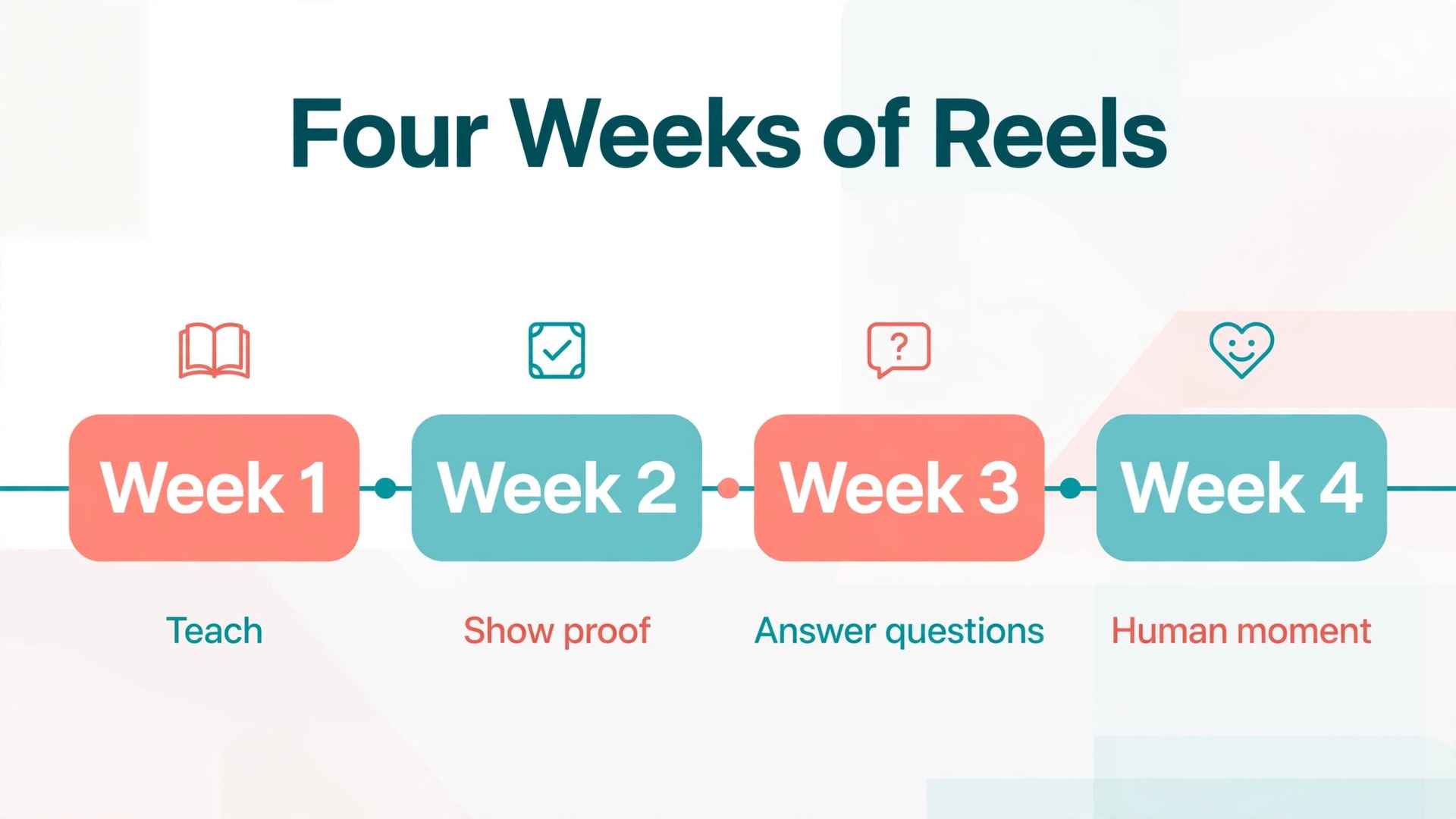
Content pillars keep cadence from turning into repetition. Most business accounts need only four pillars, rotated across the month. Teach one thing your customers get wrong, show one result or transformation, answer one frequent question or objection, and show one human moment from the business, such as a team member, a supplier visit or a delivery day. Four pillars, three Reels a week, gives you twelve distinct Reels a month without repeating the same format, and it gives followers a reason to stay, because they know the account will teach, prove and answer, not just advertise.
Measuring What Worked, Beyond Views
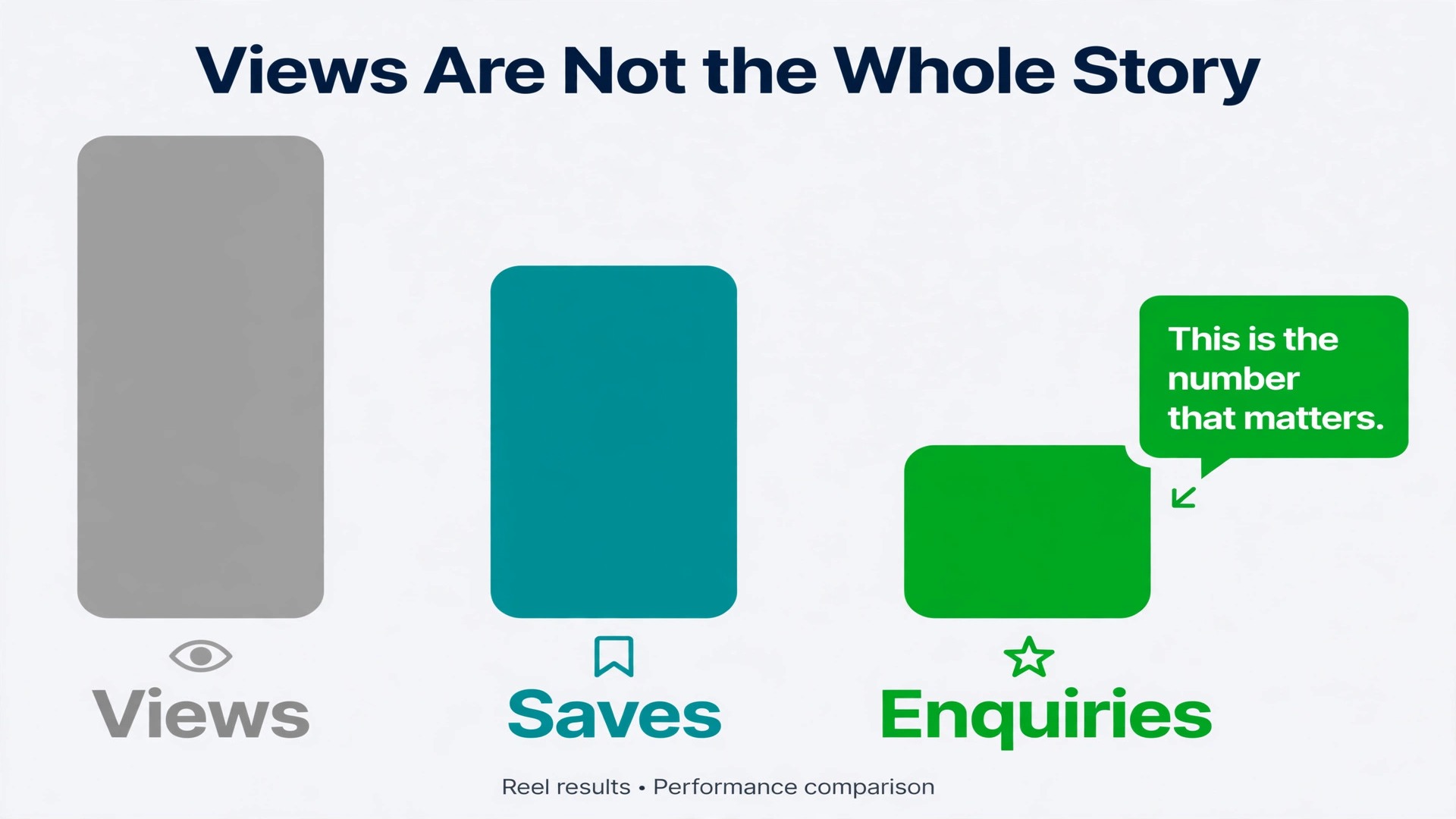
A weekly review of fifteen minutes will improve your Reels faster than any new effect or trending sound. Open Insights for each Reel from the past week and record six numbers in a simple sheet. Plays, average watch time or retention if shown, saves, shares, profile visits and follows, and enquiries, meaning direct messages and comments that ask about buying, booking or pricing. That review habit shows whether you use CapCut for Instagram Reels business to chase views or to earn enquiries. Enquiries are the number that matters most, so count them by hand if you have to. No dashboard will tell you that a comment saying “how much for Saturday” is worth more than a hundred comments saying “nice”.
| What the numbers show | Likely cause | Next action |
|---|---|---|
| High plays, early drop off | Weak hook or slow opening | Refilm the opening with a result first hook |
| Strong watch time, few saves | Useful but not reusable | Add a checklist, price guide or step list viewers can keep |
| Many saves, few enquiries | No clear next step | Add one call to action in the caption and closing frame |
| Many profile visits, few follows | Grid or bio does not match the Reel | Fix the bio line and pin the best three Reels |
| Steady enquiries, modest plays | Right audience, small reach | Make three more Reels on the same problem |
| Comments but no messages | Call to action asks for comments only | Add a message based action for serious buyers |
Mistakes That Quietly Hurt Business Reels
The most damaging mistakes are rarely technical. They are habits that feel productive but quietly push buyers away. The first is posting the same Reel to every platform without adapting it. A clip made for one feed, with text placed for that feed, can look cropped or muted elsewhere, and a caption written for one audience can confuse another. If you cross post, check the text safe zones and the caption on each platform before you publish, or keep the Reel native to Instagram and make a separate version for other platforms when time allows.
Another mistake is inconsistent branding across Reels. One Reel uses one font, the next uses three, the cover styles change weekly, and the tone swings from formal to joking. Viewers cannot build familiarity with an account that looks different every time, and familiarity is what turns a follower into a customer. Fix the font, the caption style, the cover layout and the closing frame, then change them only when you have a clear reason, not because a new template looked tempting that week.
Related reading can help here. If you want a broader view of tools for this platform, the guide to the best Instagram tools compares options for planning and creating posts, while the roundup of video editing tools places CapCut beside other editors for different budgets and skill levels. For a direct comparison with a script based editor, see Descript versus CapCut, and if you are weighing alternatives before committing, the CapCut alternatives guide covers other options. The companion guide on Reels that will not upload is worth bookmarking for the day an export refuses to post, and the YouTube Shorts workflow in CapCut shows how much of this editing system transfers to short video on another platform.
Each of those guides supports a different part of how you use CapCut for Instagram Reels business.
Frequently Asked Questions
How long should a business Reel be
Most business Reels work best between 15 and 60 seconds. That length is long enough to name a problem, show proof and give a next step, and short enough to hold a viewer who is deciding whether to stay. Longer Reels suit detailed tutorials and complex explanations, but only when every section earns its time. If you can cut a Reel from 90 seconds to 45 seconds without losing a key point, do it, because a tighter Reel usually keeps more viewers to the call to action.
Do I need CapCut Pro to make good business Reels
No. The free plan covers the core work of a business Reel, which is trimming, text, manual captions, audio and export. Paid plans add premium assets, fuller AI tools and higher export options, and they save time once you post regularly, but they do not supply the hook, the offer or the call to action. Start free, learn which features you actually use every week, then check the official plan page and pay only if a paid feature removes a real bottleneck in your workflow. That is why the free plan is a sensible place to use CapCut for Instagram Reels business before paying.
How often should a small business post Reels
Three Reels a week is a realistic target for most small businesses, posted on days when you can reply to comments in the first hour. Consistency over months matters more than a short burst of daily posts followed by silence. If three a week is too much, start with two a week and keep that rhythm for a month before adding a third. A steady rhythm builds familiarity, and familiarity is what turns occasional viewers into customers who remember your name when they need your service.
Should I use trending audio on every Reel
No. Use trending audio only when the mood fits the message and the licence position is clear for a business account. Talking explanations need the voice above quiet music, testimonials need no competing song, and visual process Reels can carry music more strongly. Original audio, especially your own voice, is often safer and more trustworthy for a service business, because it cannot be muted for a music issue and it sounds like a real person rather than a borrowed trend. That choice matters when you use CapCut for Instagram Reels business, because the sound you pick shapes the edit.
Why do my Reels get views but no messages
Views without messages usually mean one of three gaps. The hook attracted the wrong audience, the middle proved the result without naming the offer, or the caption gave no single next step. Check the Reel against those three points in order. First, did the opening name the buyer and the problem. Second, did the middle show a result tied to a service you sell. Third, did the caption and closing frame ask for one clear action, such as commenting one word or sending a message. Fix the weakest of the three first, because fixing all three at once makes it impossible to tell what worked.
Can I reuse one CapCut project for every Reel
Yes, and you should. Save a template project with your fonts, caption style, cover layout and closing frame, then duplicate it for each new Reel instead of starting from a blank project. A template keeps your branding consistent, cuts editing time sharply after the first week, and lets you focus on scripting and filming, which is where Reel quality is decided. Update the template only when you have a clear reason, such as a font that reads poorly on small screens, not because a new effect looked attractive that week.
The Reel System Worth Keeping
A business Reel system does not need to be complicated. It needs a clear buyer, a hook that names their problem, a short proof in the middle, a caption that adds the offer and one next step, and a weekly review that tells you what to repeat. That is the whole system, and every part of this guide serves one of those steps. When you use CapCut for Instagram Reels business in this structured way, the editing app stops being a place where clips go to look pretty, and becomes the last step in a selling process that starts with a customer question and ends with a message in your inbox.
Start small this week. Pick three real customer questions, script one Reel for each, film them in one block, and edit them with the template and checklist in this guide. Post them on three days when you can reply in the first hour, pin a comment on each one, and record the enquiries beside the views in your review sheet. After four weeks of that rhythm, you will know which hooks your audience stays for, which offers bring messages, and which formats deserve more of your time.
That knowledge, earned from your own numbers, is worth more than any trending sound or new effect, because it belongs to your business and no competitor can copy it by downloading the same app.