
A small business owner sends an invoice on Monday, chases payment on Friday, and discovers at tax time that the books are a mess of spreadsheets and guesses. That is the problem at the heart of xero vs freshbooks for small business. Both tools are proven, both are loved by their users, and they solve the same problem from opposite sides. One is a full accounting platform built for accountants and growing teams. The other is an invoicing first tool built for freelancers and service businesses that live on client work.
This guide compares the two tools on price, invoicing, reconciliation, payroll, and the daily reality of running a small business in 2026. Prices here come from vendor pricing pages and 2026 comparisons, so check the vendor page before committing, because accounting prices moved sharply in 2026 and first month discounts hide the real rate. The cheapest headline price is rarely the cheapest system once team members, payroll, and payment processing are added.
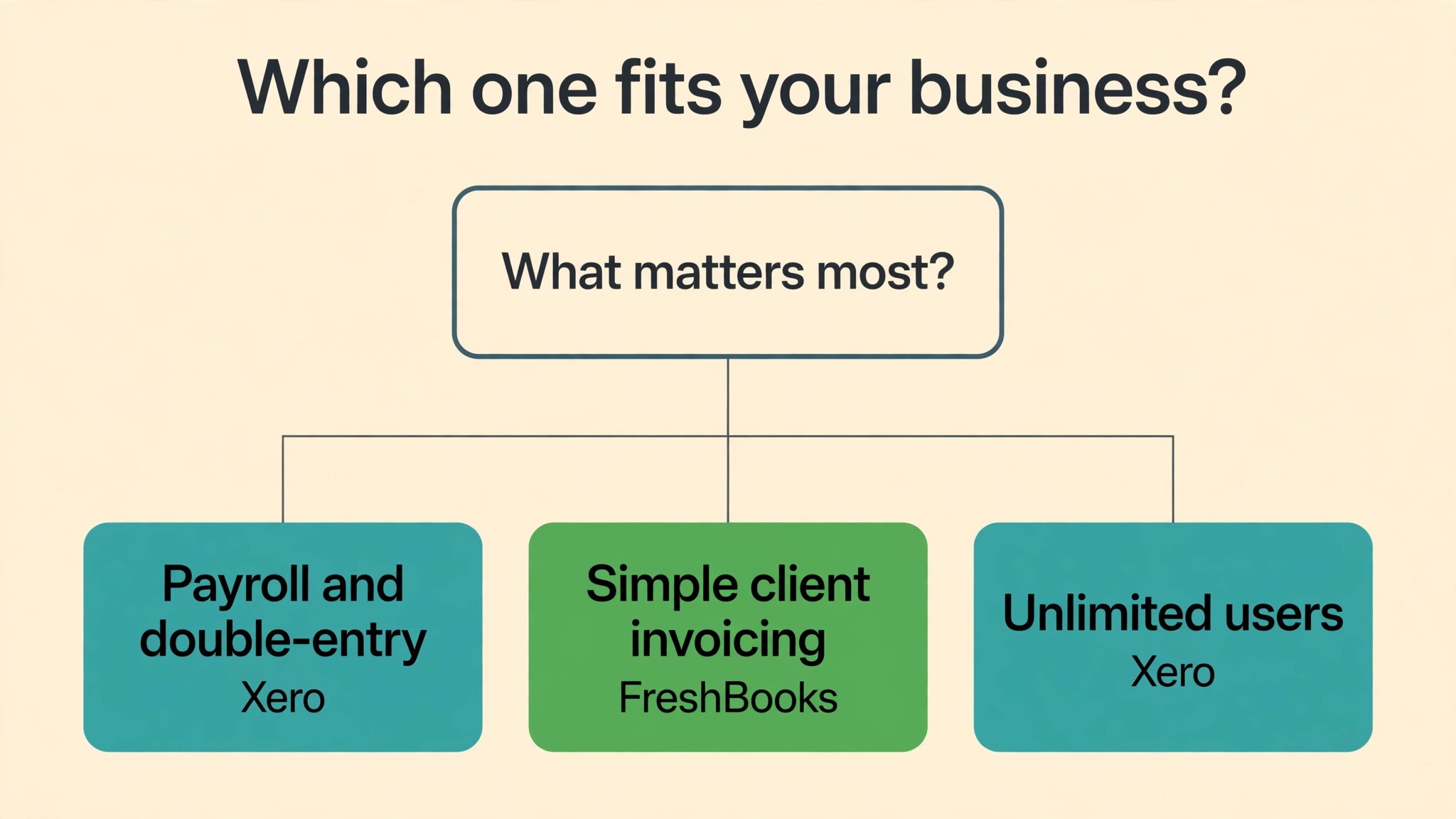
The two tools differ in one decisive way. Xero gives every plan unlimited users and full double entry accounting, so a growing team and its accountant can work in the same books. FreshBooks gives every plan one user and charges 11 dollars a month for each extra team member, so a team of three pays far more than the sticker price. Your choice should follow how many people touch the books and how much accounting depth you need, not which invoice template looks nicer.
Xero vs FreshBooks for Small Business at a Glance
| Area | Xero | FreshBooks |
|---|---|---|
| Core job | Full double entry accounting | Invoicing first, accounting second |
| Entry price | 27 dollars a month, Early | 23 dollars a month, Lite |
| Mid price | 59 dollars a month, Growing | 43 dollars a month, Plus |
| Top price | 97 dollars a month, Established | 70 dollars a month, Premium |
| Users included | Unlimited on every plan | One, plus 11 dollars a month per extra member |
| Billable clients | Unlimited invoices on Growing and up | 5 on Lite, 50 on Plus, unlimited on Premium |
| Payroll | Gusto add-on, 36 dollars plus 6 per person | 40 dollars plus 6 dollars per person |
| Multi-currency | Established only | Limited, check plan details |
| Free trial | 30 day trial | 30 day free trial |
The xero vs freshbooks for small business question turns on team size more than on features. A solo freelancer pays 276 dollars a year on FreshBooks Lite against 324 dollars on Xero Early, so FreshBooks wins for one person. A three person team pays 780 dollars a year on FreshBooks Plus against 708 dollars on Xero Growing, so Xero wins the moment a second person joins the books. That crossover is the number that decides this comparison for most small businesses, since few businesses stay a one person operation forever.
The Verdict for Small Business
For most small businesses, Xero is the better first pick once the business has a team, an accountant, or inventory to track. Its unlimited users mean the owner, the bookkeeper, and the accountant all work in the same books without extra seat fees. Its bank reconciliation is the fastest in the category, with smart suggestions that learn from past matches. Its Growing plan at 59 dollars a month covers unlimited invoices and bills, budgets, and a 60 day forecast, which is the depth a real business needs.
FreshBooks is the better pick for a freelancer or a small service business that lives on invoices, time tracking, and proposals. Its invoicing is the friendliest in the category, with professional templates, automatic reminders, and late fees that actually get clients to pay. Its time tracking ties hours to invoices in one click, which is the workflow a consultant or designer uses every day. A solo owner who sends five invoices a month and tracks time will finish the job faster in FreshBooks than in Xero.
The honest answer is that the two tools serve different businesses. A business that needs full accounting, inventory, multi-currency, or an accountant in the books should choose Xero. A business that needs beautiful invoices, time tracking, and proposals should choose FreshBooks. A business that tries to force one job into the other tool will pay for features it never uses and miss the ones it needs every week.
The crossover point is worth naming plainly, since it is the number most owners remember after reading this guide. One person should pick FreshBooks, three people should pick Xero, and two people should test both with real numbers before deciding. That rule holds for most service businesses, while product businesses should pick Xero at any size, since inventory is not a feature FreshBooks can add with a higher tier. A business that grows from one person to three will outgrow FreshBooks Lite within a year, and planning for that move now saves a migration later.
| Business type | First pick | Why |
|---|---|---|
| Solo freelancer, 5 clients | FreshBooks Lite | Cheapest real plan, best invoicing, time tracking included |
| Service business, 50 clients | FreshBooks Plus | Proposals, double entry reports, accountant access |
| 3 person team, growing | Xero Growing | Unlimited users, unlimited invoices, 708 dollars a year |
| Business with inventory | Xero Established | Inventory, multi-currency, projects, expense claims |
| Business with an accountant | Xero Growing | Accountant works free in the same books |
| Business that bills by the hour | FreshBooks Plus | Time tracking tied to invoices, proposals included |
Pricing Compared
Xero pricing is three tiers with no seat fees. Early costs 27 dollars a month and covers 20 invoices and 5 bills a month, which almost every business outgrows within a quarter. Growing costs 59 dollars a month and covers unlimited invoices and bills, with auto reconcile, budgets, and a 60 day forecast. Established costs 97 dollars a month and adds multi-currency, projects and time tracking, expense claims, and a 180 day forecast. Every tier includes unlimited users, which is the feature that makes Xero cheap for teams.
FreshBooks pricing is three tiers plus seat fees. Lite costs 23 dollars a month and covers invoices to 5 billable clients, with unlimited invoices, expenses, and time tracking. Plus costs 43 dollars a month for 50 billable clients, and adds proposals, double entry reports, and accountant access. Premium costs 70 dollars a month for unlimited billable clients, and adds project profitability. Every plan starts with one user, and each extra team member costs 11 dollars a month, so a three person team on Plus pays 43 dollars plus 22 dollars, or 65 dollars a month.
The pricing trap in this comparison is the seat fee, and it is the detail most guides to xero vs freshbooks for small business understate. A three person firm on FreshBooks Plus pays 65 dollars a month, which is closer to Xero Growing at 59 dollars than the 43 dollar sticker suggests.
Xero includes unlimited users at that price, so the gap grows with every hire. A five person team on FreshBooks Plus pays 87 dollars a month, while Xero Growing still costs 59 dollars. Payroll adds more on both sides, since Xero payroll through Gusto costs 36 dollars a month plus 6 dollars per employee, while FreshBooks payroll costs 40 dollars a month plus 6 dollars per person. Payment processing is separate on both tools, so model that cost on your average invoice before comparing subscriptions.
A solo owner pays 276 dollars a year on FreshBooks Lite against 324 dollars on Xero Early, so FreshBooks wins the solo math. A three person team pays 780 dollars a year on FreshBooks Plus against 708 dollars on Xero Growing, so Xero wins the team math. A business with inventory or multi-currency needs Xero Established at 97 dollars a month, or 1,164 dollars a year, against FreshBooks Premium at 70 dollars plus seat fees. Price the team you will be in a year, not the team you are today, and count every seat before comparing headline prices.

Features Compared
Invoicing
FreshBooks wins invoicing clearly, because it was built for people who send invoices every day. Templates look professional, clients can pay online in a few clicks, and automatic reminders and late fees chase payment without the owner sending awkward emails. Time tracked on a project flows into an invoice in one click, which is the workflow a consultant uses weekly. Xero invoicing is solid and covers recurring invoices, online payments, and reminders, but its templates and flow feel like accounting software rather than a client facing tool. A business that sends many invoices and chases payment will finish the job faster in FreshBooks.
Bank Reconciliation
Xero wins bank reconciliation by a wide margin, because it is the feature the platform was built around. Bank feeds connect to hundreds of banks, transactions arrive daily, and smart suggestions match payments to invoices with accuracy that improves over time. A business owner can reconcile a week of transactions in minutes, and the accountant sees the same matches. FreshBooks reconciliation is simpler and covers the basics, but it lacks the depth and the learning that makes Xero reconciliation fast at scale. A business with hundreds of transactions a month will feel the difference within the first week.
Expenses and Receipts
Both tools handle expenses well, and the difference is in the depth. Xero captures receipts through its app and add-ons, matches them to transactions, and tracks expense claims on Established. FreshBooks captures receipts, tracks expenses against clients and projects, and makes it easy to bill expenses back to a client. A service business that passes expenses to clients will prefer FreshBooks, since the expense to invoice flow is direct. A business with many staff expenses and claims will prefer Xero Established, since its claims workflow is built for teams rather than solo owners.
Payroll
Payroll is an add-on on both tools, and neither is the cheapest way to pay a team. Xero payroll runs through Gusto at 36 dollars a month plus 6 dollars per employee or contractor, which integrates with the books and keeps payroll taxes in one place. FreshBooks payroll costs 40 dollars a month plus 6 dollars per person, with a similar integration. A business with employees should price payroll as part of the total, since it adds 400 dollars or more a year to either tool. A business with contractors only should check whether it needs full payroll at all, since contractor payments can often run through bills instead.
Inventory and Projects
Xero wins inventory and projects clearly. Established includes inventory tracking, multi-currency, and project tracking with time and costs, which suits product businesses and agencies that track profitability per project. FreshBooks Premium adds project profitability, and its project features cover time, expenses, and invoicing per project, but it has no real inventory system. A business that sells products should choose Xero, since inventory is a deciding feature that FreshBooks cannot replace. A service business that tracks projects should test both, since FreshBooks project flow is friendlier for small teams.
Accountant Access and Integrations
Xero wins accountant access, because accountants live in Xero. Most accountants use Xero daily, know its reports, and can work in a client books without extra seats or fees. FreshBooks gives accountant access on Plus and above, and its reports cover the basics, but fewer accountants specialise in it. Xero also connects to more than a thousand apps, including inventory, e-commerce, and point of sale tools, while FreshBooks integrates with the common tools a freelancer needs. A business that works with an accountant should ask which tool the accountant prefers, since that answer often decides the comparison.
Xero vs FreshBooks for Small Business by Business Type
Different business types push the decision in different directions, and the business type is the fastest way to settle the xero vs freshbooks for small business question for your own company. A freelancer who bills by the hour lives on time tracking and invoices, so FreshBooks leads. A product business that holds stock lives on inventory and multi-currency, so Xero leads. An agency with a team and an accountant lives on unlimited users and reporting, so Xero leads. A consultant with five clients and no staff lives on proposals and reminders, so FreshBooks leads.
A freelancer should test the invoice to payment flow first. Create a client, track two hours, send the invoice, and watch how the client pays. FreshBooks makes that flow feel effortless, with a professional invoice, an online payment link, and an automatic reminder if the client is late. Xero handles the same flow competently, but the freelancer will spend more clicks and see more accounting screens. A freelancer who sends twenty invoices a month will feel that difference every week, and the time saved is worth more than the subscription difference.
A product business should test inventory and multi-currency instead. Create a product, record a purchase, sell it in another currency, and check the stock level and the profit report. Xero Established handles that flow with inventory tracking and multi-currency built in, while FreshBooks has no real inventory system and limited currency support. A product business that tries to run inventory in FreshBooks will end up tracking stock in a spreadsheet, which defeats the purpose of buying accounting software. The business type decides the tool, and the tool should follow the business rather than the other way round.
An agency should test team access and project profitability. Invite three team members, assign them to a project, track their time and expenses, and check the project profit report. Xero Growing covers unlimited users and unlimited invoices, so the whole team works in the books without seat fees, while FreshBooks Plus charges 11 dollars a month per extra member and covers 50 clients. An agency with five people and forty clients will pay 87 dollars a month on FreshBooks Plus against 59 dollars on Xero Growing, and the gap grows with every hire. That math is the reason agencies usually land on Xero.
How to Judge Xero vs FreshBooks for Small Business
Start with who touches the books, not with a feature tour. Count how many people send invoices, track expenses, and reconcile the bank, and whether an accountant needs access. A business with one owner and no accountant will be happy in FreshBooks. A business with a bookkeeper, an accountant, and two staff will be happier in Xero, since unlimited users remove the seat math entirely. The right tool matches your team reality, not a generic best list.
Next, test the workflow you do every week. Send an invoice, record a payment, reconcile a bank transaction, and track an hour of billable time. Watch whether each step takes seconds or minutes, and whether the tool reminds you about the next step or leaves you to remember it. FreshBooks wins the invoice and time tracking test for most service businesses. Xero wins the reconciliation test for most businesses with real transaction volume. The weekly workflow is the test that matters, since you will repeat it hundreds of times a year.
Then model the total yearly cost at your real team size and client count. A solo freelancer pays 276 dollars a year on FreshBooks Lite, while a three person team pays 780 dollars on FreshBooks Plus against 708 dollars on Xero Growing. Work through a year with your actual numbers, including payroll and payment processing, before comparing headline prices. A 20 dollar seat fee becomes hundreds of dollars across a team, and a client limit that forces a tier jump costs more than the subscription difference.
Finally, run a free trial with real numbers in each tool. Import a month of bank transactions, send a real invoice, and ask your accountant to look at the reports. Adoption is the feature that decides this comparison, since a perfect tool nobody updates is worse than a simple tool the owner opens every week. The xero vs freshbooks for small business decision should be made by the person who will do the books, not by the person who read the most reviews.
Switching Costs and Migration
Moving accounting software is harder than moving most tools, because the books carry history that matters at tax time. Both tools import customers, suppliers, invoices, and bank transactions, but the details still take time. Chart of accounts, opening balances, and unpaid invoices need checking line by line, and a mistake in the opening balance will haunt every report after the move. Plan a weekend for the move and a month of parallel checking, and keep the old books read only until the new ones are proven.
The bigger switching cost is the accountant. An accountant who knows Xero will need time to learn FreshBooks, and an accountant who knows FreshBooks will need time to learn Xero. Ask your accountant which tool they prefer before moving, since their answer often outweighs the feature table. A business that moves against its accountant advice will pay for extra hours at tax time, which costs more than any subscription saving.
Migration is also a good moment to clean the books. Write off dead invoices, close stale clients, and reconcile every account before the move. A fresh start in the new tool with clean opening balances beats a perfect import of messy history. Businesses that use the switch to clean their books end up happier than businesses that copy every old transaction across unchanged, since the clean books make every report after the move more trustworthy.
Mistakes Small Businesses Make When Choosing
The first mistake is choosing on price alone. FreshBooks Lite looks cheaper than Xero Early for a solo owner, and it is, but a business that hires one person will pay more on FreshBooks Plus than on Xero Growing within a year. Xero Established looks expensive at 97 dollars a month, and it is, but it replaces inventory and multi-currency tools that would cost more separately. Price the business you will be in a year, not the business you are today, and count every seat and every client before comparing headline prices.
The second mistake is skipping the accountant conversation. A business that picks a tool its accountant does not know will pay for extra hours at tax time, and the accountant may ask for exports that the tool handles poorly. Ask the accountant first, and let their answer weigh as heavily as the feature list. The accountant is the person who will live in the reports, and their preference is a practical signal rather than a bias.
The third mistake is ignoring the client limit. FreshBooks Lite covers 5 billable clients, which is enough for a new freelancer and too few for a growing one. A business that passes 5 clients must move to Plus, and a business that passes 50 must move to Premium. Xero has no client limit on Growing and above, so a growing business never hits a wall. Count your clients today and in six months, and price the tier you will end up on rather than the tier you start on.
The fourth mistake is forgetting payment processing fees. Both tools charge a percentage on every card payment, and that fee is separate from the subscription. A business that invoices 10,000 dollars a month and takes most of it by card will pay hundreds of dollars a year in processing, which dwarfs the subscription difference between the two tools. Check the processing rate on each tool, compare it with a standalone processor, and model the total cost on your real invoice volume before choosing.
Setup Checklist
Use this checklist when you move a small business to Xero or FreshBooks, and keep a copy in your business notes.
1. Reconcile every bank account in the old tool before exporting. 2. List every client, supplier, and open invoice for the import. 3. Set opening balances and confirm they match the old books exactly. 4. Connect bank feeds and confirm transactions arrive daily. 5. Set up invoice templates, payment links, and automatic reminders. 6. Invite your accountant with the right permissions, not full access. 7. Run both tools for one month until every report matches. 8. Review reconciliation time, unpaid invoices, and cost monthly for the first quarter.
Related Guides
Keep exploring with these guides on Stratilyze:
- TidyCal vs Calendly for Small Business
- Switch from QuickBooks to FreshBooks as a Small Business
- Switch from FreshBooks to QuickBooks as a Small Business
Frequently Asked Questions
Is Xero or FreshBooks cheaper for a small business?
It depends on team size, and that is the short answer most owners need from the xero vs freshbooks for small business price question. A solo freelancer pays 276 dollars a year on FreshBooks Lite against 324 dollars on Xero Early, so FreshBooks wins for one person. A three person team pays 780 dollars a year on FreshBooks Plus against 708 dollars on Xero Growing, so Xero wins the moment a second person joins. Count every seat and every client before comparing, since the seat fee and the client limit decide the real bill.
Does FreshBooks do full accounting?
FreshBooks does double entry accounting on Plus and above, with a trial balance and reports that cover most small business needs. It is not as deep as Xero for inventory, multi-currency, and complex reporting, and most accountants prefer Xero for those jobs. A freelancer or service business will find FreshBooks accounting enough, while a product business or a team with an accountant should choose Xero.
Can Xero handle invoicing as well as FreshBooks?
Xero invoicing is solid and covers recurring invoices, online payments, and reminders, but its templates and flow feel like accounting software rather than a client facing tool. FreshBooks invoicing is friendlier, with better templates, automatic reminders, and late fees that get clients to pay faster. A business that sends many invoices and chases payment will finish the job faster in FreshBooks, while a business that sends few invoices will not notice the difference.
Which tool is better for a business with an accountant?
Xero is better for a business with an accountant, since most accountants use Xero daily and can work in the client books without extra seats or fees. FreshBooks gives accountant access on Plus and above, but fewer accountants specialise in it. Ask your accountant which tool they prefer before choosing, since their answer often decides the comparison and saves hours at tax time.
How do I move from one tool to the other?
Export customers, suppliers, invoices, and bank transactions from the old tool, then import them into the new one and check opening balances line by line. Keep the old books read only for a month and run both tools in parallel until every report matches. Plan a weekend for the move, and ask your accountant to check the opening balances before you close the old books.
Is the free trial enough to decide?
Yes, for a first look. Both tools offer a 30 day free trial, which is enough to send a real invoice, reconcile a month of bank transactions, and ask your accountant to review the reports. A trial with real numbers tells you more than a demo, since your clients, your invoices, and your transaction volume are the variables that matter. Do not decide on a demo alone.
A Final Word Before You Choose
There is no universal winner here, because the right tool follows how many people touch the books and how much accounting depth you need. A solo freelancer weighing xero vs freshbooks for small business who lives on invoices should start with FreshBooks Lite and enjoy the friendliest invoicing in the category. A growing team with an accountant should start with Xero Growing and enjoy unlimited users and the fastest reconciliation available. A product business should start with Xero Established for inventory and multi-currency.
Whichever you choose, run a trial with real numbers, ask your accountant first, and model the bill at your team size in a year. An accounting tool earns its fee in invoices paid on time and books that close cleanly at tax time, not in a demo. Choose the tool your business will actually use on its busiest week, and the rest of the feature list will take care of itself.