

A YouTube video lives or dies on its voice. Viewers forgive a shaky camera, but they leave in seconds when the narration sounds flat, robotic, or hard to follow. That is the blunt reason the best ai voiceover tools for youtube videos matter to any creator who publishes faceless videos, explainers, documentaries, or Shorts. The voice is the channel, and the tool that makes it decides how long viewers stay.
This guide compares ten tools that creators actually use for YouTube narration in 2026, judged on voice realism, language coverage, cloning, commercial rights, pricing model, and how fast a script becomes finished audio. Prices here come from vendor pages and comparisons checked in late 2026, so check the vendor pricing page before committing, because AI voice pricing changes often and free plan limits move without warning. The most expensive mistake in AI voice is not the monthly fee. It is publishing a monetised video made on a free plan that does not allow commercial use.
The ten tools differ in one decisive way. ElevenLabs, PlayHT, and Lovo sell voice quality and cloning. Murf, Descript, and Speechify sell a studio workflow with video editing built in. WellSaid, Azure, and Google sell enterprise grade reliability for production teams. Your choice should follow which of those models matches how your channel actually publishes.
Why Voice Quality Decides Retention
YouTube viewers decide in the first thirty seconds whether to stay, and the voice carries that decision. A natural voice with varied pace, pauses, and emphasis keeps a ten minute explainer engaging. A flat voice makes the same script feel like a lecture, and viewers click away no matter how good the visuals are. Retention is the metric YouTube rewards, so voice quality is not a cosmetic choice. It is a ranking factor in practice.
The second reason is trust. A faceless channel lives entirely on its voice, and viewers who hear the same consistent voice across fifty videos build a relationship with it. Voice cloning makes that consistency possible at scale, letting a creator keep one voice across every upload without recording every line. A channel that changes voice every video feels unstable, and viewers notice even when they cannot name why.
The third reason is cost and speed. Recording, editing, and re-recording narration takes hours per video, and a creator who publishes daily cannot sustain that pace alone. AI voiceover turns a script into finished audio in minutes, with edits that cost seconds rather than a new recording session. A daily channel that saves two hours per video gains ten hours a week, which is a whole extra video.
The 10 Tools at a Glance
| Tool | Main job | Best for | Starting paid price |
|---|---|---|---|
| ElevenLabs | Voice realism and cloning | Best overall narration | 5 dollars a month |
| Murf AI | Video voiceover studio | Video first creators | 19 dollars a month |
| PlayHT | High volume voice | Daily publishers | 19 dollars a month |
| Speechify | Studio voiceover and dubbing | Dubbing and multilingual | About 100 dollars a year |
| WellSaid Labs | Professional English voice | Corporate and e-learning | About 10 dollars a month |
| Descript | Edit audio through text | Creators who edit video too | Free, paid from 12 dollars |
| Lovo AI | Expressive voices | Character and story channels | 19 dollars a month |
| Resemble AI | Custom voice cloning | Branded voices | Quote, from 29 dollars |
| Azure AI Speech | Enterprise voice API | Developers and teams | Pay as you go |
| Google Cloud TTS | Cloud voice API | Developers and apps | Pay as you go |
The best ai voiceover tools for youtube videos cannot be picked from this table alone, because the pricing models differ wildly. ElevenLabs charges by character, Murf charges by minute, PlayHT charges by word, and Azure and Google charge by character through an API. A creator who publishes one ten minute video a week needs a different plan than a creator who publishes three videos a day, and the cheapest tool for one of them is the most expensive for the other.
Free plans also differ in the one way that matters. ElevenLabs free gives about 10,000 credits a month, roughly ten minutes of speech, with no commercial rights and attribution reported as required. Murf free gives about ten minutes a month with no downloads and no commercial rights. PlayHT free gives limited credits. Descript free gives about 60 media minutes a month with limits. Test on a free plan, but move to a paid plan before you monetise, and check the licence before you publish anything that earns money.
Best Pick by Job
| Job type | First pick | Second tool | Why this pair works |
|---|---|---|---|
| Faceless explainer channel | ElevenLabs | Murf AI | Best voice plus a studio for video |
| Daily Shorts channel | PlayHT | ElevenLabs | Volume pricing plus top quality for hero videos |
| Documentary and long form | ElevenLabs | WellSaid Labs | Emotional range plus clean professional English |
| Multilingual channel | PlayHT | Speechify | 140 plus languages plus dubbing |
| Corporate and training | WellSaid Labs | Murf AI | Professional tone plus team workflow |
| Developer built channel | Azure AI Speech | Google Cloud TTS | Reliable APIs plus pay as you go pricing |
A faceless explainer channel using the best ai voiceover tools for youtube videos needs the most human voice first, and ElevenLabs wins that job in most blind comparisons, especially on longer scripts. Murf adds the studio workflow for creators who also edit video, with a timeline, background music, and a Google Slides add-on. Together they cover narration quality and production speed without a second subscription.
A daily Shorts channel needs volume pricing above all else, and PlayHT word based pricing is generous at about 150 words per minute, with a 99 dollar unlimited tier for serious scale. A documentary channel needs emotional control over long scripts, which is where ElevenLabs leads, with WellSaid as the clean professional backup. A multilingual channel needs PlayHT language breadth, with Speechify dubbing for videos that must sound native in two languages.
How to Judge the Best AI Voiceover Tools for YouTube Videos
Start with your own script, not with a demo reel. Take a real script from your channel, generate it on three tools, and listen on phone speakers, since that is how most viewers will hear it. Judge the pauses, the emphasis on key words, and how the voice handles numbers, names, and questions. A demo voice that sounds great on a sales page can sound flat on your script, and a voice that sounds plain on a demo can suit your niche perfectly.
Next, check the commercial licence before you fall in love with a voice. Free plans often exclude commercial rights or require attribution, and a monetised video made on such a plan is a copyright and policy risk. Paid plans from ElevenLabs, Murf, and PlayHT include commercial rights, but the details differ by tier, so read the licence for the plan you will actually buy. YouTube also recommends disclosing synthetic media when it is central to the video or could mislead viewers, so plan that disclosure into your description.
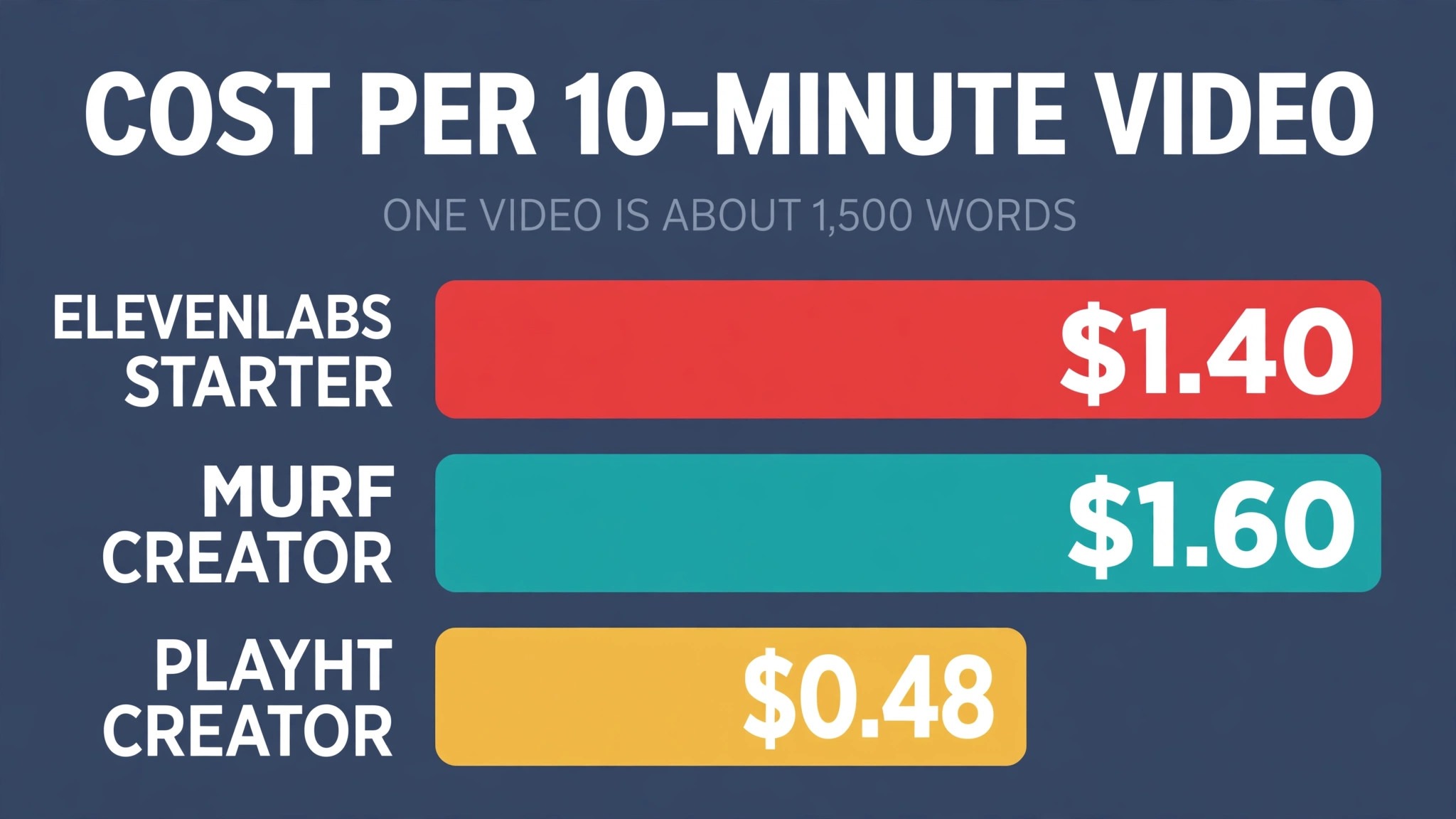
Then model the monthly cost at your real volume. A ten minute video is roughly 1,500 words or 8,500 characters, and a channel publishing four videos a month needs about 34,000 characters. ElevenLabs Starter at 5 dollars a month gives 30,000 credits, so it covers about three videos. Murf Creator at 19 dollars a month gives about two hours, which covers twelve ten minute videos. PlayHT Creator at 19 dollars a month gives 60,000 words, which covers forty videos. Work out your own number before subscribing, because the plan that fits your volume is the plan that saves you money.
Finally, test the editing workflow. A tool that makes great audio but forces you to re-generate the whole file for one word change will slow you down. Descript edits audio through the transcript, so fixing a word is as easy as fixing a typo. Murf lets you change a word, a pause, or an emphasis without leaving the studio. ElevenLabs regenerates quickly but needs a separate editor for video. The workflow matters as much as the voice, because you will repeat it on every video.

The 10 Tools in Detail
1. ElevenLabs
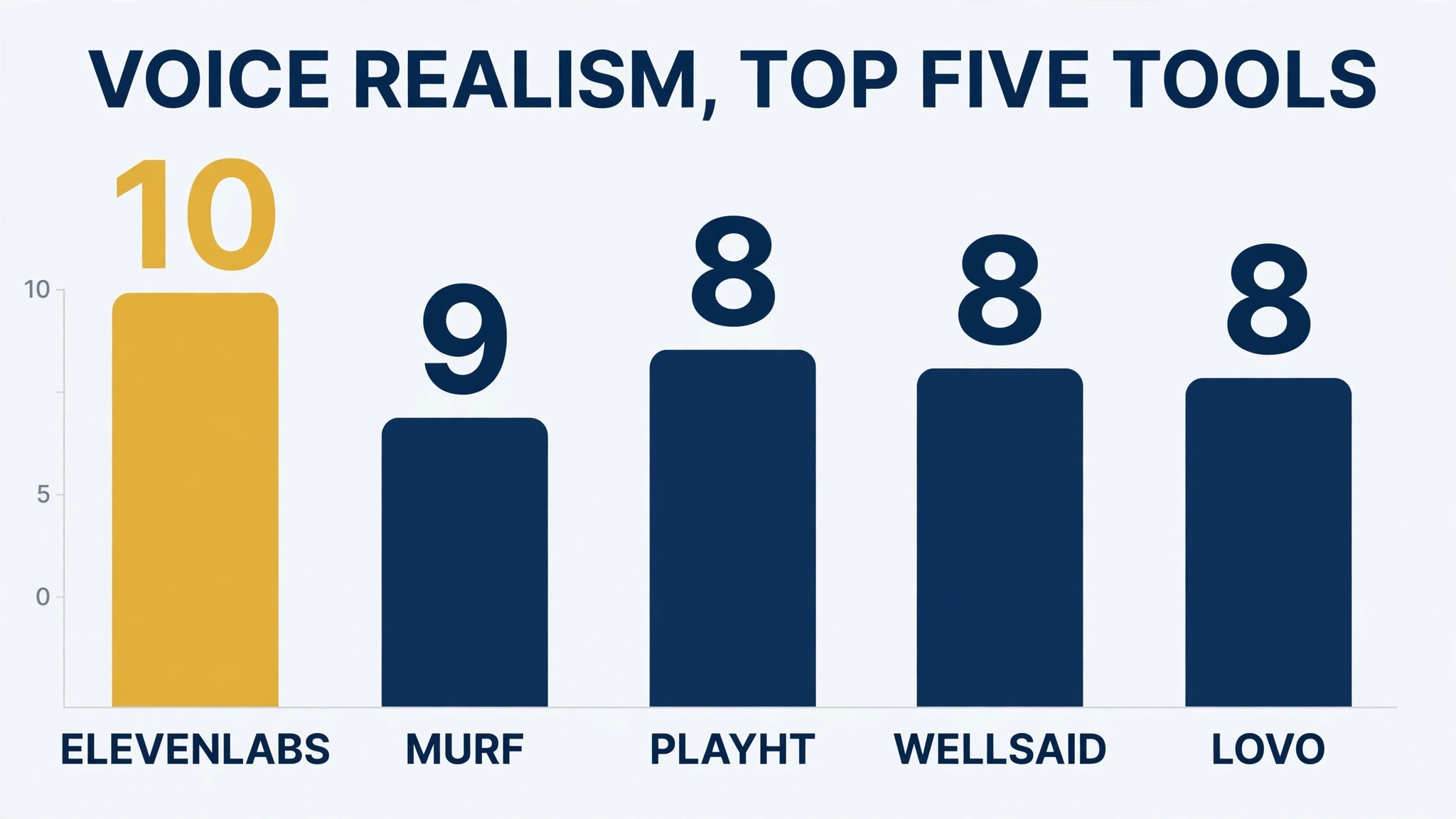
ElevenLabs is the realism leader in 2026, and its voices handle emotion, whispering, and long form narration better than anything else in this guide. Its voice cloning is genuinely strong, with a minute of your own voice producing a usable digital twin, and professional cloning on higher tiers. For YouTube narration, ElevenLabs still sounds the most human in blind comparisons, especially on longer scripts where lesser voices flatten out.
Pricing starts with a free tier of about 10,000 credits a month, roughly ten minutes of speech, with no commercial rights. Starter costs about 5 dollars a month billed annually, or 6 dollars monthly, with 30,000 credits, a commercial licence, and instant voice cloning. Creator costs about 22 dollars a month with 121,000 credits and professional voice cloning. Pro costs about 99 dollars for 600,000 credits. One credit is roughly one character on standard models, and about 850 characters make one minute of audio. Check the vendor pricing page for current rates, since they move often.
ElevenLabs fits YouTubers and podcasters who need the most human narration, audiobook producers, and anyone cloning a real voice. The trade off is that it is audio only, with no video editor, so creators need a separate tool for the visual side. For pure voice realism and cloning quality at an affordable price, ElevenLabs is the default recommendation in this guide.
2. Murf AI
Murf AI wins on workflow. Its 140 plus voices are excellent, but the real draw is the built-in studio, with timeline editing, background music, and a Google Slides add-on that mean you can produce a finished video voiceover without leaving the app. Minutes based pricing is the easiest model to understand, which matters when you are budgeting a channel.
Pricing starts with a free tier of about ten minutes a month, with no downloads and no commercial rights. Creator starts around 19 dollars a month on annual billing, or about 29 dollars monthly, with two hours of generation and commercial rights. Business costs about 99 dollars a month with eight hours. Heavy users hit the minute caps faster than expected, so a daily channel should model its real minute count before choosing a tier.
Murf fits video creators, e-learning producers, and corporate teams who want one studio for voice and video. The trade off is a higher entry price than ElevenLabs for the same minutes, and voice realism that is professional and clear rather than the most human available. For a creator whose workflow is video first, Murf is the easiest recommendation in this guide.
3. PlayHT
PlayHT is the volume play. Word based pricing is generous, at about 150 words per minute, it supports 140 plus languages, and the 99 dollar a month unlimited tier is the cheapest route to serious scale, which is ideal for faceless channels publishing daily. Voice cloning sits on premium plans, and the API suits creators building voice features into their own tools.
Pricing is reported at about 19 dollars a month for Creator, with 60,000 words, or about 400 minutes, and 99 dollars a month for Unlimited. Some listings show entry plans from around 10 dollars a month, so verify the current pricing on the vendor page. The free tier gives limited credits with no commercial rights for monetised work. For a channel publishing three or more videos a day, PlayHT is often the cheapest tool that still sounds good.
PlayHT fits high volume publishers, multilingual channels, and podcasters who need long form narration at scale. The trade off is voice quality that is high but not the most human, and a studio that is audio focused rather than video focused. For a daily publisher, the volume maths outweighs the small quality gap.
4. Speechify
Speechify started as a text to speech listening app and now sells a Studio product for voiceover and dubbing. Its strength is turning written content into spoken audio fast, with voices that suit narration and a dubbing workflow for creators who publish in more than one language. The Studio Starter plan is reported at about 100 dollars a year, which makes it one of the cheapest paid options in this guide.
The free tier gives about 600 Studio credits, enough to test the voices on a real script. Paid Studio plans add more credits, downloads, and commercial rights, though the exact credit counts change often, so check the vendor pricing page. Speechify voices are clear and professional, though they are not the most expressive in this guide, and the tool suits straightforward narration better than character work.
Speechify fits creators who want affordable studio dubbing, educators turning articles into audio, and channels publishing the same video in two languages. The trade off is a smaller voice library than ElevenLabs or Murf, and less control over emotion and pacing. For a creator on a tight budget who needs dubbing, Speechify is the value pick.
5. WellSaid Labs
WellSaid Labs is the professional English voiceover specialist, aimed at corporate training, e-learning, and commercial production. Its voices are clean, consistent, and corporate friendly, with licensed avatars on higher tiers, and it is English focused with more than 20 accents. A creator who needs a voice that sounds like a training video rather than a YouTube personality will find WellSaid the most reliable option here.
Pricing is reported at about 10 dollars a month billed annually for Starter, or about 19 dollars monthly, with a small download allowance, and about 49 dollars a month for higher tiers with more minutes. The free tier gives about three download minutes a month. WellSaid does not offer voice cloning, which is a real gap for creators who want their own voice, but for a professional narrator voice it is a strong choice.
WellSaid fits corporate trainers, e-learning producers, and documentary makers who need clean English narration without fuss. The trade off is price per minute that is higher than PlayHT for volume work, and no cloning. For a channel that values a polished professional sound above all else, WellSaid earns its place.
6. Descript
Descript is different from every other tool in this guide, because it edits audio and video through a transcript. You edit the text, and the audio and video follow, which makes fixing a misspoken word as easy as fixing a typo. Its Overdub feature clones your voice for corrections, and the free plan gives about 60 media minutes a month with limits.
Pricing for paid plans starts from about 12 dollars a month for Creator, with more minutes and features on Pro. Descript voices are good but not the most realistic in this guide, and the tool is really a video editor that happens to do voice well, rather than a voice tool that happens to edit video. A creator who already edits in Descript gets voiceover almost free. A creator who only needs voice should pick a dedicated voice tool instead.
Descript fits creators who edit video and audio together, podcasters who cut filler words from transcripts, and teams that publish both video and audio versions of the same content. The trade off is voice quality that trails ElevenLabs, and a learning curve for the transcript workflow. For a creator who edits every day, Descript is the most productive tool in this guide.
7. Lovo AI
Lovo AI, also known as Genny, sells expressive voices for character work, storytelling, and branded content. Its voices carry more emotion and character than the corporate tools in this guide, which suits story channels, kids content, and creators who need distinct voices for different characters. The library covers more than 20 languages with a focus on expressive English.
Pricing starts from about 19 dollars a month for Basic on annual billing, with higher tiers adding more minutes, more voices, and voice cloning. The free tier gives a small allowance for testing. Lovo voices are strong on character and story, though they are less suited to straight documentary narration, where a calmer voice works better. Check the vendor pricing page for the current tier limits.
Lovo fits storytellers, animation channels, and creators who need several distinct voices in one video. The trade off is a smaller library than the biggest tools, and pricing that sits in the middle of the pack without the volume advantage of PlayHT. For a channel built on character and story, Lovo is the expressive pick.
8. Resemble AI
Resemble AI is built around custom voice cloning for brands. It creates a digital voice from a small sample, then lets a team use that voice across videos, ads, and support messages with consistent branding. The cloning quality is strong, and the API suits developers building voice into products, games, and apps.
Pricing is quote based for higher tiers, with entry plans reported from about 29 dollars a month. The free tier is limited, and the tool is priced for brands and teams rather than hobbyists. A solo creator who only needs one voice for YouTube will find ElevenLabs cheaper and simpler. A brand that needs its voice everywhere, in every video and every ad, will find Resemble the right system.
Resemble fits brands, agencies, and developers who need a consistent branded voice at scale. The trade off is price and complexity for a solo creator, and a smaller ready made voice library than the general tools. For a branded voice programme, Resemble is the specialist pick.
9. Azure AI Speech
Azure AI Speech is Microsoft cloud voice service, and it is the enterprise reliability pick in this guide. It offers hundreds of voices across many languages, neural voices that sound natural, and custom neural voice training for brands that need their own voice. Pricing is pay as you go by character, which suits developers and teams with variable volume.
The strength is reliability, scale, and integration with the Microsoft stack. A team that already runs on Azure can add voice with no new vendor, and the API handles millions of characters without breaking. The weakness for a solo YouTuber is the developer setup. There is no friendly studio, no timeline editor, and no voice library browser built for creators. You need code or a third party tool to use it well.
Azure fits developers, enterprises, and teams building voice into apps, games, and automated video pipelines. The trade off is a creator experience that is built for engineers, not for YouTubers. For a channel that generates voice through code, Azure is the reliable pick.
10. Google Cloud Text-to-Speech
Google Cloud Text-to-Speech is the other enterprise API in this guide, with WaveNet and neural voices across many languages, plus custom voice options. Pricing is pay as you go by character, with a free tier of up to one million characters a month for standard voices, which is generous for testing and small projects.
The strength is the same as Azure. Reliability, scale, and a huge language list, with voices that are clear and professional. The weakness is also the same. There is no creator studio, and a YouTuber needs a third party tool or code to turn the API into finished audio. For a developer building a video pipeline, Google is a strong and cheap option. For a creator who wants to paste a script and download audio, it is the wrong tool.
Google fits developers, apps, and teams that generate voice through code at scale. The trade off is the lack of a creator friendly interface. For a channel that runs on automation, Google is the budget API pick.
The Total Monthly Cost, Worked Honestly
| Channel type | Videos a month | Minutes a month | Cheapest good tool | Monthly cost |
|---|---|---|---|---|
| Hobbyist, 1 video a week | 4 | 40 | ElevenLabs Starter | 5 dollars |
| Growing channel, 2 a week | 8 | 80 | ElevenLabs Creator | 22 dollars |
| Daily Shorts, 30 a month | 30 | 60 | PlayHT Creator | 19 dollars |
| Daily long form, 30 a month | 30 | 300 | PlayHT Unlimited | 99 dollars |
| Corporate training, 10 a month | 10 | 100 | WellSaid Starter | 10 dollars |
| Multilingual, 8 a month | 8 | 80 | PlayHT Creator | 19 dollars |
A hobbyist publishing one ten minute video a week needs about 40 minutes a month, and ElevenLabs Starter at 5 dollars covers it with room to spare. A growing channel publishing twice a week needs about 80 minutes, and ElevenLabs Creator at 22 dollars fits. A daily Shorts channel needs about 60 minutes but many separate generations, and PlayHT Creator at 19 dollars fits best. A daily long form channel needs about 300 minutes, and only PlayHT Unlimited at 99 dollars covers it without overage charges.
The practical rule is simple. Count your minutes, count your words, and buy the plan that covers both with a small margin. A plan that is too small costs more in overage and re-rolls than the next tier up. A plan that is too big wastes money every month. The best ai voiceover tools for youtube videos are the ones whose pricing model matches your publishing rhythm, not the ones with the lowest sticker price.
Mistakes Creators Make With AI Voiceover
The first mistake is publishing a monetised video on a free plan. Free plans from ElevenLabs, Murf, and PlayHT do not include commercial rights, and a video that earns money on such a plan is a policy risk. Move to a paid plan before you monetise, and check the licence for the plan you buy. The 5 dollar Starter plan is the cheapest insurance a channel can buy.
The second mistake is choosing a voice from a demo reel instead of your own script. A voice that sounds great reading a sales paragraph can sound flat reading your script, especially on numbers, names, and technical terms. Generate your real script on three of the best ai voiceover tools for youtube videos, listen on phone speakers, and pick the voice that holds up for ten minutes. A voice that bores you on minute eight will bore your viewers too.
The third mistake is ignoring disclosure. YouTube recommends disclosing synthetic media when it is central to the video or could mislead viewers. Add a short disclosure to your description, and keep it honest. Viewers accept AI narration when it is disclosed and the content is good. They feel misled when they discover it later, and that feeling costs subscribers.
Setup Checklist
Use this checklist when you set up AI voiceover for a YouTube channel, and keep a copy with your publishing notes.
- Write one real script and generate it on three tools before buying anything.
- Check the commercial licence for the plan you will buy, not the free plan.
- Pick one voice and use it across every video for consistency.
- Set up your disclosure line for AI narration in the video description template.
- Build a pronunciation list for names, brands, and technical terms your voice gets wrong.
- Test the full workflow from script to finished audio to uploaded video once end to end.
- Count your minutes and words monthly, and adjust the plan before you hit the cap.
- Review retention on the first ten AI narrated videos against your previous ten.
Related Guides
Keep exploring with these guides on Stratilyze:
- Edit YouTube Videos in Descript: Text-Based Cuts, Captions and Clips
- The Real Cost of Starting a YouTube Channel in 2026 (Gear, Software, First Videos)
- 11 Best AI YouTube Thumbnail Generators in 2026
Frequently Asked Questions
What is the best AI voiceover tool for YouTube?
ElevenLabs is the best overall pick for most YouTube creators, because it sounds the most human, clones voices well, and starts at about 5 dollars a month. Murf is the best pick for video first creators who want a studio, and PlayHT is the best pick for daily publishers who need volume pricing. The best ai voiceover tools for youtube videos depend on your publishing rhythm, so test your own script on three tools before deciding.
Can I use AI voiceover for monetised YouTube videos?
Yes, but only on a paid plan that includes commercial rights. Free plans from the major tools do not include commercial rights, and some require attribution. Move to a paid plan before you monetise, check the licence, and add a disclosure to your description as YouTube recommends.
How much does AI voiceover cost per video?
A ten minute video is roughly 1,500 words or 8,500 characters. On ElevenLabs Starter at 5 dollars a month for 30,000 credits, one video costs about 1 dollar and 40 cents in credits. On Murf Creator at 19 dollars a month for two hours, one ten minute video costs about 1 dollar and 60 cents. On PlayHT Creator at 19 dollars a month for 60,000 words, one video costs about 48 cents. Volume pricing makes a real difference at scale.
Is AI voiceover allowed on YouTube?
Yes. YouTube allows AI generated narration, and it recommends disclosing synthetic media when it is central to the video or could mislead viewers. Add a short disclosure to the description, keep the content accurate and useful, and the voice is not a policy problem. Low quality spam content is a problem whether the voice is human or AI.
Which AI voice sounds the most human?
ElevenLabs, in most blind comparisons in 2026, especially on longer scripts where emotion and pacing matter. Murf and WellSaid sound professional and clear, and PlayHT sounds high quality for volume work. Test your own script, because the most human voice for a documentary is not the most human voice for a comedy Short.
Can AI clone my own voice for YouTube?
Yes. ElevenLabs clones a voice from about a minute of audio, with professional cloning on higher tiers. PlayHT and Lovo offer cloning on premium plans, and Resemble specialises in branded voice cloning. Record a clean sample in a quiet room, check the terms for your plan, and keep the clone consistent across videos so viewers recognise your channel.
A Final Word Before You Choose
There is no universal winner among these ten, because the right tool follows how your channel publishes. A faceless explainer channel should start with ElevenLabs. A video first creator should start with Murf. A daily publisher should start with PlayHT. A corporate trainer should start with WellSaid. A developer building a pipeline should start with Azure or Google.
Whichever you choose, test your real script on three tools, check the commercial licence before you monetise, and count your minutes before you subscribe. A voiceover tool earns its fee in retention, consistency, and hours saved per video. Choose the tool that does those three jobs on your busiest publishing week, and the rest of the feature list will take care of itself. The best ai voiceover tools for youtube videos are the ones that fit your voice, your volume, and your budget, not the ones with the longest feature list.