
A podcaster records a great conversation, then faces the real work. The audio needs editing, the filler words need removing, the video needs clips for social media, and the episode needs to ship on time. That is the problem at the heart of descript vs riverside for podcasters. The two tools look similar from a distance, since both record, edit, and publish, but they solve different halves of the job. One is a recorder that captures studio quality audio and video. The other is an editor that turns a transcript into a finished episode.
This guide compares the two tools on price, recording quality, editing speed, AI features, and the daily workflow of shipping a weekly show in 2026. Prices here come from vendor pricing pages and 2026 comparisons, so check the vendor page before committing, because plan names, transcription limits, and metered minutes change often. The cheapest headline price is rarely the cheapest system once recording hours and media minutes are added.
The two tools differ in one decisive way. Riverside records each guest locally in high quality, so internet problems never ruin the audio. Descript edits by letting you delete words from a transcript, so cutting an episode feels like editing a document. Your choice should follow whether your biggest pain is recording quality or editing time, not which tool has the longer feature list.
Descript vs Riverside for Podcasters at a Glance
| Area | Descript | Riverside |
|---|---|---|
| Core job | Text based audio and video editing | Local studio quality recording |
| Free plan | 1 hour transcription, watermarked exports | 2 hours recording per month, 720p |
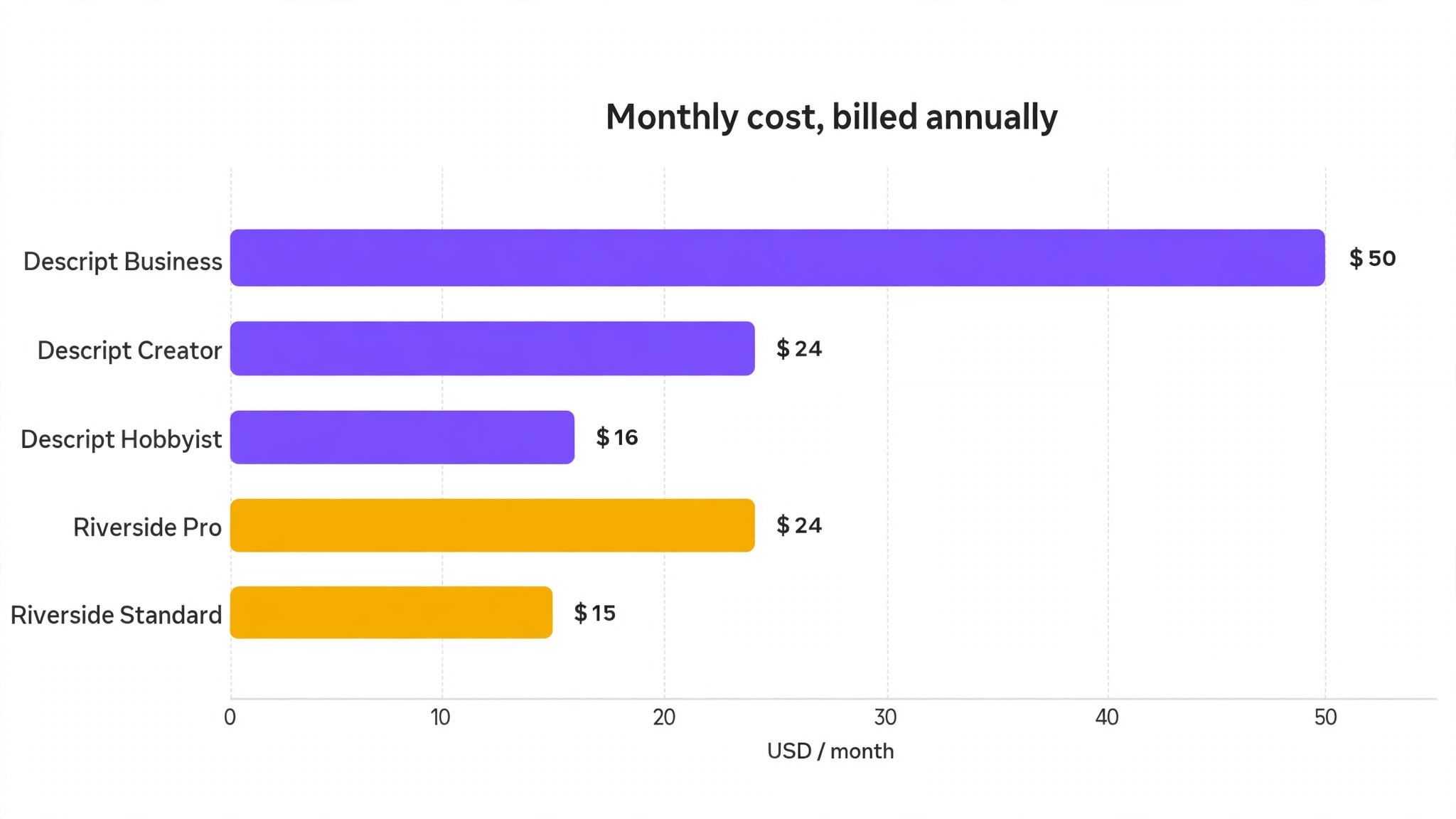
| Entry paid price | 16 dollars per user per month, Hobbyist annual | 15 dollars per month, Standard annual |
| Mid tier price | 24 dollars per user per month, Creator annual | 24 dollars per month, Pro annual |
| Top tier price | 50 dollars per user per month, Business annual | Custom, Business |
| Recording | Squadcast recorder built in | Local recording, separate tracks |
| Video quality | Up to 4K export on paid plans | Up to 4K video on paid plans |
| AI features | Overdub voice clone, Underlord AI, filler removal | Magic Clips, Magic Audio, AI show notes |
The descript vs riverside for podcasters question turns on workflow more than on price, since the entry tiers cost almost the same. Descript Hobbyist costs 16 dollars per user per month billed annually, while Riverside Standard costs 15 dollars per month. The mid tiers both land at 24 dollars per month. The difference is what that money buys. Descript buys editing speed and transcription hours. Riverside buys recording hours and video quality. A podcaster who records remote guests weekly needs Riverside recording first. A podcaster who edits solo shows daily needs Descript editing first.
The Verdict for Podcasters
For most podcasters, the honest verdict is that the two tools do different jobs and many shows need both. Riverside is the better recorder, full stop. It captures each guest locally at up to 4K video and 48 kHz audio, so a bad connection never degrades the recording. Descript is the better editor, full stop. Its text based editing lets you cut filler words, rearrange sections, and fix a sentence by typing, which is faster than any timeline editor for spoken word.
If you must pick one, pick by your bottleneck. A show with remote guests, video episodes, and clips for social media should start with Riverside, since recording quality cannot be fixed in editing. A show with long solo episodes, heavy editing, and a need for fast turnaround should start with Descript, since editing time is the cost that compounds every week. A show that does both will spend about 40 dollars a month on Riverside Pro plus Descript Hobbyist, which is still cheaper than a single hour of a freelance editor.
The combined stack is the answer most working podcasters reach. Record on Riverside, export the separate tracks, and edit in Descript. The workflow takes an extra export step, but it gives you the best recording and the best editing in one show. That stack costs less than most single tools that try to do both jobs badly, and it scales from a first episode to a hundredth without changing tools.
The stack also makes the budget easy to defend. A show that pays 48 dollars a month for both tools and saves four hours of editing a week is paying about 3 dollars per saved hour, which is cheaper than any freelancer and faster than any timeline editor. A show that pays for one tool and loses an episode to a bad recording pays far more, since a lost episode costs listeners. The pair is not a luxury, since it is the cheapest way to protect both halves of the show at once.
| Podcaster type | First pick | Why |
|---|---|---|
| Remote interviews, video first | Riverside Pro | Local 4K recording, separate tracks, Magic Clips |
| Solo show, heavy editing | Descript Creator | Text editing, Overdub, fast turnaround |
| Weekly show, both jobs | Riverside plus Descript | Best recording plus best editing, about 40 dollars a month |
| Beginner, testing the format | Riverside free | 2 free hours, no card, learn recording first |
| Team show, several hosts | Descript Business | Team features, shared media minutes, priority support |
| Clips for social media | Riverside Pro | Magic Clips turn long episodes into short video fast |
Pricing Compared
Descript pricing runs on media minutes and transcription hours, and the meters matter. The free plan covers 1 hour of transcription with watermarked exports at 720p. Hobbyist costs 16 dollars per user per month billed annually, or 24 dollars monthly, and covers 10 hours of transcription with no watermark. Creator costs 24 dollars per user per month billed annually, or 35 dollars monthly, and covers 30 hours with AI features and Overdub voice cloning. Business costs 50 dollars per user per month billed annually, with 40 hours and full team features. Descript meters every minute of raw media imported into a project, so multi-track teams can overrun the bundled minutes and pay extra.
Riverside pricing runs on recording hours, and the limits are simpler. The free plan covers 2 hours of separate track recording per month at 720p. Standard costs 15 dollars per month billed annually, or 19 dollars monthly, and covers 5 hours of recording with up to 4K video. Pro costs 24 dollars per month billed annually, or 29 dollars monthly, and covers 15 hours with Magic Audio, custom branding, and workspace roles. Business is custom priced with 25 hours and live streaming. Riverside charges a flat monthly rate with no per seat metering on its main plans, which makes the bill predictable.
The pricing trap in this comparison is Descript media minutes, and it is the detail most guides to descript vs riverside for podcasters skip. A podcaster who imports raw multi-camera video for every episode can burn through the bundled minutes faster than the transcription hours suggest.
Unused credits expire monthly with no rollover, so the meter punishes teams that import everything and edit later. Riverside has no equivalent trap, since recording hours are the only meter and they are easy to track. Price the plan you will end up on, and count your real recording and editing hours for a month before choosing. A show that records four hours and edits ten hours a month needs Riverside Pro and Descript Creator, which together cost 48 dollars a month billed annually.
Features Compared

Recording Quality
Riverside wins recording quality clearly, because local recording is its whole design. Each guest records on their own device at full quality, and the files upload after the call, so a frozen video call never damages the audio. Separate tracks for every guest make editing and mixing straightforward. Descript records through its built in Squadcast recorder, which is solid for remote guests but does not match Riverside local capture for reliability. A show that records remote guests should treat recording quality as the deciding feature, since no editor can restore audio that was never captured cleanly.
Editing Speed
Descript wins editing speed by a wide margin, because text based editing changes the job entirely. You read the transcript, delete the words you do not want, and the audio follows. Filler word removal, silence removal, and Studio Sound cleanup run in a few clicks, and Overdub lets you fix a misspoken word by typing the correction. Riverside editing is a timeline editor with AI clips and text based tools, which is good for cutting highlights but slower for a full episode edit. A podcaster who edits a two hour episode every week will save hours with Descript, and those hours are the real cost of the tool.
Audio Quality and Cleanup
Both tools clean audio well, and the difference is in the approach. Descript Studio Sound removes background noise and room echo with one click, and its filler removal handles ums and uhs across the whole episode. Riverside Magic Audio enhances voices and removes noise from locally recorded tracks, which start cleaner because they were never compressed by a video call. Clean source audio beats cleanup every time, so Riverside recordings need less fixing, while Descript cleanup is stronger for audio recorded elsewhere. A show that records in a noisy room should test both tools on the same raw file before deciding.
AI Features and Clips
Both tools ship AI features, and they serve different moments. Descript Underlord AI drafts show notes, summaries, and social posts from the transcript, while Overdub clones your voice for small corrections. Riverside Magic Clips finds the best moments in a long recording and turns them into short vertical video with captions, which is the fastest path to social media content. A show that lives on clips should lean Riverside, while a show that lives on written show notes and fast corrections should lean Descript. Neither AI feature replaces a human listen, since both tools make mistakes on names, numbers, and tone.
Collaboration and Guests
Riverside is built for guests, with a simple browser link that needs no download and a producer view that controls the session. Guests join, record locally, and leave, which is the smoothest guest experience in podcasting. Descript collaboration covers team editing, shared projects, and comments, which suits a production team that edits together. A show with a new guest every week will feel the Riverside difference immediately, while a show with a fixed team of editors will feel the Descript difference. Count your guests per month before choosing, since guest friction is the cost that compounds.
Export and Publishing
Both tools export to the formats a podcaster needs, and the difference is in the destination. Descript exports audio and video with DAW export for Audition and Reaper, which suits editors who finish in a dedicated audio tool. Riverside exports separate tracks, 4K video, and clips sized for social platforms, which suits video first shows. Both publish to hosting platforms, and neither replaces a podcast host. Check your publishing flow before choosing, since an export step that takes ten minutes every episode becomes a weekly tax on the show.
Descript vs Riverside for Podcasters by Show Format
Different show formats push the decision in different directions, and the format is the fastest way to settle the descript vs riverside for podcasters question for your own show. An interview show with a new guest every week lives or dies on guest experience and recording reliability, so Riverside leads. A solo commentary show lives or dies on editing speed, so Descript leads. A narrative show with scripted segments and sound design needs Descript text editing and DAW export. A video show that publishes clips daily needs Riverside Magic Clips and local 4K capture.
An interview show should test the guest flow first. Send the Riverside link to a friend and record five minutes, then send the Descript link and do the same. Watch which session started faster, which audio sounded cleaner, and which guest needed less help. Riverside wins that test for most hosts, since the browser link needs no download and the local recording protects against a frozen call. A show that records two guests a week will feel that difference in every episode, and the time saved on guest support adds up to hours a month.
A solo show should test editing speed instead. Record ten minutes of solo audio, then edit it in both tools and time the work. Descript text editing usually finishes in half the time of a timeline editor, since deleting a sentence from a transcript is faster than finding it on a waveform. A host who records a daily solo show will save an hour a day with Descript, which is the difference between shipping daily and shipping twice a week. That time saving is the strongest argument in this whole comparison, and it only shows up in a real editing test.
A narrative show adds a third test, which is sound design and structure. Descript handles multi-track editing, music beds, and DAW export, so a producer can build a layered episode and finish it in Audition or Reaper. Riverside handles the recording and the clips, but the narrative build happens elsewhere. A producer who builds episodes from many small clips should keep Descript at the centre of the workflow, with Riverside as the recorder for interviews. The format decides the tool, and the tool should follow the format rather than the other way round.
How to Judge Descript vs Riverside for Podcasters
Start with your bottleneck, not with a feature tour. Count how many hours you spend recording, how many hours you spend editing, and how many clips you publish per episode. A show that spends two hours recording and eight hours editing needs Descript first. A show that spends two hours recording and one hour editing needs Riverside first. The right tool matches your time sink, not a generic best list.
Next, test both tools on the same episode. Record one remote interview on Riverside and one on Descript, then edit both and compare the time, the audio quality, and the frustration. Watch whether the recording survived a bad connection, whether filler removal worked, and whether the export matched your publishing flow. A trial with one real episode tells you more than ten reviews, since your guests, your room, and your voice are the variables that matter.
Then model the total monthly cost at your real hours. A show that records four hours and edits ten hours a month needs Riverside Pro at 24 dollars and Descript Creator at 24 dollars, which together cost 48 dollars a month billed annually. A show that records two hours and edits three hours needs Riverside Standard at 15 dollars and Descript Hobbyist at 16 dollars, which together cost 31 dollars. Work through a month with your actual numbers, including media minutes, before comparing headline prices. A 9 dollar plan difference disappears against an hour of saved editing time.
Finally, check the meter that will catch you. Descript meters media minutes on every import, and multi-track teams overrun the bundle regularly. Riverside meters recording hours only, which is easy to track. The descript vs riverside for podcasters decision should be made after one real month of usage in each tool, not after a demo, since the meter only shows up in real work.
A Weekly Workflow That Uses Both
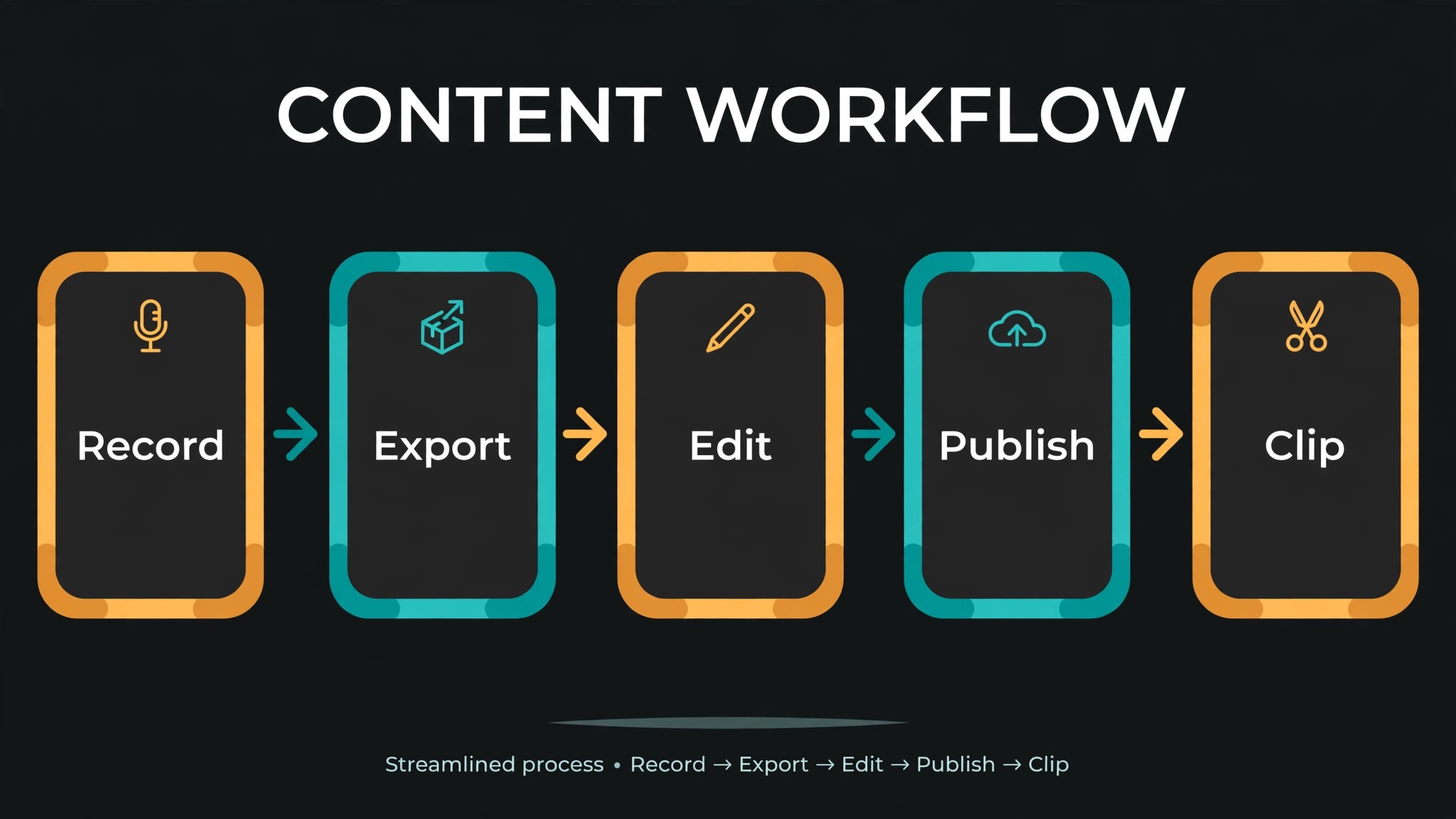
The best workflow for a weekly show uses Riverside to record and Descript to edit, and it takes five steps. Record the episode on Riverside with local capture and separate tracks, so every guest sounds clean. Export the tracks and import them into Descript, where the transcript becomes the edit. Cut filler words, rearrange sections, and fix mistakes with Overdub where a re-record would take too long. Run Studio Sound cleanup and check the levels before export. Publish the finished audio and video, then use Riverside Magic Clips to cut three short videos for social media from the same recording.
That workflow costs about 40 dollars a month for a weekly show on Riverside Pro plus Descript Hobbyist, and it saves hours every week against editing in a timeline tool. The extra export step takes ten minutes, while text editing saves an hour or more per episode. A show that ships weekly will feel the difference by the third episode, when the routine is set and the time savings are real. The two tools are not rivals in this workflow, since each one does the job the other cannot do well.
The workflow also protects the show against a bad recording day. A guest with a poor connection still sounds good, because Riverside recorded locally. A host who misspeaks still ships on time, because Descript Overdub fixes the word. A show that depends on one tool for both jobs has a single point of failure, while a show with two tools has a backup for each half of the job. That resilience is worth the extra subscription for any show that publishes on a schedule.
Clips deserve their own routine inside the workflow, since social media is where most new listeners find a show. After the episode is published, open the Riverside recording and let Magic Clips find the strongest moments, then review the three best clips before posting. Add captions, check that the hook lands in the first three seconds, and post one clip a day for three days rather than all three at once. A show that clips every episode grows faster than a show that only publishes audio, and the clip routine takes twenty minutes once the template is set.
Mistakes Podcasters Make When Choosing
The first mistake is choosing on price alone. The entry tiers cost almost the same, so price does not decide this comparison. A podcaster who picks Descript for recording quality or Riverside for editing speed will be unhappy within a month, since each tool is average at the other job. Choose by your bottleneck, and budget for both tools if your show needs both halves done well.
The second mistake is ignoring the meters. Descript media minutes catch multi-track teams by surprise, and the overage arrives as a bill rather than a warning. Riverside recording hours are simpler, but a show that records long sessions can still outgrow Standard at 5 hours and need Pro at 15 hours. Count your real hours for a month before choosing a tier, and check the meter in the first week of use.
The third mistake is skipping the guest test. A tool that is easy for the host and hard for the guest will lose guests, and a show that loses guests loses episodes. Send a test link to a friend, record five minutes, and ask how it felt. Riverside guest experience is the smoothest in the category, while Descript guest recording is solid but less polished. The guest test takes ten minutes and saves a season of awkward starts.
The fourth mistake is deleting raw recordings too soon. A finished episode is not a backup, since a re-edit, a clip request, or a correction needs the original tracks. Keep the raw Riverside recording and the Descript project files for at least a month after publishing, on local storage as well as in the cloud. A show that deletes its raw files to save space will regret it the first time a sponsor asks for a clip from an old episode.
Setup Checklist
Use this checklist when you set up Descript or Riverside for a weekly show, and keep a copy in your show notes.
1. Test record with a friend and check audio quality on both tools. 2. Set up a template project with intro, outro, and show notes. 3. Connect your podcast host and confirm the export settings. 4. Set recording hours and media minute alerts before the first episode. 5. Build a clip template for social media in the tool you choose. 6. Back up raw recordings locally after every session. 7. Run one full episode end to end before the first real recording. 8. Review editing time, recording hours, and cost monthly for the first quarter.
Related Guides
Keep exploring with these guides on Stratilyze:
- Descript vs CapCut in 2026: Which Editor Wins for Creators?
- Best AI Transcription Tools for Podcasters (15 Tools)
- Best AI Music Generators for Podcasters (8 Tools)
Frequently Asked Questions
Is Descript or Riverside better for beginners?
Riverside is better for a beginner who records remote guests, since the free plan covers 2 hours a month and the guest link needs no download. Descript is better for a beginner who edits solo and wants text based editing, since deleting words from a transcript is easier to learn than a timeline. Most beginners should start with Riverside free, record a few episodes, and add Descript when editing becomes the bottleneck.
Can I use Descript and Riverside together?
Yes, and most working podcasters do, since the descript vs riverside for podcasters stack is the standard workflow for a weekly show. Record on Riverside for local quality and separate tracks, then edit in Descript for text based speed. The combined cost is about 40 dollars a month for Riverside Pro plus Descript Hobbyist, which is cheaper than a single hour of freelance editing. The workflow adds one export step and saves an hour or more of editing per episode.
Does Descript replace a recording tool?
Partly. Descript records through its built in Squadcast recorder, which is solid for remote guests and fine for many shows. It does not match Riverside local recording for reliability, since a bad connection can still affect the capture. A show that records remote guests weekly should treat Riverside as the recorder and Descript as the editor, rather than expecting one tool to do both jobs at the same level.
How many hours do I get on each plan?
Riverside Standard covers 5 hours of recording a month, and Pro covers 15 hours. Descript Hobbyist covers 10 hours of transcription a month, and Creator covers 30 hours, with media minutes metered on imports. Count your real recording and editing hours for a month before choosing, since the meter that catches you depends on whether you record long sessions or import multi-track video.
Which tool is better for video podcasts?
Riverside is better for video podcasts, since it records local 4K video with separate tracks and turns long episodes into Magic Clips for social media. Descript exports up to 4K video on paid plans and edits video by transcript, which is strong for cutting a video episode but weaker for capturing it. A video first show should record on Riverside and edit the video in Descript or a dedicated video editor.
Do I need both tools to start a podcast?
No. A beginner can start with Riverside free alone, record and publish, and add Descript later when editing time grows. A solo podcaster who records alone can start with Descript alone and add Riverside when remote guests arrive. The two tools are a stack, not a requirement, and the right time to add the second one is when the first tool becomes the bottleneck.
A Final Word Before You Choose
There is no universal winner here, because the right tool follows whether your bottleneck is recording or editing. A show with remote guests and video episodes weighing descript vs riverside for podcasters should start with Riverside, since recording quality cannot be fixed later. A show with long solo episodes and heavy editing should start with Descript, since text editing saves hours every week. A weekly show that does both should budget for the pair, since 40 dollars a month buys the best recording and the best editing in one workflow.
Whichever you choose, record one real episode in each tool, count your hours for a month, and watch the meter that will catch you. A podcast tool earns its fee in episodes that ship on time, not in a demo, and a show that ships every week beats a show with better tools and no schedule. Choose the tool that fixes your bottleneck on your busiest recording week, and the rest of the feature list will take care of itself.