
A local designer usually charges $75 to $300 for one poster, and a print shop adds $8 to $40 for a large-format print. Hold that number in mind before choosing software, because the best poster makers turn a $200 job into an afternoon of your own time plus the price of paper. A free tool covers the whole job when the poster is a one-off for a school fair or a garage sale. A paid plan earns its keep when posters go out every week and the same design has to look right on a noticeboard, a window and a phone screen.
The money question is not which tool is cheapest on its pricing page. It is what a year of posters costs once design time, print runs and reprints are added in. A tool that exports a clean print file saves a reprint. A tool that resizes one design into three sizes saves an evening. This guide prices all ten tools that way, keeping design cost, print cost and time cost separate, so the pick for a one-off poster and the pick for a weekly run are never confused.
What a Poster Actually Costs Before You Open a Tool
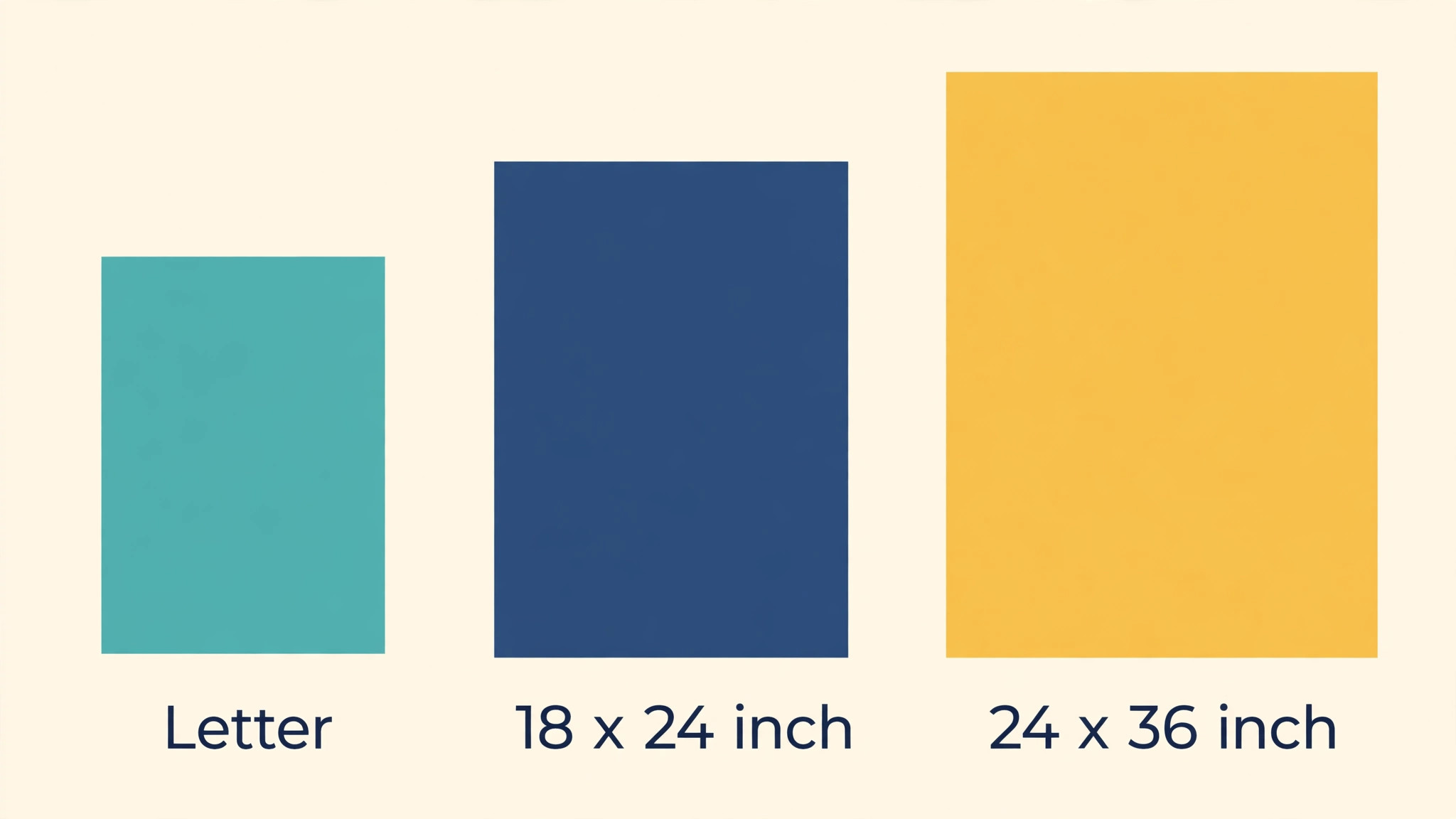
Start with the three bills every poster carries. The first is design, and it runs from $0 on a free plan to $144 a year for Canva Pro, with most paid plans sitting between $72 and $144 a year. The second is printing. A home printer handles a letter-size poster for roughly $1 to $3 a copy, while a print shop charges about $8 to $15 for an 18 by 24 inch poster and $20 to $40 for a 24 by 36 inch one.
The third is time, and it is the bill people forget. A first poster in an unfamiliar tool takes two to three hours. The same poster in a tool you know takes 20 minutes, and over 50 posters a year that gap is worth more than any subscription on this list.
Size drives the print bill more than anything else. A letter-size poster fits a home printer and a noticeboard, and it costs almost nothing to test. An 18 by 24 inch poster reads from across a room and needs a print shop. A 24 by 36 inch poster dominates a window and needs heavier paper so it does not curl. Pick the size before picking the tool, because a tool that cannot export at the size you need will force a rebuild later, and a rebuild is the most expensive part of any poster.
| Cost item | One-off poster | Weekly posters, 50 a year |
|---|---|---|
| Design software | $0 on a free plan | $72 to $144 a year on a paid plan |
| Home printing, letter size | $1 to $3 | $50 to $150 a year |
| Print shop, 18 by 24 inch | $8 to $15 | $400 to $750 a year |
| Print shop, 24 by 36 inch | $20 to $40 | $1,000 to $2,000 a year |
| Your time, first poster | 2 to 3 hours | 20 minutes once the template is set |
The table shows why the free plan suits a single poster and fails a weekly run. Fifty posters at a print shop cost far more than any tool on this list, so the tool that keeps the print file clean and the template reusable is the one that saves real money.
Is the Free Tier Really Free When Print Is Involved?
Free plans look generous until the poster goes to print. Nine of the ten tools on this list offer a free plan, and PicMonkey is the only one that does not, offering a 7-day trial instead. A free plan covers templates, stock photos and basic editing, which is enough for a digital poster. Print is where the limits appear. Watermarks sit on free exports in PosterMyWall and Fotor. Low-resolution exports soften type on a large print. Premium templates and brand colours sit behind the paywall, so a free poster often looks like every other free poster on the same board.
The honest test is to print one copy before printing fifty. Export the poster from the free plan, print it at the size it will hang, and read it from six feet away. If the headline stays sharp and no watermark shows, the free plan is enough.
Brand consistency is the second hidden cost of staying free. A shop that changes its colours and fonts on every poster trains customers to ignore it. Paid plans lock the palette, the fonts and the logo in a brand kit, so every poster matches the last one. Canva Pro, Adobe Express Premium and VistaCreate Pro all include a brand kit, and Design.com builds its whole subscription around one shared kit across the logo, the poster and the website.
How Were the 10 Tools Priced and Tested?
Every one of the best poster makers below was judged on the same five questions. First, what does a year actually cost on the annual price rather than the monthly teaser rate. Second, does the free plan produce a print-ready file, or does it watermark or soften the export. Third, how fast does a first poster go from a blank page to a finished file. Fourth, how strong are the poster templates at real print sizes, not just social sizes. Fifth, does the tool resize one poster into a window version, a noticeboard version and a phone version without a rebuild.
Prices here come from vendor pricing pages and independent comparisons checked in October and November 2026. Prices move during the year, and two sources disagreed on PosterMyWall, listing Premium at $9.95 a month on one page and $13 a month on another, so the figure used here is $13 a month or $109 a year. Check the live page before subscribing, because a price quoted here is a guide, not a contract.
The 10 Tools at a Glance
The ten tools below cover every way to make a poster, from a free template editor to a photo-first design studio.
| Tool | Best for | Starting paid price | Free plan | Watch out |
|---|---|---|---|---|
| Canva | All-round poster design | Pro $144 a year | Yes | Templates look common |
| Adobe Express | Fast branded posters | Premium $9.99 a month | Yes | Smaller poster range |
| VistaCreate | Budget team posters | Pro $10 a month billed annually | Yes | Looser brand lock |
| Design.com | Poster plus brand in one place | From about $3 a month | Yes | Less depth per tool |
| PosterMyWall | Event and shop posters | Premium $13 a month | Yes | Watermarks on free plan |
| Venngage | Information posters | Premium $10 a month billed annually | Yes | Paid export limits |
| Fotor | Photo-led posters | Pro $8.99 a month | Yes | Weaker text tools |
| Visme | Data and report posters | Starter $12.25 a month billed annually | Yes | Poster is one feature |
| PicMonkey | Photo editing plus posters | Basic $7.99 a month | No, 7-day trial | No permanent free plan |
| Snappa | Fastest simple poster | Pro $10 a month billed annually | Yes | 3 downloads a month free |
Canva leads the table on range, and Adobe Express leads it on speed, since its editor finishes a branded poster fastest. PosterMyWall is the most poster-focused tool of the ten, and Snappa is the fastest route from a blank page to a finished poster for a first-time user.
Best Pick by Job
Every common poster job has one pick from the best poster makers in the rows below, so start with the row that fits your poster.
| Job | Pick | Why it wins here |
|---|---|---|
| Everyday posters | Canva | Largest template range, print ordering built in |
| Poster in a hurry | Adobe Express | Simplest editor, quick resize |
| Team posters on a budget | VistaCreate | One Pro plan covers up to 10 seats |
| Poster plus logo and website | Design.com | One account, one shared brand kit |
| Event and shop posters | PosterMyWall | Poster-first templates, print sizes |
| Poster full of facts | Venngage | Strong structure, icons, clear hierarchy |
| Poster built around a photo | Fotor | Photo editing built in |
| Poster with charts and data | Visme | Charts, tables and data widgets |
| Photo editing before design | PicMonkey | Deep photo tools, then design |
| Simplest poster, no learning curve | Snappa | Preset sizes, template, text swap, export |
The 10 Best Poster Makers in Detail
Canva leads on range and Adobe Express on speed, VistaCreate follows on team value, and the rest hold their places on single jobs instead of overall power.
1. Canva — The All-Round Poster Default
Canva is the safest pick for most poster work, because the poster library is the largest on this list and the print path is built in. The free plan covers thousands of poster templates, stock photos and 5GB of storage, which is enough for a one-off poster. Pro is $144 a year on annual billing, or $18 a month on monthly billing, and adds the brand kit, background removal, one-click resize and 1TB of storage. The resize tool matters most for posters, because one design has to fit a noticeboard, a window and a phone, and rebuilding it three times eats an evening.
Print ordering runs inside Canva, so a poster can go from the editor to a delivered print without a separate shop visit, though a local print shop is often cheaper for a single large poster. The real risk with Canva is sameness. Its templates are so widely used that a poster can look like the one already hanging on the same board. A real photo of the event or the shop, plus one changed choice on colour or layout, is what keeps a Canva poster from blending in.
2. Adobe Express — The Fast Branded Poster
Adobe Express is the pick when the poster has to be finished today and still look on-brand. Premium runs $9.99 a month or $99.99 a year, and includes the poster maker, brand kits, 250 generative credits a month and one-click resize. The free plan is genuinely useful, with core templates, Adobe Fonts and background removal that carries no credit limit, which matters when every event photo needs a clean cutout.
The editor is simpler than Canva, and a first-time user will finish a poster faster here than anywhere else on this list. The poster template range is smaller, and the collaboration tools are thinner, so a team that designs together every week will feel the limits. A business already using Adobe fonts will find the type choices stronger here, and the $99.99 yearly price undercuts Canva Pro by about $44 a year.
3. VistaCreate — The Budget Team Poster
VistaCreate is the closest like-for-like alternative to Canva at a lower team price. Pro is priced at $13 a month, or $10 a month when billed annually, which works out to $120 a year, and one Pro plan covers up to 10 seats. The free Starter plan includes more than 100,000 templates, 10GB of storage and social scheduling. Pro adds premium templates, background removal, one-click resizing and brand kits.
The editor feels familiar to anyone who has used Canva. The brand lock is looser, so a hurried user can drift off palette, and the AI tools are thinner. The value is the team price. A small shop with three people making posters pays $120 a year once, where Canva would charge per person. For a team that wants a fresh look every season, VistaCreate is the cheapest way to get there.
4. Design.com — The Poster Plus Brand Kit Pick
Design.com earns fourth place because a poster is rarely the only thing a new business needs, and one subscription here carries the poster, the logo, the brand kit and the website together. The price starts from about $3 a month with annual billing for the Starter tier, with higher tiers adding the website builder and more tools. A business launching a shop, a stall or a service gets its poster, its logo and its site from the same colours and fonts, so the poster on the window matches the website on the phone.
The poster maker itself is workmanlike rather than exceptional. It builds a clean poster from a template and a few choices, offers designs that suit shops, events and local services, and exports in the formats a print shop needs. Canva designs better and Adobe Express works faster. The value is the shared kit. One payment covers the identity, and the poster is one piece of it, which makes the effective cost of the poster itself very low for a business that needs the rest anyway.
5. PosterMyWall — The Poster Specialist
PosterMyWall is the only tool on this list that started with posters and flyers as its core job, and the focus shows. The library holds millions of templates organised the way a local business thinks, with grand openings, live music nights, school fundraisers and holiday sales, each sized for real printing. Premium is $13 a month or $109 a year, with a Premium Plus tier at $30 a month for heavier users, and the platform extends into email campaigns, social publishing and digital signage.
The free plan is usable for social sharing, though high-resolution downloads carry a watermark, which rules it out for a printed poster on a wall. Single high-resolution downloads start from about $5.99, which suits a business that needs one poster a month without a subscription. A shop that only needs a printed poster and a social post will find PosterMyWall hard to beat on price and relevance, and a business that needs a locked brand kit will find Canva stronger.
6. Venngage — The Information Poster
Venngage started as an infographic maker, so a poster that leans on facts, steps or a clear hierarchy looks sharper here than in a general design tool. Premium is $10 a month per user on yearly billing, with a Business plan at $24 a month, and a free plan grants basic designs, though paid export limits apply. The icons, sections and contrast checkers carry meaning without words, which helps a poster that has to be read from a distance.
The poster templates are thinner than the leaders, and the tool is at its slowest when the poster is a simple announcement rather than a visual document. A school, a clinic or a community group that needs a poster explaining steps, dates or safety information will find the infographic approach useful, and a shop that needs a quick sale poster will find it slower than Canva.
7. Fotor — The Photo-Led Poster
Fotor pairs a design editor with a photo editor, so a business that photographs its own products, food or events can edit the photo and drop it straight into the poster without a second app. Pro is $8.99 a month, or $39.99 a year on the annual plan quoted by several comparisons, which makes it one of the cheapest paid tools on this list. The free Basic plan covers occasional use.
The text tools are weaker than Canva, and the poster templates are thinner than the leaders, so a poster that lives or dies on readable dates and prices needs care here. The appeal is the photo workflow, and the AI photo tools, including background removal and retouching, save a separate editing step. For a restaurant, a photographer or a market stall whose photos carry the poster, Fotor is the right pick. For a poster built mostly from words, Canva or Adobe Express will serve better.
8. Visme — The Data Poster
Visme is built for visual documents, with strong charts, tables and data widgets, so a poster that carries numbers, a schedule or a comparison will look stronger here than in a pure design tool. The Starter plan is $12.25 a month per person on yearly billing, and the Pro plan is $24.75 a month, with a free plan that handles occasional use but limits downloads.
The poster is one feature among many, with templates thinner than Canva. A business that only makes posters will pay for features it never uses, and the editor takes longer to learn than Snappa or Adobe Express. The strength is layout. A poster with a giving table, a class timetable or a price comparison reads clearly here, because the data tools keep the numbers aligned and readable.
9. PicMonkey — The Photo Editor Turned Poster Maker
PicMonkey is the only tool on this list with no permanent free plan, offering a 7-day trial instead, and Basic is $7.99 a month or $72 a year. The trial must be used deliberately, with a real poster ready to design before it starts. What the money buys is deep photo editing first and design second, with brand kits, templates and touch-up tools that suit a photo-first business.
A photographer, a maker or a food business that edits every image before it goes on a poster will get more from PicMonkey than from a template-first tool. The poster templates are fewer than Canva, and the absence of a free plan means a casual user cannot test it at leisure. The photo tools are the reason to pay, because a poster with a well-edited photo of the real product will beat a poster with a stock photo every time. Budget $72 a year only if the photo editing will be used weekly.
10. Snappa — The Fastest Simple Poster
Snappa is the pick for a person who needs a poster in twenty minutes and has never opened design software. Preset dimensions cover every common format, the editor is stripped down to template, text swap and export, and the free Starter plan allows 3 downloads a month. Pro is $15 a month, or $10 a month when billed annually, and removes the cap while adding background removal, custom font uploads and social integrations.
The simplicity is also the limit. Snappa has no brand kit as deep as Canva, no photo editor as strong as Fotor, and no print ordering built in. A business that makes one poster a month will never hit those limits, and a business that makes posters every week will outgrow Snappa within a season. For a first poster, though, nothing on this list is faster. Start here when speed matters more than depth, and move to Canva when the poster habit becomes weekly.
Which Wins for a Small Business, Canva vs Adobe Express?
Both rank among the best poster makers for small businesses, but they win on different jobs. Canva wins when the poster needs the widest template choice and print ordering in one place, and the $144 a year Pro plan pays for itself once posters go out every week. Adobe Express wins when the poster has to be finished today, because the simpler editor and the $99.99 a year Premium plan get a branded poster out the door faster, even though the template range is smaller.
How to Choose the Right Poster Maker for Your Next Poster
Start from the job, not the price list, because the best poster makers differ more on workflow than on cost. Pick the size first, then check the free plan for watermarks and low-resolution exports at that size. If posters go out weekly, pay for the brand kit and one-click resize, since those two features save more time than any discount. If the poster is a one-off, stay free and spend the money on one good proof print instead.
Which Poster Sizes Sell, and Which Ones Waste Paper?
A poster that reads from across a room follows one rule, which is that the headline does the work and everything else supports it. The best poster makers all export at the three sizes that matter. Letter size fits a noticeboard, a shop counter and a home printer, and it suits a poster read up close. The 18 by 24 inch size fits a window, a hall wall and a market stall. The 24 by 36 inch size dominates a large window or an exhibition wall, and it needs heavier paper so it does not curl or tear.
The mistake is printing large before testing small. Print one letter-size copy first, pin it up, and read it from six feet away. If the headline reads clearly and the date and place sit in the next largest type, the design is ready to scale up. If the words are small or the date hides in a paragraph, remove words rather than adding them.
Should You Print at Home, Use a Print Shop, or Order Online?
Home printing wins for a test copy and for a run under ten copies, because the cost is ink and paper and the turnaround is minutes. A home printer struggles past letter size, and the colours drift from the screen, so a large poster printed at home often looks washed out. A print shop wins for a run of ten to fifty posters at 18 by 24 inches, because the colour is true, the paper is heavier, and the price per poster falls as the run grows. Ask for one proof copy before the full run.
Ordering online wins when the poster has to reach several places at once, because the order ships to each address without a shop visit. Delivery takes days, and the price is often higher than a local shop for a single large poster. A shop that prints every week should build a relationship with one local print shop, because the shop will remember the paper, the size and the colour settings, and the reprint will match the first run.
Whichever of the best poster makers you choose, the proof copy is the step that saves the reprint.
A Poster That Reads From Across the Room
Distance decides every design choice on a poster. The headline should be the largest type on the page, the date and place should be the next largest, and the details should be the smallest, because a reader decides in three seconds whether to keep reading. One photo is enough, and it should be bright, with the text kept clear of the busiest part of the image. A real photo of the shop or the event will beat a stock photo, because a customer can tell the difference.
Colour should do one job, which is to make the headline stand out from the background, and a poster with three colours will read better than one with six. White space lets the eye find the headline first and the details second. Step back from the screen before exporting, because a poster that reads on a laptop at arm’s length may fail on a wall at six feet.
Frequently Asked Questions
How much should I budget for my first poster run?
Budget $0 for design on a free plan, $1 to $3 for a home-printed test copy, and $8 to $15 for one 18 by 24 inch print from a shop. A first run of 20 posters at that size costs about $160 to $300 at a print shop, plus the design time. Start with one proof copy, read it from six feet away, and only then order the full run.
Can I make a poster for free?
Yes, and nine of the ten tools on this list offer a free plan that covers a poster for digital use. Canva free, Adobe Express free and VistaCreate free all include poster templates, photos and export, and Snappa free covers 3 downloads a month. The free plan falls short on print, because watermarks and low-resolution exports show on a large print, so print one test copy first.
What size poster should I print?
Letter size suits a noticeboard and a counter, 18 by 24 inches suits a window and a hall wall, and 24 by 36 inches suits a large window or an exhibition wall. Pick the size before the design starts, because a design built for letter size will not scale cleanly to 24 by 36 inches without larger type and a simpler layout.
Do I need a paid plan to print a poster?
No, though a paid plan helps when posters go out every week. A paid plan removes watermarks, unlocks high-resolution export, adds the brand kit and adds one-click resize, which turns one poster into three sizes in minutes. A business that prints 20 posters a month will spend more on one wasted batch than on a month of Canva Pro at $12 a month on annual billing.
Which poster maker is best for a small business?
Canva is the safest choice for most small businesses, because the template range is largest, the brand kit keeps every poster matching, and print ordering is built in. PosterMyWall is the pick for event and shop posters, because its templates are built for the exact events a local business runs. Design.com is the pick for a new business that also needs a logo and a website, because one subscription covers all three.
How do I make a poster that people actually read?
Put one message in the largest type, the date and place in the next largest type, and the details in the smallest type, with one bright photo and no more than three colours. Remove words until only the message, the date, the place and one invitation remain.
The Short Version for a Busy Week
Cost decides the poster tool more honestly than features do, and the best poster makers prove it. A one-off poster costs nothing on a free plan plus the price of paper, and Canva free or Adobe Express free will cover it. A weekly poster habit costs $72 to $144 a year for the tool and far more for printing. Canva is the default for most businesses at $144 a year, Adobe Express is the faster pick at $99.99 a year, and VistaCreate is the team pick at $120 a year for up to 10 seats.
Start with the poster that is due soonest. Pick its size first, print one proof copy, and read it from six feet away before ordering the run. Keep one template for every poster that follows, change only the words and the photo, and let the brand kit hold the colours steady. The best poster makers are the ones that make the second poster faster than the first, and the tenth faster than the second, because a poster habit that stays fast is a poster habit that lasts.