

Job hunting has a volume problem. Most roles ask for a tailored CV and a custom cover letter, and doing that well for one application takes real time. Doing it for fifty applications takes weeks, and that is usually why a search stalls. AIApply is built to remove that bottleneck. It finds roles that match your experience, tailors your documents for each one, applies on your behalf, and then helps you prepare for the interviews that follow. This AIApply review covers how it works, what it costs, and who it fits, so you can decide if it belongs in your search.
"AiApply is an AI job-application platform used by 3m+ jobseekers. It finds roles that match your experience, tailors your CV and cover letter for each one, applies on your behalf, and helps you prepare for interviews."
AIApply at a Glance
| What it is | An AI job search co-pilot: resume builder, cover letter generator, ATS scanner, job board, Auto Apply, mock interviews, and live interview coaching in one dashboard. |
| Built for | Jobseekers at every stage, from students to executives, across tech, marketing, finance, healthcare, sales, and more. |
| Free plan | Limited monthly use: 1 AI cover letter, 1 ATS resume check, 1 mock interview, and 1 auto-apply per month. |
| Premium (AIApply Toolkit) | $29 per month, or $12 per month billed annually ($144 per year). Resume Builder, Cover Letter Generator, Application Kit, and Mock Interview Tool. Does not include Auto Apply or Interview Buddy. |
| Auto Apply | $49 per month for 100 applications, $99 per month for 250 applications, or $199 per quarter for 750 applications. Sold separately from Premium. Extra credits from $49. Unused credits roll over while the subscription is active. |
| Interview Buddy | $19 per month or $99 per year. A separate product, not part of Premium. |
| How it signs in | Email plus a one-time code. No password is needed at sign-up. |
Quick Verdict
AIApply is the strongest all-in-one option for jobseekers who want the entire search handled in one place: tailored documents, automated applications, and interview preparation together. The free plan lets you test the core tools before paying anything, and Premium at $29 per month or $144 per year unlocks unlimited use. Auto Apply is the standout feature, and Hybrid mode, which automatically submits jobs with a fit score of 75 or higher and holds the rest for review, removes the biggest worry about automated applying. If your search has stalled on volume, this is the tool to try first.
Why AIApply Stands Out
Three capabilities define the platform, and they work as one continuous workflow rather than three separate tools.
- Auto-apply. AIApply finds roles that match your experience and applies on your behalf, so volume stops being the bottleneck of your search.
- Tailored CVs and cover letters for every application. Each document is rewritten for the specific job description, with the right keywords in the right places, instead of one generic CV sent everywhere.
- AI mock interviews. Role-specific questions are built from the job description itself, with instant feedback on each answer, so you walk into the real interview already rehearsed.
The third point deserves emphasis, because it is where most job tools stop short. Getting interviews is only half the job. AIApply also prepares you for them, first in practice mode and then with live coaching during the real interview.
What AIApply Is

AIApply is an AI-powered job search co-pilot that covers the whole journey from the first draft of a CV to the final interview invite. The platform analyses your background and the roles you want, then uses advanced AI, including GPT-4, to write tailored CVs and cover letters, recommend high-match roles on its job board, and submit applications for you through Auto Apply.
The promise on the homepage is direct. Stop applying for weeks, start interviewing in days. This is not a template library. It is a workflow that takes the repetitive half of job hunting off your plate so your time goes into interviews, not forms.
How AIApply Works
The workflow has four stages, and each one hands off cleanly to the next.
1. Create your profile. Build a professional profile in minutes by uploading your CV or creating one from scratch. You can also import a LinkedIn profile and let the system turn it into a polished document.
2. Tell it what you are looking for. Select your preferred roles, locations, salary range, and work preferences. The more detail you give here, the better the matches get.
3. Auto Apply takes over. The AI scans thousands of job postings daily, finds roles that match your profile, tailors your CV and cover letter for each one, and submits the applications automatically.
4. Land interviews. Track every application in real time in your dashboard, then prepare with the interview tools. This is where the mock interview and live coaching features come in, and they matter more than most people expect, because getting interviews is only half the job.

Inside the Dashboard: From Sign-Up to First Application
Signing up takes minutes. Enter an email address, and a one-time code arrives by email; entering it creates the account automatically, and no password is asked at this stage. Auto Apply is selected by default, with the AI Resume Builder as the other option. Onboarding then asks you to import a resume (PDF, DOC, or DOCX) or import a LinkedIn profile before anything else unlocks, and to set up an Application Kit with a job title, a pasted job description, and a tone slider from Very Casual to Very Formal.
From there you set preferences and browse the job board, or click Start Auto-Apply on the dashboard. The sidebar groups everything clearly: Auto Apply holds the Dashboard, Job Search, Saved Jobs, Answer Library, and Preferences; Documents holds Application Kits, Resumes, and Cover Letters; and Interview holds Interview Buddy and Mock Interviews.

Preferences: You Stay in Control
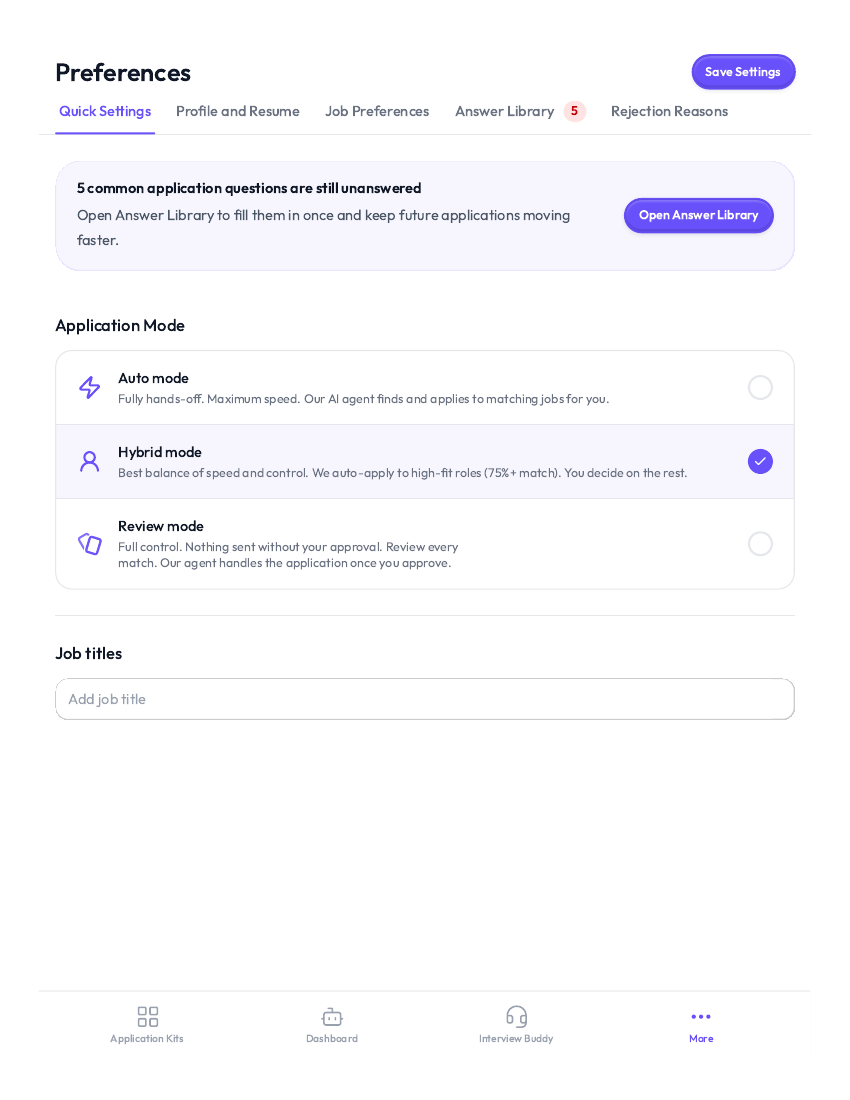
The Preferences screen is where Auto Apply stops feeling like a black box. The default application mode is Hybrid, which automatically submits jobs with a fit score of 75 or higher and holds the rest for review. Review mode is the stricter option, where every match needs your approval first. That control answers the biggest worry about automated applying, because you decide how much goes out on its own.
You can also set target roles, target companies, excluded companies, locations, salary range, and work types, plus extra preferences such as Remote Only and No Agencies. An Answer Library stores answers to common application questions, from work authorization and sponsorship to degree, clearance, and hybrid work, so you fill them in once instead of on every form.
Auto Apply: The Core Feature
Auto Apply is the reason most people come to AIApply, and it works in five steps.
First you create your profile by uploading a CV or building one with the AI resume builder. Then you set your preferences for target roles, locations, salary range, and work preferences. The AI then scans thousands of postings daily to find roles that match. For each match, it tailors your CV and cover letter and submits the application automatically. Finally, you monitor everything in real time and prepare for interviews with the AI interview tools.
Two controls keep this honest. You choose Hybrid mode, which automatically submits jobs with a fit score of 75 or higher and holds the rest for review, or Review mode, where every match needs your approval first. And you manage volume with an Auto Apply subscription: $49 a month for 100 applications, $99 a month for 250, or $199 a quarter for 750, with extra credits available if you need more before renewal. Unused credits roll over while your subscription is active.
AI Resume Builder and Cover Letter Generator
Every application starts with documents, and AIApply treats them as a pair. The AI Resume Builder auto-generates ATS-friendly CVs and keeps the language aligned with your target role. Templates use a clean structure that parses correctly in applicant tracking systems, and the AI weaves keywords from each job description into your content naturally, so you score higher in automated rankings.
The AI Cover Letter Generator writes a bespoke letter for each posting. You provide the job description or the key details, and the AI aligns your achievements with what the employer asked for. You can direct the tone, emphasise specific wins, and edit the final output before it goes out.
You are always in control of the output. You can regenerate sections, edit wording, reorder content, duplicate a CV for a different role, and export as PDF or Word, or share a secure link so recruiters always see the latest version. The Resume Scanner and Optimizer checks your CV against ATS criteria and suggests targeted keyword fixes before anything is submitted, which is the step that catches missing phrases and formatting issues early.
ATS Tools: Scanner, Checker, and Optimizer
Before anything is submitted, the Resume Scanner and Optimizer checks your CV against ATS criteria and suggests targeted keyword fixes. The public scanner tools are free with no sign-up: upload a resume up to 5MB, paste the job description, and get an instant ATS compatibility score with detailed feedback. A separate Rewriter improves clarity and impact with stronger action verbs and quantified achievements, and an Optimizer identifies missing keywords and weak bullet points against a specific posting.
AI Mock Interview and Live Interview Coaching
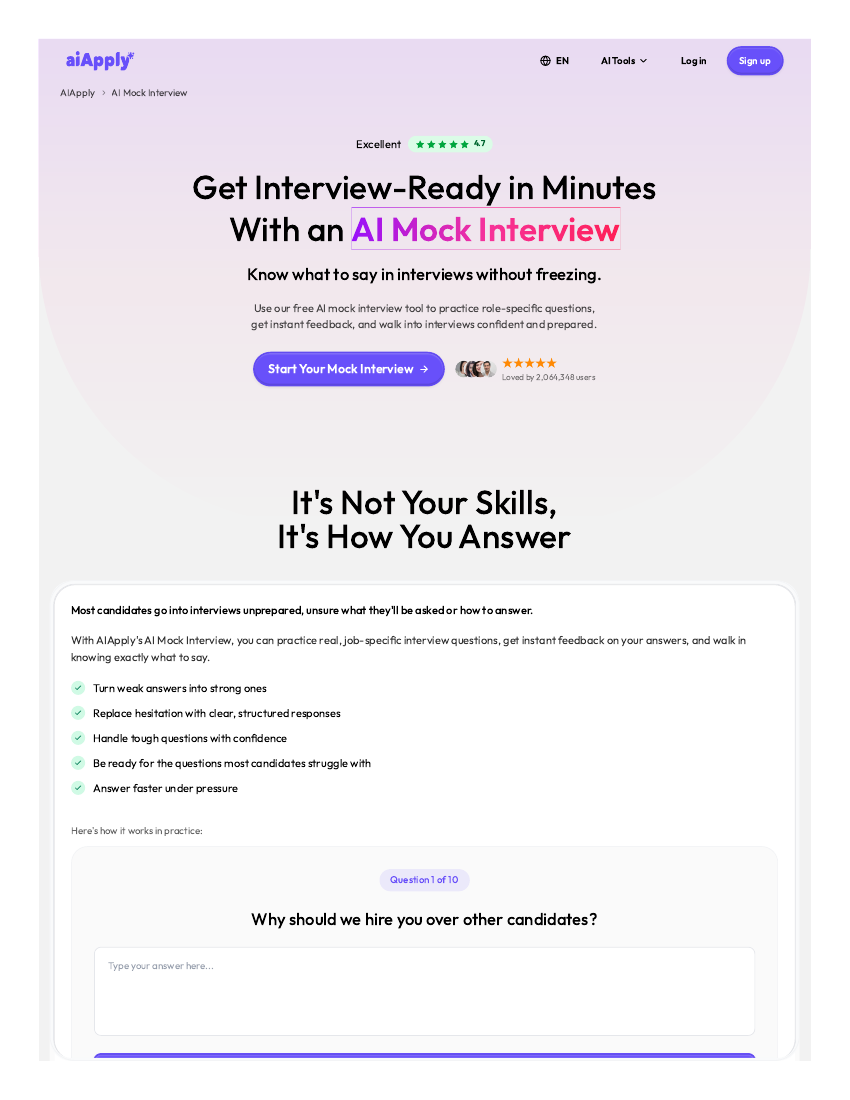
This is the part that separates AIApply from a plain resume tool, and it works in two modes that are worth keeping apart.
Mock mode is practice. The AI Mock Interview simulates real interviews with role-specific questions built from the job description. You choose your interview type, from job-specific, behavioural, technical, or custom interviews tailored to your target role. You answer by voice or text, just like a real interview, and you get instant, detailed feedback on your answers, your communication style, and the areas to improve. Question categories cover common, behavioural, technical, leadership, industry-specific, and situational questions, across more than 50 industries. Practice is unlimited, difficulty adapts as you improve, and you can track progress over time.
Live mode is coaching during a real interview. Interview Buddy and Interview Copilot support you while an interview is actually happening, with help on answers in the moment. Interview Buddy is a separate product at $19 a month or $99 a year, not part of Premium. That distinction matters. Mock mode is where you rehearse and fix weak answers. Live mode is where you get support when it counts. Used together, they cover the interview stage from both sides, preparation and performance.
The Rest of the Toolkit
Beyond the headline features, AIApply bundles the supporting tools into one dashboard, so you stop patching together separate apps.
- Job Board and Job Tracker. Listings are aggregated in one place, and you can apply or auto-apply with a click, then track every application in real time.
- AI Salary Coach. Guidance on what a role should pay, so you set realistic ranges in your preferences.
- AI LinkedIn Optimizer. Aligns your LinkedIn presence with the roles you are targeting.
- AI Career Coach. Broader guidance across the search, beyond single applications.
- Resume Translator. Converts your CV into other languages for global searches.
Students and recent graduates can verify their status for a discounted Premium plan, and the platform also runs seasonal promotions and referral rewards.
Job Search, Job Hub, and the Free Tracker
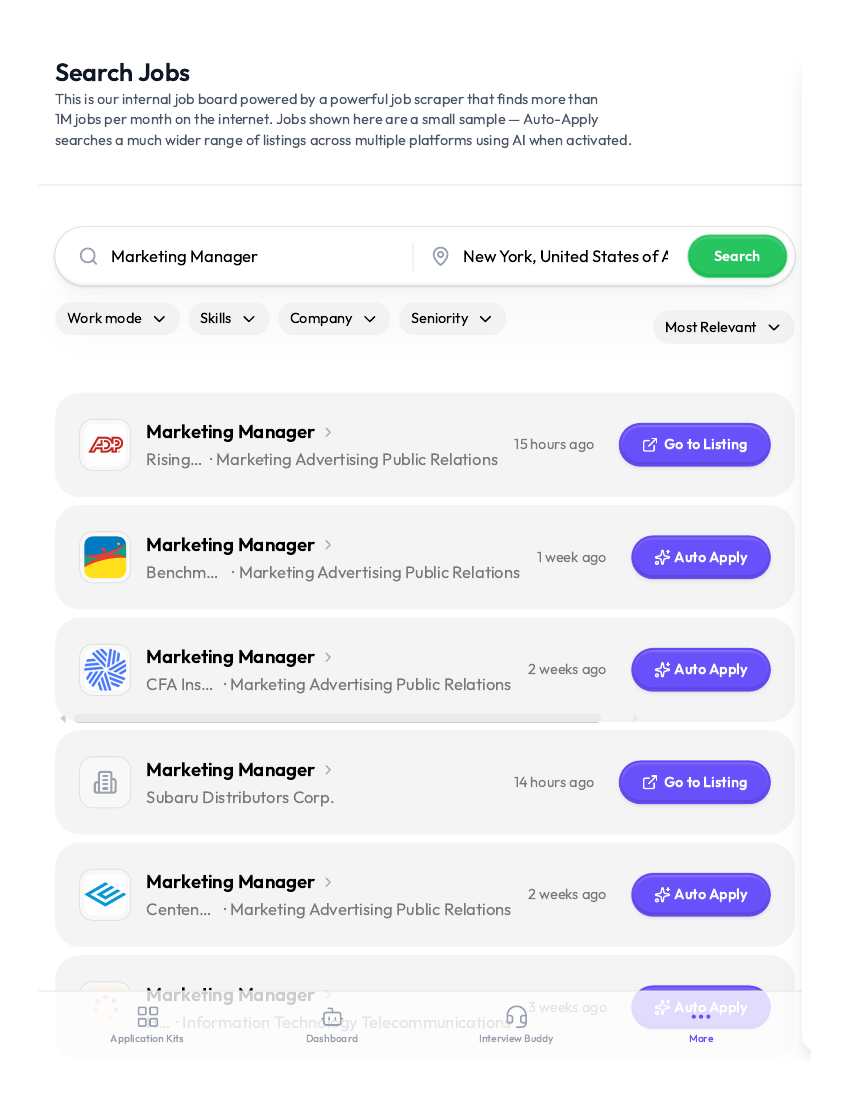
Inside the app, Job Search is a full board with title and location search, filters for employment type, job sites, date posted, location type, and work arrangement, plus a job alert option. Each result shows company, title, location, date, and a match score, with Auto Apply, Save Job, and Go to Listing on every listing. Job Hub tracks applications with All, Applied, Review, and Declined filters and a List or Kanban toggle, and Saved Jobs keeps everything you bookmarked in one place. Separately, the public Job Search Tracker tool is free with no registration at all: you add company, job title, application date, and status, move entries from Applied to Interview to Offer, and set reminders and deadlines.
Salary, LinkedIn, and Career Tools
The salary tools cover the money side of the search. The Expected Salary Calculator takes role, experience, location, education, skills, and industry, then estimates a range from market data. A Salary Negotiation Template Generator turns a job title, current offer, and target salary into a professional negotiation script, and a Job Offer Comparison Calculator compares two or more offers side by side on base salary, bonus, stock and equity, vesting, health insurance, time off, and remote policy, then computes total annual compensation.
The LinkedIn tools work without an account: a Headline Generator, a Summary Generator, and LinkedIn to Resume, which turns a pasted LinkedIn URL into a polished, ATS-friendly resume in seconds. The Career Path Finder suggests next moves from your current role, skills, interests, and career goals, and the Resume Translator converts a resume into six European languages while preserving formatting, free for the first translation.
How to Use AIApply, Step by Step
If you are starting from zero, this is the fastest path through the platform.
- Sign up for a free account and explore the core tools at your own pace, including a sample cover letter and the job board.
- Build or import your CV. Upload a PDF or Word file, import from LinkedIn, or start from scratch by entering your experience.
- Run the Resume Scanner on your draft and fix the keyword and formatting gaps it flags.
- Set your job preferences for roles, locations, salary range, and work preferences.
- Generate a tailored cover letter for a real posting and edit it until it sounds like you.
- Turn on Auto Apply with a plan that matches your volume ($49 a month for 100 applications, $99 a month for 250, or $199 a quarter for 750), and review the first few applications before they go out.
- When interview invites arrive, practise in mock mode with role-specific questions, then use the live coaching tools for the real thing.
- Track everything in the dashboard and adjust your preferences as responses come in.
The whole setup takes minutes, not days, and the free tier lets you test the core tools before paying anything.
AIApply Pricing

| Plan | What you get | Price |
|---|---|---|
| Free | Limited core tools, sample cover letter, job board browsing | Free |
| Premium | Resume Builder, Cover Letter Generator, Application Kit, Mock Interview Tool, job board, scanner, translator. Does not include Auto Apply or Interview Buddy | $29 per month or $144 per year |
| Auto Apply | The platform submits applications for you (sold separately from Premium) | $49/month for 100 applications, $99/month for 250, or $199/quarter for 750 |
| Interview Buddy | Live coaching during a real interview (separate product) | $19 per month or $99 per year |
| Students | Discounted Premium plan with student verification | 40% off all Premium plans |
Extra Auto Apply credits, if you need more before renewal: $49 for 100, $99 for 250, $199 for 600, $299 for 1,000, and $499 for 2,000. Unused credits roll over while your Auto Apply subscription is active. Tailoring add-ons are sold separately: Tailored Resume $12/month and Tailored Cover Letter $12/month.
A few things worth knowing before you pay. Premium (the AIApply Toolkit) includes the Resume Builder, Cover Letter Generator, Application Kit, and Mock Interview Tool, plus the job board, scanner, and translator. It does not include Auto Apply or Interview Buddy, which are sold separately. Premium and Auto Apply can be combined. You can cancel anytime from your account settings, and refund requests are handled case by case, often with prorated refunds or credits when something does not work as expected.
Who AIApply Is For
AIApply fits anyone whose search has stalled on volume. If you are sending a handful of applications a month and hearing nothing, the problem is often that you are not reaching enough of the right roles with documents tuned for each one. That is exactly the gap Auto Apply closes.
It also fits career changers, who can reframe past experience for a new field, entry-level candidates, who can highlight transferable skills, and experienced professionals, who can modernise a CV they have not touched in years. The AI adapts its language for tech, marketing, finance, healthcare, sales, and more, so the documents reflect the metrics and terminology each industry expects.
It is less useful if you only apply to two or three dream roles a year and want to handcraft every word yourself. In that case the free tier still helps with a polished CV and a mock interview round, but the paid automation is built for volume.
Good to Know Before You Start
- The dashboard cannot be explored without importing a resume or LinkedIn profile first, as there is no skip option.
- Auto Apply activation is a paid step, and it is sold separately from Premium.
- AI-written documents still deserve your review, because only you know which achievements matter most.
- Interview Buddy is a separate product at $19 a month or $99 a year, so live coaching is not included in Premium or the free plan.
Pros and Cons
Pros
- One workflow from CV to application to interview, instead of five separate tools
- Auto Apply scales to dozens or hundreds of tailored applications without burnout
- ATS-friendly documents with keyword optimisation and a pre-send scanner check
- Mock interviews with instant feedback, plus live coaching for real interviews
- You can review drafts before they are sent in Review mode, and edit every AI-generated line
- Free tier lets you test the core tools before paying
Cons
- Auto Apply is a separate subscription, so heavy users pay on top of Premium
- AI-written documents still need your review, because only you know which achievements matter most
Related Guides
Keep exploring with these guides on Stratilyze:
- The 5 Best AI Interview Preparation Tools in 2026 (We Ran the Same Mock Interview in Each)
- Best AI Email Management Tools (Inbox Triage & Auto-Sorting) in 2026
- Best AI Mock Interview Tools (8 Tools)
Frequently Asked Questions
Do I need an existing CV to use AIApply? No. Start from scratch by entering your experience, upload a PDF or Word file, or import your LinkedIn profile and let the system build the document.
Will my CV be ATS-friendly? Yes. Templates use a clean structure that parses correctly in applicant tracking systems, and the scanner catches missing phrases or formatting issues before you apply.
Will employers tell that AI wrote my application? Generally no. The content is designed to read like it was written by an experienced job seeker, and you can edit every line before sending. What employers care about is clarity, relevance, and results.
Can AIApply really apply to jobs on my behalf? Yes. Set your role, location, and salary preferences, and Auto Apply sources matching listings, tailors your documents, and submits applications for you. In Hybrid mode, jobs with a fit score of 75 or higher go out automatically and the rest are held for review; in Review mode, every match needs your approval first.
Is there a free option? Yes. A limited free tier lets you explore the core tools at your own pace, including a sample cover letter and the job board. Full access to the writing and interview-prep tools requires Premium. Auto Apply and Interview Buddy are separate products.
Can I cancel anytime? Yes, from your account settings. Subscriptions renew automatically, so turning it off stops the next charge.
AIApply Review Verdict
AIApply earns its place by solving the least glamorous part of job hunting, which is also the part that stops most searches. Writing tailored documents for every role and submitting them one by one is slow, repetitive work, and it is exactly the work an AI workflow should take over. Auto Apply handles the volume, the resume and cover letter tools handle the quality, and the mock interview and live coaching tools handle the part that actually wins the job.
If your search feels stuck, the fastest test is free. Build a CV, run the scanner, generate one tailored cover letter, and take one mock interview. If the output sounds like you and the process saves you hours, Premium and an Auto Apply plan will scale that result across your whole search.
Try AIApply at aiapply.co.