

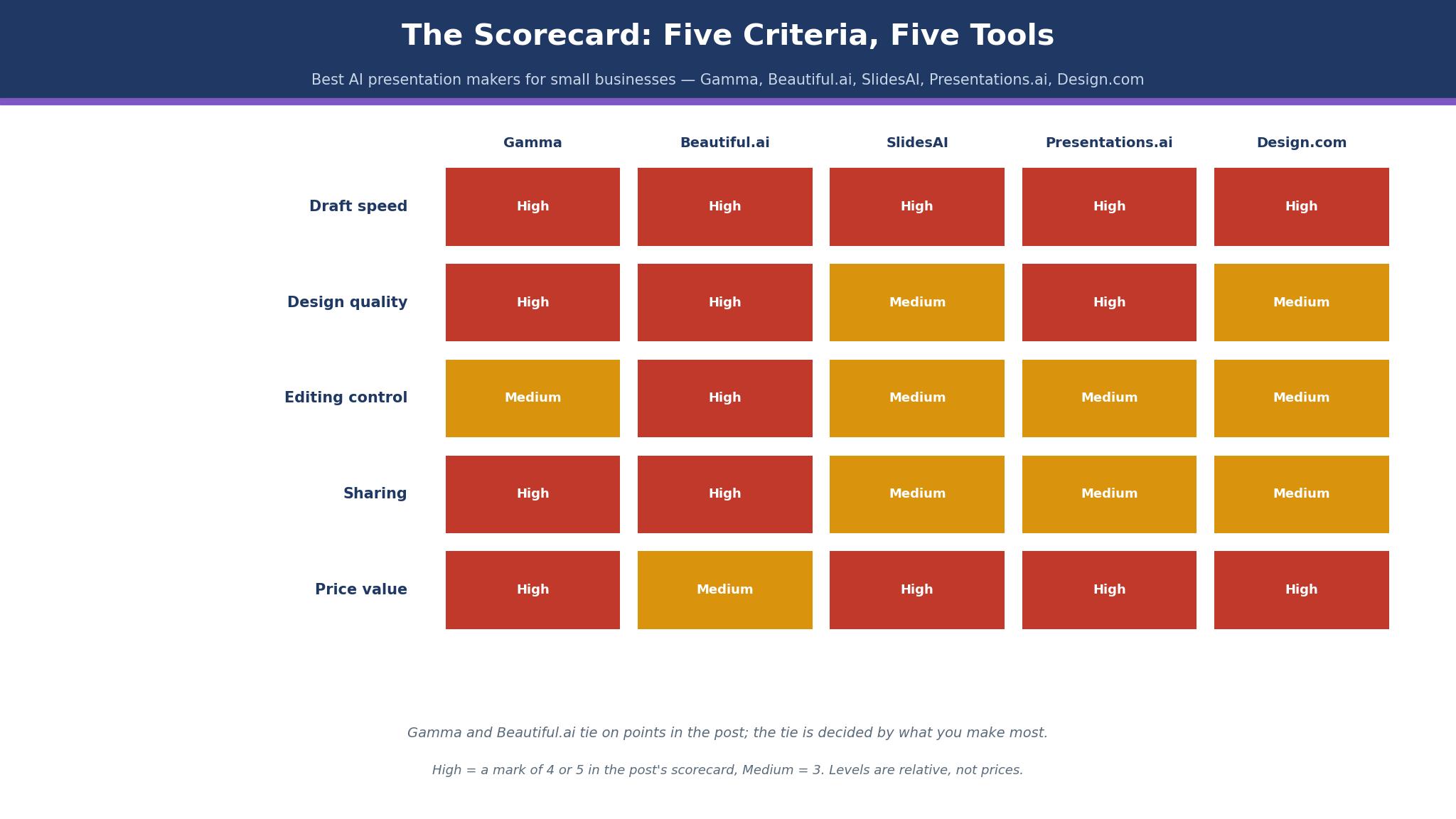
Here is the scorecard for the best ai presentation makers for small businesses, marked on five things that decide whether a deck survives a real meeting. Gamma leads the table, Beautiful.ai sits second, and the gap between them is narrower than the marketing suggests. What follows is the evidence behind every mark, tool by tool.
The Scorecard
Every tool in this guide was marked on the same five tests, each scored from one to five. Draft speed means how fast a usable first version appears from a short prompt. Design quality means whether the result looks like a professional made it, with no crooked text or clashing colours. Editing control means how far you can push a slide away from the template without a fight.
| Tool | Draft speed | Design quality | Editing control | Sharing | Price | Total |
|---|---|---|---|---|---|---|
| Gamma | 5 | 4 | 3 | 4 | 4 | 20 |
| Beautiful.ai | 4 | 5 | 4 | 4 | 3 | 20 |
| SlidesAI | 5 | 3 | 3 | 3 | 5 | 19 |
| Presentations.ai | 4 | 4 | 3 | 3 | 4 | 18 |
| Design.com | 4 | 3 | 3 | 3 | 4 | 17 |
Gamma and Beautiful.ai tie on points, and the tie is decided by what you make most. Gamma wins when the deck must exist by tomorrow morning, because its first draft arrives fastest and needs the least cleanup.
One caution about the table above. A total of twenty does not mean a tool is perfect, and a total of seventeen does not mean a tool is weak. The five marks pull in different directions on purpose, because a tool that drafts in minutes will rarely give you the same control as a tool that makes you build each slide by hand. Read the columns that match your week, ignore the ones that do not, and let the detail sections below settle the rest. A score is a starting point for a decision, not the decision itself.
Gamma vs Beautiful.ai
The two leaders among the best ai presentation makers for small businesses solve different problems, and the choice between them is really a choice about who reads the deck. Gamma turns a paragraph of notes into a finished-looking set of slides in minutes, and it is happiest when the writer knows the content and wants the design handled.
Gamma charges by credits, which changes how the bill behaves. Plus costs $9 a month billed annually, or $108 for the year, and includes 1,500 credits a month on the newest published figures, though some checks still list 1,000, so treat the allowance as reported. Pro costs $18 a month billed annually, or $216 a year, with 4,000 credits. A small business that makes four decks a month will sit comfortably on Plus.
Beautiful.ai charges by seat, with no meter running. Pro costs $14.50 a month billed annually, or $174 for the year, and generation inside the plan is unlimited. Older pages list Pro at $12 a month billed annually, or $144 a year, so the two figures are both in circulation and the checkout page is the final word. Team costs $40 per user a month billed annually, or $50 monthly, for two to twenty seats.
On exports, Gamma sends decks out as PDF, PowerPoint and PNG, and its PowerPoint files need a tidy-up pass before a client sees them. Beautiful.ai exports editable PowerPoint and Google Slides files that hold their layout better, which matters when a client insists on editing in PowerPoint. On branding, Beautiful.ai gives you a custom theme builder that keeps fonts and colours locked across a team.
How to Choose the Best AI Presentation Makers for Small Businesses
When you compare the best ai presentation makers for small businesses, start with the deck you make most often, not the one you imagine making. A sales deck that goes to a prospect needs design discipline and clean exports, so editing control and sharing matter more than raw speed.
Then count how many decks you actually make. One deck a month is a free-tier problem, and five of the tools below handle it without a subscription. Two decks a week is a paid-plan problem, and the credit model starts to bite. Gamma Plus at $108 a year covers roughly four decks a month with room to spare.
Check the export before you commit to anything. Make one real deck, export it to PowerPoint, and open it on the machine your client uses. If the text overflows or the images shift, you have learned more in ten minutes than any review can tell you. Check the brand controls too.
Use the free tier or the trial as a real test, not a tour. Pick a deck you actually need, build it end to end, export it, and show it to one person whose opinion you trust. If the tool survives that test, the subscription is an easy yes. If it fails, you have learned the truth in an afternoon instead of discovering it in front of a client. The tools that offer a free tier make this easy, and the ones that ask for a card before the trial deserve a calendar reminder on the day the trial ends.
Best Pick by Job
The table below matches each common job to one pick from the best ai presentation makers for small businesses, so you can skip straight to the row that describes your week.
| Job | Pick | Why it wins here |
|---|---|---|
| First deck by tomorrow | Gamma | Fastest usable draft, free start, cheapest paid year |
| Client-facing pitch | Beautiful.ai | Strict layouts, clean PowerPoint export, locked branding |
| Weekly team decks | Beautiful.ai Team | Shared themes, live co-editing, unlimited generation |
| Tight budget, many decks | SlidesAI | Low price, works inside tools you already own |
| One account for deck plus logo | Design.com | Deck, logo and brand kit in a single subscription |
| Occasional internal updates | Presentations.ai | Free tier is genuinely usable, Pro is $240 a year |
The Deck the AI Wrote That Nobody Believed
Every tool among the best ai presentation makers for small businesses will, sooner or later, invent a fact. It will add a statistic to a slide that has no source, give a client a revenue figure that never existed, or turn a rough estimate from your notes into a confident claim with a decimal point.
Some tools make this easier than others. Gamma lets you edit any card inline, so a wrong claim can be fixed in seconds, but its speed tempts you to skip the check entirely. Beautiful.ai keeps slides short by design, which means fewer claims per slide and fewer chances to invent one.
The other habit that helps is keeping your own numbers out of the prompt. When the tool asks for context, give it the facts you want on the slides, in plain words, rather than asking it to guess the market size or the result. A deck built from your numbers has far fewer invented claims than a deck built from a one-line topic, because the tool fills gaps only where you left them. Write the outline yourself, hand the tool the outline, and let it do the design. That division of labour is what keeps the facts yours and the layout theirs.

The 15 Tools in Detail
The fifteen tools below are the best ai presentation makers for small businesses ranked by the scorecard, and the ranking holds up when you read the detail.
1. Gamma
Gamma is the fastest route from a rough idea to a deck you can show someone.
Type a paragraph, pick a theme, and the tool builds a full set of slides with images, headings and a structure that mostly makes sense. The first draft usually needs edits, but the edits are small.
The credit system is the part to understand before you pay. Every AI action spends credits, and the allowance refreshes monthly. Plus gives 1,500 credits a month on the newest published figures, though some checks still list 1,000, so treat that number as reported.
Pro gives 4,000. A worked example makes the arithmetic concrete. A consultant who builds three client decks a month, each about eighteen slides with two image generations per deck, spends roughly 900 credits a month and sits safely inside Plus at $108 a year.
Gamma publishes decks to the web with a link, and the analytics on Pro show who opened a deck and how far they read. That matters for a sales deck, because a prospect who stops on slide three is telling you something.
The weak spot is editing control. Gamma decides the layout, and pushing a slide far from the template takes more clicks than it should.
2. Beautiful.ai
Beautiful.ai is the most disciplined design tool on this list, and that discipline is its whole argument. You pick a Smart Slide layout, type your content, and the slide rearranges itself to keep everything aligned, spaced and inside the margins.
Nothing overlaps. Nothing drifts.
The price is a seat subscription with unlimited generation, which changes the value calculation completely.
Pro costs $14.50 a month billed annually, or $174 for the year, with a single month available for $45 when one project needs it. Older pages list Pro at $12 a month billed annually, or $144 a year, so check the price at checkout and treat the higher figure as the planning number.
A worked example shows where the money goes. A three-person agency on Team pays $1,440 a year at the annual rate, or $1,800 on monthly billing, and makes as many decks as it likes.
The same agency on Gamma Pro pays $648 a year for three seats but watches credits on busy months. The Beautiful.ai bill is higher and flatter, and the team never thinks about a meter. Exports hold up well in PowerPoint and Google Slides, and the custom theme builder locks fonts and colours across the whole team.
3. SlidesAI
SlidesAI lives inside Google Slides and PowerPoint rather than asking you to learn a new editor, and that is why it ranks third.
You write your text, or paste it from a document, and the tool turns it into slides inside the app you already use.
The price is the lowest on this list for what it does. The paid plan runs about $10 a month billed annually, or $120 a year, with a free tier that covers occasional use.
SlidesAI does not generate images with the flair of Gamma or Midjourney, and its layouts are plainer than Beautiful.ai. What it does well is speed and familiarity.
The worked example in this section counts the hours a deck saves, not the dollars it costs.
An operations manager who turns a monthly report into slides spends about two hours doing it by hand. With SlidesAI the same job takes about thirty minutes, including the cleanup pass, which saves roughly eighteen hours a year on one recurring deck alone.
4. Presentations.ai
Presentations.ai is the quiet value pick of this guide, and it earns that title by being honest about what it is. It turns a prompt or an outline into a full deck, with a free Starter tier that lets unlimited users try the tool, and a Pro tier at $240 a year for one user.
The output quality sits a clear step below Gamma on speed and below Beautiful.ai on polish, but the gap is smaller than the price gap suggests. A small business that makes two decks a month will find Presentations.ai perfectly adequate, and the $240 annual cost is easy to approve. The tool handles custom fonts and colours, exports to PDF and PowerPoint, and includes analytics on Pro.
5. Design.com
Design.com enters this list at number five because it does something none of the four above it does. A single Design.com account turns one deck into a matching logo, card and kit, so the slides, the handout and the follow-up email all carry the same colours without anyone retyping them.
The deck maker itself is solid rather than spectacular. It builds clean slides from a prompt, offers templates that suit small business topics, and exports in the formats a small team needs. It will not out-draft Gamma or out-design Beautiful.ai, and nobody should buy it expecting that. Its strength is the bundle.
Design.com lists its price as a monthly subscription with a cheaper annual rate, and the figure moves by region, so read the pricing page on the day you buy rather than trusting a roundup. Judge the bundle on the separate tools it replaces, not on its own monthly price.
6. Pitch
Pitch is built for teams that present together, and it shows in every part of the product. Slides are made to be shared, commented on and updated while a deal is live, and the analytics tell you which slides a prospect actually read.
The free tier covers small teams getting started, and the Pro tier runs from about $20 per user a month on annual billing, though the exact figure is reported rather than confirmed on the vendor page at the time of writing. That puts a five-person team at roughly $1,200 a year, which is real money for a small business.
The analytics are the feature that justifies that bill, and they are worth a closer look. Pitch shows which slides each prospect opened, how long they stayed, and where they stopped, which turns a follow-up call from guesswork into a conversation about the exact slide that lost them. A team that sends ten decks a week and learns nothing from them is paying for a design tool. A team that reads the analytics is paying for a sales tool, and the difference shows up in the close rate within a quarter.
7. Decktopus
Decktopus aims at speed for people who hate making decks, and it mostly delivers. Give it a topic, answer a few questions, and it returns a structured deck with images and a clean layout in a couple of minutes.
Pricing runs from a free tier to paid plans reported at around $10 to $15 a month, with the exact figure varying by billing period and region, so treat it as reported and confirm before you pay. The tool exports to PDF and PowerPoint, and its templates cover the common small business cases, from a service proposal to a product launch. The limit is control.
8. Slidebean
Slidebean pitches itself to founders, and its decks read that way. The tool takes a set of inputs about a business and arranges them into the shape investors expect, with financial slides and a narrative flow that follows the usual pitch arc.
The price is reported at around $12 a month on annual billing for the core plan, with higher tiers for teams and for the done-for-you services the company also sells. Slidebean also sells pitch deck design as a service, which is a different product at a different price, so read the plan page carefully and do not confuse the two.
9. Plus AI
Plus AI works inside Google Slides and PowerPoint, like SlidesAI, and its pitch is that the AI stays where the work already happens. You describe the deck, it builds the slides in your own account, and you edit them with the tools you know.
The paid plan is reported at about $10 per user a month on annual billing, which puts it at $120 a year for one person. The free tier covers a few decks a month, enough to judge whether the output suits you. Plus AI handles outlines well and is honest about its limits, producing structured, readable decks rather than spectacular ones.
10. Visme
Visme is the broadest tool on this list, covering presentations, infographics, reports and social graphics in one account, and that breadth is both its strength and its weakness. A small business that wants one tool for every visual job will find Visme hard to beat.
Pricing starts free, with Starter at $12.25 a month billed annually and Pro at $24.75 a month billed annually, which works out to $147 and $297 a year. Visme Pro adds brand controls, viewer analytics and wider export choices, and a team that runs its decks through Visme every week should budget the year on Pro, not on Starter.
The chart tools deserve a mention of their own, because they are where Visme pulls ahead of the deck specialists. A quarterly report with real numbers is easier to build in Visme than in Gamma or Beautiful.ai, since the charts are native, the data links to a sheet, and the result updates when the numbers change. A small business that reports to a board or a lender will feel that difference every quarter. The deck builder alone would rank Visme lower, and the reporting strength is what keeps it in the top ten.
11. Prezi
Prezi is the oldest idea on this list and still the most distinctive. Instead of a line of slides, it builds a canvas you move across, zooming into one idea and back out to the whole picture.
The price is reported at around $7 to $15 a month depending on the tier and billing period, so confirm the current figure before you budget. Prezi’s weakness is the same as its strength.
12. Genially
Genially makes interactive decks, with clickable elements, embedded quizzes and animated transitions that a static slide tool cannot match. A trainer who needs an audience to take part, or a teacher who needs a lesson that responds, will get more from Genially than from any tool above it.
The free tier is usable, and the paid plans are reported at around $10 a month on annual billing for Pro, with higher tiers for teams. The catch is that an interactive deck needs an audience in the room and a screen to show it on.
- Genially in one line. Interactive decks for training and teaching, free to start, paid plans reported near $10 a month.
- Best moment. A trainer runs a quiz inside the deck and the room answers on their phones.
- Watch out. The deck needs a live audience and a screen, and it exports poorly as a file.
- Verdict. Pick it for teaching, skip it for anything that must be emailed.
13. Powtoon
Powtoon makes animated video decks, with characters, movement and voiceover, and it occupies a corner of this list that no other tool touches.
Q. Who should actually pay for Powtoon? A. A business that needs animated explainers regularly, not once. The subscription only pays for itself when the animation habit sticks.
Q. What does it cost? A. Paid plans are reported from around $15 a month on annual billing for the basic tier, rising for the Pro tier that removes branding and adds more characters and scenes. Confirm the current price before you buy, because Powtoon has changed its tiers more than once.
Q. What is the drawback? A. Time. An animated deck takes longer to make than a static one, and the result can feel like a cartoon in a room that wanted a document.
Q. When is it the right call? A. When the audience is a customer watching a screen, not a client reading a proposal. For that job, nothing else on this list competes.
14. Canva
Canva is the most capable design tool on this list and the least specialised deck maker, and both facts matter. Its deck templates are numerous, its asset library is enormous, and its Magic Design feature turns a prompt into a set of slides that look polished from the first minute.
Two sources list different Pro prices, so the $144 and $120 figures below are both reported, and the vendor page is the tiebreaker. The newest vendor pages list Pro at $144 a year, or $18 a month billed monthly, for one person, while older pages still show $120 a year, or $15 a month. Business costs $250 per person a year. The AI features on Pro are capped by monthly credits, which is a quieter limit than the marketing suggests, and heavy AI use can hit the cap mid-month.
The template library is the other reason Canva keeps its place here, and it is hard to overstate for a small business. A deck, a social post, a flyer and a price list can all come from the same account, in the same fonts and colours, without hiring a designer or learning a second tool. That consistency is worth more than any single feature, because customers notice when a business looks different on every channel. The deck tool inside Canva is good enough, and the system around it is what you are really paying for.
15. Simplified
Simplified rounds out the list as a budget all-rounder, covering decks, social graphics and short video in one account with an AI writer attached. The free tier is genuinely usable for occasional work, and the paid Pro plan is reported at around $12 a month, which keeps the year-one cost near $144. The deck builder is straightforward, the templates are clean, and the AI copy help is useful when the words are the hard part rather than the design. The limits are real.
What Does a Deck Cost in Year One?
The cheapest year among the best ai presentation makers for small businesses is not the cheapest tool, because the bill depends on how many decks you make and how many people make them. A single owner on Gamma Plus pays $108 for the year and makes about four decks a month inside the credit allowance. The same owner on Beautiful.ai Pro pays $174 for the year and makes as many decks as the hours allow.
Teams change the arithmetic completely. Three people on Beautiful.ai Team pay $1,440 a year at the annual rate, while three people on Gamma Pro pay $648 a year but watch credits on busy months. Three people on Pitch Pro, reported near $20 per user a month, pay roughly $720 a year. The right question for a team is not which plan is cheapest, but which plan stops being enough first.
One more cost that never appears on a pricing page is the price of switching later. A business that builds fifty decks in one tool and then moves will spend days re-creating templates, re-learning shortcuts and fixing exports that shift in the move. That switching cost is the real reason to test properly before paying, and it is also the reason the free tier matters so much. Pick the tool you can imagine using for two years, not the one with the cheapest first month, and the year-one bill will look after itself.
How Much Time Does AI Actually Save?
The honest answer is that the best ai presentation makers for small businesses save hours on the first draft and minutes on the finished deck, and the two are easy to confuse. A twenty-slide sales deck takes a competent person about six hours to build by hand, counting the writing, the layout and the image search.
The finished deck is a different story. The AI draft still needs a verification pass, a design pass and a rehearsal, and those take about ninety minutes on a deck that matters. The total saving lands near three and a half hours per deck, which is still a large number when a business makes two decks a week.
Can You Trust an AI Deck in a Client Meeting?
You can trust it exactly as far as you have checked it, and no further. The tools in this guide are good at structure, layout and readable prose, and they are unreliable at facts, figures and claims about your own business.
The practical rule is simple. Never present a slide you have not read twice, once for sense and once for facts. Keep the source for every number in the speaker notes, so a question from the room has an answer. And when the AI writes a claim that sounds impressive, ask where it came from before you believe it.
Frequently Asked Questions
Gamma or Beautiful.ai — which makes the better first deck?
Gamma makes the better first deck when speed matters, because it drafts a full set of slides from a short prompt in minutes and its free tier lets you start without paying.
Do I need a paid plan to make a professional deck?
No, not for one deck. Gamma, SlidesAI, Presentations.ai, Visme and Canva all have free tiers that produce real, exportable work. The paid plan becomes necessary when you make decks every week, when you need your branding locked, or when you need analytics and clean PowerPoint exports.
Will the AI write facts I cannot trust?
Yes, it will, and every one of the best ai presentation makers for small businesses does it. AI deck makers fill space with plausible text, and plausible text sometimes includes invented numbers, names and claims.
Can I export an AI deck to PowerPoint and edit it there?
Yes, on most tools, though the quality of the export varies. Beautiful.ai and Gamma both export editable PowerPoint files, and Beautiful.ai holds its layout better in the transfer. SlidesAI and Plus AI work inside PowerPoint and Google Slides already, so there is no export step at all.
Is Design.com a good choice if I only need decks?
No, not on deck quality alone. Gamma and Beautiful.ai both make better decks. Design.com earns its place when you also need a logo, a business card and a brand kit, because one subscription covers all of them and the pieces share the same identity.
What happens to my decks if I cancel?
Your exported files stay yours on every tool in this guide, and you should download them before cancelling. The decks stored inside the tool usually become read-only or inaccessible once the subscription ends, and the AI features stop immediately.
The Verdict: Gamma First, Beautiful.ai Second
Gamma is the best pick in this guide to the best ai presentation makers for small businesses, because it is the fastest route to a usable deck, the cheapest paid year among the leaders at $108 on Plus, and the only leader with a free tier that does real work.
What I would do, if I were buying for a small business tomorrow, is start on Gamma free, make three real decks, and see how many credits a month the work actually uses. If Plus covers it, stay there and spend the saved money on better images. If the decks go to clients and the branding matters, move to Beautiful.ai Pro and treat the $174 as a client-facing cost, not a software cost.