
A small classroom exposes a bad projector fast. The teacher stands close to the screen, the lights stay on for note taking, the back row sits only a few metres from the wall, and a dim or washed out image turns a lesson into squinting. That is why the best projector for small classroom buying is less about chasing the biggest specification sheet and more about matching three things to the actual room. Brightness must survive daylight and overhead lights. Throw distance must fit the space between the wall and the first desk. And the total price must include the mount, the screen or wall preparation, and the sound, not just the box.
This guide gives a decision first answer, not a catalogue. You will learn how to measure your room in ten minutes, what brightness really means in a lit room, how throw ratio decides whether a projector can even work in your space, and which type of machine fits each room size and budget band. Prices in this guide come from vendor and retailer listings checked in October 2026, and they move with stock, education discounts, and regional pricing, so check the official page and the checkout total before you buy. Where a model is listed as discontinued or out of stock, treat its price as a guide to the class of machine, not as a live offer.
Start With the Room, Not the Projector
Walk into the room with a tape measure before you open a single product page. Measure three things. First, the width of usable wall or screen space, after you subtract whiteboards, doors, radiators, and anything that cannot move. Second, the distance from that wall to the front row of desks, and to the back row. Third, the distance from the wall to the nearest ceiling point where a mount could sit without hanging over a walkway or a light fitting.
Those three numbers set your screen size. A 100 inch diagonal image in 16 by 9 format is about 2.21 metres wide and 1.25 metres tall. An 80 inch image is about 1.77 metres wide and 1.0 metre tall. If your usable wall width is only 1.9 metres, a 100 inch image will not fit, and no projector setting will fix that. In that case, plan for 80 or 90 inches and choose a projector that fills that size well, rather than forcing a bigger image onto a smaller wall.
Light is the third room factor, and it is the one most buyers guess at. Note where windows sit relative to the screen wall. Windows beside the screen wash the image from the side. Windows behind the students create glare on the screen and on laptop lids. Overhead lights directly above the screen wall spill onto the image. Blinds, a matte screen surface, and a projector with enough brightness all help, but blinds cost far less than jumping to a much brighter machine. If you can fit blinds or reposition the screen wall away from direct window light, do that first, then buy the brightness you still need.
Brightness That Works With the Lights On
Brightness is measured in lumens, but not every lumen figure means the same thing. ANSI lumens follow a standard test with nine measured points across the image, averaged into one figure. Marketing lumens, sometimes labelled simply as lumens or LED lumens, can be far higher on paper and far dimmer in a real room. When you compare machines, compare ANSI lumens to ANSI lumens, and treat an unlabelled lumen figure with caution. If a vendor page does not say ANSI, ask, or assume the real output is lower than the headline.
For a small classroom, brightness bands work like this in practice. Below 3,000 ANSI lumens, you need dimmed lights and controlled windows for a comfortable image, which rarely matches real teaching. Between 3,000 and 3,500 ANSI lumens, slides and text hold up with moderate ambient light, but video and detailed colour work still benefit from blinds. Between 3,500 and 4,000 ANSI lumens, most small classrooms can teach with the lights on and the blinds partly open. Above 4,000 ANSI lumens, you gain headroom for bright rooms, large images, and ageing light sources, but you also pay more and may need a larger machine.
That band is where the best projector for small classroom lessons with the lights on usually sits, because it leaves room for a light source that dims with age.
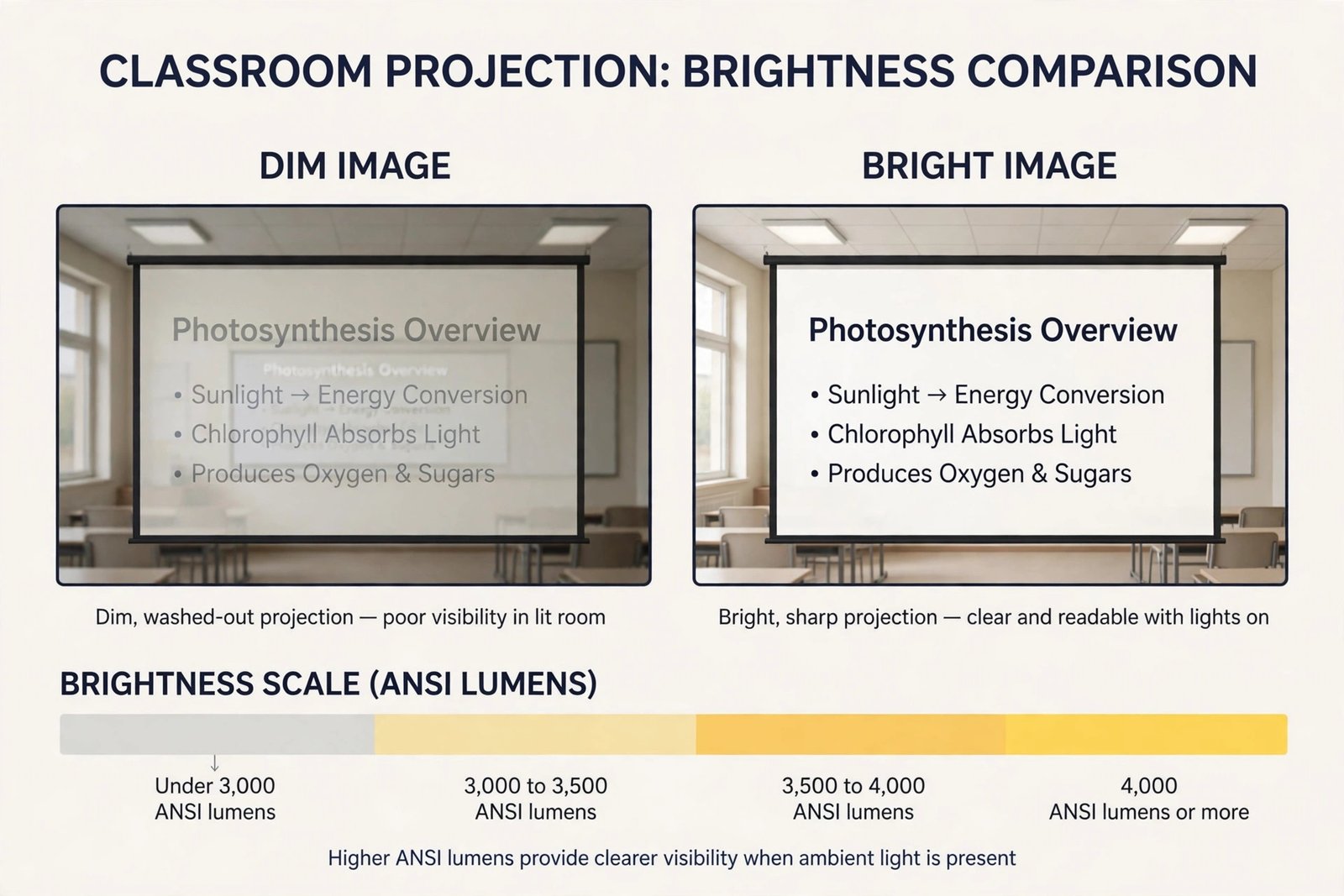
Brightness by Teaching Light
| Teaching light | Brightness to aim for | What it feels like |
|---|---|---|
| Dimmed room, blinds closed | 3,000 ANSI lumens or more | Slides read easily, video looks rich |
| Lights on, blinds partly open | 3,500 to 4,000 ANSI lumens | Text stays crisp, colour holds up |
| Bright room, windows near screen | 4,000 ANSI lumens or more, plus blinds | Readable, but blinds still help a lot |
| Very bright room, no blinds possible | 5,000 ANSI lumens or more, or a flat panel | Projector alone may disappoint, test first |
Throw Distance and Why It Decides Everything
Throw ratio is the single number that decides whether a projector fits your room. It is the distance from the lens to the screen divided by the width of the image. A throw ratio of 0.5 to 1 means the projector sits half a metre back for every metre of image width. A throw ratio of 1.5 to 1 means it sits one and a half metres back for every metre of image width. Lower is closer to the screen. In short, picking the best projector for small classroom use starts with throw, because a machine that cannot sit where your room allows is the wrong machine at any price.
Work the maths for your room before you shortlist anything. Take your planned image width in metres and multiply it by the throw ratio. That gives the lens to screen distance. For a 100 inch image, the width is about 2.21 metres. A 0.5 to 1 short throw machine needs about 1.1 metres. A 0.33 to 1 ultra short throw machine needs about 0.73 metres. A standard throw machine at 1.5 to 1 needs about 3.3 metres, which in a small classroom puts the mount near the middle of the room, right where students sit and where shadows happen.
Shadows are the practical reason throw matters. With a standard throw machine, every time the teacher steps to the screen to point at a diagram, their body blocks the beam and casts a shadow across the content. With a short throw machine, the beam comes from above and close, so the teacher can stand beside the screen with far less shadow. With an ultra short throw machine, the teacher can stand at the screen itself and barely interrupt the image. In a small room, where the teacher works close to the board all lesson, that difference changes daily teaching, not just installation.
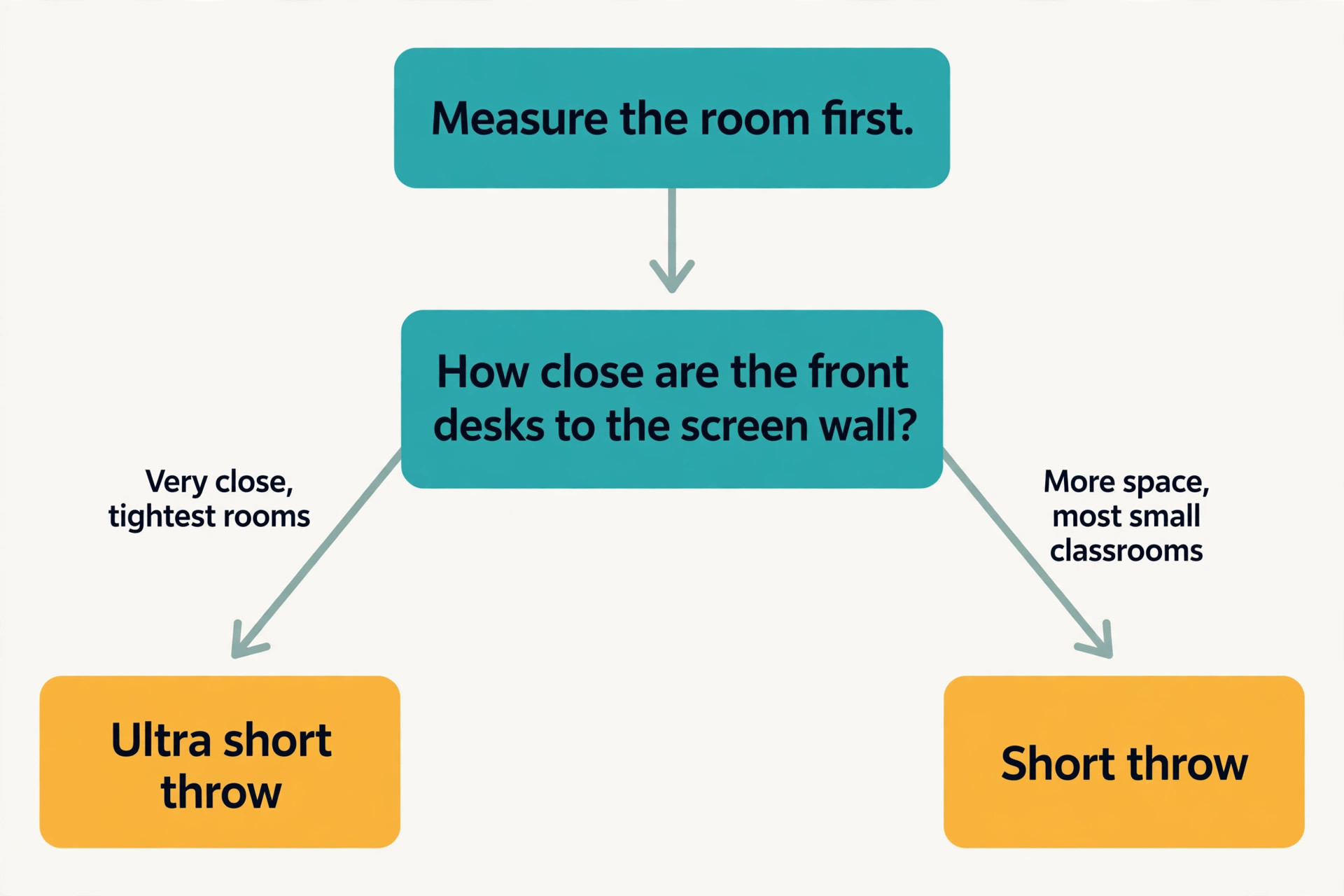
Throw Types at a Glance
| Throw type | Typical ratio | 100 inch distance | Best classroom fit |
|---|---|---|---|
| Ultra short throw | 0.25 to 1 to 0.33 to 1 | About 0.55 to 0.73 metres | Tightest rooms, wall cabinet installs |
| Short throw | 0.5 to 1 to 0.7 to 1 | About 1.1 to 1.55 metres | Most small classrooms |
| Standard throw | 1.3 to 1 to 1.8 to 1 | About 2.9 to 4.0 metres | Larger rooms, or rooms with a clear centre mount |
Decision Table by Room Size and Budget
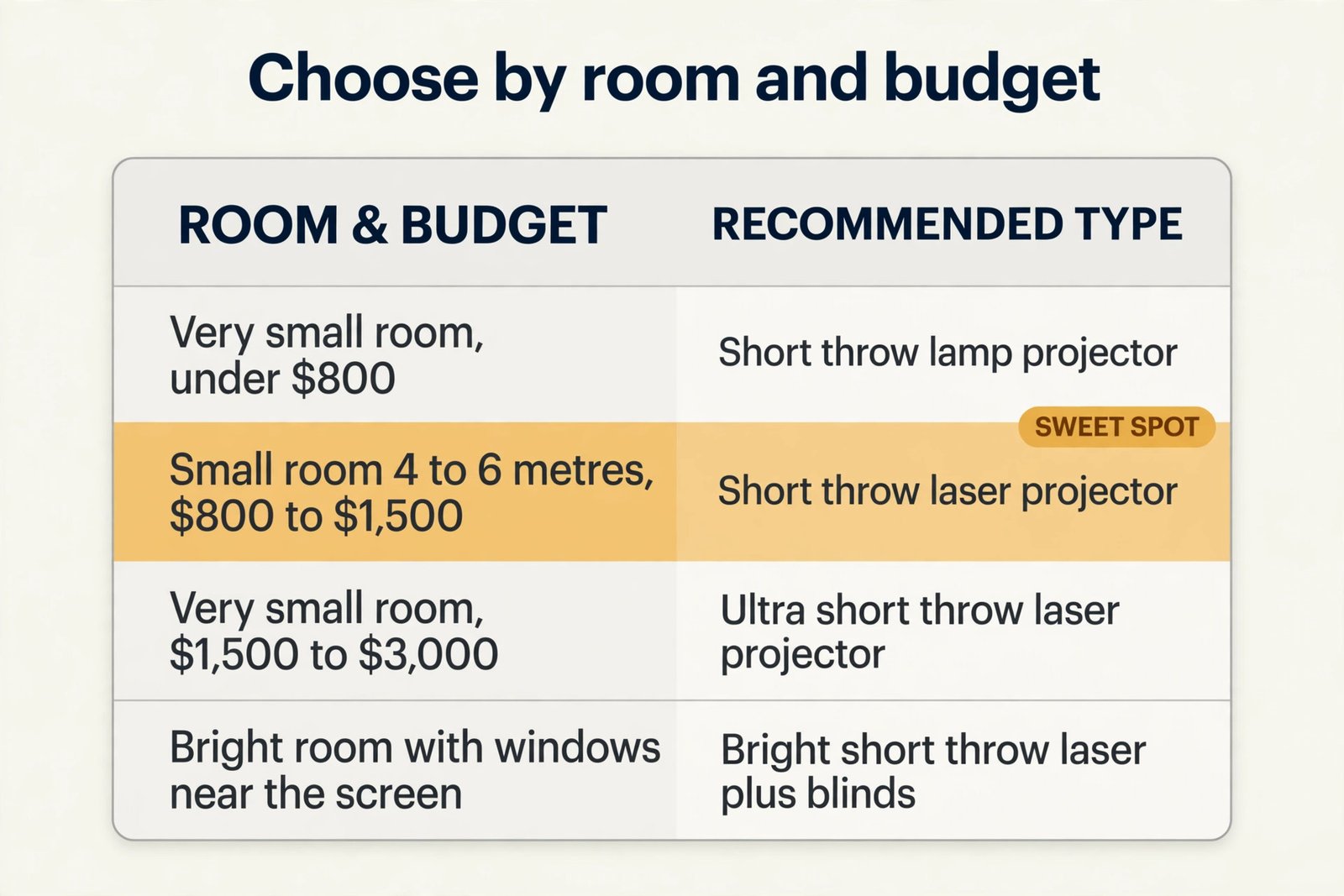
This is the decision section of the guide, the table you can use without reading the rest. Find your room, find your budget band, and read across for the type to buy, the brightness to aim for, and the compromise to accept. Prices are total machine prices in US dollars from listings checked in October 2026, before mount, screen, and sound extras. Check the checkout total, because education pricing and stock change the real figure. Use it to narrow the field, then confirm the winner with the throw maths for your exact room, because the best projector for small classroom budgets is still the wrong buy if it cannot sit where your room allows.
| Room and budget | Buy this type | Brightness aim | Screen aim | Compromise to accept |
|---|---|---|---|---|
| Very small room, under 4 metres deep, under 800 dollars | Short throw lamp projector, WXGA or Full HD | 3,500 ANSI lumens or more | 80 to 90 inches | Lamp changes, more fan noise, plan a spare lamp budget |
| Very small room, under 4 metres deep, 800 to 1,500 dollars | Short throw laser projector | 3,500 to 4,000 ANSI lumens | 90 to 100 inches | Higher upfront cost, check for optical zoom |
| Very small room, under 4 metres deep, 1,500 to 3,000 dollars | Ultra short throw laser projector | 3,500 ANSI lumens or more | 100 to 120 inches | Cabinet cost, fixed placement, heavier machine |
| Small room, 4 to 6 metres deep, under 800 dollars | Short throw lamp projector | 3,500 ANSI lumens or more | 90 to 100 inches | Lamp service, check throw maths carefully |
| Small room, 4 to 6 metres deep, 800 to 1,500 dollars | Short throw laser projector | 4,000 ANSI lumens | 100 inches | Little to compromise, this is the sweet spot |
| Small room, 4 to 6 metres deep, 1,500 to 3,000 dollars | Ultra short throw laser or bright short throw laser | 4,000 to 5,000 ANSI lumens | 100 to 120 inches | Paying for brightness you may not need in a dim room |
| Bright room with windows near the screen, any size | Bright short throw laser, plus blinds | 4,000 ANSI lumens or more | 90 to 100 inches | Blinds are not optional, budget for them first |
| Shared trolley between rooms, under 1,500 dollars | Portable short throw laser or bright lamp machine | 3,500 ANSI lumens or more | 80 to 100 inches | Setup time each move, protect the lens in transit |
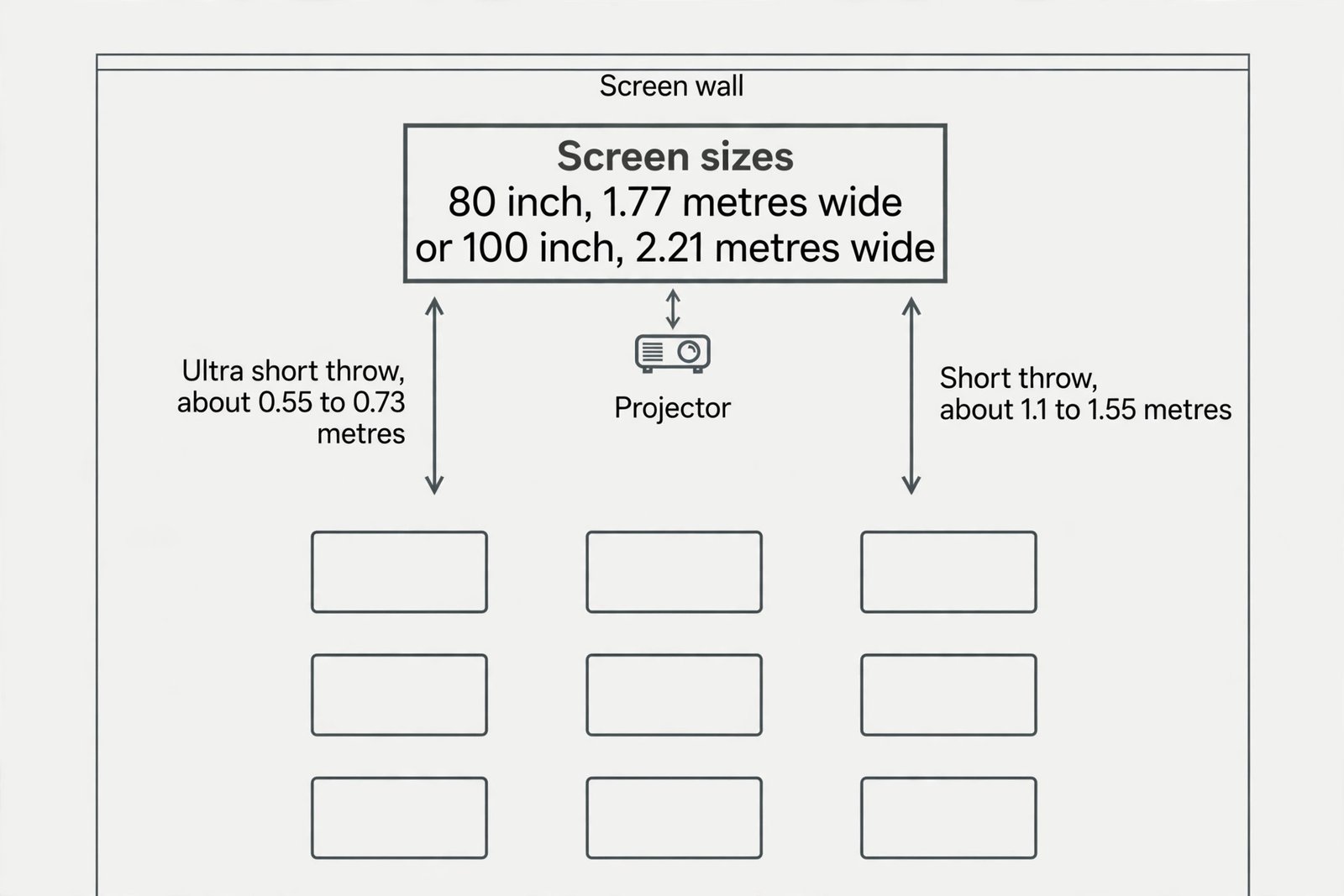
How to Choose the Best Projector for Small Classroom Use
Choosing well means working through five decisions in order. Throw first, brightness second, light source third, resolution fourth, and sound plus connectivity last. Reversing that order is how buyers end up with a sharp 4K machine that cannot fit the room, or a bright machine that needs a new lamp every school year.
Start with throw, as above. Shortlist only machines whose throw ratio fills your screen from a position your room actually allows. If your ceiling joists or light fittings force a mount point, measure from that point, not from an ideal point. If you plan a wall cabinet for ultra short throw, measure the cabinet height and depth, because the machine must sit level and square, with its lens at the height the vendor specifies.
Next, set brightness from your light, not from the specification sheet maximum. Use the brightness bands in the earlier table, then add headroom if your image will be large, your room is bright, or your light source will age. Laser machines hold brightness longer than lamps, so a laser machine rated at 3,500 ANSI lumens may still beat a lamp machine rated at 4,000 ANSI lumens after a year of heavy use, once the lamp has dimmed.
Then choose the light source, because it decides maintenance for years. Lamp machines cost less upfront, but lamps dim, lamps fail, and lamp changes need access to a ceiling mounted machine, which often means a ladder, a booked maintenance slot, and a lesson without projection. Typical lamp life is around 5,000 to 6,000 hours at full brightness and up to 10,000 to 15,000 hours in eco mode on some models, but real life in a dusty classroom is often shorter. Laser machines cost more upfront, but their light source is typically rated at 20,000 to 30,000 hours, with some models quoting up to 60,000 hours in a dimming mode.
For a classroom used four hours a day, five days a week, for 36 school weeks, that is roughly 720 hours a year, so a laser source outlives the machine’s other parts in practice. For a single classroom used lightly, a lamp machine can still be the right financial choice. For a room used all day, every day, or for a fleet of rooms managed by one technician, laser usually wins on total cost.
Resolution comes fourth, and here the classroom answer is simple. For slides, documents, web pages, and most video, Full HD at 1920 by 1080 is plenty, and WXGA at 1280 by 800 is acceptable for text heavy teaching on a smaller screen. 4K looks superb for detailed photography and video, but it adds cost, and in a small classroom viewed from 3 to 6 metres, the difference between Full HD and 4K on an 80 to 100 inch screen is small for most lesson content. Spend the 4K premium only if your teaching is image critical, such as detailed art or design work, and your budget already covers throw, brightness, and laser.
Otherwise, put that money toward a better screen, better sound, or blinds.
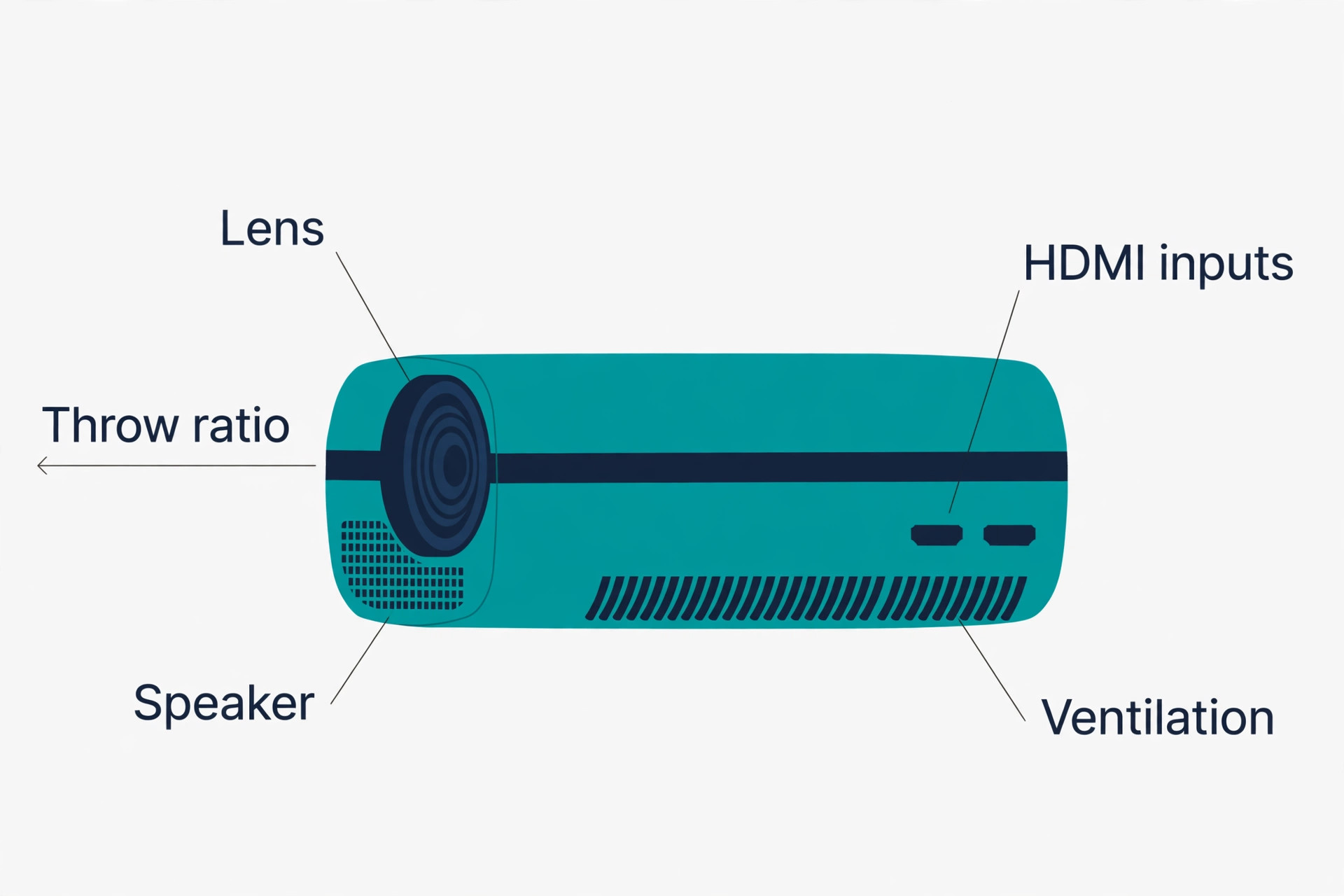
Sound and connectivity come last in the order, but they decide daily usability. A built in speaker of 10 to 20 watts can carry a small classroom for speech and short clips, but it will struggle with video at the back of a noisy room. Budget for a pair of powered classroom speakers or a soundbar if video and audio matter to your lessons, and check that the projector has an audio output that matches them. For connectivity, two HDMI inputs cover a teacher laptop and a second source, such as a document camera or a streaming device.
USB power for a streaming stick, a wired network port for remote management, and wireless casting support all help, but none of them rescue a machine with the wrong throw. Check that the teacher laptop, the document camera, and any interactive panel all connect without adapters that get lost between lessons.
Situation Verdicts for Real Rooms
Generic advice fails when rooms differ, so here are verdicts by situation. Find the situation closest to yours and use it as your starting shortlist, then run the throw and brightness checks for your exact room. Each verdict below is written for a real room shape, not a specification ideal, and the best projector for small classroom work in each case is the one that fits that room first.
The Tightest Room, Where the Wall Is Almost at the Front Desks
Buy an ultra short throw laser machine on a low cabinet. A BenQ LH856UST, listed by a retailer at 2,529 dollars, gives 3,500 ANSI lumens, Full HD resolution, and a 0.33 to 1 throw ratio, with a laser source rated up to 20,000 hours at full brightness and up to 38,000 hours in eco mode, according to the vendor specification page. That class of machine turns a room that cannot host a ceiling mount into a workable teaching space, because the machine sits centimetres from the wall. The trade offs are price, a fixed placement that leaves little room for error, and a cabinet that must be stable and at the right height.
Measure twice, buy once, and protect the cabinet from knocks, because a bumped ultra short throw machine shifts the whole image. See the vendor page at BenQ LH856UST specifications for the full specification list.
The Bright Room With Windows Beside the Screen
Buy brightness and blinds together. A ViewSonic LSD400HD-ST, listed on the vendor store at 1,099.99 dollars, gives 4,000 ANSI lumens, Full HD resolution, a 0.5 to 1 short throw lens that fills 100 inches from about 1.1 metres, and a laser source rated at 30,000 hours. That combination handles lights on teaching in a small room without demanding a premium ultra short throw price. Check the vendor page for current stock and education pricing before you commit, because the listed price is a single listing at a point in time. Pair it with blinds or a repositioned screen wall, because even 4,000 ANSI lumens struggles against direct sun on the screen itself.
See the vendor page at ViewSonic LSD400HD-ST for the current listing and specifications.
The Tight Budget That Still Needs to Teach Every Day
Buy a short throw lamp machine in the 500 to 900 dollar band, and ring fence money for a spare lamp. A ViewSonic PS502W, listed by a retailer at 579.99 dollars, gives 4,000 lumens, WXGA resolution, and a 0.5 to 1 throw ratio that fills 100 inches from about 4.5 feet. That listing showed the model out of stock at that retailer, so treat it as a class guide and check current stock and successor models. A lamp machine at this price teaches well, but budget for lamp changes and for a technician visit to a ceiling mount, or choose a trolley or shelf mount that a teacher can reach safely.
Do not spend the whole budget on the machine and leave nothing for the mount, because an unmounted projector on a desk is a shadow and cable hazard.
What the Price Really Buys
Headline prices mislead because they exclude the parts that make a projector usable in a classroom. Build a total budget before you compare machines, and include every line below. A machine that looks 200 dollars cheaper can cost more once you add the extras it needs. When you compare totals, remember that the best projector for small classroom budgets is the one whose five year total, not whose box price, fits the school budget.
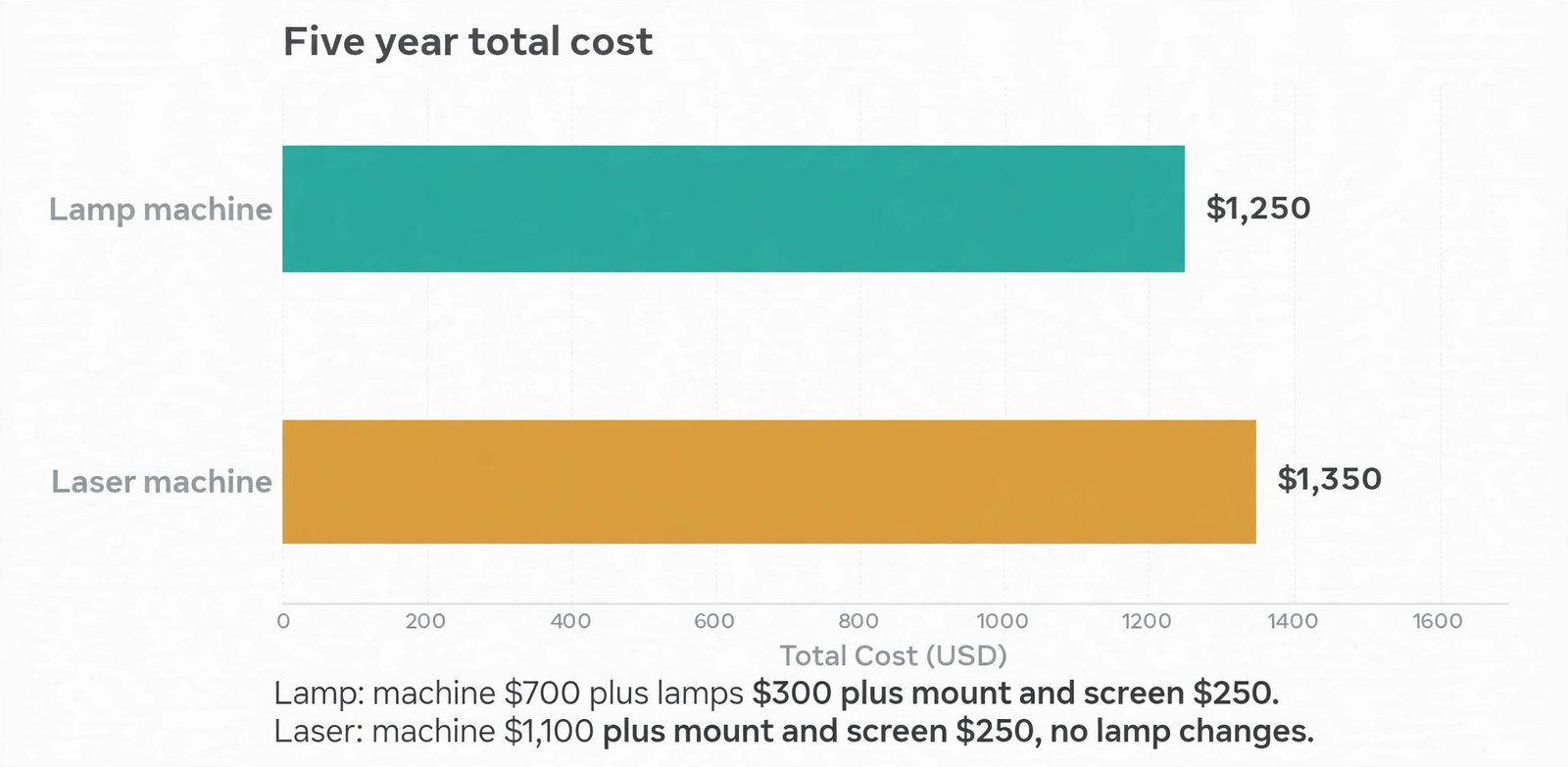
Total cost over five years tells the real story. Take the machine price, add the install and extras, then add lamp costs for lamp machines at your expected usage. A lamp machine at 700 dollars with two lamp changes at 150 dollars each, plus a mount and screen at 250 dollars, reaches 1,250 dollars over five years, before technician time. A laser machine at 1,100 dollars with the same mount and screen, and no lamp changes, reaches 1,350 dollars, a gap of only 100 dollars, with far less downtime. In a heavily used room, the laser machine can end up cheaper, and in a lightly used room, the lamp machine stays cheaper.
Run that simple sum for your usage, not for a generic classroom.
How to Set It Up in One Afternoon
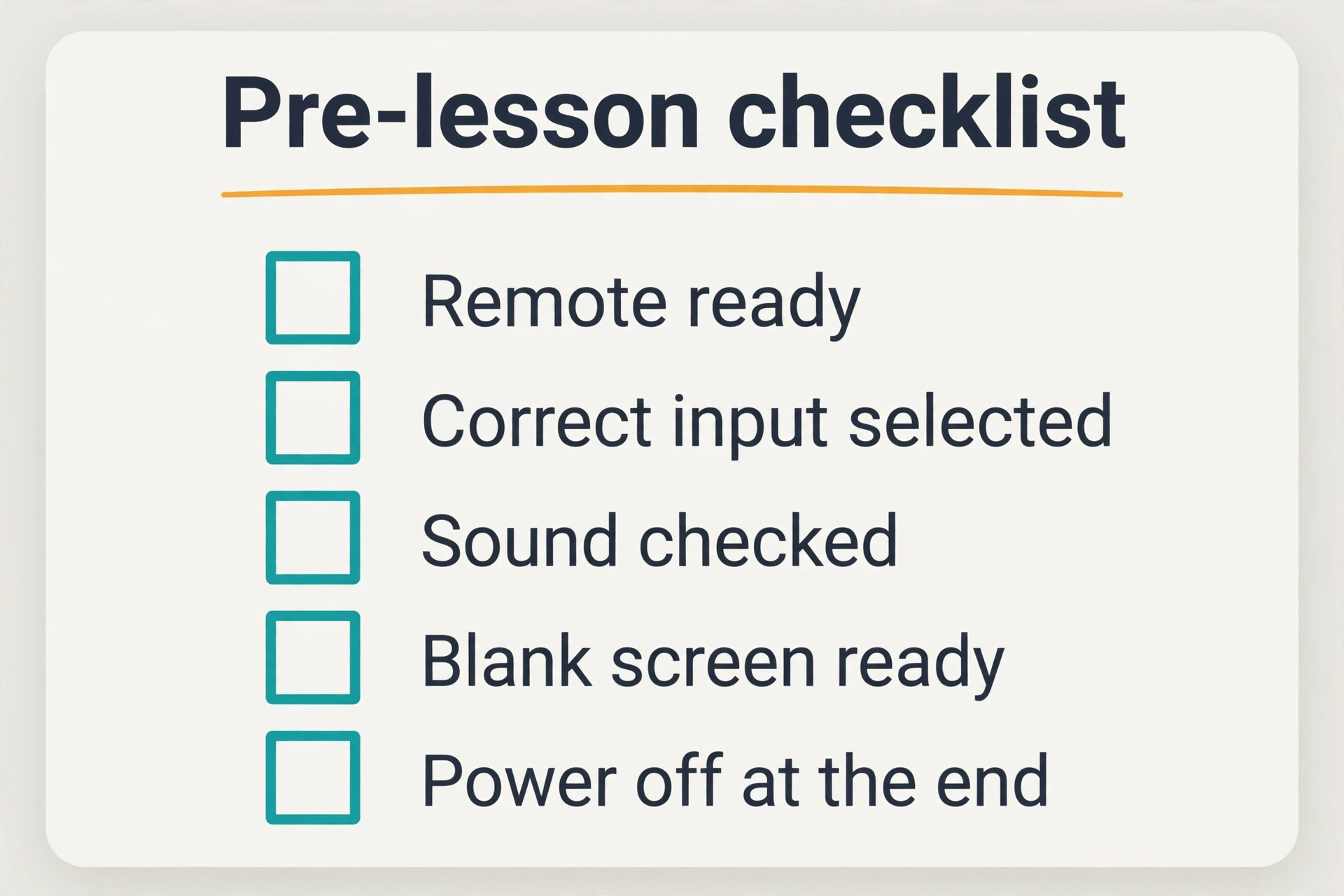
A tidy install takes an afternoon, not a weekend, if the room survey is done and the parts are on site. Start by confirming the mount position with the throw maths, then mark the screen position on the wall with painter tape and check it from the back row. Hang or fix the screen, or prepare the wall surface, before you mount the projector, because screen position decides projector position, not the other way round.
Mount the projector square to the screen, level, and at the height the vendor specifies. For a ceiling mount, use a short drop pole for a short throw machine, and check that the beam clears light fittings and the top of the screen frame. For an ultra short throw cabinet, level the cabinet, check that it cannot be bumped by passing students, and route cables through containment, not across the floor. Connect power, HDMI from the teacher desk, audio to the speakers, and network if you use remote management.
Power on, focus, and square the image before you touch keystone. Use the vendor test pattern or a slide with a grid and text at the corners. Adjust focus until corner text is as sharp as centre text. Use lens shift first if fitted, then small keystone only if needed. Check the image from the back row, from the side seats, and from the teacher position, because an image that looks fine from the centre can wash out at the sides if the screen gain is high or the room light hits it unevenly.
Mistakes That Waste a Classroom Budget
The first mistake is buying brightness without measuring throw. A bright standard throw machine in a small room casts shadows, hangs over students, and wastes the brightness advantage, because the teacher blocks the beam. Measure throw first, every time, even if you have bought projectors before, because every room is different. That single habit is what separates the best projector for small classroom rooms that actually work from a bright machine that never fits.
The second mistake is trusting a headline lumen figure without checking whether it is ANSI lumens. A machine quoted at 6,000 unlabelled lumens can look dimmer than a machine quoted at 3,500 ANSI lumens in the same room. Compare like with like, and favour vendors who publish ANSI figures and colour light output alongside white brightness.
The third mistake is buying a huge screen for a small room. A 120 inch image in a room where the front row sits 2 metres away forces head turning and eye strain, and it makes the image dimmer, because the same light spreads over a larger area. Size the screen to the room and the back row, not to the largest size the projector can produce.
The fourth mistake is forgetting sound. A projector speaker that sounds fine in an empty room at installation can vanish under 25 students, a humming ventilation system, and corridor noise. Test sound with a full room in mind, and budget for external speakers from the start if video matters.
The fifth mistake is mounting a lamp machine where nobody can reach it. A ceiling mount over a stairwell, a high atrium, or a locked room creates a maintenance problem for every lamp change. If access is hard, favour laser, or choose a mount position a technician can reach with a standard ladder and a booked slot that does not clash with lessons.
The sixth mistake is skipping blinds and room light control to save money, then spending far more on a brighter machine that still struggles against direct sun. Blinds, a matte screen, and a screen wall away from windows are cheap compared with a brightness upgrade, and they improve every machine you will ever install in that room.
The seventh mistake is buying for one teacher’s laptop and forgetting the next teacher’s device. Check HDMI, USB-C adapters, wireless casting, and document camera connections for the devices your staff actually use, including tablets and Chromebooks. A room that works for one laptop and fails for the next creates a support queue and a reputation for unreliability.
The eighth mistake is ignoring total cost. A cheap machine with expensive lamps, a short warranty, and a difficult mount can cost more over five years than a mid priced laser machine with a sealed engine and a fast warranty swap. Run the five year sum, get an education quote, and compare total cost, not headline price.
A projector is only one part of a teaching setup, and the rest of the kit decides whether lessons run smoothly. For teachers choosing wider classroom tools, best AI tools for teachers covers planning and classroom aids, while best AI tools for students helps with study and revision tools that pair well with projected lessons. For lesson decks and visual material, best AI presentation makers is useful when you want slides that stay readable at the back of a small room. Read those guides alongside this one when you plan the full room, not just the projector.
Frequently Asked Questions
How many lumens do I need for a small classroom with the lights on?
Aim for 3,500 to 4,000 ANSI lumens for lights on teaching in a small classroom, with blinds partly open. Below 3,000 ANSI lumens, you will usually need dimmed lights for a comfortable image. Above 4,000 ANSI lumens, you gain headroom for bright rooms and larger images, but check that the extra brightness is ANSI lumens, not an unlabelled marketing figure. That band is where the best projector for small classroom work usually sits for daily lessons.
Is a short throw or an ultra short throw machine better for a small classroom?
A short throw machine suits most small classrooms, because it fills 90 to 100 inches from about 1.1 to 1.55 metres and costs less than ultra short throw. An ultra short throw machine suits the tightest rooms, where the distance from wall to front desks is under a metre, or where a ceiling mount is impossible. Choose ultra short throw when placement forces it, not as a default, because the cabinet and the fixed placement add cost and complexity.
What screen size should I choose for a small classroom?
Choose 80 to 100 inches for most small classrooms, sized to your usable wall width and your back row distance. An 80 inch image fits a wall about 1.77 metres wide, while a 100 inch image needs about 2.21 metres of width. Test readability from the back row with sample text before you fix the size, and do not exceed what the front row can view without strain.
Is laser worth the extra cost over a lamp projector for a classroom?
Laser is worth it for rooms used all day, for fleets managed by one technician, and for mounts that are hard to reach, because it removes lamp changes and holds brightness longer. Lamp remains sensible for a lightly used single room, where the lower upfront price outweighs the lamp cost. Run the five year total, including lamps, mount, screen, and sound, for your usage before you decide.
Can I project onto a white wall instead of buying a screen?
Yes, if the wall is smooth, matte, and evenly painted in white or a very light neutral colour, and if it is free of marks, patches, and texture. A dedicated screen gives a more even surface, better edge definition, and a consistent gain, which helps at the side seats. For a permanent classroom, a fixed frame screen is usually worth the 100 to 300 dollar cost. For a trial or a shared trolley, a good wall is acceptable.
Do I need 4K resolution for classroom teaching?
No, not for most teaching. Full HD at 1920 by 1080 is plenty for slides, documents, web pages, and video, and WXGA at 1280 by 800 is acceptable for text heavy lessons on a smaller screen. Buy 4K only if your teaching is image critical and your budget already covers throw, brightness, and laser. Otherwise, spend the difference on sound, blinds, or a better screen.
Throw First, Then Brightness
The classroom that teaches well with a projector is not the classroom with the most expensive machine. It is the classroom where the throw fits the room, the brightness fits the light, the screen fits the wall, and the sound reaches the back row. That combination is achievable at every budget band in the decision table, provided you measure first and buy in the right order. Throw first, brightness second, light source third, resolution fourth, and sound plus connectivity last. Follow that order, run the five year total, and test readability from the back row before you sign off.