

The problem is not the headline price. It is that the cheapest Xero plan caps you at twenty invoices and five bills a month, while the plan that removes those caps costs more than twice as much. A business that sends twenty two invoices in a busy month has outgrown the entry tier, even if it has only one employee. This guide works through the cost of Xero for small business monthly with that trap in mind, so you choose on invoice volume and features, not on a price that fits only a quiet month.
Xero is a cloud accounting package built around double entry bookkeeping, bank reconciliation, invoicing, and reporting. It suits a small business that wants clean books, an accountant who can log in without an extra seat fee, and a system that scales from a freelancer to a team without repricing every user. It is less suited to a business that needs deep inventory, native United States payroll, or a full point of sale system, because those jobs need add-ons or partner tools.
The feature that most changes the comparison is unlimited users. Every Xero plan includes unlimited users, so a bookkeeper, an accountant, and several staff can all log in without adding a per user fee. That is a major advantage over ledgers that charge by seat, especially for a team of five or more. The cost driver in Xero is therefore the plan level and the add-ons, not headcount, and that changes how a growing business should budget.
| Plan | Monthly price | Invoices each month | Bills each month | Users |
|---|---|---|---|---|
| Early | 27 dollars | 20 | 5 | Unlimited |
| Growing | 59 dollars | Unlimited | Unlimited | Unlimited |
| Established | 97 dollars | Unlimited | Unlimited | Unlimited |
Prices here are United States list prices after the 1 October 2026 increase, as reported by several comparison sources in October 2026. Earlier prices were 25 dollars, 55 dollars, and 90 dollars, so older guides will show lower figures. Promotional offers, such as a large discount for the first three months, can lower the first bill, but the renewal price is the figure to budget on. Confirm the current price on the vendor page before you buy, and check whether tax applies in your location.
Invoice Cap That Decides the Tier for Most Buyers
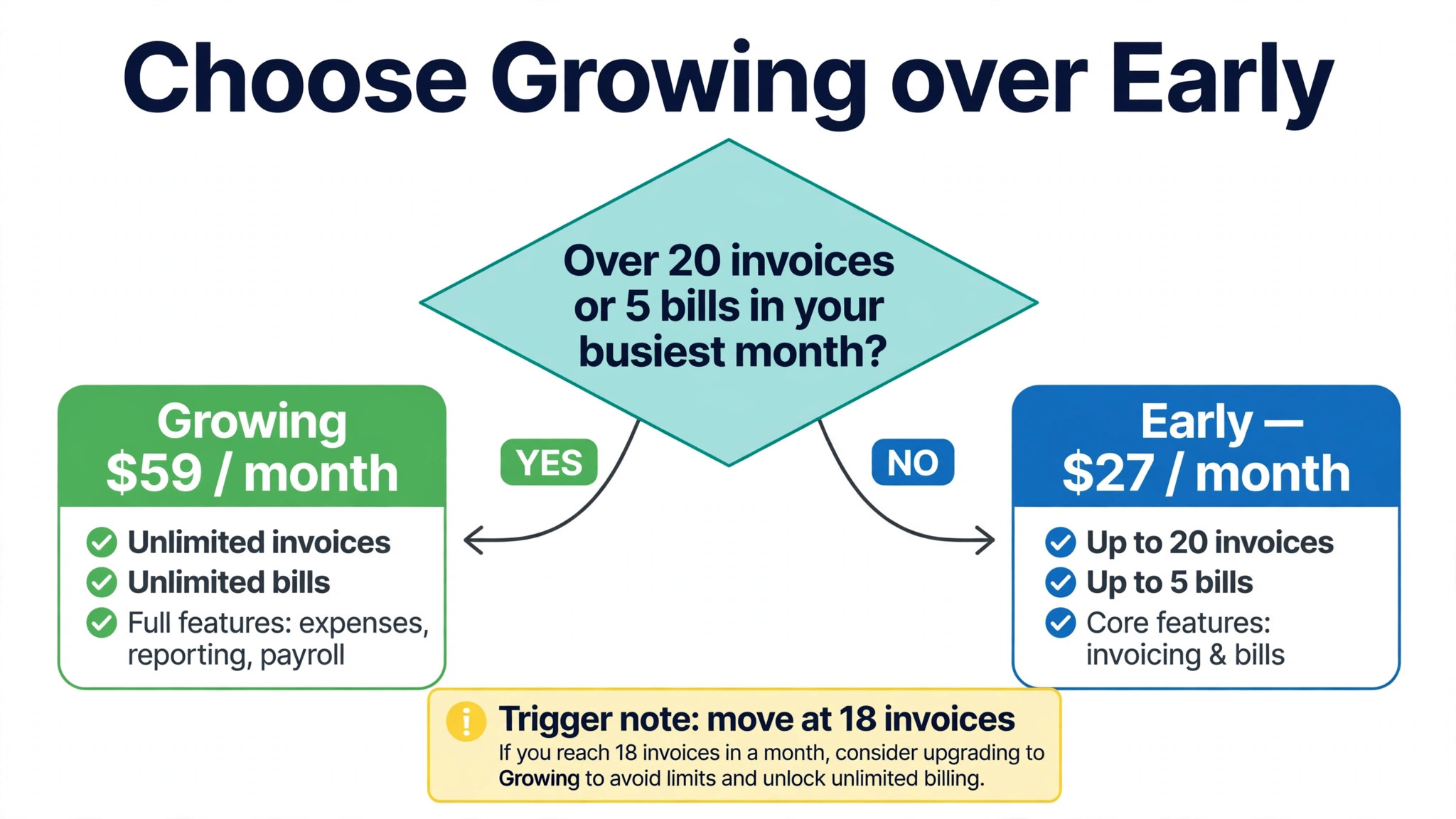
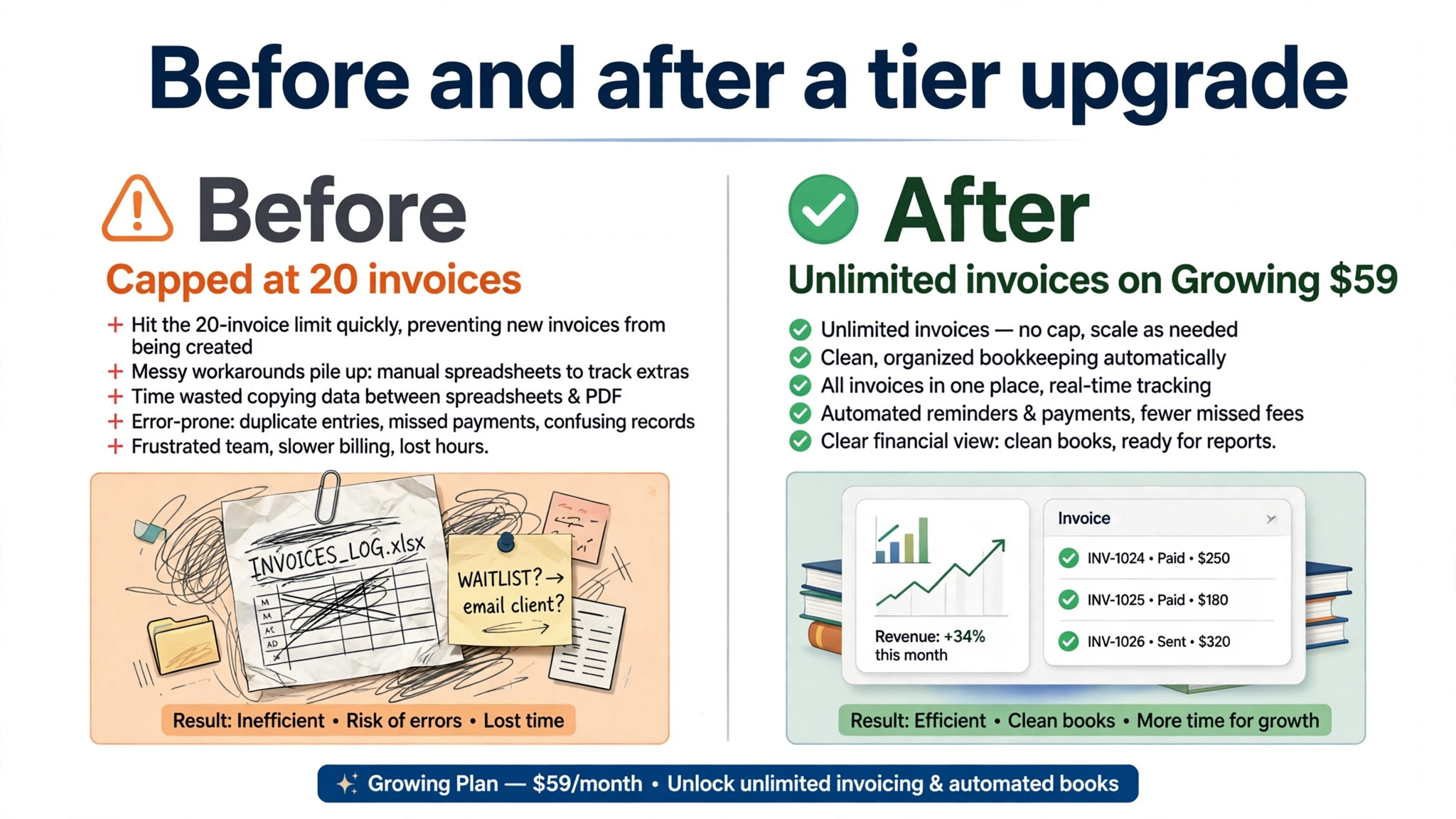
Early looks like a bargain at 27 dollars a month, until invoice volume is counted honestly. Twenty invoices a month sounds generous for a freelancer, but a business with weekly clients, recurring work, or several small jobs can reach that number in a fortnight. Five bills a month is tighter still, because rent, suppliers, software, and utilities can easily exceed five supplier bills. A business that hits either cap must either wait, work outside the system, or upgrade, and none of those options is good bookkeeping.
Growing removes both caps for 59 dollars a month, which is 32 dollars more than Early. That jump is the central decision in Xero pricing. For a business sending twenty five invoices a month, Growing is not a luxury, it is the minimum viable plan. For a business sending ten invoices a month, Early is a genuine saving, provided the bill cap also fits. Count invoices and bills over the past three months, including your busiest month, before choosing, because an average month hides the peak that forces an upgrade, and that peak is a key driver of the cost of Xero for small business monthly.
Established adds multi-currency, expense claims, project tracking, and analytics for 97 dollars a month. Those features are not needed by a purely domestic service business, but they are essential for a business that bills in a second currency or tracks project costs in detail. A business that needs only one of those features must still buy the whole tier, because Xero does not sell multi-currency or expenses as a standalone upgrade to Growing in the United States packaging reported here. Price the tier, not the single feature.
Early at 27 Dollars Each Month
Early suits a very small business with low, predictable transaction volume. It includes bank reconciliation, invoicing up to the cap, bill entry up to the cap, and Hubdoc receipt capture, which together cover the basics for a freelancer or a side business. A solo consultant with a handful of monthly clients, a small landlord with few tenants, or a creator with regular but limited billing can run clean books on Early without paying for capacity that stays unused.
The risk with Early is growth, and growth in a small business is often lumpy rather than smooth. A single large project with staged invoices, a seasonal rush, or a new client with weekly billing can push a business over twenty invoices in one month. That month is exactly when clean books matter most, because cash flow, tax, and supplier payments all need accurate records. Starting on Early is fine, but set a trigger in advance, such as eighteen invoices in a month, and move to Growing before the cap forces a messy workaround that raises the cost of Xero for small business monthly in wasted time.
Early also lacks some features that a growing team takes for granted, including multi-currency and project tracking. A business that plans to bill overseas clients within the year should not start on Early with a plan to upgrade later, because the upgrade is inevitable and the time spent learning the limits is wasted. Start on the tier that fits the next twelve months, not the tier that fits this month alone.

Growing at 59 Dollars Each Month
Growing is where most small businesses land, and for good reason. Unlimited invoices and bills remove the main friction in Early, bulk reconciliation speeds up bank work, and dashboards give an owner a clearer view of cash, profit, and outstanding invoices. A business with a steady flow of clients, several suppliers, and a bookkeeper or accountant involved will find Growing a comfortable home for years, without the extra cost of Established.
The value of Growing grows with transaction volume, because the cost stays flat while the work it handles increases. A business sending fifty invoices a month pays the same 59 dollars as a business sending twenty one, which makes Growing cheaper per invoice than Early at higher volumes. That flat price is also why unlimited users matter so much, because a team can grow without the subscription growing with it. Compare that with a seat priced ledger, where every new team member adds a monthly fee.
Growing does not include multi-currency, expense claims, or project tracking, so a business that needs those features must look at Established or at partner tools. Expense claims in particular can matter for a team that travels or buys on behalf of clients, because a manual expenses process creates delays and missing receipts. If expenses are a weekly job, price Established before buying a separate expenses tool, because the combined cost may be higher than the tier jump.
Established at 97 Dollars Each Month
Established is the tier for a business that operates across currencies, tracks projects, or needs deeper analysis. Multi-currency lets a business invoice and pay in foreign currencies while keeping the home currency books correct, which is essential for exporters, agencies with overseas clients, and ecommerce sellers with international sales. Project tracking ties time and costs to a job, so a firm can see margin by project rather than only revenue by client. Analytics add forecasting and performance views that help an owner plan ahead.
The jump from Growing to Established is 38 dollars a month, or 456 dollars a year. That is a modest increase for a business that bills overseas, because a single currency error or a mispriced project can cost far more. It is a poor investment for a domestic business with no projects and no foreign currency, because the extra features will sit unused while the bill rises every month. Let a named job decide the upgrade, such as a first overseas invoice or a first fixed price project with tracked costs.
Established also includes expense claims, which can replace a separate expenses tool for a small team. A business that currently pays for an expenses app should compare that subscription with the tier jump, because dropping the separate tool may make Established cheaper overall. The same logic applies to reporting tools, where the analytics in Established may reduce the need for a separate dashboard subscription. Price the whole stack, not the single tier.
Cost of Xero for Small Business Monthly by Team Size and Add-Ons
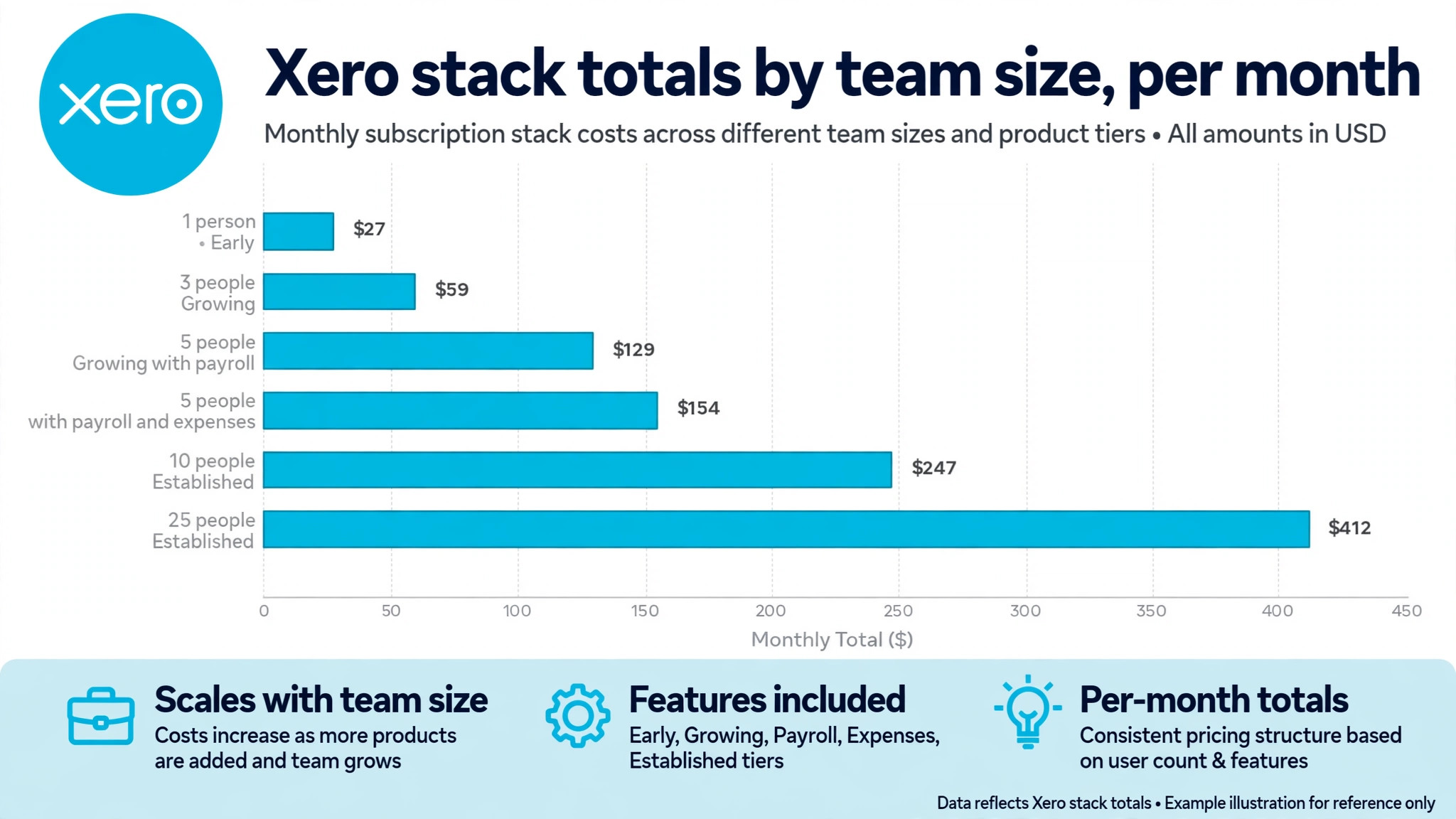
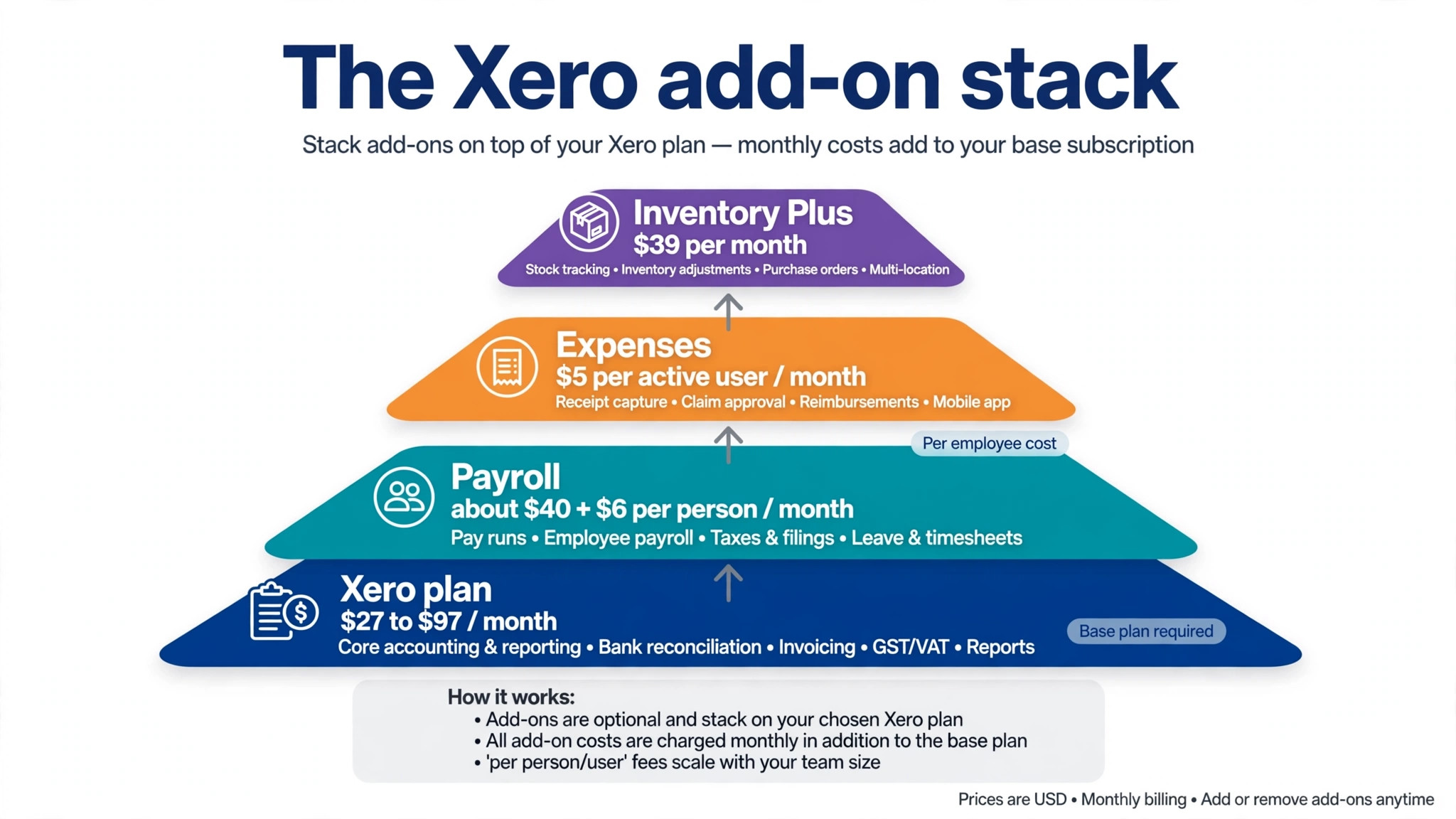
Because Xero charges a flat plan price with unlimited users, the table below shows how the total changes with add-ons and headcount rather than with seats. Payroll is shown through a partner, Gusto, at a reported starting level of about 40 dollars a month plus about 6 dollars per person paid, and expenses are shown at a reported 5 dollars per active user a month for the standalone expenses module where it applies. Confirm both figures on the vendor and partner pages, because partner prices change.
| Team and setup | Plan | Plan cost | Payroll estimate | Expenses estimate | Monthly total |
|---|---|---|---|---|---|
| 1 person, no payroll | Early | 27 dollars | 0 dollars | 0 dollars | 27 dollars |
| 3 people, no payroll | Growing | 59 dollars | 0 dollars | 0 dollars | 59 dollars |
| 5 people, payroll for 5 | Growing | 59 dollars | 70 dollars | 0 dollars | 129 dollars |
| 5 people, payroll and expenses | Growing | 59 dollars | 70 dollars | 25 dollars | 154 dollars |
| 10 people, payroll for 10 | Established | 97 dollars | 100 dollars | 50 dollars | 247 dollars |
| 25 people, payroll for 25 | Established | 97 dollars | 190 dollars | 125 dollars | 412 dollars |
A solo operator on Early pays 27 dollars a month, which is a low entry price for a proper double entry ledger. A three person business on Growing pays 59 dollars a month with no payroll, because unlimited users mean the team size does not change the plan cost. That contrast is the core advantage of Xero for a team, and it is why a seat priced rival can look cheaper for one person and dearer for five.
Once payroll enters the picture, the total rises fast. A five person business on Growing with payroll for five people reaches about 129 dollars a month, and adding expenses for five active users lifts it to about 154 dollars a month. A ten person business on Established with payroll and expenses reaches about 247 dollars a month, while a twenty five person business reaches about 412 dollars a month. Those totals are still driven mainly by payroll and expenses, not by the Xero plan itself, which stays at 97 dollars for Established at any team size.
The lesson is to budget Xero as a stack, not as a single price. The plan is the smallest part of the total for a larger team, while payroll is the largest. A business comparing Xero with a rival that bundles payroll should compare the stack total, including the partner payroll price, rather than the plan price alone. A business with no employees can ignore payroll entirely and enjoy the flat plan price at its full value.
Payroll, Expenses, Projects, and Inventory Add-Ons
United States payroll does not sit inside Xero in the same way as in some rivals. It runs through a partner, most commonly Gusto, and the partner price is separate from the Xero subscription. That separation has advantages, because a specialist payroll provider may handle tax filings, benefits, and compliance better than a general ledger, but it also means a second subscription, a second login, and a second support route. A business with staff should test the integration during a trial, with a real pay run if possible, rather than assuming the connection works smoothly.
Expenses are another add-on to price carefully. The standalone expenses module is reported at 5 dollars per active user a month for United States businesses that need full expense claim workflows beyond receipt capture. Hubdoc receipt capture is included on Growing and Established in the packaging reported here, which covers photographing and storing receipts, but full claim approval and reimbursement workflows sit in the expenses module. A solo operator may need only receipt capture, while a team with travelling staff may need the full module.
Projects are reported at about 13 dollars a month for up to five users on Established in some comparison coverage, and availability varies by region and plan. That price is modest for a firm that tracks job costs, but it should be confirmed for your account, because project features are included differently in different regions. Inventory Plus is reported at 39 dollars a month on Growing or Established for stronger stock control, and that matters for a product business that has outgrown basic tracking. A service business can ignore both add-ons, while a product business should price them from the start.
Third party apps are the wider add-on story in the cost of Xero for small business monthly. The marketplace includes more than a thousand connections, from ecommerce and payment tools to reporting and inventory systems, and most of them carry their own subscription. A typical small business may spend 50 dollars to 200 dollars a month on marketplace apps on top of the Xero plan, according to comparison coverage. That range is wide because it depends on the business, but it is a useful warning. List the apps you need, price each one, and only then compare Xero with a rival that bundles one of them.
Edition Jump in Plain Terms
The Early to Growing jump costs 32 dollars a month and buys unlimited invoices and bills, bulk reconciliation, and dashboards. It is worth it the moment invoice or bill volume, or the time spent on reconciliation, makes Early feel tight. It is not worth it for a business with ten invoices and three bills a month, where Early leaves comfortable headroom. Use your busiest month, not your average month, to make this call, because the cap bites in the busy month.
The Growing to Established jump costs 38 dollars a month and buys multi-currency, expense claims, project tracking, and analytics. It is worth it when any one of those features is a weekly need, or when dropping a separate expenses or reporting tool offsets the increase. It is not worth it for a domestic service business with no projects, where the extra features would sit unused. A useful test is to name the first overseas invoice, project, or expense claim that requires Established, and the date it is expected. If neither exists, stay on Growing.
A jump should also be timed to renewal and to workload, because a rushed change can add to the cost of Xero for small business monthly in support time and rework. Moving tiers mid month is usually straightforward, but moving during a tax deadline, a payroll run, or a major project close adds risk for no benefit. Plan the change for a quiet week, check that historical data and reports carry over as expected, and confirm the new invoice total before the change takes effect. A tier jump is a business decision, not a button to press in a hurry.
Charges and Surprises to Watch in the First Year
Promotional pricing is the first surprise, because a large discount for the first three months makes the first bill look far lower than the renewal bill. A Growing plan at a promotional rate may cost only a fraction of 59 dollars for three months, then rise to the full rate for the remaining nine months. Budget on the renewal rate for the full year, and treat the promotion as a saving, not as the price. Put the renewal date in the calendar when you sign up, so the rise does not arrive as a shock.
Partner prices are the second surprise in the cost of Xero for small business monthly, because payroll, inventory, and reporting tools can rise independently of Xero. A Gusto price change, a Dext receipt tool increase, or a new inventory app subscription can lift the stack total without any change to the Xero plan itself. Review the whole stack quarterly, with one owner checking every subscription that touches the books. That review takes less time than untangling a year of unreviewed charges.
Multi-organisation pricing is the third surprise for accountants, franchise operators, and businesses with several entities. Each organisation file carries its own subscription, so a business with three entities pays three plan prices, not one. The multi-organisation discount that some older accounts enjoyed was phased out from October 2026 in the United States, according to comparison coverage, so a multi-entity buyer should confirm the current terms in writing. Price per entity, not per business, when several legal entities are involved.

Errors That Push a Small Business Onto the Wrong Tier
The first error is counting only this month when choosing Early. A business with fifteen invoices this month and twenty eight next month will hit the cap in the busy month, and the upgrade will then happen under pressure. Count three months, include the peak, and add a buffer for growth. If the peak is close to twenty invoices or five bills, choose Growing and avoid the disruption.
The second error is buying Established for a single feature that a cheaper tool already covers well. A business that needs only receipt capture may already have it through Hubdoc on Growing, while a business that needs only a simple project list may track it in a separate tool it already pays for. Before jumping to Established, check whether the feature you need is already available on Growing, or in a tool you already own. A tier jump should replace a cost or unlock a job, not merely add a feature to a list.
The third error that distorts the cost of Xero for small business monthly is ignoring payroll when comparing Xero with a bundled rival. A Growing plan at 59 dollars looks cheaper than a rival at 85 dollars, until payroll at 70 dollars for five people is added to Xero and the rival includes payroll in its price. The comparison that matters is the stack total for the same jobs, including payroll, expenses, and any marketplace apps. Build that stack for both products before deciding, and the cheaper option will usually be clear.
The fourth error is letting the subscription drift without a review. Xero plans, partner prices, and business needs all change over a year, and a tier that fitted last January may not fit this January. Set a quarterly review with one owner, checking plan level, add-ons, partner subscriptions, and invoice volume. Cancel unused apps, confirm the plan still fits, and note the renewal date. That habit saves more money than chasing a promotional discount.
Before you commit, run a two week trial with real invoices, real bills, and a real bank reconciliation, and invite your accountant to review the setup. That trial will reveal whether the invoice cap fits, whether payroll integration works, and whether the reporting answers the questions you actually ask at month end. A trial that uses only demo data hides exactly the limits that later drive an upgrade, and a careful trial is the cheapest way to confirm the cost of Xero for small business monthly for your own volume.
Who Each Tier Is Actually For
Early is for a freelancer, a side business, or a very small firm with low and stable transaction volume. It is a proper accounting package at a low price, and it should be kept only while invoice and bill counts stay comfortably below the caps. The moment volume grows, or a second currency or project need appears, Early has done its job and Growing or Established should take over.
Growing is for most small businesses, from a busy freelancer to a team with many clients and suppliers. Unlimited invoices and bills, bulk reconciliation, and dashboards cover the daily accounting job without paying for features a domestic service business does not need. It is the default choice when in doubt, and the tier to return to if Established was bought for a feature that never became a weekly habit.
Established is for a business that bills overseas, tracks projects, manages expense claims for a team, or needs deeper analytics for planning. It is the tier for exporters, agencies with international clients, project based firms, and growing businesses that need a clearer forward view. The cost of Xero for small business monthly on Established is 97 dollars for the plan alone, and the stack total with payroll and expenses can reach several hundred dollars for a larger team, so the tier should be bought for named jobs, not for headroom alone.

More Reading on Stratilyze
Readers comparing accounting tools often check related guides next. The guide to accounting software for small firms places Xero beside its main rivals, the guide to accounting software for ecommerce sellers covers stock and multi-currency needs, and the guide to invoicing software for freelancers shows how billing alone changes the same decision.
Frequently Asked Questions
How much does Xero cost for a small business each month?
A small business pays 27 dollars a month for Early, 59 dollars for Growing, or 97 dollars for Established, at United States list prices after the October 2026 increase. Those figures cover the plan only, with unlimited users on every tier. Payroll through a partner, expenses, inventory, and marketplace apps sit outside the plan price, so a larger team should budget for the whole stack, not only the plan.
Is Xero cheaper than QuickBooks for a team?
Xero can be cheaper for a team, because every plan includes unlimited users, while QuickBooks Online charges by seat on most plans. A five person business pays the same Xero plan price as a solo operator, while a seat priced rival adds a fee for each extra user. The comparison changes with payroll and features, because QuickBooks bundles some items differently, so compare the stack total for the same jobs, including payroll and expenses, before deciding.
Does Xero include payroll in the monthly price?
No, United States payroll is not included in the Xero plan price. It runs through a partner, most commonly Gusto, at a reported starting level of about 40 dollars a month plus about 6 dollars per person paid. That partner price is separate from the Xero subscription and should be added to any budget for a business with staff. Confirm the current partner price and the integration terms during a trial, with a real pay run if possible.
What happens if I exceed the Early invoice limit?
Early caps invoicing at twenty invoices and bills at five bills a month, so a business that exceeds either cap must upgrade to Growing, wait until the next month, or work outside the system. Working outside the system creates messy books and missing records, so an upgrade is usually the sensible response. Set a trigger, such as eighteen invoices in a month, and move to Growing before the cap forces a decision under pressure.
Is multi-currency available on every Xero plan?
No, multi-currency is available on Established, not on Early or Growing, in the United States packaging reported here. A business that invoices or pays in a second currency must therefore buy Established, even if it needs no other Established feature. Check the current plan comparison on the vendor page, because regional packaging differs, and confirm that multi-currency covers the currencies and workflows your business actually uses.
Can my accountant use Xero without an extra seat fee?
Yes, every Xero plan includes unlimited users, so an accountant and a bookkeeper can log in without adding a per user fee to the subscription. That is a major advantage for a small business that works closely with an external accountant, because the accountant can review the same live records rather than working from exports. Confirm the access roles and permissions during setup, so each user sees only the areas they need.