
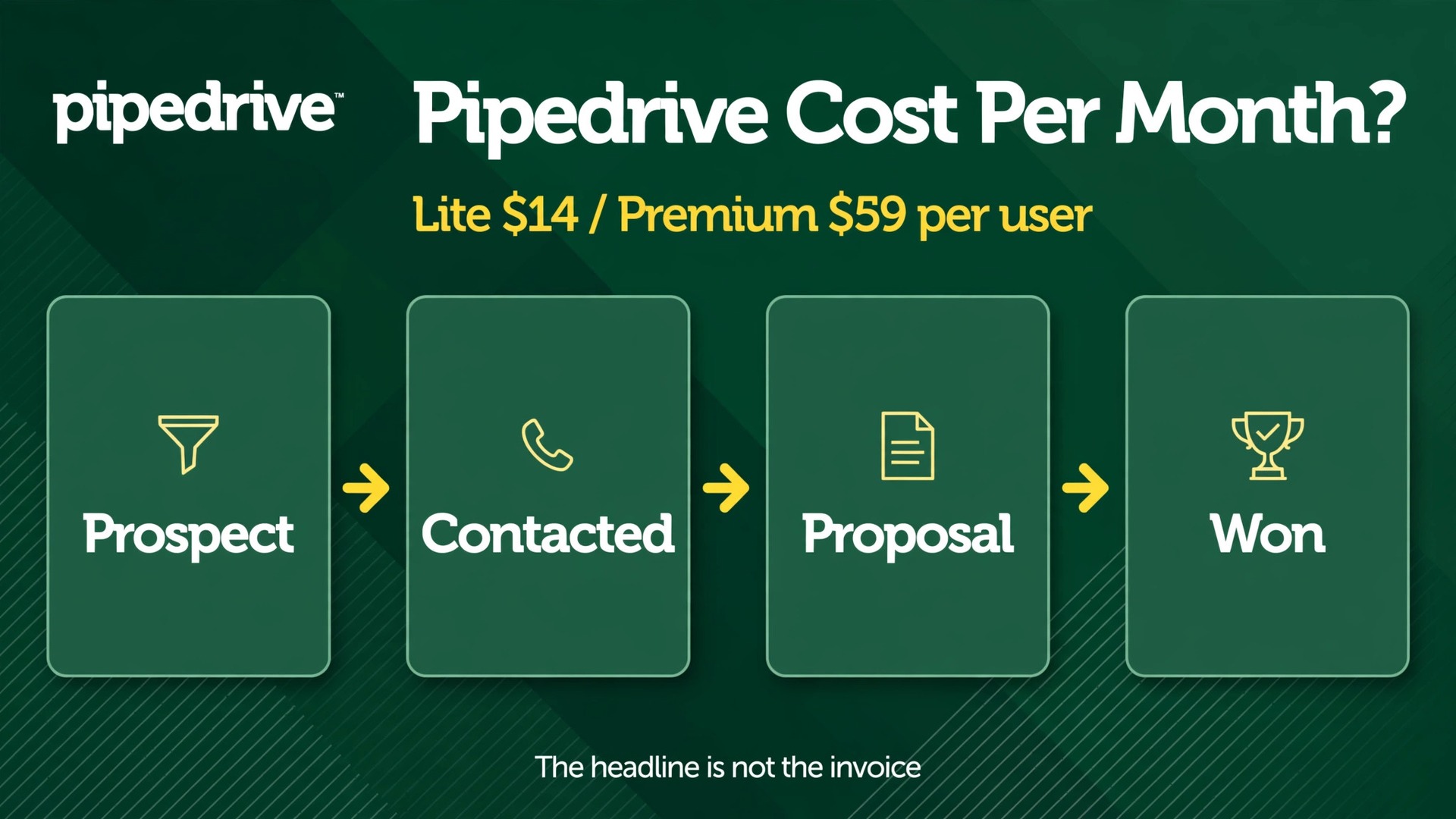
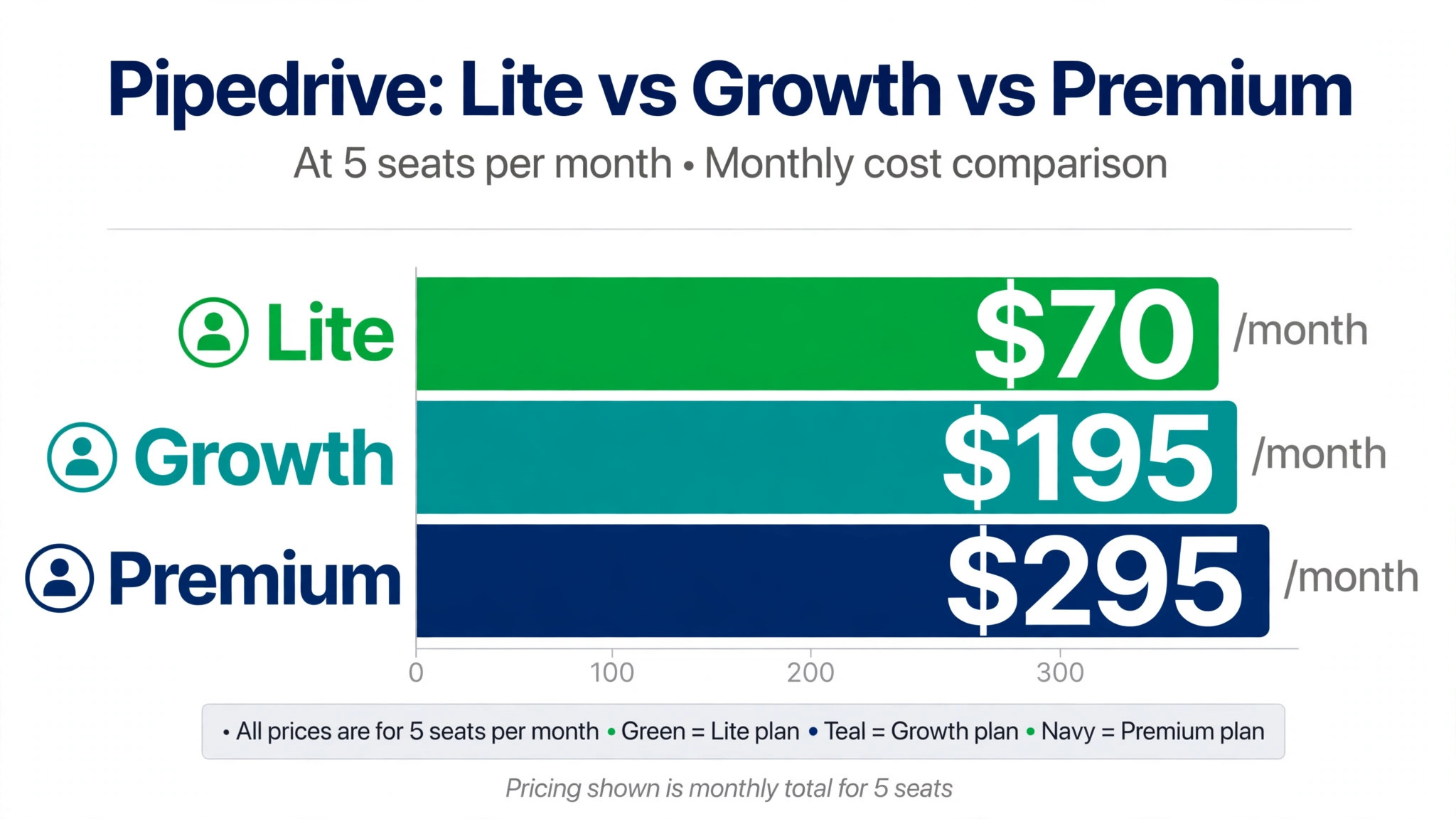
Recent comparison coverage puts a five person sales team on Pipedrive at roughly 195 dollars a month on the Growth tier and 295 dollars a month on Premium, before add-ons and tax. That single contrast explains why so many buyers feel misled by a headline price. The per user figure looks small, but the bill is driven by headcount, billing term, and the extra products a growing team soon needs. This guide works through the cost of Pipedrive for small business monthly in plain numbers, so you can budget for the seat total rather than the advertised rate alone.
Pipedrive is a sales pipeline tool first and a general business platform second. It helps a small team track deals, follow up on time, and see which opportunities are stuck. It does not replace an accounting package, a marketing suite, or a full customer service desk. That focus is part of its appeal, because a rep can learn the pipeline view in a day and managers can see the whole book of business at a glance. It is also the reason add-ons matter so much, because lead capture, documents, and project work sit outside the core subscription on the lower tiers.
Before you compare tiers, decide how many people will actually log in every week. Pipedrive bills per user, so every dormant seat, part time helper, and manager who only wants a weekly report still counts if they hold a paid seat. A team of three active reps plus a founder who checks the pipeline twice a week is a four seat bill, not a three seat bill. Clean up that count first, and the rest of the pricing decision becomes much easier to make with confidence.
| Plan | Annual price per user each month | Monthly billing note | Best starting point |
|---|---|---|---|
| Lite | 14 dollars | Higher on monthly billing | Solo seller or very small team |
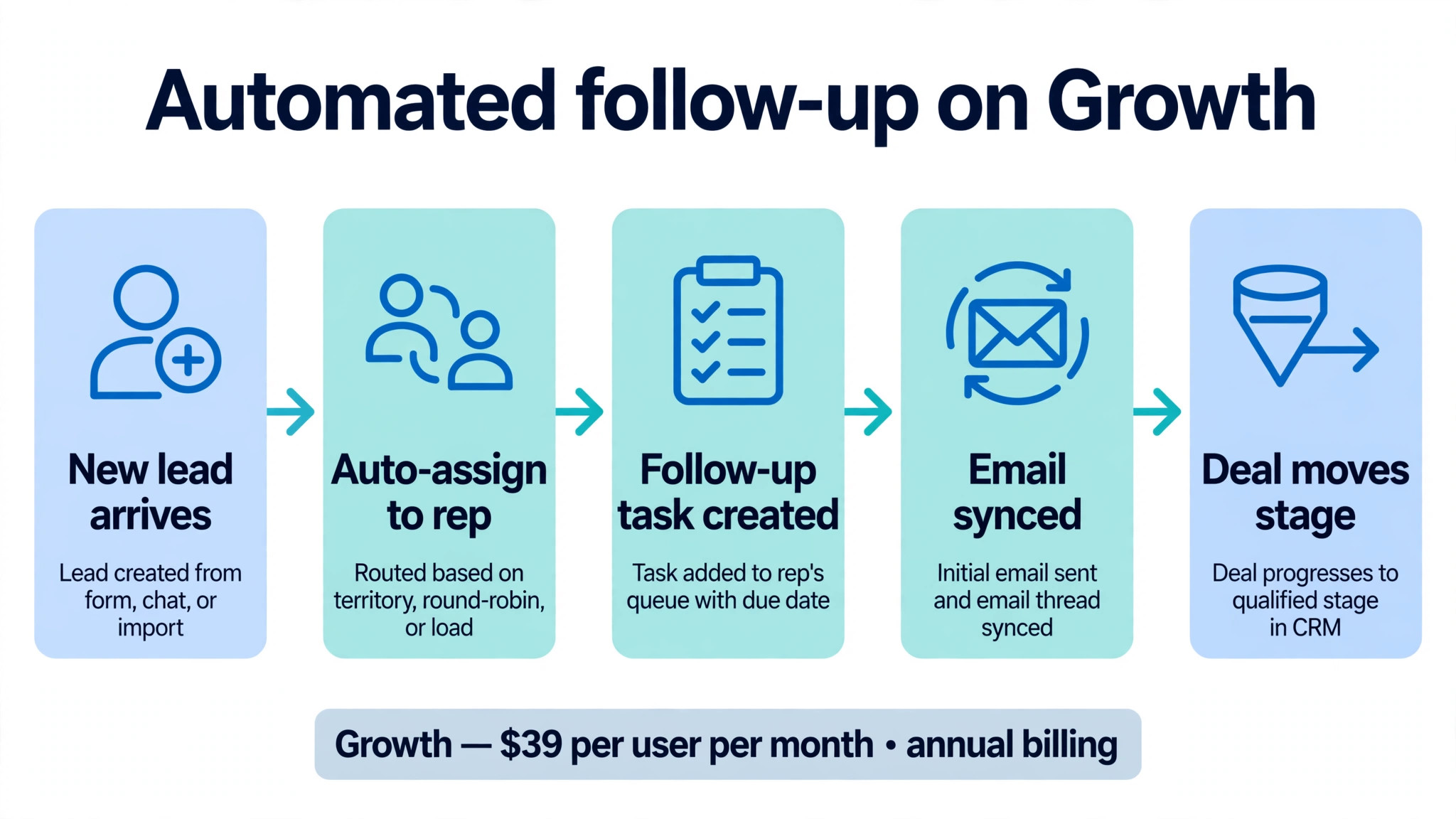
| Growth | 39 dollars | Higher on monthly billing | Small team that needs automation |
| Premium | 59 dollars | Higher on monthly billing | Team that needs reports and AI help |
| Ultimate | 79 dollars | Higher on monthly billing | Larger team with strict controls |
Prices in this guide are United States list prices as reported in October 2026 comparison coverage, and they can change. Pipedrive has also renamed its tiers over time, so older reviews may call the same levels Essential, Advanced, Professional, Power, and Enterprise. Confirm the current names and prices on the vendor page before you buy. Any honest account of the cost of Pipedrive for small business monthly must budget on the renewal price rather than any introductory offer. Taxes, implementation help, and third party tools sit outside the figures in the tables below.
Why the Headline Price Rarely Matches the Invoice
The headline price is a per user rate on annual billing. It assumes you pay for a full year in advance, that every user needs the same tier, and that you need nothing beyond the core CRM. Small businesses rarely meet all three conditions at once. Cash flow may push you toward monthly billing, one manager may need reporting that reps do not, and a lead form or a signing tool may become essential within weeks of launch. Each gap adds a line to the invoice.
Annual billing is the largest single lever. Comparison sources report annual rates that are materially lower than monthly rates, with the saving varying by tier. That saving is real, but it is also a commitment. If you buy ten seats for a year and two reps leave in month three, you have paid for capacity you no longer use unless the vendor lets you reassign or reduce seats on terms you have agreed in writing. Ask about seat changes, downgrades, and refunds before you commit, not after the first invoice lands.
Add-ons are the second lever, and they work in different ways. Some are charged per company, so they cost the same for a team of two as for a team of twenty. Others are charged per user, so they grow with headcount. A flat company add-on can look cheap for a large team and expensive for a solo seller. A per user add-on can look trivial for one person and become a major line item at twenty seats. Read the billing unit, not just the price, before you judge whether an add-on is good value.
The third lever in the cost of Pipedrive for small business monthly is the work around the software. Migrating old deals, cleaning duplicate contacts, setting up pipelines, and training reps all take time. Some teams do that work in house over a few weekends. Others pay a partner or a consultant for a faster setup. Neither cost appears on the Pipedrive pricing page, but both belong in a first year budget. A cheap tier that nobody adopts is more expensive than a dearer tier that the team actually uses every day.
Lite at 14 Dollars per User Each Month
Lite is the entry point for a solo seller or a tiny team that needs a clear pipeline and little else. It covers contacts, deals, activities, and basic reporting, and it gives a new user a place to record every conversation without building a spreadsheet system from scratch. For a founder selling a single service, that simplicity is a genuine advantage. There is no complex setup to maintain and no long list of features to ignore.
The limits appear quickly once a team starts to automate. Lite does not provide the workflow automation, deeper reporting, or advanced permissions that a growing team usually wants. A rep who must remember every follow-up by hand, or a manager who cannot build the report the business needs, will feel the ceiling within a few months. That does not make Lite a bad product. It makes Lite a starting point with a clear upgrade path, and buyers should treat it that way.
Lite makes most sense for one or two people, for a side business testing a sales process, or for a team that already uses other tools for automation and reporting. It makes least sense for a team of five or more, because the manual work it leaves behind grows with every deal. If you expect to hire a third rep this year, price Growth from the start and compare the total, rather than celebrating a low entry price you will soon leave behind.
Growth at 39 Dollars per User Each Month
Growth is where Pipedrive starts to feel like a team tool rather than a personal tracker. It adds workflow automation, email sync and tracking, a meeting scheduler, and stronger reporting than Lite. A small team can route new leads to the right rep, create follow-up tasks automatically when a deal moves stage, and see activity across the whole team instead of asking each rep for a verbal update. Those features save the hours that Lite leaves as manual work.
The trade is a jump from 14 dollars to 39 dollars per user each month on annual billing. For a five person team, that is a move from 70 dollars a month to 195 dollars a month, or 1,500 dollars more over a year. That increase is easy to justify when automation replaces admin time, but it should still be tested against real work. List the five tasks you want automated, estimate the hours they consume now, and check that Growth actually automates those tasks rather than merely promising automation in general.
Growth also introduces limits that matter at scale, including caps on automations and reports that some comparison reviews flag for mid sized teams, and those limits belong in any account of the cost of Pipedrive for small business monthly. A team running many pipelines, many deal types, and many automated rules should ask for the current limits in writing during a trial. Hitting a cap mid quarter is frustrating, because the fix is either a tidy up of old rules or a jump to a higher tier. Plan the trial around your busiest workflow, not your simplest one.
Premium is the tier many established small teams settle on, because it bundles several products that are paid add-ons lower down. It adds an AI sales assistant, revenue forecasting, custom reporting, and stronger permissions, and comparison coverage reports that LeadBooster, Projects, and Smart Docs are included from Premium upward in the current packaging. That bundling changes the comparison completely, because a Growth team paying separately for those products may already be close to the Premium price.
The AI assistant and forecasting tools are useful only if the underlying data is clean. Pipedrive can flag deals at risk and project revenue from past patterns, but it cannot fix missing close dates, duplicate contacts, or stages that reps update only at month end. Teams that adopt Premium should also adopt a weekly pipeline hygiene habit, with one owner checking stale deals and overdue activities. Without that habit, the most expensive features in the package will produce confident looking numbers from messy inputs.
Premium suits a team of roughly five to twenty people that needs reliable reporting, a manager view of the whole pipeline, and documents or projects tied to deals. It suits a business with several pipelines, a formal sales process, and a need to forecast with some rigour. It is overkill for a solo seller, and it may still be short of the controls a regulated or very large team needs. Judge it by the reports and permissions you will use weekly, not by the feature list as a whole.
Ultimate at 79 Dollars per User Each Month
Ultimate is the top published tier for teams that need the strongest security, permissions, and support arrangements. It builds on Premium with unlimited style controls, single sign on, and dedicated support in the packaging reported by comparison sources. For most small businesses, those features are not the reason to buy. They become important when a business handles sensitive client data, works with larger corporate customers, or must prove who can see and change each record.
The cost jump from Premium to Ultimate is 20 dollars per user each month on annual billing. For a ten person team, that is 200 dollars a month or 2,400 dollars a year, before tax. That money is well spent when a customer contract or a compliance requirement demands it, and poorly spent when it buys controls nobody configures. Ask your largest customers what they actually require, and ask your team who would own permissions and security if you upgraded. If neither question has a clear answer, stay on Premium.
Ultimate also suits a business that expects to scale well beyond twenty seats and wants a tier it will not outgrow quickly. The risk with any top tier is paying for headroom years before you need it. A better approach is to buy the tier that fits the next twelve months, review at renewal, and upgrade when a concrete requirement appears. Pipedrive tiers are easier to move between than a failed implementation is to repair.
Cost of Pipedrive for Small Business Monthly at 2, 5, 10 and 25 Seats
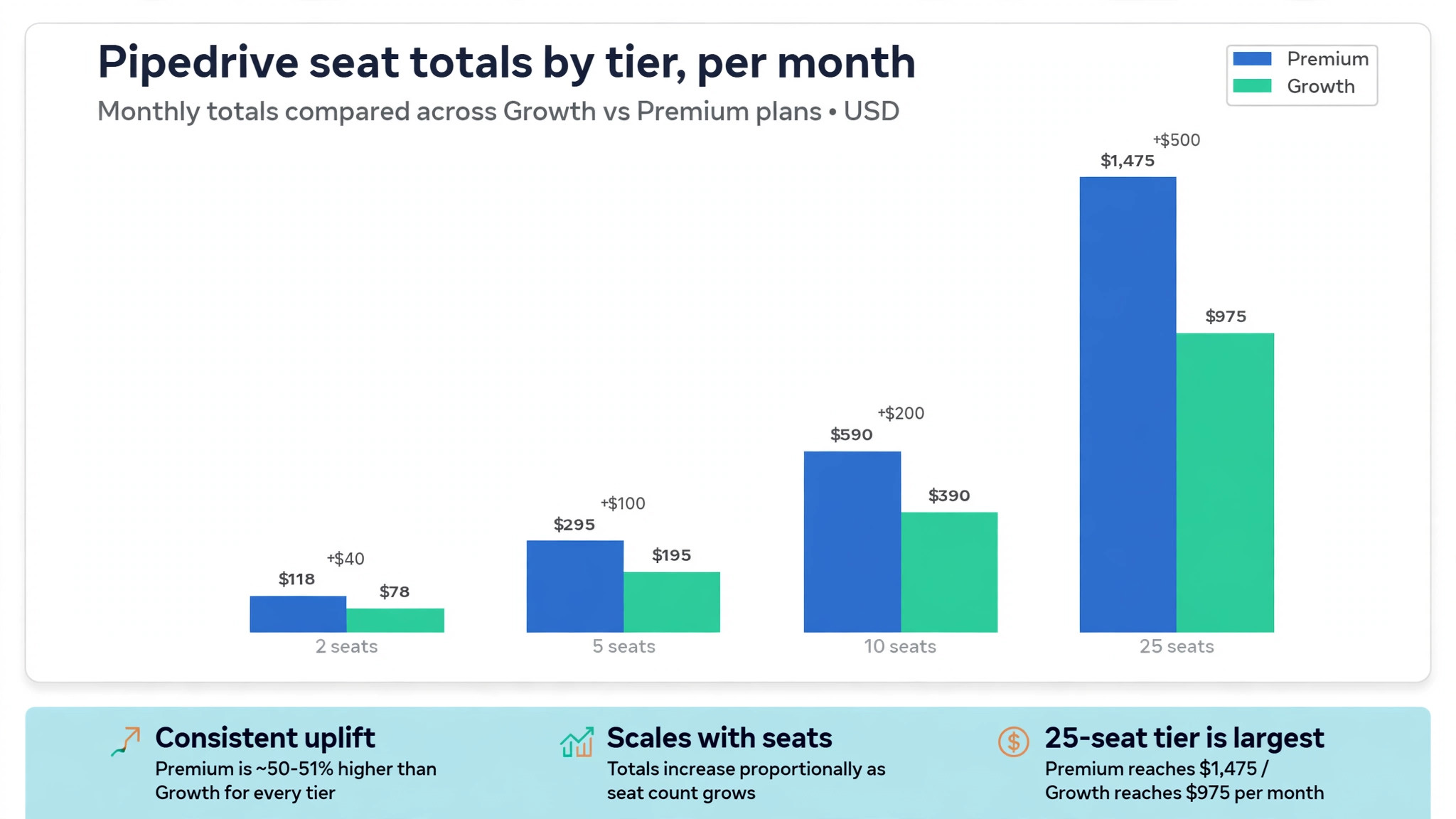
The table below shows the monthly subscription total at annual list prices, before add-ons and tax. It is the number to put in a budget, because a per user price alone hides how fast the bill grows with hiring. Multiply any monthly figure by twelve for the annual subscription total, and remember that monthly billing will cost more than the annual figure shown here.
| Team size | Lite each month | Growth each month | Premium each month | Ultimate each month |
|---|---|---|---|---|
| 2 seats | 28 dollars | 78 dollars | 118 dollars | 158 dollars |
| 5 seats | 70 dollars | 195 dollars | 295 dollars | 395 dollars |
| 10 seats | 140 dollars | 390 dollars | 590 dollars | 790 dollars |
| 25 seats | 350 dollars | 975 dollars | 1,475 dollars | 1,975 dollars |
A two person business can run on Lite for 28 dollars a month, which is genuinely cheap for a proper CRM. The same business on Premium pays 118 dollars a month, and that gap is the first decision to make honestly. If the extra reporting and automation do not save at least a few hours a month, Lite is the better buy. If they save a lost deal or a week of chasing, Premium pays for itself quickly. Measure the saving in deals and hours, not in feature count.
At five seats, the choice sharpens. Growth at 195 dollars a month gives a real team tool without the Premium price, while Premium at 295 dollars a month adds reporting depth and bundled products. A five person team that needs LeadBooster and Smart Docs should compare Growth plus those add-ons against Premium, because the flat add-on fees narrow the gap. In many cases, the bundled tier wins once two company add-ons are added to Growth.
At ten seats, Premium at 590 dollars a month is the common landing point for a serious small sales team. Growth at 390 dollars a month still works for a team with simple reporting needs, but the saving of 200 dollars a month must be weighed against manager time spent building workarounds. At twenty five seats, the annual totals become strategic, with Premium at 17,700 dollars a year and Ultimate at 23,700 dollars a year. At that size, negotiate the renewal, review seat usage quarterly, and assign one owner to the subscription.
Add-Ons That Change the Monthly Total
LeadBooster is the add-on most small teams meet first. Comparison sources report a starting price of about 32 dollars and 50 cents per company each month on annual billing, covering web forms, a chatbot, live chat, and a scheduler. Because it is charged per company rather than per user, it is cheap for a large team and noticeable for a solo seller. It is worth the money when inbound leads arrive through the website every week, and a waste when most leads arrive by referral or phone.
Smart Docs is reported at the same starting level, about 32 dollars and 50 cents per company each month, and it covers quotes, proposals, and electronic signatures. A team that sends proposals from a separate tool may already pay a similar amount elsewhere, so Smart Docs can replace an existing cost rather than add a new one. A team that rarely sends formal proposals should not buy it on the promise that it might be useful one day. Buy it when proposal volume makes the current process painful.
Projects is charged per user in the packaging reported by comparison sources, with figures ranging from about 6 dollars and 67 cents to about 16 dollars per user each month depending on the source and billing term. That range is a warning to confirm the current price in your own account before budgeting. Projects suits a team that sells and then delivers, because it ties delivery tasks to the deal that won the work. A pure sales team with no delivery stage should skip it.
Campaigns and Web Visitors sit outside every tier in the packaging reported by comparison sources, so they lift the cost of Pipedrive for small business monthly for marketing heavy teams. Campaigns starts from about 13 dollars and 33 cents a month and scales with marketing contact volume, while Web Visitors starts from about 41 dollars a month and scales with the number of organisations identified. Both can be valuable, but both are also easy to buy for a campaign that never runs. Start with the core CRM, prove the sales process, and add marketing products only when a named campaign needs them.

Edition Jumps and the Point Where Upgrading Pays
The jump from Lite to Growth costs 25 dollars per user each month on annual billing. For a five person team, that is 125 dollars a month. The jump is worth it when automation removes repetitive admin, when email tracking improves follow-up, or when team reporting replaces manual status meetings. It is not worth it when the team is still learning basic pipeline discipline, because automation on top of a messy process only creates messy results faster.
The jump from Growth to Premium costs 20 dollars per user each month, or 100 dollars a month for five seats. That jump is easier to justify than the first one when LeadBooster, Projects, and Smart Docs are already on the bill, because Premium bundles them in the current packaging. It is harder to justify when none of those products are used, because the remaining Premium benefits are mainly reporting, forecasting, and AI assistance. Price the bundle you will actually use, not the bundle on the page.

Tax is the most predictable surprise, because list prices are usually quoted before tax. The invoice total will be higher, and the difference matters more as seat count grows. Implementation help is the second surprise, because a partner setup, data migration, or training day is billed separately from the subscription. Even a self setup costs staff time, and that time should be counted in the first year cost even if no invoice arrives for it.
Third party tools are the third surprise. Pipedrive connects with email, calendars, accounting, and marketing tools, and some of those connections need a paid plan on the other side. A team that needs a particular integration should check its price before choosing a Pipedrive tier, because a cheap CRM plus an expensive integration can cost more than a dearer CRM with a native feature. The same logic applies to phone tools, document storage, and reporting add-ons that sit outside Pipedrive.
Seat hygiene is a quieter part of the cost of Pipedrive for small business monthly. Every leaver who keeps a seat, every contractor who stays active after a project ends, and every manager who holds a full seat for occasional viewing adds to the monthly bill. Review the user list every quarter, deactivate dormant accounts, and consider whether a viewer or a report export could replace a full seat for occasional users. At 59 dollars per user each month, five dormant seats cost 295 dollars a month for nothing.
Mistakes That Inflate a Pipedrive Bill
The most common mistake is buying for the team you hope to have next year rather than the team you have now. A solo founder on Premium pays for forecasting and permissions that a one person pipeline does not need, and a three person team on Ultimate pays for controls that no customer has asked for. Buy for the next twelve months, set a review date at renewal, and upgrade when hiring or a customer requirement makes the case.
The second mistake that raises the cost of Pipedrive for small business monthly is paying for add-ons before the core habit exists. LeadBooster cannot fix a pipeline that reps update once a month, and Smart Docs cannot fix proposals that nobody follows up. Prove the core workflow first, with deals moving through stages on time and activities logged daily, then add one product at a time and measure whether it changes a result. A single add-on that wins one extra deal a month is cheap, while three unused add-ons are an expensive shelf.
The third mistake is ignoring the billing term. Monthly billing feels safer, but it costs more per month and can hide the true annual commitment in a series of small invoices. Annual billing saves money, but it locks in seats that may change. The right choice depends on hiring confidence and cash flow, not on which option looks cheaper in a screenshot. Put both totals in the budget, side by side, and choose with eyes open.
The fourth mistake is skipping the trial test. A trial should include real deals, real email, and a real weekly report, not a demo pipeline with perfect data. Import a sample of old deals, connect email, build the automations you plan to use, and see where the tier stops you. That test reveals limits, missing features, and training needs while the cost of changing tier is still zero.
Choosing Between Monthly and Annual Billing
Monthly billing suits a business with uncertain hiring, seasonal revenue, or a short trial of a new sales process. It costs more per month, but it lets you reduce seats sooner if a hire does not work out or a campaign ends. For a team testing Pipedrive for the first time, two or three months on monthly billing can be a sensible insurance policy, even at the higher rate, because it avoids a year of seats you may not need.
Annual billing suits a stable team with a proven process and a clear twelve month headcount plan. The saving is meaningful, especially at ten seats or more, where the difference between monthly and annual rates can run to hundreds of dollars a month. It also forces a useful discipline, because a team that commits for a year is more likely to adopt the tool properly, clean its data, and build the reporting it needs. Commitment can improve usage, provided the tier choice was tested first.
A middle path works for many small businesses. Start on monthly billing for a short trial, confirm the tier and add-ons with real work, then switch to annual billing once the team size and workflow are stable. That approach pays a small premium for flexibility at the start and captures the annual saving for most of the year. Put the switch date in the calendar at the end of the trial, so the premium does not drift on for a full year by accident.

Verdict on Who Each Tier Suits Best
Lite suits a solo seller, a founder testing a sales process, or a tiny team that needs a clean pipeline and nothing more. It is the cheapest honest start, and it is easy to leave behind when automation becomes necessary. Do not judge Lite by what it lacks, because its job is to be simple. Judge it by whether your deals move, your follow-ups happen, and your pipeline stays visible without extra admin.
Growth suits a small team of three to ten people that needs automation, email tracking, and team reporting without paying for AI and advanced controls. It is the sensible default for most small businesses, provided the automation and report limits are checked during a trial. If your team fits that description and your reporting needs are straightforward, Growth is likely the best value in the range.
Premium suits a team of five to twenty people that needs custom reporting, forecasting, and bundled documents and projects, and that will actually use those tools weekly. It is the tier to choose when Growth plus add-ons approaches the Premium price, or when managers need a reliable forecast they can defend. Ultimate suits a larger or more regulated team that needs strict permissions, single sign on, and dedicated support, and that can name the requirement that justifies the extra 20 dollars per user each month.
The cost of Pipedrive for small business monthly is therefore not one number, but a range from 28 dollars a month for two Lite seats to 1,975 dollars a month for twenty five Ultimate seats, before add-ons and tax. Start with your seat count, add the products you will actually use, and choose the tier that fits the next twelve months..

More Reading on Stratilyze
Readers weighing a CRM choice often compare the wider market next. The guide to CRM software for small firms sets Pipedrive beside its main rivals, the guide to CRM options for a three person sales team shows how the same decision changes at a smaller size, and the guide to moving from Pipedrive to HubSpot explains what a later switch really involves.
Frequently Asked Questions
How much does Pipedrive cost for a small team in the first month?
A small team pays the per user rate multiplied by seats, plus any add-ons and tax. Two seats on Lite cost 28 dollars a month on annual billing, while five seats on Growth cost 195 dollars a month on the same basis. Monthly billing costs more per month, and add-ons such as LeadBooster add a flat company fee. Budget on the seat total, not the single user price, and confirm the current rate on the vendor page before purchase.
Is Pipedrive worth the price for a solo business?
For a solo seller with a steady flow of deals, Lite at 14 dollars a month on annual billing is usually good value, because it replaces spreadsheets and missed follow-ups with a visible pipeline. It is less compelling for a business with only a handful of deals a year, where a simple tracker may do the same job for free. Test Lite with real deals for a month, and keep it only if follow-up and visibility clearly improve.
Does Pipedrive charge per user or per company?
Pipedrive charges the core subscription per user, so every paid seat adds the full tier rate to the monthly bill. Some add-ons work differently, with LeadBooster and Smart Docs charged per company and Projects charged per user in the packaging reported by comparison sources. That mix is why two teams on the same tier can pay very different totals, and why the billing unit matters as much as the price itself.
What happens to the price when the team grows?
The subscription grows in step with seats, because each new user adds the tier rate. A move from five to ten seats doubles the seat total, while a flat company add-on stays the same and a per user add-on doubles as well. Growth in seats is also the moment to review the tier, because a larger team often needs reporting and permissions that justify Premium. Review seats and add-ons quarterly, so growth does not silently inflate the bill.
Can a small business reduce its Pipedrive cost without losing key features?
Yes, by cutting dormant seats, cancelling unused add-ons, and choosing the tier that matches real usage rather than the full feature list. A team on Premium that never uses forecasting or bundled documents may save money on Growth, while a team on Growth paying for two company add-ons may save by moving to Premium. Annual billing also lowers the monthly rate, provided the team size is stable enough for a twelve month commitment.
Is there a free version of Pipedrive for small businesses?
Pipedrive does not offer a permanent free plan in the packaging reported by comparison sources, but it does offer a trial period that lets a team test the pipeline with real work. Use that trial to import real deals, connect email, and build the weekly report you actually need. If the trial shows clear value, choose the lowest tier that passes that test, and upgrade only when a concrete limit or reporting need appears.