
Compare a 10 person sales team on Zoho CRM Professional with the same team on a big name rival, and the gap is stark. Zoho Professional costs 230 dollars a month on annual billing, while a comparable tier elsewhere can cost several times that amount before onboarding fees are counted. The real question is not whether Zoho is cheap. It is which Zoho edition a small business actually needs, because the cost of Zoho CRM for small business monthly ranges from zero to 1300 dollars a month for a 25 person team depending on the edition chosen. This guide prices every edition at real team sizes, names the jumps between them, and flags outside add-ons.
Zoho CRM is a full customer relationship system with leads, deals, pipelines, automation, reporting and an AI assistant called Zia, and it sits inside a much larger Zoho ecosystem of accounting, marketing, support and office apps. That ecosystem is both a benefit and a budgeting risk, because a business that starts with CRM often adds neighbouring Zoho apps later. Prices here reflect published figures at writing time, and Zoho adjusts regional pricing from time to time, so confirm the current price on the vendor page before you buy.
Zoho CRM Prices on One Page
The table below lists the five editions with their headline rates. Annual figures are monthly equivalents, meaning the yearly charge divided by 12. Monthly figures are the price of refusing the yearly commitment. Ultimate is billed annually only in some presentations, so its monthly figure should be confirmed at checkout.
| Edition | Annual billing | Monthly billing | Headline limit |
|---|---|---|---|
| Free | 0 dollars | 0 dollars | 3 users, 5000 records |
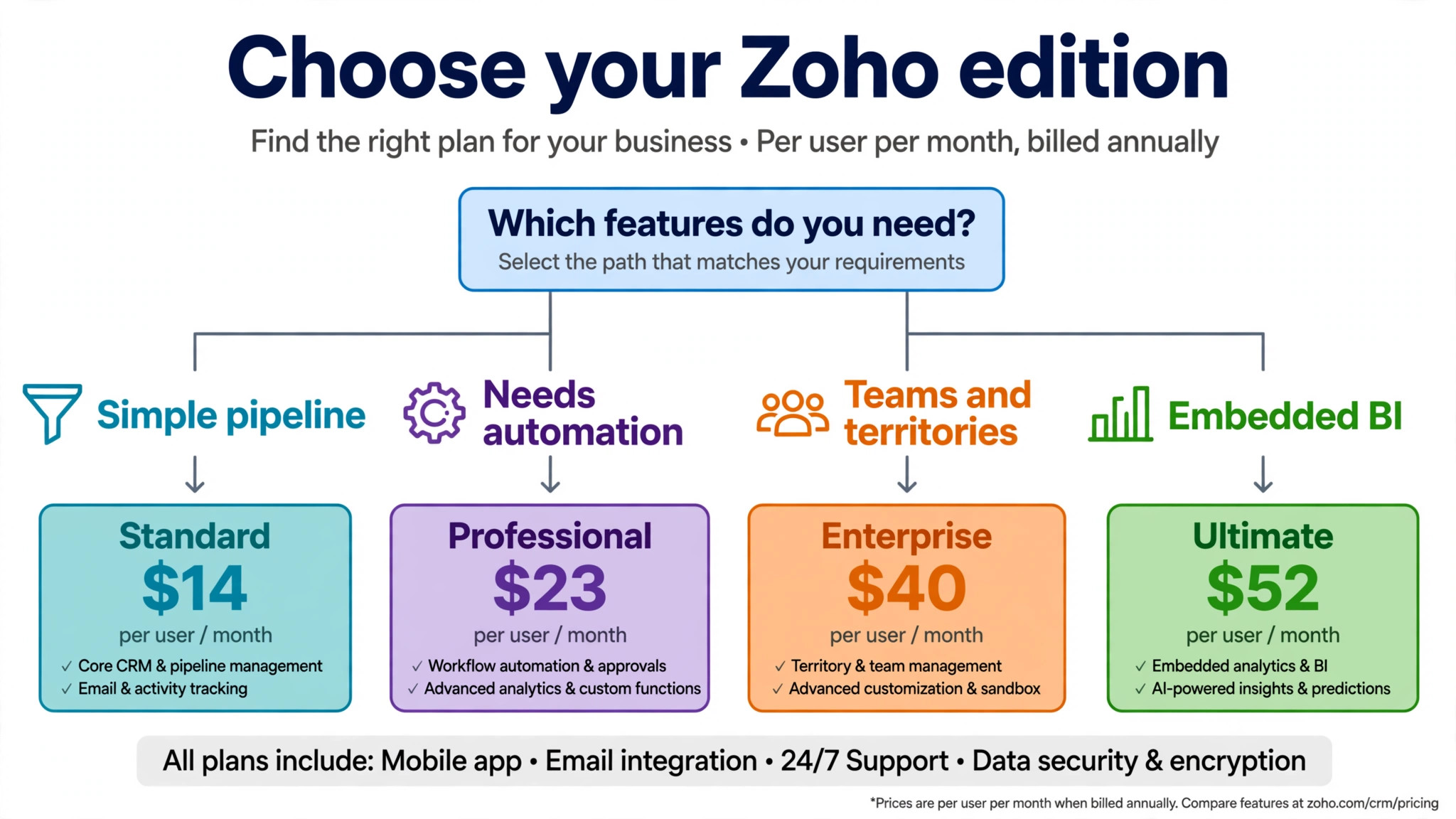
| Standard | 14 dollars per user | 20 dollars per user | 100000 records |
| Professional | 23 dollars per user | 35 dollars per user | 25 custom modules |
| Enterprise | 40 dollars per user | 50 dollars per user | Zia AI included |
| Ultimate | 52 dollars per user | 65 dollars per user | 500 custom modules |
Two patterns in the table matter more than any single price. The first is the size of the jumps, with 9 dollars between Standard and Professional, 17 dollars between Professional and Enterprise, and 12 dollars between Enterprise and Ultimate. The second is that the most valuable features for a growing sales team, serious automation and AI, sit in the upper editions rather than the entry ones. A business that budgets for Standard and then discovers it needs Enterprise automation will face a bill nearly three times larger than planned.
Why Zoho Looks Cheap Until You Add the Second App
Zoho CRM looks cheap in isolation, and for a standalone CRM it usually is. The bill grows when the business adds the apps around it, because a CRM rarely lives alone in a real company. Email marketing, accounting, support tickets and document signing each have their own Zoho app and price, and adopting several can double total Zoho spend without changing the CRM edition. The CRM price is honest, but it is only one line in a larger Zoho budget.
The second reason Zoho looks cheaper than it is involves people rather than apps. Zoho CRM charges per user, and a small business that counts only sales reps will undercount the bill. Marketing, support, manager and finance staff who need CRM access all add seats, even if they never close a deal. A cheaper Team user type exists for staff who only need limited visibility, but it works only inside the newer CRM For Everyone interface.
The third reason is implementation. Zoho CRM is powerful and configurable, which means it takes time to set up pipelines, fields, workflows, permissions and reports properly. A business that underestimates that setup either pays a consultant or struggles with a half configured system. The subscription may be 115 dollars a month for five Professional seats, but the first year cost includes the time or fees needed to make those seats useful.
Free Edition
Free suits a solo founder or a micro team of up to three users validating a pipeline. It allows 5000 records, a small amount of data storage and a limited set of features, which is enough to track early leads, test pipeline stages and learn the product before paying. For a founder with a handful of prospects and no team, Free is a genuine tool rather than a demo, and it costs nothing to keep while the business finds its first customers.
The limits arrive as soon as the business grows. Three users is a hard ceiling, 5000 records covers only a small pipeline, and the automation, reporting and customisation features that make a CRM valuable are sharply limited. A team that hires a fourth salesperson, imports a lead list of a few thousand contacts, or wants automated follow ups will outgrow Free in the same week. That is not a criticism of the plan, since it is designed as an entry point, but a business should plan the move to Standard or Professional before growth forces it.
Move off Free when the team reaches three users, when records approach 5000, or when follow up work starts slipping because automation is missing. Standard at 14 dollars per user per month on annual billing is the cheapest honest step for a simple pipeline, while Professional at 23 dollars is the better step for a team that already knows it needs automation. Staying on Free past those triggers saves a small subscription and costs deals that were never followed up.
Standard Edition
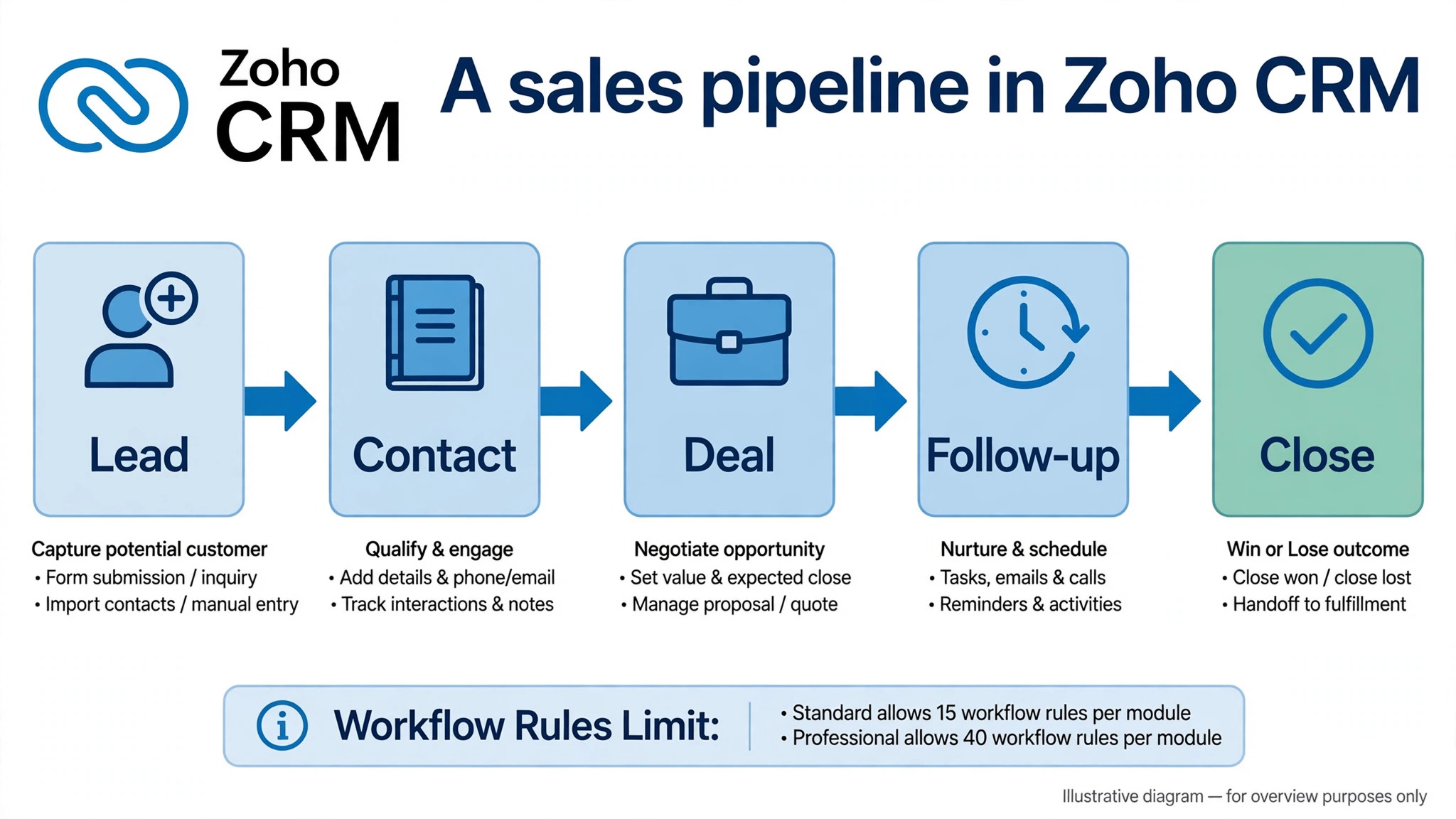
Standard costs 14 dollars per user per month on annual billing or 20 dollars on monthly billing, and it suits a small team with a simple pipeline and modest automation needs. It raises records to 100000, allows 10 custom modules and 15 active workflow rules per module, and covers the core CRM job of tracking leads, contacts, deals and activities. For a team of two to eight reps selling a straightforward product with a short sales cycle, Standard handles the daily work without fuss.
The gates on Standard are automation depth and AI. Workflow rules are capped at 15 per module, custom modules at 10, and Zia AI is not included, so a team that wants to automate complex follow up sequences, build many custom objects or use AI assistance will hit a ceiling. Reporting is also lighter than on higher editions, which matters once a manager wants pipeline forecasts, territory views or detailed sales analytics. A team that buys Standard for a complex sales process will spend its time working around limits instead of selling.
Choose Standard when the sales process is simple, the team is small, and the main need is a shared pipeline with basic automation and reporting. A trades business, a small agency or a local services company with a handful of reps will usually be well served here. A team with multiple sales stages, approval steps, complex routing or AI needs should price Professional from the start, because upgrading mid year means rebuilding workflows as well as paying more per seat.
Professional Edition
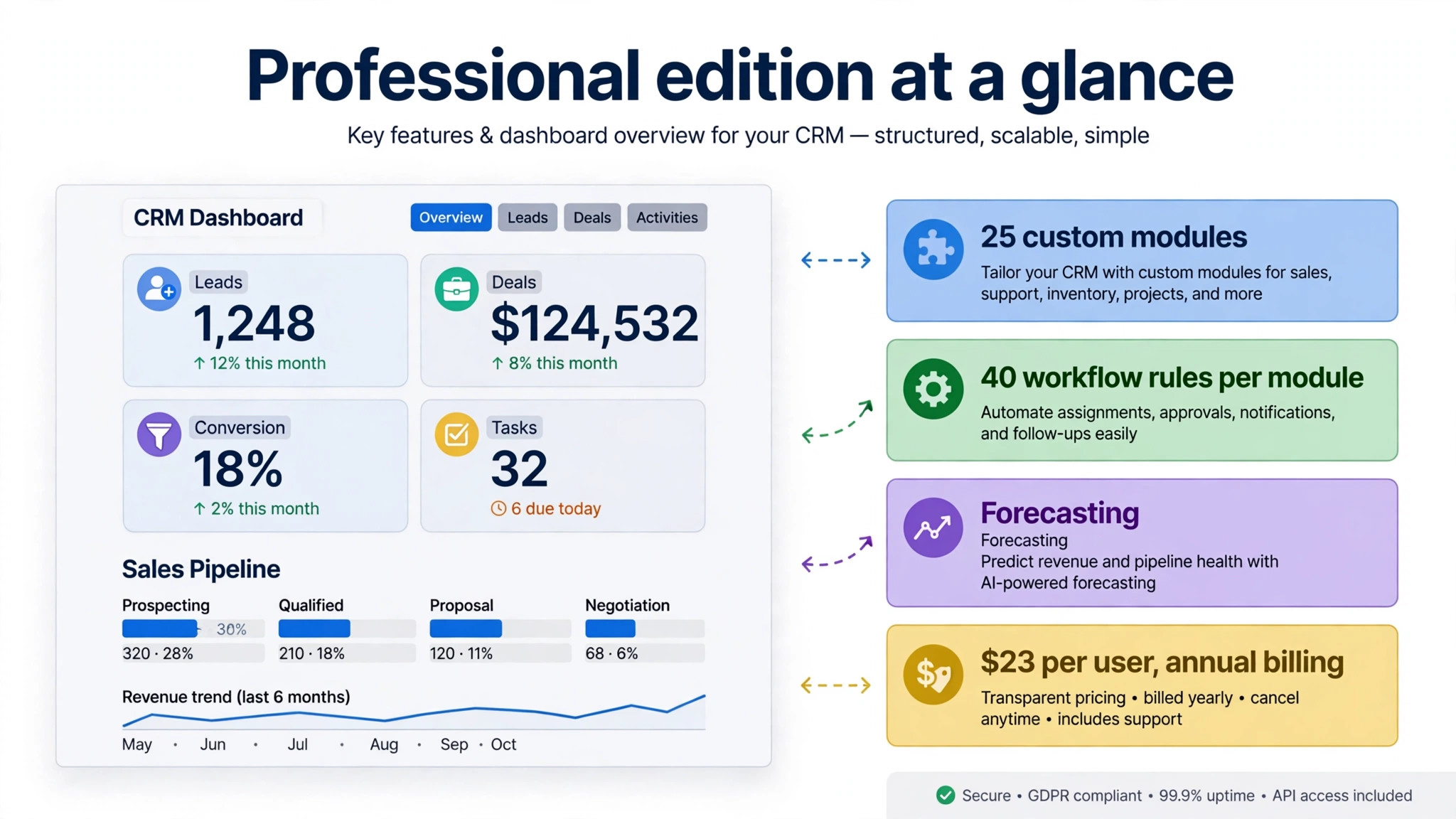
Professional costs 23 dollars per user per month on annual billing or 35 dollars on monthly billing, and it is the edition most growing small businesses land on. It raises custom modules to 25 and workflow rules to 40 per module, adds inventory management, sales forecasting, more automation options and stronger reporting, and it suits teams of five to thirty reps needing process automation. The step up from Standard is 9 dollars per seat, which is 90 dollars a month for a 10 person team, and for a team that uses automation daily that step pays for itself in follow ups that no longer depend on memory.
The value of Professional shows up in the work it removes. Automated assignment, follow up reminders, approval steps and stage based actions keep deals moving without a manager chasing each rep, and forecasting gives leadership a realistic view of the quarter instead of a guess. A team that runs on spreadsheets and memory will feel the difference within a month, because fewer deals stall between stages and fewer leads go cold. That operational gain is the real reason Professional is the most common choice for a growing small business, not the feature list alone.
Professional still lacks the full AI and territory features of Enterprise, and a team that wants Zia AI, multi team management, portals or a developer sandbox will need to look higher. The cost of Zoho CRM for small business monthly on Professional stays manageable for most teams, at 115 dollars a month for five seats or 230 dollars for ten seats on annual billing, and that price point is why Professional is the default recommendation in this guide for teams that have outgrown a simple pipeline.
Enterprise Edition
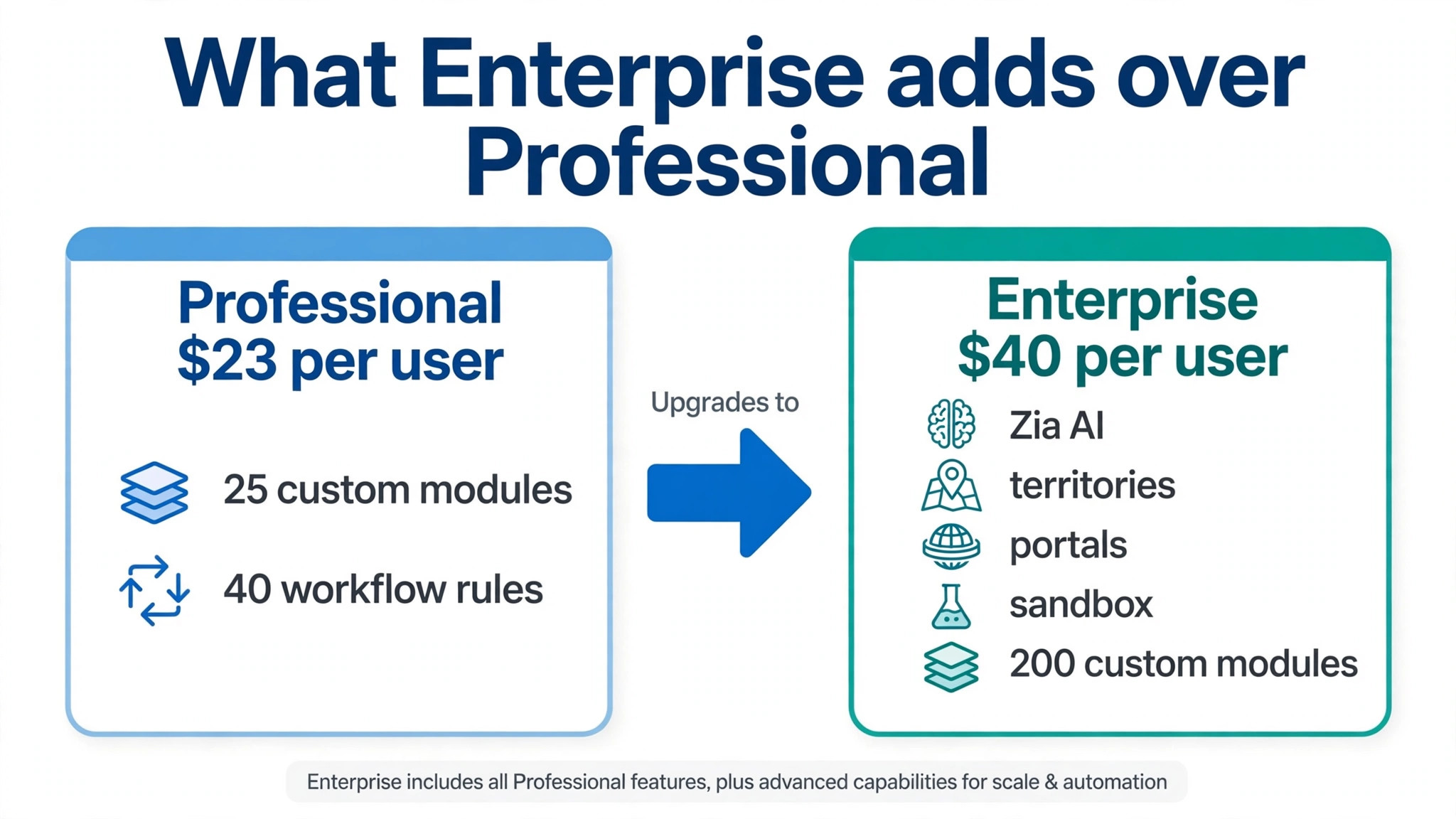
Enterprise costs 40 dollars per user per month on annual billing or 50 dollars on monthly billing, a jump of 17 dollars per seat from Professional, and it is the edition Zoho highlights as its most popular. It raises custom modules to 200, adds Zia AI, multi team management with territories, client portals, a developer sandbox, field level encryption and far higher API ceilings, reported at 5000000 credits a day. For a sales organisation with several teams, territories, complex permissions or regulated client data, those features are the reason to pay the jump.
The jump is harder to justify for a small team that only wants AI. A 10 person team that moves to Enterprise for Zia alone pays an extra 170 dollars a month, or 2040 dollars a year, for AI plus enterprise features it may never use. Before making that move, ask whether a separate AI tool or a better Professional workflow would solve the same problem. Edition features generally apply at the organisation level, so confirm the exact rule before assuming a mixed seat approach will work.
Choose Enterprise when the organisation has multiple sales teams, territory rules, portal needs or security requirements that Professional cannot meet, or when API volume and sandbox testing become part of the daily operation. A 20 to 100 person sales organisation fits that description well. A five person team with one pipeline does not, and for that team Enterprise is an expensive way to buy AI that could be served more cheaply elsewhere.
Ultimate Edition
Ultimate costs 52 dollars per user per month on annual billing or 65 dollars on monthly billing, and it is built for data heavy and bespoke deployments rather than typical small businesses. It raises custom modules to 500, adds embedded business intelligence, extended storage and migration assistance, and removes the published API ceiling that applies on lower editions. A business with very large data volumes, complex analytics needs or a migration project that needs vendor help will find those features relevant, and most small businesses will not.
The step from Enterprise to Ultimate is 12 dollars per seat, which is 120 dollars a month for a 10 person team or 300 dollars for a 25 person team, and it buys depth rather than breadth. Embedded BI lets a business build advanced dashboards inside the CRM, while migration help smooths a move from another system. Neither feature changes the daily job of a small sales team that already runs well on Enterprise, so Ultimate should be bought for a named analytics or migration need, not as a general upgrade.
Most small businesses should treat Ultimate as a ceiling they will never need to reach. If the business grows to the point where embedded BI and 500 custom modules matter, the CRM budget will be a small part of a much larger operation, and the decision will be made with proper advice. Until then, money saved by staying on Professional or Enterprise is better spent on lead generation, staff or product.
Full Users, Team Users and the Seat Split
Zoho distinguishes between full users with complete CRM access and Team users with limited access for marketing, support or finance staff. Team users can view data, add notes and use the mobile app, but they cannot own records, run reports, access Zia AI or manage automation. For a business where half the CRM users only need visibility, Team user seats can cut the bill significantly.
The catch is that Team users and the Teamspaces feature only work inside the newer CRM For Everyone interface, so a business must opt into that experience to use them. A team running the classic interface cannot mix in cheaper Team users, and a business that assumes it can will budget for a saving it cannot claim. Check the current interface and Team user rules on the vendor page before pricing a mixed seat model, and confirm the Team user rate in writing, since it is not always shown alongside the headline edition prices.
The practical rule is to count full users honestly first, then look for Team user candidates. Sales reps, sales managers and anyone who owns records or builds automation are full users. Support, finance and marketing staff who only view data are Team user candidates. A 10 person operation with six full users and four Team users will pay far less than a 10 full user operation, and that split should be modelled before any edition is chosen.
The Cost of Zoho CRM for Small Business Monthly at 2, 5, 10 and 25 Seats
The table below prices all four paid editions on annual billing, without add-ons. Monthly billing figures follow in the paragraph after the table. Free is excluded because it caps at three users, and Team user savings are discussed in the seat section above.
| Team size | Standard annual | Professional annual | Enterprise annual | Ultimate annual |
|---|---|---|---|---|
| 2 seats | 28 dollars | 46 dollars | 80 dollars | 104 dollars |
| 5 seats | 70 dollars | 115 dollars | 200 dollars | 260 dollars |
| 10 seats | 140 dollars | 230 dollars | 400 dollars | 520 dollars |
| 25 seats | 350 dollars | 575 dollars | 1000 dollars | 1300 dollars |
Yearly totals make the edition choice concrete. A 10 seat team pays 1680 dollars a year on Standard, 2760 dollars on Professional, 4800 dollars on Enterprise and 6240 dollars on Ultimate. A 25 seat team pays 4200 dollars a year on Standard, 6900 dollars on Professional, 12000 dollars on Enterprise and 15600 dollars on Ultimate. The gap between Standard and Enterprise for 25 seats is 7800 dollars a year, which is why the edition decision deserves more attention than the per seat headline.
Monthly billing raises every figure. Standard moves from 14 dollars to 20 dollars per user per month, Professional from 23 dollars to 35 dollars, Enterprise from 40 dollars to 50 dollars and Ultimate from 52 dollars to 65 dollars. A 10 seat Professional team therefore pays 350 dollars a month on monthly billing instead of 230 dollars, or 1440 dollars more over a year. That premium buys flexibility during a trial or an uncertain hiring period, but it is an expensive habit once the team and the edition are settled.

Paid Add-Ons That Sit Outside the Edition Price
The edition price covers the CRM itself, but several costs that small businesses expect to be included are charged separately. Extra storage beyond the edition allowance, SMS credits, lead enrichment, premium support and some integrations can all add lines to the bill, and the exact charges depend on usage and region. A business with heavy SMS use, large file storage or faster support needs should ask for those rates before committing.
Neighbouring Zoho apps are the larger add-on story. Zoho Campaigns for email marketing, Zoho Books for accounting, Zoho Desk for support and Zoho Sign for signatures each carry their own subscription, and adopting the full stack will pay a combined bill far above the CRM line alone. That stack can still be good value compared with buying each app elsewhere, since the apps share data and logins, but budget the stack as a whole. Price the CRM, then add every neighbouring app the team will actually use to the same budget sheet.
Implementation help is a further add-on in practice, even though it is not sold as a product on the pricing page. Zoho partners and consultants charge for setup, migration, customisation and training, and a complex deployment can cost several times the first year subscription. A small business with a simple pipeline can usually set up Zoho itself with a week of focused work, while a business with multiple pipelines, territories and integrations should get a written implementation quote before choosing an edition. The edition decision and the implementation quote belong in the same decision, not in separate months.
The Setup Bill Nobody Budgets For
Setup time is the largest first year cost that never appears on the Zoho pricing page. Pipelines must be designed, fields and modules customised, workflow rules built, permissions set, reports created and old data cleaned before migration. A business that rushes that work ends up with a CRM that mirrors its old spreadsheet, including the old spreadsheet problems, and staff stop trusting it within weeks. A business that invests the time ends up with a system that actually reflects how it sells, and that difference is worth more than any edition discount.
Data migration deserves its own budget line. Cleaning duplicate contacts, standardising company names, mapping old pipeline stages to new ones and testing the import all take hours, and a bad import creates months of confusion. Ultimate includes migration assistance, but a Professional or Enterprise team must do that work itself or pay for help. A budget that ignores migration will be wrong in the first quarter even if the subscription maths is perfect.
Training is the final setup cost, and it is the one most often skipped. Zoho CRM is a wide product, and new users need guidance on leads, deals, activities, dashboards and mobile use before they will use it consistently. A short training session, a written playbook for common tasks and a named CRM owner will do more for adoption than any feature upgrade. The cost of Zoho CRM for small business monthly is only good value when the team actually uses the system, and use comes from training, not from the subscription alone.
Yearly Billing Against Monthly Billing
In the cost of Zoho CRM for small business monthly, annual billing saves 6 dollars per user per month on Standard, 12 dollars on Professional, 10 dollars on Enterprise and 13 dollars on Ultimate compared with monthly billing. For a 10 seat team that is 720 dollars a year on Standard, 1440 dollars on Professional, 1200 dollars on Enterprise and 1560 dollars on Ultimate. Those savings are large enough to matter, and they are the reason most established Zoho teams pay annually once the edition and the headcount are settled. The saving only holds if the seats stay filled and the edition stays right for the full year.
Monthly billing suits a business that is still trialling Zoho, that hires seasonally, or that is unsure whether Professional or Enterprise fits its process. In those cases the premium buys the right to change edition or leave without paying for a year of the wrong choice, and that freedom is worth more than the discount. A sensible pattern is to pay monthly for the first quarter, confirm the edition and the seat split, and then switch to annual billing. The business loses a small discount for one quarter and gains certainty for the rest of the year.
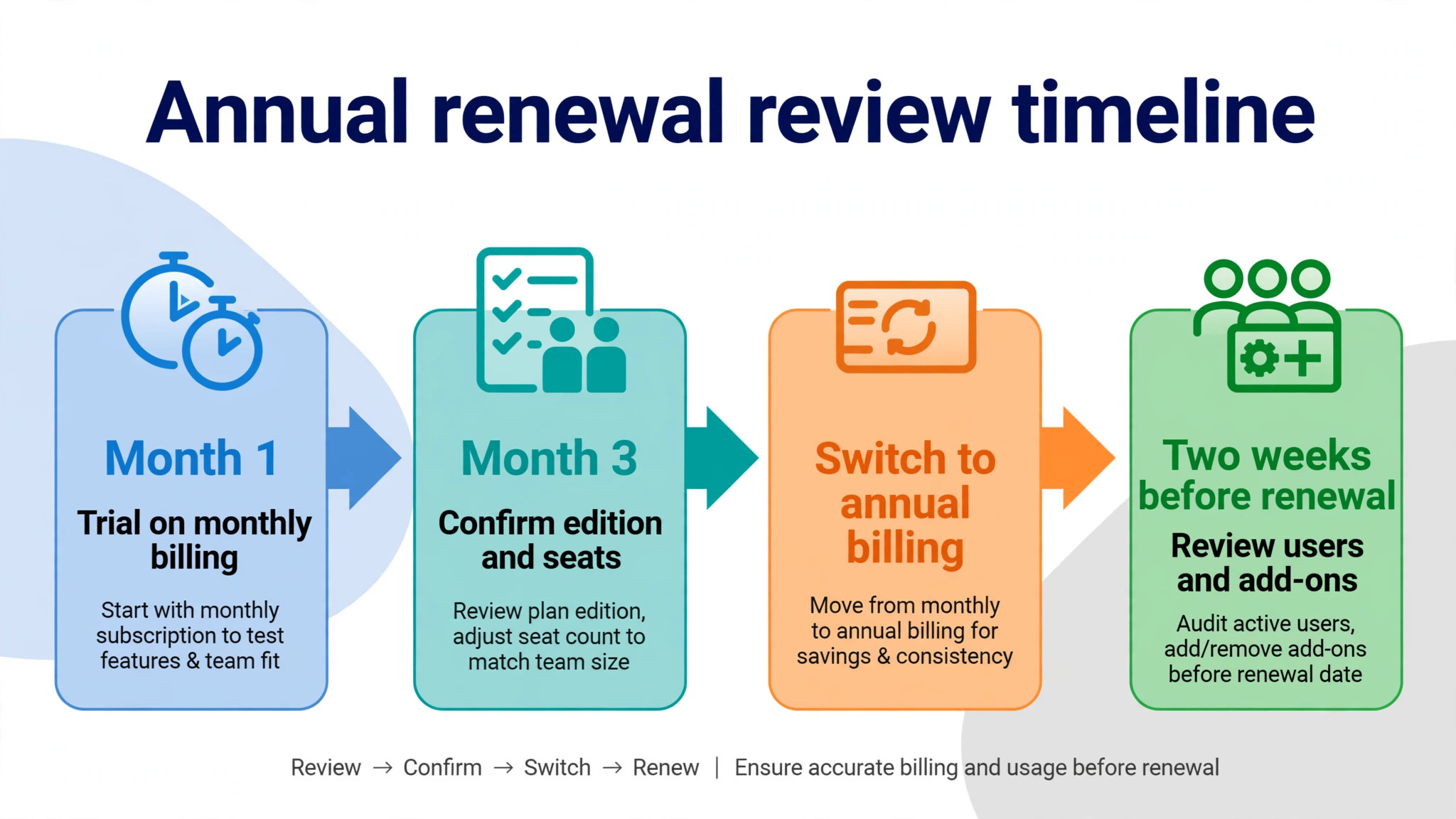
Renewal discipline matters as much as billing term. Zoho contracts auto renew, so set a reminder two weeks before renewal to review users, Team user splits, storage, add-ons and edition fit. Removing departed users and converting visibility only staff to Team users can save hundreds of dollars at renewal.
Mistakes That Raise the CRM Bill
The most common mistake is buying Enterprise for AI alone. Enterprise costs 17 dollars more per seat than Professional, so a 10 person team pays 170 dollars extra a month for AI plus enterprise features it may never use. Before making that jump, test whether a better Professional workflow, a separate AI tool or a smaller AI need would solve the same problem. An edition jump driven by one feature is the fastest way to inflate a CRM bill, and a mistake in the cost of Zoho CRM for small business monthly often starts with exactly that jump.
The second mistake is counting every staff member as a full user. Marketing, support and finance staff who only need to view data can often be Team users at a lower rate inside the CRM For Everyone interface, and ignoring that split can add thousands of dollars a year for a larger team. The fix is a seat audit before purchase and before every renewal, listing each person, their actual CRM job and whether they own records or only view them. That audit takes an hour and can change the edition maths entirely.
The third mistake is underestimating setup and then paying for rescue work. A business that skips pipeline design, data cleaning and training will either live with a weak CRM or pay a consultant to fix it later, and rescue work costs more than proper setup. Invest the setup week, write the playbook and assign a CRM owner. A CRM that the team actually uses is cheap at any edition, while a CRM that the team avoids is expensive even when it is free.
– Buying Enterprise for AI alone without pricing the alternatives – Counting visibility only staff as full users instead of Team users – Skipping pipeline design, data cleaning and training at setup – Adding neighbouring Zoho apps without budgeting the full stack – Renewing annually without reviewing users or edition fit first

Picking an Edition Without Regret
Free fits a solo founder or a micro team of up to three users validating a pipeline with under 5000 records. Standard fits a small team with a simple pipeline, basic automation and modest reporting needs, at 14 dollars per user per month on annual billing. Professional fits a growing team that needs real automation, forecasting and stronger reporting, at 23 dollars per user per month on annual billing, and it is the default recommendation here for teams that have outgrown a simple pipeline.
Enterprise fits a sales organisation with multiple teams, territories, portals, sandbox needs or security requirements that Professional cannot meet, at 40 dollars per user per month on annual billing. Ultimate fits data heavy or bespoke deployments with embedded BI and migration needs, at 52 dollars per user per month on annual billing, and most small businesses will never need it. The cost of Zoho CRM for small business monthly is therefore best decided by process, not by ambition. Match the edition to the sales process as it is today, with room for the hires planned in the next six months, and no further.
The final advice is to trial honestly before committing annually. Run one live pipeline on the chosen edition for a month, track follow up rates, automation use and reporting needs, and confirm the seat split between full users and Team users. If the trial shows Professional automation saving real selling time, pay annually with confidence. If it shows Standard covering the job, bank the saving. A decision made from trial data will rarely be regretted.
More Reading on Stratilyze
The guides below sit next to a Zoho CRM decision, covering CRM choices for small sales teams and the move from Pipedrive to Zoho.
– CRM software for small business – CRM for a 3 person sales team – Migrate Pipedrive to Zoho CRM for a small business
Frequently Asked Questions
Is Zoho CRM really free for a small business?
Free costs nothing for up to three users with 5000 records, which suits a solo founder or a micro team validating a pipeline. Its automation, reporting and customisation features are sharply limited, and a fourth user or a larger lead list will force a move to a paid edition. Treat Free as a genuine trial for a very small team, not as a permanent home for a growing sales operation, and plan the move to Standard or Professional before growth forces it in a hurry.
What makes the cost of Zoho CRM for small business monthly jump between editions?
The jumps are driven by feature gates rather than seat counts. Standard to Professional adds 9 dollars per user per month and unlocks deeper automation, more custom modules and forecasting. Professional to Enterprise adds 17 dollars and unlocks Zia AI, territories, portals, a sandbox and far higher API ceilings. Enterprise to Ultimate adds 12 dollars and unlocks embedded BI, 500 custom modules and migration help. A team should move only when a gate it actually needs sits in the higher edition.
Can support and finance staff use Zoho CRM more cheaply than sales reps?
Yes, in many cases, through Team users with limited access for marketing, support or finance staff who only need visibility. Team users can view data, add notes and use the mobile app, but they cannot own records, run reports, access Zia AI or manage automation. The catch is that Team users work only inside the newer CRM For Everyone interface, so the business must opt into that experience and confirm the Team user rate before budgeting the saving.
Is Professional enough for a growing sales team?
For most growing small businesses, yes. Professional at 23 dollars per user per month on annual billing covers 25 custom modules, 40 workflow rules per module, forecasting, inventory management and stronger reporting, which suits teams of five to thirty reps with real automation needs. It lacks Zia AI, territories and portals, so a team that needs those features specifically should price Enterprise. A team that only needs automation and reporting will find Professional the best value edition in the range.
How much does setup really add to the first year cost?
Setup adds staff time for pipeline design, field customisation, workflow building, data cleaning and training, and for a complex deployment it can cost several times the first year subscription if a consultant is hired. A simple pipeline can usually be set up by the business itself in about a week of focused work, while multiple pipelines and territories justify a written implementation quote before purchase. Budget setup alongside the subscription, not after it.
Should a small business pay annually or monthly for Zoho CRM?
Annual billing saves 1440 dollars a year for a 10 seat Professional team compared with monthly billing, and similar amounts on other editions, so it is the cheaper choice once the edition and the headcount are settled. Monthly billing costs more per seat but lets the business change edition or leave, which suits a trial period or uncertain hiring. Start monthly for one quarter, confirm the edition and the seat split, then switch to annual billing when the numbers stop moving.