
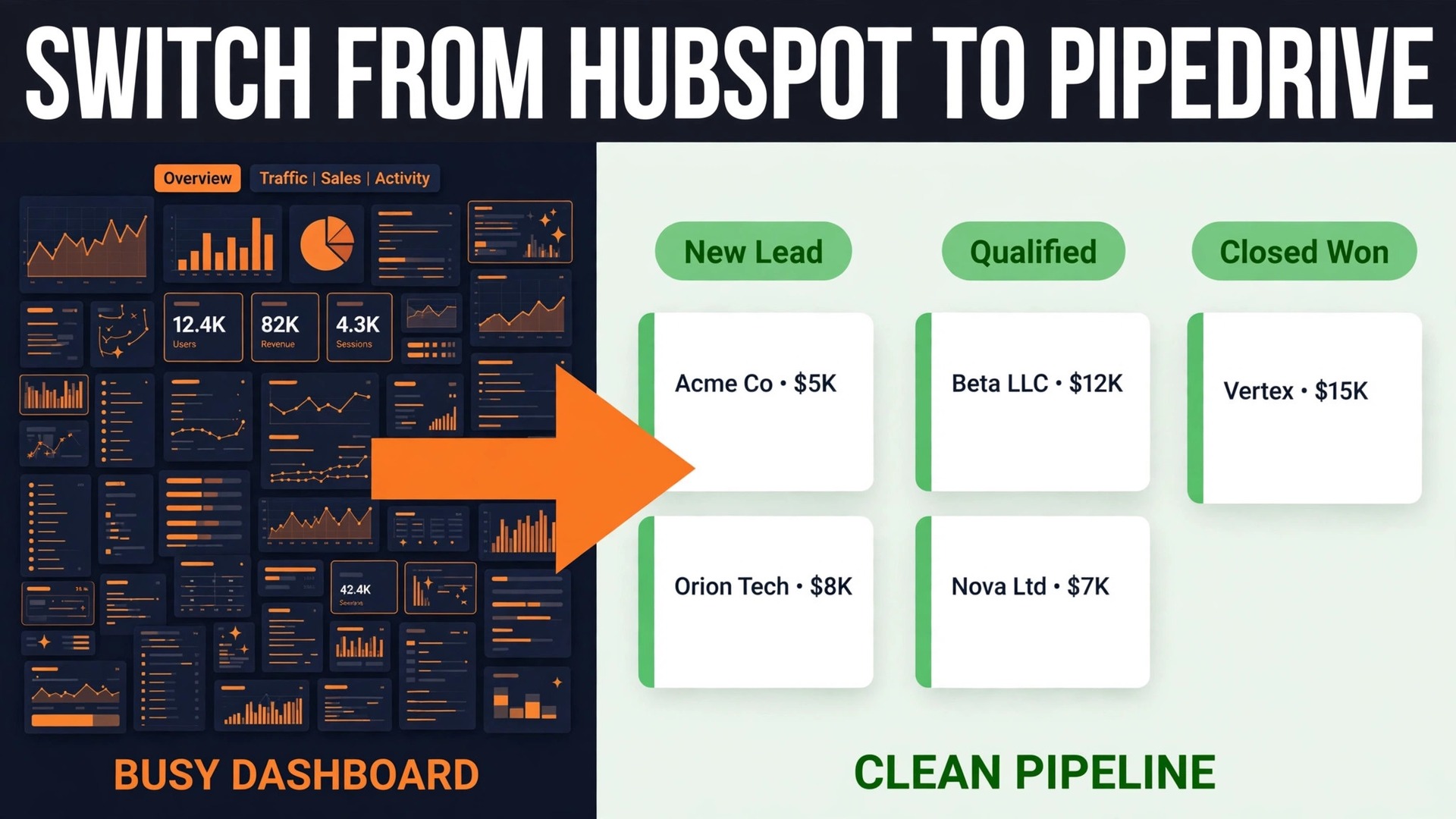
Verdict first. Pipedrive is the right move for a small business whose selling happens in a pipeline, whose team lives in deals and activities, and whose HubSpot bill now buys marketing and service features nobody opens. A switch HubSpot to Pipedrive small business teams make for that reason usually pays back within a quarter, because the new bill is per seat and predictable, and the daily work gets simpler instead of more layered.
The verdict flips when marketing automation is the engine of the business. If HubSpot workflows nurture leads, score behaviour, run campaigns and hand warm prospects to sales, then Pipedrive alone will feel thin, and the team will rebuild that engine with connected tools at extra cost. This guide helps a team tell which side of that line it sits on, then walks through the move in an order that keeps selling going while the system changes underneath it.
Prices here are ranges drawn from published pricing guides at writing time, so confirm on the vendor page before you buy. Pipedrive guides list Essential at about 14 dollars per user a month on annual billing, Advanced around 24 to 29 dollars depending on the source, and Professional around 49 dollars, with higher tiers above that. HubSpot pricing is harder to pin down because hubs, seats and contact tiers combine, so compare the total HubSpot invoice, not a single hub price, against the Pipedrive total.
Why a Switch HubSpot to Pipedrive Small Business Move Usually Starts With the Bill
Most teams do not leave HubSpot because it is bad. They leave because the bill grew faster than the use. A free HubSpot account is genuinely useful, and Starter adds sequences and basic automation at a modest price, but the step to Professional brings a large jump, often into hundreds of dollars a month before add ons, and a small team can reach that step while using only a fraction of what it buys. Pipedrive, by contrast, prices every tier per user, so a five person team can work out its monthly cost with one multiplication.
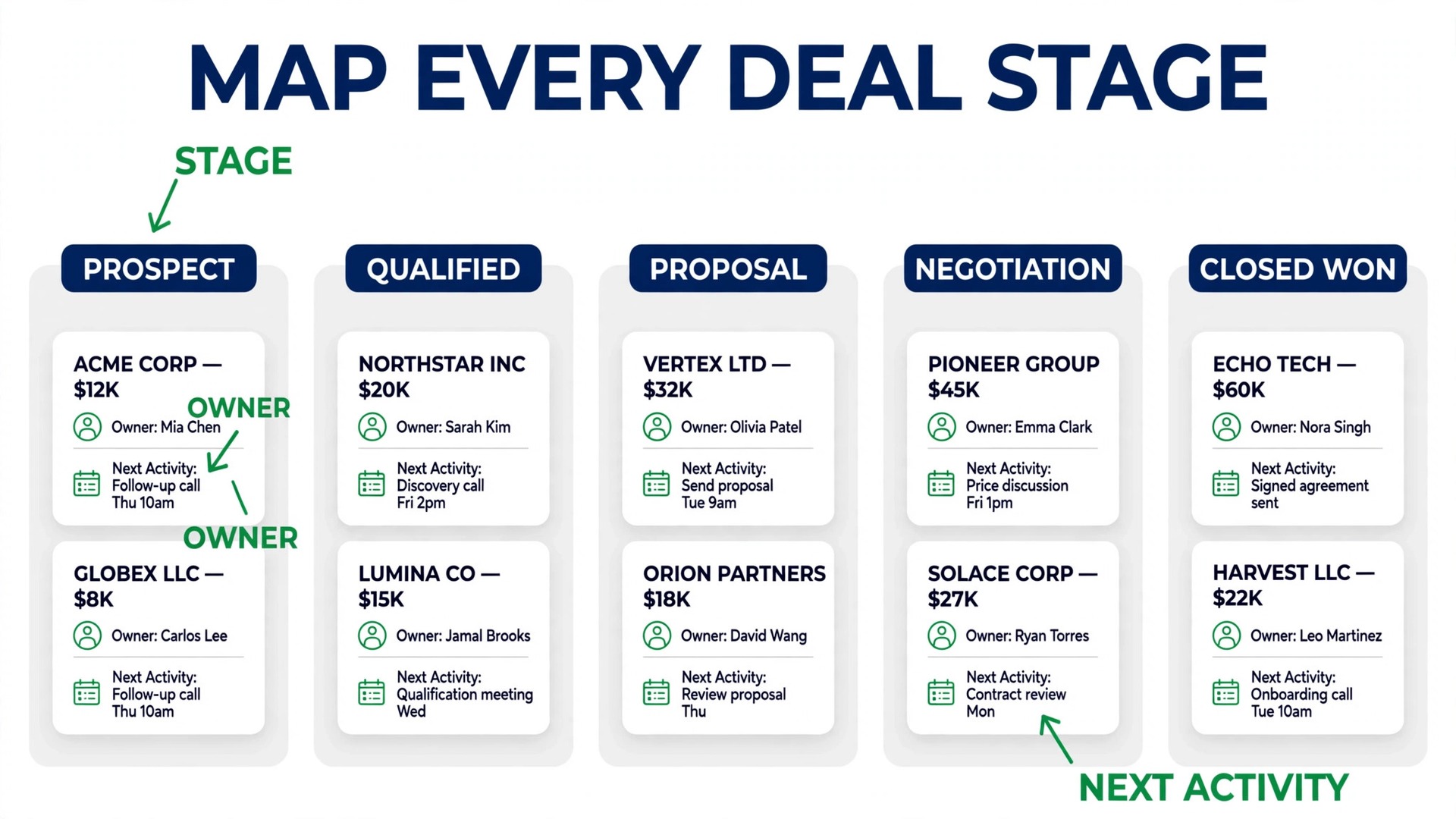
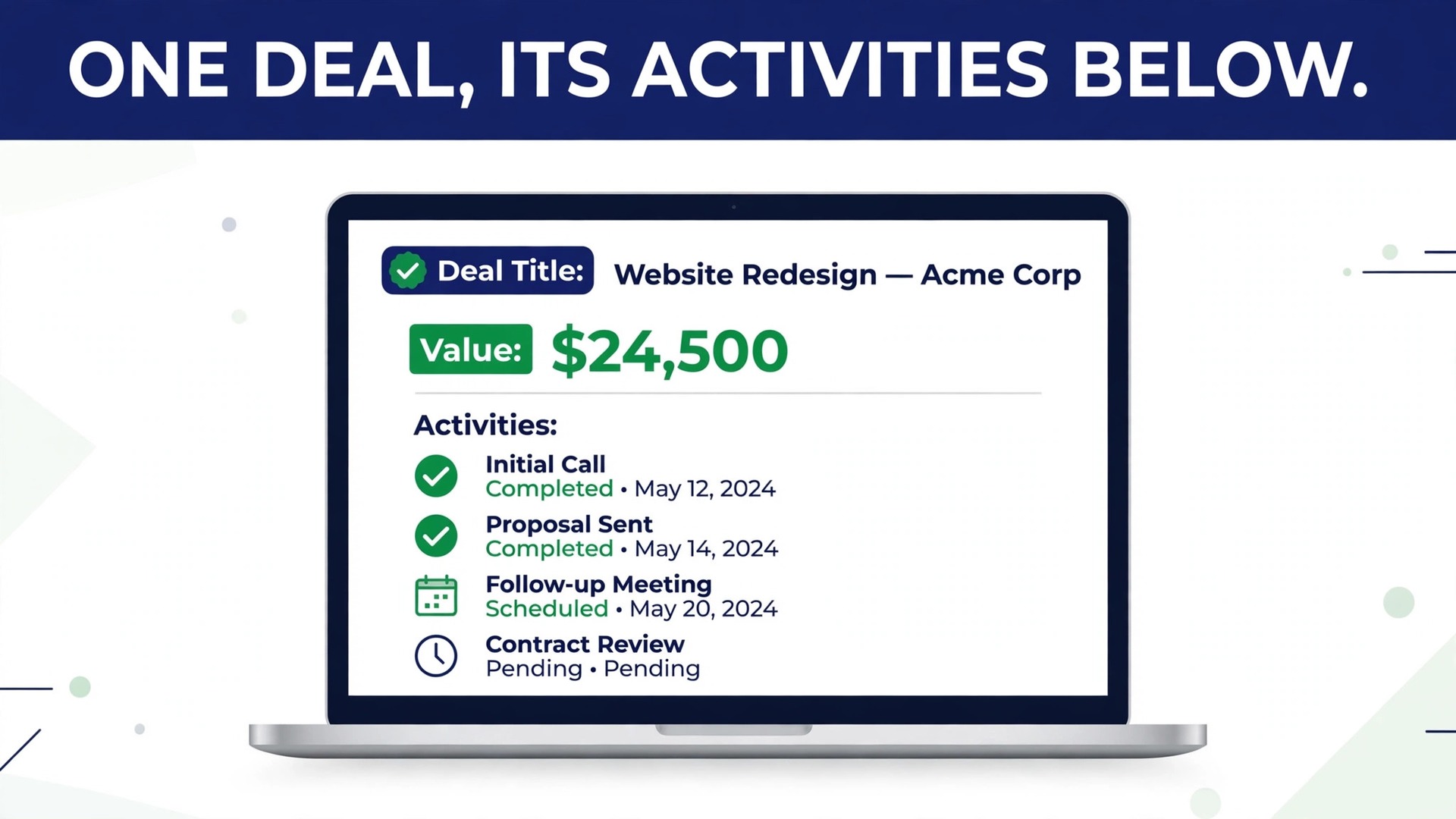
The daily experience gap matters as much as the price gap. HubSpot opens onto hubs, dashboards and objects, which suits a team with marketing, sales and service roles. Pipedrive opens onto a pipeline board, where deals sit in stages and the next activity is always visible. A sales led team of three to ten people often finds that the pipeline board matches how it already talks about work, meaning deals moving, calls booked, and follow ups due, while the hub structure feels like administration on top of selling.
There is also a focus test worth running before any export. List the HubSpot features used every week by at least one person, then list the features paid for but unused for ninety days. If the weekly list fits on one page and the unused list is long, the move case is strong. If the weekly list includes lead scoring, campaign reporting, landing pages and service tickets, the case is weak, and the team should price Pipedrive plus the connected tools needed to replace those features before deciding.
What Moves Cleanly, What Moves Partly, and What Stays Behind
Pipedrive publishes a migration guide for this exact move, and its order is worth following, because it reflects how the two data models differ. HubSpot contacts become Pipedrive persons, HubSpot companies become organizations, and HubSpot deals become Pipedrive deals, while HubSpot deal stages map onto stages inside a Pipedrive pipeline. Activities, notes and tasks travel too, though some history needs checking after import.
| HubSpot item | Pipedrive destination | Watch out for |
|---|---|---|
| Contacts | Persons, linked to organizations by email or domain | Duplicates where a contact has several emails |
| Companies | Organizations | Missing domains break the link to persons |
| Deals | Deals in a pipeline, with stage mapping | Stage names rarely match exactly, so map by hand |
| Activities and tasks | Activities on the linked deal or person | Old completed tasks add noise, so filter by date |
| Notes | Notes on the record | Long note threads need spot checks |
| Email history | Synced mailbox history where connected | Marketing sends do not carry over as activity |
| Marketing data | No direct equivalent | Campaign history, scores and lists need a new home |
| Workflows and sequences | Rebuilt as Pipedrive automations | Logic must be rewritten, not copied |
Marketing data is the honest loss in this move. Campaign history, behavioural scores, subscription types and list memberships have no direct Pipedrive field, and a team that needs that history should archive it before the switch, either as a report saved outside the CRM or inside a connected email tool. Losing a score is survivable when the team knows its best accounts by name, but losing consent and opt out status is not, so export subscription and opt out fields with the contact file and carry them into Pipedrive custom fields.

The Step Workflow for a Switch HubSpot to Pipedrive Small Business Migration
Run the steps in this order, and keep HubSpot live until the new pipeline has proved itself on real deals. A migration done in parallel feels slower for a week and far safer for a month.
- Audit HubSpot and freeze new custom fields. Export a list of every pipeline, stage, custom property and workflow, and mark each one as keep, rebuild or drop. Anything marked drop disappears from the new system on purpose, which is how a cluttered CRM gets clean.
- Clean the contact and company files before export. Merge obvious duplicates, fill missing domains, standardise country and industry values, and remove contacts who have not engaged in two years unless they are past customers. Cleaning after import takes three times as long, because errors then live in two places.
- Export from HubSpot by record type, one file at a time. Contacts, companies, deals, activities and notes each get their own export, sent to the account email as a spreadsheet file. Keep the HubSpot record IDs in a spare column even if Pipedrive does not need them, because that column is the only way to trace a strange record back to its source.
- Build the Pipedrive workspace before importing anything. Create the pipelines and stages from the mapping table in the next section, add the custom fields the audit marked as keep, set user roles, and connect the team mailbox. Importing into an unbuilt workspace forces the team to fix structure while data is already landing.
- Import in Pipedrive order, meaning organizations first, then persons, then deals, then activities and notes. Pipedrive import sits under its tools and apps area, where each file column is matched to a Pipedrive field. Use email to link persons to organizations, and run a test import of fifty records first to catch mapping errors while they are still cheap.
- Rebuild workflows and sequences as Pipedrive automations. Start with the three automations that protect revenue, which are new deal creation alerts, overdue activity reminders, and stage change notifications. Add the rest one at a time over the following two weeks, testing each against a live deal.
- Swap integrations one at a time, starting with the calendar and the mailbox, then the quoting or invoicing tool, then the email marketing tool. Each swap gets a test record that travels from Pipedrive into the connected tool and back, before the next swap begins.
- Run a two week parallel period, then cut over. During parallel running, new deals are created in Pipedrive while HubSpot stays open for history. At cutover, freeze HubSpot edits, run a final delta import of late changes, and point the team, the website forms and the inbox to Pipedrive only.

Mapping Deal Stages So No Deal Falls Between Systems
Stage mapping is where migrations quietly lose money, because a deal sitting in the wrong stage gets the wrong follow up or none at all. Build the mapping as a table before import, with one row per HubSpot stage, the matching Pipedrive stage, and a rule for deals that do not fit neatly. A stage called Negotiation in HubSpot might split in Pipedrive into Proposal Sent and Negotiation, and that split needs a rule, such as deals with a proposal date go to Proposal Sent and the rest go to Negotiation.
| HubSpot stage example | Pipedrive stage | Rule for the move |
|---|---|---|
| Appointment Scheduled | Discovery | Keep the meeting date as the next activity |
| Qualified to Buy | Qualified | Only deals with a named decision maker |
| Presentation Scheduled | Proposal Sent | Only deals with a proposal date recorded |
| Decision Maker Bought In | Negotiation | Deals with terms discussed but unsigned |
| Contract Sent | Contract Sent | Exact match, keep the contract date |
| Closed Won | Won | Close date becomes the Pipedrive close date |
| Closed Lost | Lost | Keep the lost reason in a custom field |
Probabilities and forecasts need attention too, because Pipedrive calculates pipeline value from stage and deal value, and a stage with the wrong probability distorts the forecast the owner relies on. Set stage probabilities after import, compare the Pipedrive forecast with the last HubSpot forecast for the same deals, and investigate any gap larger than ten percent before the team starts working from the new numbers. That comparison takes an hour and prevents a month of decisions made on a shifted forecast.
Rebuilding Workflows Without Rebuilding the Clutter
HubSpot workflows tend to accumulate, and a migration is the best chance a team will ever get to prune them. Before rebuilding anything, ask for each workflow who benefits, what happens if it stops for a week, and whether a person would notice. Workflows that fail that test get dropped, and the team usually finds a third of them were created for a campaign or a person who has since left.
The keep list for most small teams is short. A new deal alert to the owner, a reminder when an activity goes overdue, a task created when a deal enters a key stage, and a notification when a large deal changes stage cover most of the value. Pipedrive automations handle those patterns well, and each one should be built, tested on a sample deal, and named in plain words so the next admin can understand it without opening it.
Sequences need a separate decision, because Pipedrive email sequences live on the Advanced tier and above in published guides, while HubSpot sequences sit inside its paid hubs. A team on Pipedrive Essential that relied on HubSpot sequences must either upgrade or move sequences to a connected email tool, and that choice should be priced before cutover rather than discovered after it. Count the sequences in active use, not the sequences ever created, since dormant sequences inflate the requirement.
Swapping Integrations and Keeping the Website Forms Working
Integrations fail in two ways during a switch, which are silently and loudly, and silent failure is worse. A calendar that stops syncing shows up as double bookings within days, while a form that stops creating deals shows up as a quiet week that looks like a slow market. Test every integration with a live record, and keep a log of which test passed, on which date, and who ran it.
Website forms are the highest risk integration of all. A HubSpot form embedded on the site must be replaced with a Pipedrive web form or a form tool connected to Pipedrive, and the replacement must be tested from the public site, not from a preview. Submit a test enquiry, confirm the deal or lead appears in Pipedrive with the right source, and confirm the acknowledgement email reaches the test address. Only then remove the HubSpot form, and keep the old form code saved in case the new form needs a quick rollback.
Email marketing deserves its own paragraph, because Pipedrive has no full marketing hub of its own. Teams that sent newsletters from HubSpot usually connect a tool such as Mailchimp or ActiveCampaign, and that connection needs the consent fields carried over from the export. Import contacts into the email tool with their opt out status intact, send the first campaign to a small segment, and check unsubscribes and bounces before mailing the full list. A switch HubSpot to Pipedrive small business plan that forgets consent risks a complaint that no pipeline improvement can undo.
The Go Live Checklist for Cutover Week
Cutover week is a short list of proofs, not a celebration. Work through it in order, and delay the cutover if any item fails, because a delayed cutover costs days while a broken cutover costs deals.
– Every open deal appears in Pipedrive with the right owner, stage, value and close date, checked against a HubSpot report from the same morning. – Every active customer has a person record linked to the right organization, with phone and email verified on a sample of twenty records. – The next activity on every open deal is dated and assigned, so no deal sits without a next step on the first morning in Pipedrive. – The team mailbox and calendar sync both ways, proved by a test email and a test meeting created from Pipedrive. – Website forms create records in Pipedrive, proved by a public test submission for each form on the site. – Automations for new deals, overdue activities and stage changes fire correctly on test deals. – The old HubSpot account is set to read only for the team, with one admin keeping access for history checks during the first month. – The first pipeline review meeting runs from Pipedrive only, with the forecast compared against the final HubSpot forecast.
After cutover, hold a short review at the end of week one and week four. Week one catches missing records and broken integrations while memory is fresh. Week four answers the bigger question, which is whether the team actually works faster in Pipedrive, measured by activities completed, deals moved and time spent on admin. If those numbers improve, the move has paid off, and if they do not, the review should name the workflow or training gap rather than blaming the tool.

What the Move Costs at Three Team Sizes
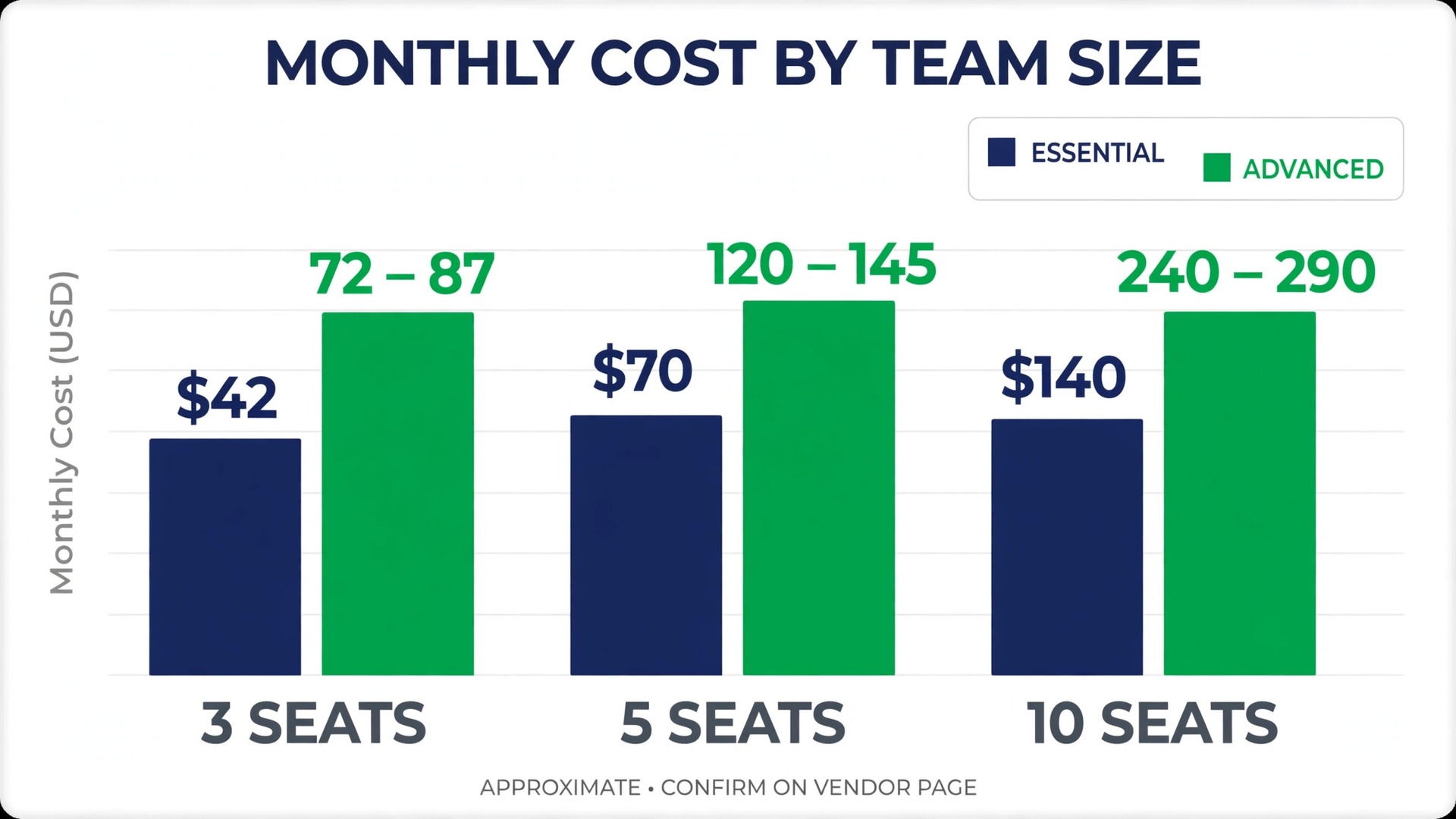
Pipedrive pricing is simple enough to model honestly. At the Essential rate of about 14 dollars per user a month on annual billing, a three person team pays about 42 dollars a month, a five person team about 70 dollars, and a ten person team about 140 dollars. Advanced, at roughly 24 to 29 dollars per user depending on the source, lifts those totals to about 72 to 87 dollars for three people, 120 to 145 dollars for five, and 240 to 290 dollars for ten. Professional at about 49 dollars doubles the Advanced figure again, so a team should only choose it for reporting, forecasting or permissions it will use weekly.
HubSpot comparison needs the whole invoice. A team on a free account pays nothing for the CRM itself but may pay for connected tools, while a team on Starter pays a modest bundle price and a team on Professional pays a far larger bundle price with seat minimums. The honest comparison is last month HubSpot invoice plus the cost of tools HubSpot replaced, against the Pipedrive seat total plus the cost of the email tool and any other connected tool the new setup needs. Run that comparison at the current headcount and at the headcount expected in a year, because per seat pricing grows with hiring while bundle pricing sometimes does not.
Migration help is a separate line. A team doing the move itself pays mainly staff time, which for a small database is usually one to two weeks of part time admin work. A team hiring a migration service or a consultant should budget for that service plus a week of internal testing, since no outside service can validate stage mapping or workflow logic without the team. Either way, keep the HubSpot account paid for one extra month after cutover, because history lookups in that month are cheaper than reimporting data later.
Mistakes That Cost Deals During a CRM Switch
The first mistake is importing dirty data and promising to clean it later. Later never arrives, because the team is busy selling from the new system, and dirty data then corrupts forecasts, duplicates outreach and hides real deals among dead ones. Clean before import, even if cleaning takes a week, because a clean pipeline is the main benefit of the move.
The second mistake is mapping stages by name instead of by meaning. Two systems can both have a stage called Qualified and mean different things by it, one meaning a meeting booked and the other meaning budget confirmed. Map by the test that moves a deal into the stage, meaning the evidence required, and write that test into the mapping table so the next admin inherits the logic rather than the label.
The third mistake is training the team on the day of cutover and expecting fluency by lunch. Pipedrive is simpler than HubSpot, but a pipeline board, activity habits and automation rules still need a short session and a written one page guide. Run the training during parallel running, when mistakes land in a practice pipeline rather than on live deals, and name one internal champion who answers questions in the first two weeks.
The fourth mistake is switching every integration on the same day. Each integration is a separate failure point, and switching them together makes the cause of any fault hard to find. Swap one, test it, let it run for two days, then swap the next, and keep the old integration details saved until its replacement has proved itself on real records.
When Staying on HubSpot Is the Smarter Decision
Staying is right when marketing drives the business. A team whose leads come from content, campaigns and nurture sequences, and whose sales team works the warm end of that funnel, will spend more rebuilding that engine around Pipedrive than it saves on seats. The same applies to a team that relies on HubSpot service tickets, knowledge base or customer portal features, since Pipedrive is a sales tool first and a service tool only by extension.
Staying is also right when the pain is process rather than platform. A messy pipeline, unclear stage definitions and missing follow ups will survive a move, because they travel inside the data and the habits. Fix stage definitions, activity discipline and ownership rules in HubSpot first, and if the numbers improve, the platform question may disappear. A switch HubSpot to Pipedrive small business project that starts with clean process moves faster and lands better than one that hopes a new tool will fix old habits.
A useful middle path exists for teams on the fence. Keep HubSpot for marketing and use Pipedrive for sales, connected by a sync tool, for one quarter, and measure which system the sales team actually opens. That trial costs more than a clean switch for three months, but it answers the platform question with evidence instead of opinion. If sales lives in Pipedrive by the end of the quarter, cut over fully, and if it does not, the team has saved itself a migration.

Training the Team and Running the First Pipeline Review
Training for a switch HubSpot to Pipedrive small business team should take one short session, not a full day course. Show the pipeline board, show how to create a deal, log a call, set the next activity and move a stage, then let each person enter a real deal from their own workload. People learn a CRM by doing their own work in it, and a session built around sample data feels abstract the moment it ends.
The one page guide matters more than the session itself. Write down the stage definitions in plain words, the rule for when a deal moves, who owns each pipeline, and what the next activity rule is, meaning every open deal must have a dated next step. Print that page or pin it where the team works, because a new system fails when two people use the same stage to mean different things. Review the guide after the first month and correct any definition the team kept getting wrong, since that correction is cheaper than a second migration.
The first pipeline review in Pipedrive should follow the same agenda the team used before, so the change of tool does not also become a change of meeting. Walk the board stage by stage, ask for the next step on each deal, and note any deal that has stalled. If the meeting runs shorter than the old HubSpot review, that is a good sign, because the board shows the same information with fewer clicks. If it runs longer, the cause is usually missing data or unclear stages, and both are fixable in the same week.
Adoption can be measured without spying on the team. Count activities logged per person per week, deals with a next step, and deals that have not moved in fourteen days, and share those counts openly in the review. A switch HubSpot to Pipedrive small business move succeeds when those three numbers improve, not when everyone says they like the new tool. Praise the behaviour the team wants, meaning prompt activity logging and honest stage updates, and fix the process wherever the numbers show a gap rather than blaming the software.
Finally, protect the new simplicity. Every request for a new field, pipeline or automation should answer two questions, which are what decision it improves and who will keep it accurate. Fields without an owner become clutter within a quarter, and a pipeline that grows back to HubSpot complexity within a year has wasted the move. A quarterly tidy, lasting thirty minutes, keeps the system close to the clean state the migration created. A switch HubSpot to Pipedrive small business team that guards that simplicity will still be glad of the move in a year, while a team that lets clutter return will be shopping for another tool.
Frequently Asked Questions About Switching From HubSpot to Pipedrive
Can contacts, companies and deals move from HubSpot to Pipedrive?
Yes, by spreadsheet export from HubSpot and import into Pipedrive in the order organizations, persons, deals, then activities and notes. Pipedrive publishes a guide for this move with field mapping during import. Marketing history, scores and campaign data do not have direct equivalents, so archive those reports before the switch.
How long does a switch HubSpot to Pipedrive small business migration take?
A small database with clean data usually takes one to two weeks of part time work, plus a two week parallel period before cutover. Larger databases, messy stage definitions or many workflows can stretch the project to a month. Cleaning and stage mapping take most of the time, while the import itself is the quickest part.
Will the team lose email history in the move?
Email history tied to synced mailboxes can be preserved where the mailbox connection carries it, but marketing sends from HubSpot do not arrive as Pipedrive activity. Keep HubSpot access for one month after cutover for history checks, and save any campaign report the business may need for reporting or compliance before closing the account.
Does Pipedrive replace HubSpot marketing automation?
No, not on its own. Pipedrive automations cover pipeline tasks, reminders and stage actions, while email marketing and nurture sequences usually move to a connected tool. Price that connected tool into the comparison, and carry consent and opt out status across with the contact export, before promising the team a like for like replacement.
Which Pipedrive plan should a small team start on?
Start on Advanced if the team uses email sequences and workflow automation weekly, since Essential lacks full sequences in published guides. Start on Essential only if the team mainly needs pipeline, contacts and activities, and upgrade when sequences become a weekly habit. Confirm on the vendor page before you buy, since tier features change.
What should happen to HubSpot after cutover?
Set it to read only for the team, keep one admin with access for history, and keep the subscription paid for one extra month. After that month, export any remaining reports, confirm nothing in Pipedrive references a HubSpot record that still needs checking, and then close the account. Deleting data before that check risks losing the audit trail for old deals.
More Reading on Stratilyze
– Cost of HubSpot for a Small Business Monthly – Cost of Pipedrive for a Small Business Monthly – Migrate Pipedrive to HubSpot for a Sales Team – Best CRM Software for a Small Business